"a19e0535960bd083"{"id":"1002005","slug":"easy-map-and-navigation-system","title":"Easy Map and Navigation System","category":"Gameplay Features","engine":"5.0+","assetVersion":"","engineVersion":"Engine Version: 5.0+","tag":"Gameplay Features","accent":"blue","visual":"mech","summary":"Explore the Easy Map and Navigation System, featuring a compass minimap with AI tracking, path display, rough terrain 3D pointers, and full worldmap tools.","platform":"Unreal Engine","publishedAt":"2026-10-26T12:23:06.080Z","updatedAt":"2026-10-26T12:23:06.080Z","sourceNotes":[],"fileContents":[],"compatibility":["Unreal Engine","Engine Version: 5.0+"],"featuredImage":{"alt":"Easy Map and Navigation System","src":"/wp-content/uploads/published/2026/10/280c293cab36-c2a58787-289a-4148-bba7-cc35f43f4275-931fe92c6f.webp"},"hasDownloadLink":true,"downloads":1,"terms":[{"taxonomy":"category","slug":"gameplay-features","name":"Gameplay Features"}],"galleryImages":[{"src":"/wp-content/uploads/published/2026/10/f7d59035bda9-17a2a7b3-e0ec-4c39-b277-93b4cf874a2b-771080a55f.webp","alt":"Easy Map and Navigation System"},{"src":"/wp-content/uploads/published/2026/10/dac3ec69a960-608f5706-1556-482f-8d1c-9317633548f6-0b6b2cc95d.webp","alt":"Easy Map and Navigation System"},{"src":"/wp-content/uploads/published/2026/10/830bc3686df1-5bf0aaa4-7780-43f4-89cd-d1a9bc847773-ce5e1b7579.webp","alt":"Easy Map and Navigation System"}],"accessPanel":{"kind":"resource","title":"Download this resource","eyebrow":"Free Download","message":"Log in or create a free account to start your download.","fileName":"Content.7z","safetyNote":"Resources are manually reviewed before listing to improve quality and reduce obvious risks.","actionLabel":"Download Free","resourceType":"Resource archive"},"contentHtml":"\u003ch2\u003eNavigation Demands in Sprawling Game Environments\u003c/h2\u003e\n\u003cp\u003eWayfinding is fundamental to how players interpret space in exploration games, role-playing adventures, and large-scale action titles. When players step into vast outdoor landscapes, dense urban districts, or multi-tiered dungeons, maintaining directional clarity without breaking immersion is a delicate balance. A player who constantly opens full-screen menus to check their heading loses momentum, while a player left without clear indicators can easily become disoriented by winding valleys, vertical cliffs, and irregular geometry.\u003c/p\u003e\n\u003cp\u003eEasy Map and Navigation System targets these exact navigational challenges. Constructed as a Blueprint solution, it supplies a suite of functional spatial tools that translate positional data into readable on-screen cues. Rather than relying on a single static display method, the system establishes a multi-layered approach to orientation that operates at the screen periphery, directly inside the three-dimensional game world, and across comprehensive top-down views.\u003c/p\u003e \u003ch2\u003eCompass Minimap with AI Tracking and Follow Paths\u003c/h2\u003e\n\u003cp\u003eThe core continuous feedback loop for player orientation centers on the compass minimap. This interface element handles immediate surrounding space, keeping heading indicators visible while remaining unobtrusive during active gameplay. Within this module, the tool incorporates distinct tracking logic for both static goals and dynamic entities.\u003c/p\u003e\n\u003cp\u003eA primary capability of this module is tracking AI alongside standard landmarks. Having non-player characters and AI actors registered directly on the compass minimap gives developers the mechanics required for combat encounters, escort quests, and dynamic stealth scenarios. When an AI moves through the scene, the radar and compass elements update their position accordingly, maintaining tactical clarity without requiring custom tracking scripts from scratch.\u003c/p\u003e\n\u003cp\u003eBeyond simple directional blips, the system provides follow markers accompanied by follow path showing functionality. Rather than merely pointing a player toward an arbitrary coordinate as the crow flies, path display systems project navigable routes across the layout. This prevents players from running blindly into sheer rock faces or dead-end canyons. The follow path guides movement along valid walking surfaces, making objective tracking practical in complex layouts where direct linear movement is physically blocked.\u003c/p\u003e \u003ch2\u003eSpatial Guidance with the 3D Pointer on Rough Terrain\u003c/h2\u003e\n\u003cp\u003eFlat 2D UI elements often fall short when gameplay relies on severe verticality. A flat icon displayed on a HUD edge cannot easily convey whether an objective sits hundreds of meters above the character on a cliffside ledge or deep below in a subterranean cavern. To resolve this, Easy Map and Navigation System incorporates a dedicated 3D pointer.\u003c/p\u003e\n\u003cp\u003eThis 3D pointer is specifically configured to remain functional across rough terrain. Uneven landscapes, irregular hills, jagged boulders, and broken ground meshes frequently disrupt basic spatial pointers by clipping into geometry or floating unnaturally above target surfaces. By accounting for irregular topography, the 3D pointer provides a reliable in-world beacon that accurately aligns with destinations regardless of elevation spikes or rugged surface profiles.\u003c/p\u003e\n\u003cp\u003eCoupled with the 3D pointer is support for 3D widgets. These widgets position interface graphics directly in the game world, allowing interactive points, objective markers, and area identifiers to anchor to world locations rather than floating exclusively on the screen viewport. The integration of 3D widgets bridges the gap between HUD-based information and environmental presence, giving developers flexible visual options for presenting waypoints in real time.\u003c/p\u003e \u003ch2\u003eFull-Scale Orientation Through the Worldmap and 3D Widgets\u003c/h2\u003e\n\u003cp\u003eWhile the compass minimap and in-world indicators manage local, minute-to-minute traversal, broad-scale route planning requires a wider scope. The package includes a dedicated worldmap designed to handle macro-level orientation. Players can pull back from their immediate surroundings to inspect territorial boundaries, evaluate long-distance objectives, and plot travel routes across wide environments.\u003c/p\u003e\n\u003cp\u003eThe worldmap complements the local follow path indicators. Players can reference major destinations on the world layout, establish intent, and then rely on the follow markers and compass minimap once they return to active exploration. This dual-layer structure ensures that navigation remains continuous from planning to execution.\u003c/p\u003e \u003ch2\u003eBlueprint Structure and Learning Resources\u003c/h2\u003e\n\u003cp\u003eBecause the toolkit is constructed with Blueprints, developers working in visual scripting can examine, modify, and extend the underlying logic without diving into compiled C++ code. The mechanics incorporate techniques and tooling derived from YOUR SANDBOX tutorials, crediting that foundational work while assembling the features into an integrated game framework.\u003c/p\u003e\n\u003cp\u003eAdopting complex navigation logic often presents implementation hurdles, particularly when syncing dynamic AI coordinates with HUD elements and world-space transforms. To support integration, the toolkit is accompanied by dedicated documentation, a showcase video illustrating features in action, and step-by-step tutorial videos. Developers needing direct technical troubleshooting can also access Discord support to resolve project-specific questions and setup challenges.\u003c/p\u003e \u003ch2\u003eIdeal Project Types and Implementation Scope\u003c/h2\u003e\n\u003cp\u003eEasy Map and Navigation System provides the most value to developers building titles where landscape traversal and entity awareness are central to the player experience. Open-world role-playing games, survival titles, team-based tactical games, and quest-heavy adventure projects benefit directly from having compass minimaps, path projection, and worldmaps running under a unified system.\u003c/p\u003e\n\u003cp\u003eIndie teams and solo creators seeking to avoid the time-intensive process of coding custom radar math, line-of-sight tracking for AI, and elevation-aware 3D markers will find this setup particularly advantageous. With ready-to-use Blueprint logic handling everything from rough-terrain waypoints to full-screen map views, technical artists and gameplay designers can focus their resources on world design and narrative flow.\u003c/p\u003e\n\n\u003ch2\u003eRelated Resources Worth Checking\u003c/h2\u003e\n\u003cul\u003e\n\u003cli\u003e\u003ca href=\"https://3dcghub.com/map-system-worldmap-minimap/\" title=\"Map System – WorldMap \u0026amp; Minimap\"\u003eMap System – WorldMap \u0026amp; Minimap\u003c/a\u003e\u003c/li\u003e\n\u003cli\u003e\u003ca href=\"https://3dcghub.com/advanced-framework-vr-mobile-desktop/\" title=\"Advanced Framework - VR, Mobile \u0026amp; Desktop\"\u003eAdvanced Framework - VR, Mobile \u0026amp; Desktop\u003c/a\u003e\u003c/li\u003e\n\u003cli\u003e\u003ca href=\"https://3dcghub.com/project-sunrise-interaction-dialogue-quest-system/\" title=\"Project Sunrise - Interaction, Dialogue \u0026amp; Quest System\"\u003eProject Sunrise - Interaction, Dialogue \u0026amp; Quest System\u003c/a\u003e\u003c/li\u003e\n\u003cli\u003e\u003ca href=\"https://3dcghub.com/driveable-vehicle-attack-submarine/\" title=\"Driveable Vehicle : Attack Submarine\"\u003eDriveable Vehicle : Attack Submarine\u003c/a\u003e\u003c/li\u003e\n\u003cli\u003e\u003ca href=\"https://3dcghub.com/compassy-mini-big-maps-compass-navigation-system/\" title=\"Compassy (Mini \u0026amp; Big Maps + Compass Navigation System)\"\u003eCompassy (Mini \u0026amp; Big Maps + Compass Navigation System)\u003c/a\u003e\u003c/li\u003e\n\u003c/ul\u003e","contentTextLength":6588,"navigation":{"current":86,"total":4026,"previous":{"id":"1002006","slug":"easy-soft-outlines","title":"Easy Soft Outlines","category":"Variety","platform":"Unreal Engine","updatedAt":"2026-10-26T12:23:49.117Z"},"next":{"id":"1002004","slug":"dynamic-radial-menu-x","title":"DYNAMIC RADIAL MENU X","category":"Procedural Systems","platform":"Unreal Engine","updatedAt":"2026-10-26T12:22:30.459Z"}},"relatedResources":[{"id":"15061","slug":"map-system-worldmap-minimap","title":"Map System – WorldMap \u0026 Minimap","category":"Gameplay Features","engine":"Engine Version: 1.3","assetVersion":"Engine version: 5.2 - 5.6","engineVersion":"Engine Version: 1.3","tag":"Gameplay Features","accent":"blue","visual":"mech","summary":"Enhance your project with a fully customizable Map System – WorldMap \u0026 Minimap. This tool offers essential navigation features like pathfinding, indoor navigation, and fog of war for any game genre.","platform":"Unreal Engine","publishedAt":"2026-03-12T07:37:44.000Z","updatedAt":"2026-06-05T13:14:26.831Z","sourceNotes":[],"fileContents":[],"compatibility":["Unreal Engine","Engine version: 5.2 - 5.6","Engine Version: 1.3"],"featuredImage":{"alt":"Map System – WorldMap \u0026 Minimap","src":"https://3dcghub.com/wp-content/uploads/2026/03/d64f7518-f352-4858-bfdf-74f3aab05c49.webp"},"hasDownloadLink":true,"downloads":3},{"id":"28394","slug":"advanced-framework-vr-mobile-desktop","title":"Advanced Framework - VR, Mobile \u0026 Desktop","category":"Gameplay Features","engine":"5.0+","assetVersion":"Engine version: 5.0+","engineVersion":"","tag":"Gameplay Features","accent":"blue","visual":"luts","summary":"Advanced Framework is a production-ready foundation for VR, desktop, and mobile applications. It combines first-person control setups, interaction systems, multiplayer replication, navigation modes, and adaptable UI tools in one package.","platform":"Unreal Engine","publishedAt":"2026-05-12T09:33:53.000Z","updatedAt":"2026-05-12T09:33:54.000Z","sourceNotes":[],"fileContents":[],"compatibility":["Unreal Engine","Engine version: 5.0+"],"featuredImage":{"alt":"Advanced Framework - VR, Mobile \u0026 Desktop","src":"https://3dcghub.com/wp-content/uploads/2026/05/98ecd66b1773_1af6d69e-fbe1-435d-abdf-cc772ef3b31f.webp"},"hasDownloadLink":true,"downloads":0},{"id":"28091","slug":"project-sunrise-interaction-dialogue-quest-system","title":"Project Sunrise - Interaction, Dialogue \u0026 Quest System","category":"Gameplay Features","engine":"5.5+","assetVersion":"Engine version: 5.5+","engineVersion":"","tag":"Gameplay Features","accent":"blue","visual":"luts","summary":"Project Sunrise combines interaction, dialogue, and quest tools inside a blueprint-only project aimed at speeding up early gameplay setup. It also includes actor collection, save, and UI stack systems, plus an example map that shows how the pieces work in p...","platform":"Unreal Engine","publishedAt":"2026-05-04T08:15:01.000Z","updatedAt":"2026-05-04T08:15:03.000Z","sourceNotes":[],"fileContents":[],"compatibility":["Unreal Engine","Engine version: 5.5+"],"featuredImage":{"alt":"Project Sunrise - Interaction, Dialogue \u0026 Quest System","src":"https://3dcghub.com/wp-content/uploads/2026/05/ae19ba5e5924_45a421ec-6361-4baa-b5f8-5a7f889edc99.webp"},"hasDownloadLink":true,"downloads":0}]}
Gameplay Features
Easy Map and Navigation System
Explore the Easy Map and Navigation System, featuring a compass minimap with AI tracking, path display, rough terrain 3D pointers, and full worldmap tools.
Wayfinding is fundamental to how players interpret space in exploration games, role-playing adventures, and large-scale action titles. When players step into vast outdoor landscapes, dense urban districts, or multi-tiered dungeons, maintaining directional clarity without breaking immersion is a delicate balance. A player who constantly opens full-screen menus to check their heading loses momentum, while a player left without clear indicators can easily become disoriented by winding valleys, vertical cliffs, and irregular geometry.
Easy Map and Navigation System targets these exact navigational challenges. Constructed as a Blueprint solution, it supplies a suite of functional spatial tools that translate positional data into readable on-screen cues. Rather than relying on a single static display method, the system establishes a multi-layered approach to orientation that operates at the screen periphery, directly inside the three-dimensional game world, and across comprehensive top-down views.
Compass Minimap with AI Tracking and Follow Paths
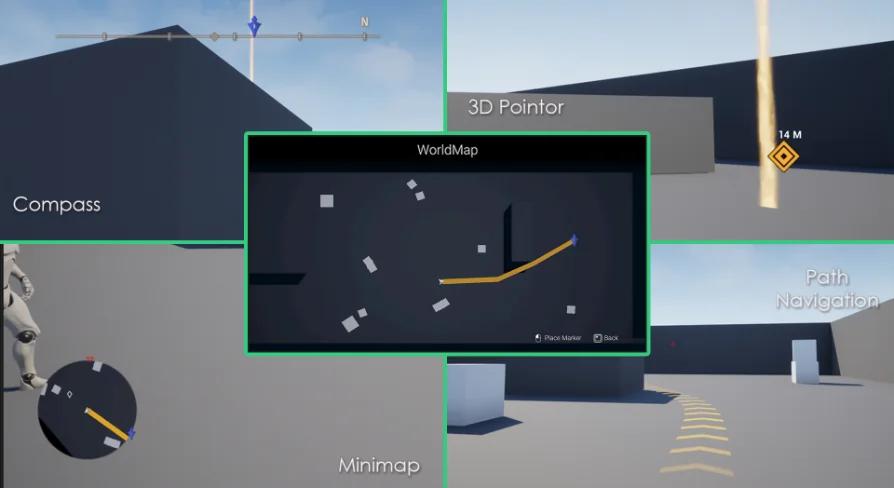
The core continuous feedback loop for player orientation centers on the compass minimap. This interface element handles immediate surrounding space, keeping heading indicators visible while remaining unobtrusive during active gameplay. Within this module, the tool incorporates distinct tracking logic for both static goals and dynamic entities.
A primary capability of this module is tracking AI alongside standard landmarks. Having non-player characters and AI actors registered directly on the compass minimap gives developers the mechanics required for combat encounters, escort quests, and dynamic stealth scenarios. When an AI moves through the scene, the radar and compass elements update their position accordingly, maintaining tactical clarity without requiring custom tracking scripts from scratch.
Beyond simple directional blips, the system provides follow markers accompanied by follow path showing functionality. Rather than merely pointing a player toward an arbitrary coordinate as the crow flies, path display systems project navigable routes across the layout. This prevents players from running blindly into sheer rock faces or dead-end canyons. The follow path guides movement along valid walking surfaces, making objective tracking practical in complex layouts where direct linear movement is physically blocked.
Spatial Guidance with the 3D Pointer on Rough Terrain
Flat 2D UI elements often fall short when gameplay relies on severe verticality. A flat icon displayed on a HUD edge cannot easily convey whether an objective sits hundreds of meters above the character on a cliffside ledge or deep below in a subterranean cavern. To resolve this, Easy Map and Navigation System incorporates a dedicated 3D pointer.
This 3D pointer is specifically configured to remain functional across rough terrain. Uneven landscapes, irregular hills, jagged boulders, and broken ground meshes frequently disrupt basic spatial pointers by clipping into geometry or floating unnaturally above target surfaces. By accounting for irregular topography, the 3D pointer provides a reliable in-world beacon that accurately aligns with destinations regardless of elevation spikes or rugged surface profiles.
Coupled with the 3D pointer is support for 3D widgets. These widgets position interface graphics directly in the game world, allowing interactive points, objective markers, and area identifiers to anchor to world locations rather than floating exclusively on the screen viewport. The integration of 3D widgets bridges the gap between HUD-based information and environmental presence, giving developers flexible visual options for presenting waypoints in real time.
Full-Scale Orientation Through the Worldmap and 3D Widgets
While the compass minimap and in-world indicators manage local, minute-to-minute traversal, broad-scale route planning requires a wider scope. The package includes a dedicated worldmap designed to handle macro-level orientation. Players can pull back from their immediate surroundings to inspect territorial boundaries, evaluate long-distance objectives, and plot travel routes across wide environments.
The worldmap complements the local follow path indicators. Players can reference major destinations on the world layout, establish intent, and then rely on the follow markers and compass minimap once they return to active exploration. This dual-layer structure ensures that navigation remains continuous from planning to execution.
Blueprint Structure and Learning Resources
Because the toolkit is constructed with Blueprints, developers working in visual scripting can examine, modify, and extend the underlying logic without diving into compiled C++ code. The mechanics incorporate techniques and tooling derived from YOUR SANDBOX tutorials, crediting that foundational work while assembling the features into an integrated game framework.
Adopting complex navigation logic often presents implementation hurdles, particularly when syncing dynamic AI coordinates with HUD elements and world-space transforms. To support integration, the toolkit is accompanied by dedicated documentation, a showcase video illustrating features in action, and step-by-step tutorial videos. Developers needing direct technical troubleshooting can also access Discord support to resolve project-specific questions and setup challenges.
Ideal Project Types and Implementation Scope
Easy Map and Navigation System provides the most value to developers building titles where landscape traversal and entity awareness are central to the player experience. Open-world role-playing games, survival titles, team-based tactical games, and quest-heavy adventure projects benefit directly from having compass minimaps, path projection, and worldmaps running under a unified system.
Indie teams and solo creators seeking to avoid the time-intensive process of coding custom radar math, line-of-sight tracking for AI, and elevation-aware 3D markers will find this setup particularly advantageous. With ready-to-use Blueprint logic handling everything from rough-terrain waypoints to full-screen map views, technical artists and gameplay designers can focus their resources on world design and narrative flow.
 Gameplay Features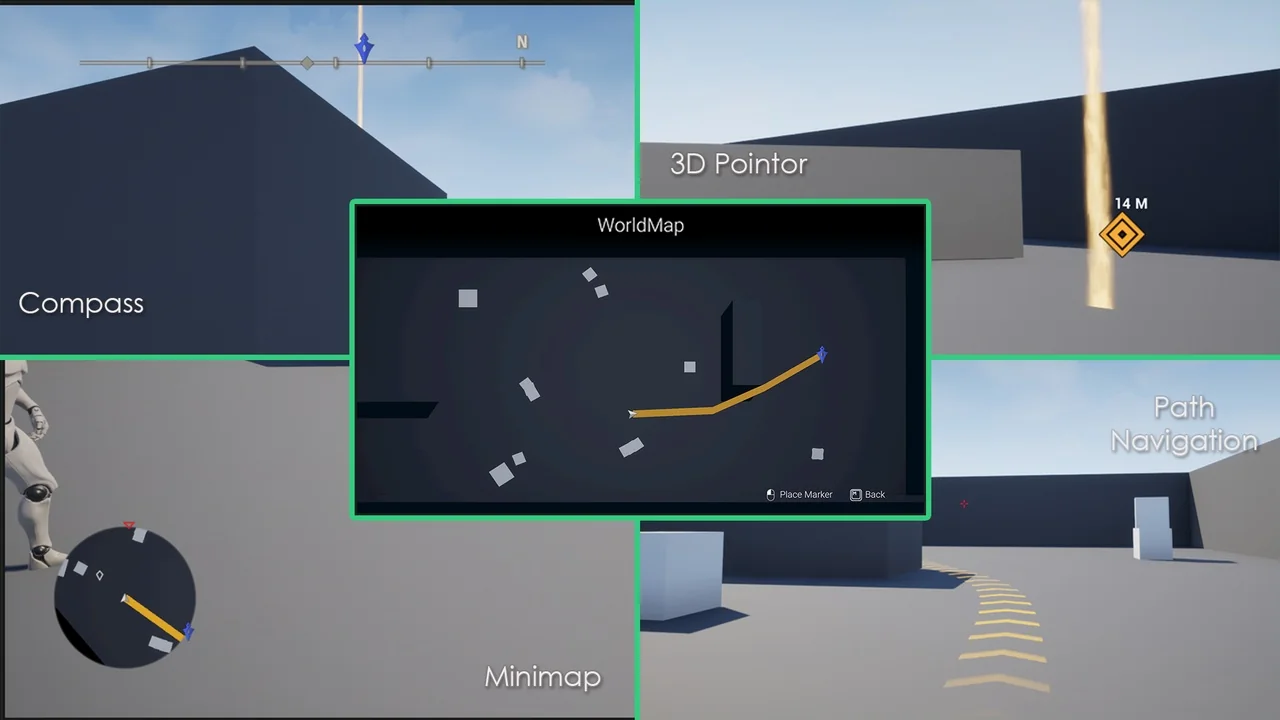
 Gameplay Features
 Gameplay Features
 Gameplay Features