"a19e0535960bd083"{"id":"1002006","slug":"easy-soft-outlines","title":"Easy Soft Outlines","category":"Variety","engine":"5.2+","assetVersion":"","engineVersion":"Engine Version: 5.2+","tag":"Variety","accent":"blue","visual":"mech","summary":"Implement post-process glow and soft outline effects on meshes and characters using custom depth-stencil passes and flexible material instances.","platform":"Unreal Engine","publishedAt":"2026-10-26T12:23:49.117Z","updatedAt":"2026-10-26T12:23:49.117Z","sourceNotes":[],"fileContents":[],"compatibility":["Unreal Engine","Engine Version: 5.2+"],"featuredImage":{"alt":"Easy Soft Outlines","src":"/wp-content/uploads/published/2026/10/8349ef037a68-9e6d7aca-d1c4-49bf-8ae4-7cf40167865c-a732d7d6f5.webp"},"hasDownloadLink":true,"downloads":0,"terms":[{"taxonomy":"category","slug":"variety-vfx","name":"Variety"}],"galleryImages":[{"src":"/wp-content/uploads/published/2026/10/290907fb6674-963cc199-63fb-469c-af0c-4d3ab2f8f550-4d6574ac41.webp","alt":"Easy Soft Outlines"},{"src":"/wp-content/uploads/published/2026/10/0a1e7d657e68-84e101f6-6471-452e-83c5-1c03af3d8f2e-2041914242.webp","alt":"Easy Soft Outlines"},{"src":"/wp-content/uploads/published/2026/10/cc6460f8faaf-c348978e-8f7b-4f58-a35f-97f3556cbedb-226b93c4bb.webp","alt":"Easy Soft Outlines"},{"src":"/wp-content/uploads/published/2026/10/2233e17bb4bd-efcba4bf-2fc6-4d19-83c1-5cefab97dd31-f9c7784f56.webp","alt":"Easy Soft Outlines"},{"src":"/wp-content/uploads/published/2026/10/1cf35fadfc60-0719917c-25b1-4da9-bd68-c0dd096e56bb-394c3a075e.webp","alt":"Easy Soft Outlines"}],"accessPanel":{"kind":"resource","title":"Download this resource","eyebrow":"Free Download","message":"Log in or create a free account to start your download.","fileName":"Content.7z","safetyNote":"Resources are manually reviewed before listing to improve quality and reduce obvious risks.","actionLabel":"Download Free","resourceType":"Resource archive"},"contentHtml":"\u003ch2\u003eHighlighting Meshes and Characters with Easy Soft Outlines\u003c/h2\u003e\u003cp\u003eCommunicating gameplay focus often requires an immediate, readable way to separate interactable items, hostile entities, or player characters from surrounding scene clutter. Easy Soft Outlines addresses this visual clarity problem by applying a soft outline or customizable glow effect directly across selected meshes using a screen-space post process workflow.\u003c/p\u003e\u003cp\u003eInstead of requiring individual surface shaders to carry custom silhouette logic, the package isolates target assets at the camera level. This makes it possible to highlight critical objectives, active targets, or distinct characters cleanly across varying environments. Because the effect functions globally through scene post processing, assets retain their standard material setups while acquiring a responsive outer halo or edge glow when needed during gameplay.\u003c/p\u003e\u003ch2\u003eConfiguring the Post Process Volume and Stencil Settings\u003c/h2\u003e\u003cp\u003eEnabling the effect begins with adjusting engine-level depth buffers to ensure custom masking data is properly written and read.\u003c/p\u003e\u003cp\u003eIn the project settings, locate the Custom Depth-Stencil Pass option and set it to Enabled with stencil. This setting allows the engine to output discrete stencil integer values alongside depth calculations, which the outline materials require to map outer edges and gradients. In the scene itself, the effect operates inside a post process volume, which can be configured as a localized volume covering a specific area or marked as an infinite, unbound volume to cover the entire level. Within the details panel of this post process volume, look under Blendables or Materials, add two new elements to the array, and define them as asset references so they can host the necessary shader passes.\u003c/p\u003e\u003ch2\u003eStacking PP_OcclusionCheck and PP_SoftOutline Materials\u003c/h2\u003e\u003cp\u003eThe visual pipeline relies on a two-part material configuration inside the post process blendables array to resolve both edge visibility and spatial obstruction.\u003c/p\u003e\u003cp\u003eOne slot in the post process volume must be assigned to a PP_OcclusionCheck material, while the complementary slot takes a PP_SoftOutline material. The system supplies specialized material instances prefixed with PPI_, allowing users to select pre-configured behaviors straight out of the box without building master networks from scratch. Proper rendering also depends on engine scalability: the Effects quality setting must be maintained at Epic or higher. Running the Effects scalability below Epic prevents the custom depth and post-process routines from processing the outline boundaries correctly, leading to broken edge rendering or missing glows.\u003c/p\u003e\u003ch2\u003eControlling Stencil Ranges for Intensity and Multi-Color Switching\u003c/h2\u003e\u003cp\u003eAssigning an outline to an individual asset is controlled directly from the details panel of the target actor or static mesh component.\u003c/p\u003e\u003cp\u003eSelect the mesh in the scene or blueprint hierarchy, locate the details panel, and check Render Custom Depth Pass to true. Once this pass is active, the mesh interacts directly with the post-process materials via the Custom Depth Stencil Value. Under default behavior, the system reads stencil numbers between 100 and 255 to control a single-color glow, using that numeric range to smoothly fade intensity up or down based on the exact integer assigned. When distinct visual states are required, the setup switches to a multi-color workflow using predetermined stencil values of 230, 240, and 250, each corresponding to one of three separate preset colors. Both the numerical threshold ranges and the specific color assignments can be adjusted directly within the material properties to match team palettes, alert levels, or item rarity conventions.\u003c/p\u003e\u003ch2\u003eDeploying Soft Outline Logic into Active Projects\u003c/h2\u003e\u003cp\u003eA video tutorial and showcase demonstrate the operational flow for testing combinations of stencil assignments and material instances across sample assets.\u003c/p\u003e\u003cp\u003eBecause the logic is driven by integer values written to the stencil buffer, mechanics such as targeting reticles, inventory selection, or dynamic character glows can be modulated simply by changing a single component property at runtime. Rather than rebuilding asset materials, visual teams can route all highlighting passes through the twin post-process blendables, adjusting falloff distance, stencil ranges, and color slots across local or infinite volumes to fit specific production needs.\u003c/p\u003e\n\n\u003ch2\u003eExplore Similar Assets\u003c/h2\u003e\n\u003cul\u003e\n\u003cli\u003e\u003ca href=\"https://3dcghub.com/post-process-hand-draw-outline/\" title=\"Post Process Hand Draw Outline\"\u003ePost Process Hand Draw Outline\u003c/a\u003e\u003c/li\u003e\n\u003cli\u003e\u003ca href=\"https://3dcghub.com/dynamic-sketch-post-process-material/\" title=\"Dynamic Sketch Post-Process Material\"\u003eDynamic Sketch Post-Process Material\u003c/a\u003e\u003c/li\u003e\n\u003cli\u003e\u003ca href=\"https://3dcghub.com/trail-vfx-pack/\" title=\"Trail VFX Pack\"\u003eTrail VFX Pack\u003c/a\u003e\u003c/li\u003e\n\u003cli\u003e\u003ca href=\"https://3dcghub.com/fluid-ninja-live/\" title=\"Fluid Ninja LIVE\"\u003eFluid Ninja LIVE\u003c/a\u003e\u003c/li\u003e\n\u003cli\u003e\u003ca href=\"https://3dcghub.com/bigblob-the-slime-physical-and-soft-body-slime-creature-with-blueprint-and-mat/\" title=\"BigBlob the Slime, physical and soft body slime creature with blueprint and mat\"\u003eBigBlob the Slime, physical and soft body slime creature with blueprint and mat\u003c/a\u003e\u003c/li\u003e\n\u003c/ul\u003e","contentTextLength":4598,"navigation":{"current":85,"total":4026,"previous":{"id":"1002007","slug":"eighteen-fantasy-chests-pack","title":"Eighteen Fantasy Chests Pack","category":"Fantasy","platform":"Unreal Engine","updatedAt":"2026-10-26T12:29:08.417Z"},"next":{"id":"1002005","slug":"easy-map-and-navigation-system","title":"Easy Map and Navigation System","category":"Gameplay Features","platform":"Unreal Engine","updatedAt":"2026-10-26T12:23:06.080Z"}},"relatedResources":[{"id":"1000170","slug":"post-process-hand-draw-outline","title":"Post Process Hand Draw Outline","category":"Variety","engine":"5.0+","assetVersion":"","engineVersion":"Engine Version: 5.0+","tag":"Variety","accent":"blue","visual":"mech","summary":"A post process material effect that turns scenes into a hand-drawn look with flows, hairy lines, twisted corners, hatching, and strong control.","platform":"Unreal Engine","publishedAt":"2026-06-19T16:53:03.610Z","updatedAt":"2026-06-19T16:53:03.610Z","sourceNotes":[],"fileContents":[],"compatibility":["Unreal Engine","Engine Version: 5.0+"],"featuredImage":{"alt":"Post Process Hand Draw Outline","src":"/wp-content/uploads/published/2026/06/efea839babc6-78e06097-109e-4af7-8178-4f34fa4e48b4-f5ed843b18.webp"},"hasDownloadLink":true,"downloads":0},{"id":"1000590","slug":"dynamic-sketch-post-process-material","title":"Dynamic Sketch Post-Process Material","category":"Variety","engine":"5.2+","assetVersion":"","engineVersion":"Engine Version: 5.2+","tag":"Variety","accent":"blue","visual":"luts","summary":"A stylized post-process material for Unreal Engine 5.2–5.7 featuring animated boiling effects, adjustable texture projection, and character masking for animatio","platform":"Unreal Engine","publishedAt":"2026-07-17T00:34:20.273Z","updatedAt":"2026-07-17T00:34:20.273Z","sourceNotes":[],"fileContents":[],"compatibility":["Unreal Engine","Engine Version: 5.2+"],"featuredImage":{"alt":"Dynamic Sketch Post-Process Material","src":"/wp-content/uploads/published/2026/07/f2b146652d31-7afe3eaa-33f2-4c3c-90fe-93b31800a880-b8785adb24.webp"},"hasDownloadLink":true,"downloads":0},{"id":"17488","slug":"trail-vfx-pack","title":"Trail VFX Pack","category":"Variety","engine":"5.2+","assetVersion":"Engine version: 5.2+","engineVersion":"5.2","tag":"Variety","accent":"blue","visual":"city","summary":"Enhance your project's visual impact with the Trail VFX Pack. This collection features five distinct trail types and eight elemental styles, offering deep customization for dash effects and projectiles.","platform":"Unreal Engine","publishedAt":"2026-03-13T14:42:15.000Z","updatedAt":"2026-04-19T15:43:31.000Z","sourceNotes":[],"fileContents":[],"compatibility":["Unreal Engine","Engine version: 5.2+"],"featuredImage":{"alt":"Trail VFX Pack","src":"https://3dcghub.com/wp-content/uploads/2026/03/6159abd4-2399-433b-8f7b-d9b6e15a3b9f.webp"},"hasDownloadLink":true,"downloads":3}]}
Variety
Easy Soft Outlines
Implement post-process glow and soft outline effects on meshes and characters using custom depth-stencil passes and flexible material instances.
Category:Unreal Engine,VarietyPlatform: Unreal EngineEngine Version: 5.2+Published: Oct 26, 2026
Variety
Resource overview
Highlighting Meshes and Characters with Easy Soft Outlines
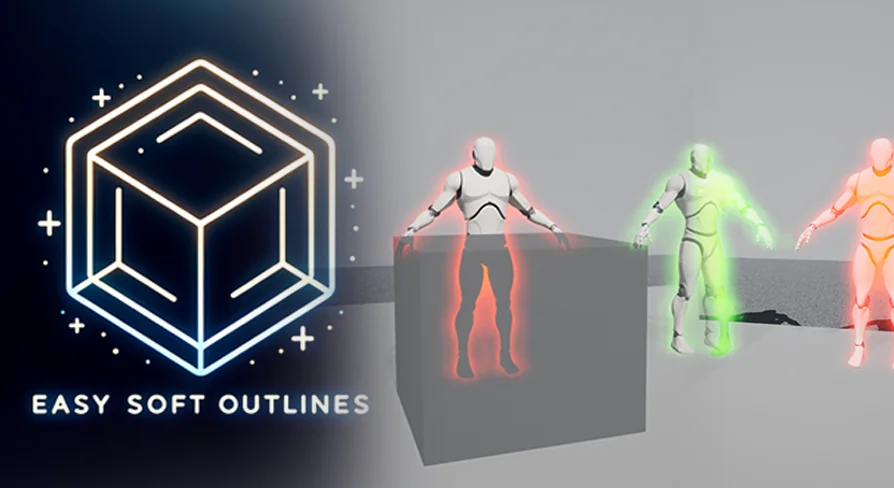
Communicating gameplay focus often requires an immediate, readable way to separate interactable items, hostile entities, or player characters from surrounding scene clutter. Easy Soft Outlines addresses this visual clarity problem by applying a soft outline or customizable glow effect directly across selected meshes using a screen-space post process workflow.
Instead of requiring individual surface shaders to carry custom silhouette logic, the package isolates target assets at the camera level. This makes it possible to highlight critical objectives, active targets, or distinct characters cleanly across varying environments. Because the effect functions globally through scene post processing, assets retain their standard material setups while acquiring a responsive outer halo or edge glow when needed during gameplay.
Configuring the Post Process Volume and Stencil Settings
Enabling the effect begins with adjusting engine-level depth buffers to ensure custom masking data is properly written and read.
In the project settings, locate the Custom Depth-Stencil Pass option and set it to Enabled with stencil. This setting allows the engine to output discrete stencil integer values alongside depth calculations, which the outline materials require to map outer edges and gradients. In the scene itself, the effect operates inside a post process volume, which can be configured as a localized volume covering a specific area or marked as an infinite, unbound volume to cover the entire level. Within the details panel of this post process volume, look under Blendables or Materials, add two new elements to the array, and define them as asset references so they can host the necessary shader passes.
Stacking PP_OcclusionCheck and PP_SoftOutline Materials
The visual pipeline relies on a two-part material configuration inside the post process blendables array to resolve both edge visibility and spatial obstruction.
One slot in the post process volume must be assigned to a PP_OcclusionCheck material, while the complementary slot takes a PP_SoftOutline material. The system supplies specialized material instances prefixed with PPI_, allowing users to select pre-configured behaviors straight out of the box without building master networks from scratch. Proper rendering also depends on engine scalability: the Effects quality setting must be maintained at Epic or higher. Running the Effects scalability below Epic prevents the custom depth and post-process routines from processing the outline boundaries correctly, leading to broken edge rendering or missing glows.
Controlling Stencil Ranges for Intensity and Multi-Color Switching
Assigning an outline to an individual asset is controlled directly from the details panel of the target actor or static mesh component.
Select the mesh in the scene or blueprint hierarchy, locate the details panel, and check Render Custom Depth Pass to true. Once this pass is active, the mesh interacts directly with the post-process materials via the Custom Depth Stencil Value. Under default behavior, the system reads stencil numbers between 100 and 255 to control a single-color glow, using that numeric range to smoothly fade intensity up or down based on the exact integer assigned. When distinct visual states are required, the setup switches to a multi-color workflow using predetermined stencil values of 230, 240, and 250, each corresponding to one of three separate preset colors. Both the numerical threshold ranges and the specific color assignments can be adjusted directly within the material properties to match team palettes, alert levels, or item rarity conventions.
Deploying Soft Outline Logic into Active Projects
A video tutorial and showcase demonstrate the operational flow for testing combinations of stencil assignments and material instances across sample assets.
Because the logic is driven by integer values written to the stencil buffer, mechanics such as targeting reticles, inventory selection, or dynamic character glows can be modulated simply by changing a single component property at runtime. Rather than rebuilding asset materials, visual teams can route all highlighting passes through the twin post-process blendables, adjusting falloff distance, stencil ranges, and color slots across local or infinite volumes to fit specific production needs.
 Variety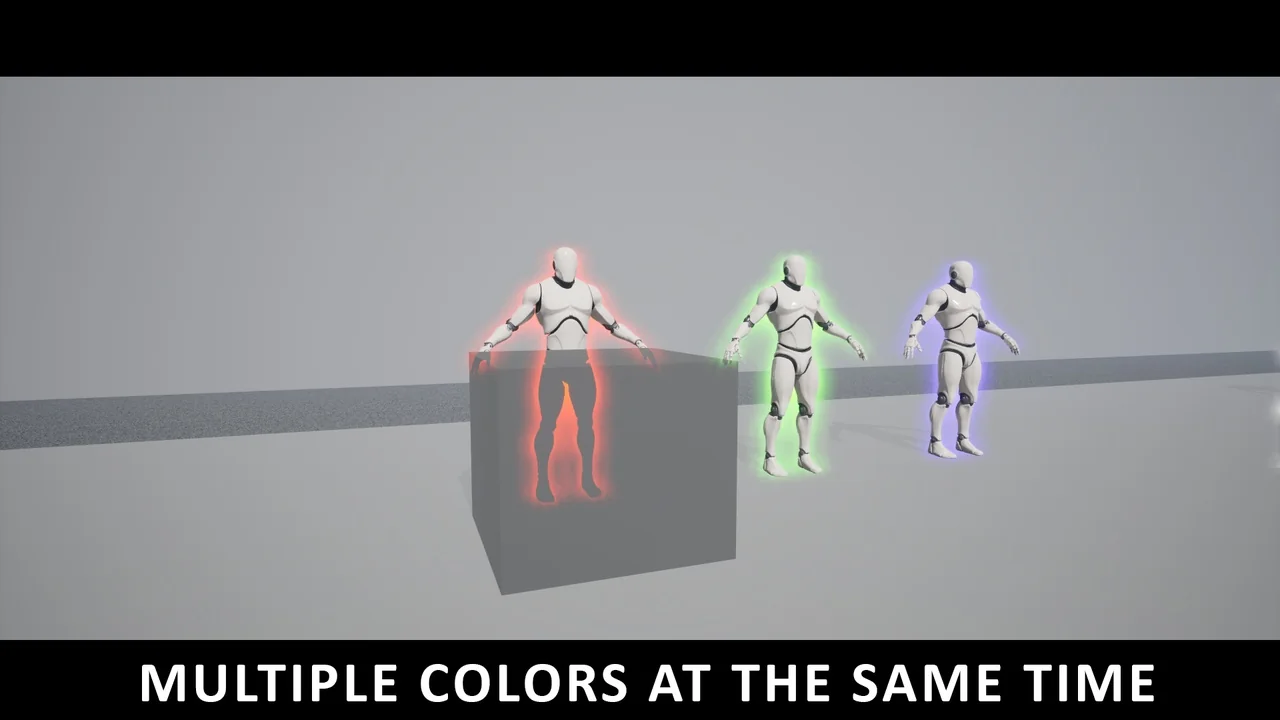
 Variety
 Variety
 Variety