"c14ff6bd758dadb1"{"id":"1000590","slug":"dynamic-sketch-post-process-material","title":"Dynamic Sketch Post-Process Material","category":"Variety","engine":"5.2+","assetVersion":"","engineVersion":"Engine Version: 5.2+","tag":"Variety","accent":"blue","visual":"luts","summary":"A stylized post-process material for Unreal Engine 5.2–5.7 featuring animated boiling effects, adjustable texture projection, and character masking for animatio","platform":"Unreal Engine","publishedAt":"2026-07-17T00:34:20.273Z","updatedAt":"2026-07-17T00:34:20.273Z","sourceNotes":[],"fileContents":[],"compatibility":["Unreal Engine","Engine Version: 5.2+"],"featuredImage":{"alt":"Dynamic Sketch Post-Process Material","src":"/wp-content/uploads/published/2026/07/f2b146652d31-7afe3eaa-33f2-4c3c-90fe-93b31800a880-b8785adb24.webp"},"hasDownloadLink":true,"downloads":0,"terms":[{"taxonomy":"category","slug":"variety-vfx","name":"Variety"}],"galleryImages":[{"src":"/wp-content/uploads/published/2026/07/75bfc9de7a6e-4cdea517-1bae-40f9-9b94-eae69db1c207-8ca48ff06e.webp","alt":"Dynamic Sketch Post-Process Material"},{"src":"/wp-content/uploads/published/2026/07/14979b45ee48-7ac4e3b6-07c2-4fef-b69a-971fddb4c5fc-caddc7460e.webp","alt":"Dynamic Sketch Post-Process Material"},{"src":"/wp-content/uploads/published/2026/07/075ee4a9941d-784226c4-8e26-4f98-8649-4d6e142e6a27-58b0247d8e.webp","alt":"Dynamic Sketch Post-Process Material"},{"src":"/wp-content/uploads/published/2026/07/4a0a8e1c19c1-3d700e07-3a83-476c-bd4b-98671bb0f88c-f7dc7f849e.webp","alt":"Dynamic Sketch Post-Process Material"},{"src":"/wp-content/uploads/published/2026/07/534c0b2f3270-6b021e06-8e4a-459c-97ed-0a55a81f6fb6-c5d3d5a250.webp","alt":"Dynamic Sketch Post-Process Material"},{"src":"/wp-content/uploads/published/2026/07/1d683af2941c-414a4063-e496-439c-8f0b-ca1ce5118b9a-9a43e8343e.webp","alt":"Dynamic Sketch Post-Process Material"},{"src":"/wp-content/uploads/published/2026/07/87123e779cdc-16cafe88-341c-4444-acbb-4366b79afa9b-49e41f8531.webp","alt":"Dynamic Sketch Post-Process Material"},{"src":"/wp-content/uploads/published/2026/07/df0c92fad127-02d7e3d3-f0ce-4aa4-bdde-11a6f90ea562-966d2e5f70.webp","alt":"Dynamic Sketch Post-Process Material"},{"src":"/wp-content/uploads/published/2026/07/7d5ae043be76-e7cf920c-ff04-48f3-9f4f-04c1d98d2340-7139ebb94e.webp","alt":"Dynamic Sketch Post-Process Material"},{"src":"/wp-content/uploads/published/2026/07/d67f45033163-daf5c52a-9f03-490e-a2da-b307250490ce-b0b9dfe4b5.webp","alt":"Dynamic Sketch Post-Process Material"}],"accessPanel":{"kind":"resource","title":"Download this resource","eyebrow":"Free Download","message":"Log in or create a free account to start your download.","fileName":"Content.7z","safetyNote":"Resources are manually reviewed before listing to improve quality and reduce obvious risks.","actionLabel":"Download Free","resourceType":"Resource archive"},"contentHtml":"\u003cp\u003eAchieving a hand-drawn, sketch-inspired aesthetic in a real-time engine often requires complex, multi-layered material setups. Standard rendering pipelines produce clean, predictable surfaces, but portraying the kinetic energy of traditional 2D illustration in a 3D environment presents a technical hurdle.\u003c/p\u003e \u003cp\u003eThe Dynamic Sketch Post-Process Material is a stylized post-process material for Unreal Engine built to solve this workflow problem. Operating as a post-process material, it intercepts the rendered frame before output and applies a sketch-based stylization. Rather than modifying individual surface materials, it transforms the final image. It serves as a central hub for creating sketch-inspired visuals, replacing the need for bespoke shaders on every object in a scene. By treating the entire frame as a canvas, the material maintains visual consistency across complex scenes where individual asset customization would be inefficient.\u003c/p\u003e \u003ch2\u003eCreating Variation Through Animated Boiling Effects\u003c/h2\u003e \u003cp\u003eLine work in hand-drawn animation is never perfectly static. It shifts and jitters from frame to frame.\u003c/p\u003e \u003cp\u003eTo replicate this characteristic, the material features animated boiling effects. In traditional cel animation, this motion comes from tracing the same drawing multiple times and cycling those drawings at the camera's frame rate. The shader simulates this kinetic line work automatically. The continuous, generated jitter gives moving and stationary geometry a persistent, hand-drawn quality. This makes the material suited for animation pipelines aiming for a traditional 2D aesthetic without requiring an artist to manually redraw frames. The boiling effect pushes the rendered image away from a sterile digital render and into an organic, sketch-like territory.\u003c/p\u003e \u003ch2\u003eAdjusting Texture Projection Types for Scene Geometry\u003c/h2\u003e \u003cp\u003eHow a texture maps onto 3D geometry changes the final look of the sketch lines.\u003c/p\u003e \u003cp\u003eThe material provides the ability to change texture projection types. This controls how the sketch and hatch patterns cast across the 3D models in the frame. Different projection methods can yield dramatically different results depending on the camera angle and the complexity of the geometry. Flat projections might yield stronger, more graphic 2D shapes, while other methods might wrap the strokes more naturally around the curves of an object. Giving the developer control over the projection type means the material adapts to a variety of scene layouts, ensuring the sketch lines fall correctly on both simple shapes and complex character meshes.\u003c/p\u003e \u003ch2\u003eMasking Characters and Assets for Targeted Stylization\u003c/h2\u003e \u003cp\u003eApplying a heavy sketch filter to an entire scene can sometimes obscure important visual information.\u003c/p\u003e \u003cp\u003eThe material supports masking out characters and assets, allowing the developer to apply separate shader effects to specific elements. By isolating characters from the background environment, the creator can leave backgrounds as a rough sketch while applying a cleaner, different stylized effect to the foreground actors. This selective application is useful for directing the viewer's eye and maintaining character readability, ensuring key action is not lost under dense hatch lines. This masking capability makes the material modular. A creator can construct scenes with multiple visual styles, managing the look of the environment and the characters as distinct elements.\u003c/p\u003e \u003ch2\u003eIntegration in Animation and Game Pipelines\u003c/h2\u003e \u003cp\u003eReal-time engines increasingly serve as production tools for rendered animation, not just interactive experiences.\u003c/p\u003e \u003cp\u003eBecause the material is a post-process effect with modular masking, it fits directly into animation and game workflows. In an animation context, a creator can set up the stylization once at the post-process level and immediately apply it to every frame of a sequence. In a game context, the shader works without interfering with gameplay logic. The compatibility with Unreal Engine spans versions 5.2 through 5.7, ensuring the material functions within recent project environments. Attempting to manage stylized line work on complex geometry often demands individual attention to each asset. By shifting the work to a post-process material, a studio working in Unreal Engine can bypass the need to write custom material functions for individual objects.\u003c/p\u003e \u003ch2\u003eConfiguring the Stylized Master Material\u003c/h2\u003e \u003cp\u003eThe material functions as a master shader, meaning it contains the parameters needed to generate many different looks.\u003c/p\u003e \u003cp\u003eDescriptive tags point directly to its modular and painterly nature. A creator can use the material to drive a painterly look one day and a stark, graphic sketch the next. The post-process material breaks away from fixed output. By engaging with the projection settings, the boiling intensity, and the masking system, the developer has the tools needed to tune the final image. Whether the scene requires a loose, rough pencil sketch or a tighter, painterly illustration style, changing the material parameters allows for fast iteration.\u003c/p\u003e \u003cp\u003eIntegrating this material into a real-time production workflow effectively turns the post-process volume into an art-directable layer. Characters can be masked and treated distinctly from the environment, texture projection can be tuned to suit the framing, and the animated boiling effect can be adjusted to achieve the desired level of visual energy. This positions the Dynamic Sketch Post-Process Material as a tool for art directing a scene's final look without altering the underlying surface materials of the 3D assets.\u003c/p\u003e\n\n\u003ch2\u003eMore From The Same Workflow\u003c/h2\u003e\n\u003cul\u003e\n\u003cli\u003e\u003ca href=\"https://3dcghub.com/post-process-hand-draw-outline/\" title=\"Post Process Hand Draw Outline\"\u003ePost Process Hand Draw Outline\u003c/a\u003e\u003c/li\u003e\n\u003cli\u003e\u003ca href=\"https://3dcghub.com/advanced-night-vision/\" title=\"Advanced Night Vision\"\u003eAdvanced Night Vision\u003c/a\u003e\u003c/li\u003e\n\u003cli\u003e\u003ca href=\"https://3dcghub.com/ascii-post-process-material/\" title=\"ASCII Post Process Material\"\u003eASCII Post Process Material\u003c/a\u003e\u003c/li\u003e\n\u003cli\u003e\u003ca href=\"https://3dcghub.com/fluid-ninja-live/\" title=\"Fluid Ninja LIVE\"\u003eFluid Ninja LIVE\u003c/a\u003e\u003c/li\u003e\n\u003cli\u003e\u003ca href=\"https://3dcghub.com/500-ultimate-luts-pack-post-processing-filters/\" title=\"500+ Ultimate LUTs Pack - Post-Processing Filters\"\u003e500+ Ultimate LUTs Pack - Post-Processing Filters\u003c/a\u003e\u003c/li\u003e\n\u003c/ul\u003e","contentTextLength":5696,"navigation":{"current":1272,"total":3719,"previous":{"id":"1000591","slug":"easy-dynmc-ragdoll","title":"EASY DYNMC RAGDOLL","category":"Characters \u0026 Creatures","platform":"Unreal Engine","updatedAt":"2026-07-17T00:37:41.477Z"},"next":{"id":"1000589","slug":"duplicate-cleaner","title":"Duplicate Cleaner","category":"Engine Tools","platform":"Unreal Engine","updatedAt":"2026-07-17T00:30:21.679Z"}},"relatedResources":[{"id":"1000170","slug":"post-process-hand-draw-outline","title":"Post Process Hand Draw Outline","category":"Variety","engine":"5.0+","assetVersion":"","engineVersion":"Engine Version: 5.0+","tag":"Variety","accent":"blue","visual":"mech","summary":"A post process material effect that turns scenes into a hand-drawn look with flows, hairy lines, twisted corners, hatching, and strong control.","platform":"Unreal Engine","publishedAt":"2026-06-19T16:53:03.610Z","updatedAt":"2026-06-19T16:53:03.610Z","sourceNotes":[],"fileContents":[],"compatibility":["Unreal Engine","Engine Version: 5.0+"],"featuredImage":{"alt":"Post Process Hand Draw Outline","src":"/wp-content/uploads/published/2026/06/efea839babc6-78e06097-109e-4af7-8178-4f34fa4e48b4-f5ed843b18.webp"},"hasDownloadLink":true,"downloads":0},{"id":"1000805","slug":"color-grade-50-luts","title":"Color Grade - 50 LUTs","category":"Variety","engine":"4.26+,5.0+","assetVersion":"","engineVersion":"Engine Version: 4.26+,5.0+","tag":"Variety","accent":"blue","visual":"luts","summary":"A professionally handcrafted pack of 50 LUTs for elevating lighting and post-process workflows, adding cinematic, realistic, and stylized atmosphere to environm","platform":"Unreal Engine","publishedAt":"2026-07-31T03:35:22.549Z","updatedAt":"2026-07-31T03:35:22.549Z","sourceNotes":[],"fileContents":[],"compatibility":["Unreal Engine","Engine Version: 4.26+,5.0+"],"featuredImage":{"alt":"Color Grade - 50 LUTs","src":"/wp-content/uploads/published/2026/07/b52c3f1c055e-4f6a72a8-3a42-49db-ab88-7dabfe104570-d8237b49d5.webp"},"hasDownloadLink":true,"downloads":1},{"id":"17015","slug":"advanced-night-vision","title":"Advanced Night Vision","category":"Variety","engine":"4.27,5.0+","assetVersion":"Engine version: 4.27,5.0+","engineVersion":"4.24","tag":"Variety","accent":"blue","visual":"luts","summary":"Enhance your project's atmosphere with Advanced Night Vision, a high-quality post-process material featuring modular customization and object highlighting capabilities.","platform":"Unreal Engine","publishedAt":"2026-03-13T13:28:21.000Z","updatedAt":"2026-04-19T15:43:38.000Z","sourceNotes":[],"fileContents":[],"compatibility":["Unreal Engine","Engine version: 4.27,5.0+"],"featuredImage":{"alt":"Advanced Night Vision","src":"https://3dcghub.com/wp-content/uploads/2026/03/ed66d7f0-f96c-4d81-b9e4-fc69089d4ae1.webp"},"hasDownloadLink":true,"downloads":0}]}
Variety
Dynamic Sketch Post-Process Material
A stylized post-process material for Unreal Engine 5.2–5.7 featuring animated boiling effects, adjustable texture projection, and character masking for animatio
Achieving a hand-drawn, sketch-inspired aesthetic in a real-time engine often requires complex, multi-layered material setups. Standard rendering pipelines produce clean, predictable surfaces, but portraying the kinetic energy of traditional 2D illustration in a 3D environment presents a technical hurdle.
The Dynamic Sketch Post-Process Material is a stylized post-process material for Unreal Engine built to solve this workflow problem. Operating as a post-process material, it intercepts the rendered frame before output and applies a sketch-based stylization. Rather than modifying individual surface materials, it transforms the final image. It serves as a central hub for creating sketch-inspired visuals, replacing the need for bespoke shaders on every object in a scene. By treating the entire frame as a canvas, the material maintains visual consistency across complex scenes where individual asset customization would be inefficient.
Creating Variation Through Animated Boiling Effects
Line work in hand-drawn animation is never perfectly static. It shifts and jitters from frame to frame.
To replicate this characteristic, the material features animated boiling effects. In traditional cel animation, this motion comes from tracing the same drawing multiple times and cycling those drawings at the camera's frame rate. The shader simulates this kinetic line work automatically. The continuous, generated jitter gives moving and stationary geometry a persistent, hand-drawn quality. This makes the material suited for animation pipelines aiming for a traditional 2D aesthetic without requiring an artist to manually redraw frames. The boiling effect pushes the rendered image away from a sterile digital render and into an organic, sketch-like territory.
Adjusting Texture Projection Types for Scene Geometry
How a texture maps onto 3D geometry changes the final look of the sketch lines.
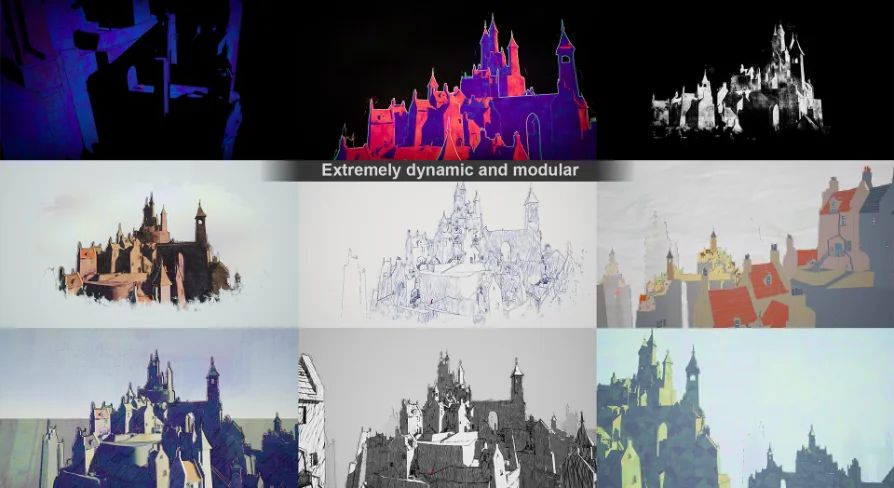
The material provides the ability to change texture projection types. This controls how the sketch and hatch patterns cast across the 3D models in the frame. Different projection methods can yield dramatically different results depending on the camera angle and the complexity of the geometry. Flat projections might yield stronger, more graphic 2D shapes, while other methods might wrap the strokes more naturally around the curves of an object. Giving the developer control over the projection type means the material adapts to a variety of scene layouts, ensuring the sketch lines fall correctly on both simple shapes and complex character meshes.
Masking Characters and Assets for Targeted Stylization
Applying a heavy sketch filter to an entire scene can sometimes obscure important visual information.
The material supports masking out characters and assets, allowing the developer to apply separate shader effects to specific elements. By isolating characters from the background environment, the creator can leave backgrounds as a rough sketch while applying a cleaner, different stylized effect to the foreground actors. This selective application is useful for directing the viewer's eye and maintaining character readability, ensuring key action is not lost under dense hatch lines. This masking capability makes the material modular. A creator can construct scenes with multiple visual styles, managing the look of the environment and the characters as distinct elements.
Integration in Animation and Game Pipelines
Real-time engines increasingly serve as production tools for rendered animation, not just interactive experiences.
Because the material is a post-process effect with modular masking, it fits directly into animation and game workflows. In an animation context, a creator can set up the stylization once at the post-process level and immediately apply it to every frame of a sequence. In a game context, the shader works without interfering with gameplay logic. The compatibility with Unreal Engine spans versions 5.2 through 5.7, ensuring the material functions within recent project environments. Attempting to manage stylized line work on complex geometry often demands individual attention to each asset. By shifting the work to a post-process material, a studio working in Unreal Engine can bypass the need to write custom material functions for individual objects.
Configuring the Stylized Master Material
The material functions as a master shader, meaning it contains the parameters needed to generate many different looks.
Descriptive tags point directly to its modular and painterly nature. A creator can use the material to drive a painterly look one day and a stark, graphic sketch the next. The post-process material breaks away from fixed output. By engaging with the projection settings, the boiling intensity, and the masking system, the developer has the tools needed to tune the final image. Whether the scene requires a loose, rough pencil sketch or a tighter, painterly illustration style, changing the material parameters allows for fast iteration.
Integrating this material into a real-time production workflow effectively turns the post-process volume into an art-directable layer. Characters can be masked and treated distinctly from the environment, texture projection can be tuned to suit the framing, and the animated boiling effect can be adjusted to achieve the desired level of visual energy. This positions the Dynamic Sketch Post-Process Material as a tool for art directing a scene's final look without altering the underlying surface materials of the 3D assets.
 Variety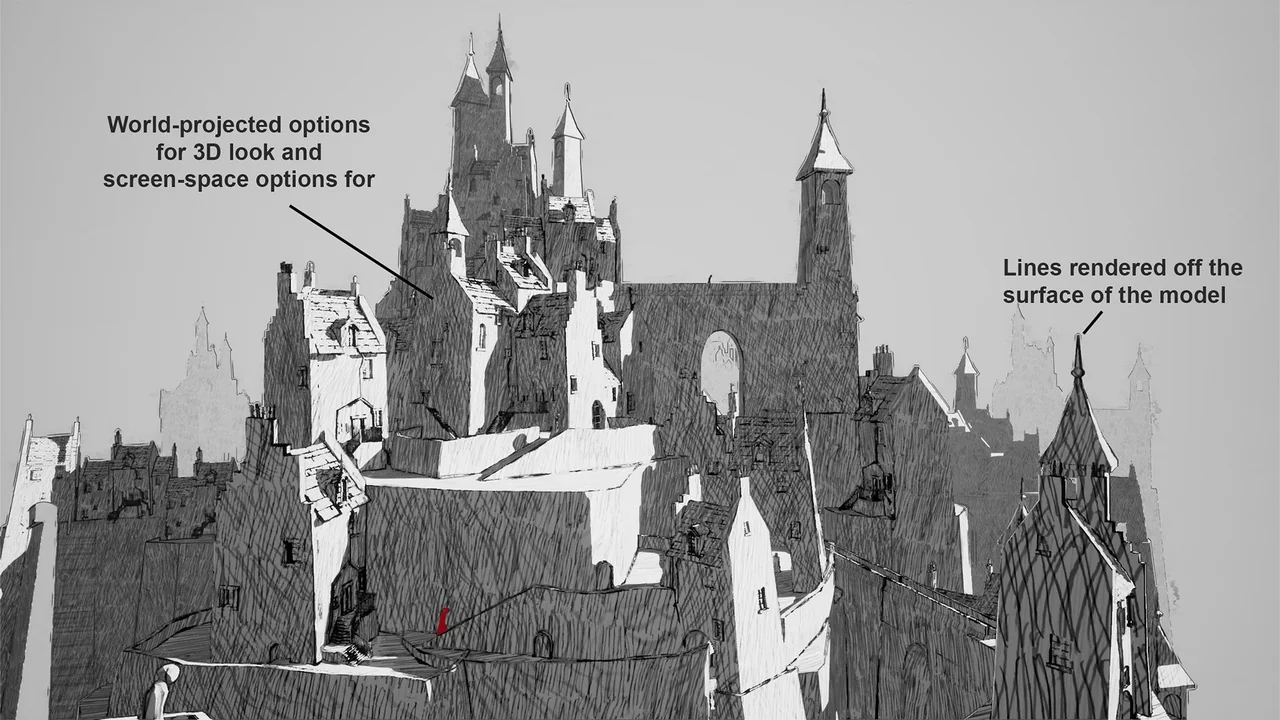
 Variety
 Variety
 Variety