"a19e0535960bd083"{"id":"1002004","slug":"dynamic-radial-menu-x","title":"DYNAMIC RADIAL MENU X","category":"Procedural Systems","engine":"4.26+,5.0+","assetVersion":"","engineVersion":"Engine Version: 4.26+,5.0+","tag":"Procedural Systems","accent":"blue","visual":"mech","summary":"DYNAMIC RADIAL MENU X delivers a data-table-driven radial menu system featuring material-based slices, gamepad controls, and deep trigonometric logic.","platform":"Unreal Engine","publishedAt":"2026-10-26T12:22:30.459Z","updatedAt":"2026-10-26T12:22:30.459Z","sourceNotes":[],"fileContents":[],"compatibility":["Unreal Engine","Engine Version: 4.26+,5.0+"],"featuredImage":{"alt":"DYNAMIC RADIAL MENU X","src":"/wp-content/uploads/published/2026/10/3bb00ef82986-3cc8594e-e9f1-4186-bd3c-c85f855c50c3-f3e5843abf.webp"},"hasDownloadLink":true,"downloads":0,"terms":[{"taxonomy":"category","slug":"procedural-systems","name":"Procedural Systems"}],"galleryImages":[{"src":"/wp-content/uploads/published/2026/10/7be1c11aeb26-cc455647-5e29-4b47-b1c1-c7a9a3348795-9be0ab107f.webp","alt":"DYNAMIC RADIAL MENU X"},{"src":"/wp-content/uploads/published/2026/10/4eded933559c-e05c2d99-d36a-417c-a619-0feb9847829c-0c98740d62.webp","alt":"DYNAMIC RADIAL MENU X"},{"src":"/wp-content/uploads/published/2026/10/dc5c7939d985-285cd366-b084-45c8-88ca-d5bf98bec5f1-b5fb073fbc.webp","alt":"DYNAMIC RADIAL MENU X"},{"src":"/wp-content/uploads/published/2026/10/edd2f4bf254b-2c009df2-9e7a-4838-ab7a-3a0225db23a0-50cbc2a0a9.webp","alt":"DYNAMIC RADIAL MENU X"},{"src":"/wp-content/uploads/published/2026/10/5f107b472c85-28bc8732-d969-49f0-ad78-dc6ea67c6748-42409117da.webp","alt":"DYNAMIC RADIAL MENU X"},{"src":"/wp-content/uploads/published/2026/10/4028d395171e-100d1611-9ad8-46ec-b5aa-f09e8c58b690-e9aaf0b6c8.webp","alt":"DYNAMIC RADIAL MENU X"},{"src":"/wp-content/uploads/published/2026/10/a34dc306ab95-09f49571-0d6d-4251-8bdb-bc392f303c00-7e1d0b99a8.webp","alt":"DYNAMIC RADIAL MENU X"},{"src":"/wp-content/uploads/published/2026/10/e7b23ecf1910-41ce4dca-605e-47bd-ab76-4ffba3c7e14b-08b1920c29.webp","alt":"DYNAMIC RADIAL MENU X"},{"src":"/wp-content/uploads/published/2026/10/8243b158d3de-c50f631e-e6fe-44ea-a7bf-ef46f57198ea-0142ea72f9.webp","alt":"DYNAMIC RADIAL MENU X"},{"src":"/wp-content/uploads/published/2026/10/68a089651a8e-58813c41-d4a2-4156-b2b8-60ca286773a5-c24338e75b.webp","alt":"DYNAMIC RADIAL MENU X"}],"accessPanel":{"kind":"resource","title":"Download this resource","eyebrow":"Free Download","message":"Log in or create a free account to start your download.","fileName":"Content.7z","safetyNote":"Resources are manually reviewed before listing to improve quality and reduce obvious risks.","actionLabel":"Download Free","resourceType":"Resource archive"},"contentHtml":"\u003ch2\u003eConstructing Radial Interfaces Without Cluttered Widget Hierarchies\u003c/h2\u003e\u003cp\u003eRadial selection menus often become difficult to maintain when each new slice requires manual changes inside a complex widget hierarchy. DYNAMIC RADIAL MENU X resolves this layout friction by shifting slice generation directly into dynamic materials.\u003c/p\u003e\u003cp\u003eInstead of manually anchoring and arranging individual visual elements inside the user interface tree for every item, the system generates dynamic slices through segregated material functions. This material-driven pipeline enables developers to alter visual styling and slice properties without touching the underlying widget structure or breaking foundational input logic. Because the visual layer remains completely decoupled from the hierarchy, the menu adapts cleanly whether presenting four options or expanding into much larger arrays.\u003c/p\u003e\u003ch2\u003eSplitting Aesthetics and Content Across Two Data Tables\u003c/h2\u003e\u003cp\u003eManaging radial interface assets is handled through a strict separation between presentation rules and functional entries.\u003c/p\u003e\u003cp\u003eThe system organizes configuration across two dedicated data tables rather than burying values inside blueprint code. The first data table governs the visual aesthetics of the menu. It holds parameters for overall menu dimensions, styling rules, icon dimensions, description text font sizing, and visual states. The second data table manages the functional content, including category structures, specific menu items, and target menu types. Because styling is cleanly segregated from content, menu styles can be stored and swapped dynamically at runtime. This allows developers to introduce custom user themes or permit players to configure personal visual profiles without disrupting item assignments.\u003c/p\u003e\u003ch2\u003eHandling Gamepad Dead-Zones, Navigation, and Mouse Auto-Centering\u003c/h2\u003e\u003cp\u003eRadial selection requires responsive input interpretation across vastly different control devices.\u003c/p\u003e\u003cp\u003eDYNAMIC RADIAL MENU X includes native input handling for both keyboard-and-mouse setups and gamepads. On controller hardware, the system incorporates dedicated gamepad dead-zone control to prevent unintended drifts and misfires during fast-paced play. On mouse hardware, the interface features an auto-centering mechanic that resets the cursor position relative to the radial center, smoothing the motion required to flick between targets. Both keyboard-mouse and controller inputs fully support real-time resizing and repositioning of the interface elements. To prevent player frustration during navigation, the underlying logic automatically detects and selects a valid item whenever an input attempts to scroll or hover over an inactive or invalid entry.\u003c/p\u003e\u003ch2\u003eLayering Outer Rings, Submenus, and Scrollable Pages\u003c/h2\u003e\u003cp\u003eComplex game systems rarely fit into an isolated circular wheel with a fixed number of items.\u003c/p\u003e\u003cp\u003eTo support broader inventories and multi-tier command structures, the architecture provides multiple radial layouts that can be mixed and matched together. Developers can construct nested hierarchical menus without depth limits, all driven straight through a single data table. When item counts exceed standard wheel capacities, scrollable menus permit pagination with customizable limits on items displayed per page. For expanded actions, an outer ring menu can spawn secondary item nodes along the outer perimeter of the primary wheel. These configurations—scrollable lists, nested submenus, and outer ring tiers—can function simultaneously within a unified radial interface.\u003c/p\u003e\u003ch2\u003ePerformance Optimization and Trigonometric Math Documentation\u003c/h2\u003e\u003cp\u003eCalculating circular layouts can quickly incur unnecessary performance costs if math operations are executed indiscriminately every tick.\u003c/p\u003e\u003cp\u003eThe Blueprint logic in DYNAMIC RADIAL MENU X is strictly event-driven to minimize processing overhead on the client. To preserve frame budgets, calculation checks are prioritized so the simplest conditions evaluate first, immediately breaking execution before expensive mathematical passes are triggered. Where advanced calculations do occur, the blueprint networks provide step-by-step documentation detailing the underlying math, walking through sine, cosine, and unit circle principles with practical numerical scenarios and calculations. Comment boxes and illustrative visual diagrams are built directly into the graphs to explain why specific trigonometric steps are taken, giving developers full visibility into vector math and procedural positioning.\u003c/p\u003e\u003ch2\u003eFitting Radial Menu Logic into Active Production Projects\u003c/h2\u003e\u003cp\u003eModular integration is essential when dropping an interface component into established frameworks like The Perfect Storm - Battle Royale.\u003c/p\u003e\u003cp\u003eThe system prepares all variables and blueprint functions into strictly categorized groups, making maintenance and feature extensions straightforward for engineering teams. Settings are designed to remain accessible for rapid integration while providing granular control over selection animations and individual UI audio triggers for every distinct menu action. With Discord support available for developer inquiries, the architecture functions as both a production-ready radial tool and an open reference for interface optimization, procedural UI materials, and controller navigation standards.\u003c/p\u003e\n\n\u003ch2\u003eContinue Browsing Similar Packs\u003c/h2\u003e\n\u003cul\u003e\n\u003cli\u003e\u003ca href=\"https://3dcghub.com/generic-radial-menus-v2-0-selection-wheels-and-pie-menus/\" title=\"Generic Radial Menus v2.0 - Selection Wheels and Pie Menus\"\u003eGeneric Radial Menus v2.0 - Selection Wheels and Pie Menus\u003c/a\u003e\u003c/li\u003e\n\u003cli\u003e\u003ca href=\"https://3dcghub.com/ultimate-archvis-kit/\" title=\"Ultimate Archvis Kit\"\u003eUltimate Archvis Kit\u003c/a\u003e\u003c/li\u003e\n\u003cli\u003e\u003ca href=\"https://3dcghub.com/ultimate-menu-system/\" title=\"Ultimate Menu System\"\u003eUltimate Menu System\u003c/a\u003e\u003c/li\u003e\n\u003cli\u003e\u003ca href=\"https://3dcghub.com/infinity-weather/\" title=\"Infinity Weather\"\u003eInfinity Weather\u003c/a\u003e\u003c/li\u003e\n\u003cli\u003e\u003ca href=\"https://3dcghub.com/easysky-multiplayer-ready-dynamic-day-night-cycle/\" title=\"EasySky Multiplayer Ready Dynamic Day / Night Cycle\"\u003eEasySky Multiplayer Ready Dynamic Day / Night Cycle\u003c/a\u003e\u003c/li\u003e\n\u003c/ul\u003e","contentTextLength":5442,"navigation":{"current":87,"total":4026,"previous":{"id":"1002005","slug":"easy-map-and-navigation-system","title":"Easy Map and Navigation System","category":"Gameplay Features","platform":"Unreal Engine","updatedAt":"2026-10-26T12:23:06.080Z"},"next":{"id":"1002003","slug":"driveable-animated-retro-cyberpunk-hover-car-02-cyberpunk-cyberpunked-car-3d","title":"Driveable / Animated Retro Cyberpunk Hover Car 02 (Cyberpunk Cyberpunked Car 3D)","category":"Spacecraft","platform":"Unreal Engine","updatedAt":"2026-10-26T12:21:43.967Z"}},"relatedResources":[{"id":"1001883","slug":"generic-radial-menus-v2-0-selection-wheels-and-pie-menus","title":"Generic Radial Menus v2.0 - Selection Wheels and Pie Menus","category":"Game Development Resource","engine":"4.26+,5.0+","assetVersion":"","engineVersion":"Engine Version: 4.26+,5.0+","tag":"Game Development R","accent":"blue","visual":"mech","summary":"Implement selection wheels and pie menus with custom Vector2D input, in-editor material styling, and single-function widget layout for console and PC.","platform":"Unreal Engine","publishedAt":"2026-10-22T11:22:42.133Z","updatedAt":"2026-10-22T11:22:42.133Z","sourceNotes":[],"fileContents":[],"compatibility":["Unreal Engine","Engine Version: 4.26+,5.0+"],"featuredImage":{"alt":"Generic Radial Menus v2.0 - Selection Wheels and Pie Menus","src":"/wp-content/uploads/published/2026/10/851241068b53-2a56ca8a-ecaf-49f1-8181-22e80e8df9a5-391e5d0a0b.webp"},"hasDownloadLink":true,"downloads":0},{"id":"1000407","slug":"ultimate-archvis-kit","title":"Ultimate Archvis Kit","category":"Procedural Systems","engine":"5.1+","assetVersion":"","engineVersion":"Engine Version: 5.1+","tag":"Procedural Systems","accent":"blue","visual":"mech","summary":"A comprehensive Blueprint toolkit for architectural visualization, featuring dynamic UI controls, material swapping, interactive lighting, and profile managemen","platform":"Unreal Engine","publishedAt":"2026-07-08T11:46:44.936Z","updatedAt":"2026-07-08T11:46:44.936Z","sourceNotes":[],"fileContents":[],"compatibility":["Unreal Engine","Engine Version: 5.1+"],"featuredImage":{"alt":"Ultimate Archvis Kit","src":"/wp-content/uploads/published/2026/07/060c703e9991-c4935242-c4ab-41df-bdd0-12d5f98e689c-b6473af33f.webp"},"hasDownloadLink":true,"downloads":0},{"id":"15521","slug":"ultimate-menu-system","title":"Ultimate Menu System","category":"Widgets \u0026 Controls","engine":"4.27,5.0+","assetVersion":"Engine version: 4.27,5.0+","engineVersion":"4.26","tag":"Widgets \u0026 Controls","accent":"blue","visual":"animation","summary":"Ultimate Menu System provides a modular and dynamic framework for creating professional game interfaces. It supports multiple input methods and includes pre-built systems for settings and multiplayer hosting.","platform":"Unreal Engine","publishedAt":"2026-03-12T09:12:56.000Z","updatedAt":"2026-04-19T15:44:45.000Z","sourceNotes":[],"fileContents":[],"compatibility":["Unreal Engine","Engine version: 4.27,5.0+"],"featuredImage":{"alt":"Ultimate Menu System","src":"https://3dcghub.com/wp-content/uploads/2026/03/f49ca1b4-975f-44a0-a17f-9f3cca8ab40c.webp"},"hasDownloadLink":true,"downloads":1}]}
Procedural Systems
DYNAMIC RADIAL MENU X
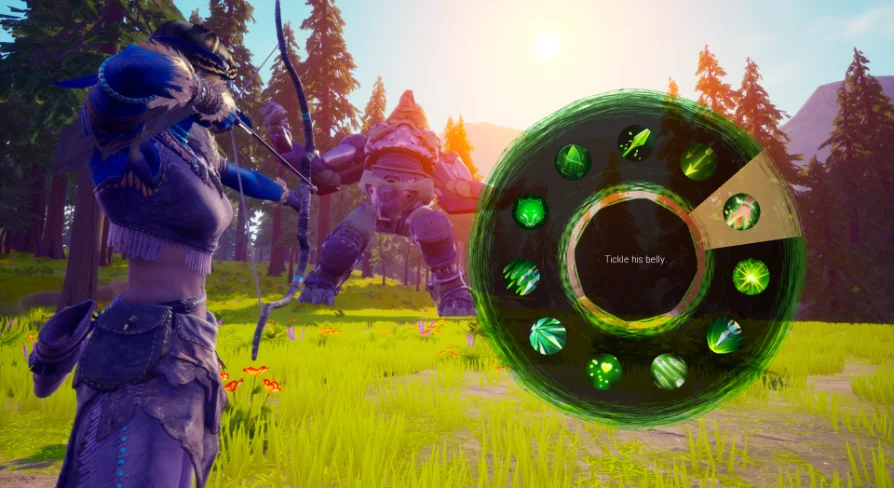
DYNAMIC RADIAL MENU X delivers a data-table-driven radial menu system featuring material-based slices, gamepad controls, and deep trigonometric logic.
Constructing Radial Interfaces Without Cluttered Widget Hierarchies
Radial selection menus often become difficult to maintain when each new slice requires manual changes inside a complex widget hierarchy. DYNAMIC RADIAL MENU X resolves this layout friction by shifting slice generation directly into dynamic materials.
Instead of manually anchoring and arranging individual visual elements inside the user interface tree for every item, the system generates dynamic slices through segregated material functions. This material-driven pipeline enables developers to alter visual styling and slice properties without touching the underlying widget structure or breaking foundational input logic. Because the visual layer remains completely decoupled from the hierarchy, the menu adapts cleanly whether presenting four options or expanding into much larger arrays.
Splitting Aesthetics and Content Across Two Data Tables
Managing radial interface assets is handled through a strict separation between presentation rules and functional entries.
The system organizes configuration across two dedicated data tables rather than burying values inside blueprint code. The first data table governs the visual aesthetics of the menu. It holds parameters for overall menu dimensions, styling rules, icon dimensions, description text font sizing, and visual states. The second data table manages the functional content, including category structures, specific menu items, and target menu types. Because styling is cleanly segregated from content, menu styles can be stored and swapped dynamically at runtime. This allows developers to introduce custom user themes or permit players to configure personal visual profiles without disrupting item assignments.
Handling Gamepad Dead-Zones, Navigation, and Mouse Auto-Centering
Radial selection requires responsive input interpretation across vastly different control devices.
DYNAMIC RADIAL MENU X includes native input handling for both keyboard-and-mouse setups and gamepads. On controller hardware, the system incorporates dedicated gamepad dead-zone control to prevent unintended drifts and misfires during fast-paced play. On mouse hardware, the interface features an auto-centering mechanic that resets the cursor position relative to the radial center, smoothing the motion required to flick between targets. Both keyboard-mouse and controller inputs fully support real-time resizing and repositioning of the interface elements. To prevent player frustration during navigation, the underlying logic automatically detects and selects a valid item whenever an input attempts to scroll or hover over an inactive or invalid entry.
Layering Outer Rings, Submenus, and Scrollable Pages
Complex game systems rarely fit into an isolated circular wheel with a fixed number of items.
To support broader inventories and multi-tier command structures, the architecture provides multiple radial layouts that can be mixed and matched together. Developers can construct nested hierarchical menus without depth limits, all driven straight through a single data table. When item counts exceed standard wheel capacities, scrollable menus permit pagination with customizable limits on items displayed per page. For expanded actions, an outer ring menu can spawn secondary item nodes along the outer perimeter of the primary wheel. These configurations—scrollable lists, nested submenus, and outer ring tiers—can function simultaneously within a unified radial interface.
Performance Optimization and Trigonometric Math Documentation
Calculating circular layouts can quickly incur unnecessary performance costs if math operations are executed indiscriminately every tick.
The Blueprint logic in DYNAMIC RADIAL MENU X is strictly event-driven to minimize processing overhead on the client. To preserve frame budgets, calculation checks are prioritized so the simplest conditions evaluate first, immediately breaking execution before expensive mathematical passes are triggered. Where advanced calculations do occur, the blueprint networks provide step-by-step documentation detailing the underlying math, walking through sine, cosine, and unit circle principles with practical numerical scenarios and calculations. Comment boxes and illustrative visual diagrams are built directly into the graphs to explain why specific trigonometric steps are taken, giving developers full visibility into vector math and procedural positioning.
Fitting Radial Menu Logic into Active Production Projects
Modular integration is essential when dropping an interface component into established frameworks like The Perfect Storm - Battle Royale.
The system prepares all variables and blueprint functions into strictly categorized groups, making maintenance and feature extensions straightforward for engineering teams. Settings are designed to remain accessible for rapid integration while providing granular control over selection animations and individual UI audio triggers for every distinct menu action. With Discord support available for developer inquiries, the architecture functions as both a production-ready radial tool and an open reference for interface optimization, procedural UI materials, and controller navigation standards.
 Procedural Systems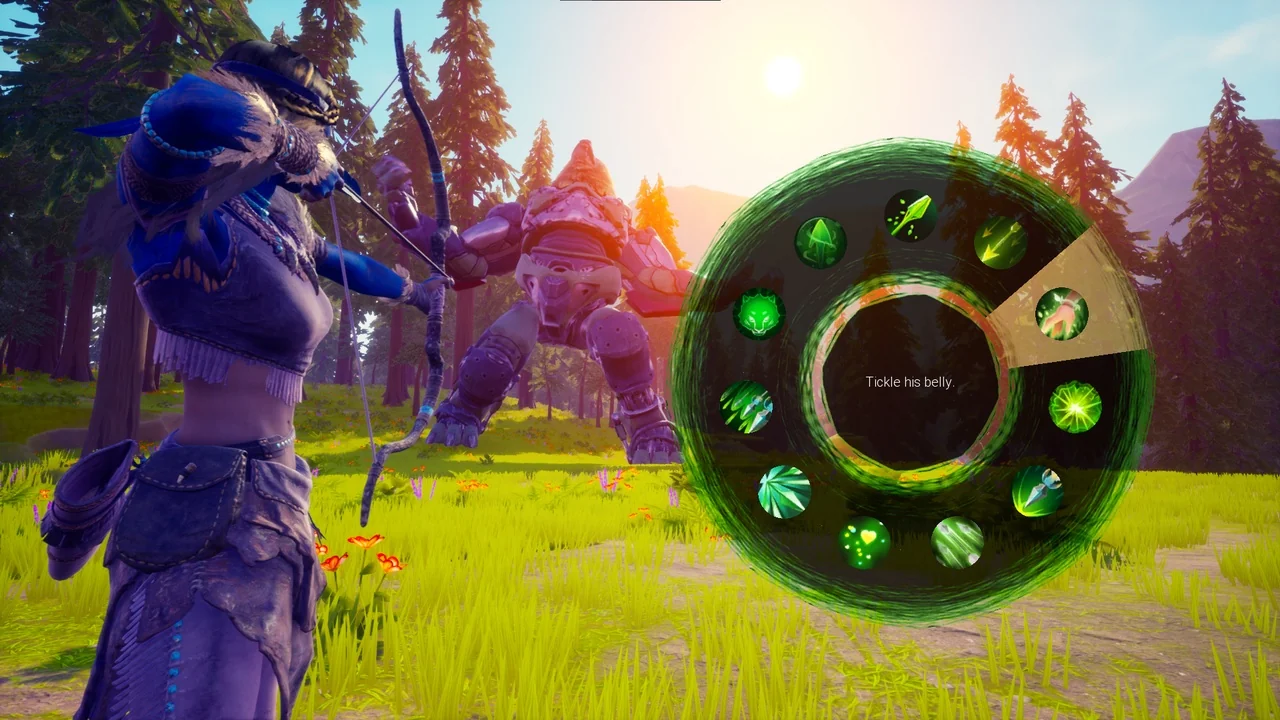
 Game Development R
 Procedural Systems
 Widgets & Controls