"c68a05d5e51405b3"{"id":"1001883","slug":"generic-radial-menus-v2-0-selection-wheels-and-pie-menus","title":"Generic Radial Menus v2.0 - Selection Wheels and Pie Menus","category":"Game Development Resource","engine":"4.26+,5.0+","assetVersion":"","engineVersion":"Engine Version: 4.26+,5.0+","tag":"Game Development R","accent":"blue","visual":"mech","summary":"Implement selection wheels and pie menus with custom Vector2D input, in-editor material styling, and single-function widget layout for console and PC.","platform":"Unreal Engine","publishedAt":"2026-10-22T11:22:42.133Z","updatedAt":"2026-10-22T11:22:42.133Z","sourceNotes":[],"fileContents":[],"compatibility":["Unreal Engine","Engine Version: 4.26+,5.0+"],"featuredImage":{"alt":"Generic Radial Menus v2.0 - Selection Wheels and Pie Menus","src":"/wp-content/uploads/published/2026/10/851241068b53-2a56ca8a-ecaf-49f1-8181-22e80e8df9a5-391e5d0a0b.webp"},"hasDownloadLink":true,"downloads":0,"terms":[],"galleryImages":[{"src":"/wp-content/uploads/published/2026/10/449f14c360ee-7dfb56a3-8d3b-4f8c-bfbc-26323b29598b-2b5d25b4f3.webp","alt":"Generic Radial Menus v2.0 - Selection Wheels and Pie Menus"},{"src":"/wp-content/uploads/published/2026/10/0eb49720253e-0fca53cb-2180-40ba-b28c-e5e5e4030293-dc33919af0.webp","alt":"Generic Radial Menus v2.0 - Selection Wheels and Pie Menus"},{"src":"/wp-content/uploads/published/2026/10/6d4827783f39-78659f6c-a3c5-45c6-9b32-df1d361d42fd-95fdd860d9.webp","alt":"Generic Radial Menus v2.0 - Selection Wheels and Pie Menus"}],"accessPanel":{"kind":"resource","title":"Download this resource","eyebrow":"Free Download","message":"Log in or create a free account to start your download.","fileName":"Generic Radial Menus v2.0 - Selection Wheels and Pie Menus.7z","safetyNote":"Resources are manually reviewed before listing to improve quality and reduce obvious risks.","actionLabel":"Download Free","resourceType":"Resource archive"},"contentHtml":"\u003ch2\u003eDynamic Selection for Gamepad and Mouse Inputs\u003c/h2\u003e\n\u003cp\u003eModern PC and console titles frequently rely on circular selection interfaces to keep player interactions responsive during active gameplay. Standard linear menus require players to navigate lists item by item, which interrupts pacing. In contrast, circular layouts let players make rapid directional choices using analog joysticks or directional mouse sweeps. Generic Radial Menus v2.0 brings that fluid interface model into development pipelines by packaging selection wheels and pie menus into a modular widget framework.\u003c/p\u003e\n\u003cp\u003eThe system is structured so gameplay logic remains decoupled from the low-level rendering and geometry of circular UI elements. By removing the friction associated with calculating polar coordinates or slicing 2D layout hierarchies manually, developers can focus on gameplay systems like weapon management, radial construction wheels, and contextual actions.\u003c/p\u003e \u003ch2\u003eVector2D Custom Input and Control Schemes\u003c/h2\u003e\n\u003cp\u003eA core addition in version 2.0 is the ability to feed custom input streams directly into the menu framework. Rather than locking the interface to hardcoded controller stick axes or mouse coordinate listeners, the radial logic accepts any arbitrary Vector2D value. This abstraction expands how developers can drive selection mechanics across distinct hardware and control schemes.\u003c/p\u003e\n\u003cp\u003ePassing directional data through a Vector2D structure allows for varied implementations:\u003c/p\u003e\n\u003cul\u003e \u003cli\u003eStandard gamepad thumbsticks feeding continuous X and Y axis floats to rotate through active selection wedges.\u003c/li\u003e \u003cli\u003eMouse delta inputs or cursor position offsets relative to the screen center for swift flick-to-select functionality.\u003c/li\u003e \u003cli\u003eSimulated directional vectors generated through virtual on-screen thumbsticks or script-driven directional cues.\u003c/li\u003e \u003cli\u003eCustom controller mappings and accessibility devices that normalize physical directional inputs into a single two-dimensional vector.\u003c/li\u003e\n\u003c/ul\u003e\n\u003cp\u003eBecause the menu calculates segment highlighting based purely on the vector passed to it, the underlying system does not care where the numbers come from. As long as a Vector2D is provided, the radial logic resolves the active index, updates visual highlights, and triggers the appropriate interaction state.\u003c/p\u003e \u003ch2\u003ePopulating Widgets via Single-Function Layout\u003c/h2\u003e\n\u003cp\u003eCreating and arranging elements inside typical rectangular user interface containers involves dropping widgets into vertical boxes, horizontal boxes, or uniform grids. Generic Radial Menus reproduces that workflow for circular spaces. Developers do not need to calculate trigonometry, angles, or rotational offsets to position visual items along an arc.\u003c/p\u003e\n\u003cp\u003eThe process mirrors standard UI creation: developers author their custom widget containing the required icons, text blocks, or counters, and then execute a single function call to register that widget with the radial menu. The system evaluates the total count of registered widgets, divides the 360-degree space into proportional wedges, and places each element at the appropriate radius and orientation automatically.\u003c/p\u003e\n\u003cp\u003eThis layout abstraction keeps UI hierarchies clean. When an inventory changes or new commands unlock during progression, developers simply pass the updated widgets into the menu function, allowing the radial math to reposition every element without manual recalculation.\u003c/p\u003e \u003ch2\u003eIn-Editor Material Customization and the 19 Radial Textures\u003c/h2\u003e\n\u003cp\u003eVisual styling in version 2.0 is handled through a dedicated material system suited to direct modification inside the editor. Radial interfaces often demand specific thematic treatments, ranging from clean sci-fi reticles to stylized fantasy borders. The integrated material system exposes styling parameters so that colors, highlights, and wedge separators can be tailored to match project art directions without requiring external graphic edits.\u003c/p\u003e\n\u003cp\u003eAccompanying the material system is an expanded visual library featuring 19 radial textures, which includes 15 textures introduced specifically for the version 2.0 release. These textures provide base masks and segment divisions for different slot configurations, edge thicknesses, and graphic styles. Developers can swap textures to change the silhouette of the selection wheel while using the material pipeline to adjust background opacity, outline accents, and hover-state tints directly in the interface editor.\u003c/p\u003e \u003ch2\u003eWeapon Selection Wheels, Build Menus, and Multi-Menu Architectures\u003c/h2\u003e\n\u003cp\u003eRadial interfaces serve different mechanical purposes depending on game genre. Generic Radial Menus is built to handle quick single-tier interactions as well as nested, multi-menu architectures.\u003c/p\u003e\n\u003cp\u003eIn action titles, a simple weapon selection wheel allows players to bring up an overlay, flick toward an equipped arm, and release to confirm the swap in a fraction of a second. The fast directional response ensures that high-tempo combat encounters are not disrupted by menu management.\u003c/p\u003e\n\u003cp\u003eFor sandbox and survival titles, build menus demand deeper categorization. The system supports multi-menu workflows where selecting a broad wedge—such as structural foundations—opens a secondary radial layer populated with specific building components. This hierarchical layout manages large catalogues of items within a compact screen footprint.\u003c/p\u003e\n\u003cp\u003eEmote selectors follow a similar pattern, distributing social gestures or team pings evenly across the wheel for instant team communication. The package also works alongside Projectile Arcs, allowing developers who use trajectory-based mechanics to cleanly integrate aim, weapon swaps, and targeting tools into a cohesive interface.\u003c/p\u003e \u003ch2\u003eEvaluating the Modular Interface Framework\u003c/h2\u003e\n\u003cp\u003eGeneric Radial Menus v2.0 solves the technical overhead of circular user interfaces through standard widget patterns, arbitrary Vector2D input compatibility, and in-editor visual styling. By handling segment math, dynamic element distribution, and input parsing under the hood, the system gives development teams a direct path toward deploying responsive selection wheels, contextual emote wheels, and complex multi-tiered menus across PC and console environments.\u003c/p\u003e\n\n\u003ch2\u003eRelated Resources Worth Checking\u003c/h2\u003e\n\u003cul\u003e\n\u003cli\u003e\u003ca href=\"https://3dcghub.com/ultimate-menu-system/\" title=\"Ultimate Menu System\"\u003eUltimate Menu System\u003c/a\u003e\u003c/li\u003e\n\u003cli\u003e\u003ca href=\"https://3dcghub.com/node-pie/\" title=\"Node Pie\"\u003eNode Pie\u003c/a\u003e\u003c/li\u003e\n\u003cli\u003e\u003ca href=\"https://3dcghub.com/package-delivery-simulator-v2-template/\" title=\"Package Delivery Simulator v2 - Template\"\u003ePackage Delivery Simulator v2 - Template\u003c/a\u003e\u003c/li\u003e\n\u003cli\u003e\u003ca href=\"https://3dcghub.com/realistic-sport-wheels-2-unreal-engine/\" title=\"Realistic Sport Wheels 2 - Unreal Engine\"\u003eRealistic Sport Wheels 2 - Unreal Engine\u003c/a\u003e\u003c/li\u003e\n\u003cli\u003e\u003ca href=\"https://3dcghub.com/library-generic-indie/\" title=\"LIBRARY - GENERIC - INDIE\"\u003eLIBRARY - GENERIC - INDIE\u003c/a\u003e\u003c/li\u003e\n\u003c/ul\u003e","contentTextLength":6248,"navigation":{"current":42,"total":3860,"previous":{"id":"1001884","slug":"grass-vol-21-hand-painted-textures","title":"Grass Vol.21 - Hand Painted Textures","category":"Nature \u0026 Terrain","platform":"Unreal Engine","updatedAt":"2026-10-22T11:23:47.706Z"},"next":{"id":"1001882","slug":"gaia-s-21-nature-materials-photorealistic","title":"Gaia's 21 Nature Materials / Photorealistic","category":"Stone","platform":"Unreal Engine","updatedAt":"2026-10-22T11:22:15.099Z"}},"relatedResources":[{"id":"15521","slug":"ultimate-menu-system","title":"Ultimate Menu System","category":"Widgets \u0026 Controls","engine":"4.27,5.0+","assetVersion":"Engine version: 4.27,5.0+","engineVersion":"4.26","tag":"Widgets \u0026 Controls","accent":"blue","visual":"animation","summary":"Ultimate Menu System provides a modular and dynamic framework for creating professional game interfaces. It supports multiple input methods and includes pre-built systems for settings and multiplayer hosting.","platform":"Unreal Engine","publishedAt":"2026-03-12T09:12:56.000Z","updatedAt":"2026-04-19T15:44:45.000Z","sourceNotes":[],"fileContents":[],"compatibility":["Unreal Engine","Engine version: 4.27,5.0+"],"featuredImage":{"alt":"Ultimate Menu System","src":"https://3dcghub.com/wp-content/uploads/2026/03/f49ca1b4-975f-44a0-a17f-9f3cca8ab40c.webp"},"hasDownloadLink":true,"downloads":1},{"id":"24665","slug":"node-pie","title":"Node Pie","category":"Blender Add-ons \u0026 Plugins","engine":"1.2.50","assetVersion":"","engineVersion":"Asset Version:1.2.50","tag":"Blender Add","accent":"amber","visual":"audio","summary":"Node Pie adds a pie menu to Blenderâs node editor so nodes can be added faster and with fewer interruptions. Its shortcuts also support auto-connection, link insertion, and node groups. The extension focuses on discoverability, muscle memory, and a more d...","platform":"Blender","publishedAt":"2026-04-16T12:31:39.000Z","updatedAt":"2026-04-20T06:12:39.000Z","sourceNotes":[],"fileContents":[],"compatibility":["Blender","Asset Version: 1.2.50"],"featuredImage":{"alt":"Node Pie","src":"https://3dcghub.com/wp-content/uploads/2026/04/dde925bee02f_7b6e1544a9b797b075d9f77330e5ee1a23ab94509d2be8a35c.webp"},"hasDownloadLink":true,"downloads":0},{"id":"1000861","slug":"package-delivery-simulator-v2-template","title":"Package Delivery Simulator v2 - Template","category":"Simulation","engine":"5.4+","assetVersion":"","engineVersion":"Engine Version: 5.4+","tag":"Simulation","accent":"blue","visual":"mech","summary":"A delivery simulation template for Unreal Engine featuring an electric truck, GPS panel, pie menu, modular roads, auto-generated minimap, charging, repairs, and","platform":"Unreal Engine","publishedAt":"2026-08-05T06:27:29.928Z","updatedAt":"2026-08-05T06:27:29.928Z","sourceNotes":[],"fileContents":[],"compatibility":["Unreal Engine","Engine Version: 5.4+"],"featuredImage":{"alt":"Package Delivery Simulator v2 - Template","src":"/wp-content/uploads/published/2026/08/69ec3dbe7a36-0d0cfd93-6e19-4dcc-be8a-04a476f59611-7cb9cbeccf.webp"},"hasDownloadLink":true,"downloads":0}]}
Game Development R
Generic Radial Menus v2.0 - Selection Wheels and Pie Menus
Implement selection wheels and pie menus with custom Vector2D input, in-editor material styling, and single-function widget layout for console and PC.
Category:Unreal EnginePlatform: Unreal EngineEngine Version: 4.26+,5.0+Published: Oct 22, 2026
Game Development R
Resource overview
Dynamic Selection for Gamepad and Mouse Inputs
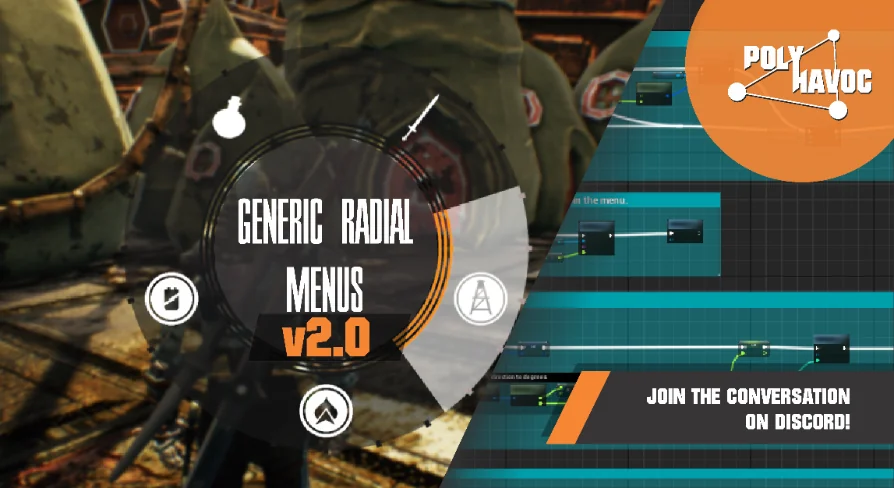
Modern PC and console titles frequently rely on circular selection interfaces to keep player interactions responsive during active gameplay. Standard linear menus require players to navigate lists item by item, which interrupts pacing. In contrast, circular layouts let players make rapid directional choices using analog joysticks or directional mouse sweeps. Generic Radial Menus v2.0 brings that fluid interface model into development pipelines by packaging selection wheels and pie menus into a modular widget framework.
The system is structured so gameplay logic remains decoupled from the low-level rendering and geometry of circular UI elements. By removing the friction associated with calculating polar coordinates or slicing 2D layout hierarchies manually, developers can focus on gameplay systems like weapon management, radial construction wheels, and contextual actions.
Vector2D Custom Input and Control Schemes
A core addition in version 2.0 is the ability to feed custom input streams directly into the menu framework. Rather than locking the interface to hardcoded controller stick axes or mouse coordinate listeners, the radial logic accepts any arbitrary Vector2D value. This abstraction expands how developers can drive selection mechanics across distinct hardware and control schemes.
Passing directional data through a Vector2D structure allows for varied implementations:
Standard gamepad thumbsticks feeding continuous X and Y axis floats to rotate through active selection wedges.
Mouse delta inputs or cursor position offsets relative to the screen center for swift flick-to-select functionality.
Simulated directional vectors generated through virtual on-screen thumbsticks or script-driven directional cues.
Custom controller mappings and accessibility devices that normalize physical directional inputs into a single two-dimensional vector.
Because the menu calculates segment highlighting based purely on the vector passed to it, the underlying system does not care where the numbers come from. As long as a Vector2D is provided, the radial logic resolves the active index, updates visual highlights, and triggers the appropriate interaction state.
Populating Widgets via Single-Function Layout
Creating and arranging elements inside typical rectangular user interface containers involves dropping widgets into vertical boxes, horizontal boxes, or uniform grids. Generic Radial Menus reproduces that workflow for circular spaces. Developers do not need to calculate trigonometry, angles, or rotational offsets to position visual items along an arc.
The process mirrors standard UI creation: developers author their custom widget containing the required icons, text blocks, or counters, and then execute a single function call to register that widget with the radial menu. The system evaluates the total count of registered widgets, divides the 360-degree space into proportional wedges, and places each element at the appropriate radius and orientation automatically.
This layout abstraction keeps UI hierarchies clean. When an inventory changes or new commands unlock during progression, developers simply pass the updated widgets into the menu function, allowing the radial math to reposition every element without manual recalculation.
In-Editor Material Customization and the 19 Radial Textures
Visual styling in version 2.0 is handled through a dedicated material system suited to direct modification inside the editor. Radial interfaces often demand specific thematic treatments, ranging from clean sci-fi reticles to stylized fantasy borders. The integrated material system exposes styling parameters so that colors, highlights, and wedge separators can be tailored to match project art directions without requiring external graphic edits.
Accompanying the material system is an expanded visual library featuring 19 radial textures, which includes 15 textures introduced specifically for the version 2.0 release. These textures provide base masks and segment divisions for different slot configurations, edge thicknesses, and graphic styles. Developers can swap textures to change the silhouette of the selection wheel while using the material pipeline to adjust background opacity, outline accents, and hover-state tints directly in the interface editor.
Weapon Selection Wheels, Build Menus, and Multi-Menu Architectures
Radial interfaces serve different mechanical purposes depending on game genre. Generic Radial Menus is built to handle quick single-tier interactions as well as nested, multi-menu architectures.
In action titles, a simple weapon selection wheel allows players to bring up an overlay, flick toward an equipped arm, and release to confirm the swap in a fraction of a second. The fast directional response ensures that high-tempo combat encounters are not disrupted by menu management.
For sandbox and survival titles, build menus demand deeper categorization. The system supports multi-menu workflows where selecting a broad wedge—such as structural foundations—opens a secondary radial layer populated with specific building components. This hierarchical layout manages large catalogues of items within a compact screen footprint.
Emote selectors follow a similar pattern, distributing social gestures or team pings evenly across the wheel for instant team communication. The package also works alongside Projectile Arcs, allowing developers who use trajectory-based mechanics to cleanly integrate aim, weapon swaps, and targeting tools into a cohesive interface.
Evaluating the Modular Interface Framework
Generic Radial Menus v2.0 solves the technical overhead of circular user interfaces through standard widget patterns, arbitrary Vector2D input compatibility, and in-editor visual styling. By handling segment math, dynamic element distribution, and input parsing under the hood, the system gives development teams a direct path toward deploying responsive selection wheels, contextual emote wheels, and complex multi-tiered menus across PC and console environments.
 Game Development R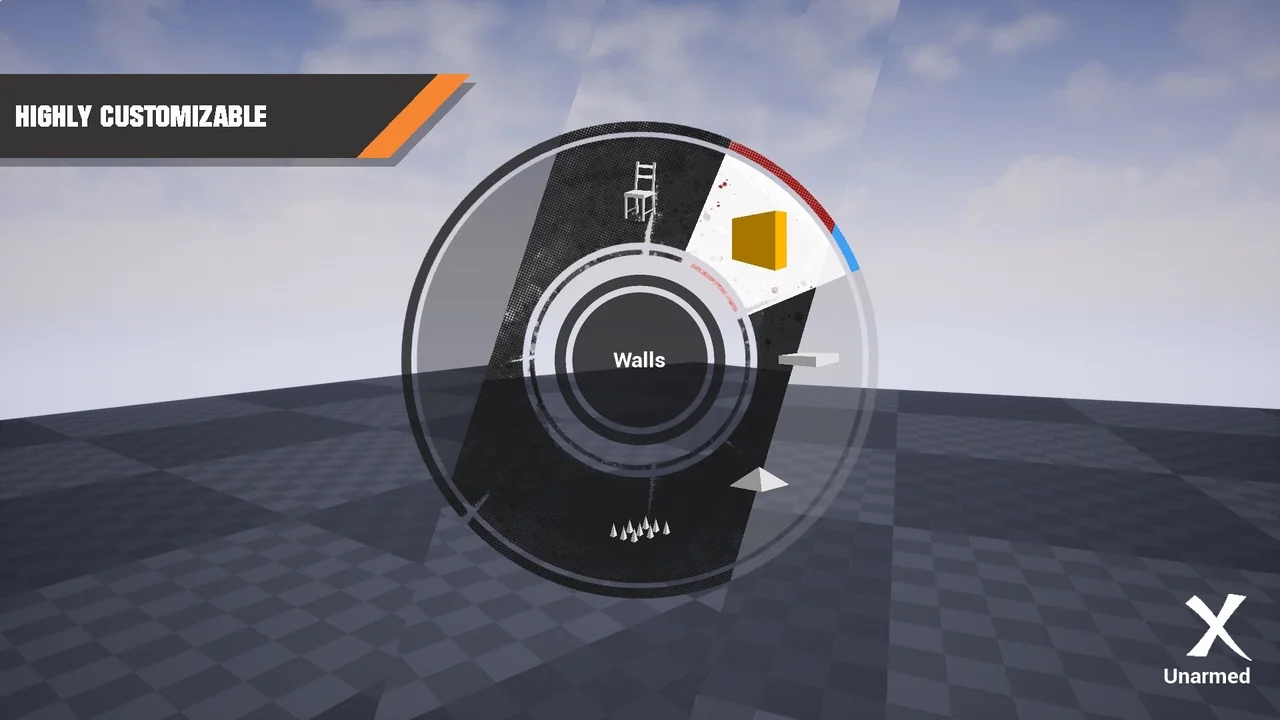
 Widgets & Controls
 Blender Add
 Simulation