"c68a05d5e51405b3"{"id":"24823","slug":"ultimate-open-world","title":"Ultimate Open World","category":"Shooter","engine":"5.5+","assetVersion":"Engine version: 5.5+","engineVersion":"Asset Version:1.1 - 1.2","tag":"Shooter","accent":"blue","visual":"character","summary":"Ultimate Open World is set up as a starting point for open world games that need a clear, organized base. It combines the studioâs work in models, animations, programming, and ready-to-use environments with materials that help frame setup and implementation.","platform":"Unreal Engine","publishedAt":"2026-04-17T09:16:54.000Z","updatedAt":"2026-04-29T05:47:19.000Z","sourceNotes":[],"fileContents":[],"compatibility":["Unreal Engine","Engine version: 5.5+","Asset Version: 1.1 - 1.2"],"featuredImage":{"alt":"Ultimate Open World","src":"https://3dcghub.com/wp-content/uploads/2026/04/f6218a722e6e_0253a61c-4a7a-4655-abf5-4f829b521192.webp"},"hasDownloadLink":true,"downloads":17,"terms":[{"taxonomy":"category","slug":"shooter","name":"Shooter"},{"taxonomy":"post_tag","slug":"characters","name":"Characters"},{"taxonomy":"post_tag","slug":"environment","name":"Environment"},{"taxonomy":"post_tag","slug":"templates","name":"Templates"}],"galleryImages":[{"src":"https://3dcghub.com/wp-content/uploads/2026/04/43cbcc1d5a0b_ddc36b47-389d-4832-ac6c-8db485a8dcdb.webp","alt":"Ultimate Open World"},{"src":"https://3dcghub.com/wp-content/uploads/2026/04/f5c49d97d9b3_2e5ff611-bb98-4eaa-b642-c0e035bd3187.webp","alt":"Ultimate Open World"},{"src":"https://3dcghub.com/wp-content/uploads/2026/04/1bc04a5bf89d_6b7fbd23-4d2c-4789-a1b2-28fa6ad4c6a1.webp","alt":"Ultimate Open World"},{"src":"https://3dcghub.com/wp-content/uploads/2026/04/592da5fa71e8_921a1958-5b14-4b66-a851-cce2677ddd12.webp","alt":"Ultimate Open World"},{"src":"https://3dcghub.com/wp-content/uploads/2026/04/943cb8072c7f_a5dfda8a-d0fe-43a7-98bf-bb02526ceaef.webp","alt":"Ultimate Open World"},{"src":"https://3dcghub.com/wp-content/uploads/2026/04/df2816e44540_3161703e-3ab6-4a68-9676-5db159fb28d3.webp","alt":"Ultimate Open World"},{"src":"https://3dcghub.com/wp-content/uploads/2026/04/a2c81c194e68_85dfc129-08bd-4d76-b1b8-e8cbb0e48c72.webp","alt":"Ultimate Open World"},{"src":"https://3dcghub.com/wp-content/uploads/2026/04/3e261ad62753_85cf1fc1-eae9-4c63-9250-03c486ef8412.webp","alt":"Ultimate Open World"},{"src":"https://3dcghub.com/wp-content/uploads/2026/04/3786caca901e_ef6c6e13-7c23-492d-b1bd-512d7f9c7361.webp","alt":"Ultimate Open World"},{"src":"https://3dcghub.com/wp-content/uploads/2026/04/68d2ec6dc451_a6348ca5-6f7f-4632-a2f9-cc329b6e2cdb.webp","alt":"Ultimate Open World"}],"accessPanel":{"kind":"resource","title":"Access this resource","eyebrow":"Free Download","message":"Log in or create a free account to start your download.","fileName":"Ultimate Open World.7z","safetyNote":"All resources are 100% manually reviewed to eliminate all risks.","actionLabel":"Download Free","resourceType":"Resource archive"},"contentHtml":"\u003ch2\u003eOpen landscapes with room for systems\u003c/h2\u003e\n\u003cp\u003eOpen landscapes, city routes, vehicles, third-person characters, and shooter-style systems all appear in the same tag set, which makes the direction of Ultimate Open World easy to read. It is presented as an open world game model for projects that need a structured base instead of a blank scene. The template is described as organized and robust, so its role is not to act as a finished showpiece, but to give an open world project a practical place to begin.\u003c/p\u003e\n\u003cp\u003eThat starting point matters when a world needs more than scenery. An open world setup usually has to hold movement, interaction, and scene structure together at the same time. This template is framed around that problem. It gives a project a foundation that can support a larger game space while still leaving room for the projectâs own direction.\u003c/p\u003e \u003ch2\u003eBroken Projectâs production approach\u003c/h2\u003e\n\u003cp\u003eThe creator behind the project is a creative studio focused on game development and 3D assets. Their work covers customized packs with models, animations, programming, and ready-to-use environments, along with freelance work on demand. That wider production background helps explain why Ultimate Open World reads like a workflow asset rather than a standalone environment. It sits inside a studio practice that already combines several parts of game creation.\u003c/p\u003e\n\u003cp\u003eVisual quality and optimization are both called out, which is a useful pairing for a project built around open world work. Large playable spaces can become difficult to manage if they are assembled without a clear structure, so the emphasis here is on keeping the world usable as well as visually coherent. The studio also positions its work for games, interactive experiences, and multimedia projects, which places this template inside a broad but clearly practical production range.\u003c/p\u003e \u003ch2\u003eWhat comes with the project workflow\u003c/h2\u003e\n\u003cp\u003eThe project is accompanied by a showcase video for version 1.0, a showcase demo, documentation, and a place for questions that tutorials cannot answer. Those materials shape how the template can be approached during setup. A project like this is easier to work with when there is a way to see the system in motion, review the documentation, and look up questions that do not fit neatly into a tutorial format.\u003c/p\u003e\n\u003cp\u003eAll updates are included as well. For a template that is meant to serve as a base, that is an important detail because it frames the project as something that can continue to develop while remaining part of the same workflow. It is not only about the initial structure of the world, but also about keeping that structure current as the template evolves.\u003c/p\u003e \u003ch2\u003eThe labels that shape the implementation path\u003c/h2\u003e\n\u003cp\u003eThe attached labels give a clearer sense of the systems surrounding the template. World and open define the scope. Vehicle, shooter, behavior, animation, advanced, and thirdperson suggest a project space where movement and action matter. AI, NPC, realistic, HUD, character, city, pack, and weapon add more of the elements that often sit around an open world setup.\u003c/p\u003e\n\u003cp\u003eBlueprint, Control Rig, and Epic skeleton are especially relevant for implementation. They place the project close to logic, animation, and character structure, which is useful when a team is trying to move from a world base into active gameplay. In that sense, Ultimate Open World is not only about the look of the environment. It also connects to the systems that help the world function as a playable space.\u003c/p\u003e \u003ch2\u003eA fit for teams building out an open world base\u003c/h2\u003e\n\u003cp\u003eUltimate Open World makes the most sense for teams that want to begin with a clear open world structure. Studios, indie developers, and content creators can read it as a starting point for a game world that still leaves room for their own models, animations, programming, and scene logic. That matches the way Broken Project describes its work: as a mix of customized packs and production support that can be adapted to different kinds of projects.\u003c/p\u003e\n\u003cp\u003eIf a project needs a ready-to-use environment base, a broad set of gameplay labels, and a workflow that keeps visual quality and optimization in view, this template fits that space well. It is a practical starting point for open world development, especially when the goal is to move from concept into a structured world without losing the flexibility to shape the experience further.\u003c/p\u003e\n\n\u003ch2\u003eContinue Browsing Similar Packs\u003c/h2\u003e\n\u003cul\u003e\n\u003cli\u003e\u003ca href=\"https://3dcghub.com/nature-package-forest-environment/\" title=\"Nature Package – Forest Environment\"\u003eNature Package – Forest Environment\u003c/a\u003e\u003c/li\u003e\n\u003cli\u003e\u003ca href=\"https://3dcghub.com/forest-environment-dynamic-nature/\" title=\"Forest Environment – Dynamic Nature\"\u003eForest Environment – Dynamic Nature\u003c/a\u003e\u003c/li\u003e\n\u003cli\u003e\u003ca href=\"https://3dcghub.com/underwater-sunken-ship-environment/\" title=\"Underwater Sunken Ship Environment\"\u003eUnderwater Sunken Ship Environment\u003c/a\u003e\u003c/li\u003e\n\u003cli\u003e\u003ca href=\"https://3dcghub.com/the-carnival-environment/\" title=\"The Carnival Environment\"\u003eThe Carnival Environment\u003c/a\u003e\u003c/li\u003e\n\u003cli\u003e\u003ca href=\"https://3dcghub.com/pizza-bar-environment-by-gamertose/\" title=\"Pizza Bar Environment by Gamertose\"\u003ePizza Bar Environment by Gamertose\u003c/a\u003e\u003c/li\u003e\n\u003c/ul\u003e","contentTextLength":4570,"navigation":{"current":2072,"total":3860,"previous":{"id":"27803","slug":"true-fighting-game-engine","title":"TRUE Fighting Game Engine","category":"Gameplay Features","platform":"Unreal Engine","updatedAt":"2026-04-29T06:07:37.000Z"},"next":{"id":"27788","slug":"ue5-rigged-npc-creator","title":"UE5 Rigged NPC Creator","category":"Characters \u0026 Creatures","platform":"Unreal Engine","updatedAt":"2026-04-28T19:15:03.000Z"}},"relatedResources":[{"id":"16965","slug":"ultimate-scan-effects-and-screen-effects","title":"Ultimate Scan Effects and Screen Effects","category":"Transition","engine":"5.1+","assetVersion":"Engine version: 5.1+","engineVersion":"5.1","tag":"Transition","accent":"blue","visual":"character","summary":"Enhance your gaming visuals with over 20 distinctive scan effects and advanced post-processing materials. This package includes blueprint integration and object highlighting systems for professional environment design.","platform":"Unreal Engine","publishedAt":"2026-03-12T18:18:56.000Z","updatedAt":"2026-04-19T15:43:40.000Z","sourceNotes":[],"fileContents":[],"compatibility":["Unreal Engine","Engine version: 5.1+"],"featuredImage":{"alt":"Ultimate Scan Effects and Screen Effects","src":"https://3dcghub.com/wp-content/uploads/2026/03/07aa1530-ea1a-422b-a1b1-39644cfa57ee.webp"},"hasDownloadLink":true,"downloads":1},{"id":"1001583","slug":"open-world-animset","title":"Open World Animset","category":"Variety","engine":"4.8+,5.0+","assetVersion":"","engineVersion":"Engine Version: 4.8+,5.0+","tag":"Variety","accent":"blue","visual":"mech","summary":"Over 500 motion capture animations for humanoid character movement, traversal, cover mechanics, firearm handling, and melee combat.","platform":"Unreal Engine","publishedAt":"2026-10-10T08:55:24.492Z","updatedAt":"2026-10-10T08:55:24.492Z","sourceNotes":[],"fileContents":[],"compatibility":["Unreal Engine","Engine Version: 4.8+,5.0+"],"featuredImage":{"alt":"Open World Animset","src":"/wp-content/uploads/published/2026/10/5316a1357041-5e3578f2-c647-450e-a63b-ea83d2aa1e89-94597b32fa.webp"},"hasDownloadLink":true,"downloads":1},{"id":"8084","slug":"225-square-km-procedural-forest","title":"225 Square Km Procedural Forest","category":"Forest \u0026 Jungle","engine":"5.1+","assetVersion":"Engine version: 5.1+","engineVersion":"5.1","tag":"Forest \u0026 Jungle","accent":"blue","visual":"city","summary":"Create expansive, realistic natural environments with this comprehensive Unreal Engine 5 asset pack. It features Nanite-optimized meshes, smart auto-materials, and procedural tools for large-scale world building.","platform":"Unreal Engine","publishedAt":"2026-02-22T16:49:31.000Z","updatedAt":"2026-04-19T15:55:35.000Z","sourceNotes":[],"fileContents":[],"compatibility":["Unreal Engine","Engine version: 5.1+"],"featuredImage":{"alt":"225 Square Km Procedural Forest","src":"https://3dcghub.com/wp-content/uploads/2026/02/9ab8ba3c-4e3d-4fee-91a4-31b716d15cfd.webp"},"hasDownloadLink":true,"downloads":1}]}
Shooter
Ultimate Open World
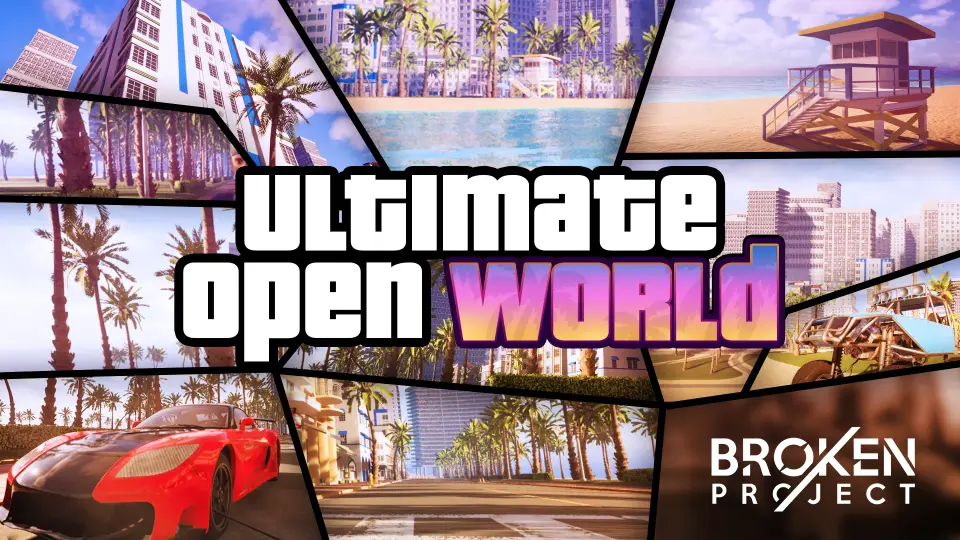
Ultimate Open World is set up as a starting point for open world games that need a clear, organized base. It combines the studioâs work in models, animations, programming, and ready-to-use environments with materials that help frame setup and implementation.
Open landscapes, city routes, vehicles, third-person characters, and shooter-style systems all appear in the same tag set, which makes the direction of Ultimate Open World easy to read. It is presented as an open world game model for projects that need a structured base instead of a blank scene. The template is described as organized and robust, so its role is not to act as a finished showpiece, but to give an open world project a practical place to begin.
That starting point matters when a world needs more than scenery. An open world setup usually has to hold movement, interaction, and scene structure together at the same time. This template is framed around that problem. It gives a project a foundation that can support a larger game space while still leaving room for the projectâs own direction.
Broken Projectâs production approach
The creator behind the project is a creative studio focused on game development and 3D assets. Their work covers customized packs with models, animations, programming, and ready-to-use environments, along with freelance work on demand. That wider production background helps explain why Ultimate Open World reads like a workflow asset rather than a standalone environment. It sits inside a studio practice that already combines several parts of game creation.
Visual quality and optimization are both called out, which is a useful pairing for a project built around open world work. Large playable spaces can become difficult to manage if they are assembled without a clear structure, so the emphasis here is on keeping the world usable as well as visually coherent. The studio also positions its work for games, interactive experiences, and multimedia projects, which places this template inside a broad but clearly practical production range.
What comes with the project workflow
The project is accompanied by a showcase video for version 1.0, a showcase demo, documentation, and a place for questions that tutorials cannot answer. Those materials shape how the template can be approached during setup. A project like this is easier to work with when there is a way to see the system in motion, review the documentation, and look up questions that do not fit neatly into a tutorial format.
All updates are included as well. For a template that is meant to serve as a base, that is an important detail because it frames the project as something that can continue to develop while remaining part of the same workflow. It is not only about the initial structure of the world, but also about keeping that structure current as the template evolves.
The labels that shape the implementation path
The attached labels give a clearer sense of the systems surrounding the template. World and open define the scope. Vehicle, shooter, behavior, animation, advanced, and thirdperson suggest a project space where movement and action matter. AI, NPC, realistic, HUD, character, city, pack, and weapon add more of the elements that often sit around an open world setup.
Blueprint, Control Rig, and Epic skeleton are especially relevant for implementation. They place the project close to logic, animation, and character structure, which is useful when a team is trying to move from a world base into active gameplay. In that sense, Ultimate Open World is not only about the look of the environment. It also connects to the systems that help the world function as a playable space.
A fit for teams building out an open world base
Ultimate Open World makes the most sense for teams that want to begin with a clear open world structure. Studios, indie developers, and content creators can read it as a starting point for a game world that still leaves room for their own models, animations, programming, and scene logic. That matches the way Broken Project describes its work: as a mix of customized packs and production support that can be adapted to different kinds of projects.
If a project needs a ready-to-use environment base, a broad set of gameplay labels, and a workflow that keeps visual quality and optimization in view, this template fits that space well. It is a practical starting point for open world development, especially when the goal is to move from concept into a structured world without losing the flexibility to shape the experience further.
 Shooter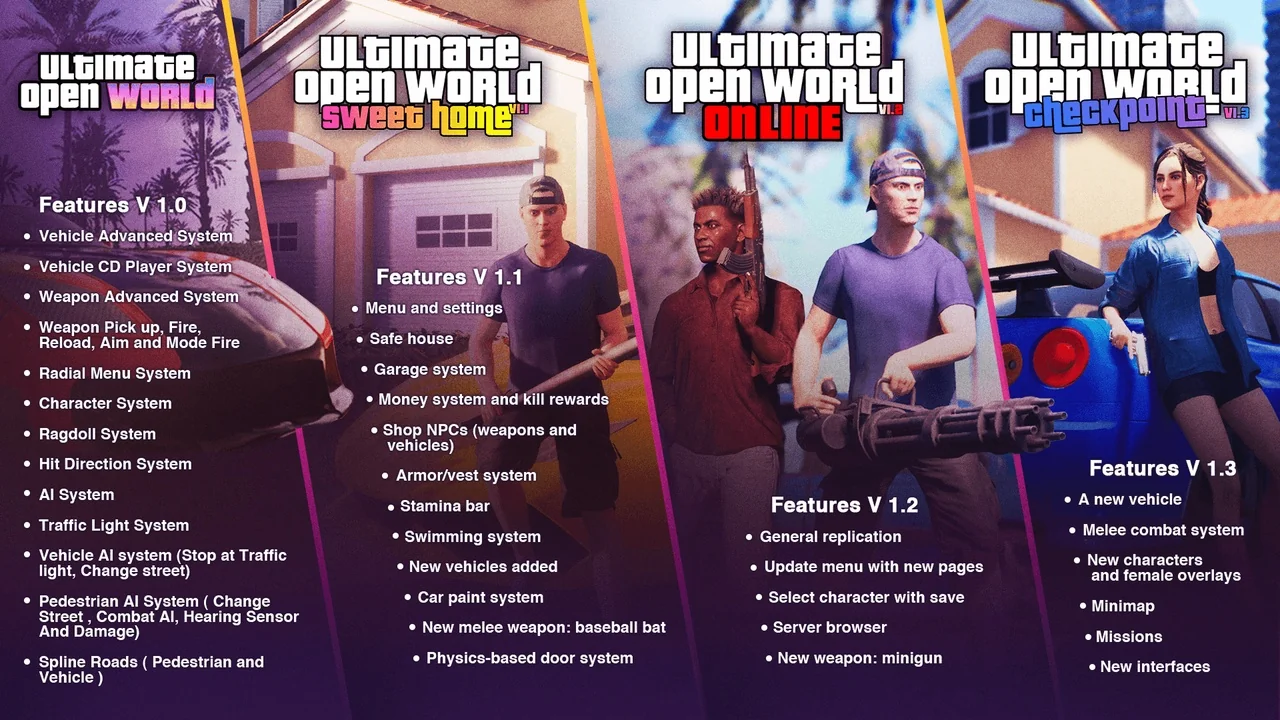
 Transition
 Variety
 Forest & Jungle