"6ac84fdb0bd06614"{"id":"1001231","slug":"demonstrating-animation-blueprints-and-ai-for-gameplay-designers","title":"Demonstrating Animation Blueprints and AI for Gameplay Designers","category":"Action-Adventure","engine":"5.0+","assetVersion":"","engineVersion":"Engine Version: 5.0+","tag":"Action-Adventure","accent":"blue","visual":"animation","summary":"Explore the connection between Animation Blueprints, behavior trees, montages, and basic enemy character AI for gameplay designers.","platform":"Unreal Engine","publishedAt":"2026-09-21T03:35:26.508Z","updatedAt":"2026-09-21T03:35:26.508Z","sourceNotes":[],"fileContents":[],"compatibility":["Unreal Engine","Engine Version: 5.0+"],"featuredImage":{"alt":"Demonstrating Animation Blueprints and AI for Gameplay Designers","src":"/wp-content/uploads/published/2026/09/17ead882c717-6d1822dd-94f6-42cb-bab3-18f794094846-660798aead.webp"},"hasDownloadLink":true,"downloads":0,"terms":[{"taxonomy":"category","slug":"action-adventure","name":"Action-Adventure"}],"galleryImages":[{"src":"/wp-content/uploads/published/2026/09/429f60d33546-2970555c-c29b-41ce-ad32-d7c3e3acddee-2be73a2a67.webp","alt":"Demonstrating Animation Blueprints and AI for Gameplay Designers"}],"accessPanel":{"kind":"resource","title":"Download this resource","eyebrow":"Free Download","message":"Log in or create a free account to start your download.","fileName":"Content.7z","safetyNote":"Resources are manually reviewed before listing to improve quality and reduce obvious risks.","actionLabel":"Download Free","resourceType":"Resource archive"},"contentHtml":"\u003ch2\u003eSynchronizing Basic Enemy Character Movement with Animation Blueprints\u003c/h2\u003e\n\u003cp\u003eA responsive hostile character depends on continuous communication between runtime decisions and skeletal deformation. When an enemy character navigates an environment, the underlying artificial intelligence determines spatial intent, but the Animation Blueprint translates that intent into believable motion. Setting up a basic enemy character requires defining how raw velocity, direction, and operational states feed directly into state machines and blend spaces. Without this tight integration, characters suffer from disjointed foot sliding, sudden snapping, or delayed response times during gameplay encounters.\u003c/p\u003e\n\u003cp\u003eAnimation Blueprints operate as the central processing hub for skeletal meshes, polling character state data frame by frame. Within this setup, basic enemy character AI provides the values—such as whether the unit is actively patrolling, pursuing a target, or pausing in place—while the animation graph manages transitions between corresponding animation assets. Designing this layer cleanly ensures that gameplay designers can isolate locomotion bugs from decision-making errors, maintaining a distinct boundary between what an AI chooses to do and how the skeletal mesh expresses that action.\u003c/p\u003e \u003ch2\u003eBehavior Trees and Blueprints in AI Decision Making\u003c/h2\u003e\n\u003cp\u003eArtificial intelligence in modern game engines relies heavily on hierarchical task planning to simulate awareness and intent. The architecture implemented here joins standard Blueprints with behavior trees to dictate how enemy characters react to their surroundings. Behavior trees break down complex decision logic into digestible, structured branches composed of sequences, selectors, and tasks. Instead of overloading a single actor class with sprawling condition checks, the tree delegates specific actions downward through dedicated execution paths.\u003c/p\u003e\n\u003cp\u003eBlueprints serve as the functional glue in this structure, supplying custom tasks, condition checks, and services that update blackboard data. An enemy AI evaluating player proximity or selecting navigation targets relies on these Blueprint nodes to read game state data, process navigation paths, and push target references into the tree. Once a task completes—such as reaching an assigned destination or losing sight of an opponent—the tree triggers subsequent branches, immediately alerting the character's movement component and Animation Blueprint to adapt to the new behavioral state.\u003c/p\u003e \u003ch2\u003eExecuting Dynamic Actions Through Animation Montages\u003c/h2\u003e\n\u003cp\u003eStandard locomotion loops cover wandering, walking, and running, but non-cyclical actions require a distinct playback pipeline. Animation montages fulfill this role by temporarily taking control of skeletal bones to play targeted attacks, stagger animations, or state-specific reactions without rebuilding entire state machine branches. Montages allow gameplay designers to layer root motion, insert animation notify events, and blend distinct animation slots over running locomotion cycles.\u003c/p\u003e\n\u003cp\u003eWithin the context of basic enemy character AI, behavior trees initiate these one-off actions by calling montage playback functions through Blueprints. When an enemy character enters attack range, the behavior tree halts standard path following and initiates an attack task. The task fires an animation montage that plays an attack swing, while embedded animation notifies can trigger timing windows for hit detection or sound cues. Once the montage finishes, the Animation Blueprint seamlessly resumes the base locomotion state, allowing the AI to re-evaluate its next task inside the behavior tree without interrupting visual flow.\u003c/p\u003e \u003ch2\u003eConnecting Systems in the Epic Dev Community Framework\u003c/h2\u003e\n\u003cp\u003eThis implementation ties directly into the educational concepts detailed in the associated course, Demonstrating Animation Blueprints And AI For Gameplay Designers, hosted on the Epic Dev Community. The core focus of that instruction centers on demystifying the intersection of artificial intelligence and character animation—two foundational pillars that are frequently taught in isolation despite relying on each other constantly in active production.\u003c/p\u003e\n\u003cp\u003eBy reviewing how animation assets, montages, Blueprints, and behavior trees intersect within a functional project, designers see the complete signal path from abstract AI decision to the final animated frame on screen. This practical correlation is crucial for gameplay designers who must author enemy encounters without needing a dedicated engineering team to build custom movement logic from scratch. Observing how blackboard variables shift and trigger matching animation parameters clarifies how real-time gameplay logic orchestrates visual fidelity.\u003c/p\u003e \u003ch2\u003eWorkflow Value for Gameplay Designers and UI Material Lab Integration\u003c/h2\u003e\n\u003cp\u003eThe setup functions alongside UI Material Lab workflows, offering an organized reference point for developers seeking clean separations of system responsibilities. Building enemy AI that coordinates cleanly with animation assets minimizes technical debt in gameplay projects. When animation assets are properly classified into standard sequences and montages, and behavior tree tasks communicate systematically through Blueprints, tuning enemy pacing becomes an iterative design task rather than a technical rewrite.\u003c/p\u003e\n\u003cp\u003eGameplay designers looking to implement reliable character encounters gain a clear blueprint for uniting behavior trees with Animation Blueprints. By analyzing how each component—from low-level animation assets to high-level artificial intelligence logic—interacts under runtime conditions, development teams can build scalable, responsive enemy characters ready for combat, stealth, and navigation challenges.\u003c/p\u003e\n\n\u003ch2\u003eMore From The Same Workflow\u003c/h2\u003e\n\u003cul\u003e\n\u003cli\u003e\u003ca href=\"https://3dcghub.com/asymmetric-multiplayer-horror/\" title=\"Asymmetric Multiplayer Horror\"\u003eAsymmetric Multiplayer Horror\u003c/a\u003e\u003c/li\u003e\n\u003cli\u003e\u003ca href=\"https://3dcghub.com/cinematic-cutscene-system/\" title=\"Cinematic Cutscene System\"\u003eCinematic Cutscene System\u003c/a\u003e\u003c/li\u003e\n\u003cli\u003e\u003ca href=\"https://3dcghub.com/athena-ai-a-utility-ai-framework-v2/\" title=\"Athena AI: A Utility AI Framework - V2\"\u003eAthena AI: A Utility AI Framework - V2\u003c/a\u003e\u003c/li\u003e\n\u003cli\u003e\u003ca href=\"https://3dcghub.com/parkour-race-multiplayer-blueprint-game-template-platformer-by-kekdot/\" title=\"Parkour Race - Multiplayer Blueprint Game Template - Platformer - By Kekdot\"\u003eParkour Race - Multiplayer Blueprint Game Template - Platformer - By Kekdot\u003c/a\u003e\u003c/li\u003e\n\u003cli\u003e\u003ca href=\"https://3dcghub.com/npc-ai-queuing-system/\" title=\"NPC AI Queuing System\"\u003eNPC AI Queuing System\u003c/a\u003e\u003c/li\u003e\n\u003c/ul\u003e","contentTextLength":5943,"navigation":{"current":8,"total":3181,"previous":{"id":"1001232","slug":"dynamic-orbs-system","title":"Dynamic Orbs System","category":"Weapons \u0026 Combat","platform":"Unreal Engine","updatedAt":"2026-09-21T03:37:02.772Z"},"next":{"id":"1001230","slug":"defender-animated-dialogue-system","title":"Defender: Animated Dialogue System","category":"Action-Adventure","platform":"Unreal Engine","updatedAt":"2026-09-21T03:33:30.367Z"}},"relatedResources":[{"id":"1000977","slug":"asymmetric-multiplayer-horror","title":"Asymmetric Multiplayer Horror","category":"Action-Adventure","engine":"5.0+","assetVersion":"","engineVersion":"Engine Version: 5.0+","tag":"Action-Adventure","accent":"blue","visual":"mech","summary":"Blueprint template for asymmetric multiplayer horror with 4 vs 1 play, AI or player monsters, first/third person views, and a Cursed Forest demo.","platform":"Unreal Engine","publishedAt":"2026-08-17T17:19:51.833Z","updatedAt":"2026-08-17T17:19:51.833Z","sourceNotes":[],"fileContents":[],"compatibility":["Unreal Engine","Engine Version: 5.0+"],"featuredImage":{"alt":"Asymmetric Multiplayer Horror","src":"/wp-content/uploads/published/2026/08/d3e8d4559426-f968b340-50b9-4a59-9fa7-7cdea14f055c-e0904bd06f.webp"},"hasDownloadLink":true,"downloads":1},{"id":"10637","slug":"cinematic-cutscene-system","title":"Cinematic Cutscene System","category":"Gameplay Features","engine":"5.3+","assetVersion":"Engine version: 5.3+","engineVersion":"4.26","tag":"Gameplay Features","accent":"blue","visual":"animation","summary":"Enhance your game's storytelling with the Cinematic Cutscene System. This tool enables developers to build immersive scenes without writing code or relying on complex Behavior Trees.","platform":"Unreal Engine","publishedAt":"2026-03-03T15:51:35.000Z","updatedAt":"2026-04-19T15:49:58.000Z","sourceNotes":[],"fileContents":[],"compatibility":["Unreal Engine","Engine version: 5.3+"],"featuredImage":{"alt":"Cinematic Cutscene System","src":"https://3dcghub.com/wp-content/uploads/2026/03/e35fc466-fe41-41bb-85f1-65815bca7292.webp"},"hasDownloadLink":true,"downloads":0},{"id":"13714","slug":"athena-ai-a-utility-ai-framework-v2","title":"Athena AI: A Utility AI Framework - V2","category":"Engine Tools","engine":"5.1 - 5.4","assetVersion":"Engine version: 5.1 - 5.4","engineVersion":"Asset Version:2.0","tag":"Engine Tools","accent":"blue","visual":"audio","summary":"Athena AI: A Utility AI Framework - V2 provides a powerful and modular system for creating smarter NPCs. It replaces rigid condition trees with reactive, data-driven behaviors using curves and structured logic.","platform":"Unreal Engine","publishedAt":"2026-03-11T09:45:45.000Z","updatedAt":"2026-04-19T15:46:23.000Z","sourceNotes":[],"fileContents":[],"compatibility":["Unreal Engine","Engine version: 5.1 - 5.4","Asset Version: 2.0"],"featuredImage":{"alt":"Athena AI: A Utility AI Framework - V2","src":"https://3dcghub.com/wp-content/uploads/2026/03/8e651a50-5518-47d7-8584-284991c6cb2c.webp"},"hasDownloadLink":true,"downloads":0}]}
Action-Adventure
Demonstrating Animation Blueprints and AI for Gameplay Designers
Explore the connection between Animation Blueprints, behavior trees, montages, and basic enemy character AI for gameplay designers.
Synchronizing Basic Enemy Character Movement with Animation Blueprints
A responsive hostile character depends on continuous communication between runtime decisions and skeletal deformation. When an enemy character navigates an environment, the underlying artificial intelligence determines spatial intent, but the Animation Blueprint translates that intent into believable motion. Setting up a basic enemy character requires defining how raw velocity, direction, and operational states feed directly into state machines and blend spaces. Without this tight integration, characters suffer from disjointed foot sliding, sudden snapping, or delayed response times during gameplay encounters.
Animation Blueprints operate as the central processing hub for skeletal meshes, polling character state data frame by frame. Within this setup, basic enemy character AI provides the values—such as whether the unit is actively patrolling, pursuing a target, or pausing in place—while the animation graph manages transitions between corresponding animation assets. Designing this layer cleanly ensures that gameplay designers can isolate locomotion bugs from decision-making errors, maintaining a distinct boundary between what an AI chooses to do and how the skeletal mesh expresses that action.
Behavior Trees and Blueprints in AI Decision Making
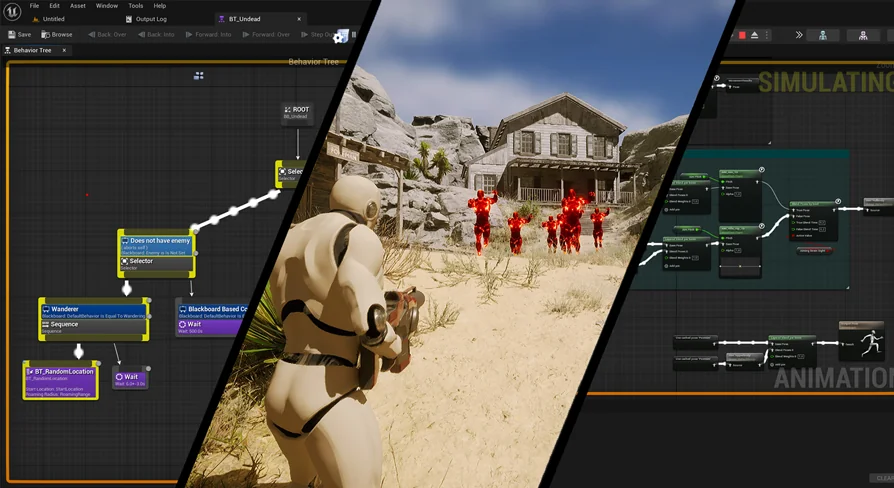
Artificial intelligence in modern game engines relies heavily on hierarchical task planning to simulate awareness and intent. The architecture implemented here joins standard Blueprints with behavior trees to dictate how enemy characters react to their surroundings. Behavior trees break down complex decision logic into digestible, structured branches composed of sequences, selectors, and tasks. Instead of overloading a single actor class with sprawling condition checks, the tree delegates specific actions downward through dedicated execution paths.
Blueprints serve as the functional glue in this structure, supplying custom tasks, condition checks, and services that update blackboard data. An enemy AI evaluating player proximity or selecting navigation targets relies on these Blueprint nodes to read game state data, process navigation paths, and push target references into the tree. Once a task completes—such as reaching an assigned destination or losing sight of an opponent—the tree triggers subsequent branches, immediately alerting the character's movement component and Animation Blueprint to adapt to the new behavioral state.
Executing Dynamic Actions Through Animation Montages
Standard locomotion loops cover wandering, walking, and running, but non-cyclical actions require a distinct playback pipeline. Animation montages fulfill this role by temporarily taking control of skeletal bones to play targeted attacks, stagger animations, or state-specific reactions without rebuilding entire state machine branches. Montages allow gameplay designers to layer root motion, insert animation notify events, and blend distinct animation slots over running locomotion cycles.
Within the context of basic enemy character AI, behavior trees initiate these one-off actions by calling montage playback functions through Blueprints. When an enemy character enters attack range, the behavior tree halts standard path following and initiates an attack task. The task fires an animation montage that plays an attack swing, while embedded animation notifies can trigger timing windows for hit detection or sound cues. Once the montage finishes, the Animation Blueprint seamlessly resumes the base locomotion state, allowing the AI to re-evaluate its next task inside the behavior tree without interrupting visual flow.
Connecting Systems in the Epic Dev Community Framework
This implementation ties directly into the educational concepts detailed in the associated course, Demonstrating Animation Blueprints And AI For Gameplay Designers, hosted on the Epic Dev Community. The core focus of that instruction centers on demystifying the intersection of artificial intelligence and character animation—two foundational pillars that are frequently taught in isolation despite relying on each other constantly in active production.
By reviewing how animation assets, montages, Blueprints, and behavior trees intersect within a functional project, designers see the complete signal path from abstract AI decision to the final animated frame on screen. This practical correlation is crucial for gameplay designers who must author enemy encounters without needing a dedicated engineering team to build custom movement logic from scratch. Observing how blackboard variables shift and trigger matching animation parameters clarifies how real-time gameplay logic orchestrates visual fidelity.
Workflow Value for Gameplay Designers and UI Material Lab Integration
The setup functions alongside UI Material Lab workflows, offering an organized reference point for developers seeking clean separations of system responsibilities. Building enemy AI that coordinates cleanly with animation assets minimizes technical debt in gameplay projects. When animation assets are properly classified into standard sequences and montages, and behavior tree tasks communicate systematically through Blueprints, tuning enemy pacing becomes an iterative design task rather than a technical rewrite.
Gameplay designers looking to implement reliable character encounters gain a clear blueprint for uniting behavior trees with Animation Blueprints. By analyzing how each component—from low-level animation assets to high-level artificial intelligence logic—interacts under runtime conditions, development teams can build scalable, responsive enemy characters ready for combat, stealth, and navigation challenges.
 Action-Adventure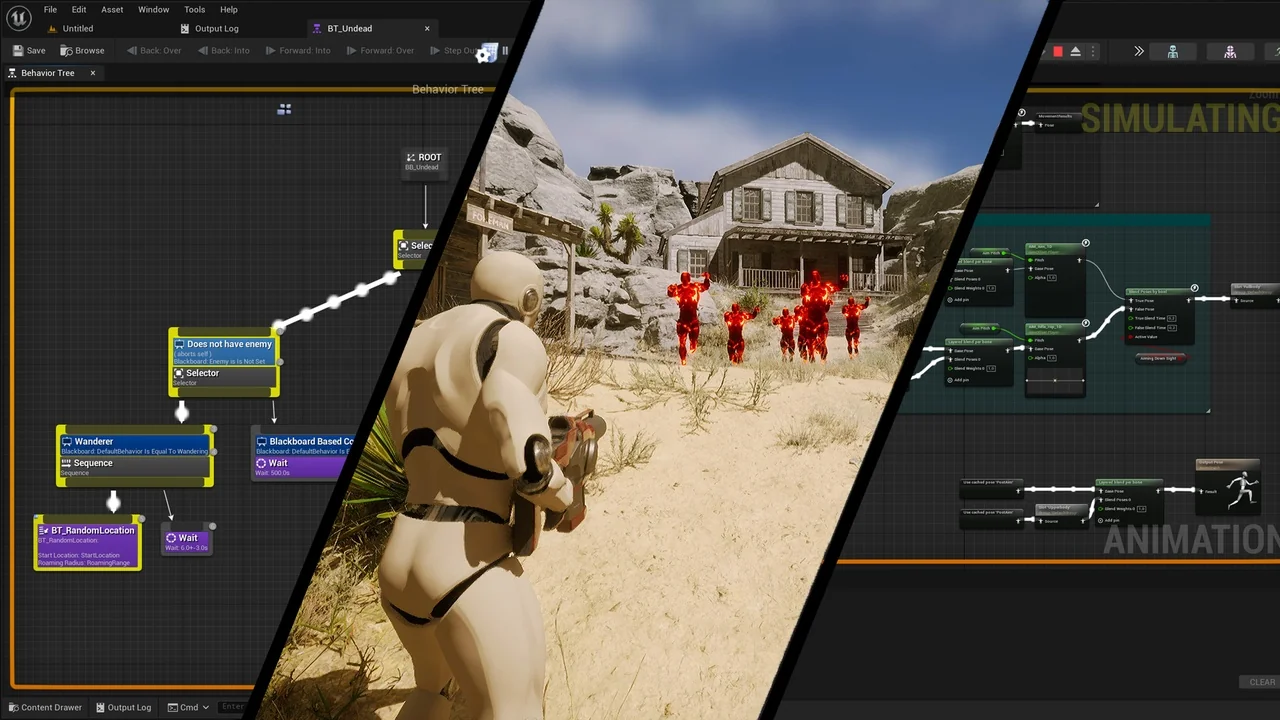
 Action-Adventure
 Gameplay Features
 Engine Tools