"6f9bd6df1f44a86f"{"id":"1000863","slug":"parkour-race-multiplayer-blueprint-game-template-platformer-by-kekdot","title":"Parkour Race - Multiplayer Blueprint Game Template - Platformer - By Kekdot","category":"Action-Adventure","engine":"5.3+","assetVersion":"","engineVersion":"Engine Version: 5.3+","tag":"Action-Adventure","accent":"blue","visual":"mech","summary":"A 100% multiplayer Blueprint party game template for Unreal Engine with full match flow, replicated gameplay actors, modular platforming assets, and two example","platform":"Unreal Engine","indexPolicy":"index","publishedAt":"2026-08-05T06:34:50.838Z","updatedAt":"2026-08-05T06:34:50.838Z","sourceNotes":[],"fileContents":[],"compatibility":["Unreal Engine","Engine Version: 5.3+"],"featuredImage":{"alt":"Parkour Race - Multiplayer Blueprint Game Template - Platformer - By Kekdot","src":"/wp-content/uploads/published/2026/08/ef0927e53696-7d17bb77-cb1b-4c8d-b895-6f3d9565bd90-1f486a8833.webp"},"hasDownloadLink":true,"downloads":1,"terms":[{"taxonomy":"category","slug":"action-adventure","name":"Action-Adventure"}],"galleryImages":[{"src":"/wp-content/uploads/published/2026/08/85d1c480287e-e2952dda-c9f8-4719-89af-577f41615734-07b54428b3.webp","alt":"Parkour Race - Multiplayer Blueprint Game Template - Platformer - By Kekdot"},{"src":"/wp-content/uploads/published/2026/08/e84b9285badc-1afcc264-81a4-465c-b5a3-1ba89fc79d44-a704c04d95.webp","alt":"Parkour Race - Multiplayer Blueprint Game Template - Platformer - By Kekdot"},{"src":"/wp-content/uploads/published/2026/08/af3923dbe4b8-f27fcad6-5075-4940-a40d-85de7d64d41f-91f5bccd52.webp","alt":"Parkour Race - Multiplayer Blueprint Game Template - Platformer - By Kekdot"},{"src":"/wp-content/uploads/published/2026/08/891fe21a124a-78a10bf0-5e1d-4ec1-9775-1341dae8e0a8-e4f118b25f.webp","alt":"Parkour Race - Multiplayer Blueprint Game Template - Platformer - By Kekdot"},{"src":"/wp-content/uploads/published/2026/08/7ae77c5015cf-62797855-5c7e-4610-9517-8975424a71ba-a60070fe45.webp","alt":"Parkour Race - Multiplayer Blueprint Game Template - Platformer - By Kekdot"},{"src":"/wp-content/uploads/published/2026/08/2dfadd696f26-986bd27c-adb9-440a-a6f1-409f712f8b3e-bc0a175753.webp","alt":"Parkour Race - Multiplayer Blueprint Game Template - Platformer - By Kekdot"},{"src":"/wp-content/uploads/published/2026/08/49b6dd4b1cc7-538b47ba-5b16-4ed2-8f7e-4a632e45f568-f093e5abac.webp","alt":"Parkour Race - Multiplayer Blueprint Game Template - Platformer - By Kekdot"},{"src":"/wp-content/uploads/published/2026/08/0a9d44a4deca-dfc4af4b-4d81-4410-b7f3-70bc01bf05c2-3df9dc2f54.webp","alt":"Parkour Race - Multiplayer Blueprint Game Template - Platformer - By Kekdot"},{"src":"/wp-content/uploads/published/2026/08/e6c8a6078913-1099ddea-6f60-40d2-9ac7-87171b6b8729-6aed754122.webp","alt":"Parkour Race - Multiplayer Blueprint Game Template - Platformer - By Kekdot"},{"src":"/wp-content/uploads/published/2026/08/cfdcd544ab2c-190c4cae-8a05-4627-8722-cb98b118eda3-4d82406b3a.webp","alt":"Parkour Race - Multiplayer Blueprint Game Template - Platformer - By Kekdot"}],"accessPanel":{"kind":"resource","title":"Download this resource","eyebrow":"Free Download","message":"Log in or create a free account to start your download.","fileName":"ParkourRaceMultiplayer.7z","safetyNote":"Resources are manually reviewed before listing to improve quality and reduce obvious risks.","actionLabel":"Download Free","resourceType":"Resource archive"},"contentHtml":"\u003cp\u003e\u003cem\u003eParkour Race\u003c/em\u003e is a 100% multiplayer Blueprint Party Game Template for Unreal Engine. The premise is straightforward: runners make their way across moving platforms, launch off jump pads, balance along rotating beams, and time their crossing of bridges that open beneath them. The 1st player to reach and pick up the trophy wins the race. The package is meant to be Plug \u0026amp; Play, with a full gameplay template that can be picked apart, modified, and rebuilt into a custom parkour game.\u003c/p\u003e\n\n\u003cp\u003eThe template includes the entire multiplayer layer: gameplay logic, Replicated Gameplay Actors, complete match flow, a Main Menu setup, and multiplayer session handling for hosting, finding, and joining games. 2 example Levels are provided, and the Level-building side relies on a wide variety of Blueprint Actors plus modular world assets. For developers looking to understand how such a project is structured, the Blueprint code is written as a best-practice example across \u003ccode\u003eGameMode\u003c/code\u003e, \u003ccode\u003eGameState\u003c/code\u003e, \u003ccode\u003ePlayerState\u003c/code\u003e, \u003ccode\u003ePlayerController\u003c/code\u003e, \u003ccode\u003eCharacter\u003c/code\u003e, and \u003ccode\u003eWidgets\u003c/code\u003e.\u003c/p\u003e\n\n\u003ch2\u003eParkour Race's Complete Match Flow: Countdown, Spawn, Winner, Repeat\u003c/h2\u003e\n\n\u003cp\u003eA full match in \u003cem\u003eParkour Race\u003c/em\u003e runs through a logical sequence: countdown, spawning, gameplay, winner announcement, and repeat. This loop is written into the template, so a developer does not need to wire up the basic round structure from scratch. The \u003ccode\u003eGameMode\u003c/code\u003e handles the flow, the \u003ccode\u003eGameState\u003c/code\u003e tracks the state of the match, and the \u003ccode\u003ePlayerState\u003c/code\u003e carries per-player information through the session.\u003c/p\u003e\n\n\u003cp\u003eDuring gameplay, several systems work together to keep the race moving. Players spawn through a dedicated player spawning system, and a checkpoint respawn system returns a runner to the last passed checkpoint after a fall. A collision-based ragdolling system triggers when a player gets knocked around by moving obstacles or other racers. If a player is eliminated or waiting for the next round, the player spectating system lets them stay in the action. Each round randomizes the character color and gender, and names are displayed above player heads when players are within a certain distance of each other, using a Screen Space Widget.\u003c/p\u003e\n\n\u003cp\u003eThe match flow also includes an In-Game Pause Menu with options to continue, leave the game, open settings, or quit. That means the template covers not just the race itself, but also the moments around it: getting into a match, leaving it, and making quick graphical or volume adjustments.\u003c/p\u003e\n\n\u003ch2\u003eThe Multiplayer Blueprint Classes Behind \u003cem\u003eParkour Race\u003c/em\u003e\u003c/h2\u003e\n\n\u003cp\u003e\u003cem\u003eParkour Race\u003c/em\u003e places its multiplayer logic in the standard Unreal Engine Blueprint classes: \u003ccode\u003eGameMode\u003c/code\u003e, \u003ccode\u003eGameState\u003c/code\u003e, \u003ccode\u003ePlayerState\u003c/code\u003e, \u003ccode\u003ePlayerController\u003c/code\u003e, \u003ccode\u003eCharacter\u003c/code\u003e, and \u003ccode\u003eWidgets\u003c/code\u003e. The code is described as best-practice multiplayer Blueprint code, optimized for a lean and structured setup. Comments are included throughout to make the systems easier to follow, which is especially useful for developers who are still learning how replication and network ownership work in Unreal.\u003c/p\u003e\n\n\u003cp\u003eThe template's functionality is kept focused rather than bloated. It provides an optimized multiplayer Blueprint setup that is easy to extend. The networked pieces are handled through Replicated Gameplay Actors, so the state of platforms, jump pads, rotating beams, and other interactive elements is shared across clients. Match flow such as spawning, gameplay, winning, and repeating is also replicated, meaning all players see the same countdown and win conditions.\u003c/p\u003e\n\n\u003cp\u003eIn addition to the gameplay classes, the template includes a basic Save Game System and a handy Function Library. These support pieces give the project a more complete foundation than a pure gameplay demo would, allowing simple persistent data and shared utility functions to be folded into the project.\u003c/p\u003e\n\n\u003ch2\u003eModular World Assets and the 2 Example Levels\u003c/h2\u003e\n\n\u003cp\u003eLevel building in \u003cem\u003eParkour Race\u003c/em\u003e is structured through a collection of modular world assets and Blueprint Actors. These can be combined to create platforming challenges of varying difficulty. Moving platforms, jump pads, rotating beams, and bridges that open at unexpected moments are all part of the included vocabulary, so constructing a new course is mostly a matter of arranging existing pieces rather than creating new mechanics.\u003c/p\u003e\n\n\u003cp\u003eThe template ships with 2 example Levels that show how these pieces can be arranged into full race courses. They also serve as a starting point for developers who want to build their own unique game using the template. Prototype materials such as \u003cem\u003eGrid\u003c/em\u003e, \u003cem\u003eColors\u003c/em\u003e, and \u003cem\u003eFresnel\u003c/em\u003e are included, giving the Levels a clean, readable visual style during development. A basic audio setup is already implemented, and loading screens plus a boot screen are part of the package.\u003c/p\u003e\n\n\u003ch2\u003eHosting, Joining, and the Basic Session UI\u003c/h2\u003e\n\n\u003cp\u003e\u003cem\u003eParkour Race\u003c/em\u003e includes a simple modular Main Menu setup. From the Main Menu, a player can host a session, find and join a session, or open settings. The Host Game Widget, Find Game Widget (server browser), and Join Game Widget cover the core session flow without requiring a 3rd-party backend or complex player-matchmaking logic.\u003c/p\u003e\n\n\u003cp\u003eThe settings menu is kept basic but functional: window mode, resolution, graphics quality, and audio volume are all adjustable. Dynamic confirmation pop-ups appear for actions that need a second look, and error handling is included for network errors and travel errors. These small touches make the template feel like a finished base rather than a disconnected set of systems.\u003c/p\u003e\n\n\u003ch2\u003eWhat Stands Out for New Unreal Multiplayer Developers\u003c/h2\u003e\n\n\u003cp\u003e\u003cem\u003eParkour Race\u003c/em\u003e is positioned as a beginner-friendly template. The combination of a polished sample game, well-commented Blueprint code, and documentation on how to modify and use the template lowers the barrier for someone who wants to make a multiplayer platformer or party game. Since the entire match flow and session logic are already in place, someone can open the project, run a race, and then trace how each class contributes to the experience.\u003c/p\u003e\n\n\u003cp\u003eThe template's real strength is that it connects the different parts of a multiplayer Unreal project into 1 working example. A developer can study how the \u003ccode\u003eGameMode\u003c/code\u003e drives the round, how the \u003ccode\u003eGameState\u003c/code\u003e tracks the match, how the \u003ccode\u003ePlayerState\u003c/code\u003e stores player info, and how the \u003ccode\u003eCharacter\u003c/code\u003e and \u003ccode\u003eWidgets\u003c/code\u003e handle the on-screen experience. From there, adding new obstacle types, building additional Levels, or reshaping the race rules is a more focused task because the foundation is already structured.\u003c/p\u003e\n\n\u003cp\u003eFor developers aiming to build a parkour platformer, a party game, or even a custom multiplayer racing prototype, \u003cem\u003eParkour Race\u003c/em\u003e supplies the core systems ready to run. The included documentation and tutorial point to the intended workflow: open the template, study its flow, and modify it to fit the game you want to make.\u003c/p\u003e\n\n\u003ch2\u003eMore From The Same Workflow\u003c/h2\u003e\n\u003cul\u003e\n\u003cli\u003e\u003ca href=\"https://3dcghub.com/multiplayer-blueprint-lobby-solution-template-by-kekdot/\" rel=\"noopener noreferrer\"\u003eMultiplayer Blueprint Lobby Solution - Template - By Kekdot\u003c/a\u003e\u003c/li\u003e\n\u003cli\u003e\u003ca href=\"https://3dcghub.com/mysql-and-mariadb-integration/\" rel=\"noopener noreferrer\"\u003eMySQL and MariaDB Integration\u003c/a\u003e\u003c/li\u003e\n\u003cli\u003e\u003ca href=\"https://3dcghub.com/multiplayer-tps-basic/\" rel=\"noopener noreferrer\"\u003eMultiplayer TPS Basic\u003c/a\u003e\u003c/li\u003e\n\u003cli\u003e\u003ca href=\"https://3dcghub.com/multiplayer-object-throwing-system/\" rel=\"noopener noreferrer\"\u003eMultiplayer Object Throwing System\u003c/a\u003e\u003c/li\u003e\n\u003cli\u003e\u003ca href=\"https://3dcghub.com/ultimate-gameplay-camera/\" rel=\"noopener noreferrer\"\u003eUltimate Gameplay Camera\u003c/a\u003e\u003c/li\u003e\n\u003c/ul\u003e","contentTextLength":6944,"navigation":{"current":1501,"total":4218,"previous":{"id":"1000864","slug":"platoon-drill-basics","title":"Platoon: Drill Basics","category":"Variety","platform":"Unreal Engine","updatedAt":"2026-08-05T06:38:16.978Z"},"next":{"id":"1000862","slug":"package-deliveryman-anims","title":"Package Deliveryman Anims","category":"Locomotion / Gaits","platform":"Unreal Engine","updatedAt":"2026-08-05T06:30:37.279Z"}},"relatedResources":[{"id":"1000977","slug":"asymmetric-multiplayer-horror","title":"Asymmetric Multiplayer Horror","category":"Action-Adventure","engine":"5.0+","assetVersion":"","engineVersion":"Engine Version: 5.0+","tag":"Action-Adventure","accent":"blue","visual":"mech","summary":"Blueprint template for asymmetric multiplayer horror with 4 vs 1 play, AI or player monsters, first/third person views, and a Cursed Forest demo.","platform":"Unreal Engine","indexPolicy":"index","publishedAt":"2026-08-17T17:19:51.833Z","updatedAt":"2026-08-17T17:19:51.833Z","sourceNotes":[],"fileContents":[],"compatibility":["Unreal Engine","Engine Version: 5.0+"],"featuredImage":{"alt":"Asymmetric Multiplayer Horror","src":"/wp-content/uploads/published/2026/08/d3e8d4559426-f968b340-50b9-4a59-9fa7-7cdea14f055c-e0904bd06f.webp"},"hasDownloadLink":true,"downloads":1},{"id":"1000657","slug":"multiplayer-blueprint-lobby-solution-template-by-kekdot","title":"Multiplayer Blueprint Lobby Solution - Template - By Kekdot","category":"Network \u0026 Multiplayer","engine":"5.3+","assetVersion":"","engineVersion":"Engine Version: 5.3+","tag":"Network","accent":"blue","visual":"luts","summary":"The MBLS template is a 100% Blueprint multiplayer lobby foundation for Unreal Engine, with server browser, chat, settings, character customization, and data-dri","platform":"Unreal Engine","indexPolicy":"index","publishedAt":"2026-07-21T20:17:43.082Z","updatedAt":"2026-07-21T20:17:43.082Z","sourceNotes":[],"fileContents":[],"compatibility":["Unreal Engine","Engine Version: 5.3+"],"featuredImage":{"alt":"Multiplayer Blueprint Lobby Solution - Template - By Kekdot","src":"/wp-content/uploads/published/2026/07/2aaa9d7b3fdd-d9a2d1e1-e1ad-4f4b-96a9-4c0245b7e2ed-5a79d3f3f4.webp"},"hasDownloadLink":true,"downloads":1},{"id":"1002125","slug":"multiplayer-gravity-gun","title":"Multiplayer Gravity Gun","category":"Gameplay Features","engine":"5.3+","assetVersion":"","engineVersion":"Engine Version: 5.3+","tag":"Gameplay Features","accent":"blue","visual":"mech","summary":"Explore the Multiplayer Gravity Gun Blueprint template, featuring replicated dual-beam physics manipulation, mouse wheel distance control, and sound replication","platform":"Unreal Engine","indexPolicy":"index","publishedAt":"2026-10-29T09:05:24.427Z","updatedAt":"2026-10-29T09:05:24.427Z","sourceNotes":[],"fileContents":[],"compatibility":["Unreal Engine","Engine Version: 5.3+"],"featuredImage":{"alt":"Multiplayer Gravity Gun","src":"/wp-content/uploads/published/2026/10/9fa1b1893a83-f38a0201-cd4c-4164-9945-6e296aa6e5ea-9706b84c8e.webp"},"hasDownloadLink":true,"downloads":0}]}
Action-Adventure
Parkour Race - Multiplayer Blueprint Game Template - Platformer - By Kekdot
A 100% multiplayer Blueprint party game template for Unreal Engine with full match flow, replicated gameplay actors, modular platforming assets, and two example
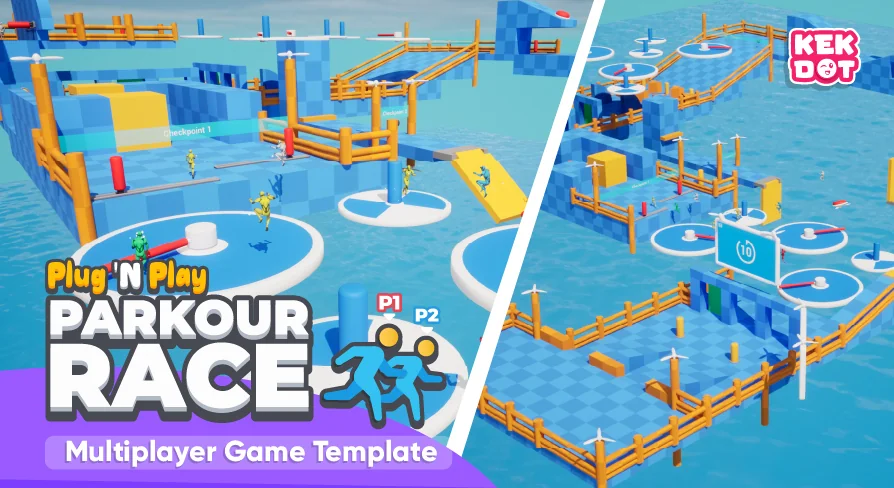
Parkour Race is a 100% multiplayer Blueprint Party Game Template for Unreal Engine. The premise is straightforward: runners make their way across moving platforms, launch off jump pads, balance along rotating beams, and time their crossing of bridges that open beneath them. The 1st player to reach and pick up the trophy wins the race. The package is meant to be Plug & Play, with a full gameplay template that can be picked apart, modified, and rebuilt into a custom parkour game.
The template includes the entire multiplayer layer: gameplay logic, Replicated Gameplay Actors, complete match flow, a Main Menu setup, and multiplayer session handling for hosting, finding, and joining games. 2 example Levels are provided, and the Level-building side relies on a wide variety of Blueprint Actors plus modular world assets. For developers looking to understand how such a project is structured, the Blueprint code is written as a best-practice example across GameMode, GameState, PlayerState, PlayerController, Character, and Widgets.
Parkour Race's Complete Match Flow: Countdown, Spawn, Winner, Repeat
A full match in Parkour Race runs through a logical sequence: countdown, spawning, gameplay, winner announcement, and repeat. This loop is written into the template, so a developer does not need to wire up the basic round structure from scratch. The GameMode handles the flow, the GameState tracks the state of the match, and the PlayerState carries per-player information through the session.
During gameplay, several systems work together to keep the race moving. Players spawn through a dedicated player spawning system, and a checkpoint respawn system returns a runner to the last passed checkpoint after a fall. A collision-based ragdolling system triggers when a player gets knocked around by moving obstacles or other racers. If a player is eliminated or waiting for the next round, the player spectating system lets them stay in the action. Each round randomizes the character color and gender, and names are displayed above player heads when players are within a certain distance of each other, using a Screen Space Widget.
The match flow also includes an In-Game Pause Menu with options to continue, leave the game, open settings, or quit. That means the template covers not just the race itself, but also the moments around it: getting into a match, leaving it, and making quick graphical or volume adjustments.
The Multiplayer Blueprint Classes Behind Parkour Race
Parkour Race places its multiplayer logic in the standard Unreal Engine Blueprint classes: GameMode, GameState, PlayerState, PlayerController, Character, and Widgets. The code is described as best-practice multiplayer Blueprint code, optimized for a lean and structured setup. Comments are included throughout to make the systems easier to follow, which is especially useful for developers who are still learning how replication and network ownership work in Unreal.
The template's functionality is kept focused rather than bloated. It provides an optimized multiplayer Blueprint setup that is easy to extend. The networked pieces are handled through Replicated Gameplay Actors, so the state of platforms, jump pads, rotating beams, and other interactive elements is shared across clients. Match flow such as spawning, gameplay, winning, and repeating is also replicated, meaning all players see the same countdown and win conditions.
In addition to the gameplay classes, the template includes a basic Save Game System and a handy Function Library. These support pieces give the project a more complete foundation than a pure gameplay demo would, allowing simple persistent data and shared utility functions to be folded into the project.
Modular World Assets and the 2 Example Levels
Level building in Parkour Race is structured through a collection of modular world assets and Blueprint Actors. These can be combined to create platforming challenges of varying difficulty. Moving platforms, jump pads, rotating beams, and bridges that open at unexpected moments are all part of the included vocabulary, so constructing a new course is mostly a matter of arranging existing pieces rather than creating new mechanics.
The template ships with 2 example Levels that show how these pieces can be arranged into full race courses. They also serve as a starting point for developers who want to build their own unique game using the template. Prototype materials such as Grid, Colors, and Fresnel are included, giving the Levels a clean, readable visual style during development. A basic audio setup is already implemented, and loading screens plus a boot screen are part of the package.
Hosting, Joining, and the Basic Session UI
Parkour Race includes a simple modular Main Menu setup. From the Main Menu, a player can host a session, find and join a session, or open settings. The Host Game Widget, Find Game Widget (server browser), and Join Game Widget cover the core session flow without requiring a 3rd-party backend or complex player-matchmaking logic.
The settings menu is kept basic but functional: window mode, resolution, graphics quality, and audio volume are all adjustable. Dynamic confirmation pop-ups appear for actions that need a second look, and error handling is included for network errors and travel errors. These small touches make the template feel like a finished base rather than a disconnected set of systems.
What Stands Out for New Unreal Multiplayer Developers
Parkour Race is positioned as a beginner-friendly template. The combination of a polished sample game, well-commented Blueprint code, and documentation on how to modify and use the template lowers the barrier for someone who wants to make a multiplayer platformer or party game. Since the entire match flow and session logic are already in place, someone can open the project, run a race, and then trace how each class contributes to the experience.
The template's real strength is that it connects the different parts of a multiplayer Unreal project into 1 working example. A developer can study how the GameMode drives the round, how the GameState tracks the match, how the PlayerState stores player info, and how the Character and Widgets handle the on-screen experience. From there, adding new obstacle types, building additional Levels, or reshaping the race rules is a more focused task because the foundation is already structured.
For developers aiming to build a parkour platformer, a party game, or even a custom multiplayer racing prototype, Parkour Race supplies the core systems ready to run. The included documentation and tutorial point to the intended workflow: open the template, study its flow, and modify it to fit the game you want to make.
 Action-Adventure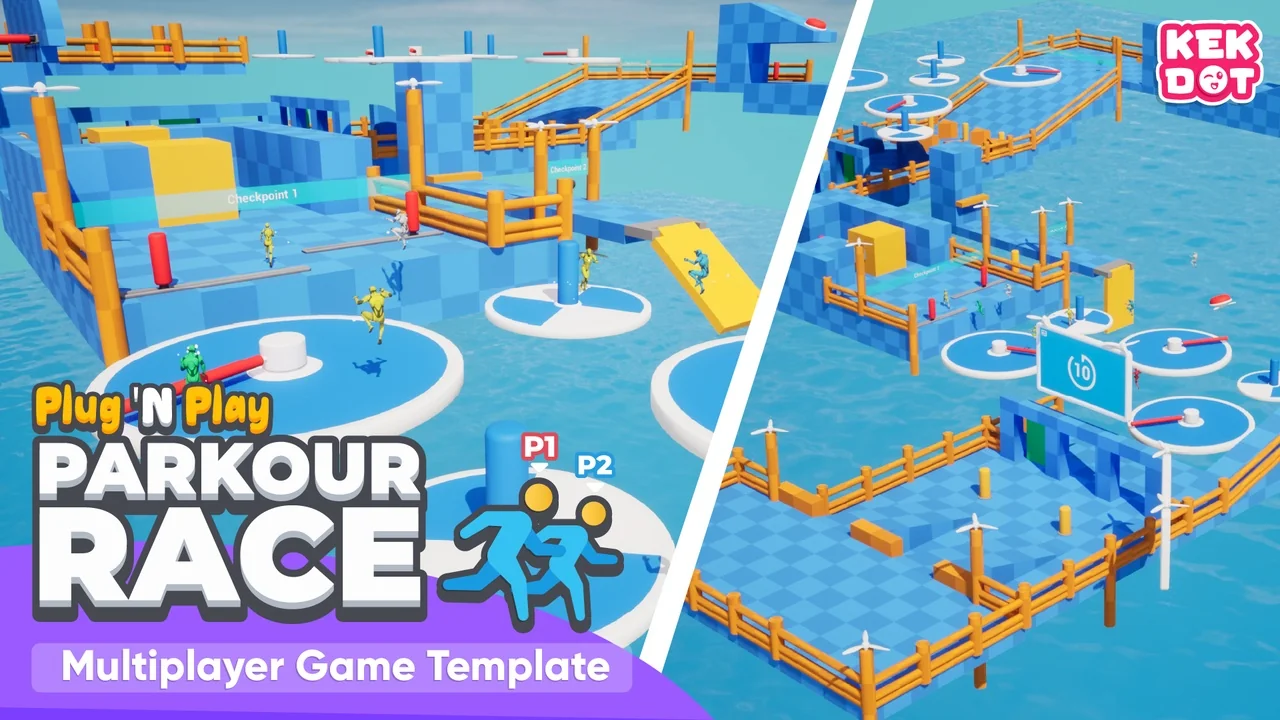
 Action-Adventure
 Network
 Gameplay Features