"c14ff6bd758dadb1"{"id":"1000657","slug":"multiplayer-blueprint-lobby-solution-template-by-kekdot","title":"Multiplayer Blueprint Lobby Solution - Template - By Kekdot","category":"Network \u0026 Multiplayer","engine":"5.3+","assetVersion":"","engineVersion":"Engine Version: 5.3+","tag":"Network","accent":"blue","visual":"luts","summary":"The MBLS template is a 100% Blueprint multiplayer lobby foundation for Unreal Engine, with server browser, chat, settings, character customization, and data-dri","platform":"Unreal Engine","publishedAt":"2026-07-21T20:17:43.082Z","updatedAt":"2026-07-21T20:17:43.082Z","sourceNotes":[],"fileContents":[],"compatibility":["Unreal Engine","Engine Version: 5.3+"],"featuredImage":{"alt":"Multiplayer Blueprint Lobby Solution - Template - By Kekdot","src":"/wp-content/uploads/published/2026/07/2aaa9d7b3fdd-d9a2d1e1-e1ad-4f4b-96a9-4c0245b7e2ed-5a79d3f3f4.webp"},"hasDownloadLink":true,"downloads":1,"terms":[{"taxonomy":"category","slug":"network-and-multiplayer","name":"Network \u0026 Multiplayer"}],"galleryImages":[{"src":"/wp-content/uploads/published/2026/07/f8cad5092376-8b0d712c-b16a-439a-a8eb-d82a60e7a20b-9a3a9cfbbd.webp","alt":"Multiplayer Blueprint Lobby Solution - Template - By Kekdot"},{"src":"/wp-content/uploads/published/2026/07/9574806539d6-976fed6a-53c3-4fbd-8cc0-5f27009458f8-6c8577be00.webp","alt":"Multiplayer Blueprint Lobby Solution - Template - By Kekdot"},{"src":"/wp-content/uploads/published/2026/07/1b35b58a27e1-f0d164c2-bf1e-45b6-b4aa-a6162124577c-25309104d6.webp","alt":"Multiplayer Blueprint Lobby Solution - Template - By Kekdot"},{"src":"/wp-content/uploads/published/2026/07/77b16a9ff788-3403cf2f-4558-4c45-acfb-bcec844109a6-2532b59888.webp","alt":"Multiplayer Blueprint Lobby Solution - Template - By Kekdot"},{"src":"/wp-content/uploads/published/2026/07/111d75d0feee-936c8457-c0f9-4a52-86db-89e67c2ba5d6-d2ae4bd7f0.webp","alt":"Multiplayer Blueprint Lobby Solution - Template - By Kekdot"},{"src":"/wp-content/uploads/published/2026/07/186480bd4395-118a8d3f-040c-40e4-bc4c-2a566e86b9b5-4d899de260.webp","alt":"Multiplayer Blueprint Lobby Solution - Template - By Kekdot"},{"src":"/wp-content/uploads/published/2026/07/539b13f88d9f-f70971e4-2b7f-4e2a-b52a-4fe163419a3d-955f899502.webp","alt":"Multiplayer Blueprint Lobby Solution - Template - By Kekdot"},{"src":"/wp-content/uploads/published/2026/07/a8ed1a3aa853-20045a96-da16-429b-a6d2-aa47d3b9e42b-02f9845f17.webp","alt":"Multiplayer Blueprint Lobby Solution - Template - By Kekdot"},{"src":"/wp-content/uploads/published/2026/07/9def764b3204-1d195df4-5dca-4795-ad75-0f6185d5b98b-c2a412ba02.webp","alt":"Multiplayer Blueprint Lobby Solution - Template - By Kekdot"},{"src":"/wp-content/uploads/published/2026/07/3642b752082d-b24f510d-1b88-4789-a437-21c520015302-9a88a57b05.webp","alt":"Multiplayer Blueprint Lobby Solution - Template - By Kekdot"}],"accessPanel":{"kind":"resource","title":"Download this resource","eyebrow":"Free Download","message":"Log in or create a free account to start your download.","fileName":"MultiplayerBlueprintLobby.7z","safetyNote":"Resources are manually reviewed before listing to improve quality and reduce obvious risks.","actionLabel":"Download Free","resourceType":"Resource archive"},"contentHtml":"\u003cp\u003eWhen a host presses launch in the lobby, a countdown ticks down to game start. Connected players see the status indicator shift, the game settings locked in by the host carry over into the gameplay map, and the session travels seamlessly into the match. This is the operational flow of the Modular Blueprint Lobby Solution, a template built so that the foundational multiplayer infrastructure of a game is already replicating, displaying menus, and handling player data before a developer writes a single line of gameplay logic.\u003c/p\u003e \u003ch2\u003eBuilding a Multiplayer Foundation with MBLS\u003c/h2\u003e \u003cp\u003eDeveloped entirely in Blueprints, this solution functions as a pre-built framework for managing online sessions, player connections, and lobby interactions. It is fully replicated across all necessary network classes, including GameMode, GameState, PlayerController, PlayerState, and Character. Seamless Travel is enabled by default, allowing maps to transition without dropping the session. The architecture relies on a modular setup with base classes intended for code reuse, accompanied by a handy function library and neatly organized project structure.\u003c/p\u003e \u003cp\u003eThe system defaults to standard session nodes for testing connections on the same local network. For online play, any Unreal Engine compatible subsystem—such as Steam or Epic Online Services—can be integrated to take over online session support.\u003c/p\u003e \u003ch3\u003eLobby Mechanics and Player Management\u003c/h3\u003e \u003cp\u003eHandling a lobby involves coordinating multiple players, their ready states, and the specific parameters of the match being hosted. The template provides a connected player list and a ready up system that hosts can disable if they prefer to launch directly. Hosts maintain authority over the session, able to define the maximum number of players and the connection type when creating a game. They also control the match parameters through the game settings menu, where they can adjust the Game Mode, Map, and broader match settings. Clients connecting to the lobby can view these settings but cannot alter them.\u003c/p\u003e \u003cp\u003eLobby management extends to player moderation through a player kick system. A lobby launch event triggers a visible countdown, keeping all connected players informed of the impending transition into gameplay. The host's chosen settings are not discarded at launch; gameplay maps actively display the data defined in the lobby, meaning any custom gameplay logic programmed by the developer can read and react to these variables.\u003c/p\u003e \u003ch2\u003eSystem Architecture and Game Mode Data Tables\u003c/h2\u003e \u003cp\u003eMatch configurations are tied together using data tables. Game modes are managed through these tables, providing a structured way to define and call up different variations of a match without digging into the blueprint logic itself. This data-driven approach applies to the lobby game settings as well, tying the frontend menu selections directly to backend variables.\u003c/p\u003e \u003cp\u003eProgramming in Blueprints often requires a clear structure to avoid spaghetti logic. The template is set up using best practices for blueprint programming, with extensive commenting throughout the code for easy understanding. The modular setup places base classes where they make logical sense, separating the lobby UI from the session management and the gameplay propagation. This organization allows developers to expand upon the existing systems without breaking core replication logic.\u003c/p\u003e \u003ch2\u003eInterface Components and Settings Menus\u003c/h2\u003e \u003cp\u003eThe user interface spans the entire player journey, starting with an animated boot screen acting as a placeholder for game-specific branding. From there, the main menu presents options to host or join games. Joining a game brings up a server browser that lists server names, current player counts, and ping values. A 3D menu example is included to demonstrate how spatial interfaces can be constructed.\u003c/p\u003e \u003cp\u003eThe settings architecture is divided into an advanced settings menu featuring several distinct widgets:\u003c/p\u003e\n\u003cul\u003e\n\u003cli\u003e\u003cstrong\u003eVideo settings:\u003c/strong\u003e Display configurations, graphics quality levels, and advanced graphics options.\u003c/li\u003e\n\u003cli\u003e\u003cstrong\u003eAudio settings:\u003c/strong\u003e Volume controls and audio quality selections.\u003c/li\u003e\n\u003cli\u003e\u003cstrong\u003eControl settings:\u003c/strong\u003e Input mappings and configurations.\u003c/li\u003e\n\u003c/ul\u003e\n\u003cp\u003eThese menus rely on custom widget classes—such as a base button, a base option switcher, tooltips, and popups for feedback and error handling. Dynamic loading screens display contextual data based on the destination, ensuring transitions remain visually consistent. An in-game menu triggered by the ESC key provides pause functionality, offering options to continue, leave, game, access the in-game settings, or quit entirely.\u003c/p\u003e \u003ch3\u003eCharacter Customization and Save Data\u003c/h3\u003e \u003cp\u003ePlayers can alter their appearance through character customization options for skin and hats. These choices are written to a local save game file, ensuring they persist across sessions. The player profile menu also saves to local save data, keeping user configurations intact between play sessions.\u003c/p\u003e \u003cp\u003eCommunication during lobby wait times is handled by a multiplayer chat component. Built as a reusable component, this chat system functions within the lobby environment and can be integrated elsewhere in a project if needed.\u003c/p\u003e \u003ch2\u003eAdapting the Template Across Game Genres\u003c/h2\u003e \u003cp\u003eThe infrastructure is genre-agnostic. Because the lobby simply passes match settings into the gameplay map, the underlying session logic works whether the project is a shooter, a horror game, an RPG, a co-op adventure, a real-time strategy, or an MMO. The separation of lobby logic from gameplay logic means a developer can focus on programming character movement, combat, or AI behavior relying on the template to have already handled the session handshake, player readiness checks, and map transitions.\u003c/p\u003e \u003ch2\u003eBase Widget Classes and Reusable Code\u003c/h2\u003e \u003cp\u003eThroughout the project, a variety of custom widgets are available for reuse. Base widget classes for buttons and option switchers establish a consistent visual language for menu interactions. Custom tooltips and popups handle player feedback and error reporting. Because these widgets are built as base classes, developers can subclass them to create genre-specific menus while maintaining the core functionality already established by the template. The inclusion of practical examples throughout the project demonstrates how these base elements interact with the replicated game state, reducing the guesswork involved in wiring UI to network variables.\u003c/p\u003e \u003cp\u003eFor teams evaluating this asset, the core takeaway is the elimination of frontline multiplayer plumbing. The MBLS template provides a network-optimized, fully replicated foundation where hosting, joining, settings propagation, and player data persistence are already functional, allowing development to begin directly at the gameplay layer.\u003c/p\u003e\n\n\u003ch2\u003eExplore Similar Assets\u003c/h2\u003e\n\u003cul\u003e\n\u003cli\u003e\u003ca href=\"https://3dcghub.com/multiplayer-tps-basic/\" title=\"Multiplayer TPS Basic\"\u003eMultiplayer TPS Basic\u003c/a\u003e\u003c/li\u003e\n\u003cli\u003e\u003ca href=\"https://3dcghub.com/ultimate-gameplay-camera/\" title=\"Ultimate Gameplay Camera\"\u003eUltimate Gameplay Camera\u003c/a\u003e\u003c/li\u003e\n\u003cli\u003e\u003ca href=\"https://3dcghub.com/universal-shooting-game-template-and-framework/\" title=\"Universal Shooting Game Template and Framework\"\u003eUniversal Shooting Game Template and Framework\u003c/a\u003e\u003c/li\u003e\n\u003cli\u003e\u003ca href=\"https://3dcghub.com/dynamic-flight-with-blueprints/\" title=\"Dynamic Flight with Blueprints\"\u003eDynamic Flight with Blueprints\u003c/a\u003e\u003c/li\u003e\n\u003cli\u003e\u003ca href=\"https://3dcghub.com/the-flashlight-toolkit/\" title=\"The Flashlight Toolkit\"\u003eThe Flashlight Toolkit\u003c/a\u003e\u003c/li\u003e\n\u003c/ul\u003e","contentTextLength":6856,"navigation":{"current":1204,"total":3719,"previous":{"id":"1000658","slug":"mushroom-k","title":"Mushroom (K)","category":"Characters \u0026 Creatures","platform":"Unreal Engine","updatedAt":"2026-07-21T20:25:46.015Z"},"next":{"id":"1000656","slug":"modular-medieval-village-medieval-village-stylized-village-fantasy-village","title":"Modular Medieval Village (Medieval Village, Stylized Village, Fantasy Village)","category":"Towns \u0026 Villages","platform":"Unreal Engine","updatedAt":"2026-07-21T20:13:46.984Z"}},"relatedResources":[{"id":"11239","slug":"multiplayer-tps-basic","title":"Multiplayer TPS Basic","category":"Network \u0026 Multiplayer","engine":"5.0+","assetVersion":"Engine version: 5.0+","engineVersion":"4.15","tag":"Network","accent":"blue","visual":"animation","summary":"Multiplayer TPS Basic provides a foundational kit for creating online cooperative third-person shooters. It features intelligent AI that shares player weaponry and interactive crates for loadout management.","platform":"Unreal Engine","publishedAt":"2026-03-04T17:13:23.000Z","updatedAt":"2026-04-19T15:48:14.000Z","sourceNotes":[],"fileContents":[],"compatibility":["Unreal Engine","Engine version: 5.0+"],"featuredImage":{"alt":"Multiplayer TPS Basic","src":"https://3dcghub.com/wp-content/uploads/2026/03/856e363a-e9e8-470e-b806-9a65acd66ce4.webp"},"hasDownloadLink":true,"downloads":1},{"id":"15108","slug":"ultimate-gameplay-camera","title":"Ultimate Gameplay Camera","category":"Gameplay Features","engine":"5.3 - 5.5","assetVersion":"Engine version: 5.3 - 5.5","engineVersion":"Asset Version:1.3","tag":"Gameplay Features","accent":"blue","visual":"audio","summary":"The Ultimate Gameplay Camera provides a professional-grade, dynamic third-person camera system for Unreal Engine. It features smooth movement, multiplayer replication, and extensive customization options without requiring C++ knowledge.","platform":"Unreal Engine","publishedAt":"2026-03-12T07:52:43.000Z","updatedAt":"2026-04-19T15:45:35.000Z","sourceNotes":[],"fileContents":[],"compatibility":["Unreal Engine","Engine version: 5.3 - 5.5","Asset Version: 1.3"],"featuredImage":{"alt":"Ultimate Gameplay Camera","src":"https://3dcghub.com/wp-content/uploads/2026/03/89e2406f-10ab-4f8a-97aa-fa74ad5bc513.webp"},"hasDownloadLink":true,"downloads":1},{"id":"11176","slug":"universal-shooting-game-template-and-framework","title":"Universal Shooting Game Template and Framework","category":"Gameplay Features","engine":"5.1+","assetVersion":"Engine version: 5.1+","engineVersion":"5.1","tag":"Gameplay Features","accent":"blue","visual":"character","summary":"A comprehensive, blueprint-only framework designed for creating shooting games with independent modules and multiplayer support. It features integrated AI, weapon systems, and character customization tools.","platform":"Unreal Engine","publishedAt":"2026-03-03T17:04:56.000Z","updatedAt":"2026-04-19T15:48:15.000Z","sourceNotes":[],"fileContents":[],"compatibility":["Unreal Engine","Engine version: 5.1+"],"featuredImage":{"alt":"Universal Shooting Game Template and Framework","src":"https://3dcghub.com/wp-content/uploads/2026/03/809586c9-06d5-4b25-8d10-adc2975bbd96.webp"},"hasDownloadLink":true,"downloads":0}]}
Network
Multiplayer Blueprint Lobby Solution - Template - By Kekdot
The MBLS template is a 100% Blueprint multiplayer lobby foundation for Unreal Engine, with server browser, chat, settings, character customization, and data-dri
When a host presses launch in the lobby, a countdown ticks down to game start. Connected players see the status indicator shift, the game settings locked in by the host carry over into the gameplay map, and the session travels seamlessly into the match. This is the operational flow of the Modular Blueprint Lobby Solution, a template built so that the foundational multiplayer infrastructure of a game is already replicating, displaying menus, and handling player data before a developer writes a single line of gameplay logic.
Building a Multiplayer Foundation with MBLS
Developed entirely in Blueprints, this solution functions as a pre-built framework for managing online sessions, player connections, and lobby interactions. It is fully replicated across all necessary network classes, including GameMode, GameState, PlayerController, PlayerState, and Character. Seamless Travel is enabled by default, allowing maps to transition without dropping the session. The architecture relies on a modular setup with base classes intended for code reuse, accompanied by a handy function library and neatly organized project structure.
The system defaults to standard session nodes for testing connections on the same local network. For online play, any Unreal Engine compatible subsystem—such as Steam or Epic Online Services—can be integrated to take over online session support.
Lobby Mechanics and Player Management
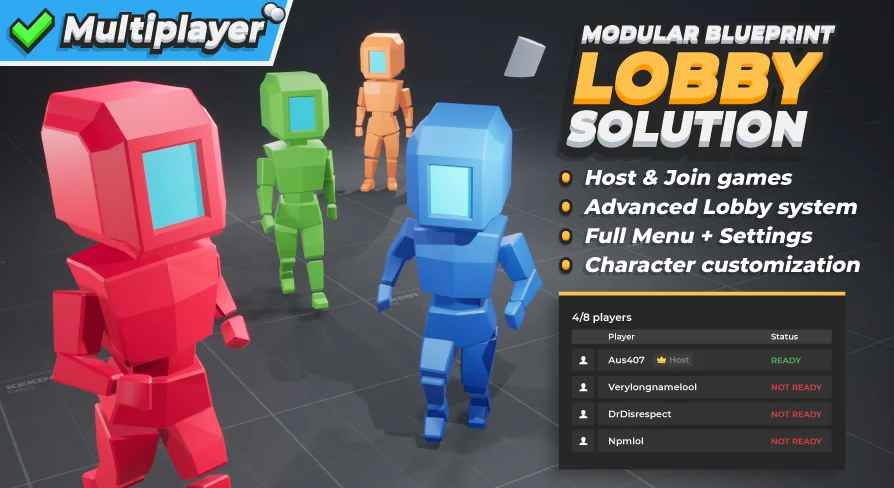
Handling a lobby involves coordinating multiple players, their ready states, and the specific parameters of the match being hosted. The template provides a connected player list and a ready up system that hosts can disable if they prefer to launch directly. Hosts maintain authority over the session, able to define the maximum number of players and the connection type when creating a game. They also control the match parameters through the game settings menu, where they can adjust the Game Mode, Map, and broader match settings. Clients connecting to the lobby can view these settings but cannot alter them.
Lobby management extends to player moderation through a player kick system. A lobby launch event triggers a visible countdown, keeping all connected players informed of the impending transition into gameplay. The host's chosen settings are not discarded at launch; gameplay maps actively display the data defined in the lobby, meaning any custom gameplay logic programmed by the developer can read and react to these variables.
System Architecture and Game Mode Data Tables
Match configurations are tied together using data tables. Game modes are managed through these tables, providing a structured way to define and call up different variations of a match without digging into the blueprint logic itself. This data-driven approach applies to the lobby game settings as well, tying the frontend menu selections directly to backend variables.
Programming in Blueprints often requires a clear structure to avoid spaghetti logic. The template is set up using best practices for blueprint programming, with extensive commenting throughout the code for easy understanding. The modular setup places base classes where they make logical sense, separating the lobby UI from the session management and the gameplay propagation. This organization allows developers to expand upon the existing systems without breaking core replication logic.
Interface Components and Settings Menus
The user interface spans the entire player journey, starting with an animated boot screen acting as a placeholder for game-specific branding. From there, the main menu presents options to host or join games. Joining a game brings up a server browser that lists server names, current player counts, and ping values. A 3D menu example is included to demonstrate how spatial interfaces can be constructed.
The settings architecture is divided into an advanced settings menu featuring several distinct widgets:
Video settings: Display configurations, graphics quality levels, and advanced graphics options.
Audio settings: Volume controls and audio quality selections.
Control settings: Input mappings and configurations.
These menus rely on custom widget classes—such as a base button, a base option switcher, tooltips, and popups for feedback and error handling. Dynamic loading screens display contextual data based on the destination, ensuring transitions remain visually consistent. An in-game menu triggered by the ESC key provides pause functionality, offering options to continue, leave, game, access the in-game settings, or quit entirely.
Character Customization and Save Data
Players can alter their appearance through character customization options for skin and hats. These choices are written to a local save game file, ensuring they persist across sessions. The player profile menu also saves to local save data, keeping user configurations intact between play sessions.
Communication during lobby wait times is handled by a multiplayer chat component. Built as a reusable component, this chat system functions within the lobby environment and can be integrated elsewhere in a project if needed.
Adapting the Template Across Game Genres
The infrastructure is genre-agnostic. Because the lobby simply passes match settings into the gameplay map, the underlying session logic works whether the project is a shooter, a horror game, an RPG, a co-op adventure, a real-time strategy, or an MMO. The separation of lobby logic from gameplay logic means a developer can focus on programming character movement, combat, or AI behavior relying on the template to have already handled the session handshake, player readiness checks, and map transitions.
Base Widget Classes and Reusable Code
Throughout the project, a variety of custom widgets are available for reuse. Base widget classes for buttons and option switchers establish a consistent visual language for menu interactions. Custom tooltips and popups handle player feedback and error reporting. Because these widgets are built as base classes, developers can subclass them to create genre-specific menus while maintaining the core functionality already established by the template. The inclusion of practical examples throughout the project demonstrates how these base elements interact with the replicated game state, reducing the guesswork involved in wiring UI to network variables.
For teams evaluating this asset, the core takeaway is the elimination of frontline multiplayer plumbing. The MBLS template provides a network-optimized, fully replicated foundation where hosting, joining, settings propagation, and player data persistence are already functional, allowing development to begin directly at the gameplay layer.
 Network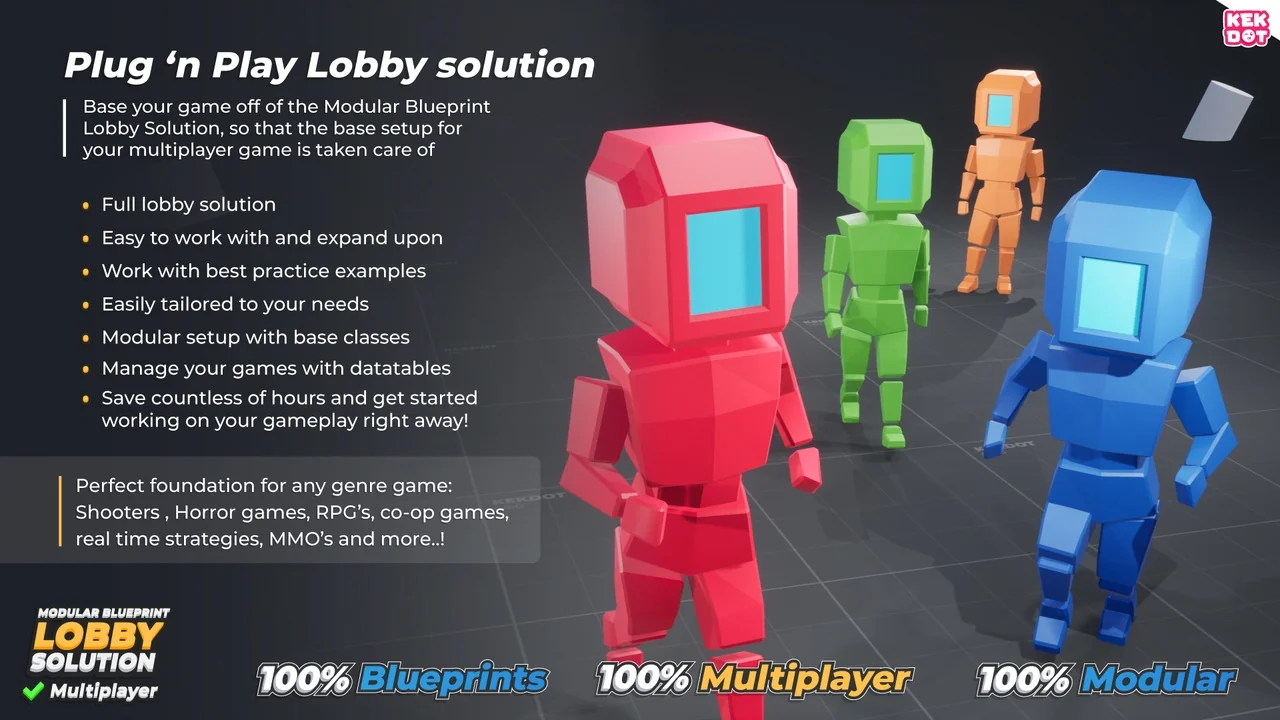
 Network
 Gameplay Features
 Gameplay Features