"6ac84fdb0bd06614"{"id":"1001230","slug":"defender-animated-dialogue-system","title":"Defender: Animated Dialogue System","category":"Action-Adventure","engine":"5.0+","assetVersion":"","engineVersion":"Engine Version: 5.0+","tag":"Action-Adventure","accent":"blue","visual":"mech","summary":"Build branching conversations, stat-driven choices, and cinematic camera blends in Unreal Engine with the Defender: Animated Dialogue System.","platform":"Unreal Engine","publishedAt":"2026-09-21T03:33:30.367Z","updatedAt":"2026-09-21T03:33:30.367Z","sourceNotes":[],"fileContents":[],"compatibility":["Unreal Engine","Engine Version: 5.0+"],"featuredImage":{"alt":"Defender: Animated Dialogue System","src":"/wp-content/uploads/published/2026/09/5f1e86a5bee3-28925296-45e9-4cb2-b513-a2e776dbaadb-af1ecc219b.webp"},"hasDownloadLink":true,"downloads":0,"terms":[{"taxonomy":"category","slug":"action-adventure","name":"Action-Adventure"}],"galleryImages":[{"src":"/wp-content/uploads/published/2026/09/febc2ed0e841-41d47a35-a2b4-4568-9ba4-4cbde97fca0c-90a1bce5b9.webp","alt":"Defender: Animated Dialogue System"},{"src":"/wp-content/uploads/published/2026/09/0fc5da27a681-ad27888d-fd53-40e6-9c0b-4369b6ce6eae-d791d14006.webp","alt":"Defender: Animated Dialogue System"},{"src":"/wp-content/uploads/published/2026/09/d5ebe925ae7a-4e4aefaf-3de6-4d45-a7e2-d487fe47fba2-f3bbf0d86d.webp","alt":"Defender: Animated Dialogue System"},{"src":"/wp-content/uploads/published/2026/09/23171857260e-ca38b819-2bdf-4144-b6bb-877712947d4c-7c9a560763.webp","alt":"Defender: Animated Dialogue System"},{"src":"/wp-content/uploads/published/2026/09/621e16810551-5f44d3ee-d0e2-4071-a878-f16c49ef8a8f-f5ec1a730c.webp","alt":"Defender: Animated Dialogue System"},{"src":"/wp-content/uploads/published/2026/09/4dbae4224385-3f3f368d-c67c-4b51-9c4e-935ac9f17880-d8901b3fbc.webp","alt":"Defender: Animated Dialogue System"},{"src":"/wp-content/uploads/published/2026/09/8bf525ef0d50-4be6e78d-c50c-4638-bce6-e20c914c9c04-bc4f457f4d.webp","alt":"Defender: Animated Dialogue System"},{"src":"/wp-content/uploads/published/2026/09/a8c20ff16976-607ddd8d-6706-45ed-9fc5-699e1362f350-de7ad27264.webp","alt":"Defender: Animated Dialogue System"},{"src":"/wp-content/uploads/published/2026/09/8f6d02a0ca0b-6e15c0f0-2715-4595-adeb-9dd88f9ba6f8-5f17fe94ba.webp","alt":"Defender: Animated Dialogue System"},{"src":"/wp-content/uploads/published/2026/09/9c7f95039203-ab0f379e-05f5-40ce-ba62-a6a3bff1633c-a5561362f0.webp","alt":"Defender: Animated Dialogue System"}],"accessPanel":{"kind":"resource","title":"Download this resource","eyebrow":"Free Download","message":"Log in or create a free account to start your download.","fileName":"Content.7z","safetyNote":"Resources are manually reviewed before listing to improve quality and reduce obvious risks.","actionLabel":"Download Free","resourceType":"Resource archive"},"contentHtml":"\u003cp\u003eNarrative-heavy gameplay relies on pacing, player agency, and smooth visual framing to keep conversations engaging. Defender: Animated Dialogue System is structured to handle these storytelling demands across story-driven games, quest systems, standard NPC encounters, and scripted cutscenes. Built entirely in Blueprints, the package treats dialogue not merely as static text blocks, but as an interactive layer capable of redirecting camera perspectives, testing player statistics, and communicating directly with gameplay logic.\u003c/p\u003e \u003ch2\u003eBranching Dialogue via DataTables and Stat Checks\u003c/h2\u003e\n\u003cp\u003eConversation flows are configured through DataTables, allowing dialogue trees to be organized without hardcoding text paths into level geometry or character blueprints. Writers and designers can assign dedicated audio files to individual dialogue rows, ensuring voice lines match the displayed text. When dialogues conclude or get interrupted, the system can restart conversations from a specific row rather than forcing the player to repeat an entire exchange from the beginning.\u003c/p\u003e \u003cp\u003eBranching paths can be gated behind character attributes. Out of the box, the system incorporates four distinct stats:\u003c/p\u003e\n\u003cul\u003e \u003cli\u003eReasoning\u003c/li\u003e \u003cli\u003eManipulation\u003c/li\u003e \u003cli\u003eIntimidation\u003c/li\u003e \u003cli\u003eKarma\u003c/li\u003e\n\u003c/ul\u003e\n\u003cp\u003eDevelopers can expand beyond these default statistics by adding custom stats tailored to their specific role-playing mechanics. If a player meets the required stat threshold, gated conversation choices become accessible, opening unique branches or bypassing standard encounter flows.\u003c/p\u003e \u003ch2\u003eDialogueComp, Typewriter Effects, and Cinematic Bars\u003c/h2\u003e\n\u003cp\u003eOn-screen text delivery adapts depending on the narrative scenario. Standard spoken dialogue can be channeled through the core DialogueComp component to handle traditional user interfaces, while overhead dialogue bubbles can be spawned directly above NPCs or world actors for ambient chatter and quick interactions. Text rendering supports an animated typewriter effect, revealing characters progressively to simulate speech timing.\u003c/p\u003e \u003cp\u003eFor high-stakes encounters and narrative beats, the system can trigger a custom cinematic mode. Activating this mode deploys a cinematic bars widget across the viewport while smoothly blending the active view target to a dedicated framing camera. This transitions the perspective from standard third-person or top-down action into a focused dramatic shot without jarring cuts. A multi-message feature is also included to handle multiple concurrent on-screen notices without cluttering the interface.\u003c/p\u003e \u003ch2\u003eCamera Direction with BP_CameraTrackerVolume and FadeMeshComp\u003c/h2\u003e\n\u003cp\u003eVisual presentation extends beyond screen widgets into dynamic camera tracking and line-of-sight management. The asset includes BP_CameraTrackerVolume, a fixed camera tracking volume that allows creators to define structured camera bounds and paths through specific scene areas. This setup suits structured story segments where the player must remain framed relative to key set pieces or speaking actors.\u003c/p\u003e \u003cp\u003eTo keep conversations visible in crowded interiors or dense environments, the FadeMeshComp automatically fades out geometry that obstructs the view between the camera and the main character. When an NPC or player walks behind columns, walls, or props, the component handles mesh transparency dynamically. Environmental interaction is supported further by an integrated surface-aware footstep system, keeping physical movement grounded while characters move through conversational spaces.\u003c/p\u003e \u003ch2\u003eEvent-Driven Logic and Level Blueprint Event Triggering\u003c/h2\u003e\n\u003cp\u003eBehind the interface, the framework employs an event-driven architecture designed to minimize performance overhead. Instead of executing continuous casting operations between different blueprints, dialogue steps trigger modular events that relay state changes directly to the actors that need them. Conversation steps can invoke events within the Level Blueprint, making it possible to unlock doors, start cinematics, spawn objectives, or alter environmental lighting as soon as a line of dialogue concludes.\u003c/p\u003e \u003cp\u003eNPCs within the dialogue network can be tied to AI behavior trees, enabling them to follow designated waypoints before or after speaking. Game state continuity is maintained through a partitioned save and load system, recording conversation milestones, NPC flags, and stat updates so progress persists cleanly across play sessions.\u003c/p\u003e \u003ch2\u003eIntegrating the Defender System across Frameworks and Plugins\u003c/h2\u003e\n\u003cp\u003eThe system is tested inside full production environments, including the Voyager: Third Person Shooter Template (compatible with version 3), the Defender: Top Down Shooter Template, and the Defender: Side Scroller Shooter Kit. Because the core mechanics are shaped by modular components, developers can extract and attach the in-game components to custom player characters or independent game projects.\u003c/p\u003e \u003cp\u003eMigration into existing projects requires activating Epic Games' Common UI Plugin and the Enhanced Input Plugin to ensure proper UI stack management and input mapping. Full gamepad navigation is configured out of the box, with widget color settings exposed for easy theme adjustments. The demonstration environments showcase integration alongside Paragon character assets, including Twinblast Specops and Greystone Novaborn, along with sample assets from Lyra, Content Examples, and Action RPG.\u003c/p\u003e \u003cp\u003eDevelopers crafting quest-heavy RPGs, tactical top-down shooters, or character-focused adventure titles can deploy this system to standardize conversation pipelines without writing custom UI renderers or narrative event managers from scratch.\u003c/p\u003e\n\n\u003ch2\u003eMore From The Same Workflow\u003c/h2\u003e\n\u003cul\u003e\n\u003cli\u003e\u003ca href=\"https://3dcghub.com/point-and-click-adventure-toolkit/\" title=\"Point and Click Adventure Toolkit\"\u003ePoint and Click Adventure Toolkit\u003c/a\u003e\u003c/li\u003e\n\u003cli\u003e\u003ca href=\"https://3dcghub.com/hyper-multiplayer-survival-template-pro-mst-v4/\" title=\"Hyper Multiplayer Survival Template Pro [MST] V4\"\u003eHyper Multiplayer Survival Template Pro [MST] V4\u003c/a\u003e\u003c/li\u003e\n\u003cli\u003e\u003ca href=\"https://3dcghub.com/hyper-multiplayer-survival-template-plus-mst-v4/\" title=\"Hyper Multiplayer Survival Template Plus [MST] v4\"\u003eHyper Multiplayer Survival Template Plus [MST] v4\u003c/a\u003e\u003c/li\u003e\n\u003cli\u003e\u003ca href=\"https://3dcghub.com/cesium-for-unreal-vr-tutorials/\" title=\"Cesium for Unreal VR Tutorials\"\u003eCesium for Unreal VR Tutorials\u003c/a\u003e\u003c/li\u003e\n\u003cli\u003e\u003ca href=\"https://3dcghub.com/animation-ecosystem-for-game-development/\" title=\"Animation Ecosystem for Game Development\"\u003eAnimation Ecosystem for Game Development\u003c/a\u003e\u003c/li\u003e\n\u003c/ul\u003e","contentTextLength":5780,"navigation":{"current":9,"total":3181,"previous":{"id":"1001231","slug":"demonstrating-animation-blueprints-and-ai-for-gameplay-designers","title":"Demonstrating Animation Blueprints and AI for Gameplay Designers","category":"Action-Adventure","platform":"Unreal Engine","updatedAt":"2026-09-21T03:35:26.508Z"},"next":{"id":"1001229","slug":"cesium-for-unreal-vr-tutorials","title":"Cesium for Unreal VR Tutorials","category":"Action-Adventure","platform":"Unreal Engine","updatedAt":"2026-09-21T03:31:12.361Z"}},"relatedResources":[{"id":"1001120","slug":"point-and-click-adventure-toolkit","title":"Point and Click Adventure Toolkit","category":"Action-Adventure","engine":"5.1+","assetVersion":"","engineVersion":"Engine Version: 5.1+","tag":"Action-Adventure","accent":"blue","visual":"mech","summary":"A 100% Blueprint framework for point-and-click adventure games with data-driven dialogue, inventory, scene manager, cameras, save/load systems, and complete pla","platform":"Unreal Engine","publishedAt":"2026-09-07T12:59:10.534Z","updatedAt":"2026-09-07T12:59:10.534Z","sourceNotes":[],"fileContents":[],"compatibility":["Unreal Engine","Engine Version: 5.1+"],"featuredImage":{"alt":"Point and Click Adventure Toolkit","src":"/wp-content/uploads/published/2026/09/bd0381c0f3a9-1def5d9f-97d7-43ea-ac15-388511944ee3-16d72cc4b4.webp"},"hasDownloadLink":true,"downloads":0},{"id":"1001152","slug":"hyper-multiplayer-survival-template-pro-mst-v4","title":"Hyper Multiplayer Survival Template Pro [MST] V4","category":"Action-Adventure","engine":"5.3+","assetVersion":"","engineVersion":"Engine Version: 5.3+","tag":"Action-Adventure","accent":"blue","visual":"mech","summary":"Explore Hyper Multiplayer Survival Template Pro [MST] V4, a fully replicated Unreal Engine framework for open-world, co-op PvE, and survival projects.","platform":"Unreal Engine","publishedAt":"2026-09-10T17:56:18.119Z","updatedAt":"2026-09-10T17:56:18.119Z","sourceNotes":[],"fileContents":[],"compatibility":["Unreal Engine","Engine Version: 5.3+"],"featuredImage":{"alt":"Hyper Multiplayer Survival Template Pro [MST] V4","src":"/wp-content/uploads/published/2026/09/6060550226b8-0f2946eb-0653-4ed7-a160-e35859e9e5e9-61232ad933.webp"},"hasDownloadLink":true,"downloads":1},{"id":"1001151","slug":"hyper-multiplayer-survival-template-plus-mst-v4","title":"Hyper Multiplayer Survival Template Plus [MST] v4","category":"Action-Adventure","engine":"5.4+","assetVersion":"","engineVersion":"Engine Version: 5.4+","tag":"Action-Adventure","accent":"blue","visual":"mech","summary":"Explore Hyper Multiplayer Survival Template Plus v4, featuring replicated base building, landscape tools, inventory, crafting, and modular Unreal Engine systems","platform":"Unreal Engine","publishedAt":"2026-09-10T15:52:12.318Z","updatedAt":"2026-09-10T15:52:12.318Z","sourceNotes":[],"fileContents":[],"compatibility":["Unreal Engine","Engine Version: 5.4+"],"featuredImage":{"alt":"Hyper Multiplayer Survival Template Plus [MST] v4","src":"/wp-content/uploads/published/2026/09/6998f3fa0308-de2368c5-543b-49ea-adad-ee13b3d478ed-563273f35a.webp"},"hasDownloadLink":true,"downloads":1}]}
Action-Adventure
Defender: Animated Dialogue System
Build branching conversations, stat-driven choices, and cinematic camera blends in Unreal Engine with the Defender: Animated Dialogue System.
Narrative-heavy gameplay relies on pacing, player agency, and smooth visual framing to keep conversations engaging. Defender: Animated Dialogue System is structured to handle these storytelling demands across story-driven games, quest systems, standard NPC encounters, and scripted cutscenes. Built entirely in Blueprints, the package treats dialogue not merely as static text blocks, but as an interactive layer capable of redirecting camera perspectives, testing player statistics, and communicating directly with gameplay logic.
Branching Dialogue via DataTables and Stat Checks
Conversation flows are configured through DataTables, allowing dialogue trees to be organized without hardcoding text paths into level geometry or character blueprints. Writers and designers can assign dedicated audio files to individual dialogue rows, ensuring voice lines match the displayed text. When dialogues conclude or get interrupted, the system can restart conversations from a specific row rather than forcing the player to repeat an entire exchange from the beginning.
Branching paths can be gated behind character attributes. Out of the box, the system incorporates four distinct stats:
Reasoning
Manipulation
Intimidation
Karma
Developers can expand beyond these default statistics by adding custom stats tailored to their specific role-playing mechanics. If a player meets the required stat threshold, gated conversation choices become accessible, opening unique branches or bypassing standard encounter flows.
DialogueComp, Typewriter Effects, and Cinematic Bars
On-screen text delivery adapts depending on the narrative scenario. Standard spoken dialogue can be channeled through the core DialogueComp component to handle traditional user interfaces, while overhead dialogue bubbles can be spawned directly above NPCs or world actors for ambient chatter and quick interactions. Text rendering supports an animated typewriter effect, revealing characters progressively to simulate speech timing.
For high-stakes encounters and narrative beats, the system can trigger a custom cinematic mode. Activating this mode deploys a cinematic bars widget across the viewport while smoothly blending the active view target to a dedicated framing camera. This transitions the perspective from standard third-person or top-down action into a focused dramatic shot without jarring cuts. A multi-message feature is also included to handle multiple concurrent on-screen notices without cluttering the interface.
Camera Direction with BP_CameraTrackerVolume and FadeMeshComp
Visual presentation extends beyond screen widgets into dynamic camera tracking and line-of-sight management. The asset includes BP_CameraTrackerVolume, a fixed camera tracking volume that allows creators to define structured camera bounds and paths through specific scene areas. This setup suits structured story segments where the player must remain framed relative to key set pieces or speaking actors.
To keep conversations visible in crowded interiors or dense environments, the FadeMeshComp automatically fades out geometry that obstructs the view between the camera and the main character. When an NPC or player walks behind columns, walls, or props, the component handles mesh transparency dynamically. Environmental interaction is supported further by an integrated surface-aware footstep system, keeping physical movement grounded while characters move through conversational spaces.
Event-Driven Logic and Level Blueprint Event Triggering
Behind the interface, the framework employs an event-driven architecture designed to minimize performance overhead. Instead of executing continuous casting operations between different blueprints, dialogue steps trigger modular events that relay state changes directly to the actors that need them. Conversation steps can invoke events within the Level Blueprint, making it possible to unlock doors, start cinematics, spawn objectives, or alter environmental lighting as soon as a line of dialogue concludes.
NPCs within the dialogue network can be tied to AI behavior trees, enabling them to follow designated waypoints before or after speaking. Game state continuity is maintained through a partitioned save and load system, recording conversation milestones, NPC flags, and stat updates so progress persists cleanly across play sessions.
Integrating the Defender System across Frameworks and Plugins
The system is tested inside full production environments, including the Voyager: Third Person Shooter Template (compatible with version 3), the Defender: Top Down Shooter Template, and the Defender: Side Scroller Shooter Kit. Because the core mechanics are shaped by modular components, developers can extract and attach the in-game components to custom player characters or independent game projects.
Migration into existing projects requires activating Epic Games' Common UI Plugin and the Enhanced Input Plugin to ensure proper UI stack management and input mapping. Full gamepad navigation is configured out of the box, with widget color settings exposed for easy theme adjustments. The demonstration environments showcase integration alongside Paragon character assets, including Twinblast Specops and Greystone Novaborn, along with sample assets from Lyra, Content Examples, and Action RPG.
Developers crafting quest-heavy RPGs, tactical top-down shooters, or character-focused adventure titles can deploy this system to standardize conversation pipelines without writing custom UI renderers or narrative event managers from scratch.
 Action-Adventure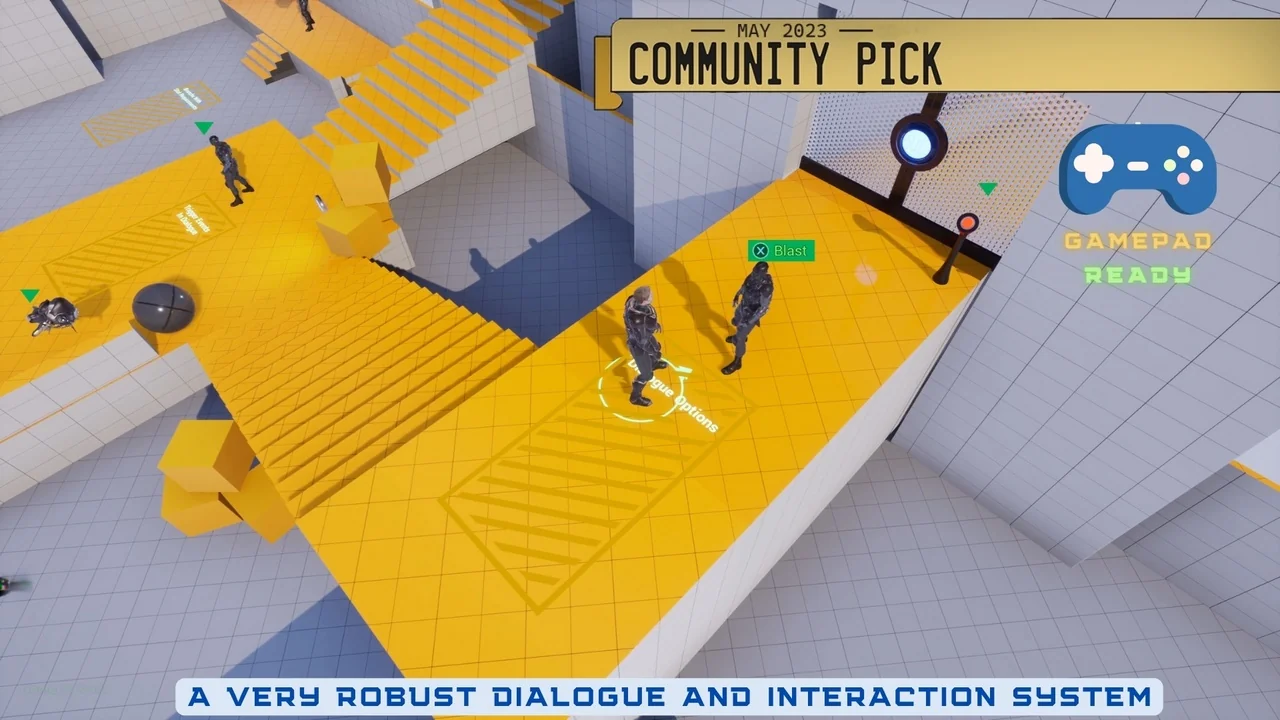
 Action-Adventure
![Hyper Multiplayer Survival Template Pro [MST] V4](/wp-content/uploads/published/2026/09/6060550226b8-0f2946eb-0653-4ed7-a160-e35859e9e5e9-61232ad933.webp) Action-Adventure
Action-Adventure![Hyper Multiplayer Survival Template Plus [MST] v4](/wp-content/uploads/published/2026/09/6998f3fa0308-de2368c5-543b-49ea-adad-ee13b3d478ed-563273f35a.webp) Action-Adventure
Action-Adventure