"c68a05d5e51405b3"{"id":"1001120","slug":"point-and-click-adventure-toolkit","title":"Point and Click Adventure Toolkit","category":"Action-Adventure","engine":"5.1+","assetVersion":"","engineVersion":"Engine Version: 5.1+","tag":"Action-Adventure","accent":"blue","visual":"mech","summary":"A 100% Blueprint framework for point-and-click adventure games with data-driven dialogue, inventory, scene manager, cameras, save/load systems, and complete pla","platform":"Unreal Engine","publishedAt":"2026-09-07T12:59:10.534Z","updatedAt":"2026-09-07T12:59:10.534Z","sourceNotes":[],"fileContents":[],"compatibility":["Unreal Engine","Engine Version: 5.1+"],"featuredImage":{"alt":"Point and Click Adventure Toolkit","src":"/wp-content/uploads/published/2026/09/bd0381c0f3a9-1def5d9f-97d7-43ea-ac15-388511944ee3-16d72cc4b4.webp"},"hasDownloadLink":true,"downloads":1,"terms":[{"taxonomy":"category","slug":"action-adventure","name":"Action-Adventure"}],"galleryImages":[{"src":"/wp-content/uploads/published/2026/09/f37532cfdede-227ee72c-1cf7-412f-be2a-ebf8a0c994d6-9bd66bd89b.webp","alt":"Point and Click Adventure Toolkit"},{"src":"/wp-content/uploads/published/2026/09/5836b73a6f61-c3665e03-e873-4769-a27b-b8a4d36855a2-93c66cc63f.webp","alt":"Point and Click Adventure Toolkit"},{"src":"/wp-content/uploads/published/2026/09/afc999cff32a-42d85079-c781-4776-b025-3d2269df7b39-efa2ef95a5.webp","alt":"Point and Click Adventure Toolkit"},{"src":"/wp-content/uploads/published/2026/09/54245c346480-06e7ec73-a301-42bb-a816-c1e3097fd585-f5acbe0eec.webp","alt":"Point and Click Adventure Toolkit"},{"src":"/wp-content/uploads/published/2026/09/2c24c39f73d9-6ea63360-2323-4546-94e7-e9b9b67c4c50-d61d1ce86c.webp","alt":"Point and Click Adventure Toolkit"},{"src":"/wp-content/uploads/published/2026/09/28b66ce775e8-f90c32db-df26-44ef-acf4-e3d6dfbd6566-67108cadd3.webp","alt":"Point and Click Adventure Toolkit"},{"src":"/wp-content/uploads/published/2026/09/3b91e333daf9-52e4d557-07c2-4efa-849d-3ac454633d2f-927199d755.webp","alt":"Point and Click Adventure Toolkit"}],"accessPanel":{"kind":"resource","title":"Download this resource","eyebrow":"Free Download","message":"Log in or create a free account to start your download.","fileName":"PointandClickAdventureToo.7z","safetyNote":"Resources are manually reviewed before listing to improve quality and reduce obvious risks.","actionLabel":"Download Free","resourceType":"Resource archive"},"contentHtml":"\u003cp\u003eThe Point and Click Adventure Toolkit is a gameplay framework built to handle the many interconnected systems that a classic point-and-click adventure needs. Beyond one-purpose asset, it covers the whole production spine: 100% Blueprint code, point-and-click movement and interactions, a flexible Actions System, data-driven dialogue, interactive items with inventory, intractable objects, doors and cross-scene transitions, advanced and fixed cameras, an extensive save/load system, and a wide set of UI screens. It also includes a Scene Manager for cut scenes and scene state handling, plus gameplay and dialogue conditions for branching narrative logic. The package is rounded out by supportive tooling, a Scene Hints framework, and an extensive gameplay demo with content examples.\u003c/p\u003e \u003ch2\u003ePoint and Click Movement and the Actions System\u003c/h2\u003e\n\u003cp\u003eThe core interaction model is point-and-click styled movement, the same familiar method used by classic adventure titles. The player clicks to move, examines objects, talks to characters, and triggers actions in the game world. Underneath that is an Actions System that is built for easy expansion. New actions can be added or existing ones modified directly, which keeps the process of defining what each click does from getting locked inside hard-coded logic. This design puts the focus on authoring gameplay actions rather than rewriting framework code, which fits a project structured around many different object and location interactions.\u003c/p\u003e\n\u003cp\u003eThe toolkit pairs that movement with interactive items and an inventory system, as well as intractable objects placed throughout the scenes. Because inventory and object interaction are such a central loop in adventure games, having them handled inside the same framework means that picking up an item, using it on something, and advancing the scene are all coordinated through one set of rules. Doors and cross-scene transitions are also included, so moving from one environment to another is already wired into the framework instead of requiring separate level-loading code.\u003c/p\u003e \u003ch2\u003eDialogue, Scene Manager, and Camera Controls\u003c/h2\u003e\n\u003cp\u003eDialogue in the toolkit is data-driven, which means conversations can be authored as structured data rather than scattered through event graphs. This is important for adventure games, where dialogue often contains clues, optional responses, and conversation branches that feed into puzzle states. Gameplay and Dialogue Conditions give the framework a way to lock or unlock dialogue lines and interactive events based on what has already happened, whether that is an inventory state, a scene flag, or some other gameplay checkpoint. Using conditions in this way allows the same dialogue node to behave differently depending on the player's progress.\u003c/p\u003e\n\u003cp\u003eThe Scene Manager is built for cut scenes and for managing scene states. It can transition between scenes while also tracking what state each scene is in, which becomes useful for setups where rooms change over time or where certain events need to be triggered only after previous ones are resolved. Advanced and Fixed Cameras give you control over how each scene is viewed. Fixed cameras work well for classic static shots, while advanced cameras can follow the player or move between points during scripted moments. Having both camera types incorporated into the framework avoids mixing separate camera systems into adventure sequences.\u003c/p\u003e \u003ch2\u003eSave/Load, Full UI Set, and Developer Tooling\u003c/h2\u003e\n\u003cp\u003eAn adventure game often requires the player to step away and return later, so an extensive Save and Load system is an important piece of the toolkit. It is designed to preserve the gameplay state, not just the player's position. Because the save system is part of the same framework as dialogue conditions, scene states, inventory, and doors, it can serialize the information those systems rely on. The UI set included here is unusually complete: a Main Menu, Game Menu, Player Game UI, Inventory UI, Hints menu, Simple Game Preferences, and an in-game developer menu are all part of the package. That means the player-facing shell of a game is already represented, including the settings screen and debug interface.\u003c/p\u003e\n\u003cp\u003eThe Scene Hints framework adds another layer that many adventure titles use to keep players on track without breaking immersion. By tying hints into the scene manager and the UI, the toolkit provides a clear place to show contextual reminders. Supportive Tooling for many features also appears throughout the package, giving developers more direct handling of systems that are otherwise data-driven or blueprint-based. All of this is strengthened by having every gameplay system assembled as Blueprint, so project teams can read, modify, and extend the logic without needing to drop into C++.\u003c/p\u003e \u003ch2\u003e2D and 3D Support, Demo, and Content Examples\u003c/h2\u003e\n\u003cp\u003eThe toolkit states support for two-dimensional and three-dimensional perspectives, which widens how it can be applied. A point-and-click game can be built with flat artwork, 3D environments, or a mix of the two, and the framework handles the interaction logic in a way that is not locked to a specific render approach. That is especially useful for teams that want to prototype an adventure with placeholder 3D and later adopt a 2D presentation, or vice versa. It also keeps the door open for hybrid scenes where characters use 3D models while backgrounds are pre-rendered or drawn.\u003c/p\u003e\n\u003cp\u003eBeyond the feature list, the Point and Click Adventure Toolkit includes an extensive gameplay demo and content examples. Those examples act as a working reference for how the Actions System, the dialogue data, the inventory interactions, the scene transitions, and the UI all fit together in a playable setting. For a framework of this scope, having a demo to start from shortens the time between opening the project and having something interactive to test. The content examples help clarify which part of the framework each system owns, which matters when you are layering your own puzzles, characters, and scenes on top of the provided foundation.\u003c/p\u003e \u003cp\u003eBy covering interaction, narrative, navigation, persistence, and presentation in one Blueprint-based package, the Point and Click Adventure Toolkit gives a project the core building blocks for a full adventure game. The included demo and content examples make it straightforward to see the systems in action, while the Actions System and data-driven dialogue leave room for custom gameplay without losing the existing structure.\u003c/p\u003e\n\n\u003ch2\u003eRelated Resources Worth Checking\u003c/h2\u003e\n\u003cul\u003e\n\u003cli\u003e\u003ca href=\"https://3dcghub.com/enhanced-movement-system/\" title=\"Enhanced Movement System\"\u003eEnhanced Movement System\u003c/a\u003e\u003c/li\u003e\n\u003cli\u003e\u003ca href=\"https://3dcghub.com/asymmetric-multiplayer-horror/\" title=\"Asymmetric Multiplayer Horror\"\u003eAsymmetric Multiplayer Horror\u003c/a\u003e\u003c/li\u003e\n\u003cli\u003e\u003ca href=\"https://3dcghub.com/parkour-race-multiplayer-blueprint-game-template-platformer-by-kekdot/\" title=\"Parkour Race - Multiplayer Blueprint Game Template - Platformer - By Kekdot\"\u003eParkour Race - Multiplayer Blueprint Game Template - Platformer - By Kekdot\u003c/a\u003e\u003c/li\u003e\n\u003cli\u003e\u003ca href=\"https://3dcghub.com/vhs-project-2-5/\" title=\"VHS Project 2.5\"\u003eVHS Project 2.5\u003c/a\u003e\u003c/li\u003e\n\u003cli\u003e\u003ca href=\"https://3dcghub.com/fantasy-girls-pack-2/\" title=\"Fantasy Girls Pack\"\u003eFantasy Girls Pack\u003c/a\u003e\u003c/li\u003e\n\u003c/ul\u003e","contentTextLength":6652,"navigation":{"current":855,"total":3860,"previous":{"id":"1001122","slug":"rocky-desert","title":"Rocky Desert","category":"Desert","platform":"Unreal Engine","updatedAt":"2026-09-07T13:05:56.081Z"},"next":{"id":"1001119","slug":"plant-fruits-and-vegetables","title":"plant Fruits and vegetables","category":"Nature \u0026 Plants","platform":"Unreal Engine","updatedAt":"2026-09-07T12:55:52.646Z"}},"relatedResources":[{"id":"1001239","slug":"msl-toolkit","title":"MSL Toolkit","category":"Action-Adventure","engine":"5.0+","assetVersion":"","engineVersion":"Engine Version: 5.0+","tag":"Action-Adventure","accent":"blue","visual":"mech","summary":"Explore the MSL Toolkit for Unreal Engine, featuring folder-based menus, input rebinding, audio localization, and prioritized savegame actor loading.","platform":"Unreal Engine","publishedAt":"2026-09-23T14:43:29.877Z","updatedAt":"2026-09-23T14:43:29.877Z","sourceNotes":[],"fileContents":[],"compatibility":["Unreal Engine","Engine Version: 5.0+"],"featuredImage":{"alt":"MSL Toolkit","src":"/wp-content/uploads/published/2026/09/8c27331a8f43-faf5c4e0-b079-461a-917d-fe933d7f4639-e1c30312ca.webp"},"hasDownloadLink":true,"downloads":0},{"id":"1001236","slug":"easy-locomotion-toolkit","title":"Easy Locomotion Toolkit","category":"Action-Adventure","engine":"5.0+","assetVersion":"","engineVersion":"Engine Version: 5.0+","tag":"Action-Adventure","accent":"blue","visual":"animation","summary":"A component-based Unreal Engine framework featuring modular locomotion calculations, datatable animset swapping, and structure-driven replication.","platform":"Unreal Engine","publishedAt":"2026-09-21T03:46:32.498Z","updatedAt":"2026-09-21T03:46:32.498Z","sourceNotes":[],"fileContents":[],"compatibility":["Unreal Engine","Engine Version: 5.0+"],"featuredImage":{"alt":"Easy Locomotion Toolkit","src":"/wp-content/uploads/published/2026/09/1c39ce837155-999607d8-b0a8-4400-a6a4-e5ddd2c06569-2ec6a33aef.webp"},"hasDownloadLink":true,"downloads":0},{"id":"1001235","slug":"easy-ai-toolkit","title":"Easy AI Toolkit","category":"Action-Adventure","engine":"5.0+","assetVersion":"","engineVersion":"Engine Version: 5.0+","tag":"Action-Adventure","accent":"blue","visual":"mech","summary":"Explore the Easy AI Toolkit for Unreal Engine, featuring modular actor navigation, controller lifecycle controls, and dynamic behavior tree swapping.","platform":"Unreal Engine","publishedAt":"2026-09-21T03:45:03.291Z","updatedAt":"2026-09-21T03:45:03.291Z","sourceNotes":[],"fileContents":[],"compatibility":["Unreal Engine","Engine Version: 5.0+"],"featuredImage":{"alt":"Easy AI Toolkit","src":"/wp-content/uploads/published/2026/09/2ea23c1fb0c2-05ef4a20-03f1-4d9a-832b-7ce6083cdc69-d6a85e3559.webp"},"hasDownloadLink":true,"downloads":0}]}
Action-Adventure
Point and Click Adventure Toolkit
A 100% Blueprint framework for point-and-click adventure games with data-driven dialogue, inventory, scene manager, cameras, save/load systems, and complete pla
The Point and Click Adventure Toolkit is a gameplay framework built to handle the many interconnected systems that a classic point-and-click adventure needs. Beyond one-purpose asset, it covers the whole production spine: 100% Blueprint code, point-and-click movement and interactions, a flexible Actions System, data-driven dialogue, interactive items with inventory, intractable objects, doors and cross-scene transitions, advanced and fixed cameras, an extensive save/load system, and a wide set of UI screens. It also includes a Scene Manager for cut scenes and scene state handling, plus gameplay and dialogue conditions for branching narrative logic. The package is rounded out by supportive tooling, a Scene Hints framework, and an extensive gameplay demo with content examples.
Point and Click Movement and the Actions System
The core interaction model is point-and-click styled movement, the same familiar method used by classic adventure titles. The player clicks to move, examines objects, talks to characters, and triggers actions in the game world. Underneath that is an Actions System that is built for easy expansion. New actions can be added or existing ones modified directly, which keeps the process of defining what each click does from getting locked inside hard-coded logic. This design puts the focus on authoring gameplay actions rather than rewriting framework code, which fits a project structured around many different object and location interactions.
The toolkit pairs that movement with interactive items and an inventory system, as well as intractable objects placed throughout the scenes. Because inventory and object interaction are such a central loop in adventure games, having them handled inside the same framework means that picking up an item, using it on something, and advancing the scene are all coordinated through one set of rules. Doors and cross-scene transitions are also included, so moving from one environment to another is already wired into the framework instead of requiring separate level-loading code.
Dialogue, Scene Manager, and Camera Controls
Dialogue in the toolkit is data-driven, which means conversations can be authored as structured data rather than scattered through event graphs. This is important for adventure games, where dialogue often contains clues, optional responses, and conversation branches that feed into puzzle states. Gameplay and Dialogue Conditions give the framework a way to lock or unlock dialogue lines and interactive events based on what has already happened, whether that is an inventory state, a scene flag, or some other gameplay checkpoint. Using conditions in this way allows the same dialogue node to behave differently depending on the player's progress.
The Scene Manager is built for cut scenes and for managing scene states. It can transition between scenes while also tracking what state each scene is in, which becomes useful for setups where rooms change over time or where certain events need to be triggered only after previous ones are resolved. Advanced and Fixed Cameras give you control over how each scene is viewed. Fixed cameras work well for classic static shots, while advanced cameras can follow the player or move between points during scripted moments. Having both camera types incorporated into the framework avoids mixing separate camera systems into adventure sequences.
Save/Load, Full UI Set, and Developer Tooling
An adventure game often requires the player to step away and return later, so an extensive Save and Load system is an important piece of the toolkit. It is designed to preserve the gameplay state, not just the player's position. Because the save system is part of the same framework as dialogue conditions, scene states, inventory, and doors, it can serialize the information those systems rely on. The UI set included here is unusually complete: a Main Menu, Game Menu, Player Game UI, Inventory UI, Hints menu, Simple Game Preferences, and an in-game developer menu are all part of the package. That means the player-facing shell of a game is already represented, including the settings screen and debug interface.
The Scene Hints framework adds another layer that many adventure titles use to keep players on track without breaking immersion. By tying hints into the scene manager and the UI, the toolkit provides a clear place to show contextual reminders. Supportive Tooling for many features also appears throughout the package, giving developers more direct handling of systems that are otherwise data-driven or blueprint-based. All of this is strengthened by having every gameplay system assembled as Blueprint, so project teams can read, modify, and extend the logic without needing to drop into C++.
2D and 3D Support, Demo, and Content Examples
The toolkit states support for two-dimensional and three-dimensional perspectives, which widens how it can be applied. A point-and-click game can be built with flat artwork, 3D environments, or a mix of the two, and the framework handles the interaction logic in a way that is not locked to a specific render approach. That is especially useful for teams that want to prototype an adventure with placeholder 3D and later adopt a 2D presentation, or vice versa. It also keeps the door open for hybrid scenes where characters use 3D models while backgrounds are pre-rendered or drawn.
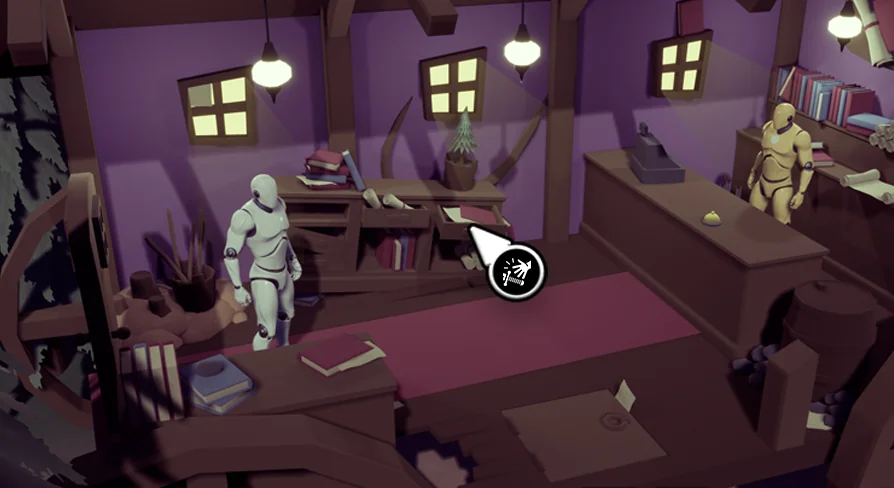
Beyond the feature list, the Point and Click Adventure Toolkit includes an extensive gameplay demo and content examples. Those examples act as a working reference for how the Actions System, the dialogue data, the inventory interactions, the scene transitions, and the UI all fit together in a playable setting. For a framework of this scope, having a demo to start from shortens the time between opening the project and having something interactive to test. The content examples help clarify which part of the framework each system owns, which matters when you are layering your own puzzles, characters, and scenes on top of the provided foundation.
By covering interaction, narrative, navigation, persistence, and presentation in one Blueprint-based package, the Point and Click Adventure Toolkit gives a project the core building blocks for a full adventure game. The included demo and content examples make it straightforward to see the systems in action, while the Actions System and data-driven dialogue leave room for custom gameplay without losing the existing structure.
 Action-Adventure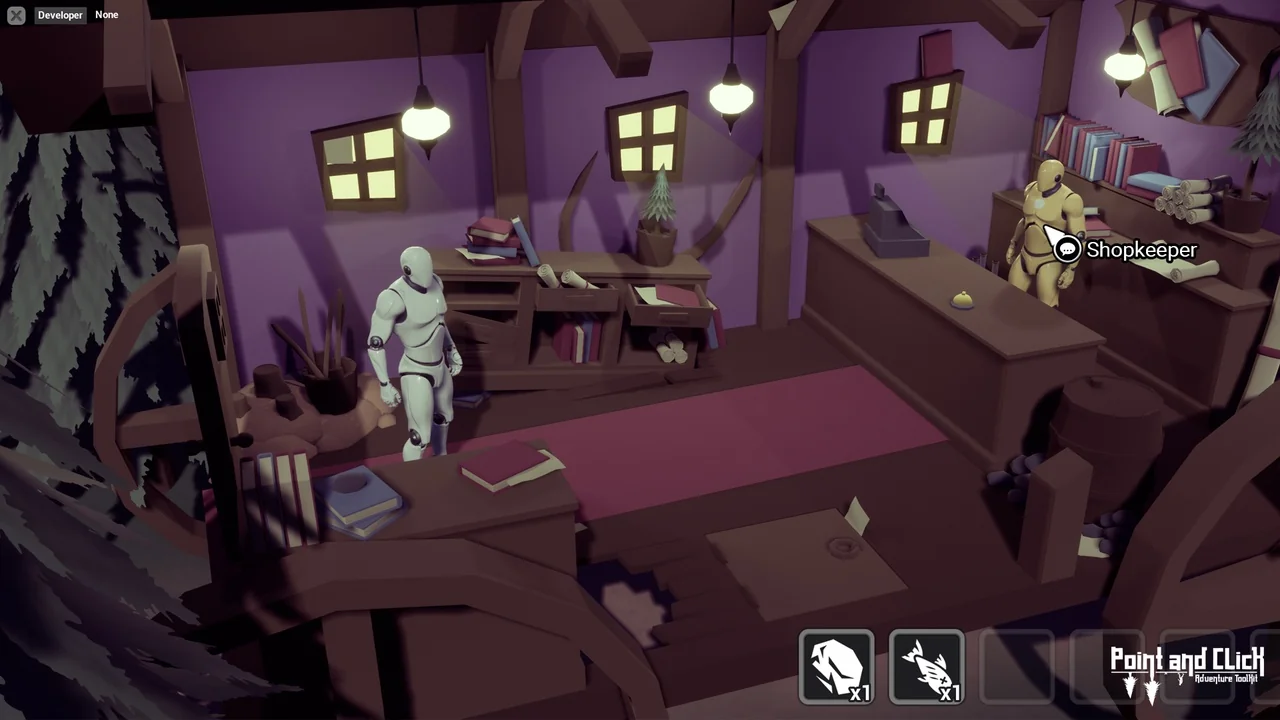
 Action-Adventure
 Action-Adventure
 Action-Adventure