"6ac84fdb0bd06614"{"id":"1001236","slug":"easy-locomotion-toolkit","title":"Easy Locomotion Toolkit","category":"Action-Adventure","engine":"5.0+","assetVersion":"","engineVersion":"Engine Version: 5.0+","tag":"Action-Adventure","accent":"blue","visual":"animation","summary":"A component-based Unreal Engine framework featuring modular locomotion calculations, datatable animset swapping, and structure-driven replication.","platform":"Unreal Engine","publishedAt":"2026-09-21T03:46:32.498Z","updatedAt":"2026-09-21T03:46:32.498Z","sourceNotes":[],"fileContents":[],"compatibility":["Unreal Engine","Engine Version: 5.0+"],"featuredImage":{"alt":"Easy Locomotion Toolkit","src":"/wp-content/uploads/published/2026/09/1c39ce837155-999607d8-b0a8-4400-a6a4-e5ddd2c06569-2ec6a33aef.webp"},"hasDownloadLink":true,"downloads":0,"terms":[{"taxonomy":"category","slug":"action-adventure","name":"Action-Adventure"}],"galleryImages":[{"src":"/wp-content/uploads/published/2026/09/91e843c082fc-d43b5904-dbf2-49a0-9c7f-6167b4962fb5-f264c6f611.webp","alt":"Easy Locomotion Toolkit"},{"src":"/wp-content/uploads/published/2026/09/a1bf03f64182-40c06fb8-2d67-4b33-8728-aa2b1d481f8b-730de9909d.webp","alt":"Easy Locomotion Toolkit"},{"src":"/wp-content/uploads/published/2026/09/bec57abd05f0-d89828c1-b863-42c2-a99e-8de08b12f996-eaf698779a.webp","alt":"Easy Locomotion Toolkit"}],"accessPanel":{"kind":"resource","title":"Download this resource","eyebrow":"Free Download","message":"Log in or create a free account to start your download.","fileName":"Content.7z","safetyNote":"Resources are manually reviewed before listing to improve quality and reduce obvious risks.","actionLabel":"Download Free","resourceType":"Resource archive"},"contentHtml":"\u003ch2\u003eResolving Blueprint Clutter with Easy Locomotion Toolkit Component Architecture\u003c/h2\u003e\u003cp\u003eLocomotion logic often turns character Blueprints and Animation Blueprints into tangled graphs that become difficult to debug and maintain across distinct characters.\u003c/p\u003e\u003cp\u003eThe Easy Locomotion Toolkit counters this sprawl by shifting all movement processing into a dedicated actor component. Rather than embedding extensive mathematical networks directly into character classes, the component performs its calculations independently using modular structures. Character Blueprints and AnimBPs remain bare, leaving clean graph space for gameplay actions, specific abilities, and project-unique logic. Locomotion data is organized directly into isolated modules, meaning individual calculation routines handle their own subsets of information without polluting the overarching actor hierarchy.\u003c/p\u003e\u003ch2\u003eSwapping Animsets via DataTable Logic\u003c/h2\u003e\u003cp\u003eManaging movement variations usually demands extensive state machine adjustments or duplicate transition graphs for different weapon stances and mobility profiles.\u003c/p\u003e\u003cp\u003eWithin this framework, changing a character's animation profile is controlled through external data structures rather than embedded script edits. The built-in DataTable system enables developers to switch entire character animsets directly at runtime. Adding new movement modes, alternative animation assets, and conditional travel states requires only a few clicks inside the configuration tables. Because the component handles the underlying calculation tasks, custom actor types simply read the outgoing data state and feed the corresponding assets to their animation graphs without manual Blueprint restructuring.\u003c/p\u003e\u003ch2\u003eModule-Based Calculations and Network Replication\u003c/h2\u003e\u003cp\u003eSynchronizing complex character mobility over a network frequently introduces bandwidth bottlenecks and desynchronization between clients and servers.\u003c/p\u003e\u003cp\u003eThe system routes its data pipeline through optimized structures that automate replication across connected sessions. Each isolated module executes its own calculation pass, and the resulting values are bundled into structures for network distribution. To maintain responsive handling, calculations are processed client-side, ensuring local movement stays fluid without waiting for round-trip validation. By automating the communication layer through data structures, the toolkit removes the need to manually wire custom RPCs or copy-paste replication functions whenever a character setup changes.\u003c/p\u003e\u003ch2\u003eIntegrating Custom Actor Classes and AI Systems\u003c/h2\u003e\u003cp\u003eStandard movement implementations are frequently locked to native character classes, restricting their utility on non-standard pawns or artificial intelligence entities.\u003c/p\u003e\u003cp\u003eBecause the logic is contained in a single actor component, it can attach to any standard character or custom actor class without rewriting core movement functions. Once attached, the component performs the necessary movement evaluations internally, allowing the host actor to read the calculated outputs and trigger appropriate movement responses. The system includes full AI support and functions alongside the Easy AI Toolkit, enabling non-player characters to share the exact same movement mechanics, mode switches, and DataTable-driven animset changes used by player-controlled characters.\u003c/p\u003e\u003ch2\u003eAnimation Requirements and Unreal Engine Version Implementation\u003c/h2\u003e\u003cp\u003eProject integration requires clarity regarding animation dependencies and baseline engine compatibility across production cycles.\u003c/p\u003e\u003cp\u003eThe toolkit is provided with basic Unreal Engine 4 starter animations rather than complex display sets. While promotional demonstration materials showcase external marketplace assets, those specific animation sequences are not bundled directly inside the toolkit itself, though third-party animation assets can be substituted into the system's DataTables. The setup is configured for engine builds from version 4.19.2 through 4.24 and higher. While projects constructed in earlier engine releases generally carry forward cleanly, changes to internal engine functions between versions can occasionally require straightforward node updates. Users working with the package are expected to have a foundational understanding of Blueprints to map their specific actor setups and manage DataTable references properly.\u003c/p\u003e\u003ch2\u003eLocomotion Pipeline Placement in Action and RPG Projects\u003c/h2\u003e\u003cp\u003eEstablishing movement mechanics is typically the first mechanical hurdle when constructing modular combat systems, quest lines, or role-playing architectures.\u003c/p\u003e\u003cp\u003eThe framework functions as an underlying base layer within broader action setups, slotting directly underneath systems such as combo tools, QTE handlers, dialogue trees, stats, and ragdoll frameworks. By resolving locomotion data management through an isolated component, studios can standardize movement across players, companions, and enemy variants while keeping individual gameplay scripts fully compartmentalized.\u003c/p\u003e\n\n\u003ch2\u003eRelated Resources Worth Checking\u003c/h2\u003e\n\u003cul\u003e\n\u003cli\u003e\u003ca href=\"https://3dcghub.com/easy-ai-toolkit/\" title=\"Easy AI Toolkit\"\u003eEasy AI Toolkit\u003c/a\u003e\u003c/li\u003e\n\u003cli\u003e\u003ca href=\"https://3dcghub.com/dynamic-qte-system/\" title=\"Dynamic QTE System\"\u003eDynamic QTE System\u003c/a\u003e\u003c/li\u003e\n\u003cli\u003e\u003ca href=\"https://3dcghub.com/advanced-locomotion-system-v4/\" title=\"Advanced Locomotion System V4\"\u003eAdvanced Locomotion System V4\u003c/a\u003e\u003c/li\u003e\n\u003cli\u003e\u003ca href=\"https://3dcghub.com/point-and-click-adventure-toolkit/\" title=\"Point and Click Adventure Toolkit\"\u003ePoint and Click Adventure Toolkit\u003c/a\u003e\u003c/li\u003e\n\u003cli\u003e\u003ca href=\"https://3dcghub.com/enhanced-movement-system/\" title=\"Enhanced Movement System\"\u003eEnhanced Movement System\u003c/a\u003e\u003c/li\u003e\n\u003c/ul\u003e","contentTextLength":5093,"navigation":{"current":3,"total":3181,"previous":{"id":"1001237","slug":"horse-starter-kit","title":"Horse Starter Kit","category":"Action-Adventure","platform":"Unreal Engine","updatedAt":"2026-09-21T03:49:23.075Z"},"next":{"id":"1001235","slug":"easy-ai-toolkit","title":"Easy AI Toolkit","category":"Action-Adventure","platform":"Unreal Engine","updatedAt":"2026-09-21T03:45:03.291Z"}},"relatedResources":[{"id":"1001235","slug":"easy-ai-toolkit","title":"Easy AI Toolkit","category":"Action-Adventure","engine":"5.0+","assetVersion":"","engineVersion":"Engine Version: 5.0+","tag":"Action-Adventure","accent":"blue","visual":"mech","summary":"Explore the Easy AI Toolkit for Unreal Engine, featuring modular actor navigation, controller lifecycle controls, and dynamic behavior tree swapping.","platform":"Unreal Engine","publishedAt":"2026-09-21T03:45:03.291Z","updatedAt":"2026-09-21T03:45:03.291Z","sourceNotes":[],"fileContents":[],"compatibility":["Unreal Engine","Engine Version: 5.0+"],"featuredImage":{"alt":"Easy AI Toolkit","src":"/wp-content/uploads/published/2026/09/2ea23c1fb0c2-05ef4a20-03f1-4d9a-832b-7ce6083cdc69-d6a85e3559.webp"},"hasDownloadLink":true,"downloads":0},{"id":"1001233","slug":"dynamic-qte-system","title":"Dynamic QTE System","category":"Action-Adventure","engine":"5.0+","assetVersion":"","engineVersion":"Engine Version: 5.0+","tag":"Action-Adventure","accent":"blue","visual":"mech","summary":"Explore the Dynamic QTE System for Unreal Engine, featuring non-linear cinematic quick time events, MSL toolkit subsystems, and NPC-driven sequences.","platform":"Unreal Engine","publishedAt":"2026-09-21T03:40:52.960Z","updatedAt":"2026-09-21T03:40:52.960Z","sourceNotes":[],"fileContents":[],"compatibility":["Unreal Engine","Engine Version: 5.0+"],"featuredImage":{"alt":"Dynamic QTE System","src":"/wp-content/uploads/published/2026/09/dc69da09122c-09594aa3-a75c-4c31-be50-6d617a4b9e72-24a2b26565.webp"},"hasDownloadLink":true,"downloads":0},{"id":"1001226","slug":"advanced-locomotion-system-v4","title":"Advanced Locomotion System V4","category":"Action-Adventure","engine":"5.0+","assetVersion":"","engineVersion":"Engine Version: 5.0+","tag":"Action-Adventure","accent":"blue","visual":"animation","summary":"Technical breakdown of Advanced Locomotion System V4 for Unreal Engine 4, covering curve-driven movement, layered AnimBP logic, and dynamic mantling.","platform":"Unreal Engine","publishedAt":"2026-09-21T03:20:36.125Z","updatedAt":"2026-09-21T03:20:36.125Z","sourceNotes":[],"fileContents":[],"compatibility":["Unreal Engine","Engine Version: 5.0+"],"featuredImage":{"alt":"Advanced Locomotion System V4","src":"/wp-content/uploads/published/2026/09/51c36ad1f441-ab404707-41ee-416b-828a-8d4b1f1bf80d-f9556d70e9.webp"},"hasDownloadLink":true,"downloads":0}]}
Action-Adventure
Easy Locomotion Toolkit
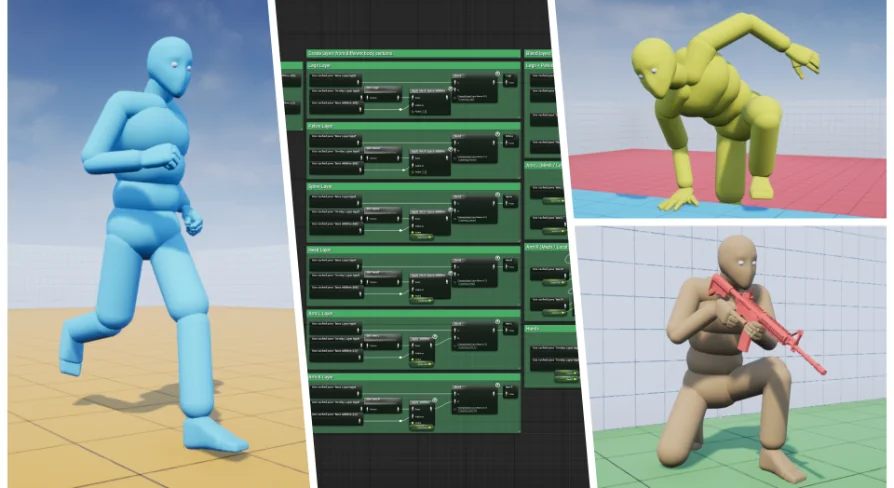
A component-based Unreal Engine framework featuring modular locomotion calculations, datatable animset swapping, and structure-driven replication.
Resolving Blueprint Clutter with Easy Locomotion Toolkit Component Architecture
Locomotion logic often turns character Blueprints and Animation Blueprints into tangled graphs that become difficult to debug and maintain across distinct characters.
The Easy Locomotion Toolkit counters this sprawl by shifting all movement processing into a dedicated actor component. Rather than embedding extensive mathematical networks directly into character classes, the component performs its calculations independently using modular structures. Character Blueprints and AnimBPs remain bare, leaving clean graph space for gameplay actions, specific abilities, and project-unique logic. Locomotion data is organized directly into isolated modules, meaning individual calculation routines handle their own subsets of information without polluting the overarching actor hierarchy.
Swapping Animsets via DataTable Logic
Managing movement variations usually demands extensive state machine adjustments or duplicate transition graphs for different weapon stances and mobility profiles.
Within this framework, changing a character's animation profile is controlled through external data structures rather than embedded script edits. The built-in DataTable system enables developers to switch entire character animsets directly at runtime. Adding new movement modes, alternative animation assets, and conditional travel states requires only a few clicks inside the configuration tables. Because the component handles the underlying calculation tasks, custom actor types simply read the outgoing data state and feed the corresponding assets to their animation graphs without manual Blueprint restructuring.
Module-Based Calculations and Network Replication
Synchronizing complex character mobility over a network frequently introduces bandwidth bottlenecks and desynchronization between clients and servers.
The system routes its data pipeline through optimized structures that automate replication across connected sessions. Each isolated module executes its own calculation pass, and the resulting values are bundled into structures for network distribution. To maintain responsive handling, calculations are processed client-side, ensuring local movement stays fluid without waiting for round-trip validation. By automating the communication layer through data structures, the toolkit removes the need to manually wire custom RPCs or copy-paste replication functions whenever a character setup changes.
Integrating Custom Actor Classes and AI Systems
Standard movement implementations are frequently locked to native character classes, restricting their utility on non-standard pawns or artificial intelligence entities.
Because the logic is contained in a single actor component, it can attach to any standard character or custom actor class without rewriting core movement functions. Once attached, the component performs the necessary movement evaluations internally, allowing the host actor to read the calculated outputs and trigger appropriate movement responses. The system includes full AI support and functions alongside the Easy AI Toolkit, enabling non-player characters to share the exact same movement mechanics, mode switches, and DataTable-driven animset changes used by player-controlled characters.
Animation Requirements and Unreal Engine Version Implementation
Project integration requires clarity regarding animation dependencies and baseline engine compatibility across production cycles.
The toolkit is provided with basic Unreal Engine 4 starter animations rather than complex display sets. While promotional demonstration materials showcase external marketplace assets, those specific animation sequences are not bundled directly inside the toolkit itself, though third-party animation assets can be substituted into the system's DataTables. The setup is configured for engine builds from version 4.19.2 through 4.24 and higher. While projects constructed in earlier engine releases generally carry forward cleanly, changes to internal engine functions between versions can occasionally require straightforward node updates. Users working with the package are expected to have a foundational understanding of Blueprints to map their specific actor setups and manage DataTable references properly.
Locomotion Pipeline Placement in Action and RPG Projects
Establishing movement mechanics is typically the first mechanical hurdle when constructing modular combat systems, quest lines, or role-playing architectures.
The framework functions as an underlying base layer within broader action setups, slotting directly underneath systems such as combo tools, QTE handlers, dialogue trees, stats, and ragdoll frameworks. By resolving locomotion data management through an isolated component, studios can standardize movement across players, companions, and enemy variants while keeping individual gameplay scripts fully compartmentalized.
 Action-Adventure
 Action-Adventure
 Action-Adventure
 Action-Adventure