"6ac84fdb0bd06614"{"id":"1001235","slug":"easy-ai-toolkit","title":"Easy AI Toolkit","category":"Action-Adventure","engine":"5.0+","assetVersion":"","engineVersion":"Engine Version: 5.0+","tag":"Action-Adventure","accent":"blue","visual":"mech","summary":"Explore the Easy AI Toolkit for Unreal Engine, featuring modular actor navigation, controller lifecycle controls, and dynamic behavior tree swapping.","platform":"Unreal Engine","publishedAt":"2026-09-21T03:45:03.291Z","updatedAt":"2026-09-21T03:45:03.291Z","sourceNotes":[],"fileContents":[],"compatibility":["Unreal Engine","Engine Version: 5.0+"],"featuredImage":{"alt":"Easy AI Toolkit","src":"/wp-content/uploads/published/2026/09/2ea23c1fb0c2-05ef4a20-03f1-4d9a-832b-7ce6083cdc69-d6a85e3559.webp"},"hasDownloadLink":true,"downloads":0,"terms":[{"taxonomy":"category","slug":"action-adventure","name":"Action-Adventure"}],"galleryImages":[{"src":"/wp-content/uploads/published/2026/09/4525485cf4a7-6c5ace1a-2aaf-4149-bb71-b50fbf81cb60-964ca5a2af.webp","alt":"Easy AI Toolkit"},{"src":"/wp-content/uploads/published/2026/09/48c611eba251-c3ab083e-41fc-47db-acd9-a622738a6fa0-c39071f6f6.webp","alt":"Easy AI Toolkit"}],"accessPanel":{"kind":"resource","title":"Download this resource","eyebrow":"Free Download","message":"Log in or create a free account to start your download.","fileName":"Content.7z","safetyNote":"Resources are manually reviewed before listing to improve quality and reduce obvious risks.","actionLabel":"Download Free","resourceType":"Resource archive"},"contentHtml":"\u003cp\u003eImplementing artificial intelligence in Unreal Engine often requires navigating rigid class hierarchies, particularly the default reliance on Character and Pawn base classes. The Easy AI Toolkit restructures this workflow by packaging artificial intelligence operations into a modular component. By attaching the Easy AI component directly to any actor class, projects can initiate complex tasks, services, and pathfinding routines without writing low-level management frameworks from scratch.\u003c/p\u003e \u003ch2\u003eAttaching the Easy AI Component Across Diverse Actor Classes\u003c/h2\u003e\n\u003cp\u003eStandard engine architectures usually bind artificial intelligence logic tightly to Pawn or Character classes. The Easy AI component changes that dynamic by allowing attachment to any actor class in the project. Static world props, interactable mechanisms, distinct vehicle meshes, and custom entity setups can directly inherit navigation routines and service execution without being forced into an unnecessary Character hierarchy.\u003c/p\u003e\n\u003cp\u003eOnce attached, the component grants the host actor the capacity to read complex tasks and run services immediately. Developers can step straight into designing game logic instead of building boilerplate bridges between actor data and artificial intelligence controllers. The modular Blueprint setup keeps the integration customizable, giving designers the flexibility to define specific behaviors on an actor-by-actor basis while relying on a centralized system architecture.\u003c/p\u003e \u003ch2\u003eNavMesh Path Management and Custom Movement Pipelines\u003c/h2\u003e\n\u003cp\u003eMovement execution within the toolkit relies on an advanced path management system built to handle diverse locomotion models. Grounded humanoids, quadruped actors, and wheeled vehicles all share the same underlying path search logic. The toolkit processes path queries through standard NavMesh volumes, extracts the resulting path data, and exposes those waypoints for consumption by any custom movement system or external locomotion asset.\u003c/p\u003e\n\u003cp\u003eThis decoupling of path data from default movement components makes it straightforward to direct non-standard units. When dealing with vehicles, the component calculates NavMesh corridors and feeds steering and throttle data into custom vehicle dynamics rather than relying on default character movement constraints. For aerial units, the system adapts to custom navigation setups, allowing flying actors to translate pathing information into three-dimensional coordinate updates without breaking compatibility with ground-based logic.\u003c/p\u003e \u003ch2\u003eAI Controller Lifecycles and Behavior Tree Management\u003c/h2\u003e\n\u003cp\u003eIn default Unreal Engine level instances, AI controllers persist in the world once spawned unless explicitly cleaned up by custom code. Over extended play sessions with frequent unit spawning, these lingering controllers consume unnecessary memory and processing power. The Easy AI component actively addresses controller lifecycles by providing built-in tool functions that destroy, clear, or replace artificial intelligence controllers and their associated working data on the fly.\u003c/p\u003e\n\u003cp\u003eWhen an actor attached to the component is removed from the world, the toolkit automatically destroys the accompanying controller alongside the host actor. If a specific scenario demands swapping out logic sets mid-encounter, developers can manually clear or replace controllers at runtime without restarting the actor instance.\u003c/p\u003e\n\u003cp\u003eBehavior tree execution receives similar runtime controls. The toolkit allows trees to pause and resume without losing the context of their latest instructions. When an actor is interrupted or changes states, the current tree can freeze its state, yield to a higher-priority behavior, and resume smoothly once conditions normalize. Behavior trees can also be swapped entirely during live gameplay, allowing direct communication between individual tree branches and assigned tasks to govern complex operational transitions.\u003c/p\u003e \u003ch2\u003eIntegrated Systems for Formations, Resources, and World Context\u003c/h2\u003e\n\u003cp\u003eTo demonstrate practical implementation methods, the toolkit incorporates multiple complete sub-systems built on top of the base component. These sample systems highlight how to route pathing and logic data into higher-level game mechanics:\u003c/p\u003e\n\u003cul\u003e \u003cli\u003e\u003cstrong\u003eStrategic rectangle selection:\u003c/strong\u003e Provides top-down selection bounds to select multiple actors simultaneously.\u003c/li\u003e \u003cli\u003e\u003cstrong\u003eGroups, formations, and factions:\u003c/strong\u003e Organizes independent actors into coordinated squads with defined faction relationships and spatial offsets.\u003c/li\u003e \u003cli\u003e\u003cstrong\u003eWorkspaces and resource harvesting:\u003c/strong\u003e Structures task assignments around target locations, letting units navigate to work sites, gather materials, and interact with designated props.\u003c/li\u003e \u003cli\u003e\u003cstrong\u003eCombat and attacking routines:\u003c/strong\u003e Executes direct offensive behaviors and target engagement driven by behavior tree branches.\u003c/li\u003e \u003cli\u003e\u003cstrong\u003eDate and time-based behavior:\u003c/strong\u003e Schedules unit activities based on simulated timelines, adjusting task execution depending on in-game hours or calendar states.\u003c/li\u003e\n\u003c/ul\u003e\n\u003cp\u003eBecause these bonus examples are built directly into the toolkit, developers can examine how the Easy AI component interfaces with surrounding gameplay systems without needing to invent proprietary communication patterns between actors, tasks, and world managers.\u003c/p\u003e \u003ch2\u003eBlueprint Requirements and Engine Version Maintenance\u003c/h2\u003e\n\u003cp\u003eWorking effectively with the toolkit requires at least a baseline understanding of Unreal Engine Blueprints. While the system simplifies navigation sorting and controller management, tailoring tasks, expanding custom movement mechanics, and tweaking behavior tree branches still relies on visual scripting logic. It is structured for creators who know how to navigate Blueprint graphs and actor components rather than absolute beginners.\u003c/p\u003e\n\u003cp\u003eThe toolkit natively targets Unreal Engine versions 4.19.2 through 4.24 and above. Content developed in these earlier iterations of the engine is constructed to transfer forward into newer engine releases cleanly under standard conditions. In scenarios where broader engine updates alter underlying engine functions, small script adjustments may be required to resolve version-specific syntax changes. Additionally, the system functions alongside specialized narrative and quest tools, including external Dialogue Tree and Quest frameworks, making it a viable foundation for narrative-driven role-playing games and complex multi-character simulations.\u003c/p\u003e\n\n\u003ch2\u003eExplore Similar Assets\u003c/h2\u003e\n\u003cul\u003e\n\u003cli\u003e\u003ca href=\"https://3dcghub.com/demonstrating-animation-blueprints-and-ai-for-gameplay-designers/\" title=\"Demonstrating Animation Blueprints and AI for Gameplay Designers\"\u003eDemonstrating Animation Blueprints and AI for Gameplay Designers\u003c/a\u003e\u003c/li\u003e\n\u003cli\u003e\u003ca href=\"https://3dcghub.com/asymmetric-multiplayer-horror/\" title=\"Asymmetric Multiplayer Horror\"\u003eAsymmetric Multiplayer Horror\u003c/a\u003e\u003c/li\u003e\n\u003cli\u003e\u003ca href=\"https://3dcghub.com/dynamic-qte-system/\" title=\"Dynamic QTE System\"\u003eDynamic QTE System\u003c/a\u003e\u003c/li\u003e\n\u003cli\u003e\u003ca href=\"https://3dcghub.com/point-and-click-adventure-toolkit/\" title=\"Point and Click Adventure Toolkit\"\u003ePoint and Click Adventure Toolkit\u003c/a\u003e\u003c/li\u003e\n\u003cli\u003e\u003ca href=\"https://3dcghub.com/enhanced-movement-system/\" title=\"Enhanced Movement System\"\u003eEnhanced Movement System\u003c/a\u003e\u003c/li\u003e\n\u003c/ul\u003e","contentTextLength":6505,"navigation":{"current":4,"total":3181,"previous":{"id":"1001236","slug":"easy-locomotion-toolkit","title":"Easy Locomotion Toolkit","category":"Action-Adventure","platform":"Unreal Engine","updatedAt":"2026-09-21T03:46:32.498Z"},"next":{"id":"1001234","slug":"dynamic-ragdoll","title":"Dynamic Ragdoll","category":"Action-Adventure","platform":"Unreal Engine","updatedAt":"2026-09-21T03:43:09.332Z"}},"relatedResources":[{"id":"1001231","slug":"demonstrating-animation-blueprints-and-ai-for-gameplay-designers","title":"Demonstrating Animation Blueprints and AI for Gameplay Designers","category":"Action-Adventure","engine":"5.0+","assetVersion":"","engineVersion":"Engine Version: 5.0+","tag":"Action-Adventure","accent":"blue","visual":"animation","summary":"Explore the connection between Animation Blueprints, behavior trees, montages, and basic enemy character AI for gameplay designers.","platform":"Unreal Engine","publishedAt":"2026-09-21T03:35:26.508Z","updatedAt":"2026-09-21T03:35:26.508Z","sourceNotes":[],"fileContents":[],"compatibility":["Unreal Engine","Engine Version: 5.0+"],"featuredImage":{"alt":"Demonstrating Animation Blueprints and AI for Gameplay Designers","src":"/wp-content/uploads/published/2026/09/17ead882c717-6d1822dd-94f6-42cb-bab3-18f794094846-660798aead.webp"},"hasDownloadLink":true,"downloads":0},{"id":"1000977","slug":"asymmetric-multiplayer-horror","title":"Asymmetric Multiplayer Horror","category":"Action-Adventure","engine":"5.0+","assetVersion":"","engineVersion":"Engine Version: 5.0+","tag":"Action-Adventure","accent":"blue","visual":"mech","summary":"Blueprint template for asymmetric multiplayer horror with 4 vs 1 play, AI or player monsters, first/third person views, and a Cursed Forest demo.","platform":"Unreal Engine","publishedAt":"2026-08-17T17:19:51.833Z","updatedAt":"2026-08-17T17:19:51.833Z","sourceNotes":[],"fileContents":[],"compatibility":["Unreal Engine","Engine Version: 5.0+"],"featuredImage":{"alt":"Asymmetric Multiplayer Horror","src":"/wp-content/uploads/published/2026/08/d3e8d4559426-f968b340-50b9-4a59-9fa7-7cdea14f055c-e0904bd06f.webp"},"hasDownloadLink":true,"downloads":1},{"id":"1001236","slug":"easy-locomotion-toolkit","title":"Easy Locomotion Toolkit","category":"Action-Adventure","engine":"5.0+","assetVersion":"","engineVersion":"Engine Version: 5.0+","tag":"Action-Adventure","accent":"blue","visual":"animation","summary":"A component-based Unreal Engine framework featuring modular locomotion calculations, datatable animset swapping, and structure-driven replication.","platform":"Unreal Engine","publishedAt":"2026-09-21T03:46:32.498Z","updatedAt":"2026-09-21T03:46:32.498Z","sourceNotes":[],"fileContents":[],"compatibility":["Unreal Engine","Engine Version: 5.0+"],"featuredImage":{"alt":"Easy Locomotion Toolkit","src":"/wp-content/uploads/published/2026/09/1c39ce837155-999607d8-b0a8-4400-a6a4-e5ddd2c06569-2ec6a33aef.webp"},"hasDownloadLink":true,"downloads":0}]}
Action-Adventure
Easy AI Toolkit
Explore the Easy AI Toolkit for Unreal Engine, featuring modular actor navigation, controller lifecycle controls, and dynamic behavior tree swapping.
Implementing artificial intelligence in Unreal Engine often requires navigating rigid class hierarchies, particularly the default reliance on Character and Pawn base classes. The Easy AI Toolkit restructures this workflow by packaging artificial intelligence operations into a modular component. By attaching the Easy AI component directly to any actor class, projects can initiate complex tasks, services, and pathfinding routines without writing low-level management frameworks from scratch.
Attaching the Easy AI Component Across Diverse Actor Classes
Standard engine architectures usually bind artificial intelligence logic tightly to Pawn or Character classes. The Easy AI component changes that dynamic by allowing attachment to any actor class in the project. Static world props, interactable mechanisms, distinct vehicle meshes, and custom entity setups can directly inherit navigation routines and service execution without being forced into an unnecessary Character hierarchy.
Once attached, the component grants the host actor the capacity to read complex tasks and run services immediately. Developers can step straight into designing game logic instead of building boilerplate bridges between actor data and artificial intelligence controllers. The modular Blueprint setup keeps the integration customizable, giving designers the flexibility to define specific behaviors on an actor-by-actor basis while relying on a centralized system architecture.
NavMesh Path Management and Custom Movement Pipelines
Movement execution within the toolkit relies on an advanced path management system built to handle diverse locomotion models. Grounded humanoids, quadruped actors, and wheeled vehicles all share the same underlying path search logic. The toolkit processes path queries through standard NavMesh volumes, extracts the resulting path data, and exposes those waypoints for consumption by any custom movement system or external locomotion asset.
This decoupling of path data from default movement components makes it straightforward to direct non-standard units. When dealing with vehicles, the component calculates NavMesh corridors and feeds steering and throttle data into custom vehicle dynamics rather than relying on default character movement constraints. For aerial units, the system adapts to custom navigation setups, allowing flying actors to translate pathing information into three-dimensional coordinate updates without breaking compatibility with ground-based logic.
AI Controller Lifecycles and Behavior Tree Management
In default Unreal Engine level instances, AI controllers persist in the world once spawned unless explicitly cleaned up by custom code. Over extended play sessions with frequent unit spawning, these lingering controllers consume unnecessary memory and processing power. The Easy AI component actively addresses controller lifecycles by providing built-in tool functions that destroy, clear, or replace artificial intelligence controllers and their associated working data on the fly.
When an actor attached to the component is removed from the world, the toolkit automatically destroys the accompanying controller alongside the host actor. If a specific scenario demands swapping out logic sets mid-encounter, developers can manually clear or replace controllers at runtime without restarting the actor instance.
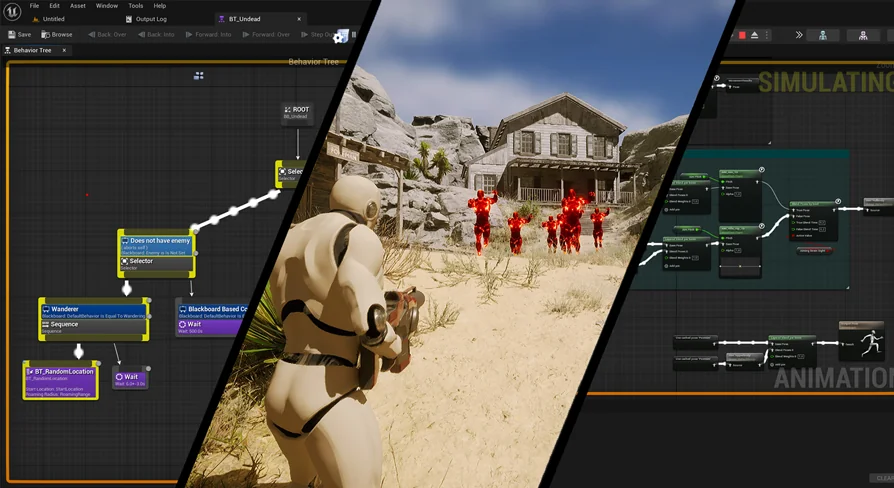
Behavior tree execution receives similar runtime controls. The toolkit allows trees to pause and resume without losing the context of their latest instructions. When an actor is interrupted or changes states, the current tree can freeze its state, yield to a higher-priority behavior, and resume smoothly once conditions normalize. Behavior trees can also be swapped entirely during live gameplay, allowing direct communication between individual tree branches and assigned tasks to govern complex operational transitions.
Integrated Systems for Formations, Resources, and World Context
To demonstrate practical implementation methods, the toolkit incorporates multiple complete sub-systems built on top of the base component. These sample systems highlight how to route pathing and logic data into higher-level game mechanics:
Groups, formations, and factions: Organizes independent actors into coordinated squads with defined faction relationships and spatial offsets.
Workspaces and resource harvesting: Structures task assignments around target locations, letting units navigate to work sites, gather materials, and interact with designated props.
Combat and attacking routines: Executes direct offensive behaviors and target engagement driven by behavior tree branches.
Date and time-based behavior: Schedules unit activities based on simulated timelines, adjusting task execution depending on in-game hours or calendar states.
Because these bonus examples are built directly into the toolkit, developers can examine how the Easy AI component interfaces with surrounding gameplay systems without needing to invent proprietary communication patterns between actors, tasks, and world managers.
Blueprint Requirements and Engine Version Maintenance
Working effectively with the toolkit requires at least a baseline understanding of Unreal Engine Blueprints. While the system simplifies navigation sorting and controller management, tailoring tasks, expanding custom movement mechanics, and tweaking behavior tree branches still relies on visual scripting logic. It is structured for creators who know how to navigate Blueprint graphs and actor components rather than absolute beginners.
The toolkit natively targets Unreal Engine versions 4.19.2 through 4.24 and above. Content developed in these earlier iterations of the engine is constructed to transfer forward into newer engine releases cleanly under standard conditions. In scenarios where broader engine updates alter underlying engine functions, small script adjustments may be required to resolve version-specific syntax changes. Additionally, the system functions alongside specialized narrative and quest tools, including external Dialogue Tree and Quest frameworks, making it a viable foundation for narrative-driven role-playing games and complex multi-character simulations.
 Action-Adventure
 Action-Adventure
 Action-Adventure
 Action-Adventure