"1a0e4ac4dc71d030"{"id":"1001246","slug":"visual-novel-framework-full-system","title":"Visual Novel Framework - Full System","category":"Action-Adventure","engine":"5.0+","assetVersion":"","engineVersion":"Engine Version: 5.0+","tag":"Action-Adventure","accent":"blue","visual":"mech","summary":"Integrate branching dialogue, datatables, and cinematic camera staging into 2D and 3D Unreal Engine 4 projects using Blueprints.","platform":"Unreal Engine","publishedAt":"2026-09-23T15:22:43.488Z","updatedAt":"2026-09-23T15:22:43.488Z","sourceNotes":[],"fileContents":[],"compatibility":["Unreal Engine","Engine Version: 5.0+"],"featuredImage":{"alt":"Visual Novel Framework - Full System","src":"/wp-content/uploads/published/2026/09/cd24d8bd8ec5-6bf38e8e-2d35-4377-b460-8cc4d9c99bd3-e5d6065b71.webp"},"hasDownloadLink":true,"downloads":0,"terms":[{"taxonomy":"category","slug":"action-adventure","name":"Action-Adventure"}],"galleryImages":[{"src":"/wp-content/uploads/published/2026/09/74be9eb1c777-3decc9bb-b251-418c-bf20-b51e89152ca7-d7a0c7e1cb.webp","alt":"Visual Novel Framework - Full System"},{"src":"/wp-content/uploads/published/2026/09/62f1e02caf74-f9a85fcf-5457-463d-8bdd-0e5eff8c372a-30a7176d6d.webp","alt":"Visual Novel Framework - Full System"},{"src":"/wp-content/uploads/published/2026/09/f7f39ccd45c9-3e1a2f91-940f-48ee-a854-5db31b95919b-c3367d146d.webp","alt":"Visual Novel Framework - Full System"},{"src":"/wp-content/uploads/published/2026/09/9b80359d0090-6d01669c-514c-47a3-8e55-6c51e9aa414b-3fef3a9091.webp","alt":"Visual Novel Framework - Full System"}],"accessPanel":{"kind":"resource","title":"Download this resource","eyebrow":"Free Download","message":"Log in or create a free account to start your download.","fileName":"Content.7z","safetyNote":"Resources are manually reviewed before listing to improve quality and reduce obvious risks.","actionLabel":"Download Free","resourceType":"Resource archive"},"contentHtml":"\u003cp\u003eBringing long-form narrative into Unreal Engine 4 often introduces an immediate clash between writing workflows and game engine architecture. Visual novels rely on thousands of lines of text, nuanced branching, conditional responses, and continuous character reactions. When building these narratives inside an engine primarily known for spatial immersion and real-time graphics, creators face the challenge of tying text-driven storytelling directly into game worlds. The Visual Novel Framework provides an established Blueprint architecture that bridges this divide, allowing narrative sequences to exist comfortably alongside 2D artwork, fully realized 3D environments, and active gameplay loops.\u003c/p\u003e \u003ch2\u003eBridging 2D and 3D Gameplay with the Visual Novel Framework\u003c/h2\u003e\n\u003cp\u003eMany traditional narrative tools isolate dialogue inside static screen overlays, treating the story layer as an entirely separate program running on top of basic backdrops. This framework approaches narrative staging differently by integrating cleanly into both 2D and 3D spaces within UE4. Whether a project features a stylized flat presentation or places the player inside an exploratory physical room, the dialogue and visual progression can operate as an organic part of the active level.\u003c/p\u003e\n\u003cp\u003eIntegrating narrative events directly with gameplay gives developers room to rethink scene construction. Dialogue does not need to pause the entire world unless the design calls for it; instead, conversational moments can occur as players navigate spaces, inspect objects, or transition through distinct narrative beats. Because the system runs within standard engine structures, scenes can easily pivot between traditional narrative screens and spatial interaction without requiring disparate tools to exchange state information.\u003c/p\u003e \u003ch2\u003eThe Spreadsheet to Datatable Pipeline for Narrative Scripts\u003c/h2\u003e\n\u003cp\u003eDrafting interactive scripts in standard writing programs or basic text documents is intuitive for writers, but translating that raw dialogue into game-ready logic often creates a severe production bottleneck. Manually hard-coding script branches, speaker tags, and triggers line by line introduces friction and raises the risk of human error during editing passes.\u003c/p\u003e\n\u003cp\u003eThe framework resolves this translation issue by organizing the script pipeline around spreadsheets and Unreal Engine Datatables. Writers can maintain their scripts in structured columns within familiar spreadsheet software, tracking dialogue, branching paths, and scene markers in a format that remains readable across the writing team. Once the text and tags are organized, the spreadsheet exports and imports directly into the engine as a Datatable.\u003c/p\u003e\n\u003cp\u003eThis pipeline creates a clear separation between content creation and script execution:\u003c/p\u003e\n\u003cul\u003e \u003cli\u003eWriters can iterate on dialogue, alter phrasing, and adjust narrative beats entirely inside a spreadsheet environment without touching engine Blueprints.\u003c/li\u003e \u003cli\u003eUpdating project text simply requires re-importing the updated spreadsheet over the existing Datatable asset.\u003c/li\u003e \u003cli\u003eDialogue keys, speaker references, and branching instructions remain central and structured, eliminating manual data entry inside individual actors or level scripts.\u003c/li\u003e\n\u003c/ul\u003e \u003ch2\u003eBranching, Player Choices, and Level Changes at Scale\u003c/h2\u003e\n\u003cp\u003eScale is often the primary failure point for storytelling tools built inside general-purpose game engines. A simple conversation system might function smoothly for a dozen lines of linear interaction, but visual novels routinely expand into massive, multifaceted scripts containing hundreds of decision points, diverging story paths, and long-term state tracking. The framework's architecture is explicitly structured to support large-scale scripts without succumbing to unwieldy Blueprint spaghetti.\u003c/p\u003e\n\u003cp\u003ePlayer choices can be served dynamically, guiding the flow of the Datatable toward specific narrative branches based on input. As conversations progress, the system can route flow across complex story webs, evaluate conditions, and trigger broader structural events such as level changes. Moving between distinct environments or chapters is handled as a standard progression mechanism, allowing creators to split epic stories across distinct maps, load screens, or staging areas without losing track of narrative momentum.\u003c/p\u003e \u003ch2\u003eStaging Dialogue with Cinematic Camera Angles and Animation Blueprints\u003c/h2\u003e\n\u003cp\u003eA narrative game relies as heavily on framing and physical expression as it does on the spoken or written word. Text boxes alone rarely carry emotional climaxes; visual interest comes from character gestures, subtle shifts in posture, and calculated perspective changes. The system connects narrative data directly to character movement and spatial framing, enabling creators to direct conversations with cinematic pacing.\u003c/p\u003e\n\u003cp\u003eThrough support for character Animation Blueprints, dialogue entries can cue specific character animations, poses, and state changes as lines progress. A character can lean forward in suspicion, react in surprise, or cross their arms in frustration simultaneously with the appearance of a dialogue line. This connection between the Datatable script and character state machines ensures that character models remain expressive and dynamic rather than locking into motionless t-poses or static looping idle states.\u003c/p\u003e\n\u003cp\u003eCinematic camera angles work alongside character performance to give scenes a deliberate visual cadence. By instructing cameras to shift angles, pan, or frame specific speakers as lines advance, developers can turn straightforward conversation trees into structured visual scenes. The script can call for close-ups during dramatic revelations, pull back to establish a wider two-shot during negotiations, or focus attention on an environmental detail tied to the conversation, bringing visual novel pacing into line with cinematic production.\u003c/p\u003e \u003ch2\u003eArchitecture Tested Across Published Unreal Engine Projects\u003c/h2\u003e\n\u003cp\u003eConstructing a complete dialogue and story framework from scratch inside Unreal Engine often leads to unforeseen hurdles regarding performance, script formatting, and system maintenance. The Blueprints that make up this framework were not developed as a hypothetical prototype; they originate from approximately two years of hands-on visual novel development in UE4 by Woodsy Studio. Having powered published commercial games, the logic accounts for the practical difficulties that arise when shipping a complete, narrative-heavy title.\u003c/p\u003e\n\u003cp\u003eFor teams building story-rich adventures, visual novels, or hybrid RPGs, the framework offers an established pathway from initial script draft to engine implementation. By grounding the script authoring process in spreadsheets, utilizing native Datatables, and linking directly with cinematic cameras and Animation Blueprints, the system allows creators to focus on crafting branching journeys and visual staging inside Unreal Engine 4.\u003c/p\u003e\n\n\u003ch2\u003eMore From The Same Workflow\u003c/h2\u003e\n\u003cul\u003e\n\u003cli\u003e\u003ca href=\"https://3dcghub.com/hyper-multiplayer-survival-template-pro-mst-v4/\" title=\"Hyper Multiplayer Survival Template Pro [MST] V4\"\u003eHyper Multiplayer Survival Template Pro [MST] V4\u003c/a\u003e\u003c/li\u003e\n\u003cli\u003e\u003ca href=\"https://3dcghub.com/easy-locomotion-toolkit/\" title=\"Easy Locomotion Toolkit\"\u003eEasy Locomotion Toolkit\u003c/a\u003e\u003c/li\u003e\n\u003cli\u003e\u003ca href=\"https://3dcghub.com/point-and-click-adventure-toolkit/\" title=\"Point and Click Adventure Toolkit\"\u003ePoint and Click Adventure Toolkit\u003c/a\u003e\u003c/li\u003e\n\u003cli\u003e\u003ca href=\"https://3dcghub.com/parkour-race-multiplayer-blueprint-game-template-platformer-by-kekdot/\" title=\"Parkour Race - Multiplayer Blueprint Game Template - Platformer - By Kekdot\"\u003eParkour Race - Multiplayer Blueprint Game Template - Platformer - By Kekdot\u003c/a\u003e\u003c/li\u003e\n\u003cli\u003e\u003ca href=\"https://3dcghub.com/island-challenge-game/\" title=\"Island Challenge Game\"\u003eIsland Challenge Game\u003c/a\u003e\u003c/li\u003e\n\u003c/ul\u003e","contentTextLength":7075,"navigation":{"current":12,"total":3200,"previous":{"id":"1001247","slug":"basic-multiplayer-melee-combat-system","title":"Basic Multiplayer Melee Combat System","category":"Fighting","platform":"Unreal Engine","updatedAt":"2026-09-23T15:24:40.286Z"},"next":{"id":"1001245","slug":"the-immersive-template","title":"The Immersive Template","category":"Action-Adventure","platform":"Unreal Engine","updatedAt":"2026-09-23T15:01:06.039Z"}},"relatedResources":[{"id":"1001152","slug":"hyper-multiplayer-survival-template-pro-mst-v4","title":"Hyper Multiplayer Survival Template Pro [MST] V4","category":"Action-Adventure","engine":"5.3+","assetVersion":"","engineVersion":"Engine Version: 5.3+","tag":"Action-Adventure","accent":"blue","visual":"mech","summary":"Explore Hyper Multiplayer Survival Template Pro [MST] V4, a fully replicated Unreal Engine framework for open-world, co-op PvE, and survival projects.","platform":"Unreal Engine","publishedAt":"2026-09-10T17:56:18.119Z","updatedAt":"2026-09-10T17:56:18.119Z","sourceNotes":[],"fileContents":[],"compatibility":["Unreal Engine","Engine Version: 5.3+"],"featuredImage":{"alt":"Hyper Multiplayer Survival Template Pro [MST] V4","src":"/wp-content/uploads/published/2026/09/6060550226b8-0f2946eb-0653-4ed7-a160-e35859e9e5e9-61232ad933.webp"},"hasDownloadLink":true,"downloads":1},{"id":"1001236","slug":"easy-locomotion-toolkit","title":"Easy Locomotion Toolkit","category":"Action-Adventure","engine":"5.0+","assetVersion":"","engineVersion":"Engine Version: 5.0+","tag":"Action-Adventure","accent":"blue","visual":"animation","summary":"A component-based Unreal Engine framework featuring modular locomotion calculations, datatable animset swapping, and structure-driven replication.","platform":"Unreal Engine","publishedAt":"2026-09-21T03:46:32.498Z","updatedAt":"2026-09-21T03:46:32.498Z","sourceNotes":[],"fileContents":[],"compatibility":["Unreal Engine","Engine Version: 5.0+"],"featuredImage":{"alt":"Easy Locomotion Toolkit","src":"/wp-content/uploads/published/2026/09/1c39ce837155-999607d8-b0a8-4400-a6a4-e5ddd2c06569-2ec6a33aef.webp"},"hasDownloadLink":true,"downloads":0},{"id":"1001120","slug":"point-and-click-adventure-toolkit","title":"Point and Click Adventure Toolkit","category":"Action-Adventure","engine":"5.1+","assetVersion":"","engineVersion":"Engine Version: 5.1+","tag":"Action-Adventure","accent":"blue","visual":"mech","summary":"A 100% Blueprint framework for point-and-click adventure games with data-driven dialogue, inventory, scene manager, cameras, save/load systems, and complete pla","platform":"Unreal Engine","publishedAt":"2026-09-07T12:59:10.534Z","updatedAt":"2026-09-07T12:59:10.534Z","sourceNotes":[],"fileContents":[],"compatibility":["Unreal Engine","Engine Version: 5.1+"],"featuredImage":{"alt":"Point and Click Adventure Toolkit","src":"/wp-content/uploads/published/2026/09/bd0381c0f3a9-1def5d9f-97d7-43ea-ac15-388511944ee3-16d72cc4b4.webp"},"hasDownloadLink":true,"downloads":0}]}
Action-Adventure
Visual Novel Framework - Full System
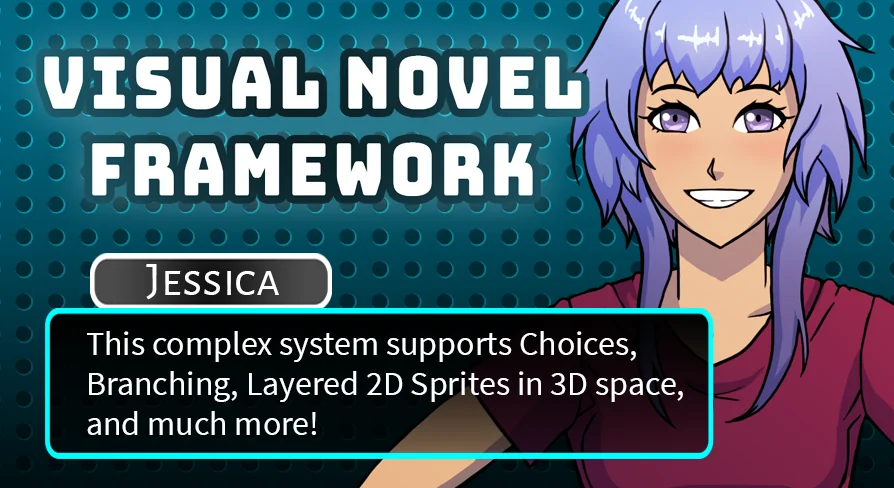
Integrate branching dialogue, datatables, and cinematic camera staging into 2D and 3D Unreal Engine 4 projects using Blueprints.
Bringing long-form narrative into Unreal Engine 4 often introduces an immediate clash between writing workflows and game engine architecture. Visual novels rely on thousands of lines of text, nuanced branching, conditional responses, and continuous character reactions. When building these narratives inside an engine primarily known for spatial immersion and real-time graphics, creators face the challenge of tying text-driven storytelling directly into game worlds. The Visual Novel Framework provides an established Blueprint architecture that bridges this divide, allowing narrative sequences to exist comfortably alongside 2D artwork, fully realized 3D environments, and active gameplay loops.
Bridging 2D and 3D Gameplay with the Visual Novel Framework
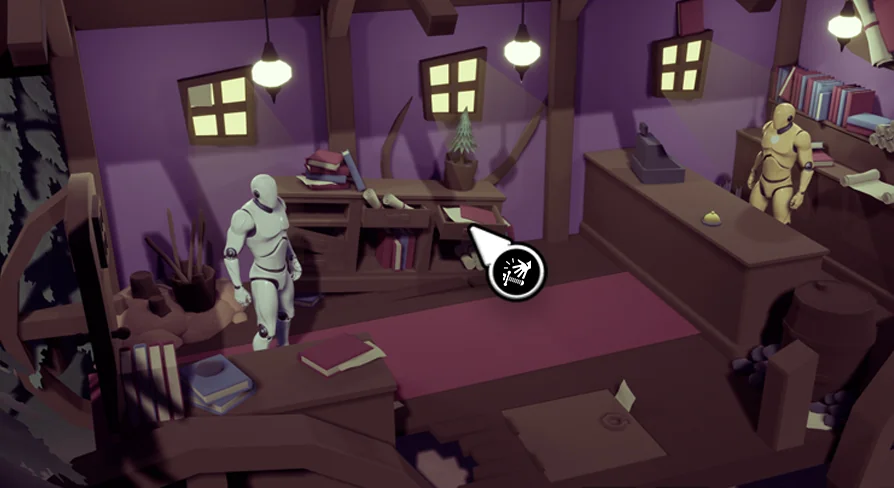
Many traditional narrative tools isolate dialogue inside static screen overlays, treating the story layer as an entirely separate program running on top of basic backdrops. This framework approaches narrative staging differently by integrating cleanly into both 2D and 3D spaces within UE4. Whether a project features a stylized flat presentation or places the player inside an exploratory physical room, the dialogue and visual progression can operate as an organic part of the active level.
Integrating narrative events directly with gameplay gives developers room to rethink scene construction. Dialogue does not need to pause the entire world unless the design calls for it; instead, conversational moments can occur as players navigate spaces, inspect objects, or transition through distinct narrative beats. Because the system runs within standard engine structures, scenes can easily pivot between traditional narrative screens and spatial interaction without requiring disparate tools to exchange state information.
The Spreadsheet to Datatable Pipeline for Narrative Scripts
Drafting interactive scripts in standard writing programs or basic text documents is intuitive for writers, but translating that raw dialogue into game-ready logic often creates a severe production bottleneck. Manually hard-coding script branches, speaker tags, and triggers line by line introduces friction and raises the risk of human error during editing passes.
The framework resolves this translation issue by organizing the script pipeline around spreadsheets and Unreal Engine Datatables. Writers can maintain their scripts in structured columns within familiar spreadsheet software, tracking dialogue, branching paths, and scene markers in a format that remains readable across the writing team. Once the text and tags are organized, the spreadsheet exports and imports directly into the engine as a Datatable.
This pipeline creates a clear separation between content creation and script execution:
Writers can iterate on dialogue, alter phrasing, and adjust narrative beats entirely inside a spreadsheet environment without touching engine Blueprints.
Updating project text simply requires re-importing the updated spreadsheet over the existing Datatable asset.
Dialogue keys, speaker references, and branching instructions remain central and structured, eliminating manual data entry inside individual actors or level scripts.
Branching, Player Choices, and Level Changes at Scale
Scale is often the primary failure point for storytelling tools built inside general-purpose game engines. A simple conversation system might function smoothly for a dozen lines of linear interaction, but visual novels routinely expand into massive, multifaceted scripts containing hundreds of decision points, diverging story paths, and long-term state tracking. The framework's architecture is explicitly structured to support large-scale scripts without succumbing to unwieldy Blueprint spaghetti.
Player choices can be served dynamically, guiding the flow of the Datatable toward specific narrative branches based on input. As conversations progress, the system can route flow across complex story webs, evaluate conditions, and trigger broader structural events such as level changes. Moving between distinct environments or chapters is handled as a standard progression mechanism, allowing creators to split epic stories across distinct maps, load screens, or staging areas without losing track of narrative momentum.
Staging Dialogue with Cinematic Camera Angles and Animation Blueprints
A narrative game relies as heavily on framing and physical expression as it does on the spoken or written word. Text boxes alone rarely carry emotional climaxes; visual interest comes from character gestures, subtle shifts in posture, and calculated perspective changes. The system connects narrative data directly to character movement and spatial framing, enabling creators to direct conversations with cinematic pacing.
Through support for character Animation Blueprints, dialogue entries can cue specific character animations, poses, and state changes as lines progress. A character can lean forward in suspicion, react in surprise, or cross their arms in frustration simultaneously with the appearance of a dialogue line. This connection between the Datatable script and character state machines ensures that character models remain expressive and dynamic rather than locking into motionless t-poses or static looping idle states.
Cinematic camera angles work alongside character performance to give scenes a deliberate visual cadence. By instructing cameras to shift angles, pan, or frame specific speakers as lines advance, developers can turn straightforward conversation trees into structured visual scenes. The script can call for close-ups during dramatic revelations, pull back to establish a wider two-shot during negotiations, or focus attention on an environmental detail tied to the conversation, bringing visual novel pacing into line with cinematic production.
Architecture Tested Across Published Unreal Engine Projects
Constructing a complete dialogue and story framework from scratch inside Unreal Engine often leads to unforeseen hurdles regarding performance, script formatting, and system maintenance. The Blueprints that make up this framework were not developed as a hypothetical prototype; they originate from approximately two years of hands-on visual novel development in UE4 by Woodsy Studio. Having powered published commercial games, the logic accounts for the practical difficulties that arise when shipping a complete, narrative-heavy title.
For teams building story-rich adventures, visual novels, or hybrid RPGs, the framework offers an established pathway from initial script draft to engine implementation. By grounding the script authoring process in spreadsheets, utilizing native Datatables, and linking directly with cinematic cameras and Animation Blueprints, the system allows creators to focus on crafting branching journeys and visual staging inside Unreal Engine 4.
 Action-Adventure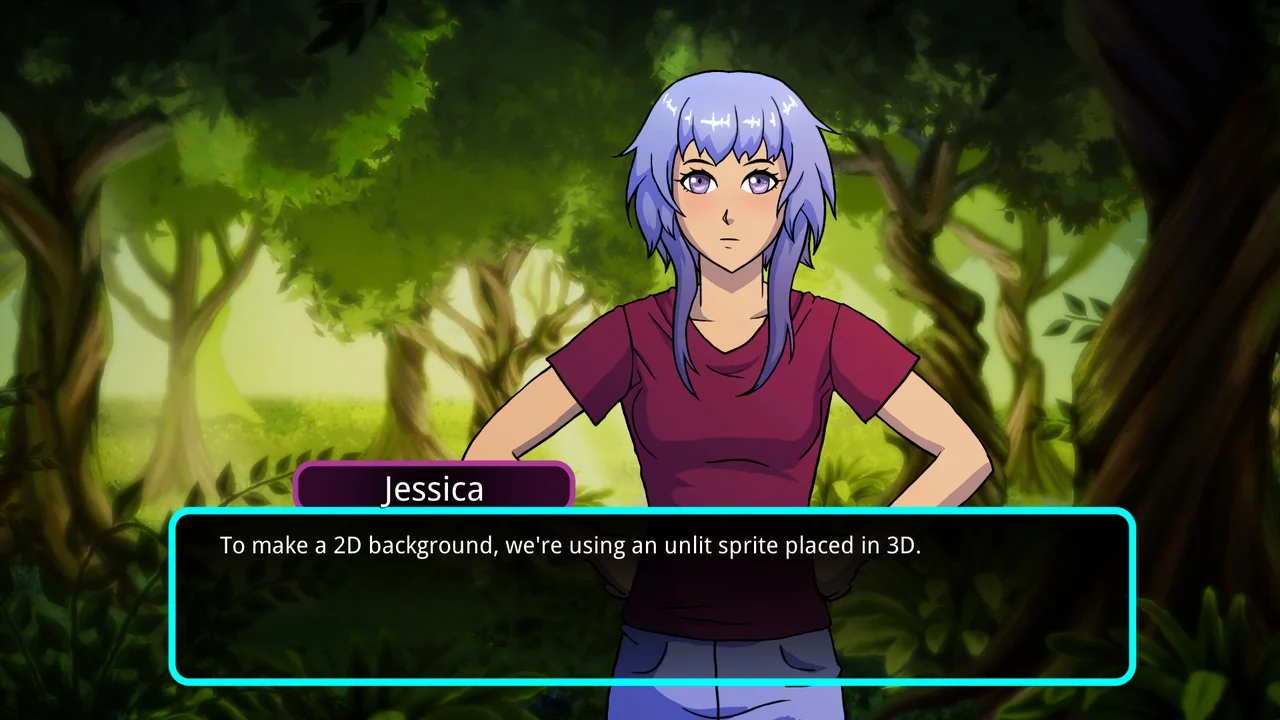
![Hyper Multiplayer Survival Template Pro [MST] V4](/wp-content/uploads/published/2026/09/6060550226b8-0f2946eb-0653-4ed7-a160-e35859e9e5e9-61232ad933.webp) Action-Adventure
Action-Adventure Action-Adventure
 Action-Adventure