"7ad89cffa44984cf"{"id":"1002575","slug":"bodycam-backroom-vhs-effect","title":"Bodycam Backroom VHS Effect","category":"Action-Adventure","engine":"5.1+","assetVersion":"","engineVersion":"Engine Version: 5.1+","tag":"Action-Adventure","accent":"blue","visual":"mech","summary":"Create authentic found-footage and tactical bodycam visuals with post-process VHS filters, head-bob blueprints, audio assets, and showcase maps.","platform":"Unreal Engine","indexPolicy":"index","publishedAt":"2026-11-13T20:13:51.555Z","updatedAt":"2026-11-13T20:13:51.555Z","sourceNotes":[],"fileContents":[],"compatibility":["Unreal Engine","Engine Version: 5.1+"],"featuredImage":{"alt":"Bodycam Backroom VHS Effect","src":"/wp-content/uploads/published/2026/11/665ce96109f9-064ae0b3-87e9-42cb-84e8-f20fa2c2c38f-edcacaa738.webp"},"hasDownloadLink":true,"downloads":0,"terms":[{"taxonomy":"category","slug":"action-adventure","name":"Action-Adventure"}],"galleryImages":[{"src":"/wp-content/uploads/published/2026/11/c223b960cd32-db39e658-6514-4f24-903b-9256223044e2-591a8b3305.webp","alt":"Bodycam Backroom VHS Effect"},{"src":"/wp-content/uploads/published/2026/11/90e312821028-280302cc-63f4-40ce-94aa-9f33a2c2264d-e218f36c48.webp","alt":"Bodycam Backroom VHS Effect"},{"src":"/wp-content/uploads/published/2026/11/8edaaa75448e-2d058c3f-f924-4df1-b8b4-6bf4cec93f22-17ad1f32b9.webp","alt":"Bodycam Backroom VHS Effect"},{"src":"/wp-content/uploads/published/2026/11/2452f55dd71d-104bbed5-6072-4ccd-9dc7-7674489dad5b-cefde00682.webp","alt":"Bodycam Backroom VHS Effect"},{"src":"/wp-content/uploads/published/2026/11/77d77d1d060e-28a0ed4c-9dd9-446b-9189-88e106d5856b-da718f38fe.webp","alt":"Bodycam Backroom VHS Effect"},{"src":"/wp-content/uploads/published/2026/11/e61e430d2203-3ced3c39-ca71-4c52-aa6c-34bf31fb88b1-6016cab3d9.webp","alt":"Bodycam Backroom VHS Effect"},{"src":"/wp-content/uploads/published/2026/11/1e23e751fb42-a73278d8-7456-4508-97c8-61346542e31f-7a97dc8713.webp","alt":"Bodycam Backroom VHS Effect"}],"accessPanel":{"kind":"resource","title":"Get this resource","eyebrow":"Free resource","message":"Download this resource in your browser.","fileName":"Content.7z","safetyNote":"Resources are manually reviewed before listing to improve quality and reduce obvious risks.","actionLabel":"Get this resource","resourceType":"Resource archive","versions":[]},"contentHtml":"\u003cp\u003eEerie, low-fidelity camera footage has become one of the most recognizable visual styles in contemporary first-person games. Whether capturing the stark, tactical tension of an unedited security bodycam or the disorienting isolation of a liminal space exploration, raw camera artifacts completely reshape how a player experiences an environment. The Bodycam Backroom VHS Effect provides a unified material, post-process, and animation toolkit aimed at capturing this specific aesthetic, turning standard game viewports into convincing amateur footage, CRT displays, or degrading videotape recordings.\u003c/p\u003e \u003ch2\u003eCrafting Atmosphere with the Bodycam Visual Pipeline\u003c/h2\u003e\n\u003cp\u003eModern found-footage projects rely heavily on visual imperfections to establish psychological tension. Rather than presenting a clean digital viewport, this toolkit applies post-process filters that emulate vintage, consumer-grade optics and physical camera sensors. The resulting look instantly evokes tactical simulations like Unrecord alongside unsettling retro environments such as the Backrooms.\u003c/p\u003e\n\u003cp\u003eAt the center of this visual presentation is an optical distortion system featuring a distinct fish-eye lens curvature and dynamic screen warping. Edges bend and curve naturally, mimicking the wide, miniature lenses common to body-worn cameras and portable tape recorders. The screen warp introduces edge stretching and spherical aberration that make tight corridors, haunted structures, and abandoned institutional hallways feel suffocating. Subtle color shifts and high-contrast exposure settings complement these distortions, generating the harsh shadows and blown-out highlights typical of budget electronic cameras operating under low-light conditions.\u003c/p\u003e \u003ch2\u003eSimulating Analog Tape with the VHS Post-Process Material\u003c/h2\u003e\n\u003cp\u003eBeyond lens distortion, the core material network replicates the physical decay and visual traits of 1970s, 80s, and 90s magnetic tape playback. The VHS post-process filter applies controlled static noise across the frame, simulating signal dropouts, magnetic grain, and analog RF interference. Rather than applying a single uniform overlay, the system incorporates individual visual components that can be tweaked independently across multiple parameters.\u003c/p\u003e\n\u003cp\u003eKey among these artifacts is the screen burn effect, which simulates phosphor retention and visual ghosting where bright elements bleed across scan lines. Players see traces of intense light sources lingering across the display, reinforcing the appearance of an aging cathode-ray tube television or an overworked VCR playback head. In addition, the material renders a real-time adjustable digital timestamp on the HUD. Modeled after vintage camcorder on-screen displays, this timestamp updates dynamically to anchor the found-footage illusion and give players the impression of reviewing recovered field recordings.\u003c/p\u003e \u003ch2\u003eCamera Motion: Head Bobs, Shakes, and Blueprint Setup\u003c/h2\u003e\n\u003cp\u003eVisual filters alone are only half the equation when crafting believable amateur recordings; the physical movement of the camera rig is equally critical. Static first-person cameras feel detached and artificial, whereas actual bodycam footage is erratic, responsive, and tied to the bearer's kinetic energy.\u003c/p\u003e\n\u003cp\u003eTo address camera behavior, the package includes dedicated blueprint logic for realistic head bobs and motion shakes. The system categorizes character movement into distinct physical states:\u003c/p\u003e\n\u003cul\u003e \u003cli\u003e\u003cstrong\u003eIdle:\u003c/strong\u003e Introduces subtle breathing sway, micro-jitter, and balance adjustments that keep the viewpoint alive even while stationary.\u003c/li\u003e \u003cli\u003e\u003cstrong\u003eWalking:\u003c/strong\u003e Implements rhythmic head bobbing, slight vertical stepping dips, and lateral roll that mimic a person walking while wearing body-mounted hardware.\u003c/li\u003e \u003cli\u003e\u003cstrong\u003eSprinting:\u003c/strong\u003e Drives violent camera shakes, sharp tilts, and rapid angular shifts that reflect the chaos of running through hostile or terrifying environments.\u003c/li\u003e\n\u003c/ul\u003e\n\u003cp\u003eImplementing these movement dynamics into existing character setups is straightforward. Because the system is structured around common first-person blueprint conventions, developers can integrate the functionality directly into a project's existing camera component without rewriting their character movement pipelines.\u003c/p\u003e \u003ch2\u003eFlashlight, Audio, and the Included Backroom Showcase Maps\u003c/h2\u003e\n\u003cp\u003eHorror immersion relies just as heavily on sound and illumination as it does on post-process rendering. To ensure the visual effects function within an active gameplay context, the asset pack includes sound design and utility tools alongside its rendering materials. Footstep audio is included to pair with the mechanical head-bob system, giving physical weight to every stride taken by the player. Ambient background sounds provide underlying tension, filling empty spaces with low-frequency drone textures and atmospheric dread suited for psychological thrillers and creepy exploration titles.\u003c/p\u003e\n\u003cp\u003eAn interactive flashlight mechanic is also supplied out of the box. In found-footage scenarios, a directional light source interacting with fish-eye lens warp, digital noise, and screen burn is essential for generating suspense. Illuminating a dark room exposes the post-process material's ability to handle high dynamic range contrast, lens flare reflections, and tape bleed in real time.\u003c/p\u003e\n\u003cp\u003eFor testing, tuning, and immediate inspection, the package delivers three dedicated environments. An overview map lays out the parameters, materials, and components in a clean diagnostic setting, allowing developers to isolate and inspect individual visual toggles. Two fully realized showcase level maps demonstrate the complete ecosystem at work—combining the bodycam camera rigs, VHS noise, interactive lighting, and ambient soundscapes inside finished test environments to show how the assets function together in actual level geometry.\u003c/p\u003e \u003ch2\u003ePractical Implementation for First-Person Games\u003c/h2\u003e\n\u003cp\u003eAdding the asset to an active project is designed as an immediate drop-in process. After bringing the files into a project directory, developers assign the post-process material to a scene's global volume or bind it directly to the player camera within their primary first-person blueprint. Because the VHS distortion, noise intensity, screen warp, and head bob dynamics are parameter-driven, they can be dialed down for action-heavy tactical shooters where target visibility is paramount, or pushed into extreme distortion for psychological horror sequences where disorientation is the goal.\u003c/p\u003e\n\n\u003ch2\u003eMore From The Same Workflow\u003c/h2\u003e\n\u003cul\u003e\n\u003cli\u003e\u003ca href=\"https://3dcghub.com/vhs-project-2-5/\" rel=\"noopener noreferrer\"\u003eVHS Project 2.5\u003c/a\u003e\u003c/li\u003e\n\u003cli\u003e\u003ca href=\"https://3dcghub.com/customizable-bodycam-component/\" rel=\"noopener noreferrer\"\u003eCustomizable Bodycam Component\u003c/a\u003e\u003c/li\u003e\n\u003cli\u003e\u003ca href=\"https://3dcghub.com/advanced-bodycam-vhs-body-camera-component-with-video-effects/\" rel=\"noopener noreferrer\"\u003eAdvanced BodyCam / VHS - Body Camera Component with Video Effects\u003c/a\u003e\u003c/li\u003e\n\u003cli\u003e\u003ca href=\"https://3dcghub.com/bodycam-fps-kit/\" rel=\"noopener noreferrer\"\u003eBODYCAM FPS KIT\u003c/a\u003e\u003c/li\u003e\n\u003cli\u003e\u003ca href=\"https://3dcghub.com/advanced-crt-tv-vcr-vhs-effects/\" rel=\"noopener noreferrer\"\u003eAdvanced CRT TV - VCR - VHS Effects\u003c/a\u003e\u003c/li\u003e\n\u003c/ul\u003e","contentTextLength":6580,"navigation":{"current":2,"total":4499,"previous":{"id":"1002576","slug":"match-3-rpg-template","title":"Match 3 RPG Template","category":"RPG","platform":"Unreal Engine","updatedAt":"2026-11-13T20:14:38.214Z"},"next":{"id":"1002574","slug":"advanced-asymmetrical-multiplayer-template","title":"Advanced Asymmetrical Multiplayer Template","category":"Action-Adventure","platform":"Unreal Engine","updatedAt":"2026-11-13T20:13:09.696Z"}},"relatedResources":[{"id":"1000713","slug":"vhs-project-2-5","title":"VHS Project 2.5","category":"Action-Adventure","engine":"5.5+","assetVersion":"Asset Version: v2.0","engineVersion":"Engine Version: 5.5+","tag":"Action-Adventure","accent":"blue","visual":"mech","summary":"VHS Project 2.5 is a complete Unreal Engine remake featuring an improved post-process VHS shader with screen warping, tracking lines, and first-person horror me","platform":"Unreal Engine","indexPolicy":"index","publishedAt":"2026-07-24T02:42:53.418Z","updatedAt":"2026-07-24T02:42:53.418Z","sourceNotes":[],"fileContents":[],"compatibility":["Unreal Engine","Asset Version: v2.0","Engine Version: 5.5+"],"featuredImage":{"alt":"VHS Project 2.5","src":"/wp-content/uploads/published/2026/07/f56136406ef4-fb20dc2b-4ebf-48f0-84c5-d9d5c3643837-05329032f9.webp"},"hasDownloadLink":true,"downloads":6},{"id":"1000048","slug":"customizable-bodycam-component","title":"Customizable Bodycam Component","category":"Gameplay Features","engine":"5.1+","assetVersion":"","engineVersion":"Engine Version: 5.1+","tag":"Gameplay Features","accent":"blue","visual":"mech","summary":"A Blueprint-driven camera component designed to deliver photorealistic, character-mirrored motion, exposed material parameters, and customizable VHS effects.","platform":"Unreal Engine","indexPolicy":"index","publishedAt":"2026-05-22T11:03:34.875Z","updatedAt":"2026-10-24T07:39:32.861Z","sourceNotes":[],"fileContents":[],"compatibility":["Unreal Engine","Engine Version: 5.1+"],"featuredImage":{"alt":"Customizable Bodycam Component","src":"/wp-content/uploads/published/2026/05/a8f60f9cccc0-8a5f4ac1-11c7-49f2-9fb6-a21c09403ba4-65699f7637.webp"},"hasDownloadLink":true,"downloads":5},{"id":"1001935","slug":"advanced-bodycam-vhs-body-camera-component-with-video-effects","title":"Advanced BodyCam / VHS - Body Camera Component with Video Effects","category":"Gameplay Features","engine":"5.0+","assetVersion":"","engineVersion":"Engine Version: 5.0+","tag":"Gameplay Features","accent":"blue","visual":"mech","summary":"Add realistic body camera and VHS visual effects to character rigs using the drag-and-drop BPC_BodyCamComponent with exposed optical and motion settings.","platform":"Unreal Engine","indexPolicy":"index","publishedAt":"2026-10-24T11:12:27.777Z","updatedAt":"2026-10-24T11:12:27.777Z","sourceNotes":[],"fileContents":[],"compatibility":["Unreal Engine","Engine Version: 5.0+"],"featuredImage":{"alt":"Advanced BodyCam / VHS - Body Camera Component with Video Effects","src":"/wp-content/uploads/published/2026/10/6e34fe42e6f6-4f31419b-4b67-4d04-91d2-22b0beff1d20-a41ea00718.webp"},"hasDownloadLink":true,"downloads":1}]}
Action-Adventure
Bodycam Backroom VHS Effect
Create authentic found-footage and tactical bodycam visuals with post-process VHS filters, head-bob blueprints, audio assets, and showcase maps.
Eerie, low-fidelity camera footage has become one of the most recognizable visual styles in contemporary first-person games. Whether capturing the stark, tactical tension of an unedited security bodycam or the disorienting isolation of a liminal space exploration, raw camera artifacts completely reshape how a player experiences an environment. The Bodycam Backroom VHS Effect provides a unified material, post-process, and animation toolkit aimed at capturing this specific aesthetic, turning standard game viewports into convincing amateur footage, CRT displays, or degrading videotape recordings.
Crafting Atmosphere with the Bodycam Visual Pipeline
Modern found-footage projects rely heavily on visual imperfections to establish psychological tension. Rather than presenting a clean digital viewport, this toolkit applies post-process filters that emulate vintage, consumer-grade optics and physical camera sensors. The resulting look instantly evokes tactical simulations like Unrecord alongside unsettling retro environments such as the Backrooms.
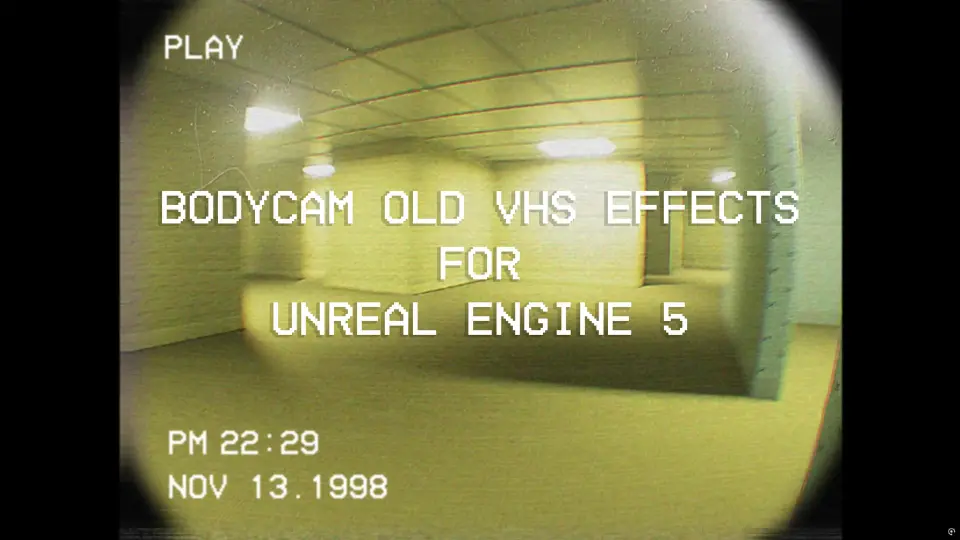
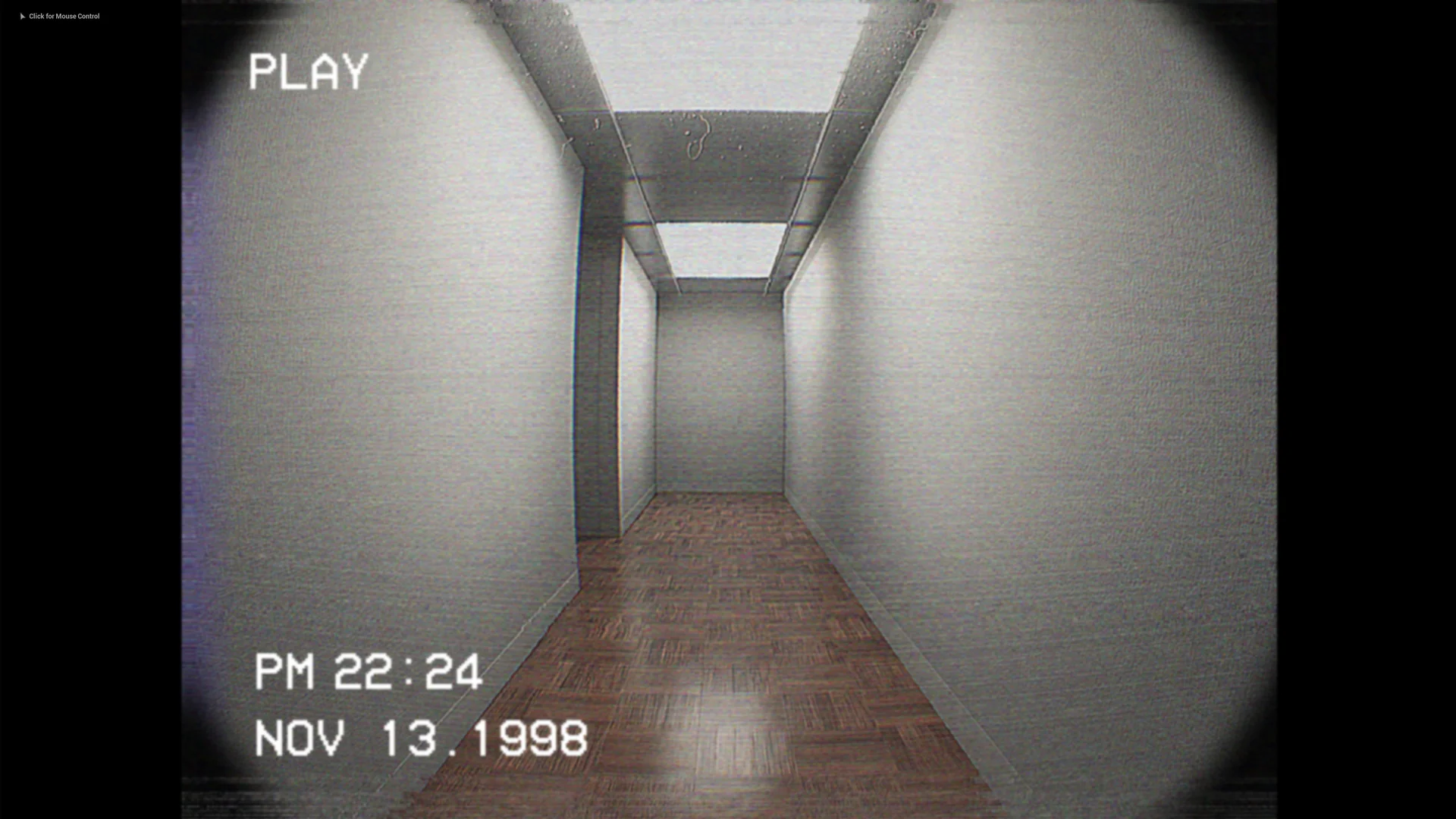
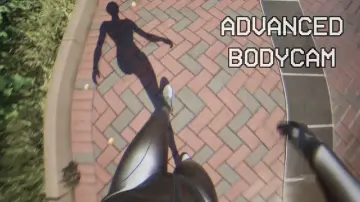
At the center of this visual presentation is an optical distortion system featuring a distinct fish-eye lens curvature and dynamic screen warping. Edges bend and curve naturally, mimicking the wide, miniature lenses common to body-worn cameras and portable tape recorders. The screen warp introduces edge stretching and spherical aberration that make tight corridors, haunted structures, and abandoned institutional hallways feel suffocating. Subtle color shifts and high-contrast exposure settings complement these distortions, generating the harsh shadows and blown-out highlights typical of budget electronic cameras operating under low-light conditions.
Simulating Analog Tape with the VHS Post-Process Material
Beyond lens distortion, the core material network replicates the physical decay and visual traits of 1970s, 80s, and 90s magnetic tape playback. The VHS post-process filter applies controlled static noise across the frame, simulating signal dropouts, magnetic grain, and analog RF interference. Rather than applying a single uniform overlay, the system incorporates individual visual components that can be tweaked independently across multiple parameters.
Key among these artifacts is the screen burn effect, which simulates phosphor retention and visual ghosting where bright elements bleed across scan lines. Players see traces of intense light sources lingering across the display, reinforcing the appearance of an aging cathode-ray tube television or an overworked VCR playback head. In addition, the material renders a real-time adjustable digital timestamp on the HUD. Modeled after vintage camcorder on-screen displays, this timestamp updates dynamically to anchor the found-footage illusion and give players the impression of reviewing recovered field recordings.
Camera Motion: Head Bobs, Shakes, and Blueprint Setup
Visual filters alone are only half the equation when crafting believable amateur recordings; the physical movement of the camera rig is equally critical. Static first-person cameras feel detached and artificial, whereas actual bodycam footage is erratic, responsive, and tied to the bearer's kinetic energy.
To address camera behavior, the package includes dedicated blueprint logic for realistic head bobs and motion shakes. The system categorizes character movement into distinct physical states:
Idle: Introduces subtle breathing sway, micro-jitter, and balance adjustments that keep the viewpoint alive even while stationary.
Walking: Implements rhythmic head bobbing, slight vertical stepping dips, and lateral roll that mimic a person walking while wearing body-mounted hardware.
Sprinting: Drives violent camera shakes, sharp tilts, and rapid angular shifts that reflect the chaos of running through hostile or terrifying environments.
Implementing these movement dynamics into existing character setups is straightforward. Because the system is structured around common first-person blueprint conventions, developers can integrate the functionality directly into a project's existing camera component without rewriting their character movement pipelines.
Flashlight, Audio, and the Included Backroom Showcase Maps
Horror immersion relies just as heavily on sound and illumination as it does on post-process rendering. To ensure the visual effects function within an active gameplay context, the asset pack includes sound design and utility tools alongside its rendering materials. Footstep audio is included to pair with the mechanical head-bob system, giving physical weight to every stride taken by the player. Ambient background sounds provide underlying tension, filling empty spaces with low-frequency drone textures and atmospheric dread suited for psychological thrillers and creepy exploration titles.
An interactive flashlight mechanic is also supplied out of the box. In found-footage scenarios, a directional light source interacting with fish-eye lens warp, digital noise, and screen burn is essential for generating suspense. Illuminating a dark room exposes the post-process material's ability to handle high dynamic range contrast, lens flare reflections, and tape bleed in real time.
For testing, tuning, and immediate inspection, the package delivers three dedicated environments. An overview map lays out the parameters, materials, and components in a clean diagnostic setting, allowing developers to isolate and inspect individual visual toggles. Two fully realized showcase level maps demonstrate the complete ecosystem at work—combining the bodycam camera rigs, VHS noise, interactive lighting, and ambient soundscapes inside finished test environments to show how the assets function together in actual level geometry.
Practical Implementation for First-Person Games
Adding the asset to an active project is designed as an immediate drop-in process. After bringing the files into a project directory, developers assign the post-process material to a scene's global volume or bind it directly to the player camera within their primary first-person blueprint. Because the VHS distortion, noise intensity, screen warp, and head bob dynamics are parameter-driven, they can be dialed down for action-heavy tactical shooters where target visibility is paramount, or pushed into extreme distortion for psychological horror sequences where disorientation is the goal.
 Action-Adventure
 Action-Adventure
 Gameplay Features
 Gameplay Features