"6ac84fdb0bd06614"{"id":"1001227","slug":"animation-ecosystem-for-game-development","title":"Animation Ecosystem for Game Development","category":"Action-Adventure","engine":"5.0+","assetVersion":"","engineVersion":"Engine Version: 5.0+","tag":"Action-Adventure","accent":"blue","visual":"animation","summary":"Master the Unreal Engine animation ecosystem, covering retargeting, State Machines, Blendspace Analysis, Control Rig sockets, and Sequencer baking.","platform":"Unreal Engine","publishedAt":"2026-09-21T03:23:50.196Z","updatedAt":"2026-09-21T03:23:50.196Z","sourceNotes":[],"fileContents":[],"compatibility":["Unreal Engine","Engine Version: 5.0+"],"featuredImage":{"alt":"Animation Ecosystem for Game Development","src":"/wp-content/uploads/published/2026/09/7a1b518e4865-68ca6e0f-a439-4bff-b84c-0a567ea78963-8fdbbd6d5f.webp"},"hasDownloadLink":true,"downloads":0,"terms":[{"taxonomy":"category","slug":"action-adventure","name":"Action-Adventure"}],"galleryImages":[{"src":"/wp-content/uploads/published/2026/09/69c8b19f7bc8-2bd8c63f-0813-47ef-8d9f-bb30bbe4ac33-f5fca6ba71.webp","alt":"Animation Ecosystem for Game Development"}],"accessPanel":{"kind":"resource","title":"Download this resource","eyebrow":"Free Download","message":"Log in or create a free account to start your download.","fileName":"Content.7z","safetyNote":"Resources are manually reviewed before listing to improve quality and reduce obvious risks.","actionLabel":"Download Free","resourceType":"Resource archive"},"contentHtml":"\u003ch2\u003eImport, Retargeting, and Trimming for the State Machine\u003c/h2\u003e\n\u003cp\u003eCharacter motion begins with raw performance data that must be adapted to fit project-specific skeletal rigs and responsive gameplay demands. The process of bringing external movement into Unreal Engine starts at the ingestion stage, where animation clips are imported and calibrated against the target character structure. Because skeletal hierarchies, joint orientations, and proportions often vary between source files and production models, retargeting serves as the primary bridge. Retargeting recalculates bone transforms across differing skeletal meshes, translating motion curves accurately so that walks, runs, and action beats play back without limb distortions or unnatural proportions.\u003c/p\u003e\n\u003cp\u003eOnce retargeted, motion assets must be refined for responsive player input. Standard motion captures often contain preliminary lead-ins or lingering follow-throughs that introduce latency if dropped directly into interactive states. Trimming animations isolates the essential frames needed for immediate playback. By stripping out redundant frames, animators can configure clean cycles that seamlessly loop or immediate reaction frames that respond instantly to controller inputs. These trimmed, retargeted clips form the foundation for the State Machine, which manages transition logic between states like standing, walking, falling, and landing based on real-time game variables.\u003c/p\u003e \u003ch2\u003eBlendspaces and Foot Sliding Correction with Blendspace Analysis\u003c/h2\u003e\n\u003cp\u003eCharacters in modern games operate across continuous ranges of velocity, direction, and posture rather than static, single-speed movement clips. Blendspaces solve this challenge by mapping multiple related animations onto a multi-dimensional coordinate space. As a character accelerates, decelerates, or shifts movement angles, the Blendspace evaluates parameter values to calculate real-time interpolation between idle, walk, jog, and sprint states. This system replaces abrupt cuts with smooth motion transitions that match character movement speed in the virtual world.\u003c/p\u003e\n\u003cp\u003eA frequent challenge in multi-clip interpolation is foot sliding, where character translation speed across ground geometry desynchronizes from the linear speed depicted in the footstep animation. Blendspace Analysis specifically addresses this artifact inside Unreal Engine. By evaluating the motion trajectories and footstep cadences across the blended assets, the tool allows developers to synchronize stride frequency with actual locomotion speed. Calibrating these values eliminates foot skating across surfaces, ensuring that footfall contacts plant firmly on the ground regardless of whether the character is inching forward slowly or breaking into a full sprint.\u003c/p\u003e \u003ch2\u003eAttaching Items to a Control Rig Using Sockets\u003c/h2\u003e\n\u003cp\u003eGameplay regularly requires characters to interact with accessories, weapons, equipment, and interactive props. Managing these attachments dynamically requires a dependable bridge between the skeletal mesh and external static or skeletal elements. Sockets provide exact transform targets anchored to defined bones or joints within the skeletal hierarchy. When integrated into a Control Rig workflow, sockets extend beyond simple static attachment points, allowing attached objects to respond directly to procedural rig controls, IK solvers, and manual animator adjustments.\u003c/p\u003e\n\u003cp\u003eConfiguring sockets within Control Rig ensures that an attached item—such as a handheld tool or equipment piece—tracks hand placement and wrist rotation accurately throughout both keyframed and procedural motion. Animators can position constraints relative to the socket transforms, driving natural hand-grip adjustments without props slipping or detaching during intense motion swings. This direct link allows full visual fidelity during complex manipulations, maintaining item alignment while working entirely within the engine viewport.\u003c/p\u003e \u003ch2\u003eOverriding Animation via Animation Montage Slots\u003c/h2\u003e\n\u003cp\u003eWhile State Machines efficiently handle continuous, systemic locomotion states, high-priority gameplay events require immediate execution without breaking the underlying movement logic. Animation Montages provide this functionality, allowing single-shot animations—such as weapon attacks, spell casts, item interactions, or hit reactions—to fire dynamically over existing states. The routing of these events is managed through Animation Montage Slots.\u003c/p\u003e\n\u003cp\u003eSlots enable layered playback by assigning specific animation tracks to designated segments of the character skeleton. For example, an upper-body slot can receive an attack montage while the lower body remains under the control of the locomotion State Machine. This separation allows a character to reload, swing a melee weapon, or cast an ability while continuing to run, jump, or crouch across the map. Montage Slots give developers granular control over blend-in and blend-out times, transition priorities, and skeleton masking, ensuring that overrides blend into ongoing locomotion cycles naturally once an action completes.\u003c/p\u003e \u003ch2\u003eIn-Engine Motion Editing and Baking with Control Rig and Sequencer\u003c/h2\u003e\n\u003cp\u003eTraditional character pipelines often require exporting assets back out to external digital content creation software whenever an animation clip requires manual tweaking, pose correction, or timing adjustments. The combination of Control Rig and Sequencer removes this friction entirely by providing full timeline-based animation editing inside Unreal Engine. Existing animation assets can be loaded onto a Sequencer track, where Control Rig exposes all underlying manipulation controls directly over the captured performance.\u003c/p\u003e\n\u003cp\u003eAnimators can use these tools to make additive keyframe corrections, correct clipping issues between character limbs and clothing, refine gaze directions, or alter specific poses throughout an entire sequence. Because the controls operate in the native engine environment, visual checks against lighting, level geometry, and scene camera angles happen in real time. Once adjustments are complete, the resulting performance can be baked directly out into a new, standalone animation sequence without exporting external files or leaving the engine editor. This self-contained baking process preserves asset fidelity, shortens revision loops, and keeps project assets readily accessible for both cinematic sequences and interactive gameplay state graphs.\u003c/p\u003e \u003ch2\u003eEpic Dev Community Integration and Workflow Context\u003c/h2\u003e\n\u003cp\u003eThe Animation Ecosystem for Game Development curriculum on the Epic Dev Community structures these distinct pipeline phases into an integrated learning track. Categorized under educational resources and aligned with systems like the UI Material Lab, the training connects basic asset ingestion to advanced procedural correction and timeline editing. By consolidating retargeting, State Machine construction, Blendspace Analysis, socket binding, montage slot overrides, and Sequencer baking into a continuous, self-contained workflow, the system demonstrates how to produce, refine, and finalize interactive character motion entirely within Unreal Engine.\u003c/p\u003e\n\n\u003ch2\u003eRelated Resources Worth Checking\u003c/h2\u003e\n\u003cul\u003e\n\u003cli\u003e\u003ca href=\"https://3dcghub.com/asc-teuthisan/\" title=\"ASC Teuthisan\"\u003eASC Teuthisan\u003c/a\u003e\u003c/li\u003e\n\u003cli\u003e\u003ca href=\"https://3dcghub.com/island-challenge-game/\" title=\"Island Challenge Game\"\u003eIsland Challenge Game\u003c/a\u003e\u003c/li\u003e\n\u003cli\u003e\u003ca href=\"https://3dcghub.com/thief-simulator-starter-kit/\" title=\"Thief Simulator Starter Kit\"\u003eThief Simulator Starter Kit\u003c/a\u003e\u003c/li\u003e\n\u003cli\u003e\u003ca href=\"https://3dcghub.com/survival-interactable-procedural-nature-ecosystem/\" title=\"Survival Interactable Procedural Nature Ecosystem\"\u003eSurvival Interactable Procedural Nature Ecosystem\u003c/a\u003e\u003c/li\u003e\n\u003cli\u003e\u003ca href=\"https://3dcghub.com/stylish-dual-gunner-pack-action-rpg-game/\" title=\"Stylish Dual Gunner Pack Action RPG Game\"\u003eStylish Dual Gunner Pack Action RPG Game\u003c/a\u003e\u003c/li\u003e\n\u003c/ul\u003e","contentTextLength":7275,"navigation":{"current":12,"total":3181,"previous":{"id":"1001228","slug":"art-fashion-automotive-galleries-and-showcases","title":"Art, Fashion, Automotive Galleries and Showcases","category":"Interior","platform":"Unreal Engine","updatedAt":"2026-09-21T03:26:37.256Z"},"next":{"id":"1001226","slug":"advanced-locomotion-system-v4","title":"Advanced Locomotion System V4","category":"Action-Adventure","platform":"Unreal Engine","updatedAt":"2026-09-21T03:20:36.125Z"}},"relatedResources":[{"id":"1001237","slug":"horse-starter-kit","title":"Horse Starter Kit","category":"Action-Adventure","engine":"5.0+","assetVersion":"","engineVersion":"Engine Version: 5.0+","tag":"Action-Adventure","accent":"blue","visual":"mech","summary":"Explore the Horse Starter Kit for Unreal Engine, featuring rigged meshes, 69 animations, rider blueprints, groom hair, and terrain orientation.","platform":"Unreal Engine","publishedAt":"2026-09-21T03:49:23.075Z","updatedAt":"2026-09-21T03:49:23.075Z","sourceNotes":[],"fileContents":[],"compatibility":["Unreal Engine","Engine Version: 5.0+"],"featuredImage":{"alt":"Horse Starter Kit","src":"/wp-content/uploads/published/2026/09/9238c10a13dd-d17047c8-82e0-47ad-b971-45fa74e3c3b6-4e580c1518.webp"},"hasDownloadLink":true,"downloads":0},{"id":"1001231","slug":"demonstrating-animation-blueprints-and-ai-for-gameplay-designers","title":"Demonstrating Animation Blueprints and AI for Gameplay Designers","category":"Action-Adventure","engine":"5.0+","assetVersion":"","engineVersion":"Engine Version: 5.0+","tag":"Action-Adventure","accent":"blue","visual":"animation","summary":"Explore the connection between Animation Blueprints, behavior trees, montages, and basic enemy character AI for gameplay designers.","platform":"Unreal Engine","publishedAt":"2026-09-21T03:35:26.508Z","updatedAt":"2026-09-21T03:35:26.508Z","sourceNotes":[],"fileContents":[],"compatibility":["Unreal Engine","Engine Version: 5.0+"],"featuredImage":{"alt":"Demonstrating Animation Blueprints and AI for Gameplay Designers","src":"/wp-content/uploads/published/2026/09/17ead882c717-6d1822dd-94f6-42cb-bab3-18f794094846-660798aead.webp"},"hasDownloadLink":true,"downloads":0},{"id":"1001225","slug":"asc-teuthisan","title":"ASC Teuthisan","category":"Action-Adventure","engine":"5.0+","assetVersion":"","engineVersion":"Engine Version: 5.0+","tag":"Action-Adventure","accent":"blue","visual":"mech","summary":"ASC Teuthisan brings the hostile alien creature from Aaron Sims' Unreal Engine 5 short film THE EYE: CALANTHEK into engine with Control Rig animation.","platform":"Unreal Engine","publishedAt":"2026-09-21T03:17:46.654Z","updatedAt":"2026-09-21T03:17:46.654Z","sourceNotes":[],"fileContents":[],"compatibility":["Unreal Engine","Engine Version: 5.0+"],"featuredImage":{"alt":"ASC Teuthisan","src":"/wp-content/uploads/published/2026/09/2afcea6247d0-4b17c7f1-238f-42fe-88b9-86afd75bc569-0fa4f7199e.webp"},"hasDownloadLink":true,"downloads":0}]}
Action-Adventure
Animation Ecosystem for Game Development
Master the Unreal Engine animation ecosystem, covering retargeting, State Machines, Blendspace Analysis, Control Rig sockets, and Sequencer baking.
Import, Retargeting, and Trimming for the State Machine
Character motion begins with raw performance data that must be adapted to fit project-specific skeletal rigs and responsive gameplay demands. The process of bringing external movement into Unreal Engine starts at the ingestion stage, where animation clips are imported and calibrated against the target character structure. Because skeletal hierarchies, joint orientations, and proportions often vary between source files and production models, retargeting serves as the primary bridge. Retargeting recalculates bone transforms across differing skeletal meshes, translating motion curves accurately so that walks, runs, and action beats play back without limb distortions or unnatural proportions.
Once retargeted, motion assets must be refined for responsive player input. Standard motion captures often contain preliminary lead-ins or lingering follow-throughs that introduce latency if dropped directly into interactive states. Trimming animations isolates the essential frames needed for immediate playback. By stripping out redundant frames, animators can configure clean cycles that seamlessly loop or immediate reaction frames that respond instantly to controller inputs. These trimmed, retargeted clips form the foundation for the State Machine, which manages transition logic between states like standing, walking, falling, and landing based on real-time game variables.
Blendspaces and Foot Sliding Correction with Blendspace Analysis
Characters in modern games operate across continuous ranges of velocity, direction, and posture rather than static, single-speed movement clips. Blendspaces solve this challenge by mapping multiple related animations onto a multi-dimensional coordinate space. As a character accelerates, decelerates, or shifts movement angles, the Blendspace evaluates parameter values to calculate real-time interpolation between idle, walk, jog, and sprint states. This system replaces abrupt cuts with smooth motion transitions that match character movement speed in the virtual world.
A frequent challenge in multi-clip interpolation is foot sliding, where character translation speed across ground geometry desynchronizes from the linear speed depicted in the footstep animation. Blendspace Analysis specifically addresses this artifact inside Unreal Engine. By evaluating the motion trajectories and footstep cadences across the blended assets, the tool allows developers to synchronize stride frequency with actual locomotion speed. Calibrating these values eliminates foot skating across surfaces, ensuring that footfall contacts plant firmly on the ground regardless of whether the character is inching forward slowly or breaking into a full sprint.
Attaching Items to a Control Rig Using Sockets
Gameplay regularly requires characters to interact with accessories, weapons, equipment, and interactive props. Managing these attachments dynamically requires a dependable bridge between the skeletal mesh and external static or skeletal elements. Sockets provide exact transform targets anchored to defined bones or joints within the skeletal hierarchy. When integrated into a Control Rig workflow, sockets extend beyond simple static attachment points, allowing attached objects to respond directly to procedural rig controls, IK solvers, and manual animator adjustments.
Configuring sockets within Control Rig ensures that an attached item—such as a handheld tool or equipment piece—tracks hand placement and wrist rotation accurately throughout both keyframed and procedural motion. Animators can position constraints relative to the socket transforms, driving natural hand-grip adjustments without props slipping or detaching during intense motion swings. This direct link allows full visual fidelity during complex manipulations, maintaining item alignment while working entirely within the engine viewport.
Overriding Animation via Animation Montage Slots
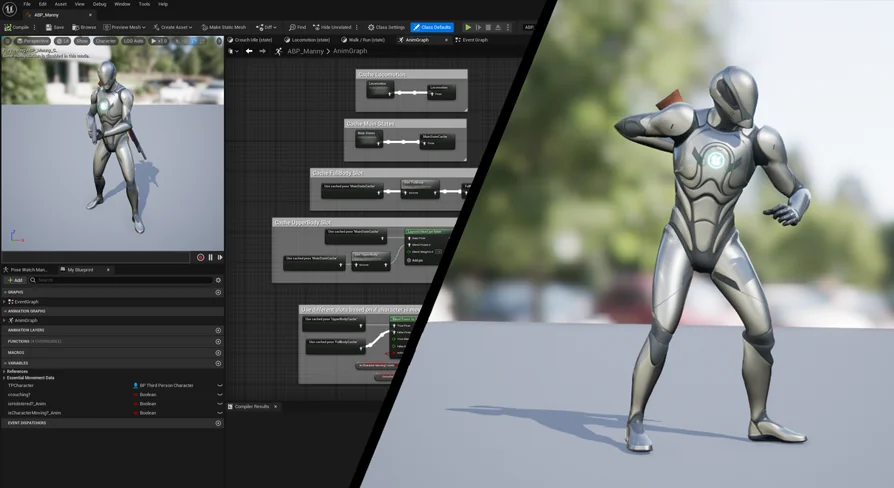
While State Machines efficiently handle continuous, systemic locomotion states, high-priority gameplay events require immediate execution without breaking the underlying movement logic. Animation Montages provide this functionality, allowing single-shot animations—such as weapon attacks, spell casts, item interactions, or hit reactions—to fire dynamically over existing states. The routing of these events is managed through Animation Montage Slots.
Slots enable layered playback by assigning specific animation tracks to designated segments of the character skeleton. For example, an upper-body slot can receive an attack montage while the lower body remains under the control of the locomotion State Machine. This separation allows a character to reload, swing a melee weapon, or cast an ability while continuing to run, jump, or crouch across the map. Montage Slots give developers granular control over blend-in and blend-out times, transition priorities, and skeleton masking, ensuring that overrides blend into ongoing locomotion cycles naturally once an action completes.
In-Engine Motion Editing and Baking with Control Rig and Sequencer
Traditional character pipelines often require exporting assets back out to external digital content creation software whenever an animation clip requires manual tweaking, pose correction, or timing adjustments. The combination of Control Rig and Sequencer removes this friction entirely by providing full timeline-based animation editing inside Unreal Engine. Existing animation assets can be loaded onto a Sequencer track, where Control Rig exposes all underlying manipulation controls directly over the captured performance.
Animators can use these tools to make additive keyframe corrections, correct clipping issues between character limbs and clothing, refine gaze directions, or alter specific poses throughout an entire sequence. Because the controls operate in the native engine environment, visual checks against lighting, level geometry, and scene camera angles happen in real time. Once adjustments are complete, the resulting performance can be baked directly out into a new, standalone animation sequence without exporting external files or leaving the engine editor. This self-contained baking process preserves asset fidelity, shortens revision loops, and keeps project assets readily accessible for both cinematic sequences and interactive gameplay state graphs.
Epic Dev Community Integration and Workflow Context
The Animation Ecosystem for Game Development curriculum on the Epic Dev Community structures these distinct pipeline phases into an integrated learning track. Categorized under educational resources and aligned with systems like the UI Material Lab, the training connects basic asset ingestion to advanced procedural correction and timeline editing. By consolidating retargeting, State Machine construction, Blendspace Analysis, socket binding, montage slot overrides, and Sequencer baking into a continuous, self-contained workflow, the system demonstrates how to produce, refine, and finalize interactive character motion entirely within Unreal Engine.
 Action-Adventure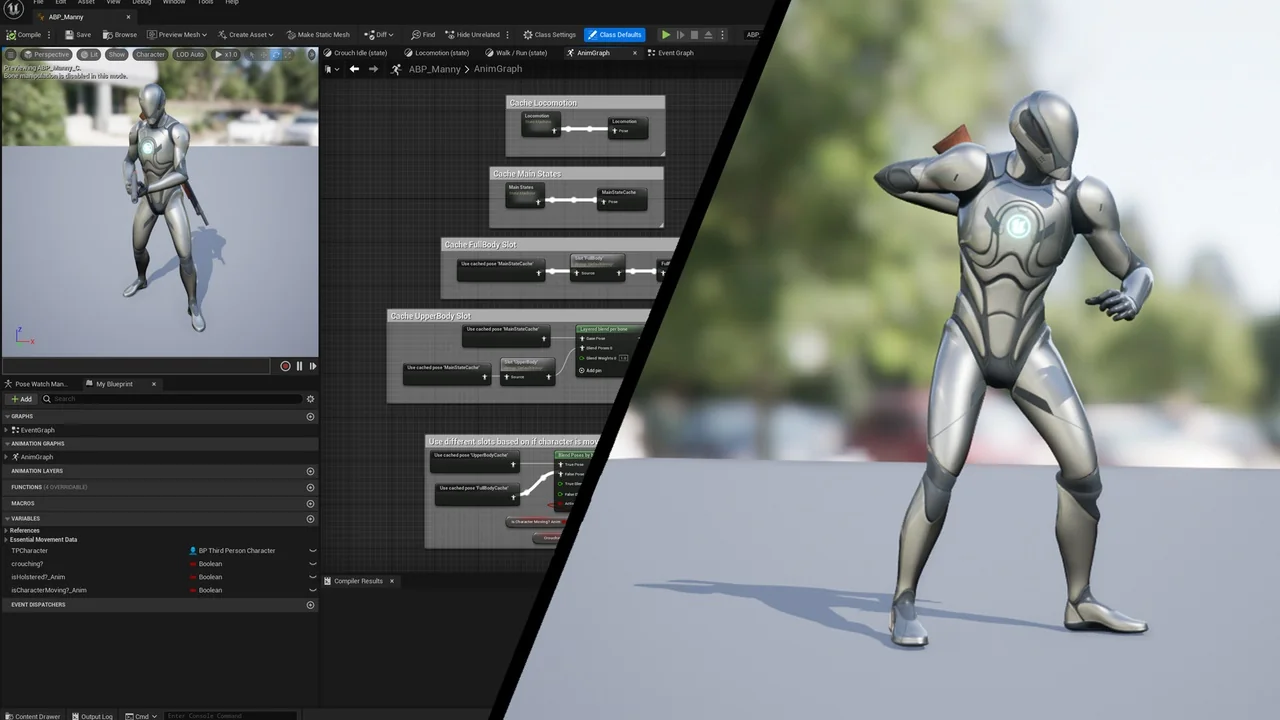
 Action-Adventure
 Action-Adventure
 Action-Adventure