"148d1066ed74e216"{"id":"1002945","slug":"websocket-client-for-unreal-engine","title":"WebSocket Client for Unreal Engine","category":"Network \u0026 Multiplayer","engine":"5.0 - 5.6","assetVersion":"Asset Version: 1.0.6 - 1.0.7","engineVersion":"Engine Version: 5.0 - 5.6","tag":"Network","accent":"blue","visual":"mech","summary":"Integrate real-time networking into Unreal Engine with dual Blueprint and C++ support, custom headers, secure protocols, and multi-connection capabilities.","platform":"Unreal Engine","indexPolicy":"index","publishedAt":"2026-11-21T23:34:24.400Z","updatedAt":"2026-11-21T23:34:24.400Z","sourceNotes":[],"fileContents":[],"compatibility":["Unreal Engine","Asset Version: 1.0.6 - 1.0.7","Engine Version: 5.0 - 5.6"],"featuredImage":{"alt":"WebSocket Client for Unreal Engine","src":"/wp-content/uploads/published/2026/11/b45f4edd2035-53552ce4-61d2-4c08-807e-41e10c97b6d4-f25dda7aa4.webp"},"fileSizeBytes":1108853,"hasDownloadLink":true,"downloads":0,"terms":[{"taxonomy":"category","slug":"network-and-multiplayer-tools-and-plugins","name":"Network \u0026 Multiplayer"}],"galleryImages":[{"src":"/wp-content/uploads/published/2026/11/be0c8b703427-3a9157e2-708b-4265-825d-e7442fb16d52-fcd5c435b7.webp","alt":"WebSocket Client for Unreal Engine"},{"src":"/wp-content/uploads/published/2026/11/287672b2e5b3-e167d1e7-f37d-4563-aac2-efaa10d72562-c2b7938bae.webp","alt":"WebSocket Client for Unreal Engine"},{"src":"/wp-content/uploads/published/2026/11/be8a51b8a856-d13d6232-a822-4948-b0dd-8ae8ec5f29aa-9558bf7c17.webp","alt":"WebSocket Client for Unreal Engine"},{"src":"/wp-content/uploads/published/2026/11/47edce249f29-f7143bee-8806-412b-bed6-69c3120744bd-d12435b1c2.webp","alt":"WebSocket Client for Unreal Engine"},{"src":"/wp-content/uploads/published/2026/11/9b05f0a7cad6-eeb528d6-54d7-484a-aeb6-f04d74bcb1e8-55de51930c.webp","alt":"WebSocket Client for Unreal Engine"}],"accessPanel":{"kind":"resource","title":"Get this resource","safetyNote":"Resources are manually reviewed before listing to improve quality and reduce obvious risks.","fileName":"WebSocket Client for Unreal Engine.7z","resourceType":"Resource archive","versions":[]},"contentHtml":"\u003cp\u003eInteractive simulations, multiplayer experiences, and real-time visualization projects frequently require bidirectional communication channels that stretch beyond traditional engine networking. Live event streaming, custom chat networks, synchronized telemetry dashboards, and external cloud integrations depend on persistent, low-latency socket pipelines. The WebSocket Client for Unreal Engine provides this bridge, establishing direct, two-way communication between Unreal Engine runtimes and remote WebSocket backends without forcing developers to wrestle with external third-party network libraries.\u003c/p\u003e\u003ch2\u003eConnecting Interactive Unreal Worlds to Real-Time Web Services\u003c/h2\u003e\u003cp\u003eModern interactive media routinely intersects with web technologies. Whether a project streams sensor information into an industrial digital twin, coordinates room states in an interactive museum installation, or synchronizes real-time user state with an online web application, standard HTTP requests are rarely fast enough. WebSockets resolve this by establishing an initial handshake that upgrades standard web connections into continuous, full-duplex network streams. In an Unreal Engine project, maintaining an open channel ensures that dynamic game events or visual updates occur instantly upon server broadcast.\u003c/p\u003e\u003cp\u003eThe plugin is designed to accommodate different development workflows by providing complete accessibility across both Blueprints and C++. Visual scripters can instantiate socket connections, hook into asynchronous message events, and transmit data entirely through node graphs without compiling source code. Simultaneously, technical directors and gameplay engineers can access the identical networking layer directly through native C++ classes, facilitating clean architectural segregation between low-level message processing and high-level scene logic. This symmetry allows rapid prototyping in Blueprint graphs while keeping the door open for performance-critical native extensions.\u003c/p\u003e\u003ch2\u003eDual Message Formats and Protocol Choices in the WebSocket Client\u003c/h2\u003e\u003cp\u003eData transmission demands vary widely depending on the nature of the network load. The WebSocket Client for Unreal Engine accounts for this diversity by supporting both string and binary message payloads across its send and receive interfaces.\u003c/p\u003e\u003cp\u003eString transmission serves structured text interchange, forming the backbone for formats such as JSON, plain text commands, and serialized state messages. When coordinating with backends running Node.js, Python, or standard web frameworks, sending and parsing string payloads allows developers to leverage existing web APIs and human-readable schemas. In contrast, high-frequency updates—such as raw transform matrices, compressed physics states, or unpacked byte streams from hardware sensors—benefit immensely from binary transmission. Passing raw byte buffers avoids string encoding overhead, keeping packet sizes minimal and serialization costs low.\u003c/p\u003e\u003cp\u003eConnection security is handled through flexible protocol selection. Developers can target endpoints using standard unencrypted connections via the \u003ccode\u003eWs://\u003c/code\u003e Protocol or enforce transport-layer security using encrypted \u003ccode\u003eWss://\u003c/code\u003e Connections. The choice allows projects to maintain frictionless local testing environments on unencrypted internal loops while securing production distributions with TLS/SSL encryption when connecting over open public networks.\u003c/p\u003e\u003ch2\u003eHeader Authentication and Simultaneous Multi-Connection Architecture\u003c/h2\u003e\u003cp\u003eProduction network infrastructure rarely relies on anonymous, single-endpoint designs. Modern web backends typically require identity verification during the initial upgrade request, and projects often need to orchestrate data across decentralized cloud services.\u003c/p\u003e\u003cp\u003eTo support authenticated backends, the plugin provides explicit access to request headers. Developers can attach custom header keys and values during connection initialization, permitting the inclusion of authorization tokens, JSON Web Tokens (JWT), session cookies, or custom API authentication keys. Because these credentials ride along with the initial connection handshake, servers can authenticate client sessions before allocating memory or binding channels to the socket instance.\u003c/p\u003e\u003cp\u003eComplex client architectures frequently interact with multiple independent services simultaneously. Rather than limiting an application to a single global socket context, the plugin supports multi-connection configurations. An interactive application can spawn and manage multiple independent socket instances in parallel:\u003c/p\u003e\u003cul\u003e\u003cli\u003eA dedicated socket maintaining a persistent connection to a low-latency live chat or notification channel.\u003c/li\u003e\u003cli\u003eA parallel socket streaming high-frequency game state or environmental updates from an authoritative simulation server.\u003c/li\u003e\u003cli\u003eAn auxiliary background socket relaying analytics, player metrics, or hardware sensor diagnostics to a monitoring cluster.\u003c/li\u003e\u003c/ul\u003e\u003cp\u003eEach socket operates independently, handling its own lifecycle transitions, message queues, and error states without blocking or degrading concurrent streams.\u003c/p\u003e\u003ch2\u003eEngine-Native Reliability Across Desktop and Mobile Platforms\u003c/h2\u003e\u003cp\u003eA notable friction point when introducing networking utilities to Unreal Engine projects is the risk of dependency bloat. Third-party C++ libraries frequently run into toolchain mismatches, complex linking procedures, or platform-specific compilation errors during cross-platform deployment. The WebSocket Client for Unreal Engine bypasses these pitfalls by building directly on top of the native WebSockets module packaged inside the engine itself. Because it relies exclusively on native engine subsystems, it introduces no external software dependencies, maintaining a light project footprint and simplifying maintenance across engine upgrades.\u003c/p\u003e\u003cp\u003eThis engine-native foundation translates directly into wide cross-platform compatibility. Projects can compile and deploy across five distinct operational platforms:\u003c/p\u003e\u003cul\u003e\u003cli\u003eWindows desktop environments.\u003c/li\u003e\u003cli\u003eMacOS workstations and runtimes.\u003c/li\u003e\u003cli\u003eLinux desktop and headless distribution environments.\u003c/li\u003e\u003cli\u003eAndroid mobile devices.\u003c/li\u003e\u003cli\u003eIOS handheld hardware.\u003c/li\u003e\u003c/ul\u003e\u003cp\u003eBecause the underlying engine module abstracts the operating system layer, socket behavior remains consistent across desktop and mobile targets. A data listener graph designed and tested on a Windows workstation behaves identically when deployed to a mobile handset or a Linux rendering node.\u003c/p\u003e\u003ch2\u003eTesting Pipelines with the Included Echo Server and Functional Demo\u003c/h2\u003e\u003cp\u003eSetting up networked subsystems can be difficult to verify without dedicated infrastructure to receive and reflect data. To eliminate configuration guesswork during initial implementation, the plugin includes both complete documentation and a functional demo project paired with a basic echo server.\u003c/p\u003e\u003cp\u003eThe echo server provides a local testing sandbox. Developers can launch the lightweight server locally, run the demo project, and immediately observe bidirectional packet exchanges. Sending a string or binary payload triggers an immediate return reflection, enabling creators to inspect delegate responses, verify message parsing nodes, and confirm socket connection flows before writing customized backend logic. This immediate feedback loop significantly reduces debugging friction, providing clear, working examples of how connection lifecycles, custom headers, and asynchronous event callbacks should be wired inside Unreal Engine.\u003c/p\u003e\u003cp\u003eWhether establishing a bridge between interactive gameplay and external web databases or feeding live market telemetry into a virtual broadcast stage, the client provides the structural tools necessary to manage high-speed, multi-platform WebSocket channels with minimal overhead.\u003c/p\u003e\n\n\u003ch2\u003eExplore Similar Assets\u003c/h2\u003e\n\u003cul\u003e\n\u003cli\u003e\u003ca href=\"https://3dcghub.com/network-clock/\" rel=\"noopener noreferrer\"\u003eNetwork Clock\u003c/a\u003e\u003c/li\u003e\n\u003cli\u003e\u003ca href=\"https://3dcghub.com/socket-io-client/\" rel=\"noopener noreferrer\"\u003eSocket.IO Client\u003c/a\u003e\u003c/li\u003e\n\u003cli\u003e\u003ca href=\"https://3dcghub.com/http-request/\" rel=\"noopener noreferrer\"\u003eHttp Request\u003c/a\u003e\u003c/li\u003e\n\u003cli\u003e\u003ca href=\"https://3dcghub.com/smooth-sync/\" rel=\"noopener noreferrer\"\u003eSmooth Sync\u003c/a\u003e\u003c/li\u003e\n\u003cli\u003e\u003ca href=\"https://3dcghub.com/web-socket-client/\" rel=\"noopener noreferrer\"\u003eWeb Socket Client\u003c/a\u003e\u003c/li\u003e\n\u003c/ul\u003e","contentTextLength":7755,"navigation":{"current":27,"total":4890,"previous":{"id":"1002946","slug":"wall-hiding-system","title":"Wall Hiding System","category":"Gameplay Features","platform":"Unreal Engine","updatedAt":"2026-11-21T23:35:05.525Z"},"next":{"id":"1002944","slug":"tech-tree-editor-designer","title":"Tech Tree Editor Designer","category":"Engine Tools","platform":"Unreal Engine","updatedAt":"2026-11-21T23:33:51.788Z"}},"relatedResources":[{"id":"1001325","slug":"network-clock","title":"Network Clock","category":"Network \u0026 Multiplayer","engine":"5.2 - 5.4","assetVersion":"Asset Version: 1.0.1","engineVersion":"Engine Version: 5.2 - 5.4","tag":"Network","accent":"blue","visual":"mech","summary":"Network Clock is an open-source Unreal Engine plugin designed to synchronize client and server time, compensating for network latency across multiplayer games.","platform":"Unreal Engine","indexPolicy":"index","publishedAt":"2026-10-02T09:54:03.857Z","updatedAt":"2026-10-02T09:54:03.857Z","sourceNotes":[],"fileContents":[],"compatibility":["Unreal Engine","Asset Version: 1.0.1","Engine Version: 5.2 - 5.4"],"featuredImage":{"alt":"Network Clock","src":"/wp-content/uploads/published/2026/10/1141f81ad01b-8fcc2205-a0ea-4f78-8f41-d5f6170fde51-4c0f489913.webp"},"fileSizeBytes":30385330,"hasDownloadLink":true,"downloads":0},{"id":"1002887","slug":"socket-io-client","title":"Socket.IO Client","category":"Network \u0026 Multiplayer","engine":"4.24 - 5.3","assetVersion":"Asset Version: 1.3.5 - 2.7.3","engineVersion":"Engine Version: 4.24 - 5.3","tag":"Network","accent":"blue","visual":"mech","summary":"Connect Unreal Engine to Node.js servers, websites, phones, and IoT hardware using the real-time C++11 Socket.IO Client plugin for Blueprints and code.","platform":"Unreal Engine","indexPolicy":"index","publishedAt":"2026-11-21T01:55:11.604Z","updatedAt":"2026-11-21T01:55:11.604Z","sourceNotes":[],"fileContents":[],"compatibility":["Unreal Engine","Asset Version: 1.3.5 - 2.7.3","Engine Version: 4.24 - 5.3"],"featuredImage":{"alt":"Socket.IO Client","src":"/wp-content/uploads/published/2026/11/87d11bc6ac94-b0148ab4-a550-48d3-b533-4537828928b3-d75320ea9a.webp"},"fileSizeBytes":349900415,"hasDownloadLink":true,"downloads":0},{"id":"1001277","slug":"http-request","title":"Http Request","category":"Network \u0026 Multiplayer","engine":"4.27 - 5.8","assetVersion":"Asset Version: 1.1","engineVersion":"Engine Version: 4.27 - 5.8","tag":"Network","accent":"blue","visual":"mech","summary":"Implement HTTP request sending with GET, POST, PUT, and DELETE methods across JSON, XML, and form-urlencoded content types, compatible with Mqtt Client.","platform":"Unreal Engine","indexPolicy":"index","publishedAt":"2026-09-30T06:10:41.021Z","updatedAt":"2026-09-30T06:10:41.021Z","sourceNotes":[],"fileContents":[],"compatibility":["Unreal Engine","Asset Version: 1.1","Engine Version: 4.27 - 5.8"],"featuredImage":{"alt":"Http Request","src":"/wp-content/uploads/published/2026/09/45d2746b540e-4fbda408-4442-4c3f-8b23-18cb993992e5-cd6e3c4b58.webp"},"fileSizeBytes":110330129,"hasDownloadLink":true,"downloads":0}]}[{"id":4225,"sourceId":4225,"taxonomyId":4225,"taxonomy":"category","slug":"asset-library","name":"Asset Library","parentId":null,"count":4744,"hasChildren":true,"href":"/","seoTitle":"Free Game Assets Library | 3DCGHUB","seoDescription":"Browse free Unreal Engine, Unity, Blender assets and game development tutorials on 3DCGHUB with previews, compatibility notes, and secure downloads.","sitemapEnabled":true,"children":[{"id":4227,"sourceId":4227,"taxonomyId":4227,"taxonomy":"category","slug":"blender-add-ons-plugins","name":"Blender Add-ons \u0026 Plugins","parentId":4225,"count":10,"hasChildren":false,"href":"/category/blender-add-ons-plugins/","seoTitle":"Free Blender Add-ons \u0026 Plugins | 3DCGHUB","seoDescription":"Browse free Blender Add-ons \u0026 Plugins tools for Blender on 3DCGHUB: curated downloads with preview images, compatibility notes and secure download access.","sitemapEnabled":true},{"id":514,"sourceId":514,"taxonomyId":514,"taxonomy":"category","slug":"unity-2","name":"Unity","parentId":4225,"count":453,"hasChildren":true,"href":"/category/unity-2/","seoTitle":"Free Unity Assets | 3DCGHUB","seoDescription":"Browse free Unity resources on 3DCGHUB: curated downloads with preview images, compatibility notes and secure download access.","sitemapEnabled":true,"children":[{"id":523,"sourceId":523,"taxonomyId":523,"taxonomy":"category","slug":"2d","name":"2D","parentId":514,"count":1,"hasChildren":true,"href":"/category/2d/","seoTitle":"Free Unity 2D | 3DCGHUB","seoDescription":"Browse free 2D assets for Unity on 3DCGHUB: curated downloads with preview images, compatibility notes and secure download access.","sitemapEnabled":true},{"id":515,"sourceId":515,"taxonomyId":515,"taxonomy":"category","slug":"3d-unity-2","name":"3D","parentId":514,"count":162,"hasChildren":true,"href":"/category/3d-unity-2/","seoTitle":"Free Unity 3D Assets | 3DCGHUB","seoDescription":"Browse free 3D assets for Unity on 3DCGHUB: curated downloads with preview images, compatibility notes and secure download access.","sitemapEnabled":true},{"id":565,"sourceId":565,"taxonomyId":565,"taxonomy":"category","slug":"add-ons","name":"Add-Ons","parentId":514,"count":2,"hasChildren":false,"href":"/category/add-ons/","seoTitle":"Free Unity Add-Ons | 3DCGHUB","seoDescription":"Browse free Add-Ons assets for Unity on 3DCGHUB: curated downloads with preview images, compatibility notes and secure download access.","sitemapEnabled":true},{"id":529,"sourceId":529,"taxonomyId":529,"taxonomy":"category","slug":"audio-unity-2","name":"Audio","parentId":514,"count":1,"hasChildren":true,"href":"/category/audio-unity-2/","seoTitle":"Free Unity Audio | 3DCGHUB","seoDescription":"Browse free Audio for Unity on 3DCGHUB: curated downloads with preview images, compatibility notes and secure download access.","sitemapEnabled":true},{"id":557,"sourceId":557,"taxonomyId":557,"taxonomy":"category","slug":"templates","name":"Templates","parentId":514,"count":36,"hasChildren":true,"href":"/category/templates/","seoTitle":"Free Unity Templates | 3DCGHUB","seoDescription":"Browse free Unity project templates on 3DCGHUB. Starter kits with previews, compatibility notes, and secure download access.","sitemapEnabled":true},{"id":533,"sourceId":533,"taxonomyId":533,"taxonomy":"category","slug":"tools-unity-2","name":"Tools","parentId":514,"count":0,"hasChildren":true,"href":"/category/tools-unity-2/","sitemapEnabled":true},{"id":554,"sourceId":554,"taxonomyId":554,"taxonomy":"category","slug":"vfx-unity-2","name":"VFX","parentId":514,"count":4,"hasChildren":true,"href":"/category/vfx-unity-2/","seoTitle":"Free Unity VFX | 3DCGHUB","seoDescription":"Browse free VFX for Unity on 3DCGHUB: curated downloads with preview images, compatibility notes and secure download access.","sitemapEnabled":true}]},{"id":511,"sourceId":511,"taxonomyId":511,"taxonomy":"category","slug":"unreal-engine-2","name":"Unreal Engine","parentId":4225,"count":4282,"hasChildren":true,"href":"/category/unreal-engine-2/","seoTitle":"Free Unreal Engine Assets | 3DCGHUB","seoDescription":"Browse free Unreal Engine resources on 3DCGHUB: curated downloads with preview images, compatibility notes and secure download access.","sitemapEnabled":true,"children":[{"id":54,"sourceId":54,"taxonomyId":54,"taxonomy":"category","slug":"3d","name":"3D","parentId":511,"count":2428,"hasChildren":true,"href":"/category/3d/","seoTitle":"Free Unreal Engine 3D | 3DCGHUB","seoDescription":"Browse free 3D assets for Unreal Engine on 3DCGHUB: curated downloads with preview images, compatibility notes and secure download access.","sitemapEnabled":true},{"id":441,"sourceId":441,"taxonomyId":441,"taxonomy":"category","slug":"animations","name":"Animations","parentId":511,"count":245,"hasChildren":true,"href":"/category/animations/","seoTitle":"Free Unreal Engine Animations | 3DCGHUB","seoDescription":"Browse free Animations for Unreal Engine on 3DCGHUB: curated downloads with preview images, compatibility notes and secure download access.","sitemapEnabled":true},{"id":446,"sourceId":446,"taxonomyId":446,"taxonomy":"category","slug":"audio","name":"Audio","parentId":511,"count":63,"hasChildren":true,"href":"/category/audio/","seoTitle":"Free Unreal Engine Audio Resources | 3DCGHUB","seoDescription":"Browse free Unreal Engine audio resources including sound effects, voices, dialogue, and ambient sounds. Curated free downloads on 3DCGHUB.","sitemapEnabled":true},{"id":466,"sourceId":466,"taxonomyId":466,"taxonomy":"category","slug":"game-systems","name":"Game Systems","parentId":511,"count":356,"hasChildren":true,"href":"/category/game-systems/","seoTitle":"Free Unreal Engine Game Systems | 3DCGHUB","seoDescription":"Browse free Game Systems tools for Unreal Engine on 3DCGHUB: curated downloads with preview images, compatibility notes and secure download access.","sitemapEnabled":true},{"id":478,"sourceId":478,"taxonomyId":478,"taxonomy":"category","slug":"game-templates","name":"Game Templates","parentId":511,"count":150,"hasChildren":true,"href":"/category/game-templates/","seoTitle":"Free Unreal Engine Game Templates | 3DCGHUB","seoDescription":"Browse free Game Templates for Unreal Engine on 3DCGHUB: curated downloads with preview images, compatibility notes and secure download access.","sitemapEnabled":true},{"id":432,"sourceId":432,"taxonomyId":432,"taxonomy":"category","slug":"hdri","name":"HDRI","parentId":511,"count":6,"hasChildren":true,"href":"/category/hdri/","seoTitle":"Free Unreal Engine HDRI | 3DCGHUB","seoDescription":"Browse free Unreal Engine HDRI skies and lighting maps on 3DCGHUB. Environment lighting with previews and secure downloads.","sitemapEnabled":true},{"id":228,"sourceId":228,"taxonomyId":228,"taxonomy":"category","slug":"material-and-textures","name":"Material \u0026 Textures","parentId":511,"count":172,"hasChildren":true,"href":"/category/material-and-textures/","seoTitle":"Free Unreal Engine Material \u0026 Textures | 3DCGHUB","seoDescription":"Browse free Material \u0026 Textures for Unreal Engine on 3DCGHUB: curated downloads with preview images, compatibility notes and secure download access.","sitemapEnabled":true},{"id":298,"sourceId":298,"taxonomyId":298,"taxonomy":"category","slug":"sprites-and-flipbooks","name":"Sprites \u0026 Flipbooks","parentId":511,"count":17,"hasChildren":true,"href":"/category/sprites-and-flipbooks/","seoTitle":"Free Unreal Engine Sprites \u0026 Flipbooks | 3DCGHUB","seoDescription":"Browse free Sprites \u0026 Flipbooks assets for Unreal Engine on 3DCGHUB: curated downloads with preview images, compatibility notes and secure download access.","sitemapEnabled":true},{"id":489,"sourceId":489,"taxonomyId":489,"taxonomy":"category","slug":"tools-and-plugins","name":"Tools \u0026 Plugins","parentId":511,"count":390,"hasChildren":true,"href":"/category/tools-and-plugins/","seoTitle":"Free Unreal Engine Tools \u0026 Plugins | 3DCGHUB","seoDescription":"Browse free Tools \u0026 Plugins for Unreal Engine on 3DCGHUB: curated downloads with preview images, compatibility notes and secure download access.","sitemapEnabled":true},{"id":459,"sourceId":459,"taxonomyId":459,"taxonomy":"category","slug":"ui","name":"UI","parentId":511,"count":43,"hasChildren":true,"href":"/category/ui/","seoTitle":"Free Unreal Engine UI | 3DCGHUB","seoDescription":"Browse free UI for Unreal Engine on 3DCGHUB: curated downloads with preview images, compatibility notes and secure download access.","sitemapEnabled":true},{"id":450,"sourceId":450,"taxonomyId":450,"taxonomy":"category","slug":"vfx","name":"VFX","parentId":511,"count":412,"hasChildren":true,"href":"/category/vfx/","seoTitle":"Free Unreal Engine VFX | 3DCGHUB","seoDescription":"Browse free VFX for Unreal Engine on 3DCGHUB: curated downloads with preview images, compatibility notes and secure download access.","sitemapEnabled":true}]}]},{"id":4222,"sourceId":4222,"taxonomyId":4222,"taxonomy":"category","slug":"tutorial-library","name":"Tutorial Library","parentId":null,"count":117,"hasChildren":false,"href":"/tutorials/","seoTitle":"Free Game Development Tutorial Library | 3DCGHUB","seoDescription":"Browse free game development tutorials for Unreal Engine, Unity, Blender, and more on 3DCGHUB with practical workflows and secure downloads.","sitemapEnabled":true}]
Resource screenshots
1 / 5
Join our channel
Follow 3DCGHUB on Telegram for new resource drops, migration updates, and community notices.
Resources are manually reviewed before listing to improve quality and reduce obvious risks.
No account required
Network
WebSocket Client for Unreal Engine
Integrate real-time networking into Unreal Engine with dual Blueprint and C++ support, custom headers, secure protocols, and multi-connection capabilities.
Interactive simulations, multiplayer experiences, and real-time visualization projects frequently require bidirectional communication channels that stretch beyond traditional engine networking. Live event streaming, custom chat networks, synchronized telemetry dashboards, and external cloud integrations depend on persistent, low-latency socket pipelines. The WebSocket Client for Unreal Engine provides this bridge, establishing direct, two-way communication between Unreal Engine runtimes and remote WebSocket backends without forcing developers to wrestle with external third-party network libraries.
Connecting Interactive Unreal Worlds to Real-Time Web Services
Modern interactive media routinely intersects with web technologies. Whether a project streams sensor information into an industrial digital twin, coordinates room states in an interactive museum installation, or synchronizes real-time user state with an online web application, standard HTTP requests are rarely fast enough. WebSockets resolve this by establishing an initial handshake that upgrades standard web connections into continuous, full-duplex network streams. In an Unreal Engine project, maintaining an open channel ensures that dynamic game events or visual updates occur instantly upon server broadcast.
The plugin is designed to accommodate different development workflows by providing complete accessibility across both Blueprints and C++. Visual scripters can instantiate socket connections, hook into asynchronous message events, and transmit data entirely through node graphs without compiling source code. Simultaneously, technical directors and gameplay engineers can access the identical networking layer directly through native C++ classes, facilitating clean architectural segregation between low-level message processing and high-level scene logic. This symmetry allows rapid prototyping in Blueprint graphs while keeping the door open for performance-critical native extensions.
Dual Message Formats and Protocol Choices in the WebSocket Client
Data transmission demands vary widely depending on the nature of the network load. The WebSocket Client for Unreal Engine accounts for this diversity by supporting both string and binary message payloads across its send and receive interfaces.
String transmission serves structured text interchange, forming the backbone for formats such as JSON, plain text commands, and serialized state messages. When coordinating with backends running Node.js, Python, or standard web frameworks, sending and parsing string payloads allows developers to leverage existing web APIs and human-readable schemas. In contrast, high-frequency updates—such as raw transform matrices, compressed physics states, or unpacked byte streams from hardware sensors—benefit immensely from binary transmission. Passing raw byte buffers avoids string encoding overhead, keeping packet sizes minimal and serialization costs low.
Connection security is handled through flexible protocol selection. Developers can target endpoints using standard unencrypted connections via the Ws:// Protocol or enforce transport-layer security using encrypted Wss:// Connections. The choice allows projects to maintain frictionless local testing environments on unencrypted internal loops while securing production distributions with TLS/SSL encryption when connecting over open public networks.
Header Authentication and Simultaneous Multi-Connection Architecture
Production network infrastructure rarely relies on anonymous, single-endpoint designs. Modern web backends typically require identity verification during the initial upgrade request, and projects often need to orchestrate data across decentralized cloud services.
To support authenticated backends, the plugin provides explicit access to request headers. Developers can attach custom header keys and values during connection initialization, permitting the inclusion of authorization tokens, JSON Web Tokens (JWT), session cookies, or custom API authentication keys. Because these credentials ride along with the initial connection handshake, servers can authenticate client sessions before allocating memory or binding channels to the socket instance.
Complex client architectures frequently interact with multiple independent services simultaneously. Rather than limiting an application to a single global socket context, the plugin supports multi-connection configurations. An interactive application can spawn and manage multiple independent socket instances in parallel:
A dedicated socket maintaining a persistent connection to a low-latency live chat or notification channel.
A parallel socket streaming high-frequency game state or environmental updates from an authoritative simulation server.
An auxiliary background socket relaying analytics, player metrics, or hardware sensor diagnostics to a monitoring cluster.
Each socket operates independently, handling its own lifecycle transitions, message queues, and error states without blocking or degrading concurrent streams.
Engine-Native Reliability Across Desktop and Mobile Platforms
A notable friction point when introducing networking utilities to Unreal Engine projects is the risk of dependency bloat. Third-party C++ libraries frequently run into toolchain mismatches, complex linking procedures, or platform-specific compilation errors during cross-platform deployment. The WebSocket Client for Unreal Engine bypasses these pitfalls by building directly on top of the native WebSockets module packaged inside the engine itself. Because it relies exclusively on native engine subsystems, it introduces no external software dependencies, maintaining a light project footprint and simplifying maintenance across engine upgrades.
This engine-native foundation translates directly into wide cross-platform compatibility. Projects can compile and deploy across five distinct operational platforms:
Windows desktop environments.
MacOS workstations and runtimes.
Linux desktop and headless distribution environments.
Android mobile devices.
IOS handheld hardware.
Because the underlying engine module abstracts the operating system layer, socket behavior remains consistent across desktop and mobile targets. A data listener graph designed and tested on a Windows workstation behaves identically when deployed to a mobile handset or a Linux rendering node.
Testing Pipelines with the Included Echo Server and Functional Demo
Setting up networked subsystems can be difficult to verify without dedicated infrastructure to receive and reflect data. To eliminate configuration guesswork during initial implementation, the plugin includes both complete documentation and a functional demo project paired with a basic echo server.
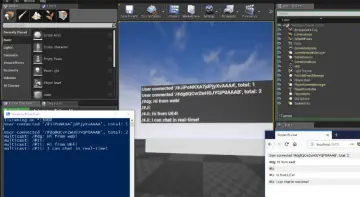
The echo server provides a local testing sandbox. Developers can launch the lightweight server locally, run the demo project, and immediately observe bidirectional packet exchanges. Sending a string or binary payload triggers an immediate return reflection, enabling creators to inspect delegate responses, verify message parsing nodes, and confirm socket connection flows before writing customized backend logic. This immediate feedback loop significantly reduces debugging friction, providing clear, working examples of how connection lifecycles, custom headers, and asynchronous event callbacks should be wired inside Unreal Engine.
Whether establishing a bridge between interactive gameplay and external web databases or feeding live market telemetry into a virtual broadcast stage, the client provides the structural tools necessary to manage high-speed, multi-platform WebSocket channels with minimal overhead.

 Network
 Network
 Network