"e9c335e082208b17"{"id":"1002887","slug":"socket-io-client","title":"Socket.IO Client","category":"Network \u0026 Multiplayer","engine":"4.24 - 5.3","assetVersion":"Asset Version: 1.3.5 - 2.7.3","engineVersion":"Engine Version: 4.24 - 5.3","tag":"Network","accent":"blue","visual":"mech","summary":"Connect Unreal Engine to Node.js servers, websites, phones, and IoT hardware using the real-time C++11 Socket.IO Client plugin for Blueprints and code.","platform":"Unreal Engine","indexPolicy":"index","publishedAt":"2026-11-21T01:55:11.604Z","updatedAt":"2026-11-21T01:55:11.604Z","sourceNotes":[],"fileContents":[],"compatibility":["Unreal Engine","Asset Version: 1.3.5 - 2.7.3","Engine Version: 4.24 - 5.3"],"featuredImage":{"alt":"Socket.IO Client","src":"/wp-content/uploads/published/2026/11/87d11bc6ac94-b0148ab4-a550-48d3-b533-4537828928b3-d75320ea9a.webp"},"fileSizeBytes":349900415,"hasDownloadLink":true,"downloads":0,"terms":[{"taxonomy":"category","slug":"network-and-multiplayer-tools-and-plugins","name":"Network \u0026 Multiplayer"}],"galleryImages":[{"src":"/wp-content/uploads/published/2026/11/9706fc5b7ca3-646aff51-29a6-490a-9bdf-426bbb186e23-2ff47e65fe.webp","alt":"Socket.IO Client"},{"src":"/wp-content/uploads/published/2026/11/17a3ab260100-956e28a7-cf5c-44c2-a732-8a8cd268c186-e9461d862b.webp","alt":"Socket.IO Client"},{"src":"/wp-content/uploads/published/2026/11/a443952ce4aa-cb892921-f483-4a15-b862-91c5f7900eb8-444da36a1b.webp","alt":"Socket.IO Client"},{"src":"/wp-content/uploads/published/2026/11/fa7dedc76498-8ea34f92-6ed7-4473-861d-e0ec7d7b8abe-0d2d290afe.webp","alt":"Socket.IO Client"},{"src":"/wp-content/uploads/published/2026/11/bf1be41fdafd-33b303be-979f-4c6b-bf58-184593f9142d-01dbd5b4a7.webp","alt":"Socket.IO Client"}],"contentHtml":"\u003cp\u003eReal-time data exchange inside Unreal Engine often demands connectivity that reaches far beyond the engine's built-in replication model. Bringing live external data into a scene requires a reliable bridge capable of sending and receiving messages instantaneously without stalling the game thread. The Socket.IO Client plugin addresses this operational need by embedding a ported C++11 implementation of the popular bi-directional networking library directly into Unreal Engine, enabling seamless communication between running actors and external network targets.\u003c/p\u003e \u003ch2\u003eArchitecture of the Socket.IO Port for Unreal Engine\u003c/h2\u003e\n\u003cp\u003eSocket.io operates fundamentally as a bi-directional, event-driven communication framework. In standard software ecosystems, the architecture is split into two halves: a backend server, which is typically constructed in Node.js, and a client layer, historically written in JavaScript to serve web browsers. By bringing the C++11 client implementation into the engine environment, the Socket.IO Client plugin allows Unreal Engine instances to adopt the role of a native client within that established ecosystem.\u003c/p\u003e\n\u003cp\u003eThis implementation eliminates the barrier between the native compiled environment of Unreal Engine and external web technology stacks. Because the underlying logic relies on a C++11 port, network calls are handled cleanly within the engine runtime. Developers do not need to construct custom socket layers or intermediate translation wrappers simply to speak with external servers. The engine connects natively to standard Node.js Socket.io server instances, participating in bi-directional messaging as naturally as a web browser or mobile client would.\u003c/p\u003e \u003ch2\u003eIntegrating the Socket.IO Client Component\u003c/h2\u003e\n\u003cp\u003eImplementing the network pipeline inside an active level centers around an actor component workflow. Developers attach the SocketIOClient component directly to any Actor of choice in their project hierarchy. This component manages the state of the socket, handles active event registrations, and establishes the pipeline required to transport data between the server and the actor's gameplay logic.\u003c/p\u003e\n\u003cp\u003eConnection management provides flexible execution timing suited to different project structures:\u003c/p\u003e\n\u003cul\u003e\n\u003cli\u003e\u003cstrong\u003eAutomatic Connection:\u003c/strong\u003e By configuring target endpoint properties ahead of time, the component can automatically initiate its connection sequence during the standard BeginPlay event cycle as soon as the actor spawns.\u003c/li\u003e\n\u003cli\u003e\u003cstrong\u003eManual Timing:\u003c/strong\u003e For projects requiring fine-grained lifecycle management, the auto-connection sequence can be deferred, allowing gameplay logic to trigger the connection routine at a distinct, custom-defined moment during execution.\u003c/li\u003e\n\u003cli\u003e\u003cstrong\u003eCustom Endpoint Binding:\u003c/strong\u003e The target server address can be defined specifically for each component instance, allowing different actors to communicate with separate endpoints or backends when necessary.\u003c/li\u003e\n\u003c/ul\u003e \u003ch2\u003eReal-Time Networking with Socket.IO Event Pipelines\u003c/h2\u003e\n\u003cp\u003eOnce an actor establishes an active connection to an endpoint, the Socket.IO Client component handles data through an event-based messaging system. Instead of forcing raw byte parsing or convoluted string serialization inside visual scripting graphs, the plugin natively routes data into Unreal Engine's standard type architecture. Both sending and receiving logic tie directly into Blueprint structs and user-defined types.\u003c/p\u003e\n\u003cp\u003eEmitting an event pushes structured data out to the connected server, identifying the message by its event name and bundling parameters into compatible engine types. In reverse, when the server emits an event targeted at the client, the component receives the incoming payload, unpackages it, and fires the corresponding event dispatcher or node in the actor graph. This clean mapping allows technical designers and programmers working in Blueprints to access structured network data directly, minimizing the boilerplate needed to deserialize incoming packets.\u003c/p\u003e \u003ch2\u003eCross-Platform Systems and Data Streaming\u003c/h2\u003e\n\u003cp\u003eBecause the plugin links Unreal Engine directly to Node.js environments and web-standard client protocols, it enables cross-platform messaging frameworks that span heterogeneous devices. Unreal projects are no longer locked within isolated engine instances; they can participate in live, unified network environments that include modern websites, smartphone applications, and independent server utilities.\u003c/p\u003e\n\u003cp\u003eA classic application of this pipeline is live cross-platform chat. An Unreal Engine project can broadcast chat messages to an external Node.js server, which instantly distributes those messages out to web pages, native mobile apps, and other running instances of the game. Players inside an interactive virtual world can converse in real time with users accessing a web-based dashboard or mobile portal without requiring complex third-party account brokers.\u003c/p\u003e\n\u003cp\u003eBeyond textual chat and simple control signals, the plugin is equipped to stream large data payloads into and out of an Unreal Engine project. Complex datasets, dynamic content streams, and external data structures can be funneled over the real-time link continuously. This allows external tools or web services to feed live analytical metrics, large data tables, or dynamic world updates straight into the runtime simulation while the engine simultaneously emits its internal state back out to external systems.\u003c/p\u003e \u003ch2\u003eHardware Control and Physical Computing with IoT Devices\u003c/h2\u003e\n\u003cp\u003eThe bi-directional nature of the Socket.IO Client plugin makes it a powerful asset for physical computing and Internet of Things (IoT) hardware integrations. Because lightweight microcontrollers and IoT devices can interface with Node.js backends or communicate via socket networks, Unreal Engine scenes can directly influence and react to physical hardware in the real world.\u003c/p\u003e\n\u003cp\u003eA prime practical example highlighted by the plugin is the real-time control of Arduino LED setups using in-engine lighting parameters. A technical artist can expose light properties—such as color, intensity, and flicker rate—from an actor in a level. As these values evolve during gameplay or interactive experiences, the SocketIOClient component emits the adjusted values across the network. The external hardware receiver parses these updates and dynamically adjusts real, physical Arduino LED arrays to mirror the digital lighting conditions inside Unreal Engine. This operational loop provides physical installations, virtual production stages, and interactive exhibits with a direct line of communication between engine-driven aesthetics and real-world lighting fixtures.\u003c/p\u003e \u003ch2\u003eBlueprint and Code Implementations for Developers\u003c/h2\u003e\n\u003cp\u003eThe plugin is packaged specifically as a developer-focused toolkit, prioritizing functional flexibility over rigid, pre-made UI templates. It accommodates both visual scripting purists and native C++ programmers, maintaining feature parity across both development routes.\u003c/p\u003e\n\u003cp\u003eIn Blueprint environments, the workflow focuses on intuitive node graphs, where incoming network events fire custom events that unpack variables into standard structs without crashing or dropping connection threads. For C++ engineers, the underlying C++11 client foundation offers clean hooks into native code, allowing advanced users to optimize memory handling, integrate low-level listeners, or thread complex data routines cleanly alongside existing engine systems.\u003c/p\u003e\n\u003cp\u003eBy blending full Blueprint accessibility with robust C++ performance, the Socket.IO Client plugin bridges the gap between external web-scale infrastructures, physical computing devices, and Unreal Engine's visual simulation capabilities.\u003c/p\u003e\n\n\u003ch2\u003eRelated Resources Worth Checking\u003c/h2\u003e\n\u003cul\u003e\n\u003cli\u003e\u003ca href=\"https://3dcghub.com/http-request/\" rel=\"noopener noreferrer\"\u003eHttp Request\u003c/a\u003e\u003c/li\u003e\n\u003cli\u003e\u003ca href=\"https://3dcghub.com/smooth-sync/\" rel=\"noopener noreferrer\"\u003eSmooth Sync\u003c/a\u003e\u003c/li\u003e\n\u003cli\u003e\u003ca href=\"https://3dcghub.com/network-clock/\" rel=\"noopener noreferrer\"\u003eNetwork Clock\u003c/a\u003e\u003c/li\u003e\n\u003cli\u003e\u003ca href=\"https://3dcghub.com/network-stats/\" rel=\"noopener noreferrer\"\u003eNetwork Stats\u003c/a\u003e\u003c/li\u003e\n\u003cli\u003e\u003ca href=\"https://3dcghub.com/http-requests-for-blueprints/\" rel=\"noopener noreferrer\"\u003eHTTP Requests for Blueprints\u003c/a\u003e\u003c/li\u003e\n\u003c/ul\u003e","contentTextLength":7684,"navigation":{"current":48,"total":4839,"previous":{"id":"1002888","slug":"json-parser-plugin","title":"JSON Parser Plugin","category":"Engine Tools","platform":"Unreal Engine","updatedAt":"2026-11-21T01:58:38.450Z"},"next":{"id":"1002886","slug":"ios-native-goodies","title":"iOS Native Goodies","category":"Engine Tools","platform":"Unreal Engine","updatedAt":"2026-11-21T01:54:21.877Z"}},"relatedResources":[{"id":"1001277","slug":"http-request","title":"Http Request","category":"Network \u0026 Multiplayer","engine":"4.27 - 5.8","assetVersion":"Asset Version: 1.1","engineVersion":"Engine Version: 4.27 - 5.8","tag":"Network","accent":"blue","visual":"mech","summary":"Implement HTTP request sending with GET, POST, PUT, and DELETE methods across JSON, XML, and form-urlencoded content types, compatible with Mqtt Client.","platform":"Unreal Engine","indexPolicy":"index","publishedAt":"2026-09-30T06:10:41.021Z","updatedAt":"2026-09-30T06:10:41.021Z","sourceNotes":[],"fileContents":[],"compatibility":["Unreal Engine","Asset Version: 1.1","Engine Version: 4.27 - 5.8"],"featuredImage":{"alt":"Http Request","src":"/wp-content/uploads/published/2026/09/45d2746b540e-4fbda408-4442-4c3f-8b23-18cb993992e5-cd6e3c4b58.webp"},"fileSizeBytes":110330129,"hasDownloadLink":true,"downloads":0},{"id":"1000252","slug":"smooth-sync","title":"Smooth Sync","category":"Network \u0026 Multiplayer","engine":"4.26 - 5.7","assetVersion":"Asset Version: 1.38 - 1.48","engineVersion":"Engine Version: 4.26 - 5.7","tag":"Network","accent":"blue","visual":"mech","summary":"A drop-in multiplayer networking plugin that replaces default Replicate Movement with customizable interpolation, extrapolation, and optional client authority.","platform":"Unreal Engine","indexPolicy":"index","publishedAt":"2026-06-30T21:38:04.429Z","updatedAt":"2026-07-06T18:48:58.674Z","sourceNotes":[],"fileContents":[],"compatibility":["Unreal Engine","Asset Version: 1.38 - 1.48","Engine Version: 4.26 - 5.7"],"featuredImage":{"alt":"Smooth Sync","src":"/wp-content/uploads/published/2026/06/44159333889a-4cc1c298-8f30-43e2-b240-a933394c9e0e-b5a28d1d92.webp"},"fileSizeBytes":164880539,"hasDownloadLink":true,"downloads":1},{"id":"1001325","slug":"network-clock","title":"Network Clock","category":"Network \u0026 Multiplayer","engine":"5.2 - 5.4","assetVersion":"Asset Version: 1.0.1","engineVersion":"Engine Version: 5.2 - 5.4","tag":"Network","accent":"blue","visual":"mech","summary":"Network Clock is an open-source Unreal Engine plugin designed to synchronize client and server time, compensating for network latency across multiplayer games.","platform":"Unreal Engine","indexPolicy":"index","publishedAt":"2026-10-02T09:54:03.857Z","updatedAt":"2026-10-02T09:54:03.857Z","sourceNotes":[],"fileContents":[],"compatibility":["Unreal Engine","Asset Version: 1.0.1","Engine Version: 5.2 - 5.4"],"featuredImage":{"alt":"Network Clock","src":"/wp-content/uploads/published/2026/10/1141f81ad01b-8fcc2205-a0ea-4f78-8f41-d5f6170fde51-4c0f489913.webp"},"fileSizeBytes":30385330,"hasDownloadLink":true,"downloads":0}]}
Resource screenshots
1 / 5
Join our channel
Follow 3DCGHUB on Telegram for new resource drops, migration updates, and community notices.
Connect Unreal Engine to Node.js servers, websites, phones, and IoT hardware using the real-time C++11 Socket.IO Client plugin for Blueprints and code.
Real-time data exchange inside Unreal Engine often demands connectivity that reaches far beyond the engine's built-in replication model. Bringing live external data into a scene requires a reliable bridge capable of sending and receiving messages instantaneously without stalling the game thread. The Socket.IO Client plugin addresses this operational need by embedding a ported C++11 implementation of the popular bi-directional networking library directly into Unreal Engine, enabling seamless communication between running actors and external network targets.
Architecture of the Socket.IO Port for Unreal Engine
Socket.io operates fundamentally as a bi-directional, event-driven communication framework. In standard software ecosystems, the architecture is split into two halves: a backend server, which is typically constructed in Node.js, and a client layer, historically written in JavaScript to serve web browsers. By bringing the C++11 client implementation into the engine environment, the Socket.IO Client plugin allows Unreal Engine instances to adopt the role of a native client within that established ecosystem.
This implementation eliminates the barrier between the native compiled environment of Unreal Engine and external web technology stacks. Because the underlying logic relies on a C++11 port, network calls are handled cleanly within the engine runtime. Developers do not need to construct custom socket layers or intermediate translation wrappers simply to speak with external servers. The engine connects natively to standard Node.js Socket.io server instances, participating in bi-directional messaging as naturally as a web browser or mobile client would.
Integrating the Socket.IO Client Component
Implementing the network pipeline inside an active level centers around an actor component workflow. Developers attach the SocketIOClient component directly to any Actor of choice in their project hierarchy. This component manages the state of the socket, handles active event registrations, and establishes the pipeline required to transport data between the server and the actor's gameplay logic.
Connection management provides flexible execution timing suited to different project structures:
Automatic Connection: By configuring target endpoint properties ahead of time, the component can automatically initiate its connection sequence during the standard BeginPlay event cycle as soon as the actor spawns.
Manual Timing: For projects requiring fine-grained lifecycle management, the auto-connection sequence can be deferred, allowing gameplay logic to trigger the connection routine at a distinct, custom-defined moment during execution.
Custom Endpoint Binding: The target server address can be defined specifically for each component instance, allowing different actors to communicate with separate endpoints or backends when necessary.
Real-Time Networking with Socket.IO Event Pipelines
Once an actor establishes an active connection to an endpoint, the Socket.IO Client component handles data through an event-based messaging system. Instead of forcing raw byte parsing or convoluted string serialization inside visual scripting graphs, the plugin natively routes data into Unreal Engine's standard type architecture. Both sending and receiving logic tie directly into Blueprint structs and user-defined types.
Emitting an event pushes structured data out to the connected server, identifying the message by its event name and bundling parameters into compatible engine types. In reverse, when the server emits an event targeted at the client, the component receives the incoming payload, unpackages it, and fires the corresponding event dispatcher or node in the actor graph. This clean mapping allows technical designers and programmers working in Blueprints to access structured network data directly, minimizing the boilerplate needed to deserialize incoming packets.
Cross-Platform Systems and Data Streaming
Because the plugin links Unreal Engine directly to Node.js environments and web-standard client protocols, it enables cross-platform messaging frameworks that span heterogeneous devices. Unreal projects are no longer locked within isolated engine instances; they can participate in live, unified network environments that include modern websites, smartphone applications, and independent server utilities.
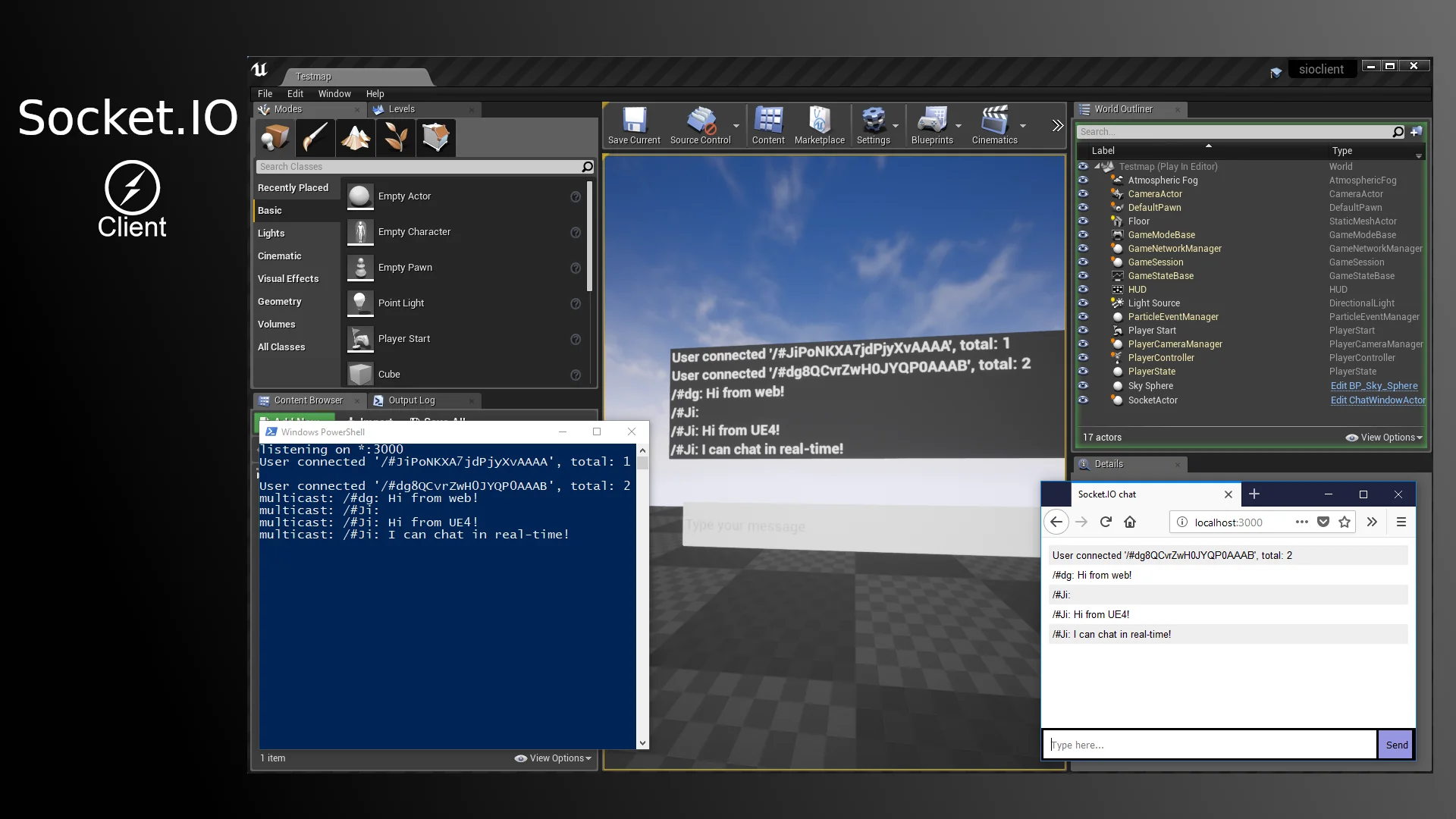
A classic application of this pipeline is live cross-platform chat. An Unreal Engine project can broadcast chat messages to an external Node.js server, which instantly distributes those messages out to web pages, native mobile apps, and other running instances of the game. Players inside an interactive virtual world can converse in real time with users accessing a web-based dashboard or mobile portal without requiring complex third-party account brokers.
Beyond textual chat and simple control signals, the plugin is equipped to stream large data payloads into and out of an Unreal Engine project. Complex datasets, dynamic content streams, and external data structures can be funneled over the real-time link continuously. This allows external tools or web services to feed live analytical metrics, large data tables, or dynamic world updates straight into the runtime simulation while the engine simultaneously emits its internal state back out to external systems.
Hardware Control and Physical Computing with IoT Devices
The bi-directional nature of the Socket.IO Client plugin makes it a powerful asset for physical computing and Internet of Things (IoT) hardware integrations. Because lightweight microcontrollers and IoT devices can interface with Node.js backends or communicate via socket networks, Unreal Engine scenes can directly influence and react to physical hardware in the real world.
A prime practical example highlighted by the plugin is the real-time control of Arduino LED setups using in-engine lighting parameters. A technical artist can expose light properties—such as color, intensity, and flicker rate—from an actor in a level. As these values evolve during gameplay or interactive experiences, the SocketIOClient component emits the adjusted values across the network. The external hardware receiver parses these updates and dynamically adjusts real, physical Arduino LED arrays to mirror the digital lighting conditions inside Unreal Engine. This operational loop provides physical installations, virtual production stages, and interactive exhibits with a direct line of communication between engine-driven aesthetics and real-world lighting fixtures.
Blueprint and Code Implementations for Developers
The plugin is packaged specifically as a developer-focused toolkit, prioritizing functional flexibility over rigid, pre-made UI templates. It accommodates both visual scripting purists and native C++ programmers, maintaining feature parity across both development routes.
In Blueprint environments, the workflow focuses on intuitive node graphs, where incoming network events fire custom events that unpack variables into standard structs without crashing or dropping connection threads. For C++ engineers, the underlying C++11 client foundation offers clean hooks into native code, allowing advanced users to optimize memory handling, integrate low-level listeners, or thread complex data routines cleanly alongside existing engine systems.
By blending full Blueprint accessibility with robust C++ performance, the Socket.IO Client plugin bridges the gap between external web-scale infrastructures, physical computing devices, and Unreal Engine's visual simulation capabilities.
 Network
 Network
 Network