"95fdaf16012263fa"{"id":"1002331","slug":"network-stats","title":"Network Stats","category":"Network \u0026 Multiplayer","engine":"4.26 - 4.27","assetVersion":"Asset Version: 1.0","engineVersion":"Engine Version: 4.26 - 4.27","tag":"Network","accent":"blue","visual":"mech","summary":"Network Stats adds a drag-and-drop HUD widget that shows ping, packet and connection readouts in multiplayer projects, with a Blueprint Subsystem behind it.","platform":"Unreal Engine","indexPolicy":"index","publishedAt":"2026-11-06T06:36:07.864Z","updatedAt":"2026-11-06T06:36:07.864Z","sourceNotes":[],"fileContents":[],"compatibility":["Unreal Engine","Asset Version: 1.0","Engine Version: 4.26 - 4.27"],"featuredImage":{"alt":"Network Stats","src":"/wp-content/uploads/published/2026/11/546e9f4b110f-76193fd8-7282-496b-a15e-8c4b66c9e578-4ba11bd2ca.webp"},"hasDownloadLink":true,"downloads":0,"terms":[{"taxonomy":"category","slug":"network-and-multiplayer-tools-and-plugins","name":"Network \u0026 Multiplayer"}],"galleryImages":[{"src":"/wp-content/uploads/published/2026/11/04bdc51879cd-e3844088-4a02-4cf3-9db3-45fed19b43b8-2550dc498d.webp","alt":"Network Stats"},{"src":"/wp-content/uploads/published/2026/11/bd2c84309359-199143b2-357b-4925-8d32-0323ca29bfc0-333d7750d7.webp","alt":"Network Stats"},{"src":"/wp-content/uploads/published/2026/11/24d867e4b3cd-f4e4ae9f-6347-4edd-806e-a09235a5ef49-a643275d99.webp","alt":"Network Stats"}],"accessPanel":{"kind":"resource","title":"Get this resource","eyebrow":"Free resource","message":"3DCGHUB is the service provider for this listing. Access is fulfilled through the official publisher channel.","fileName":"Network Stats.7z","safetyNote":"Resources are manually reviewed before listing to improve quality and reduce obvious risks.","actionLabel":"Get this resource","resourceType":"Resource archive","versions":[]},"contentHtml":"\u003cp\u003eAny competitive multiplayer scene eventually reaches the same moment: a player fires, the hit does not register, and they start hunting for a number that explains why. Shooters, battle royale drops, co-op sessions with a distant host — all of them benefit from a small, legible readout that answers \"how is my connection doing?\" without a console command. Network Stats exists for exactly that slot on the screen, showing network information on the HUD in the style popular battle royale games have made familiar.\u003c/p\u003e \u003ch2\u003eA readout players already know how to read\u003c/h2\u003e\n\u003cp\u003eBattle royale titles trained a whole audience to glance at a corner of the display and interpret what they see there. That shared literacy is the reason a stats overlay works at all: nobody needs a tutorial to understand that a rising ping number is bad news, or that packet trouble tends to show up before a rubber-banding session does. Dropping that same kind of display into a project means players arrive already knowing what the corner of their screen is telling them.\u003c/p\u003e\n\u003cp\u003eThat matters most in the moments where a match feels wrong but nothing visible explains it. A HUD readout turns a vague complaint into something a player can point at, and it does so without pulling them out of the game.\u003c/p\u003e \u003ch2\u003eThe default widget is drag-and-drop, not a build task\u003c/h2\u003e\n\u003cp\u003eThe package ships with one ready-to-use widget. It goes onto the HUD by dragging and dropping it there. That is the entire integration story for the default case — no assembly of panels, no hand-built layout, no placeholder graphics to replace before it looks presentable.\u003c/p\u003e\n\u003cp\u003eFor a project that already has a working HUD, this is the useful part. A stats display is rarely the feature anyone plans a sprint around; it is the thing that gets added late, when playtests start producing connection complaints and someone needs data on screen by the next build. Having a finished widget on hand shortens that gap considerably. It also gives a team something concrete to react to — a real readout in the corner during a playtest tells you faster whether the layout crowds the rest of the HUD than any mockup would.\u003c/p\u003e \u003ch2\u003ePing, packets, connection state — the three things the readout covers\u003c/h2\u003e\n\u003cp\u003eThe scope of the plugin is narrow on purpose. Its subject matter is the network itself: the connection a player currently holds, the packets moving across it, and the ping that measures how far away the other end feels. Those are the values a multiplayer build needs visible when something degrades.\u003c/p\u003e\n\u003cp\u003eMultiplayer is the context throughout. This is not a general-purpose debug overlay for frame timings or memory; it is a connection-focused display for games where more than one player shares a session. That focus is what keeps the widget small enough to live permanently on screen rather than being toggled on for diagnostics only.\u003c/p\u003e \u003ch2\u003eWhere the Blueprint Subsystem sits in the wiring\u003c/h2\u003e\n\u003cp\u003eBehind the widget, the plugin is compatible with the Blueprint Subsystem, which places its surface within reach of Blueprint work rather than confining it to engine-level code. In practice that means a team can treat Network Stats as part of the same Blueprint toolchain the rest of the HUD already uses — the widget goes in, and the plugin's logic is addressable the way other subsystems in the project are.\u003c/p\u003e\n\u003cp\u003eThis is the difference between a plugin that a programmer has to adopt on everyone's behalf and one that a HUD-focused developer can pick up directly. On a small team, or on a project where the UI work and the gameplay code sit with different people, that distinction decides whether a tool actually gets used.\u003c/p\u003e \u003ch2\u003eFitting it beside an existing HUD instead of replacing one\u003c/h2\u003e\n\u003cp\u003eMost projects arrive at this plugin with a HUD already in place — health, ammo, a minimap, a squad list. The stats widget is a companion to that layout, not a replacement for it. The practical question is placement: a corner that stays clear during combat, remains readable at the resolutions the project targets, and does not compete with the elements players check under pressure.\u003c/p\u003e\n\u003cp\u003eBecause the default widget arrives finished, the first pass is a matter of positioning rather than authoring. Teams can put it in front of playtesters early, watch whether anyone actually looks at it, and adjust from there. A stats display that players ignore is doing its job; one that distracts them is not, and the only reliable way to tell the difference is to have it running in a real session.\u003c/p\u003e \u003ch2\u003eWho should pick it up\u003c/h2\u003e\n\u003cp\u003eReach for Network Stats when a multiplayer project needs visible connection information on the HUD and the alternative is hand-building that display from scratch. It suits battle royale and shooter-style layouts where the readout is a permanent fixture, and it suits any multiplayer build where testers keep reporting connection problems that nobody can quantify on screen. If the project has no HUD yet, the widget still gives a starting point that can be positioned and judged in a session rather than debated in a document.\u003c/p\u003e\n\u003cp\u003eThe narrow scope is the recommendation as much as the description: this is a small, finished piece of a HUD, and it is worth having precisely because nobody wants to spend a sprint on the corner of the screen.\u003c/p\u003e\n\n\u003ch2\u003eContinue Browsing Similar Packs\u003c/h2\u003e\n\u003cul\u003e\n\u003cli\u003e\u003ca href=\"https://3dcghub.com/eos-integration-kit/\" rel=\"noopener noreferrer\"\u003eEOS Integration Kit\u003c/a\u003e\u003c/li\u003e\n\u003cli\u003e\u003ca href=\"https://3dcghub.com/universal-mp-indicator/\" rel=\"noopener noreferrer\"\u003eUniversal MP Indicator\u003c/a\u003e\u003c/li\u003e\n\u003cli\u003e\u003ca href=\"https://3dcghub.com/http-request/\" rel=\"noopener noreferrer\"\u003eHttp Request\u003c/a\u003e\u003c/li\u003e\n\u003cli\u003e\u003ca href=\"https://3dcghub.com/http-requests-for-blueprints/\" rel=\"noopener noreferrer\"\u003eHTTP Requests for Blueprints\u003c/a\u003e\u003c/li\u003e\n\u003cli\u003e\u003ca href=\"https://3dcghub.com/quest-editor-plugin/\" rel=\"noopener noreferrer\"\u003eQuest Editor Plugin\u003c/a\u003e\u003c/li\u003e\n\u003c/ul\u003e","contentTextLength":5321,"navigation":{"current":37,"total":4291,"previous":{"id":"1002332","slug":"niagara-constellations","title":"Niagara Constellations","category":"Variety","platform":"Unreal Engine","updatedAt":"2026-11-06T06:37:04.151Z"},"next":{"id":"1002330","slug":"multiplayer-starter-pack","title":"Multiplayer Starter Pack","category":"Network \u0026 Multiplayer","platform":"Unreal Engine","updatedAt":"2026-11-06T06:35:10.726Z"}},"relatedResources":[{"id":"1000154","slug":"eos-integration-kit","title":"EOS Integration Kit","category":"Network \u0026 Multiplayer","engine":"5.5 - 5.6","assetVersion":"Asset Version:4.6.2 - 4.8.5","engineVersion":"Engine Version: 5.5 - 5.6","tag":"Network","accent":"blue","visual":"mech","summary":"An Unreal Engine plugin for Epic Online Services that brings authentication, matchmaking, voice chat, storage, stats, leaderboards, and more into one workflow.","platform":"Unreal Engine","indexPolicy":"index","publishedAt":"2026-06-18T21:44:15.499Z","updatedAt":"2026-06-18T21:44:15.499Z","sourceNotes":[],"fileContents":[],"compatibility":["Unreal Engine","Asset Version:4.6.2 - 4.8.5","Engine Version: 5.5 - 5.6"],"featuredImage":{"alt":"EOS Integration Kit","src":"/wp-content/uploads/published/2026/06/d23399efa666-8ac3c106-13e9-405f-803e-82cc6e8e7f48-e62b93acec.webp"},"hasDownloadLink":true,"downloads":0},{"id":"15167","slug":"universal-mp-indicator","title":"Universal MP Indicator","category":"Network \u0026 Multiplayer","engine":"4.27 - 5.8","assetVersion":"Asset Version:1.0 - 1.4","engineVersion":"Engine version: 4.27 - 5.8","tag":"Network","accent":"blue","visual":"character","summary":"The Universal MP Indicator is a high-performance C++ plugin designed for tracking targets in 2D screen space. It offers versatile on-screen and off-screen modes with deep customization for any game project.","platform":"Unreal Engine","indexPolicy":"index","publishedAt":"2026-03-12T08:08:42.000Z","updatedAt":"2026-09-30T04:40:38.530Z","sourceNotes":[],"fileContents":[],"compatibility":["Unreal Engine","Asset Version:1.0 - 1.4","Engine version: 4.27 - 5.8"],"featuredImage":{"alt":"Universal MP Indicator","src":"https://3dcghub.com/wp-content/uploads/2026/03/425f1a5c-f01e-46ad-8217-6e746d0a12fd.webp"},"hasDownloadLink":true,"downloads":0},{"id":"1001277","slug":"http-request","title":"Http Request","category":"Network \u0026 Multiplayer","engine":"4.27 - 5.8","assetVersion":"Asset Version: 1.1","engineVersion":"Engine Version: 4.27 - 5.8","tag":"Network","accent":"blue","visual":"mech","summary":"Implement HTTP request sending with GET, POST, PUT, and DELETE methods across JSON, XML, and form-urlencoded content types, compatible with Mqtt Client.","platform":"Unreal Engine","indexPolicy":"index","publishedAt":"2026-09-30T06:10:41.021Z","updatedAt":"2026-09-30T06:10:41.021Z","sourceNotes":[],"fileContents":[],"compatibility":["Unreal Engine","Asset Version: 1.1","Engine Version: 4.27 - 5.8"],"featuredImage":{"alt":"Http Request","src":"/wp-content/uploads/published/2026/09/45d2746b540e-4fbda408-4442-4c3f-8b23-18cb993992e5-cd6e3c4b58.webp"},"hasDownloadLink":true,"downloads":0}]}
Network
Network Stats
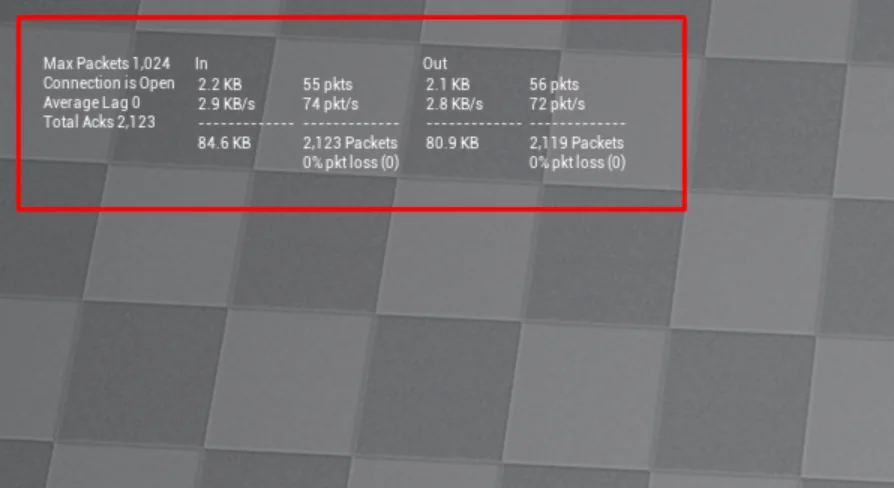
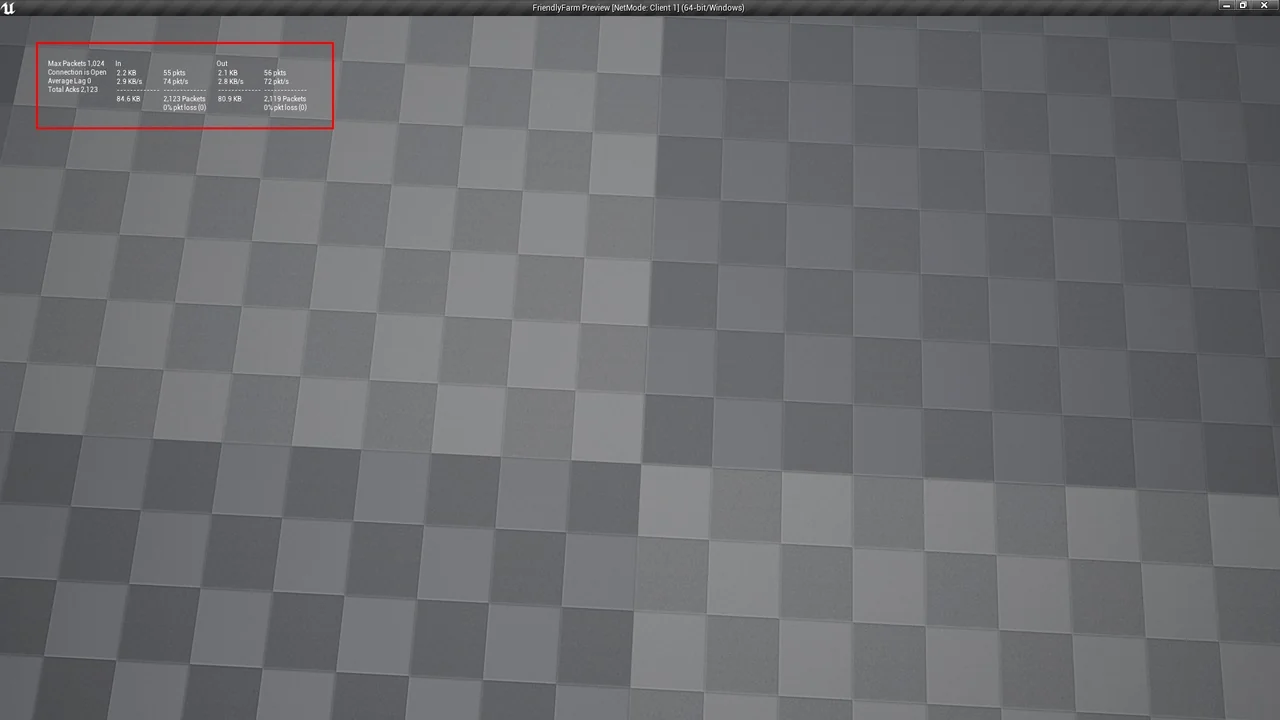
Network Stats adds a drag-and-drop HUD widget that shows ping, packet and connection readouts in multiplayer projects, with a Blueprint Subsystem behind it.
Any competitive multiplayer scene eventually reaches the same moment: a player fires, the hit does not register, and they start hunting for a number that explains why. Shooters, battle royale drops, co-op sessions with a distant host — all of them benefit from a small, legible readout that answers "how is my connection doing?" without a console command. Network Stats exists for exactly that slot on the screen, showing network information on the HUD in the style popular battle royale games have made familiar.
A readout players already know how to read
Battle royale titles trained a whole audience to glance at a corner of the display and interpret what they see there. That shared literacy is the reason a stats overlay works at all: nobody needs a tutorial to understand that a rising ping number is bad news, or that packet trouble tends to show up before a rubber-banding session does. Dropping that same kind of display into a project means players arrive already knowing what the corner of their screen is telling them.
That matters most in the moments where a match feels wrong but nothing visible explains it. A HUD readout turns a vague complaint into something a player can point at, and it does so without pulling them out of the game.
The default widget is drag-and-drop, not a build task
The package ships with one ready-to-use widget. It goes onto the HUD by dragging and dropping it there. That is the entire integration story for the default case — no assembly of panels, no hand-built layout, no placeholder graphics to replace before it looks presentable.
For a project that already has a working HUD, this is the useful part. A stats display is rarely the feature anyone plans a sprint around; it is the thing that gets added late, when playtests start producing connection complaints and someone needs data on screen by the next build. Having a finished widget on hand shortens that gap considerably. It also gives a team something concrete to react to — a real readout in the corner during a playtest tells you faster whether the layout crowds the rest of the HUD than any mockup would.
Ping, packets, connection state — the three things the readout covers
The scope of the plugin is narrow on purpose. Its subject matter is the network itself: the connection a player currently holds, the packets moving across it, and the ping that measures how far away the other end feels. Those are the values a multiplayer build needs visible when something degrades.
Multiplayer is the context throughout. This is not a general-purpose debug overlay for frame timings or memory; it is a connection-focused display for games where more than one player shares a session. That focus is what keeps the widget small enough to live permanently on screen rather than being toggled on for diagnostics only.
Where the Blueprint Subsystem sits in the wiring
Behind the widget, the plugin is compatible with the Blueprint Subsystem, which places its surface within reach of Blueprint work rather than confining it to engine-level code. In practice that means a team can treat Network Stats as part of the same Blueprint toolchain the rest of the HUD already uses — the widget goes in, and the plugin's logic is addressable the way other subsystems in the project are.
This is the difference between a plugin that a programmer has to adopt on everyone's behalf and one that a HUD-focused developer can pick up directly. On a small team, or on a project where the UI work and the gameplay code sit with different people, that distinction decides whether a tool actually gets used.
Fitting it beside an existing HUD instead of replacing one
Most projects arrive at this plugin with a HUD already in place — health, ammo, a minimap, a squad list. The stats widget is a companion to that layout, not a replacement for it. The practical question is placement: a corner that stays clear during combat, remains readable at the resolutions the project targets, and does not compete with the elements players check under pressure.
Because the default widget arrives finished, the first pass is a matter of positioning rather than authoring. Teams can put it in front of playtesters early, watch whether anyone actually looks at it, and adjust from there. A stats display that players ignore is doing its job; one that distracts them is not, and the only reliable way to tell the difference is to have it running in a real session.
Who should pick it up
Reach for Network Stats when a multiplayer project needs visible connection information on the HUD and the alternative is hand-building that display from scratch. It suits battle royale and shooter-style layouts where the readout is a permanent fixture, and it suits any multiplayer build where testers keep reporting connection problems that nobody can quantify on screen. If the project has no HUD yet, the widget still gives a starting point that can be positioned and judged in a session rather than debated in a document.
The narrow scope is the recommendation as much as the description: this is a small, finished piece of a HUD, and it is worth having precisely because nobody wants to spend a sprint on the corner of the screen.
 Network
 Network
 Network
 Network