"0341a2901a4ae9aa"{"id":"15167","slug":"universal-mp-indicator","title":"Universal MP Indicator","category":"Network \u0026 Multiplayer","engine":"4.27 - 5.8","assetVersion":"Asset Version:1.0 - 1.4","engineVersion":"Engine version: 4.27 - 5.8","tag":"Network","accent":"blue","visual":"character","summary":"The Universal MP Indicator is a high-performance C++ plugin designed for tracking targets in 2D screen space. It offers versatile on-screen and off-screen modes with deep customization for any game project.","platform":"Unreal Engine","publishedAt":"2026-03-12T08:08:42.000Z","updatedAt":"2026-09-30T04:40:38.530Z","sourceNotes":[],"fileContents":[],"compatibility":["Unreal Engine","Asset Version:1.0 - 1.4","Engine version: 4.27 - 5.8"],"featuredImage":{"alt":"Universal MP Indicator","src":"https://3dcghub.com/wp-content/uploads/2026/03/425f1a5c-f01e-46ad-8217-6e746d0a12fd.webp"},"hasDownloadLink":true,"downloads":0,"terms":[{"taxonomy":"category","slug":"network-and-multiplayer-tools-and-plugins","name":"Network \u0026 Multiplayer"},{"taxonomy":"post_tag","slug":"characters","name":"Characters"},{"taxonomy":"post_tag","slug":"game-systems","name":"Game Systems"},{"taxonomy":"post_tag","slug":"plugins","name":"Plugins"},{"taxonomy":"post_tag","slug":"tools","name":"Tools"},{"taxonomy":"post_tag","slug":"ui","name":"UI"},{"taxonomy":"post_tag","slug":"unreal-engine-5","name":"Unreal Engine 5"}],"galleryImages":[{"src":"https://3dcghub.com/wp-content/uploads/2026/03/f51f36ef78d2_250f22c9-67de-4a2b-a963-065a3465a469.webp","alt":"Universal MP Indicator"},{"src":"https://3dcghub.com/wp-content/uploads/2026/03/a2dd098b8d06_54b44873-34d0-4771-be20-13bb9bd470c8.webp","alt":"Universal MP Indicator"},{"src":"https://3dcghub.com/wp-content/uploads/2026/03/c02dda17639f_7ec183d2-52e6-4a52-a484-1633b5f00658.webp","alt":"Universal MP Indicator"},{"src":"https://3dcghub.com/wp-content/uploads/2026/03/f5c9a8c4189b_44d00b3c-2a8b-4bbc-8e74-7588dc36b700.webp","alt":"Universal MP Indicator"},{"src":"https://3dcghub.com/wp-content/uploads/2026/03/07fc709e6dc0_75f669ef-1b44-4971-8095-878432dcdd99.webp","alt":"Universal MP Indicator"},{"src":"https://3dcghub.com/wp-content/uploads/2026/03/b44cfb9da317_a908fa60-641c-4df8-abea-56de744448c2.webp","alt":"Universal MP Indicator"},{"src":"https://3dcghub.com/wp-content/uploads/2026/03/d4448ff53945_21d9298e-34bb-4b25-b2a8-32d05aa1fdbd.webp","alt":"Universal MP Indicator"}],"accessPanel":{"kind":"resource","title":"Download this resource","eyebrow":"Free Download","message":"Log in or create a free account to start your download.","fileName":"Universal MP Indicator.7z","safetyNote":"Resources are manually reviewed before listing to improve quality and reduce obvious risks.","actionLabel":"Download Free","resourceType":"Resource archive"},"contentHtml":"\u003ch2\u003eEfficient Target Tracking with Universal MP Indicator\u003c/h2\u003e\n\u003cp\u003eThe Universal MP Indicator is a comprehensive plugin designed to track actors or specific positions within a game environment. This tool works in two distinct ways: on-screen and off-screen. Consequently, it provides a versatile solution for various gameplay needs. The developer optimized the entire system for high performance. Specifically, it does not require spawning actors in the world. This ensures that the game runs smoothly even with many active indicators.\u003c/p\u003e\n\n\u003cp\u003eEverything in this plugin is written in C++ for direct efficiency. However, it remains simple to use with Blueprints. This makes it accessible for different development workflows. Users can apply the system to NPCs, enemies, or damage indicators. Additionally, it works as a general position or target marker. Because it is multiplatform, it can be integrated into projects targeting various devices.\u003c/p\u003e\n\n\u003ch2\u003eVersatile On-Screen and Off-Screen Modes\u003c/h2\u003e\n\u003cp\u003eThe system offers specialized methods for tracking targets that are not currently in the camera view. There are two primary off-screen modes: Circle and Screen Edge. Therefore, players can always maintain awareness of their objectives. When targets are visible, the widget-based system handles them in 2D screen space. This approach is highly optimized for modern game modes.\u003c/p\u003e\n\n\u003cp\u003eOn top of that, the tool includes a Reach System and a Life Span feature. These allow for dynamic behavior based on player interaction. The distance-based visibility settings further enhance the user interface. Consequently, indicators can appear or disappear based on the player's proximity to a target. This creates a cleaner and more professional HUD for the end user.\u003c/p\u003e\n\n\u003ch2\u003eExtensive Customization and Visual Effects\u003c/h2\u003e\n\u003cp\u003eCustomization is a core feature of the Universal MP Indicator. Users can modify almost every visual aspect of the markers. This includes the following attributes:\u003c/p\u003e\n\u003cul\u003e\n \u003cli\u003eCustomizable textures and UI materials.\u003c/li\u003e\n \u003cli\u003eAdjustable size, pivot, and color.\u003c/li\u003e\n \u003cli\u003eDynamic scale, rotation, and opacity settings.\u003c/li\u003e\n \u003cli\u003eAnimated pulse and other visual effects.\u003c/li\u003e\n\u003c/ul\u003e\n\u003cp\u003eThe plugin also supports actor bound offsets. This allows the indicator to sit perfectly relative to the tracked object. Furthermore, the creator included a variety of demo indicators. These demos showcase both image-based and material-based markers. Therefore, developers have a strong starting point for their own custom designs.\u003c/p\u003e\n\n\u003ch2\u003eStreamlined Workflow and Integration\u003c/h2\u003e\n\u003cp\u003eIntegrating the Universal MP Indicator into a project is straightforward. The plugin includes data table usage for managing different presets. Specifically, there are many demo data table presets available. This allows for quick iteration and testing of different indicator styles. Since it supports all game modes, it is a flexible addition to any toolkit.\u003c/p\u003e\n\n\u003cp\u003eFor teams considering it, this plugin provides a robust and optimized solution for target tracking. It combines the power of C++ with the ease of Blueprint integration. Whether you need an enemy tracker or a mission objective marker, this system offers the necessary tools. Its focus on optimization and customization makes it a valuable resource for any game developer.\u003c/p\u003e\n\n\u003ch2\u003eRelated Resources Worth Checking\u003c/h2\u003e\n\u003cul\u003e\n\u003cli\u003e\u003ca href=\"https://3dcghub.com/extile-plus-ultimate-non-tiling-material-toolkit-for-unreal-engine-environments/\" title=\"EXTILE PLUS -Ultimate Non-Tiling Material Toolkit for Unreal Engine Environments\"\u003eEXTILE PLUS -Ultimate Non-Tiling Material Toolkit for Unreal Engine Environments\u003c/a\u003e\u003c/li\u003e\n\u003cli\u003e\u003ca href=\"https://3dcghub.com/ultimate-template-unrealengine-2d-dialogue-inventory-system-save/\" title=\"ULTIMATE Template UnrealEngine || 2D + Dialogue + Inventory system + Save | |\"\u003eULTIMATE Template UnrealEngine || 2D + Dialogue + Inventory system + Save | |\u003c/a\u003e\u003c/li\u003e\n\u003cli\u003e\u003ca href=\"https://3dcghub.com/zxing-for-unreal/\" title=\"ZXing For Unreal\"\u003eZXing For Unreal\u003c/a\u003e\u003c/li\u003e\n\u003cli\u003e\u003ca href=\"https://3dcghub.com/daz-to-unreal/\" title=\"Daz To Unreal\"\u003eDaz To Unreal\u003c/a\u003e\u003c/li\u003e\n\u003cli\u003e\u003ca href=\"https://3dcghub.com/blueprint-generator-ai-kibibyte-labs-engine-assistant/\" title=\"Blueprint Generator Ai – Kibibyte Labs (Engine Assistant)\"\u003eBlueprint Generator Ai – Kibibyte Labs (Engine Assistant)\u003c/a\u003e\u003c/li\u003e\n\u003c/ul\u003e","contentTextLength":3494,"navigation":{"current":860,"total":4017,"previous":{"id":"15285","slug":"landscaping","title":"Landscaping","category":"Procedural Systems","platform":"Unreal Engine","updatedAt":"2026-09-30T05:04:36.509Z"},"next":{"id":"15157","slug":"quest-editor-plugin","title":"Quest Editor Plugin","category":"Network \u0026 Multiplayer","platform":"Unreal Engine","updatedAt":"2026-09-30T04:38:07.422Z"}},"relatedResources":[{"id":"15136","slug":"fps-first-person-shooter-framework-skg-shooter-framework-v2","title":"FPS First Person Shooter Framework (SKG Shooter Framework V2)","category":"Network \u0026 Multiplayer","engine":"5.5 - 5.7","assetVersion":"Engine version: 5.5 - 5.7","engineVersion":"Asset Version:1.4.1 - 1.4.3","tag":"Network","accent":"blue","visual":"city","summary":"The SKG Shooter Framework V2 is a performant, modular, component-based solution for building realistic first-person shooters in Unreal Engine 5.3 and beyond.","platform":"Unreal Engine","publishedAt":"2026-03-12T08:01:31.000Z","updatedAt":"2026-04-19T15:44:53.000Z","sourceNotes":[],"fileContents":[],"compatibility":["Unreal Engine","Engine version: 5.5 - 5.7","Asset Version: 1.4.1 - 1.4.3"],"featuredImage":{"alt":"FPS First Person Shooter Framework (SKG Shooter Framework V2)","src":"https://3dcghub.com/wp-content/uploads/2026/03/1ef8f873-5cad-4190-b092-53ba5e385464.webp"},"hasDownloadLink":true,"downloads":13},{"id":"13453","slug":"dragon-ik-plugin-universal-ik-system","title":"Dragon IK Plugin - Universal IK System","category":"Animations","engine":"4.26 - 5.6","assetVersion":"Engine version: 4.26 - 5.6","engineVersion":"Asset Version:V2.3.8 - 2.6.6","tag":"Animations","accent":"blue","visual":"animation","summary":"The Dragon IK Plugin - Universal IK System is a battle-tested suite designed to save time while achieving realistic animation results. It supports everything from bipeds and quadrupeds to complex multi-legged creatures.","platform":"Unreal Engine","publishedAt":"2026-03-10T17:15:30.000Z","updatedAt":"2026-04-19T15:46:27.000Z","sourceNotes":[],"fileContents":[],"compatibility":["Unreal Engine","Engine version: 4.26 - 5.6","Asset Version: V2.3.8 - 2.6.6"],"featuredImage":{"alt":"Dragon IK Plugin - Universal IK System","src":"https://3dcghub.com/wp-content/uploads/2026/03/573aa55a-7f64-4427-8ef0-1428618b4d1f.webp"},"hasDownloadLink":true,"downloads":2},{"id":"15157","slug":"quest-editor-plugin","title":"Quest Editor Plugin","category":"Network \u0026 Multiplayer","engine":"4.25 - 5.7","assetVersion":"Asset Version:8.0 - 10.14","engineVersion":"Engine version: 4.25 - 5.7","tag":"Network","accent":"blue","visual":"audio","summary":"Enhance your game development workflow with the Quest Editor Plugin. This modular system allows for customizable quests and dialogue with full multiplayer support for various project types.","platform":"Unreal Engine","publishedAt":"2026-03-12T08:06:14.000Z","updatedAt":"2026-09-30T04:38:07.422Z","sourceNotes":[],"fileContents":[],"compatibility":["Unreal Engine","Asset Version:8.0 - 10.14","Engine version: 4.25 - 5.7"],"featuredImage":{"alt":"Quest Editor Plugin","src":"https://3dcghub.com/wp-content/uploads/2026/03/8ecd90ae-2d23-4d68-850e-88eeca768f45.webp"},"hasDownloadLink":true,"downloads":0}]}
Network
Universal MP Indicator
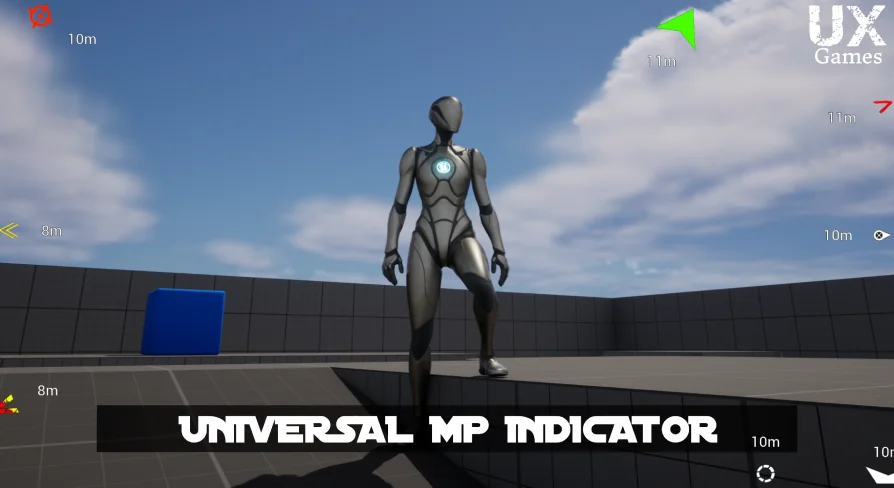
The Universal MP Indicator is a high-performance C++ plugin designed for tracking targets in 2D screen space. It offers versatile on-screen and off-screen modes with deep customization for any game project.
Efficient Target Tracking with Universal MP Indicator
The Universal MP Indicator is a comprehensive plugin designed to track actors or specific positions within a game environment. This tool works in two distinct ways: on-screen and off-screen. Consequently, it provides a versatile solution for various gameplay needs. The developer optimized the entire system for high performance. Specifically, it does not require spawning actors in the world. This ensures that the game runs smoothly even with many active indicators.
Everything in this plugin is written in C++ for direct efficiency. However, it remains simple to use with Blueprints. This makes it accessible for different development workflows. Users can apply the system to NPCs, enemies, or damage indicators. Additionally, it works as a general position or target marker. Because it is multiplatform, it can be integrated into projects targeting various devices.
Versatile On-Screen and Off-Screen Modes
The system offers specialized methods for tracking targets that are not currently in the camera view. There are two primary off-screen modes: Circle and Screen Edge. Therefore, players can always maintain awareness of their objectives. When targets are visible, the widget-based system handles them in 2D screen space. This approach is highly optimized for modern game modes.
On top of that, the tool includes a Reach System and a Life Span feature. These allow for dynamic behavior based on player interaction. The distance-based visibility settings further enhance the user interface. Consequently, indicators can appear or disappear based on the player's proximity to a target. This creates a cleaner and more professional HUD for the end user.
Extensive Customization and Visual Effects
Customization is a core feature of the Universal MP Indicator. Users can modify almost every visual aspect of the markers. This includes the following attributes:
Customizable textures and UI materials.
Adjustable size, pivot, and color.
Dynamic scale, rotation, and opacity settings.
Animated pulse and other visual effects.
The plugin also supports actor bound offsets. This allows the indicator to sit perfectly relative to the tracked object. Furthermore, the creator included a variety of demo indicators. These demos showcase both image-based and material-based markers. Therefore, developers have a strong starting point for their own custom designs.
Streamlined Workflow and Integration
Integrating the Universal MP Indicator into a project is straightforward. The plugin includes data table usage for managing different presets. Specifically, there are many demo data table presets available. This allows for quick iteration and testing of different indicator styles. Since it supports all game modes, it is a flexible addition to any toolkit.
For teams considering it, this plugin provides a robust and optimized solution for target tracking. It combines the power of C++ with the ease of Blueprint integration. Whether you need an enemy tracker or a mission objective marker, this system offers the necessary tools. Its focus on optimization and customization makes it a valuable resource for any game developer.
 Network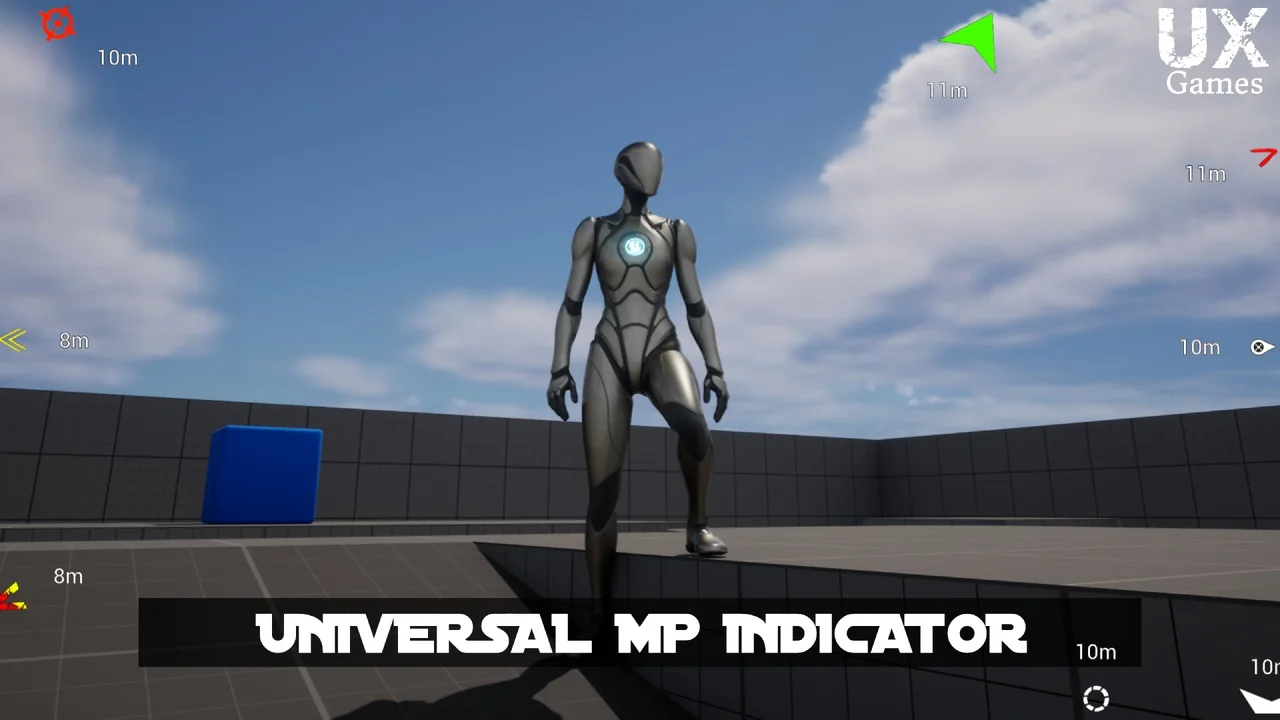
 Network
 Animations
 Network