"e9c335e082208b17"{"id":"1002886","slug":"ios-native-goodies","title":"iOS Native Goodies","category":"Engine Tools","engine":"4.26","assetVersion":"Asset Version: 1.5.1","engineVersion":"Engine Version: 4.26","tag":"Engine Tools","accent":"blue","visual":"mech","summary":"Integrate native iOS UI, camera capture, MessageUI email, haptic feedback, and system pickers into Unreal Engine projects via Blueprints.","platform":"Unreal Engine","indexPolicy":"index","publishedAt":"2026-11-21T01:54:21.877Z","updatedAt":"2026-11-21T01:54:21.877Z","sourceNotes":[],"fileContents":[],"compatibility":["Unreal Engine","Asset Version: 1.5.1","Engine Version: 4.26"],"featuredImage":{"alt":"iOS Native Goodies","src":"/wp-content/uploads/published/2026/11/c432793c5950-c3dd9e78-9a46-413f-8c8b-babb9656a56f-48a93dc759.webp"},"fileSizeBytes":20199127,"hasDownloadLink":true,"downloads":0,"terms":[{"taxonomy":"category","slug":"engine-tools-tools-and-plugins","name":"Engine Tools"}],"galleryImages":[{"src":"/wp-content/uploads/published/2026/11/ccf64d2b008b-0e2fa0cb-a3b6-43ba-84b1-1d1669b3c61c-c7e0da4721.webp","alt":"iOS Native Goodies"},{"src":"/wp-content/uploads/published/2026/11/896aedd1c267-5610ca3c-1b7b-4c05-a047-d21059e78525-a9a7d391ef.webp","alt":"iOS Native Goodies"},{"src":"/wp-content/uploads/published/2026/11/a6018694d19b-1118a05c-34a6-4b04-b400-f985e02c24ed-bcae39b61a.webp","alt":"iOS Native Goodies"},{"src":"/wp-content/uploads/published/2026/11/4d9b09190342-886c1f71-7d71-43d0-bd68-136f8fb72ac4-63533c20ab.webp","alt":"iOS Native Goodies"},{"src":"/wp-content/uploads/published/2026/11/22ce64e83de0-cf98120d-cc21-46e4-8cc4-7f25fc33085d-b0e28de175.webp","alt":"iOS Native Goodies"},{"src":"/wp-content/uploads/published/2026/11/aca195434ae2-6bb9f268-d1e7-4a90-b3fc-ac0bb9d2a005-6d5bca2912.webp","alt":"iOS Native Goodies"}],"contentHtml":"\u003cp\u003eRunning an interactive project or mobile title on an iPhone or iPad often requires reaching outside the rendering viewport to communicate directly with the operating system. Unreal Engine handles rendering, physics, and gameplay logic out of the box, but standard engine nodes do not natively display default Apple interface dialogues, trigger native date selection wheels, or query device-level diagnostic data. IOS Native Goodies bridges this gap by exposing a comprehensive suite of native operating system functions directly through Blueprints. Developers can execute system-level operations, invoke system menus, trigger hardware peripherals, and manage external app handoffs straight from visual script graphs without writing manual Objective-C or Swift wrappers.\u003c/p\u003e \u003ch2\u003eSystem Dialogs and Interface Menus in iOS Native Goodies\u003c/h2\u003e\n\u003cp\u003eWhile custom user interfaces built with Unreal Motion Graphics can recreate many application buttons and layouts, users expect certain actions to present familiar system-level visual elements. This plugin provides immediate Blueprint access to standard iOS alert views, configurable input dialogs, and native action sheets. When a project needs text input, confirmation before a destructive action, or multiple branching options presented from the bottom of the display, invoking the system interface ensures compliance with platform design guidelines and accessibility behaviors.\u003c/p\u003e\n\u003cp\u003eBeyond simple text prompts, the toolset includes dedicated native time and date pickers, alongside countdown timer interfaces. These elements allow users to select calendar dates or duration intervals using standard iOS scrolling wheels instead of complex custom UMG constructs. For operations that require user patience during background loading or asynchronous processing, developers can display the native iOS activity loader. The integration also includes direct access to the official Apple app rating dialog, letting applications request store reviews at opportune moments through the OS prompt rather than kicking users out of the active runtime.\u003c/p\u003e \u003ch2\u003eDeep App Interaction and MessageUI Communication\u003c/h2\u003e\n\u003cp\u003eMobile applications rarely exist in complete isolation, and communicating with other services on the device is often essential. IOS Native Goodies incorporates native sharing capabilities that push text, images, or links directly into the system share sheet. From there, users can send data through AirDrop, save content, or pass assets to third-party communication applications installed on their hardware.\u003c/p\u003e\n\u003cp\u003eDirect communication workflows extend to SMS messaging and email composition. Projects can pass user requests to external messaging apps or display an interactive composer directly inside the runtime using the native iOS MessageUI framework. By embedding \u003ccode\u003eMessageUI.framework\u003c/code\u003e, users can write and send emails or text messages without being forced out of the interactive experience, returning seamlessly to the application as soon as the message is dispatched or canceled.\u003c/p\u003e\n\u003cp\u003eExternal handoffs are also handled cleanly through dedicated methods for initiating standard phone calls or FaceTime calls. The plugin can open system settings specifically mapped to the host application, direct users to an App Store product listing, launch a targeted YouTube video, or open location coordinates inside Apple Maps. Contact book management is supported as well, giving projects the ability to retrieve the device contact list, search for existing entries, and generate new contacts directly from Blueprint logic.\u003c/p\u003e \u003ch2\u003eAccessing Photos, Screen Captures, and Address Books\u003c/h2\u003e\n\u003cp\u003eMedia handling on mobile devices requires explicit permission handling and smooth handshakes with the system library. IOS Native Goodies includes nodes designed to open the photo gallery, enabling users to browse their stored images and return the selected picture to the project. For in-app documentation, social sharing, or user memories, the plugin can trigger internal screenshots that capture the current frame buffer.\u003c/p\u003e\n\u003cp\u003eWhen live media is required, the plugin interfaces with the device camera to capture new still photographs. The camera hardware interface allows applications to prompt the camera view, handle the user capture action, and ingest the resulting photo for gameplay mechanics, user avatars, or profile customization. Because these operations are linked through the underlying iOS media framework, they adhere strictly to system permission dialogs and access states.\u003c/p\u003e \u003ch2\u003eHardware Sensors and Device Controls in iOS Native Goodies\u003c/h2\u003e\n\u003cp\u003eA major advantage of native platform development is direct access to physical sensors and hardware actuators on the device. IOS Native Goodies exposes diagnostic status queries, including real-time battery level readings and the current state of the proximity sensor. Monitoring battery status allows projects to dynamically throttle visual fidelity or disable unnecessary compute loops to conserve power, while the proximity sensor allows an application to detect when the device is held against a surface or brought up to a user's ear.\u003c/p\u003e\n\u003cp\u003ePhysical control nodes extend to the rear hardware flashlight, allowing logic graphs to switch the light source on and off while also adjusting its illumination intensity. For tactile feedback during user interactions, UI taps, or physical gameplay events, the plugin connects to Apple's haptic engine. Developers can trigger system vibrations and tuned haptic responses, adding physical weight to actions without configuring standalone external vibration plugins.\u003c/p\u003e \u003ch2\u003eBlueprint Architecture for Mobile Workflows\u003c/h2\u003e\n\u003cp\u003eEvery utility packaged into the plugin is exposed via native Blueprint nodes, making it accessible to artists, scripters, and technical designers who work primarily within visual scripting. Eliminating the need to configure build scripts, write native Objective-C headers, or link platform frameworks by hand shortens the cycle between implementing a feature and testing it on target hardware. Whether a project requires reading battery percentages to optimize rendering overhead, opening the system camera for an interactive minigame, or presenting a familiar iOS calendar picker, the functions integrate straight into existing mobile Unreal Engine pipelines.\u003c/p\u003e\n\n\u003ch2\u003eExplore Similar Assets\u003c/h2\u003e\n\u003cul\u003e\n\u003cli\u003e\u003ca href=\"https://3dcghub.com/android-native-goodies/\" rel=\"noopener noreferrer\"\u003eAndroid Native Goodies\u003c/a\u003e\u003c/li\u003e\n\u003cli\u003e\u003ca href=\"https://3dcghub.com/shader-world-plugin-procedural-terrain-oceans-foliage-gpu-accelerated/\" rel=\"noopener noreferrer\"\u003eShader World Plugin : Procedural Terrain, Oceans, Foliage, GPU-accelerated\u003c/a\u003e\u003c/li\u003e\n\u003cli\u003e\u003ca href=\"https://3dcghub.com/flipwidget/\" rel=\"noopener noreferrer\"\u003eFlipWidget\u003c/a\u003e\u003c/li\u003e\n\u003cli\u003e\u003ca href=\"https://3dcghub.com/dlc-in-blueprints/\" rel=\"noopener noreferrer\"\u003eDLC in Blueprints\u003c/a\u003e\u003c/li\u003e\n\u003cli\u003e\u003ca href=\"https://3dcghub.com/rdlodtools-rd-tools-pro/\" rel=\"noopener noreferrer\"\u003erdLODtools (rd Tools Pro)\u003c/a\u003e\u003c/li\u003e\n\u003c/ul\u003e","contentTextLength":6400,"navigation":{"current":49,"total":4839,"previous":{"id":"1002887","slug":"socket-io-client","title":"Socket.IO Client","category":"Network \u0026 Multiplayer","platform":"Unreal Engine","updatedAt":"2026-11-21T01:55:11.604Z"},"next":{"id":"1002885","slug":"runtime-image-loader","title":"Runtime Image Loader","category":"Engine Tools","platform":"Unreal Engine","updatedAt":"2026-11-21T01:53:31.218Z"}},"relatedResources":[{"id":"13676","slug":"android-native-goodies","title":"Android Native Goodies","category":"Engine Tools","engine":"4.26 - 5.7","assetVersion":"Engine version: 4.26 - 5.7","engineVersion":"Asset Version:1.90 - 2.3.1","tag":"Engine Tools","accent":"blue","visual":"audio","summary":"Android Native Goodies is a comprehensive solution for developers looking to integrate native Android functionality into their projects. It exposes a wide range of system features directly to Blueprints.","platform":"Unreal Engine","indexPolicy":"noindex","publishedAt":"2026-03-11T09:33:07.000Z","updatedAt":"2026-04-19T15:46:24.000Z","sourceNotes":[],"fileContents":[],"compatibility":["Unreal Engine","Engine version: 4.26 - 5.7","Asset Version: 1.90 - 2.3.1"],"featuredImage":{"alt":"Android Native Goodies","src":"https://3dcghub.com/wp-content/uploads/2026/03/d138243a-33f9-4c4b-ace3-f6ba2091f8a3.webp"},"fileSizeBytes":223635739,"hasDownloadLink":true,"downloads":0},{"id":"14579","slug":"shader-world-plugin-procedural-terrain-oceans-foliage-gpu-accelerated","title":"Shader World Plugin : Procedural Terrain, Oceans, Foliage, GPU-accelerated","category":"Engine Tools","engine":"4.27,5.0 - 5.4","assetVersion":"Engine version: 4.27,5.0 - 5.4","engineVersion":"4.26","tag":"Engine Tools","accent":"blue","visual":"character","summary":"Shader World Plugin offers a high-performance alternative to native Unreal Engine landscapes, utilizing GPU acceleration for real-time world generation. It supports massive scales and is fully editable within packaged games.","platform":"Unreal Engine","indexPolicy":"noindex","publishedAt":"2026-03-11T18:34:57.000Z","updatedAt":"2026-04-19T15:45:44.000Z","sourceNotes":[],"fileContents":[],"compatibility":["Unreal Engine","Engine version: 4.27,5.0 - 5.4"],"featuredImage":{"alt":"Shader World Plugin : Procedural Terrain, Oceans, Foliage, GPU-accelerated","src":"https://3dcghub.com/wp-content/uploads/2026/03/0922900f-bc2e-416c-a177-0cef84bcdbc8.webp"},"fileSizeBytes":2211969193,"hasDownloadLink":true,"downloads":0},{"id":"1001324","slug":"flipwidget","title":"FlipWidget","category":"Engine Tools","engine":"4.24 - 5.8","assetVersion":"Asset Version: 1.0 - 1.3","engineVersion":"Engine Version: 4.24 - 5.8","tag":"Engine Tools","accent":"blue","visual":"mech","summary":"FlipWidget brings native C++ flipbook animation to UMG, pairing runtime Blueprint nodes and Image widget parity with custom size controls.","platform":"Unreal Engine","indexPolicy":"index","publishedAt":"2026-10-02T09:52:09.334Z","updatedAt":"2026-10-02T09:52:09.334Z","sourceNotes":[],"fileContents":[],"compatibility":["Unreal Engine","Asset Version: 1.0 - 1.3","Engine Version: 4.24 - 5.8"],"featuredImage":{"alt":"FlipWidget","src":"/wp-content/uploads/published/2026/10/65077073d754-56e1e806-c4e0-458d-bd37-040d2fcd3882-1cb4d08f7c.webp"},"fileSizeBytes":119187500,"hasDownloadLink":true,"downloads":0}]}
Resource screenshots
1 / 6
Join our channel
Follow 3DCGHUB on Telegram for new resource drops, migration updates, and community notices.
Running an interactive project or mobile title on an iPhone or iPad often requires reaching outside the rendering viewport to communicate directly with the operating system. Unreal Engine handles rendering, physics, and gameplay logic out of the box, but standard engine nodes do not natively display default Apple interface dialogues, trigger native date selection wheels, or query device-level diagnostic data. IOS Native Goodies bridges this gap by exposing a comprehensive suite of native operating system functions directly through Blueprints. Developers can execute system-level operations, invoke system menus, trigger hardware peripherals, and manage external app handoffs straight from visual script graphs without writing manual Objective-C or Swift wrappers.
System Dialogs and Interface Menus in iOS Native Goodies
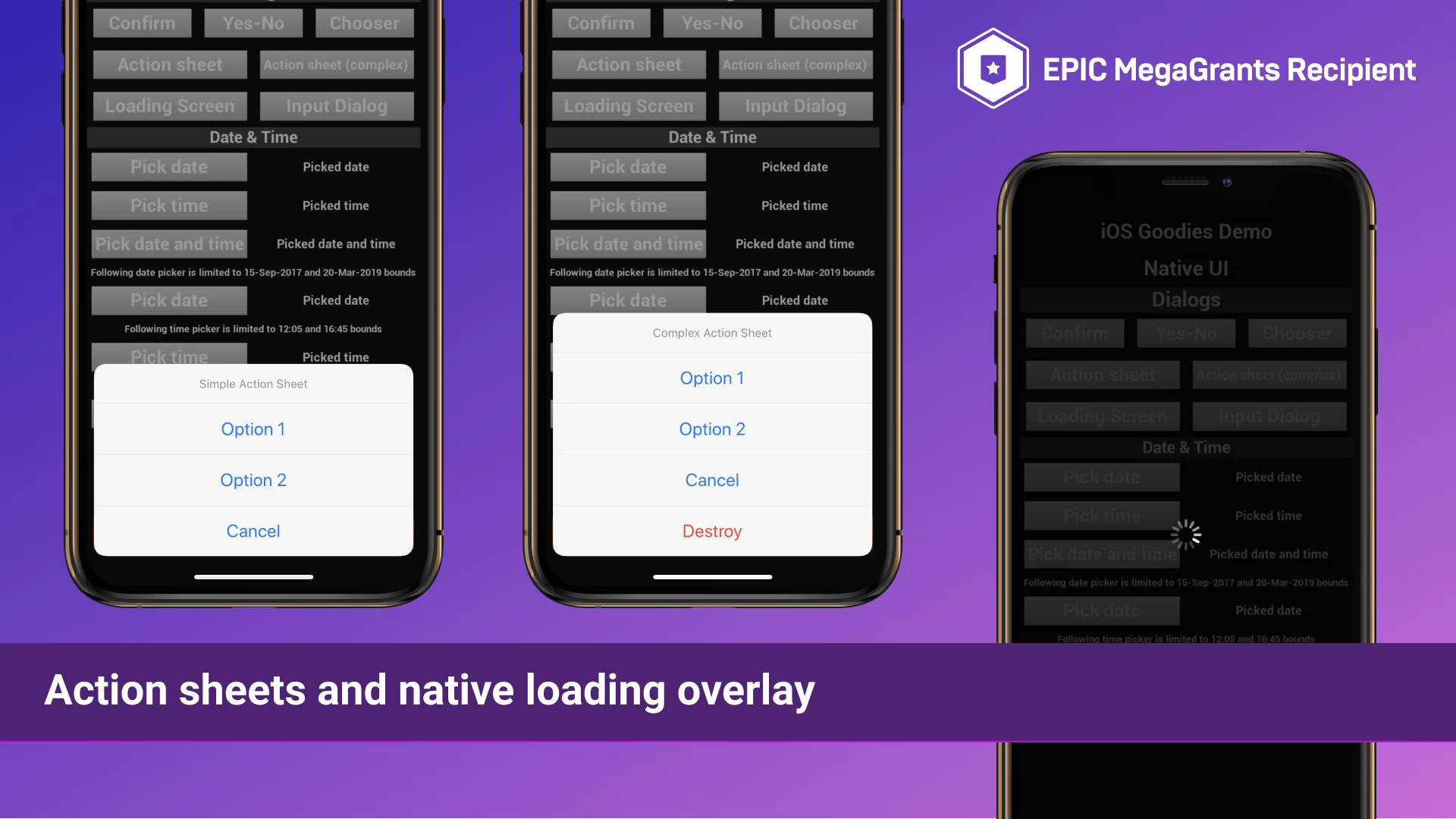
While custom user interfaces built with Unreal Motion Graphics can recreate many application buttons and layouts, users expect certain actions to present familiar system-level visual elements. This plugin provides immediate Blueprint access to standard iOS alert views, configurable input dialogs, and native action sheets. When a project needs text input, confirmation before a destructive action, or multiple branching options presented from the bottom of the display, invoking the system interface ensures compliance with platform design guidelines and accessibility behaviors.
Beyond simple text prompts, the toolset includes dedicated native time and date pickers, alongside countdown timer interfaces. These elements allow users to select calendar dates or duration intervals using standard iOS scrolling wheels instead of complex custom UMG constructs. For operations that require user patience during background loading or asynchronous processing, developers can display the native iOS activity loader. The integration also includes direct access to the official Apple app rating dialog, letting applications request store reviews at opportune moments through the OS prompt rather than kicking users out of the active runtime.
Deep App Interaction and MessageUI Communication
Mobile applications rarely exist in complete isolation, and communicating with other services on the device is often essential. IOS Native Goodies incorporates native sharing capabilities that push text, images, or links directly into the system share sheet. From there, users can send data through AirDrop, save content, or pass assets to third-party communication applications installed on their hardware.
Direct communication workflows extend to SMS messaging and email composition. Projects can pass user requests to external messaging apps or display an interactive composer directly inside the runtime using the native iOS MessageUI framework. By embedding MessageUI.framework, users can write and send emails or text messages without being forced out of the interactive experience, returning seamlessly to the application as soon as the message is dispatched or canceled.
External handoffs are also handled cleanly through dedicated methods for initiating standard phone calls or FaceTime calls. The plugin can open system settings specifically mapped to the host application, direct users to an App Store product listing, launch a targeted YouTube video, or open location coordinates inside Apple Maps. Contact book management is supported as well, giving projects the ability to retrieve the device contact list, search for existing entries, and generate new contacts directly from Blueprint logic.
Accessing Photos, Screen Captures, and Address Books
Media handling on mobile devices requires explicit permission handling and smooth handshakes with the system library. IOS Native Goodies includes nodes designed to open the photo gallery, enabling users to browse their stored images and return the selected picture to the project. For in-app documentation, social sharing, or user memories, the plugin can trigger internal screenshots that capture the current frame buffer.
When live media is required, the plugin interfaces with the device camera to capture new still photographs. The camera hardware interface allows applications to prompt the camera view, handle the user capture action, and ingest the resulting photo for gameplay mechanics, user avatars, or profile customization. Because these operations are linked through the underlying iOS media framework, they adhere strictly to system permission dialogs and access states.
Hardware Sensors and Device Controls in iOS Native Goodies
A major advantage of native platform development is direct access to physical sensors and hardware actuators on the device. IOS Native Goodies exposes diagnostic status queries, including real-time battery level readings and the current state of the proximity sensor. Monitoring battery status allows projects to dynamically throttle visual fidelity or disable unnecessary compute loops to conserve power, while the proximity sensor allows an application to detect when the device is held against a surface or brought up to a user's ear.
Physical control nodes extend to the rear hardware flashlight, allowing logic graphs to switch the light source on and off while also adjusting its illumination intensity. For tactile feedback during user interactions, UI taps, or physical gameplay events, the plugin connects to Apple's haptic engine. Developers can trigger system vibrations and tuned haptic responses, adding physical weight to actions without configuring standalone external vibration plugins.
Blueprint Architecture for Mobile Workflows
Every utility packaged into the plugin is exposed via native Blueprint nodes, making it accessible to artists, scripters, and technical designers who work primarily within visual scripting. Eliminating the need to configure build scripts, write native Objective-C headers, or link platform frameworks by hand shortens the cycle between implementing a feature and testing it on target hardware. Whether a project requires reading battery percentages to optimize rendering overhead, opening the system camera for an interactive minigame, or presenting a familiar iOS calendar picker, the functions integrate straight into existing mobile Unreal Engine pipelines.
 Engine Tools
 Engine Tools
 Engine Tools