"0341a2901a4ae9aa"{"id":"14433","slug":"rdlodtools-rd-tools-pro","title":"rdLODtools (rd Tools Pro)","category":"Engine Tools","engine":"4.27 - 5.8","assetVersion":"Asset Version: 1.4.0 - 1.5.1","engineVersion":"Engine version: 4.27 - 5.8","tag":"Engine Tools","accent":"blue","visual":"luts","summary":"rdLODtools (rd Tools Pro) is a powerful Unreal Engine plugin that simplifies the creation of Billboard, Planar, Cubic, and Impostor LODs directly within the Static Mesh Editor.","platform":"Unreal Engine","publishedAt":"2026-03-11T18:04:48.000Z","updatedAt":"2026-07-24T02:13:03.808Z","sourceNotes":[],"fileContents":[],"compatibility":["Unreal Engine","Asset Version: 1.4.0 - 1.5.1","Engine version: 4.27 - 5.8"],"featuredImage":{"alt":"rdLODtools (rd Tools Pro)","src":"https://3dcghub.com/wp-content/uploads/2026/03/970ae304-82e9-45bf-b173-3ffeb82a1413.webp"},"hasDownloadLink":true,"downloads":2,"terms":[{"taxonomy":"category","slug":"engine-tools-tools-and-plugins","name":"Engine Tools"},{"taxonomy":"post_tag","slug":"materials","name":"Materials"},{"taxonomy":"post_tag","slug":"plugins","name":"Plugins"},{"taxonomy":"post_tag","slug":"textures","name":"Textures"},{"taxonomy":"post_tag","slug":"tools","name":"Tools"},{"taxonomy":"post_tag","slug":"ui","name":"UI"},{"taxonomy":"post_tag","slug":"unreal-engine-5","name":"Unreal Engine 5"}],"galleryImages":[{"src":"https://3dcghub.com/wp-content/uploads/2026/03/3ab9e02b9dd2_f4c77819-199b-4f9d-93f7-c924d07648dd.webp","alt":"rdLODtools (rd Tools Pro)"},{"src":"https://3dcghub.com/wp-content/uploads/2026/03/e9fb62befd20_941deac9-a195-4b12-ab5e-9de7f9e29606.webp","alt":"rdLODtools (rd Tools Pro)"},{"src":"https://3dcghub.com/wp-content/uploads/2026/03/3e0fadc3358a_fd60c229-e1d0-4905-aaeb-c6c5d3863cea.webp","alt":"rdLODtools (rd Tools Pro)"},{"src":"https://3dcghub.com/wp-content/uploads/2026/03/74908181fa2e_efadeb0b-11f9-49e9-88d9-5cba0de93d7b.webp","alt":"rdLODtools (rd Tools Pro)"},{"src":"https://3dcghub.com/wp-content/uploads/2026/03/4239ccdd767f_e23284ef-e116-490a-b22d-0d530a2f1cfc.webp","alt":"rdLODtools (rd Tools Pro)"},{"src":"https://3dcghub.com/wp-content/uploads/2026/03/7e5d6f0d6482_e14e94ef-5d03-44fa-9abe-5d2686c4ad98.webp","alt":"rdLODtools (rd Tools Pro)"},{"src":"https://3dcghub.com/wp-content/uploads/2026/03/52e353ba3457_ddc84109-5e7f-4ce6-91cc-0b2921126bc2.webp","alt":"rdLODtools (rd Tools Pro)"},{"src":"https://3dcghub.com/wp-content/uploads/2026/03/db0f6972c307_78a40ac5-216d-43c8-b906-70ac19b6ce86.webp","alt":"rdLODtools (rd Tools Pro)"},{"src":"https://3dcghub.com/wp-content/uploads/2026/03/6d4569b56b14_368b5203-e2f0-422e-8d39-35c0a29af7e7.webp","alt":"rdLODtools (rd Tools Pro)"},{"src":"https://3dcghub.com/wp-content/uploads/2026/03/dc2a030e6ec0_e96e23e0-9e57-4e29-8434-f9de3deff32f.webp","alt":"rdLODtools (rd Tools Pro)"},{"src":"https://3dcghub.com/wp-content/uploads/2026/03/3335f9d9a3c3_83fcf27c-57c9-469d-9078-a5f204087598.webp","alt":"rdLODtools (rd Tools Pro)"},{"src":"https://3dcghub.com/wp-content/uploads/2026/03/3d65ec920f82_ef71c0da-2468-41ba-a5d5-5f6f8d26b2d1.webp","alt":"rdLODtools (rd Tools Pro)"},{"src":"https://3dcghub.com/wp-content/uploads/2026/03/b0a598f9507e_9ac76206-f4dc-4e78-869a-0e3bc5cbc03d.webp","alt":"rdLODtools (rd Tools Pro)"},{"src":"https://3dcghub.com/wp-content/uploads/2026/03/c492af265399_f415332b-eb5c-4bce-b24c-e9079175d5ac.webp","alt":"rdLODtools (rd Tools Pro)"},{"src":"https://3dcghub.com/wp-content/uploads/2026/03/e421271f2125_203a1b37-f15f-4a2a-9d5e-06a1fba7861e.webp","alt":"rdLODtools (rd Tools Pro)"}],"accessPanel":{"kind":"resource","title":"Download this resource","eyebrow":"Free Download","message":"Log in or create a free account to start your download.","fileName":"rdLODtools (rd Tools Pro).7z","safetyNote":"Resources are manually reviewed before listing to improve quality and reduce obvious risks.","actionLabel":"Download Free","resourceType":"Resource archive"},"contentHtml":"\u003ch2\u003eEfficient Mesh Optimization with rdLODtools (rd Tools Pro)\u003c/h2\u003e\n\u003cp\u003erdLODtools (rd Tools Pro) is a specialized Unreal Engine plugin that resides directly within the Static Mesh Editor. It is designed to help developers easily create various levels of detail, including Billboard, Planar, Cubic, TriSprite, and Impostor LODs. By running this tool over complex meshes, you can speed up rendering by significant factors. Furthermore, these LODs can maintain a thicker appearance on screen at a distance while improving overall performance.\u003c/p\u003e\n\n\u003ch2\u003eVersatile LOD Types and Features\u003c/h2\u003e\n\u003cp\u003eThe plugin offers several methods for reducing geometry complexity. Billboard LODs can utilize up to 64 frames in a FlipBook, providing a full 360-degree view of a mesh using only two or four triangles. Additionally, Planar LODs can consist of 2 to 32 planes plus a top plane. For more unique geometry, Cubic LODs can be modeled to any shape, while TriSprite LODs utilize a single triangle for maximum efficiency.\u003c/p\u003e\n\n\u003cp\u003eImpostors provide all-around views by using the engine's ImpostorBaker Shaders at runtime. These are primarily designed for complex materials, such as trees and tall, thin foliage that use masks or translucency. However, the creator notes that using these for other object types may produce mixed results. Therefore, it is often best to focus on reducing triangle counts for standard meshes.\u003c/p\u003e\n\n\u003ch2\u003eOptimized Workflow and Tools\u003c/h2\u003e\n\u003cp\u003eThe developer has integrated several tools to accelerate the optimization process. Version 1.3 introduced context menus that allow users to change LOD details or extract LODs from meshes quickly. Moreover, version 1.44 includes a tool to create new meshes at specified reduced sizes, which helps with disk footprint optimization. These features ensure that managing complex assets remains a streamlined process.\u003c/p\u003e\n\n\u003cul\u003e\n \u003cli\u003e\u003cstrong\u003eTrees and Foliage:\u003c/strong\u003e Ideal for tall, thin vegetation and complex masks.\u003c/li\u003e\n \u003cli\u003e\u003cstrong\u003eArchitecture:\u003c/strong\u003e Useful for complex skyscrapers and tall buildings with mixed materials.\u003c/li\u003e\n \u003cli\u003e\u003cstrong\u003eVRAM Balance:\u003c/strong\u003e Tools help balance the trade-off between VRAM usage and triangle reduction.\u003c/li\u003e\n \u003cli\u003e\u003cstrong\u003eColor Adjustment:\u003c/strong\u003e Material instances include adjustment values for manual color matching.\u003c/li\u003e\n\u003c/ul\u003e\n\n\u003ch2\u003eTechnical Requirements and Licensing\u003c/h2\u003e\n\u003cp\u003eTo create LODs with this plugin, Deferred Rendering must be active. If your project uses Forward Rendering, you can temporarily switch to Deferred during the creation phase. Additionally, creating Impostors requires the Impostor Baker plugin that is included with Unreal Engine. Consequently, these requirements ensure the shaders and textures are generated correctly for the final assets.\u003c/p\u003e\n\n\u003cp\u003eFor teams considering it, rdLODtools (rd Tools Pro) offers a robust solution for studio-wide performance optimization. Unlike many professional versions, the license allows for unlimited seats within a single company or studio. This makes it a scalable choice for teams working on large-scale environments and complex architectural visualizations.\u003c/p\u003e\n\n\u003ch2\u003eContinue Browsing Similar Packs\u003c/h2\u003e\n\u003cul\u003e\n\u003cli\u003e\u003ca href=\"https://3dcghub.com/proinstance-tools-plugin/\" title=\"ProInstance Tools Plugin\"\u003eProInstance Tools Plugin\u003c/a\u003e\u003c/li\u003e\n\u003cli\u003e\u003ca href=\"https://3dcghub.com/edge-decal-tools-1-2/\" title=\"Edge Decal Tools 1.2\"\u003eEdge Decal Tools 1.2\u003c/a\u003e\u003c/li\u003e\n\u003cli\u003e\u003ca href=\"https://3dcghub.com/blockout-tools-plugin/\" title=\"Blockout Tools Plugin\"\u003eBlockout Tools Plugin\u003c/a\u003e\u003c/li\u003e\n\u003cli\u003e\u003ca href=\"https://3dcghub.com/virtual-animation-tools-v6/\" title=\"Virtual Animation Tools V6\"\u003eVirtual Animation Tools V6\u003c/a\u003e\u003c/li\u003e\n\u003cli\u003e\u003ca href=\"https://3dcghub.com/power-tools-pack/\" title=\"Power Tools Pack\"\u003ePower Tools Pack\u003c/a\u003e\u003c/li\u003e\n\u003c/ul\u003e","contentTextLength":3096,"navigation":{"current":1457,"total":4017,"previous":{"id":"1000710","slug":"vehicles-vol-10-military-low-poly","title":"Vehicles VOL.10 - Military (Low Poly)","category":"Military","platform":"Unreal Engine","updatedAt":"2026-07-24T02:19:57.675Z"},"next":{"id":"1000708","slug":"vehicles-vol-8-construction-low-poly","title":"Vehicles VOL.8 - Construction (Low Poly)","category":"Service \u0026 Commercial Vehicles","platform":"Unreal Engine","updatedAt":"2026-07-24T02:01:37.218Z"}},"relatedResources":[{"id":"14467","slug":"rdtextools-rd-tools-pro","title":"rdTexTools (rd Tools Pro)","category":"Engine Tools","engine":"4.26 - 5.8","assetVersion":"Asset Version: 1.0.3 - 1.4.0","engineVersion":"Engine version: 4.26 - 5.8","tag":"Engine Tools","accent":"blue","visual":"mech","summary":"rdTexTools (rd Tools Pro) is a powerful C++ plugin for Unreal Engine that simplifies texture analysis and optimization through a streamlined, integrated interface.","platform":"Unreal Engine","publishedAt":"2026-03-11T18:07:25.000Z","updatedAt":"2026-08-05T17:10:19.438Z","sourceNotes":[],"fileContents":[],"compatibility":["Unreal Engine","Asset Version: 1.0.3 - 1.4.0","Engine version: 4.26 - 5.8"],"featuredImage":{"alt":"rdTexTools (rd Tools Pro)","src":"https://3dcghub.com/wp-content/uploads/2026/03/ce4c6b29-272d-46de-b3e4-9f7b6457de50.webp"},"hasDownloadLink":true,"downloads":2},{"id":"13732","slug":"blend-file-importer","title":"Blend File Importer","category":"Engine Tools","engine":"4.27 - 5.8","assetVersion":"Asset Version: 1.5 - 1.9.4","engineVersion":"Engine version: 4.27 - 5.8","tag":"Engine Tools","accent":"blue","visual":"animation","summary":"The Blend File Importer plugin enables a seamless connection between Blender and Unreal Engine. By allowing direct .blend file imports and automatic re-importing, it significantly speeds up the 3D asset pipeline.","platform":"Unreal Engine","publishedAt":"2026-03-11T09:51:51.000Z","updatedAt":"2026-07-30T10:55:24.261Z","sourceNotes":[],"fileContents":[],"compatibility":["Unreal Engine","Asset Version: 1.5 - 1.9.4","Engine version: 4.27 - 5.8"],"featuredImage":{"alt":"Blend File Importer","src":"https://3dcghub.com/wp-content/uploads/2026/03/800a0491-1743-4f2e-bd98-be5a1b0d2cae.webp"},"hasDownloadLink":true,"downloads":2},{"id":"13742","slug":"blockout-tools-plugin","title":"Blockout Tools Plugin","category":"Engine Tools","engine":"1.51 - 4.5.3","assetVersion":"Engine version: 4.26 - 5.7","engineVersion":"Asset Version:1.51 - 4.5.3","tag":"Engine Tools","accent":"blue","visual":"luts","summary":"Streamline your environment design with the Blockout Tools Plugin. This lightweight toolset features 15 primitive elements and triplanar grid materials for rapid level prototyping in Unreal Engine.","platform":"Unreal Engine","publishedAt":"2026-03-11T09:52:02.000Z","updatedAt":"2026-07-29T16:09:39.794Z","sourceNotes":[],"fileContents":[],"compatibility":["Unreal Engine","Engine version: 4.26 - 5.7","Asset Version:1.51 - 4.5.3"],"featuredImage":{"alt":"Blockout Tools Plugin","src":"https://3dcghub.com/wp-content/uploads/2026/03/2e655f33-dfec-4888-9b31-c0aaa5b72ba1.webp"},"hasDownloadLink":true,"downloads":2}]}
Engine Tools
rdLODtools (rd Tools Pro)
rdLODtools (rd Tools Pro) is a powerful Unreal Engine plugin that simplifies the creation of Billboard, Planar, Cubic, and Impostor LODs directly within the Static Mesh Editor.
Efficient Mesh Optimization with rdLODtools (rd Tools Pro)
rdLODtools (rd Tools Pro) is a specialized Unreal Engine plugin that resides directly within the Static Mesh Editor. It is designed to help developers easily create various levels of detail, including Billboard, Planar, Cubic, TriSprite, and Impostor LODs. By running this tool over complex meshes, you can speed up rendering by significant factors. Furthermore, these LODs can maintain a thicker appearance on screen at a distance while improving overall performance.
Versatile LOD Types and Features
The plugin offers several methods for reducing geometry complexity. Billboard LODs can utilize up to 64 frames in a FlipBook, providing a full 360-degree view of a mesh using only two or four triangles. Additionally, Planar LODs can consist of 2 to 32 planes plus a top plane. For more unique geometry, Cubic LODs can be modeled to any shape, while TriSprite LODs utilize a single triangle for maximum efficiency.
Impostors provide all-around views by using the engine's ImpostorBaker Shaders at runtime. These are primarily designed for complex materials, such as trees and tall, thin foliage that use masks or translucency. However, the creator notes that using these for other object types may produce mixed results. Therefore, it is often best to focus on reducing triangle counts for standard meshes.
Optimized Workflow and Tools
The developer has integrated several tools to accelerate the optimization process. Version 1.3 introduced context menus that allow users to change LOD details or extract LODs from meshes quickly. Moreover, version 1.44 includes a tool to create new meshes at specified reduced sizes, which helps with disk footprint optimization. These features ensure that managing complex assets remains a streamlined process.
Trees and Foliage: Ideal for tall, thin vegetation and complex masks.
Architecture: Useful for complex skyscrapers and tall buildings with mixed materials.
VRAM Balance: Tools help balance the trade-off between VRAM usage and triangle reduction.
Color Adjustment: Material instances include adjustment values for manual color matching.
Technical Requirements and Licensing
To create LODs with this plugin, Deferred Rendering must be active. If your project uses Forward Rendering, you can temporarily switch to Deferred during the creation phase. Additionally, creating Impostors requires the Impostor Baker plugin that is included with Unreal Engine. Consequently, these requirements ensure the shaders and textures are generated correctly for the final assets.
For teams considering it, rdLODtools (rd Tools Pro) offers a robust solution for studio-wide performance optimization. Unlike many professional versions, the license allows for unlimited seats within a single company or studio. This makes it a scalable choice for teams working on large-scale environments and complex architectural visualizations.
 Engine Tools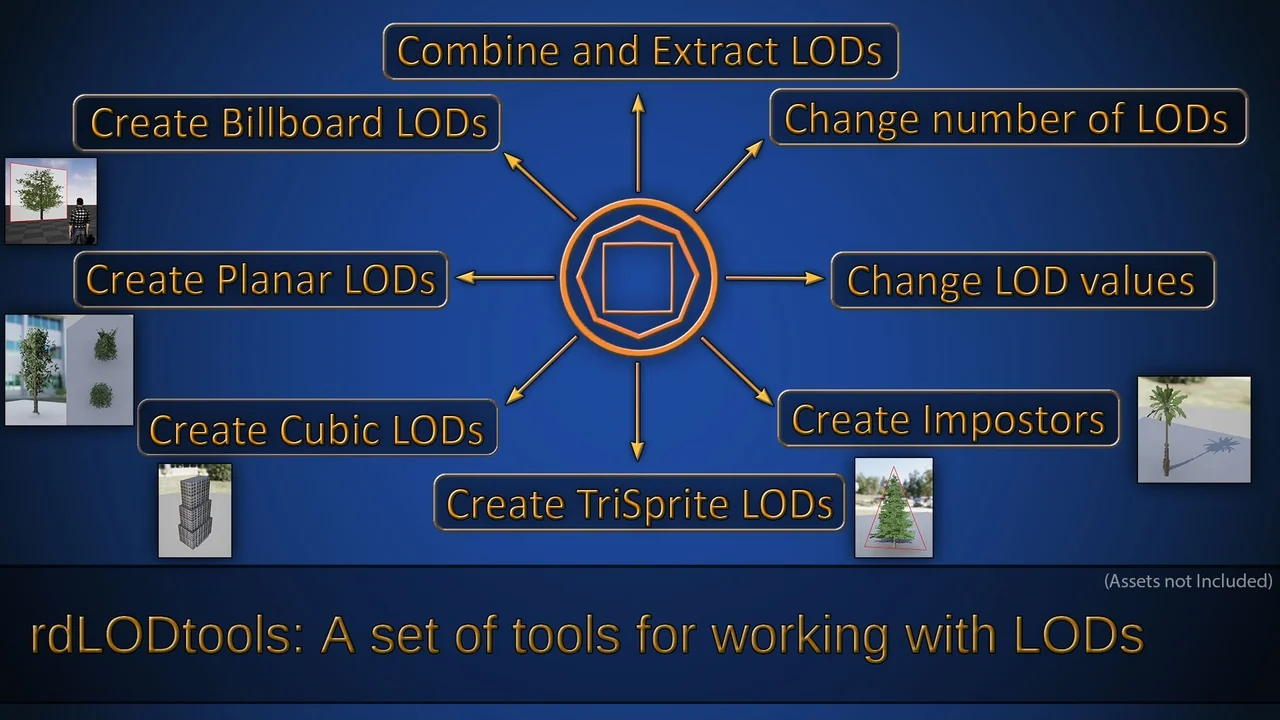
 Engine Tools
 Engine Tools
 Engine Tools