"0341a2901a4ae9aa"{"id":"14375","slug":"proinstance-tools-plugin","title":"ProInstance Tools Plugin","category":"Engine Tools","engine":"4.24 - 4.27,5.0 - 5.6","assetVersion":"Engine version: 4.24 - 4.27,5.0 - 5.6","engineVersion":"Asset Version:1.27 -1.28","tag":"Engine Tools","accent":"blue","visual":"audio","summary":"The ProInstance Tools Plugin offers a lightweight solution for procedural mesh and actor placement. It simplifies repetitive level design tasks using unified settings and multiple placement types like Grid and Path.","platform":"Unreal Engine","publishedAt":"2026-03-11T17:48:54.000Z","updatedAt":"2026-04-19T15:45:47.000Z","sourceNotes":[],"fileContents":[],"compatibility":["Unreal Engine","Engine version: 4.24 - 4.27,5.0 - 5.6","Asset Version: 1.27 -1.28"],"featuredImage":{"alt":"ProInstance Tools Plugin","src":"https://3dcghub.com/wp-content/uploads/2026/03/de35cfdf-2302-4efa-9ede-fb4b27d94082.webp"},"hasDownloadLink":true,"downloads":1,"terms":[{"taxonomy":"category","slug":"engine-tools-tools-and-plugins","name":"Engine Tools"},{"taxonomy":"post_tag","slug":"environment","name":"Environment"},{"taxonomy":"post_tag","slug":"plugins","name":"Plugins"},{"taxonomy":"post_tag","slug":"procedural","name":"Procedural"},{"taxonomy":"post_tag","slug":"textures","name":"Textures"},{"taxonomy":"post_tag","slug":"tools","name":"Tools"},{"taxonomy":"post_tag","slug":"unreal-engine-5","name":"Unreal Engine 5"}],"galleryImages":[{"src":"https://3dcghub.com/wp-content/uploads/2026/03/d0267df21db9_f1868ce2-b8b3-4271-b188-f2a3af4899b5.webp","alt":"ProInstance Tools Plugin"},{"src":"https://3dcghub.com/wp-content/uploads/2026/03/9560eef44f9e_de0a5c29-1a6e-48d8-b1d5-1e6717181a75.webp","alt":"ProInstance Tools Plugin"},{"src":"https://3dcghub.com/wp-content/uploads/2026/03/606cc054bde1_65bc6379-1eaa-44a3-858a-d8f137734821.webp","alt":"ProInstance Tools Plugin"},{"src":"https://3dcghub.com/wp-content/uploads/2026/03/ef3333b530af_f6afe2b0-2c56-4540-8760-a51673798712.webp","alt":"ProInstance Tools Plugin"},{"src":"https://3dcghub.com/wp-content/uploads/2026/03/8c8d99a46ba0_2dfe6acb-73da-4d00-bb5d-9210fc277b94.webp","alt":"ProInstance Tools Plugin"},{"src":"https://3dcghub.com/wp-content/uploads/2026/03/50ac462160a2_79189b21-55b9-438a-8d96-494a81a2e616.webp","alt":"ProInstance Tools Plugin"},{"src":"https://3dcghub.com/wp-content/uploads/2026/03/a272539a37ef_eec15cd4-e4b4-49b4-a99b-e8708ecb0240.webp","alt":"ProInstance Tools Plugin"}],"accessPanel":{"kind":"resource","title":"Access this resource","eyebrow":"Free Download","message":"Log in or create a free account to start your download.","fileName":"ProInstance Tools Plugin 4.24 - 5.6;V1.27 - 1.28.7z","safetyNote":"All resources are 100% manually reviewed to eliminate all risks.","actionLabel":"Download Free","resourceType":"Resource archive"},"contentHtml":"\u003ch2\u003eProcedural Placement Made Simple\u003c/h2\u003e\n\u003cp\u003eThe ProInstance Tools Plugin is a lightweight set of tools designed for procedural mesh and actor placement. It helps creators avoid repetitive tasks during level and environment design. Therefore, it streamlines the workflow by providing unified and easy-to-understand settings. This plugin was notably recognized as a sponsored content product for June 2021.\u003c/p\u003e\n\n\u003cp\u003eManaging large environments often requires placing many objects manually. However, this tool allows for almost endless ways to place meshes or actors efficiently. It is designed to be as easy to use as possible for developers of all skill levels.\u003c/p\u003e\n\n\u003ch2\u003eKey Features of ProInstance Tools Plugin\u003c/h2\u003e\n\u003cp\u003eThe ProInstance Tools Plugin includes several features that enhance control over scene elements. Users can manage transform settings for all instances at once or individually. Additionally, controlled randomization is available through the use of seed numbers. This ensures that variations in placement remain predictable and repeatable.\u003c/p\u003e\n\n\u003ch3\u003eVersatile Placement Types\u003c/h3\u003e\n\u003cp\u003eThe developer has included five distinct ProInstance types to handle various layout needs. These types include:\u003c/p\u003e\n\u003cul\u003e\n\u003cli\u003e\u003cstrong\u003eCircle:\u003c/strong\u003e For radial arrangements.\u003c/li\u003e\n\u003cli\u003e\u003cstrong\u003eGrid:\u003c/strong\u003e For structured, repetitive layouts.\u003c/li\u003e\n\u003cli\u003e\u003cstrong\u003ePath:\u003c/strong\u003e For linear placement along defined lines.\u003c/li\u003e\n\u003cli\u003e\u003cstrong\u003ePathScatter:\u003c/strong\u003e For randomized placement along a specific path.\u003c/li\u003e\n\u003cli\u003e\u003cstrong\u003eScatter:\u003c/strong\u003e For broad, randomized distribution across an area.\u003c/li\u003e\n\u003c/ul\u003e\n\n\u003cp\u003eBeyond that, the plugin supports snapping and alignment to the surface below. This ensures that objects sit naturally within the environment regardless of the terrain shape.\u003c/p\u003e\n\n\u003ch3\u003ePerformance and Optimization\u003c/h3\u003e\n\u003cp\u003eOne of the primary benefits of the ProInstance Tools Plugin is its ability to improve performance. It helps reduce drawcalls by utilizing efficient component types. Users can instantly switch between Static Meshes, Instanced Static Meshes (ISM), and Hierarchical Instanced Static Meshes (HISM). Moreover, it supports any other Actor Class for maximum flexibility.\u003c/p\u003e\n\n\u003cp\u003eThe plugin also features a bake function. This allows users to convert procedural placements into separate Static Meshes or Actor Classes. Consequently, this provides a way to finalize the design while maintaining optimization.\u003c/p\u003e\n\n\u003ch2\u003eStreamlined Workflow Integration\u003c/h2\u003e\n\u003cp\u003eThe toolset is built to integrate seamlessly into the existing editor environment. It features custom icons and a new custom category in Place Mode for quick access. Because it is lightweight, it does not bloat the project while providing powerful generation capabilities.\u003c/p\u003e\n\n\u003cp\u003eThe developer includes a demo level with usage examples to help users get started quickly. This resource can be found within the plugin content folder. By using these examples, creators can quickly understand how to implement the various placement types in their own projects.\u003c/p\u003e\n\n\u003ch2\u003eBest Fit\u003c/h2\u003e\n\u003cp\u003eThe ProInstance Tools Plugin is a practical solution for any developer looking to automate repetitive environment tasks. Its combination of procedural generation and unified settings makes it a versatile addition to a level design toolkit. Whether you are creating complex paths or simple grids, this tool provides the control and performance optimization needed for modern game development.\u003c/p\u003e\n\n\u003ch2\u003eExplore Similar Assets\u003c/h2\u003e\n\u003cul\u003e\n\u003cli\u003e\u003ca href=\"https://3dcghub.com/edge-decal-tools-1-2/\" title=\"Edge Decal Tools 1.2\"\u003eEdge Decal Tools 1.2\u003c/a\u003e\u003c/li\u003e\n\u003cli\u003e\u003ca href=\"https://3dcghub.com/blockout-tools-plugin/\" title=\"Blockout Tools Plugin\"\u003eBlockout Tools Plugin\u003c/a\u003e\u003c/li\u003e\n\u003cli\u003e\u003ca href=\"https://3dcghub.com/virtual-animation-tools-v6/\" title=\"Virtual Animation Tools V6\"\u003eVirtual Animation Tools V6\u003c/a\u003e\u003c/li\u003e\n\u003cli\u003e\u003ca href=\"https://3dcghub.com/power-tools-pack/\" title=\"Power Tools Pack\"\u003ePower Tools Pack\u003c/a\u003e\u003c/li\u003e\n\u003cli\u003e\u003ca href=\"https://3dcghub.com/prismatiscape-interaction-plugin/\" title=\"Prismatiscape Interaction Plugin\"\u003ePrismatiscape Interaction Plugin\u003c/a\u003e\u003c/li\u003e\n\u003c/ul\u003e","contentTextLength":3357,"navigation":{"current":3392,"total":4017,"previous":{"id":"14404","slug":"r-tune-vehicle-physics-2-0-vehicle-system-for-games-animation","title":"R-Tune Vehicle Physics 2.0 - Vehicle System for Games \u0026 Animation","category":"Engine Tools","platform":"Unreal Engine","updatedAt":"2026-04-19T15:45:47.000Z"},"next":{"id":"14450","slug":"rdsplinetools-rd-tools-pro","title":"rdSplineTools (rd Tools Pro)","category":"Engine Tools","platform":"Unreal Engine","updatedAt":"2026-04-19T15:45:46.000Z"}},"relatedResources":[{"id":"14777","slug":"voxel-plugin-pro-legacy","title":"Voxel Plugin Pro Legacy","category":"Engine Tools","engine":"4.22 -4.27, 5.0 - 5.7","assetVersion":"Engine version: 4.22 -4.27, 5.0 - 5.7","engineVersion":"Asset Version:1.0 - 2.0.8","tag":"Engine Tools","accent":"blue","visual":"animation","summary":"Create infinite, fully volumetric landscapes in Unreal Engine with Voxel Plugin Pro Legacy. This tool offers runtime editing, procedural generation, and surface sculpting for advanced environment design.","platform":"Unreal Engine","publishedAt":"2026-03-11T19:24:08.000Z","updatedAt":"2026-04-19T15:45:40.000Z","sourceNotes":[],"fileContents":[],"compatibility":["Unreal Engine","Engine version: 4.22 -4.27, 5.0 - 5.7","Asset Version: 1.0 - 2.0.8"],"featuredImage":{"alt":"Voxel Plugin Pro Legacy","src":"https://3dcghub.com/wp-content/uploads/2026/03/96bf1d13-25ff-4c47-a02e-8e0d855c1fd8.webp"},"hasDownloadLink":true,"downloads":4},{"id":"13689","slug":"asset-downgrader","title":"Asset Downgrader","category":"Engine Tools","engine":"4.27 - 5.6","assetVersion":"Engine version: 4.27 - 5.6","engineVersion":"Asset Version:1.01 - 1.26","tag":"Engine Tools","accent":"blue","visual":"animation","summary":"Asset Downgrader is an experimental tool designed to move assets between different Unreal Engine versions. It enables developers to port content back to older releases like UE 4.27 and 4.26 by patching .uasset files.","platform":"Unreal Engine","publishedAt":"2026-03-11T09:38:35.000Z","updatedAt":"2026-04-19T15:46:24.000Z","sourceNotes":[],"fileContents":[],"compatibility":["Unreal Engine","Engine version: 4.27 - 5.6","Asset Version: 1.01 - 1.26"],"featuredImage":{"alt":"Asset Downgrader","src":"https://3dcghub.com/wp-content/uploads/2026/03/6df0ddf5-ece1-415c-b6a5-fd3c4781885a.webp"},"hasDownloadLink":true,"downloads":4},{"id":"14610","slug":"simple-tree-generator","title":"Simple Tree Generator","category":"Engine Tools","engine":"5.6 - 5.8","assetVersion":"Asset Version: 1.1","engineVersion":"Engine version: 5.6 - 5.8","tag":"Engine Tools","accent":"blue","visual":"audio","summary":"Simple Tree Generator is a powerful tool designed specifically for Unreal Engine 5. It enables developers to procedurally create diverse trees and bushes with just a few clicks.","platform":"Unreal Engine","publishedAt":"2026-03-11T18:36:43.000Z","updatedAt":"2026-09-17T02:13:52.813Z","sourceNotes":[],"fileContents":[],"compatibility":["Unreal Engine","Asset Version: 1.1","Engine version: 5.6 - 5.8"],"featuredImage":{"alt":"Simple Tree Generator","src":"https://3dcghub.com/wp-content/uploads/2026/03/4e3b784d-7198-46b5-a343-a73957e40875.webp"},"hasDownloadLink":true,"downloads":0}]}
Engine Tools
ProInstance Tools Plugin
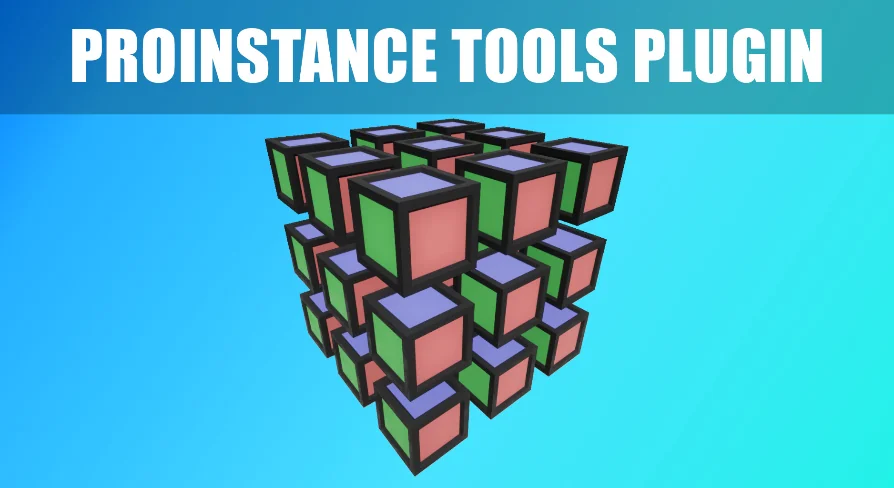
The ProInstance Tools Plugin offers a lightweight solution for procedural mesh and actor placement. It simplifies repetitive level design tasks using unified settings and multiple placement types like Grid and Path.
The ProInstance Tools Plugin is a lightweight set of tools designed for procedural mesh and actor placement. It helps creators avoid repetitive tasks during level and environment design. Therefore, it streamlines the workflow by providing unified and easy-to-understand settings. This plugin was notably recognized as a sponsored content product for June 2021.
Managing large environments often requires placing many objects manually. However, this tool allows for almost endless ways to place meshes or actors efficiently. It is designed to be as easy to use as possible for developers of all skill levels.
Key Features of ProInstance Tools Plugin
The ProInstance Tools Plugin includes several features that enhance control over scene elements. Users can manage transform settings for all instances at once or individually. Additionally, controlled randomization is available through the use of seed numbers. This ensures that variations in placement remain predictable and repeatable.
Versatile Placement Types
The developer has included five distinct ProInstance types to handle various layout needs. These types include:
Circle: For radial arrangements.
Grid: For structured, repetitive layouts.
Path: For linear placement along defined lines.
PathScatter: For randomized placement along a specific path.
Scatter: For broad, randomized distribution across an area.
Beyond that, the plugin supports snapping and alignment to the surface below. This ensures that objects sit naturally within the environment regardless of the terrain shape.
Performance and Optimization
One of the primary benefits of the ProInstance Tools Plugin is its ability to improve performance. It helps reduce drawcalls by utilizing efficient component types. Users can instantly switch between Static Meshes, Instanced Static Meshes (ISM), and Hierarchical Instanced Static Meshes (HISM). Moreover, it supports any other Actor Class for maximum flexibility.
The plugin also features a bake function. This allows users to convert procedural placements into separate Static Meshes or Actor Classes. Consequently, this provides a way to finalize the design while maintaining optimization.
Streamlined Workflow Integration
The toolset is built to integrate seamlessly into the existing editor environment. It features custom icons and a new custom category in Place Mode for quick access. Because it is lightweight, it does not bloat the project while providing powerful generation capabilities.
The developer includes a demo level with usage examples to help users get started quickly. This resource can be found within the plugin content folder. By using these examples, creators can quickly understand how to implement the various placement types in their own projects.
Best Fit
The ProInstance Tools Plugin is a practical solution for any developer looking to automate repetitive environment tasks. Its combination of procedural generation and unified settings makes it a versatile addition to a level design toolkit. Whether you are creating complex paths or simple grids, this tool provides the control and performance optimization needed for modern game development.
 Engine Tools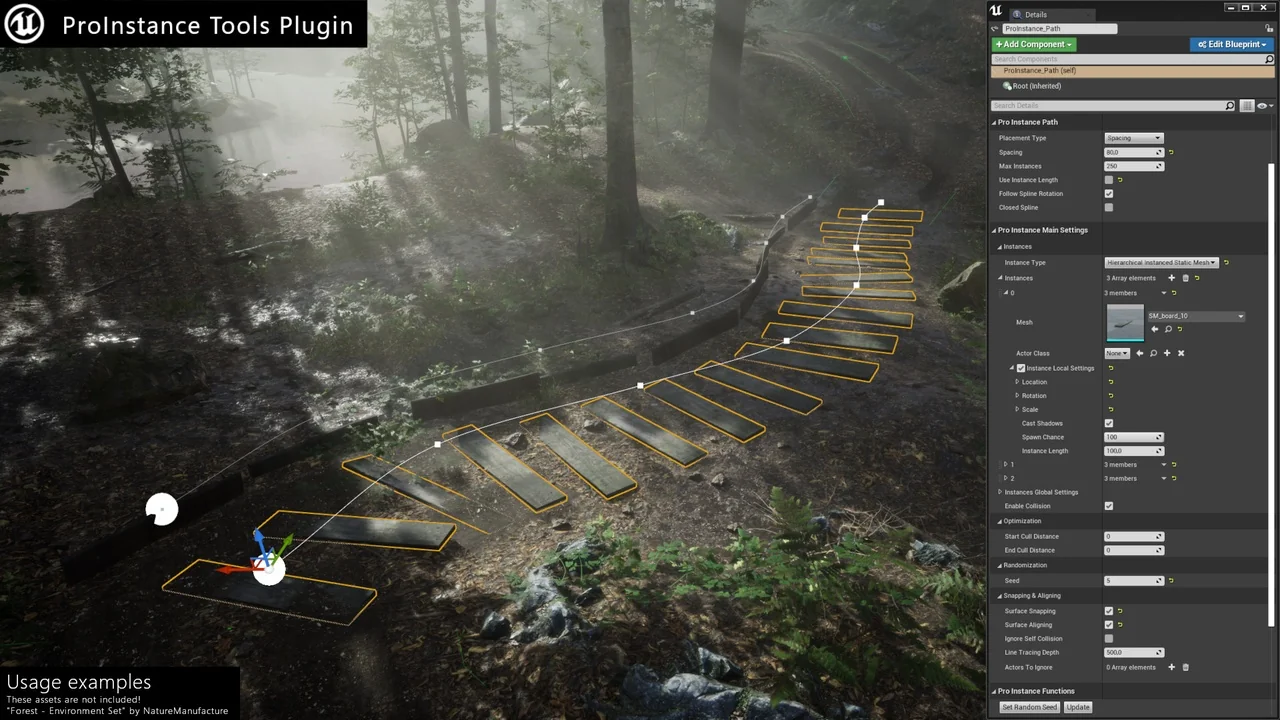
 Engine Tools
 Engine Tools
 Engine Tools