"e9c335e082208b17"{"id":"1002885","slug":"runtime-image-loader","title":"Runtime Image Loader","category":"Engine Tools","engine":"4.27 - 5.5","assetVersion":"Asset Version: 1.0","engineVersion":"Engine Version: 4.27 - 5.5","tag":"Engine Tools","accent":"blue","visual":"mech","summary":"Load PNG, JPEG, ICO, BMP, and TGA files from URLs or disk asynchronously in editor and packaged builds using Runtime Image Loader.","platform":"Unreal Engine","indexPolicy":"index","publishedAt":"2026-11-21T01:53:31.218Z","updatedAt":"2026-11-21T01:53:31.218Z","sourceNotes":[],"fileContents":[],"compatibility":["Unreal Engine","Asset Version: 1.0","Engine Version: 4.27 - 5.5"],"featuredImage":{"alt":"Runtime Image Loader","src":"/wp-content/uploads/published/2026/11/a3993a199094-4d95d076-4de5-4a03-a6be-84b3413d9d70-422258fd44.webp"},"fileSizeBytes":319589013,"hasDownloadLink":true,"downloads":0,"terms":[{"taxonomy":"category","slug":"engine-tools-tools-and-plugins","name":"Engine Tools"}],"galleryImages":[{"src":"/wp-content/uploads/published/2026/11/13a90ac3ab3e-f72fb002-818c-4f4d-a5a7-5c7068ec27dd-61669378e9.webp","alt":"Runtime Image Loader"},{"src":"/wp-content/uploads/published/2026/11/1c248b35caf6-eed6597f-95e6-45c0-bd64-6f9d45e1c202-e55c7ca09e.webp","alt":"Runtime Image Loader"},{"src":"/wp-content/uploads/published/2026/11/683b529b90d5-c967193e-02cf-4322-b303-0676f578fbbb-eed8729903.webp","alt":"Runtime Image Loader"},{"src":"/wp-content/uploads/published/2026/11/cb506948ce2f-8f8c470b-cbd4-4ef8-99ce-9b15f5f7db6f-c2ffba0f16.webp","alt":"Runtime Image Loader"}],"contentHtml":"\u003cp\u003ePulling external imagery into an interactive session often presents immediate performance obstacles when handled through standard synchronous routines. If an engine attempts to read raw bytes off a storage drive or retrieve remote data over a network connection on the primary tick, the rendering loop stalls until the texture buffer compiles. Runtime Image Loader resolves this bottleneck by implementing an asynchronous loading architecture. Dynamic visual assets can be introduced on the fly while character movement, physics simulations, and rendering pipelines continue uninterrupted at full frame rates.\u003c/p\u003e \u003ch2\u003eEliminating Thread Freezes with Asynchronous Image Loading\u003c/h2\u003e\n\u003cp\u003eMain game thread performance determines the fluidity of any interactive title. When a game needs to fetch an unbaked graphic during an active match or scene transition, decoding the incoming data synchronously forces the entire application to wait. Frame drops, audio hiccups, and unresponsive player inputs are frequent side effects of synchronous input-output operations. By delegating the retrieval, parsing, and decompression tasks to background processes, the asynchronous routine ensures that frame pacing remains stable regardless of how many graphics arrive simultaneously.\u003c/p\u003e\n\u003cp\u003eOnce the background processing finishes reading the raw byte stream and translating it into usable engine data, the resulting texture becomes accessible to UI layouts or material instances. This separation between background memory processing and the main execution thread is critical for applications that demand continuous rendering, such as open-world environments, fast-paced multiplayer titles, or dynamic simulation cockpits where even a minor frame stutter disrupts the player experience.\u003c/p\u003e \u003ch2\u003eHandling Web URLs and Local Paths Through Runtime Image Loader\u003c/h2\u003e\n\u003cp\u003eVisual assets do not always reside in local project folders, nor are they always known ahead of time. Runtime Image Loader accommodates two distinct ingestion channels: web links pointing to remote URLs and system-level local file paths. This dual-path functionality expands the scope of what can be surfaced dynamically in a project without requiring asset cooking or rebuild steps.\u003c/p\u003e\n\u003cp\u003eOnline sources allow projects to query web endpoints, content delivery networks, or remote servers to populate visual elements dynamically. A live game can query a web address to fetch up-to-date promotional banners, community announcements, user profile avatars, or changing scoreboard emblems without distributing a patch. Conversely, reading from local file paths allows software to scan arbitrary folders on a client machine. This capability is foundational for applications featuring custom user-generated content, localized file pickers, modular skin systems, or tools that inspect directories for loose imagery on disk. Because the plugin processes both local storage strings and web links through clean Blueprint and code hooks, setting up these retrieval nodes remains straightforward.\u003c/p\u003e \u003ch2\u003eSupported Raster Formats: PNG, JPEG, ICO, BMP, and TGA\u003c/h2\u003e\n\u003cp\u003eDifferent image standards serve contrasting visual and operational purposes, and handling varied pipelines requires support for standard industry formats. Runtime Image Loader natively handles five core image types:\u003c/p\u003e\n\u003cul\u003e \u003cli\u003e\u003cstrong\u003ePNG:\u003c/strong\u003e Essential for interface graphics, HUD badges, and iconography where clean alpha channels and lossless compression are required to preserve sharp geometric edges.\u003c/li\u003e \u003cli\u003e\u003cstrong\u003eJPEG:\u003c/strong\u003e Suited for photographic content, expansive background art, and remote web imagery where smaller file sizes reduce bandwidth consumption and network transfer times.\u003c/li\u003e \u003cli\u003e\u003cstrong\u003eICO:\u003c/strong\u003e Used specifically for icon files, making the plugin capable of reading application icons, custom software shortcuts, and website favicons directly into viewport elements.\u003c/li\u003e \u003cli\u003e\u003cstrong\u003eBMP:\u003c/strong\u003e A standard uncompressed raster format useful for raw graphic output from legacy external programs, desktop utilities, or basic graphics editors.\u003c/li\u003e \u003cli\u003e\u003cstrong\u003eTGA:\u003c/strong\u003e A longstanding staple of 3D game production pipelines, frequently employed for texture masks, roughness maps, and precise color channels where uncompressed fidelity is preferred.\u003c/li\u003e\n\u003c/ul\u003e\n\u003cp\u003eHaving native compatibility across this spectrum eliminates the need for external preprocessing utilities or intermediate conversion tools. Whether an incoming file is an ultra-compact JPEG photograph retrieved over a network or an uncompressed Targa graphic stored on a workstation SSD, the data streams into memory and converts into a dynamic texture seamlessly.\u003c/p\u003e \u003ch2\u003eDeploying Image Ingestion Across Editor and Packaged Builds\u003c/h2\u003e\n\u003cp\u003eA common hurdle with dynamic image plugins in modern engines is the divide between in-editor capabilities and standalone distribution. Many stock import workflows rely on editor-only libraries that fail to compile or link when packaging a shipping executable. Runtime Image Loader is structured as a dedicated CodePlugin that functions reliably in both environments.\u003c/p\u003e\n\u003cp\u003eIn the editor, developers can utilize the plugin to prototype interface systems, test external directory scanning, or construct custom utility widgets that preview remote web assets in real time. Because the underlying code avoids editor-exclusive dependencies, the exact same Blueprint logic and C++ calls translate directly into standalone packaged builds. When the final game or software package compiles, image retrieval features function identically on client hardware. This parity eliminates the need to maintain separate development and production pipelines for dynamic imagery.\u003c/p\u003e \u003ch2\u003eIntegrating Dynamic Imagery into Blueprint and Code Architectures\u003c/h2\u003e\n\u003cp\u003eAccessibility is a central consideration for any pipeline utility. Runtime Image Loader is designed to remain simple and approachable, enabling creators to incorporate dynamic texture creation into existing node graphs without managing complex thread pools, custom memory allocators, or manual socket connections. Developers interacting through Blueprints can trigger an image load with simple node calls that accept the target URL or directory path, returning a ready-to-use texture reference upon completion.\u003c/p\u003e\n\u003cp\u003eFor teams building data-heavy software—such as portfolio viewers, digital signage frameworks, launcher applications, or titles featuring comprehensive community modding support—the plugin serves as an efficient bridge between external files and active game materials. By uniting broad format compatibility, dual-path loading from web and disk, and asynchronous background processing, Runtime Image Loader provides a robust foundation for modern dynamic visual pipelines.\u003c/p\u003e\n\n\u003ch2\u003eRelated Resources Worth Checking\u003c/h2\u003e\n\u003cul\u003e\n\u003cli\u003e\u003ca href=\"https://3dcghub.com/pak-loader-plugin/\" rel=\"noopener noreferrer\"\u003ePak Loader Plugin\u003c/a\u003e\u003c/li\u003e\n\u003cli\u003e\u003ca href=\"https://3dcghub.com/flipwidget/\" rel=\"noopener noreferrer\"\u003eFlipWidget\u003c/a\u003e\u003c/li\u003e\n\u003cli\u003e\u003ca href=\"https://3dcghub.com/stereo-panoramic-player/\" rel=\"noopener noreferrer\"\u003eStereo Panoramic Player\u003c/a\u003e\u003c/li\u003e\n\u003cli\u003e\u003ca href=\"https://3dcghub.com/externaltextureplugin/\" rel=\"noopener noreferrer\"\u003eExternalTexturePlugin\u003c/a\u003e\u003c/li\u003e\n\u003cli\u003e\u003ca href=\"https://3dcghub.com/runtime-audio-importer/\" rel=\"noopener noreferrer\"\u003eRuntime Audio Importer\u003c/a\u003e\u003c/li\u003e\n\u003c/ul\u003e","contentTextLength":6663,"navigation":{"current":50,"total":4839,"previous":{"id":"1002886","slug":"ios-native-goodies","title":"iOS Native Goodies","category":"Engine Tools","platform":"Unreal Engine","updatedAt":"2026-11-21T01:54:21.877Z"},"next":{"id":"1002884","slug":"pak-loader-plugin","title":"Pak Loader Plugin","category":"Engine Tools","platform":"Unreal Engine","updatedAt":"2026-11-21T01:51:42.694Z"}},"relatedResources":[{"id":"1002884","slug":"pak-loader-plugin","title":"Pak Loader Plugin","category":"Engine Tools","engine":"4.24 - 5.5","assetVersion":"Asset Version: 1.2 - 1.7","engineVersion":"Engine Version: 4.24 - 5.5","tag":"Engine Tools","accent":"blue","visual":"mech","summary":"Load Unreal Engine pak files at runtime using Blueprint or C++ with HTTP downloads, mount point management, and asset validation utilities.","platform":"Unreal Engine","indexPolicy":"index","publishedAt":"2026-11-21T01:51:42.694Z","updatedAt":"2026-11-21T01:51:42.694Z","sourceNotes":[],"fileContents":[],"compatibility":["Unreal Engine","Asset Version: 1.2 - 1.7","Engine Version: 4.24 - 5.5"],"featuredImage":{"alt":"Pak Loader Plugin","src":"/wp-content/uploads/published/2026/11/6fb11927f86c-86c5aec4-1791-4bcd-bb67-789c5fe2184b-e75a759da4.webp"},"fileSizeBytes":173356999,"hasDownloadLink":true,"downloads":0},{"id":"1001324","slug":"flipwidget","title":"FlipWidget","category":"Engine Tools","engine":"4.24 - 5.8","assetVersion":"Asset Version: 1.0 - 1.3","engineVersion":"Engine Version: 4.24 - 5.8","tag":"Engine Tools","accent":"blue","visual":"mech","summary":"FlipWidget brings native C++ flipbook animation to UMG, pairing runtime Blueprint nodes and Image widget parity with custom size controls.","platform":"Unreal Engine","indexPolicy":"index","publishedAt":"2026-10-02T09:52:09.334Z","updatedAt":"2026-10-02T09:52:09.334Z","sourceNotes":[],"fileContents":[],"compatibility":["Unreal Engine","Asset Version: 1.0 - 1.3","Engine Version: 4.24 - 5.8"],"featuredImage":{"alt":"FlipWidget","src":"/wp-content/uploads/published/2026/10/65077073d754-56e1e806-c4e0-458d-bd37-040d2fcd3882-1cb4d08f7c.webp"},"fileSizeBytes":119187500,"hasDownloadLink":true,"downloads":0},{"id":"14666","slug":"stereo-panoramic-player","title":"Stereo Panoramic Player","category":"Engine Tools","engine":"4.26 - 5.27,5.0 - 5.3","assetVersion":"Engine version: 4.26 - 5.27,5.0 - 5.3","engineVersion":"4.21","tag":"Engine Tools","accent":"blue","visual":"character","summary":"The Stereo Panoramic Player is a powerful runtime plugin designed to display and interact with 360° panoramic images and videos. It features dedicated actors for both automated virtual tours and deep programmatic customization.","platform":"Unreal Engine","indexPolicy":"index","publishedAt":"2026-03-11T18:53:23.000Z","updatedAt":"2026-04-19T15:45:42.000Z","sourceNotes":[],"fileContents":[],"compatibility":["Unreal Engine","Engine version: 4.26 - 5.27,5.0 - 5.3"],"featuredImage":{"alt":"Stereo Panoramic Player","src":"https://3dcghub.com/wp-content/uploads/2026/03/a896c60e-d989-4a7f-b364-62ee26955900.webp"},"fileSizeBytes":293906651,"hasDownloadLink":true,"downloads":1}]}
Resource screenshots
1 / 4
Join our channel
Follow 3DCGHUB on Telegram for new resource drops, migration updates, and community notices.
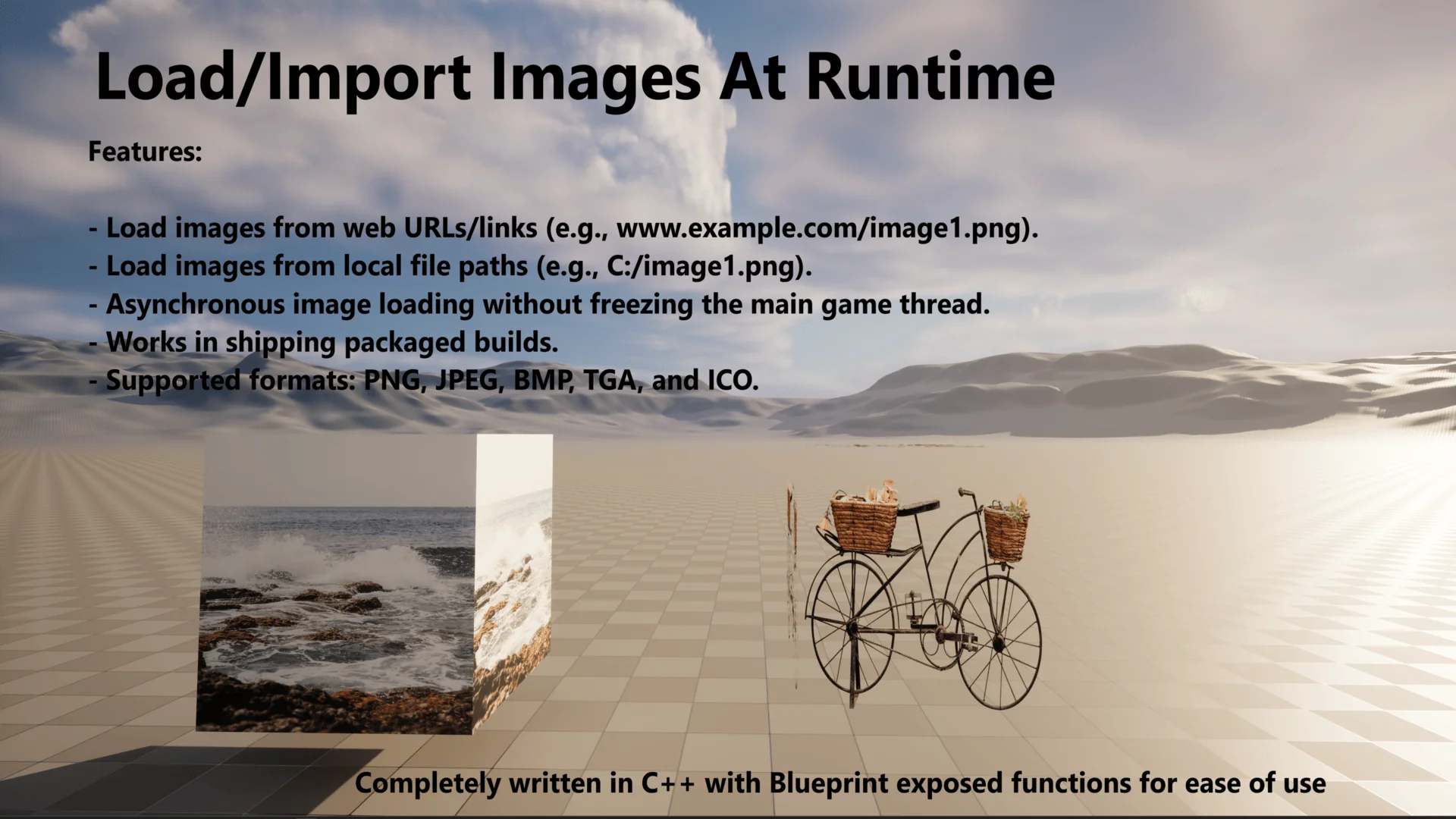
Pulling external imagery into an interactive session often presents immediate performance obstacles when handled through standard synchronous routines. If an engine attempts to read raw bytes off a storage drive or retrieve remote data over a network connection on the primary tick, the rendering loop stalls until the texture buffer compiles. Runtime Image Loader resolves this bottleneck by implementing an asynchronous loading architecture. Dynamic visual assets can be introduced on the fly while character movement, physics simulations, and rendering pipelines continue uninterrupted at full frame rates.
Eliminating Thread Freezes with Asynchronous Image Loading
Main game thread performance determines the fluidity of any interactive title. When a game needs to fetch an unbaked graphic during an active match or scene transition, decoding the incoming data synchronously forces the entire application to wait. Frame drops, audio hiccups, and unresponsive player inputs are frequent side effects of synchronous input-output operations. By delegating the retrieval, parsing, and decompression tasks to background processes, the asynchronous routine ensures that frame pacing remains stable regardless of how many graphics arrive simultaneously.
Once the background processing finishes reading the raw byte stream and translating it into usable engine data, the resulting texture becomes accessible to UI layouts or material instances. This separation between background memory processing and the main execution thread is critical for applications that demand continuous rendering, such as open-world environments, fast-paced multiplayer titles, or dynamic simulation cockpits where even a minor frame stutter disrupts the player experience.
Handling Web URLs and Local Paths Through Runtime Image Loader
Visual assets do not always reside in local project folders, nor are they always known ahead of time. Runtime Image Loader accommodates two distinct ingestion channels: web links pointing to remote URLs and system-level local file paths. This dual-path functionality expands the scope of what can be surfaced dynamically in a project without requiring asset cooking or rebuild steps.
Online sources allow projects to query web endpoints, content delivery networks, or remote servers to populate visual elements dynamically. A live game can query a web address to fetch up-to-date promotional banners, community announcements, user profile avatars, or changing scoreboard emblems without distributing a patch. Conversely, reading from local file paths allows software to scan arbitrary folders on a client machine. This capability is foundational for applications featuring custom user-generated content, localized file pickers, modular skin systems, or tools that inspect directories for loose imagery on disk. Because the plugin processes both local storage strings and web links through clean Blueprint and code hooks, setting up these retrieval nodes remains straightforward.
Supported Raster Formats: PNG, JPEG, ICO, BMP, and TGA
Different image standards serve contrasting visual and operational purposes, and handling varied pipelines requires support for standard industry formats. Runtime Image Loader natively handles five core image types:
PNG: Essential for interface graphics, HUD badges, and iconography where clean alpha channels and lossless compression are required to preserve sharp geometric edges.
JPEG: Suited for photographic content, expansive background art, and remote web imagery where smaller file sizes reduce bandwidth consumption and network transfer times.
ICO: Used specifically for icon files, making the plugin capable of reading application icons, custom software shortcuts, and website favicons directly into viewport elements.
BMP: A standard uncompressed raster format useful for raw graphic output from legacy external programs, desktop utilities, or basic graphics editors.
TGA: A longstanding staple of 3D game production pipelines, frequently employed for texture masks, roughness maps, and precise color channels where uncompressed fidelity is preferred.
Having native compatibility across this spectrum eliminates the need for external preprocessing utilities or intermediate conversion tools. Whether an incoming file is an ultra-compact JPEG photograph retrieved over a network or an uncompressed Targa graphic stored on a workstation SSD, the data streams into memory and converts into a dynamic texture seamlessly.
Deploying Image Ingestion Across Editor and Packaged Builds
A common hurdle with dynamic image plugins in modern engines is the divide between in-editor capabilities and standalone distribution. Many stock import workflows rely on editor-only libraries that fail to compile or link when packaging a shipping executable. Runtime Image Loader is structured as a dedicated CodePlugin that functions reliably in both environments.
In the editor, developers can utilize the plugin to prototype interface systems, test external directory scanning, or construct custom utility widgets that preview remote web assets in real time. Because the underlying code avoids editor-exclusive dependencies, the exact same Blueprint logic and C++ calls translate directly into standalone packaged builds. When the final game or software package compiles, image retrieval features function identically on client hardware. This parity eliminates the need to maintain separate development and production pipelines for dynamic imagery.
Integrating Dynamic Imagery into Blueprint and Code Architectures
Accessibility is a central consideration for any pipeline utility. Runtime Image Loader is designed to remain simple and approachable, enabling creators to incorporate dynamic texture creation into existing node graphs without managing complex thread pools, custom memory allocators, or manual socket connections. Developers interacting through Blueprints can trigger an image load with simple node calls that accept the target URL or directory path, returning a ready-to-use texture reference upon completion.
For teams building data-heavy software—such as portfolio viewers, digital signage frameworks, launcher applications, or titles featuring comprehensive community modding support—the plugin serves as an efficient bridge between external files and active game materials. By uniting broad format compatibility, dual-path loading from web and disk, and asynchronous background processing, Runtime Image Loader provides a robust foundation for modern dynamic visual pipelines.
 Engine Tools
 Engine Tools
 Engine Tools