"7066dd76da796369"{"id":"14666","slug":"stereo-panoramic-player","title":"Stereo Panoramic Player","category":"Engine Tools","engine":"4.26 - 5.27,5.0 - 5.3","assetVersion":"Engine version: 4.26 - 5.27,5.0 - 5.3","engineVersion":"4.21","tag":"Engine Tools","accent":"blue","visual":"character","summary":"The Stereo Panoramic Player is a powerful runtime plugin designed to display and interact with 360° panoramic images and videos. It features dedicated actors for both automated virtual tours and deep programmatic customization.","platform":"Unreal Engine","publishedAt":"2026-03-11T18:53:23.000Z","updatedAt":"2026-04-19T15:45:42.000Z","sourceNotes":[],"fileContents":[],"compatibility":["Unreal Engine","Engine version: 4.26 - 5.27,5.0 - 5.3"],"featuredImage":{"alt":"Stereo Panoramic Player","src":"https://3dcghub.com/wp-content/uploads/2026/03/a896c60e-d989-4a7f-b364-62ee26955900.webp"},"hasDownloadLink":true,"downloads":1,"terms":[{"taxonomy":"category","slug":"engine-tools-tools-and-plugins","name":"Engine Tools"},{"taxonomy":"post_tag","slug":"environment","name":"Environment"},{"taxonomy":"post_tag","slug":"panoramic-media","name":"Panoramic Media"},{"taxonomy":"post_tag","slug":"plugins","name":"Plugins"},{"taxonomy":"post_tag","slug":"stereo-panoramic-player","name":"Stereo Panoramic Player"},{"taxonomy":"post_tag","slug":"tools","name":"Tools"},{"taxonomy":"post_tag","slug":"unreal-engine-5","name":"Unreal Engine 5"}],"galleryImages":[{"src":"https://3dcghub.com/wp-content/uploads/2026/03/aec8c7387822_d1c48785-50c4-4774-b2fe-117424e7b8c3.webp","alt":"Stereo Panoramic Player"},{"src":"https://3dcghub.com/wp-content/uploads/2026/03/55e9ee7207a1_d0f131ae-529f-4e8c-84e4-fc080dab0bac.webp","alt":"Stereo Panoramic Player"},{"src":"https://3dcghub.com/wp-content/uploads/2026/03/af8a90fd158c_39dea438-93eb-416a-ad0d-a30706447dd7.webp","alt":"Stereo Panoramic Player"},{"src":"https://3dcghub.com/wp-content/uploads/2026/03/3911d98d0b10_ce172bf4-0b8e-4f04-a770-340e061370f6.webp","alt":"Stereo Panoramic Player"},{"src":"https://3dcghub.com/wp-content/uploads/2026/03/b75488412a05_6e8cad70-1e15-4d88-a619-e79880be59af.webp","alt":"Stereo Panoramic Player"},{"src":"https://3dcghub.com/wp-content/uploads/2026/03/1ed581e9a8ea_78cd8893-1313-46ee-aef6-0310ec69614f.webp","alt":"Stereo Panoramic Player"}],"accessPanel":{"kind":"resource","title":"Access this resource","eyebrow":"Free Download","message":"Log in or create a free account to start your download.","fileName":"Stereo Panoramic Player 4.26-5.3.7z","safetyNote":"All resources are 100% manually reviewed to eliminate all risks.","actionLabel":"Download Free","resourceType":"Resource archive"},"contentHtml":"\u003ch2\u003eIntroduction to the Stereo Panoramic Player\u003c/h2\u003e\n\u003cp\u003eStereo Panoramic Player is a runtime plugin designed to show and interact with 360° panoramic images and videos. This versatile tool supports both mono and stereo sources, making it a professional choice for immersive projects. Developers can use it to create high-quality visual experiences across various devices. The plugin provides two main actors to handle different levels of complexity and control.\u003c/p\u003e\n\n\u003ch2\u003eThe Panoramic Director: High-Level Virtual Tours\u003c/h2\u003e\n\u003cp\u003eThe Panoramic Director is a high-level actor created to quickly assemble an interactive panoramic 360 Virtual Tour. With this tool, you can define your entire project directly within the editor. You simply import your panoramic images and videos and define your custom hotspots. Consequently, the system handles the heavy lifting at runtime.\u003c/p\u003e\n\n\u003cp\u003eBeyond that, the Panoramic Director automatically detects when a user interacts with a specific hotspot. It then manages the transition between different panoramic media files seamlessly. This automation allows creators to focus on the content rather than complex logic. Therefore, it is an efficient solution for building standard tours with interactive elements.\u003c/p\u003e\n\n\u003ch2\u003eThe Panoramic Sphere: Programmatic Customization\u003c/h2\u003e\n\u003cp\u003eFor projects requiring more flexibility, the creator provides the Panoramic Sphere actor. This low-level actor allows for complete programmatic customization of the user experience. It gives developers total control over how panoramic media is displayed and how interactions are processed. Specifically, you can use it to display both images and videos in mono or stereo formats.\u003c/p\u003e\n\n\u003cp\u003eBecause it is a low-level actor, it is ideal for developers who need to integrate specific technical requirements. You can programmatically control the sphere to detect interactions with panoramic sources. Furthermore, this actor is perfect for those who want to build unique interactive experiences beyond standard virtual tours.\u003c/p\u003e\n\n\u003ch2\u003eBroad Platform Compatibility and Testing\u003c/h2\u003e\n\u003cp\u003eThe Stereo Panoramic Player is compatible with all major platforms. The developer actively tests the plugin to ensure performance on PC and various VR systems. Supported VR platforms include Steam, Oculus, Quest, and Cardboard. Additionally, the plugin is fully functional on mobile operating systems like iOS and Android.\u003c/p\u003e\n\n\u003cp\u003eThis wide range of compatibility makes it a reliable tool for cross-platform development. Whether you are targeting high-end VR headsets or mobile viewers, the plugin maintains its functionality. Consequently, your 360° content can reach a broader audience across different hardware.\u003c/p\u003e\n\n\u003ch2\u003eEnhanced Functionality and Integration\u003c/h2\u003e\n\u003cp\u003eThe plugin is designed to work alongside other helpful tools to improve your project. For example, it is compatible with the Google Analytics Measurement Protocol plugin. By enabling this, you can collect important analytics regarding how users interact with your application. This data is then sent directly to Google Analytics for review.\u003c/p\u003e\n\n\u003cp\u003eSimilarly, the Google Cardboard VR plugin can be utilized to enhance mobile experiences. For most applications, simply enabling this plugin allows your panoramic tour to run in VR mode on iOS and Android devices. This is particularly useful for users with Google Cardboard VR viewers. Additionally, the developer offers plugins to run multiple independent worlds at runtime. This helps you separate your virtual tours from the rest of your interactive experience.\u003c/p\u003e\n\n\u003ch2\u003eLicensing and Support\u003c/h2\u003e\n\u003cp\u003eThis plugin is licensed on a per-user basis. This means one license must be purchased for each individual user working on a project that utilizes the tool. For large-scale projects, the developer offers Premium Support services. These services are designed for enterprises running mission-critical workloads that require fast response times. Furthermore, the developer can provide specific customizations to meet unique operational needs.\u003c/p\u003e\n\n\u003ch2\u003eBest Fit\u003c/h2\u003e\n\u003cp\u003eThe Stereo Panoramic Player offers a robust and flexible solution for managing 360° media. By providing both high-level and low-level actors, it caters to both quick tour creation and deep programmatic development. Its support for stereo formats and wide platform compatibility ensures a high-quality experience for all users. Whether you are building a simple mobile tour or a complex VR application, this plugin provides the necessary features to succeed.\u003c/p\u003e\n\n\u003ch2\u003eExplore Similar Assets\u003c/h2\u003e\n\u003cul\u003e\n\u003cli\u003e\u003ca href=\"https://3dcghub.com/pbl-database/\" title=\"PBL Database\"\u003ePBL Database\u003c/a\u003e\u003c/li\u003e\n\u003cli\u003e\u003ca href=\"https://3dcghub.com/pak-creator-plugin/\" title=\"Pak Creator Plugin\"\u003ePak Creator Plugin\u003c/a\u003e\u003c/li\u003e\n\u003cli\u003e\u003ca href=\"https://3dcghub.com/narrative-tales-node-based-quests-and-dialogue/\" title=\"Narrative Tales – Node Based Quests and Dialogue\"\u003eNarrative Tales – Node Based Quests and Dialogue\u003c/a\u003e\u003c/li\u003e\n\u003cli\u003e\u003ca href=\"https://3dcghub.com/hypergrid/\" title=\"HyperGrid\"\u003eHyperGrid\u003c/a\u003e\u003c/li\u003e\n\u003cli\u003e\u003ca href=\"https://3dcghub.com/did-it-hit-trace-detection-plugin/\" title=\"Did it hit – Trace Detection Plugin\"\u003eDid it hit – Trace Detection Plugin\u003c/a\u003e\u003c/li\u003e\n\u003c/ul\u003e","contentTextLength":4571,"navigation":{"current":3404,"total":4016,"previous":{"id":"14675","slug":"twitch-integrator","title":"Twitch Integrator","category":"Engine Tools","platform":"Unreal Engine","updatedAt":"2026-04-19T15:45:42.000Z"},"next":{"id":"14657","slug":"steamcore-pro","title":"SteamCore PRO","category":"Engine Tools","platform":"Unreal Engine","updatedAt":"2026-04-19T15:45:42.000Z"}},"relatedResources":[{"id":"1001329","slug":"video-player-360-2d-180-360-stereo","title":"Video Player 360 (2D, 180, 360, Stereo)","category":"Engine Tools","engine":"4.21 - 5.2","assetVersion":"Asset Version: 1.0","engineVersion":"Engine Version: 4.21 - 5.2","tag":"Engine Tools","accent":"blue","visual":"mech","summary":"Video Player 360 delivers playback for 2D, 180, and 360 videos with stereo shaders, VR support for Oculus and Vive, and Android device compatibility.","platform":"Unreal Engine","publishedAt":"2026-10-03T04:19:57.661Z","updatedAt":"2026-10-03T04:19:57.661Z","sourceNotes":[],"fileContents":[],"compatibility":["Unreal Engine","Asset Version: 1.0","Engine Version: 4.21 - 5.2"],"featuredImage":{"alt":"Video Player 360 (2D, 180, 360, Stereo)","src":"/wp-content/uploads/published/2026/10/542d12f9c91a-b632a76b-32b3-42e3-8bdf-7bd7231487c0-9e32fbcdb5.webp"},"hasDownloadLink":true,"downloads":0},{"id":"14234","slug":"multi-channel-media-player-by-opencv-high-performance-webcamera","title":"Multi Channel Media Player By OpenCV High Performance WebCamera","category":"Engine Tools","engine":"4.27,5.1 - 5.3","assetVersion":"Engine version: 4.27,5.1 - 5.3","engineVersion":"4.27","tag":"Engine Tools","accent":"blue","visual":"audio","summary":"Enhance your project with the Multi Channel Media Player By OpenCV High Performance WebCamera. This tool supports various network streams and local video formats with optimized performance.","platform":"Unreal Engine","publishedAt":"2026-03-11T17:03:08.000Z","updatedAt":"2026-04-19T15:45:50.000Z","sourceNotes":[],"fileContents":[],"compatibility":["Unreal Engine","Engine version: 4.27,5.1 - 5.3"],"featuredImage":{"alt":"Multi Channel Media Player By OpenCV High Performance WebCamera","src":"https://3dcghub.com/wp-content/uploads/2026/03/0af13d68-5c3b-4fc8-b64b-287261fc641d.webp"},"hasDownloadLink":true,"downloads":0},{"id":"14084","slug":"journeymans-minimap","title":"Journeyman's Minimap","category":"Engine Tools","engine":"4.15 - 5.8","assetVersion":"Asset Version: 1.2","engineVersion":"Engine version: 4.15 - 5.8","tag":"Engine Tools","accent":"blue","visual":"luts","summary":"Journeyman's Minimap offers a robust and flexible solution for creating professional navigation systems in Unreal Engine. It features deep icon customization, dynamic background rendering, and a versatile Fog of War system.","platform":"Unreal Engine","publishedAt":"2026-03-11T15:41:11.000Z","updatedAt":"2026-09-29T09:16:18.015Z","sourceNotes":[],"fileContents":[],"compatibility":["Unreal Engine","Asset Version: 1.2","Engine version: 4.15 - 5.8"],"featuredImage":{"alt":"Journeyman's Minimap","src":"https://3dcghub.com/wp-content/uploads/2026/03/15004687-fa86-47a7-8b1e-a6b4374fbeec.webp"},"hasDownloadLink":true,"downloads":2}]}
Engine Tools
Stereo Panoramic Player
The Stereo Panoramic Player is a powerful runtime plugin designed to display and interact with 360° panoramic images and videos. It features dedicated actors for both automated virtual tours and deep programmatic customization.
Stereo Panoramic Player is a runtime plugin designed to show and interact with 360° panoramic images and videos. This versatile tool supports both mono and stereo sources, making it a professional choice for immersive projects. Developers can use it to create high-quality visual experiences across various devices. The plugin provides two main actors to handle different levels of complexity and control.
The Panoramic Director: High-Level Virtual Tours
The Panoramic Director is a high-level actor created to quickly assemble an interactive panoramic 360 Virtual Tour. With this tool, you can define your entire project directly within the editor. You simply import your panoramic images and videos and define your custom hotspots. Consequently, the system handles the heavy lifting at runtime.
Beyond that, the Panoramic Director automatically detects when a user interacts with a specific hotspot. It then manages the transition between different panoramic media files seamlessly. This automation allows creators to focus on the content rather than complex logic. Therefore, it is an efficient solution for building standard tours with interactive elements.
The Panoramic Sphere: Programmatic Customization
For projects requiring more flexibility, the creator provides the Panoramic Sphere actor. This low-level actor allows for complete programmatic customization of the user experience. It gives developers total control over how panoramic media is displayed and how interactions are processed. Specifically, you can use it to display both images and videos in mono or stereo formats.
Because it is a low-level actor, it is ideal for developers who need to integrate specific technical requirements. You can programmatically control the sphere to detect interactions with panoramic sources. Furthermore, this actor is perfect for those who want to build unique interactive experiences beyond standard virtual tours.
Broad Platform Compatibility and Testing
The Stereo Panoramic Player is compatible with all major platforms. The developer actively tests the plugin to ensure performance on PC and various VR systems. Supported VR platforms include Steam, Oculus, Quest, and Cardboard. Additionally, the plugin is fully functional on mobile operating systems like iOS and Android.
This wide range of compatibility makes it a reliable tool for cross-platform development. Whether you are targeting high-end VR headsets or mobile viewers, the plugin maintains its functionality. Consequently, your 360° content can reach a broader audience across different hardware.
Enhanced Functionality and Integration
The plugin is designed to work alongside other helpful tools to improve your project. For example, it is compatible with the Google Analytics Measurement Protocol plugin. By enabling this, you can collect important analytics regarding how users interact with your application. This data is then sent directly to Google Analytics for review.
Similarly, the Google Cardboard VR plugin can be utilized to enhance mobile experiences. For most applications, simply enabling this plugin allows your panoramic tour to run in VR mode on iOS and Android devices. This is particularly useful for users with Google Cardboard VR viewers. Additionally, the developer offers plugins to run multiple independent worlds at runtime. This helps you separate your virtual tours from the rest of your interactive experience.
Licensing and Support
This plugin is licensed on a per-user basis. This means one license must be purchased for each individual user working on a project that utilizes the tool. For large-scale projects, the developer offers Premium Support services. These services are designed for enterprises running mission-critical workloads that require fast response times. Furthermore, the developer can provide specific customizations to meet unique operational needs.
Best Fit
The Stereo Panoramic Player offers a robust and flexible solution for managing 360° media. By providing both high-level and low-level actors, it caters to both quick tour creation and deep programmatic development. Its support for stereo formats and wide platform compatibility ensures a high-quality experience for all users. Whether you are building a simple mobile tour or a complex VR application, this plugin provides the necessary features to succeed.
 Engine Tools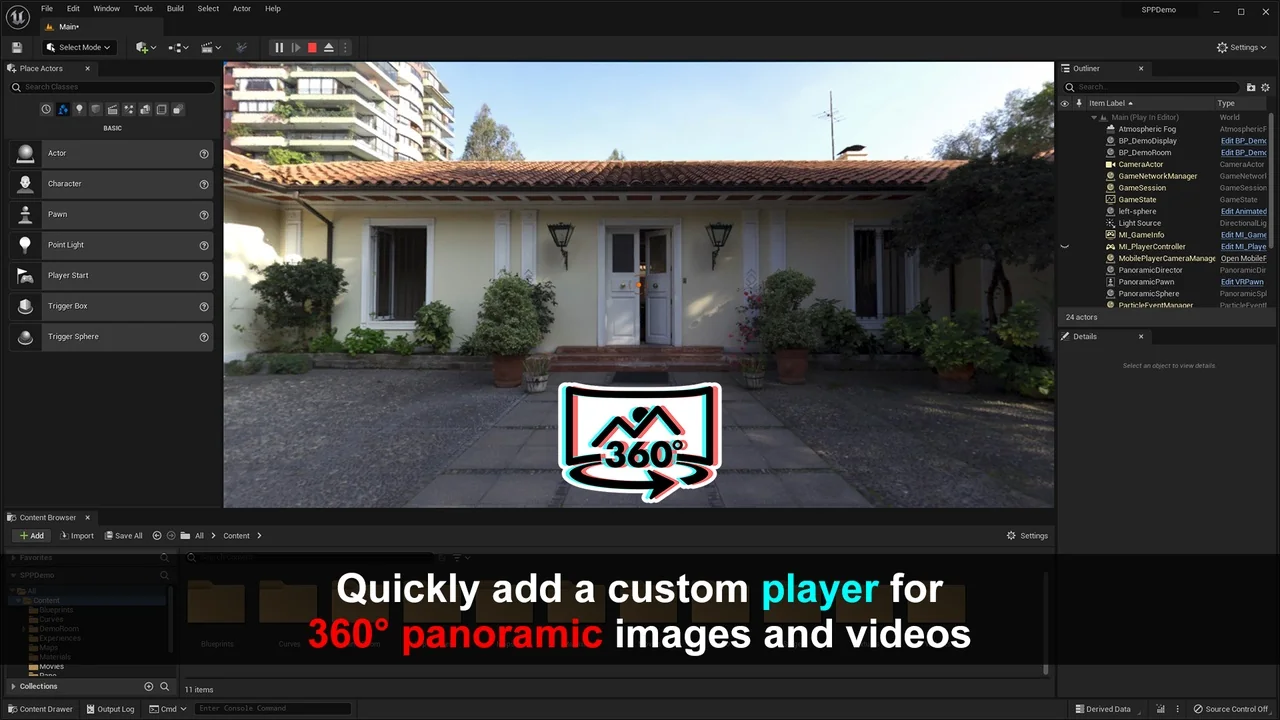
 Engine Tools
 Engine Tools
 Engine Tools