"e9c335e082208b17"{"id":"1002888","slug":"json-parser-plugin","title":"JSON Parser Plugin","category":"Engine Tools","engine":"4.27 - 5.5","assetVersion":"Asset Version: 2.8","engineVersion":"Engine Version: 4.27 - 5.5","tag":"Engine Tools","accent":"blue","visual":"mech","summary":"Work with JSON natively in Unreal Engine Blueprints using struct conversion, Base64 file transfer, compression, and asynchronous parsing nodes.","platform":"Unreal Engine","indexPolicy":"index","publishedAt":"2026-11-21T01:58:38.450Z","updatedAt":"2026-11-21T01:58:38.450Z","sourceNotes":[],"fileContents":[],"compatibility":["Unreal Engine","Asset Version: 2.8","Engine Version: 4.27 - 5.5"],"featuredImage":{"alt":"JSON Parser Plugin","src":"/wp-content/uploads/published/2026/11/d34c696e3344-110bc68a-6e7d-499b-9e71-3668d25b2ce1-100cc58e1a.webp"},"fileSizeBytes":115440288,"hasDownloadLink":true,"downloads":0,"terms":[{"taxonomy":"category","slug":"engine-tools-tools-and-plugins","name":"Engine Tools"}],"galleryImages":[{"src":"/wp-content/uploads/published/2026/11/94daacce3fb6-2399012b-f70b-4857-898c-af1075b3795f-8c103ee327.webp","alt":"JSON Parser Plugin"},{"src":"/wp-content/uploads/published/2026/11/30fe10338b41-c311bbf9-313c-4140-ab77-a49040f5920a-1e9431bf8e.webp","alt":"JSON Parser Plugin"},{"src":"/wp-content/uploads/published/2026/11/cd4061c3a217-f11d1b6a-b60b-4520-9fb4-f3a9a157a0bd-dcfb02f750.webp","alt":"JSON Parser Plugin"},{"src":"/wp-content/uploads/published/2026/11/62c2842d4631-903e9d86-77a9-4e98-9949-026f2ac26f56-84ce8ea3db.webp","alt":"JSON Parser Plugin"},{"src":"/wp-content/uploads/published/2026/11/e82666700fad-6a07e48b-bd12-426a-9961-890915015d2d-fb7b8bed02.webp","alt":"JSON Parser Plugin"},{"src":"/wp-content/uploads/published/2026/11/0a971f9d1734-a0b42d3e-3d4f-4dc3-a90b-1ee8c2251515-609f757606.webp","alt":"JSON Parser Plugin"},{"src":"/wp-content/uploads/published/2026/11/bf301bde2929-0fccb6db-431f-4633-9f8e-e966ad294080-3e983b486e.webp","alt":"JSON Parser Plugin"},{"src":"/wp-content/uploads/published/2026/11/a76fb98b23ba-189ddba5-f12a-43af-baec-b706955bd974-893fcc41d9.webp","alt":"JSON Parser Plugin"},{"src":"/wp-content/uploads/published/2026/11/f39efa7777c4-24bb95c0-b16b-49fe-82ed-5bb9b551bf6e-82402e2729.webp","alt":"JSON Parser Plugin"},{"src":"/wp-content/uploads/published/2026/11/f6bec0bc9d61-6f4d0f4d-3e79-4b03-a110-41e2301997c9-c0a11aa114.webp","alt":"JSON Parser Plugin"}],"contentHtml":"\u003ch2\u003eIntegrating the JSON Parser Plugin into Blueprint Workflows\u003c/h2\u003e\u003cp\u003eWorking directly with structured text formats inside Unreal Engine often presents technical hurdles when relying solely on default visual scripting nodes. The JSON Parser Plugin resolves these friction points by providing a direct mechanism to read, create, and manipulate JSON data trees within Blueprints. Instead of requiring dedicated C++ wrappers to parse incoming strings or assemble outgoing payloads, logic graphs can construct JSON objects, read individual elements, and update fields inline.\u003c/p\u003e\u003cp\u003eEarly implementations of Blueprint-based data trees occasionally suffered from scope and state issues. Historical revisions resolved problems where values failed to clear when passed through custom events, as well as edge cases where array variables inside the Make Json Object node were mishandled. In modern revisions, data nodes maintain clean local execution scopes, allowing developers to construct nested hierarchies of arrays, values, and nested objects across diverse gameplay setups.\u003c/p\u003e\u003ch2\u003eData Struct Conversion in the JSON Parser Environment\u003c/h2\u003e\u003cp\u003eA core capability of the toolset is the bidirectional serialization between standard Unreal Engine structures and JSON strings. The Struct to JSON and JSON to Struct functions allow complex gameplay data—such as character statistics, inventory states, and world configurations—to convert directly into clean data representations without manual node-by-node extraction.\u003c/p\u003e\u003cp\u003eManaging structs across different deployment targets requires precise data integrity safeguards. In early iterations, packaged Windows builds exhibited an issue where internal structure variable names mutated during compilation, leading to invalid key names inside the generated JSON. Patch revisions corrected this behavior, preserving accurate variable name mapping between development PIE sessions and packaged shipping binaries. Similarly, support was specifically resolved for user-created Enums contained inside Structs, ensuring custom enumerated types evaluate and serialize cleanly rather than failing during parsing.\u003c/p\u003e\u003cp\u003eComplex containers within structures also receive dedicated handling rules. Map properties contained inside Unreal structs are configured to serialize as JSON objects by default. When a project requires alternative formatting where map elements must translate into structured key-value arrays instead, developers can invoke the setStructJsonSettings function to alter this serialization behavior across their Blueprint graphs.\u003c/p\u003e\u003ch2\u003eFile Operations, Base64 Payloads, and Data Compression\u003c/h2\u003e\u003cp\u003eData interchange often involves moving files between local storage directories or across external network boundaries. Built-in Base64 functions enable developers to convert raw files into encoded text strings that fit seamlessly within standard JSON key-value pairs, turning arbitrary binary files into manageable textual payloads.\u003c/p\u003e\u003cp\u003eDisk-level read and write capabilities expanded across incremental releases. An initial suite of four specialized file functions provided direct filesystem interaction, followed by an expanded system in version 2.11 that introduced comprehensive file and directory management functions. These utilities allow Blueprints to verify directories, inspect filesystem locations, and organize external data assets alongside JSON storage routines.\u003c/p\u003e\u003cp\u003eHandling heavy data trees or raw Base64 transfers requires practical data footprint management. Starting from Unreal Engine 4.26, integrated data compression algorithms provide direct access to industry-standard formats:\u003c/p\u003e\u003cul\u003e\u003cli\u003e\u003cstrong\u003eZlib:\u003c/strong\u003e Balanced compression for general-purpose text and binary serialization pipelines.\u003c/li\u003e\u003cli\u003e\u003cstrong\u003eLZ4:\u003c/strong\u003e High-speed decompression suited to minimal performance impact during active gameplay.\u003c/li\u003e\u003cli\u003e\u003cstrong\u003eGzip:\u003c/strong\u003e Universally recognized compression format suited for cross-platform data exchanges.\u003c/li\u003e\u003c/ul\u003e\u003ch2\u003eAsynchronous Parsing Stability and Verification Signals\u003c/h2\u003e\u003cp\u003eProcessing extensive JSON trees synchronously on the game thread introduces the risk of noticeable frame rate hitching. To mitigate performance bottlenecks during large read or write cycles, the plugin features dedicated asynchronous functions. These async nodes execute data manipulation off the main thread, dispatching execution signals back to the Blueprint graph once data transformation finishes.\u003c/p\u003e\u003cp\u003eStability improvements specifically targeted these background routines to ensure safe thread handoffs when moving high-volume arrays or decoding heavily nested structures. Alongside background processing, verification mechanisms are integrated directly into parsing outputs. Functions return a dedicated boolean flag indicating whether a parse operation succeeded or failed. This allows developers to construct fail-safe execution paths, falling back to cached save states or default values if an external JSON string arrives malformed or incomplete.\u003c/p\u003e\u003ch2\u003eString Formatting Controls and Engine Constraints\u003c/h2\u003e\u003cp\u003eFormatting output text properly determines both network payload size and system memory overhead. In earlier releases, text formatting relied on a removeLineBreaks parameter, which stripped out formatting characters only after generating the full string. Version 2.10 optimized this process by introducing the compactString setting directly within the Object to Json String function. Rather than generating an indented string and cleaning it up after the fact, compactString constructs the text without spaces or line breaks from the start, minimizing memory churn and accelerating string concatenation.\u003c/p\u003e\u003cp\u003eWhen deploying projects built on Unreal Engine 4, specific compilation settings require attention. Blueprint Nativization in UE4 can trigger functional conflicts when combined with the plugin's dynamic reflection and serialization routines. Projects targeting UE4 should disable Blueprint Nativization specifically on any Blueprints that call JSON parsing, struct conversion, or compression nodes to prevent packaging errors.\u003c/p\u003e\u003cp\u003eThe plugin maintains broad engine support across major generation shifts, including legacy branches covering versions 4.18 through 4.20, standard 4.25 through 4.27 distributions, and modern Unreal Engine releases spanning 5.1 through 5.8. This consistent version coverage provides a reliable technical foundation for data management, local disk interaction, and structured text parsing across varied production environments.\u003c/p\u003e\n\n\u003ch2\u003eExplore Similar Assets\u003c/h2\u003e\n\u003cul\u003e\n\u003cli\u003e\u003ca href=\"https://3dcghub.com/blueprintjson/\" rel=\"noopener noreferrer\"\u003eBlueprintJSON\u003c/a\u003e\u003c/li\u003e\n\u003cli\u003e\u003ca href=\"https://3dcghub.com/http-and-json/\" rel=\"noopener noreferrer\"\u003eHTTP AND JSON\u003c/a\u003e\u003c/li\u003e\n\u003cli\u003e\u003ca href=\"https://3dcghub.com/le-json/\" rel=\"noopener noreferrer\"\u003eLE Json\u003c/a\u003e\u003c/li\u003e\n\u003cli\u003e\u003ca href=\"https://3dcghub.com/json4ue-json-for-ue/\" rel=\"noopener noreferrer\"\u003eJSON4UE(JSON For UE)\u003c/a\u003e\u003c/li\u003e\n\u003cli\u003e\u003ca href=\"https://3dcghub.com/blueprint-exporter/\" rel=\"noopener noreferrer\"\u003eBlueprint Exporter\u003c/a\u003e\u003c/li\u003e\n\u003c/ul\u003e","contentTextLength":6461,"navigation":{"current":47,"total":4839,"previous":{"id":"1002889","slug":"augmented-reality-ar-toolkit","title":"Augmented Reality AR Toolkit","category":"Simulation","platform":"Unreal Engine","updatedAt":"2026-11-21T01:59:04.129Z"},"next":{"id":"1002887","slug":"socket-io-client","title":"Socket.IO Client","category":"Network \u0026 Multiplayer","platform":"Unreal Engine","updatedAt":"2026-11-21T01:55:11.604Z"}},"relatedResources":[{"id":"13767","slug":"blueprintjson","title":"BlueprintJSON","category":"Engine Tools","engine":"4.23 - 5.8","assetVersion":"Asset Version:1.0 - 1.0.6","engineVersion":"Engine version: 4.23 - 5.8","tag":"Engine Tools","accent":"blue","visual":"mech","summary":"BlueprintJSON is a comprehensive library designed to bring JSON functionality to Unreal Engine Blueprints. It enables developers to read, parse, edit, and save JSON data efficiently using asynchronous processing.","platform":"Unreal Engine","indexPolicy":"noindex","publishedAt":"2026-03-11T09:59:29.000Z","updatedAt":"2026-09-29T08:30:49.387Z","sourceNotes":[],"fileContents":[],"compatibility":["Unreal Engine","Asset Version:1.0 - 1.0.6","Engine version: 4.23 - 5.8"],"featuredImage":{"alt":"BlueprintJSON","src":"https://3dcghub.com/wp-content/uploads/2026/03/635658e0-64f1-431f-b6f4-59f2fe39da17.webp"},"fileSizeBytes":314814078,"hasDownloadLink":true,"downloads":1},{"id":"14060","slug":"http-and-json","title":"HTTP AND JSON","category":"Engine Tools","engine":"4.26 - 5.8","assetVersion":"Asset Version:1.1","engineVersion":"Engine version: 4.26 - 5.8","tag":"Engine Tools","accent":"blue","visual":"audio","summary":"Streamline your network workflows with the HTTP AND JSON plugin for Blueprints. This tool simplifies data analysis and interface docking by treating JSON data as manageable strings.","platform":"Unreal Engine","indexPolicy":"noindex","publishedAt":"2026-03-11T13:27:48.000Z","updatedAt":"2026-09-29T09:07:47.488Z","sourceNotes":[],"fileContents":[],"compatibility":["Unreal Engine","Asset Version:1.1","Engine version: 4.26 - 5.8"],"featuredImage":{"alt":"HTTP AND JSON","src":"https://3dcghub.com/wp-content/uploads/2026/03/b5285804-2d24-40c2-ab91-e872bc320095.webp"},"fileSizeBytes":329882264,"hasDownloadLink":true,"downloads":0},{"id":"14108","slug":"le-json","title":"LE Json","category":"Engine Tools","engine":"4.26 - 5.4","assetVersion":"Engine version: 4.26 - 5.4","engineVersion":"Asset Version:5.3.0","tag":"Engine Tools","accent":"blue","visual":"luts","summary":"Simplify your data management with LE Json. This plugin offers dedicated Blueprint nodes for creating and parsing JSON strings within the Unreal Engine environment.","platform":"Unreal Engine","indexPolicy":"noindex","publishedAt":"2026-03-11T15:50:52.000Z","updatedAt":"2026-04-19T15:45:53.000Z","sourceNotes":[],"fileContents":[],"compatibility":["Unreal Engine","Engine version: 4.26 - 5.4","Asset Version: 5.3.0"],"featuredImage":{"alt":"LE Json","src":"https://3dcghub.com/wp-content/uploads/2026/03/80373996-08f5-4318-8e7d-557d24f41fd5.webp"},"fileSizeBytes":242239554,"hasDownloadLink":true,"downloads":0}]}
Resource screenshots
1 / 10
Join our channel
Follow 3DCGHUB on Telegram for new resource drops, migration updates, and community notices.
Integrating the JSON Parser Plugin into Blueprint Workflows
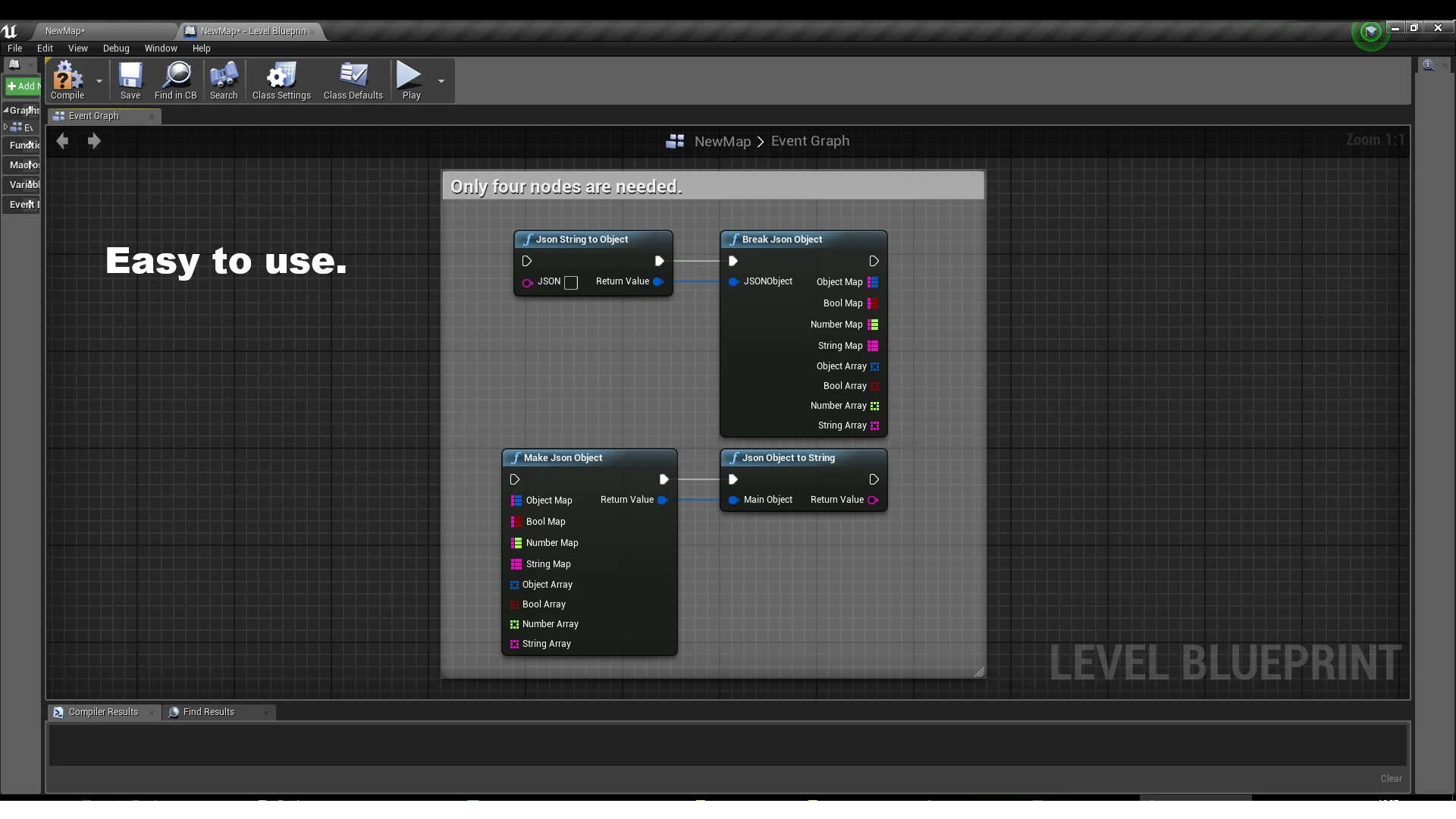
Working directly with structured text formats inside Unreal Engine often presents technical hurdles when relying solely on default visual scripting nodes. The JSON Parser Plugin resolves these friction points by providing a direct mechanism to read, create, and manipulate JSON data trees within Blueprints. Instead of requiring dedicated C++ wrappers to parse incoming strings or assemble outgoing payloads, logic graphs can construct JSON objects, read individual elements, and update fields inline.
Early implementations of Blueprint-based data trees occasionally suffered from scope and state issues. Historical revisions resolved problems where values failed to clear when passed through custom events, as well as edge cases where array variables inside the Make Json Object node were mishandled. In modern revisions, data nodes maintain clean local execution scopes, allowing developers to construct nested hierarchies of arrays, values, and nested objects across diverse gameplay setups.
Data Struct Conversion in the JSON Parser Environment
A core capability of the toolset is the bidirectional serialization between standard Unreal Engine structures and JSON strings. The Struct to JSON and JSON to Struct functions allow complex gameplay data—such as character statistics, inventory states, and world configurations—to convert directly into clean data representations without manual node-by-node extraction.
Managing structs across different deployment targets requires precise data integrity safeguards. In early iterations, packaged Windows builds exhibited an issue where internal structure variable names mutated during compilation, leading to invalid key names inside the generated JSON. Patch revisions corrected this behavior, preserving accurate variable name mapping between development PIE sessions and packaged shipping binaries. Similarly, support was specifically resolved for user-created Enums contained inside Structs, ensuring custom enumerated types evaluate and serialize cleanly rather than failing during parsing.
Complex containers within structures also receive dedicated handling rules. Map properties contained inside Unreal structs are configured to serialize as JSON objects by default. When a project requires alternative formatting where map elements must translate into structured key-value arrays instead, developers can invoke the setStructJsonSettings function to alter this serialization behavior across their Blueprint graphs.
File Operations, Base64 Payloads, and Data Compression
Data interchange often involves moving files between local storage directories or across external network boundaries. Built-in Base64 functions enable developers to convert raw files into encoded text strings that fit seamlessly within standard JSON key-value pairs, turning arbitrary binary files into manageable textual payloads.
Disk-level read and write capabilities expanded across incremental releases. An initial suite of four specialized file functions provided direct filesystem interaction, followed by an expanded system in version 2.11 that introduced comprehensive file and directory management functions. These utilities allow Blueprints to verify directories, inspect filesystem locations, and organize external data assets alongside JSON storage routines.
Handling heavy data trees or raw Base64 transfers requires practical data footprint management. Starting from Unreal Engine 4.26, integrated data compression algorithms provide direct access to industry-standard formats:
Zlib: Balanced compression for general-purpose text and binary serialization pipelines.
LZ4: High-speed decompression suited to minimal performance impact during active gameplay.
Gzip: Universally recognized compression format suited for cross-platform data exchanges.
Asynchronous Parsing Stability and Verification Signals
Processing extensive JSON trees synchronously on the game thread introduces the risk of noticeable frame rate hitching. To mitigate performance bottlenecks during large read or write cycles, the plugin features dedicated asynchronous functions. These async nodes execute data manipulation off the main thread, dispatching execution signals back to the Blueprint graph once data transformation finishes.
Stability improvements specifically targeted these background routines to ensure safe thread handoffs when moving high-volume arrays or decoding heavily nested structures. Alongside background processing, verification mechanisms are integrated directly into parsing outputs. Functions return a dedicated boolean flag indicating whether a parse operation succeeded or failed. This allows developers to construct fail-safe execution paths, falling back to cached save states or default values if an external JSON string arrives malformed or incomplete.
String Formatting Controls and Engine Constraints
Formatting output text properly determines both network payload size and system memory overhead. In earlier releases, text formatting relied on a removeLineBreaks parameter, which stripped out formatting characters only after generating the full string. Version 2.10 optimized this process by introducing the compactString setting directly within the Object to Json String function. Rather than generating an indented string and cleaning it up after the fact, compactString constructs the text without spaces or line breaks from the start, minimizing memory churn and accelerating string concatenation.
When deploying projects built on Unreal Engine 4, specific compilation settings require attention. Blueprint Nativization in UE4 can trigger functional conflicts when combined with the plugin's dynamic reflection and serialization routines. Projects targeting UE4 should disable Blueprint Nativization specifically on any Blueprints that call JSON parsing, struct conversion, or compression nodes to prevent packaging errors.
The plugin maintains broad engine support across major generation shifts, including legacy branches covering versions 4.18 through 4.20, standard 4.25 through 4.27 distributions, and modern Unreal Engine releases spanning 5.1 through 5.8. This consistent version coverage provides a reliable technical foundation for data management, local disk interaction, and structured text parsing across varied production environments.
 Engine Tools
 Engine Tools
 Engine Tools