"e9c335e082208b17"{"id":"1002889","slug":"augmented-reality-ar-toolkit","title":"Augmented Reality AR Toolkit","category":"Simulation","engine":"4.27+,5.0+","assetVersion":"","engineVersion":"Engine Version: 4.27+,5.0+","tag":"Simulation","accent":"blue","visual":"mech","summary":"Explore the Augmented Reality AR Toolkit for Unreal Engine, featuring tracking modes, touch controls, dynamic lighting, and mobile platform setup.","platform":"Unreal Engine","indexPolicy":"index","publishedAt":"2026-11-21T01:59:04.129Z","updatedAt":"2026-11-21T01:59:04.129Z","sourceNotes":[],"fileContents":[],"compatibility":["Unreal Engine","Engine Version: 4.27+,5.0+"],"featuredImage":{"alt":"Augmented Reality AR Toolkit","src":"/wp-content/uploads/published/2026/11/09d3311ba8c6-7db50c7d-639d-4a67-b0c9-34e30c85d462-c9b9f3003d.webp"},"fileSizeBytes":3938161,"hasDownloadLink":true,"downloads":0,"terms":[{"taxonomy":"category","slug":"simulation","name":"Simulation"}],"galleryImages":[{"src":"/wp-content/uploads/published/2026/11/1b8e4007dde4-63d07e0f-9651-45f4-b9f7-c5dc636a3e3e-afb246fc08.webp","alt":"Augmented Reality AR Toolkit"},{"src":"/wp-content/uploads/published/2026/11/d00129f4a34d-3d14f71d-60e3-4917-a155-c2066318d337-1f3b6c3deb.webp","alt":"Augmented Reality AR Toolkit"},{"src":"/wp-content/uploads/published/2026/11/ecb5021a4594-312536cf-3d5c-4725-819f-40ded797c027-8071c7cd11.webp","alt":"Augmented Reality AR Toolkit"},{"src":"/wp-content/uploads/published/2026/11/9b8fc998514e-f734129c-1e65-46b1-8c39-42aa5ef43ad8-33eac39900.webp","alt":"Augmented Reality AR Toolkit"},{"src":"/wp-content/uploads/published/2026/11/bce91528fa14-f7737ee4-dcaf-4457-a2fa-582257bb9b86-ba0a52c288.webp","alt":"Augmented Reality AR Toolkit"}],"contentHtml":"\u003ch2\u003eAnchoring Digital Objects with the Augmented Reality Tracking Suite\u003c/h2\u003e\u003cp\u003eConstructing believable mobile augmented reality requires reliable alignment between computer-generated geometry and the physical world. The Augmented Reality AR Toolkit approaches this through several tracking methodologies tailored to mobile hardware. World tracking acts as the primary foundation, establishing spatial understanding so virtual assets hold fixed positions relative to real surfaces as the user navigates an environment with a handheld device.\u003c/p\u003e\u003cp\u003eFor structured physical media and print materials, image tracking recognizes defined two-dimensional markers. Once the camera detects an identified image target, the system locks corresponding meshes or interactive scenes directly to that flat surface, preserving orientation and relative position during device movement.\u003c/p\u003e\u003cp\u003ePhysical tracking extends beyond flat planes on supported hardware. Object detection enables the recognition of three-dimensional physical objects in real-world spaces, allowing virtual components to react directly to real physical items. This functionality operates exclusively on iOS devices running ARKit, giving Apple hardware specialized capability when anchoring digital enhancements around pre-scanned geometric items.\u003c/p\u003e\u003ch2\u003eInteractive Touch Controls and Toolkit Interface Systems\u003c/h2\u003e\u003cp\u003eVirtual assets placed in an augmented view need straightforward physical interactions on touchscreens. The toolkit provides dedicated touch inputs that map directly to standard mobile gestures. Users can reposition models across tracked surfaces through dragging, scale meshes proportionally using pinch gestures, and twist using multiple fingers to rotate models along desired axes.\u003c/p\u003e\u003cp\u003eSpawning assets into the world relies on automated alignment routines to keep assets readable right away. Meshes automatically spawn rotated to face the user camera directly upon placement, eliminating situations where placed objects appear backwards or skewed toward odd angles. The system also calculates distance from the device camera to the selected tracking surface, scaling spawned models relative to depth so placed elements maintain reasonable proportions regardless of whether the placement target sits right in front of the lens or across a room.\u003c/p\u003e\u003cp\u003eInteractive exploration relies on contextual mesh controls. Built-in 3D buttons can be attached directly to models within virtual space. Selecting these buttons highlights specific parts of the asset and reveals descriptive text panels, enabling walkthroughs, product presentations, or technical explanations right over the digital mesh. General project navigation is backed by a dedicated mobile user interface layer and an opening splash screen to handle the transition into the camera view.\u003c/p\u003e\u003ch2\u003eVisual Fidelity Through Dynamic Shadows and Lighting Estimation\u003c/h2\u003e\u003cp\u003eGrounding 3D geometry into live camera feeds demands consistent lighting cues. Without accurate shadowing, placed objects appear disconnected from the real environment. The toolkit integrates dynamic shadows that project onto tracked real-world planes, creating clear contact points between virtual meshes and actual floors, tables, or countertops.\u003c/p\u003e\u003cp\u003eLighting estimation functions in tandem with real-time shadowing to sample illumination levels from the mobile device camera. By assessing ambient brightness and light distribution in the room or outdoor scene, the rendering setup balances virtual material response against actual environmental lighting. Virtual surfaces adjust their brightness and contrast in response to environmental shifts, preventing digital models from appearing unnaturally blown out in dim settings or flat and dark in direct daylight.\u003c/p\u003e\u003ch2\u003eCross-Platform Pipeline and Blueprint Architecture\u003c/h2\u003e\u003cp\u003eThe entire framework is constructed entirely out of Unreal Engine Blueprints without requiring custom C++ code. The visual scripting architecture makes all event logic, interaction routines, and placement behaviors directly accessible in node graphs, supported by included documentation detailing node functions and setup flows. This native visual approach simplifies testing logic adjustments directly inside the editor before deploying builds to mobile targets.\u003c/p\u003e\u003cp\u003eCross-platform support covers both iOS and Android devices, though hardware-level differences dictate specific feature availability. While core world tracking and image tracking function across platforms, the specialized object detection workflow remains an ARKit feature on iOS. Project delivery across both platforms benefits from pre-configured mobile inputs and camera management nodes designed to handle touch events and feed rendering smoothly on phone and tablet displays.\u003c/p\u003e\u003ch2\u003eEngine Stability and Version Profiles for Android and iOS\u003c/h2\u003e\u003cp\u003eEngine version selection plays an essential role when preparing projects for mobile distribution. Releases of Unreal Engine past version 4.24 feature specific platform bugs and limitations that impact Android packaging. When targeting the Google Play Store, working within an older version of Unreal Engine helps circumvent these issues. Upgrading a project forward to later engine releases remains possible if needed later, but reverting an existing Unreal project backward to an earlier engine version is fundamentally unsupported.\u003c/p\u003e\u003cp\u003eAndroid deployment and staging should be verified early. Testing can be carried out using 4.25 example projects, transferring the compiled folder and running the packaged batch script if the Android Debug Bridge (ADB) utility is installed on the host computer. Projects can also be verified by copying the compiled APK directly onto physical Android hardware for manual installation.\u003c/p\u003e\u003cp\u003eRecent iterations of Unreal Engine 5 introduce platform-level hurdles affecting both iOS and Android workflows. Due to active engine bugs across these newer releases, maintaining production within Unreal Engine 4 remains the recommended path for projects relying on this toolkit. Specific version anomalies across recent releases include:\u003c/p\u003e\u003cul\u003e\u003cli\u003eUnreal Engine 5.0 and 5.1 contain an engine bug that interferes with iOS image tracking functionality.\u003c/li\u003e\u003cli\u003eUnreal Engine 5.2 contains a known issue affecting camera feed rendering on Android devices.\u003c/li\u003e\u003cli\u003eUnreal Engine 5.3 and 5.4 present an AR positioning bug on iOS alongside device flickering and crash issues on certain Android hardware.\u003c/li\u003e\u003c/ul\u003e\u003cp\u003eTargeting older, established Unreal Engine releases avoids these specific mobile AR regressions, ensuring interactive touch placement, image anchoring, and camera feeds operate reliably across target devices.\u003c/p\u003e\n\n\u003ch2\u003eMore From The Same Workflow\u003c/h2\u003e\n\u003cul\u003e\n\u003cli\u003e\u003ca href=\"https://3dcghub.com/true-horror-first-person-view/\" rel=\"noopener noreferrer\"\u003eTrue Horror First Person View\u003c/a\u003e\u003c/li\u003e\n\u003cli\u003e\u003ca href=\"https://3dcghub.com/triplex-house-villa/\" rel=\"noopener noreferrer\"\u003eTriplex House Villa\u003c/a\u003e\u003c/li\u003e\n\u003cli\u003e\u003ca href=\"https://3dcghub.com/battle-simulator-kit/\" rel=\"noopener noreferrer\"\u003eBattle Simulator Kit\u003c/a\u003e\u003c/li\u003e\n\u003cli\u003e\u003ca href=\"https://3dcghub.com/stylized-paris-street/\" rel=\"noopener noreferrer\"\u003eStylized Paris Street\u003c/a\u003e\u003c/li\u003e\n\u003cli\u003e\u003ca href=\"https://3dcghub.com/modular-victorian-house/\" rel=\"noopener noreferrer\"\u003eModular Victorian House\u003c/a\u003e\u003c/li\u003e\n\u003c/ul\u003e","contentTextLength":6692,"navigation":{"current":46,"total":4839,"previous":{"id":"1002890","slug":"discord-rich-presence","title":"Discord Rich Presence","category":"Engine Tools","platform":"Unreal Engine","updatedAt":"2026-11-21T01:59:27.383Z"},"next":{"id":"1002888","slug":"json-parser-plugin","title":"JSON Parser Plugin","category":"Engine Tools","platform":"Unreal Engine","updatedAt":"2026-11-21T01:58:38.450Z"}},"relatedResources":[{"id":"1001613","slug":"true-horror-first-person-view","title":"True Horror First Person View","category":"Simulation","engine":"5.3+","assetVersion":"","engineVersion":"Engine Version: 5.3+","tag":"Simulation","accent":"blue","visual":"mech","summary":"Explore True Horror First Person View, a full-body horror template with Lyra-based locomotion, VHS camera effects, spline-driven AI, and Poolroom maps.","platform":"Unreal Engine","indexPolicy":"index","publishedAt":"2026-10-10T16:57:39.147Z","updatedAt":"2026-10-10T16:57:39.147Z","sourceNotes":[],"fileContents":[],"compatibility":["Unreal Engine","Engine Version: 5.3+"],"featuredImage":{"alt":"True Horror First Person View","src":"/wp-content/uploads/published/2026/10/83a7bf2c8685-1b81c236-5283-47ca-84c3-9abf864c5353-6e2d50314b.webp"},"fileSizeBytes":1746149610,"hasDownloadLink":true,"downloads":2},{"id":"1001257","slug":"triplex-house-villa","title":"Triplex House Villa","category":"Simulation","engine":"5.0+","assetVersion":"","engineVersion":"Engine Version: 5.0+","tag":"Simulation","accent":"blue","visual":"mech","summary":"Explore the Triplex House Villa environment for Unreal Engine 5.8, featuring 470 meshes, interactive Blueprints, Lumen lighting, and multi-level living spaces.","platform":"Unreal Engine","indexPolicy":"index","publishedAt":"2026-09-23T15:58:40.730Z","updatedAt":"2026-09-23T15:58:40.730Z","sourceNotes":[],"fileContents":[],"compatibility":["Unreal Engine","Engine Version: 5.0+"],"featuredImage":{"alt":"Triplex House Villa","src":"/wp-content/uploads/published/2026/09/ab43639d73d4-d05381cd-8cac-41a6-9404-e3cffed3268f-e00f76b9c4.webp"},"fileSizeBytes":3180362419,"hasDownloadLink":true,"downloads":2},{"id":"1001960","slug":"battle-simulator-kit","title":"Battle Simulator Kit","category":"Simulation","engine":"5.3+","assetVersion":"","engineVersion":"Engine Version: 5.3+","tag":"Simulation","accent":"blue","visual":"mech","summary":"Explore the Battle Simulator Kit for Unreal Engine 4, featuring 100% Blueprint logic, Sandbox and Campaign modes, unit possession, and Dog AI support.","platform":"Unreal Engine","indexPolicy":"index","publishedAt":"2026-10-24T11:37:24.819Z","updatedAt":"2026-10-24T11:37:24.819Z","sourceNotes":[],"fileContents":[],"compatibility":["Unreal Engine","Engine Version: 5.3+"],"featuredImage":{"alt":"Battle Simulator Kit","src":"/wp-content/uploads/published/2026/10/57b15a719a07-0631192e-6bf2-4182-a233-7b7af1357810-4e00f2d4b8.webp"},"fileSizeBytes":10874673,"hasDownloadLink":true,"downloads":0}]}
Resource screenshots
1 / 5
Join our channel
Follow 3DCGHUB on Telegram for new resource drops, migration updates, and community notices.
Anchoring Digital Objects with the Augmented Reality Tracking Suite
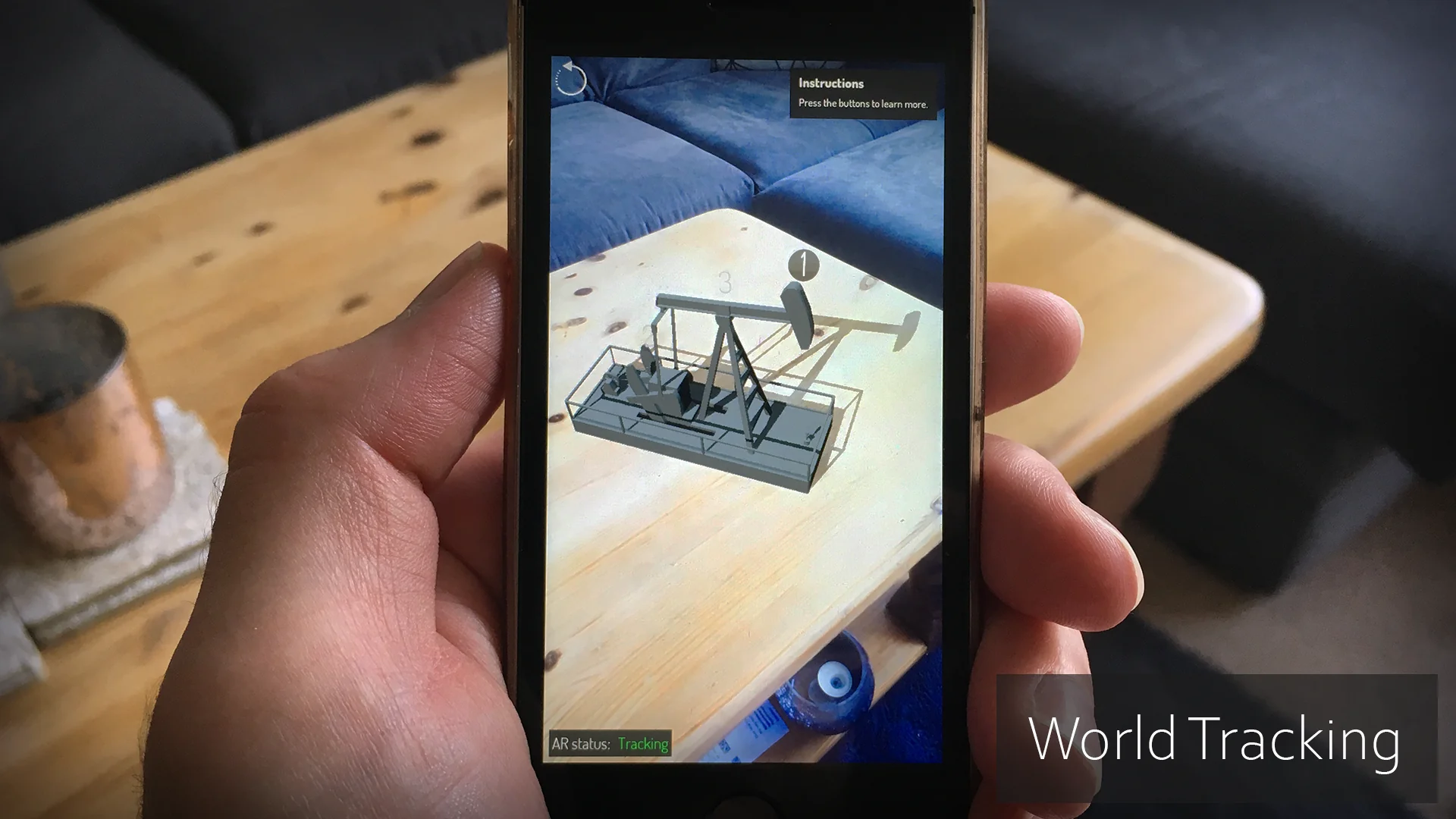
Constructing believable mobile augmented reality requires reliable alignment between computer-generated geometry and the physical world. The Augmented Reality AR Toolkit approaches this through several tracking methodologies tailored to mobile hardware. World tracking acts as the primary foundation, establishing spatial understanding so virtual assets hold fixed positions relative to real surfaces as the user navigates an environment with a handheld device.
For structured physical media and print materials, image tracking recognizes defined two-dimensional markers. Once the camera detects an identified image target, the system locks corresponding meshes or interactive scenes directly to that flat surface, preserving orientation and relative position during device movement.
Physical tracking extends beyond flat planes on supported hardware. Object detection enables the recognition of three-dimensional physical objects in real-world spaces, allowing virtual components to react directly to real physical items. This functionality operates exclusively on iOS devices running ARKit, giving Apple hardware specialized capability when anchoring digital enhancements around pre-scanned geometric items.
Interactive Touch Controls and Toolkit Interface Systems
Virtual assets placed in an augmented view need straightforward physical interactions on touchscreens. The toolkit provides dedicated touch inputs that map directly to standard mobile gestures. Users can reposition models across tracked surfaces through dragging, scale meshes proportionally using pinch gestures, and twist using multiple fingers to rotate models along desired axes.
Spawning assets into the world relies on automated alignment routines to keep assets readable right away. Meshes automatically spawn rotated to face the user camera directly upon placement, eliminating situations where placed objects appear backwards or skewed toward odd angles. The system also calculates distance from the device camera to the selected tracking surface, scaling spawned models relative to depth so placed elements maintain reasonable proportions regardless of whether the placement target sits right in front of the lens or across a room.
Interactive exploration relies on contextual mesh controls. Built-in 3D buttons can be attached directly to models within virtual space. Selecting these buttons highlights specific parts of the asset and reveals descriptive text panels, enabling walkthroughs, product presentations, or technical explanations right over the digital mesh. General project navigation is backed by a dedicated mobile user interface layer and an opening splash screen to handle the transition into the camera view.
Visual Fidelity Through Dynamic Shadows and Lighting Estimation
Grounding 3D geometry into live camera feeds demands consistent lighting cues. Without accurate shadowing, placed objects appear disconnected from the real environment. The toolkit integrates dynamic shadows that project onto tracked real-world planes, creating clear contact points between virtual meshes and actual floors, tables, or countertops.
Lighting estimation functions in tandem with real-time shadowing to sample illumination levels from the mobile device camera. By assessing ambient brightness and light distribution in the room or outdoor scene, the rendering setup balances virtual material response against actual environmental lighting. Virtual surfaces adjust their brightness and contrast in response to environmental shifts, preventing digital models from appearing unnaturally blown out in dim settings or flat and dark in direct daylight.
Cross-Platform Pipeline and Blueprint Architecture
The entire framework is constructed entirely out of Unreal Engine Blueprints without requiring custom C++ code. The visual scripting architecture makes all event logic, interaction routines, and placement behaviors directly accessible in node graphs, supported by included documentation detailing node functions and setup flows. This native visual approach simplifies testing logic adjustments directly inside the editor before deploying builds to mobile targets.
Cross-platform support covers both iOS and Android devices, though hardware-level differences dictate specific feature availability. While core world tracking and image tracking function across platforms, the specialized object detection workflow remains an ARKit feature on iOS. Project delivery across both platforms benefits from pre-configured mobile inputs and camera management nodes designed to handle touch events and feed rendering smoothly on phone and tablet displays.
Engine Stability and Version Profiles for Android and iOS
Engine version selection plays an essential role when preparing projects for mobile distribution. Releases of Unreal Engine past version 4.24 feature specific platform bugs and limitations that impact Android packaging. When targeting the Google Play Store, working within an older version of Unreal Engine helps circumvent these issues. Upgrading a project forward to later engine releases remains possible if needed later, but reverting an existing Unreal project backward to an earlier engine version is fundamentally unsupported.
Android deployment and staging should be verified early. Testing can be carried out using 4.25 example projects, transferring the compiled folder and running the packaged batch script if the Android Debug Bridge (ADB) utility is installed on the host computer. Projects can also be verified by copying the compiled APK directly onto physical Android hardware for manual installation.
Recent iterations of Unreal Engine 5 introduce platform-level hurdles affecting both iOS and Android workflows. Due to active engine bugs across these newer releases, maintaining production within Unreal Engine 4 remains the recommended path for projects relying on this toolkit. Specific version anomalies across recent releases include:
Unreal Engine 5.0 and 5.1 contain an engine bug that interferes with iOS image tracking functionality.
Unreal Engine 5.2 contains a known issue affecting camera feed rendering on Android devices.
Unreal Engine 5.3 and 5.4 present an AR positioning bug on iOS alongside device flickering and crash issues on certain Android hardware.
Targeting older, established Unreal Engine releases avoids these specific mobile AR regressions, ensuring interactive touch placement, image anchoring, and camera feeds operate reliably across target devices.
 Simulation
 Simulation
 Simulation