"7aa4acc705f0d80b"{"id":"1001960","slug":"battle-simulator-kit","title":"Battle Simulator Kit","category":"Simulation","engine":"5.3+","assetVersion":"","engineVersion":"Engine Version: 5.3+","tag":"Simulation","accent":"blue","visual":"mech","summary":"Explore the Battle Simulator Kit for Unreal Engine 4, featuring 100% Blueprint logic, Sandbox and Campaign modes, unit possession, and Dog AI support.","platform":"Unreal Engine","publishedAt":"2026-10-24T11:37:24.819Z","updatedAt":"2026-10-24T11:37:24.819Z","sourceNotes":[],"fileContents":[],"compatibility":["Unreal Engine","Engine Version: 5.3+"],"featuredImage":{"alt":"Battle Simulator Kit","src":"/wp-content/uploads/published/2026/10/57b15a719a07-0631192e-6bf2-4182-a233-7b7af1357810-4e00f2d4b8.webp"},"hasDownloadLink":true,"downloads":0,"terms":[{"taxonomy":"category","slug":"simulation","name":"Simulation"}],"galleryImages":[{"src":"/wp-content/uploads/published/2026/10/f5190d5bb65f-9274bfee-002c-41d3-8cfc-32d3868b2033-e22235883c.webp","alt":"Battle Simulator Kit"},{"src":"/wp-content/uploads/published/2026/10/c97886db346c-e0c0ce19-32e2-4ff7-aca3-e5e19707e7db-d870cb163a.webp","alt":"Battle Simulator Kit"},{"src":"/wp-content/uploads/published/2026/10/8de8127312c0-cac2010c-ad61-4c8b-990a-66bb170f2ffe-eb75ea8772.webp","alt":"Battle Simulator Kit"},{"src":"/wp-content/uploads/published/2026/10/6c8a4f6771db-cdd355ba-a090-46a7-b124-f9ed7e81cb20-10c982e25d.webp","alt":"Battle Simulator Kit"},{"src":"/wp-content/uploads/published/2026/10/b19254115a22-28eb4e9b-f90f-4049-84d6-de969c41f000-6a83b83aa0.webp","alt":"Battle Simulator Kit"}],"accessPanel":{"kind":"resource","title":"Download this resource","eyebrow":"Free Download","message":"Log in or create a free account to start your download.","fileName":"Battle Simulator Kit.7z","safetyNote":"Resources are manually reviewed before listing to improve quality and reduce obvious risks.","actionLabel":"Download Free","resourceType":"Resource archive"},"contentHtml":"\u003ch2\u003eSimulating Tactical Engagements in Unreal Engine 4\u003c/h2\u003e\n\u003cp\u003eStrategy games, tactical battle experiments, and simulated conflict environments often present significant architectural challenges during early development. Setting up logic for distinct armies, organizing combat rules, and managing engagement flows from a high vantage point requires dedicated systems. The Battle Simulator Kit addresses this exact scenario within Unreal Engine 4, providing an organized structure for testing, staging, and executing simulated war scenarios. Tailored around lowpoly strategy aesthetics and tactical combat, the kit offers an accessible foundation for staging autonomous confrontations while retaining the option for direct player intervention.\u003c/p\u003e\n\u003cp\u003eBecause the framework is built for Unreal Engine 4, it operates natively within the engine's core world and pawn architecture. Developers focusing on war games, simulation prototypes, or strategy mechanics can establish dynamic encounters between competing sides without constructing unit logic, mode separation, or possession mechanics from scratch.\u003c/p\u003e \u003ch2\u003eSandbox and Campaign Modes in the Battle Simulator Kit\u003c/h2\u003e\n\u003cp\u003eStructured gameplay and freeform experimentation often demand separate rule sets. To support both needs out of the box, the Battle Simulator Kit is organized into two primary formats: Sandbox mode and Campaign mode. Each mode provides a distinct context for how battles are assembled, evaluated, and resolved.\u003c/p\u003e\n\u003cp\u003eSandbox mode focuses on open-ended experimentation. In this environment, creators can place units freely, test different army compositions, and observe how opposing forces interact across varying lowpoly terrain setups. This mode serves as an ideal staging ground for balancing army strengths, testing custom unit rosters, and prototyping encounters. Because the sandbox provides unrestricted battlefield setup, it functions equally well as a player-facing toybox mode or as an internal design workbench for testing unit behaviors under specific battle conditions.\u003c/p\u003e\n\u003cp\u003eCampaign mode shifts the framework toward structured progression. Instead of open-ended deployment, battles are governed by defined scenarios, curated unit availability, and escalating challenges. This provides a direct path for building tactical single-player games where players must evaluate the field, deploy forces within tactical constraints, and outmaneuver opponent layouts across a series of structured engagements.\u003c/p\u003e \u003ch2\u003eDirect Unit Possession and Tactical Battle Influence\u003c/h2\u003e\n\u003cp\u003eWhile autonomous combat forms the backbone of a battle simulator, observing engagements from an overhead perspective is only one half of the experience. The Battle Simulator Kit incorporates a unit possession mechanic that functions across both Sandbox mode and Campaign mode. At any point during an encounter, the player can take direct control of a specific unit on the field.\u003c/p\u003e\n\u003cp\u003eThis possession feature fundamentally shifts the tactical dynamic. Instead of remaining a passive spectator once the battle begins, the player can manually intervene in critical clashes. Taking direct control of a front-line soldier or a specialized unit allows players to target high-priority threats, hold key choke points, or flank opposing groups. Because individual actions directly influence the outcome of the battle, player skill can turn the tide of an otherwise unfavorable simulation.\u003c/p\u003e\n\u003cp\u003eThe possession mechanic bridges the gap between spectator strategy and active combat. By handling both overhead simulation management and direct pawn inputs, the underlying system handles perspective changes and pawn control seamlessly within the Unreal Engine 4 framework.\u003c/p\u003e \u003ch2\u003eCustom Unit Creation and 100% Blueprint Architecture\u003c/h2\u003e\n\u003cp\u003eEvery strategy game requires distinct unit types with varied roles, behaviors, and visual identities. The Battle Simulator Kit accommodates project-specific needs by allowing developers to build custom units for their battles. The process is fully guided by dedicated documentation included with the kit, walking users through unit setup, behavior configuration, and integration into the deployment roster.\u003c/p\u003e\n\u003cp\u003eUnder the hood, the entire kit is built with 100% Blueprints. Avoiding compiled C++ code keeps the package approachable and transparent. Designers and developers can inspect the node networks directly, trace execution paths, and adapt logic to fit specific project demands. Spawning routines, team assignment nodes, possession handoffs, and mode controllers are all exposed in standard Blueprint graphs.\u003c/p\u003e\n\u003cp\u003eThis pure Blueprint approach ensures straightforward iteration. Developers can duplicate existing unit templates, assign custom lowpoly meshes, adjust underlying combat parameters, and plug new combatants directly into the Sandbox or Campaign deployment interfaces without needing a separate compilation pipeline.\u003c/p\u003e \u003ch2\u003eWar Themes, Lowpoly Styling, and Dog AI Compatibility\u003c/h2\u003e\n\u003cp\u003eVisually and conceptually, the package aligns with lowpoly war and strategy design. The clean styling makes battle lines, unit ranks, and physical engagements easy to read from high camera angles while keeping asset performance suitable for multiple active combatants. Beyond the core combat loop, the kit features verified compatibility with Dog AI, expanding the possibilities for incorporating specialized animal units, companion behaviors, or auxiliary battlefield logic into the simulation.\u003c/p\u003e\n\u003cp\u003eTo assist with evaluation and integration, the resource is accompanied by multiple learning and preview materials, including complete documentation, an overview video, a gameplay trailer, and a playable demo. These resources illustrate how the mode selection, unit spawning, possession transitions, and combat loops operate before modifying the underlying Blueprint graphs.\u003c/p\u003e \u003ch2\u003eWho Benefits Most from the Battle Simulator Kit\u003c/h2\u003e\n\u003cp\u003eThe Battle Simulator Kit is primarily suited for developers building lowpoly tactical simulators, strategy games, or battle-toy experiences within Unreal Engine 4. Teams needing a ready-made separation between Sandbox and Campaign structures gain a functional framework immediately, while solo creators can leverage the 100% Blueprint logic to learn how tactical simulation systems and unit possession mechanics interact inside the engine. With detailed documentation guiding custom unit creation and built-in Dog AI compatibility, the kit offers a reliable foundation for turning tactical concepts into playable combat encounters.\u003c/p\u003e\n\n\u003ch2\u003eRelated Resources Worth Checking\u003c/h2\u003e\n\u003cul\u003e\n\u003cli\u003e\u003ca href=\"https://3dcghub.com/package-delivery-simulator-v2-template/\" title=\"Package Delivery Simulator v2 - Template\"\u003ePackage Delivery Simulator v2 - Template\u003c/a\u003e\u003c/li\u003e\n\u003cli\u003e\u003ca href=\"https://3dcghub.com/space-game-starter-kit/\" title=\"Space Game Starter kit\"\u003eSpace Game Starter kit\u003c/a\u003e\u003c/li\u003e\n\u003cli\u003e\u003ca href=\"https://3dcghub.com/renovation-simulator/\" title=\"Renovation simulator\"\u003eRenovation simulator\u003c/a\u003e\u003c/li\u003e\n\u003cli\u003e\u003ca href=\"https://3dcghub.com/thief-simulator-starter-kit/\" title=\"Thief Simulator Starter Kit\"\u003eThief Simulator Starter Kit\u003c/a\u003e\u003c/li\u003e\n\u003cli\u003e\u003ca href=\"https://3dcghub.com/fps-multiplayer-template-3-5/\" title=\"FPS Multiplayer Template 3.5\"\u003eFPS Multiplayer Template 3.5\u003c/a\u003e\u003c/li\u003e\n\u003c/ul\u003e","contentTextLength":6595,"navigation":{"current":30,"total":3925,"previous":{"id":"1001961","slug":"bears-pack","title":"Bears pack","category":"Mammals","platform":"Unreal Engine","updatedAt":"2026-10-24T11:38:14.034Z"},"next":{"id":"1001959","slug":"bags-backpack-and-survival-kit","title":"Bags, Backpack \u0026 Survival Kit","category":"Clothing \u0026 Accessories","platform":"Unreal Engine","updatedAt":"2026-10-24T11:36:59.351Z"}},"relatedResources":[{"id":"1000861","slug":"package-delivery-simulator-v2-template","title":"Package Delivery Simulator v2 - Template","category":"Simulation","engine":"5.4+","assetVersion":"","engineVersion":"Engine Version: 5.4+","tag":"Simulation","accent":"blue","visual":"mech","summary":"A delivery simulation template for Unreal Engine featuring an electric truck, GPS panel, pie menu, modular roads, auto-generated minimap, charging, repairs, and","platform":"Unreal Engine","publishedAt":"2026-08-05T06:27:29.928Z","updatedAt":"2026-08-05T06:27:29.928Z","sourceNotes":[],"fileContents":[],"compatibility":["Unreal Engine","Engine Version: 5.4+"],"featuredImage":{"alt":"Package Delivery Simulator v2 - Template","src":"/wp-content/uploads/published/2026/08/69ec3dbe7a36-0d0cfd93-6e19-4dcc-be8a-04a476f59611-7cb9cbeccf.webp"},"hasDownloadLink":true,"downloads":0},{"id":"12118","slug":"renovation-simulator","title":"Renovation simulator","category":"Simulation","engine":"5.2+","assetVersion":"Engine version: 5.2+","engineVersion":"5.2","tag":"Simulation","accent":"blue","visual":"mech","summary":"Build your own renovation game using this versatile toolset featuring painting mechanics, a monetary system, and environment modification tools.","platform":"Unreal Engine","publishedAt":"2026-03-06T16:46:44.000Z","updatedAt":"2026-04-19T15:48:03.000Z","sourceNotes":[],"fileContents":[],"compatibility":["Unreal Engine","Engine version: 5.2+"],"featuredImage":{"alt":"Renovation simulator","src":"https://3dcghub.com/wp-content/uploads/2026/03/248780b1-3c33-4787-bb91-5d1262079479.webp"},"hasDownloadLink":true,"downloads":0},{"id":"12129","slug":"space-game-starter-kit","title":"Space Game Starter kit","category":"Simulation","engine":"5.3+","assetVersion":"Engine version: 5.3+","engineVersion":"5.3","tag":"Simulation","accent":"blue","visual":"audio","summary":"Launch your game development journey with the Space Game Starter kit. This package features a dynamic spaceship system and planetary environments designed specifically for beginners.","platform":"Unreal Engine","publishedAt":"2026-03-06T16:54:05.000Z","updatedAt":"2026-04-19T15:48:03.000Z","sourceNotes":[],"fileContents":[],"compatibility":["Unreal Engine","Engine version: 5.3+"],"featuredImage":{"alt":"Space Game Starter kit","src":"https://3dcghub.com/wp-content/uploads/2026/03/2c0cadf5-0536-4c3a-b1b6-e5d944fd5e66.webp"},"hasDownloadLink":true,"downloads":0}]}
Simulation
Battle Simulator Kit
Explore the Battle Simulator Kit for Unreal Engine 4, featuring 100% Blueprint logic, Sandbox and Campaign modes, unit possession, and Dog AI support.
Category:Unreal Engine,SimulationPlatform: Unreal EngineEngine Version: 5.3+Published: Oct 24, 2026
Simulation
Resource overview
Simulating Tactical Engagements in Unreal Engine 4
Strategy games, tactical battle experiments, and simulated conflict environments often present significant architectural challenges during early development. Setting up logic for distinct armies, organizing combat rules, and managing engagement flows from a high vantage point requires dedicated systems. The Battle Simulator Kit addresses this exact scenario within Unreal Engine 4, providing an organized structure for testing, staging, and executing simulated war scenarios. Tailored around lowpoly strategy aesthetics and tactical combat, the kit offers an accessible foundation for staging autonomous confrontations while retaining the option for direct player intervention.
Because the framework is built for Unreal Engine 4, it operates natively within the engine's core world and pawn architecture. Developers focusing on war games, simulation prototypes, or strategy mechanics can establish dynamic encounters between competing sides without constructing unit logic, mode separation, or possession mechanics from scratch.
Sandbox and Campaign Modes in the Battle Simulator Kit
Structured gameplay and freeform experimentation often demand separate rule sets. To support both needs out of the box, the Battle Simulator Kit is organized into two primary formats: Sandbox mode and Campaign mode. Each mode provides a distinct context for how battles are assembled, evaluated, and resolved.
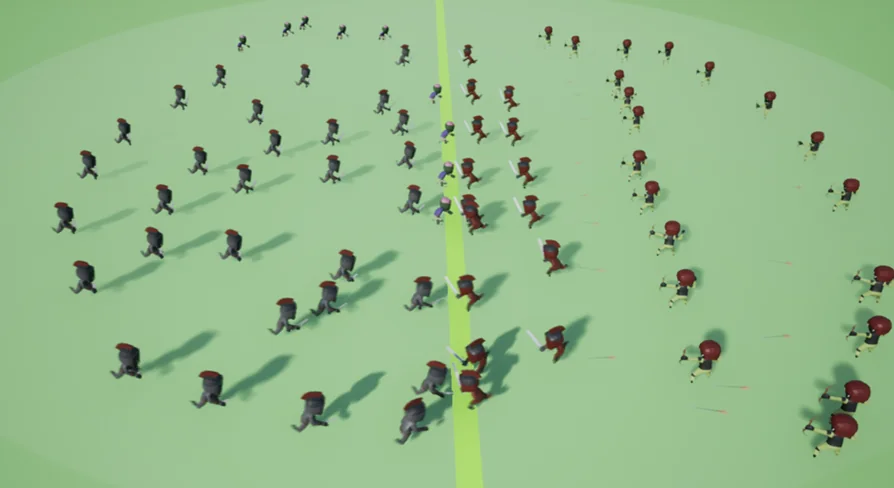
Sandbox mode focuses on open-ended experimentation. In this environment, creators can place units freely, test different army compositions, and observe how opposing forces interact across varying lowpoly terrain setups. This mode serves as an ideal staging ground for balancing army strengths, testing custom unit rosters, and prototyping encounters. Because the sandbox provides unrestricted battlefield setup, it functions equally well as a player-facing toybox mode or as an internal design workbench for testing unit behaviors under specific battle conditions.
Campaign mode shifts the framework toward structured progression. Instead of open-ended deployment, battles are governed by defined scenarios, curated unit availability, and escalating challenges. This provides a direct path for building tactical single-player games where players must evaluate the field, deploy forces within tactical constraints, and outmaneuver opponent layouts across a series of structured engagements.
Direct Unit Possession and Tactical Battle Influence
While autonomous combat forms the backbone of a battle simulator, observing engagements from an overhead perspective is only one half of the experience. The Battle Simulator Kit incorporates a unit possession mechanic that functions across both Sandbox mode and Campaign mode. At any point during an encounter, the player can take direct control of a specific unit on the field.
This possession feature fundamentally shifts the tactical dynamic. Instead of remaining a passive spectator once the battle begins, the player can manually intervene in critical clashes. Taking direct control of a front-line soldier or a specialized unit allows players to target high-priority threats, hold key choke points, or flank opposing groups. Because individual actions directly influence the outcome of the battle, player skill can turn the tide of an otherwise unfavorable simulation.
The possession mechanic bridges the gap between spectator strategy and active combat. By handling both overhead simulation management and direct pawn inputs, the underlying system handles perspective changes and pawn control seamlessly within the Unreal Engine 4 framework.
Custom Unit Creation and 100% Blueprint Architecture
Every strategy game requires distinct unit types with varied roles, behaviors, and visual identities. The Battle Simulator Kit accommodates project-specific needs by allowing developers to build custom units for their battles. The process is fully guided by dedicated documentation included with the kit, walking users through unit setup, behavior configuration, and integration into the deployment roster.
Under the hood, the entire kit is built with 100% Blueprints. Avoiding compiled C++ code keeps the package approachable and transparent. Designers and developers can inspect the node networks directly, trace execution paths, and adapt logic to fit specific project demands. Spawning routines, team assignment nodes, possession handoffs, and mode controllers are all exposed in standard Blueprint graphs.
This pure Blueprint approach ensures straightforward iteration. Developers can duplicate existing unit templates, assign custom lowpoly meshes, adjust underlying combat parameters, and plug new combatants directly into the Sandbox or Campaign deployment interfaces without needing a separate compilation pipeline.
War Themes, Lowpoly Styling, and Dog AI Compatibility
Visually and conceptually, the package aligns with lowpoly war and strategy design. The clean styling makes battle lines, unit ranks, and physical engagements easy to read from high camera angles while keeping asset performance suitable for multiple active combatants. Beyond the core combat loop, the kit features verified compatibility with Dog AI, expanding the possibilities for incorporating specialized animal units, companion behaviors, or auxiliary battlefield logic into the simulation.
To assist with evaluation and integration, the resource is accompanied by multiple learning and preview materials, including complete documentation, an overview video, a gameplay trailer, and a playable demo. These resources illustrate how the mode selection, unit spawning, possession transitions, and combat loops operate before modifying the underlying Blueprint graphs.
Who Benefits Most from the Battle Simulator Kit
The Battle Simulator Kit is primarily suited for developers building lowpoly tactical simulators, strategy games, or battle-toy experiences within Unreal Engine 4. Teams needing a ready-made separation between Sandbox and Campaign structures gain a functional framework immediately, while solo creators can leverage the 100% Blueprint logic to learn how tactical simulation systems and unit possession mechanics interact inside the engine. With detailed documentation guiding custom unit creation and built-in Dog AI compatibility, the kit offers a reliable foundation for turning tactical concepts into playable combat encounters.
 Simulation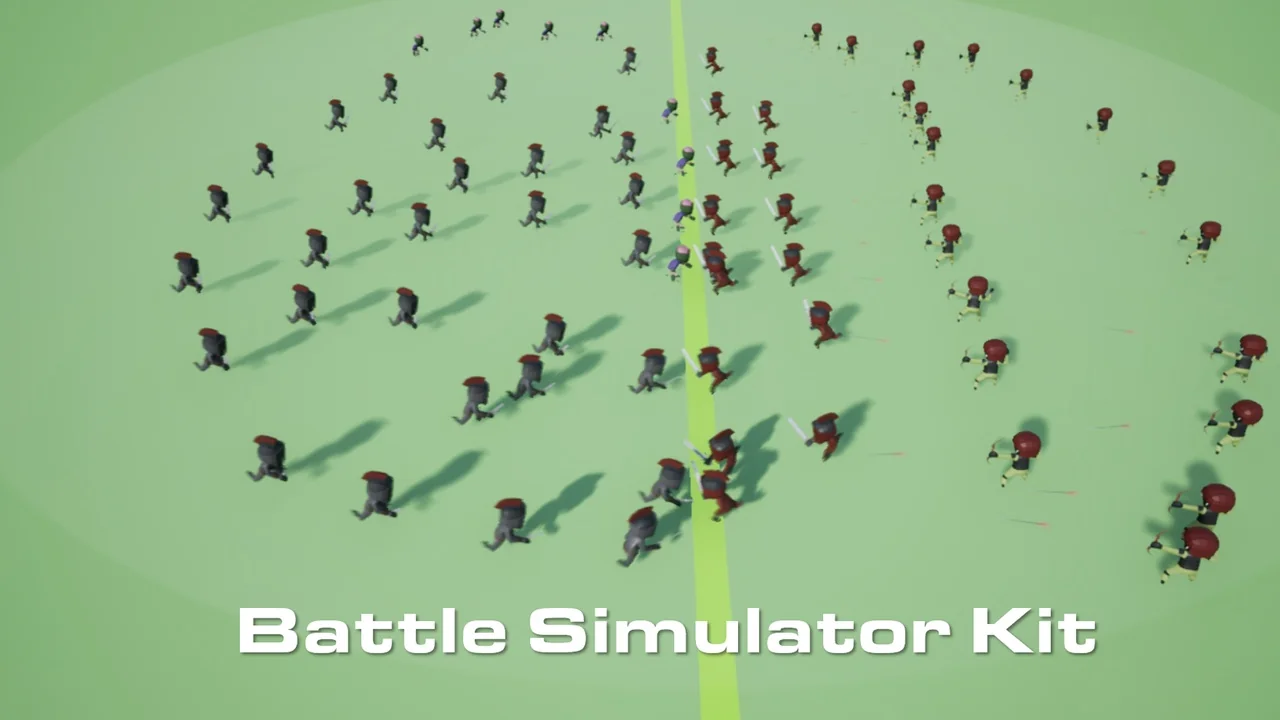
 Simulation
 Simulation
 Simulation