"7aa4acc705f0d80b"{"id":"1001961","slug":"bears-pack","title":"Bears pack","category":"Mammals","engine":"4.27+,5.0+","assetVersion":"","engineVersion":"Engine Version: 4.27+,5.0+","tag":"Mammals","accent":"blue","visual":"mech","summary":"Integration and configuration breakdown for the Bears pack, covering Brown and Polar bears, UE5 groom setup, foot IK, and Blueprint mechanics.","platform":"Unreal Engine","publishedAt":"2026-10-24T11:38:14.034Z","updatedAt":"2026-10-24T11:38:14.034Z","sourceNotes":[],"fileContents":[],"compatibility":["Unreal Engine","Engine Version: 4.27+,5.0+"],"featuredImage":{"alt":"Bears pack","src":"/wp-content/uploads/published/2026/10/fc662eba9aa4-b9cf16a2-72d2-4a23-a499-861ca7a094bb-283e30664b.webp"},"hasDownloadLink":true,"downloads":0,"terms":[{"taxonomy":"category","slug":"mammals","name":"Mammals"}],"galleryImages":[{"src":"/wp-content/uploads/published/2026/10/6e99d3223799-01d369ed-f6f8-41fb-8b18-1db2e57405c6-8faf81c81c.webp","alt":"Bears pack"},{"src":"/wp-content/uploads/published/2026/10/8caa6fe81325-bd246f6a-0f71-4e52-828e-fc3a1d5da06e-f784dca98b.webp","alt":"Bears pack"},{"src":"/wp-content/uploads/published/2026/10/4882b2b67d7c-30f80774-0269-47ae-8879-0add23135955-258c35ab54.webp","alt":"Bears pack"},{"src":"/wp-content/uploads/published/2026/10/136d72a2e30c-6bcc0954-b3f8-44dc-84ae-cef8374e394c-77196c7efd.webp","alt":"Bears pack"}],"accessPanel":{"kind":"resource","title":"Download this resource","eyebrow":"Free Download","message":"Log in or create a free account to start your download.","fileName":"Bears pack.7z","safetyNote":"Resources are manually reviewed before listing to improve quality and reduce obvious risks.","actionLabel":"Download Free","resourceType":"Resource archive"},"contentHtml":"\u003ch2\u003eSetting Up UE5 Groom and Project Rendering Optimisation\u003c/h2\u003e\u003cp\u003eIntegrating the Bears pack into an Unreal Engine 5 project begins in the project configuration settings if hair groom simulation is required. Groom elements are built specifically for UE5, requiring a specific rendering pipeline setting to evaluate correctly on skeletal meshes. Navigating to Project Settings, expanding the Rendering category, and opening the Optimisation section reveals the Enable Support Compute Skin Cache toggle. Enabling this setting is necessary for groom deformation and binding across skeletal structures.\u003c/p\u003e\u003cp\u003eGroom functionality has been verified for operation under Windows environments. While the overall character assets and target platform builds support both Windows and MacOS, compute skin cache-dependent groom behavior is confirmed primarily on Windows runtimes. Skipping the compute skin cache configuration step will cause groom rendering to fail or display incorrectly when bound to moving character geometry.\u003c/p\u003e\u003ch2\u003eAutonomous Food Seeking via BP_FoodSeekBear and NavMesh\u003c/h2\u003e\u003cp\u003eEnvironmental wildlife placement functions through a dedicated logic loop contained within BP_FoodSeekBear alongside the BP_BearFood marker actor. This subsystem provides out-of-the-box navigation behavior across any level built with an active Navigation Mesh.\u003c/p\u003e\u003cp\u003eDeploying the wildlife system requires scattering BP_BearFood actors across walkable terrain covered by a NavMesh volume. Any number of food markers can be placed within the environment. Once BP_BearFood references exist on the map, placing one or more BP_FoodSeekBear actors initiates their automated lifecycle:\u003c/p\u003e\u003cul\u003e\u003cli\u003eBP_FoodSeekBear queries the scene for placed BP_BearFood instances, randomly selects an available target, and calculates a path across the NavMesh toward that target location.\u003c/li\u003e\u003cli\u003eUpon closing the distance to the designated BP_BearFood actor within a predetermined operational threshold, the bear halts pathfinding and transitions into an eating animation state.\u003c/li\u003e\u003cli\u003eThe eating animation plays for a set duration. Once this designated time elapses, the actor queries the environment again, selects another random BP_BearFood actor, and resumes pathfinding across the NavMesh.\u003c/li\u003e\u003c/ul\u003e\u003cp\u003eBecause the logic relies directly on standard engine navigation calculations, the autonomous bears naturally route around level geometry, collision barriers, and elevation changes provided the NavMesh bounds are properly built and up to date.\u003c/p\u003e\u003ch2\u003eControlling BP_BearThirdPersonCharacter in Biped and Quadruped Modes\u003c/h2\u003e\u003cp\u003eDirect player control is handled through BP_BearThirdPersonCharacter, an interactive Blueprint preconfigured with keyboard bindings covering locomotion, posture shifting, and life-cycle state transitions. Locomotion logic handles both standard movements and speed adjustments, alongside shifts between four-legged and two-legged stances.\u003c/p\u003e\u003cp\u003eStandard navigation uses standard WASD or arrow keys to drive walking locomotion. Running is triggered by combining the R key with WASD or directional arrow input. Stance switching is fully decoupled from movement speed: pressing U shifts the character into a standing bipedal posture, while pressing N returns the skeleton to its default quadrupedal stance. This allows the bear to navigate or hold positions on two legs or four legs depending on gameplay demands.\u003c/p\u003e\u003cp\u003eState transitions also account for hit processing and elimination. Pressing K triggers a physics-simulated death sequence that collapses the skeletal mesh according to physical forces rather than fixed kinematic playback. Pressing L resets the entity via a rebirth operation, restoring collision, posture, and default input response without requiring a full level reload.\u003c/p\u003e\u003ch2\u003eSkeletal Hierarchy, Foot IK, and Pelvis Positioning\u003c/h2\u003e\u003cp\u003eThe models utilize a 66-bone skeletal hierarchy. The skeleton is scaled to match standard Epic skeletal proportions for relative scale in game environments, but it does not use the standard human Epic skeleton hierarchy due to non-humanoid anatomical requirements. Both root motion and in-place animation types are present across the 46 included animation sequences, offering options for either procedural movement controllers or animation-driven positioning.\u003c/p\u003e\u003cp\u003eA core element of the skeletal setup is the implementation of inverse kinematics across the limbs. Foot IK is active on the paws, anchoring the mesh to uneven ground geometry. Coupled with foot placement, the Blueprint calculates pelvis posture directly from foot elevation data. When a paw steps onto a rock, slope, or depression, the height delta informs the pitch, roll, and height of the pelvis bone. This dynamic adjustment prevents the body mesh from clipping into rising terrain or floating unnaturally over dips during either bipedal or quadrupedal motion.\u003c/p\u003e\u003cp\u003eCombat animations include dedicated left-hand attack sequences alongside default strikes, expanding the visual range of engagement behaviors when building hostile encounter loops or player-driven attacks.\u003c/p\u003e\u003ch2\u003eBrown Bear and Polar Bear Geometry Budgets\u003c/h2\u003e\u003cp\u003eTwo distinct animal variations are provided: the Brown bear and the Polar bear. To accommodate different hardware constraints, draw distance limits, and scene density requirements, both species feature low-poly and middle-poly mesh options.\u003c/p\u003e\u003cp\u003eVertex allocations are tightly controlled across the variants:\u003c/p\u003e\u003cul\u003e\u003cli\u003eBrownBearLowPoly: 2,974 vertices\u003c/li\u003e\u003cli\u003eBrownBearMiddlePoly: 12,202 vertices\u003c/li\u003e\u003cli\u003ePolarBearLowPoly: 2,980 vertices\u003c/li\u003e\u003cli\u003ePolarBearMiddlePoly: 12,226 vertices\u003c/li\u003e\u003c/ul\u003e\u003cp\u003eThe low-poly versions operate under 3,000 vertices, making them suitable for distant background fauna, massive wildlife counts, or strict rendering budgets. The middle-poly variants sit just above 12,200 vertices, preserving surface curvature across the muscle groups, limbs, snout, and ears for close-up playable cameras or high-detail foreground encounters.\u003c/p\u003e\u003cp\u003eSurface rendering relies on paired high-resolution texture maps alongside an optimized roughness channel. Base Color and Normal maps are authored at 4096x4096 resolution to retain fur detail, directional comb lines, and skin creases. Roughness maps are packaged at 512x512 resolution, conserving memory bandwidth while controlling the specular spread across wet snouts, paw pads, and dense coat layers.\u003c/p\u003e\u003ch2\u003ePlatform Deployment and Project Integration\u003c/h2\u003e\u003cp\u003eProjects integrating these assets can target both Windows and MacOS development environments and final builds. When organizing assets alongside broader ecosystem collections like the Complete Animals Pack, the standard naming structures and clean Blueprint division—separating direct player controllers from NavMesh AI—allow the bears to run concurrently with other fauna without naming collisions or logic overlaps.\u003c/p\u003e\u003cp\u003eDeploying into shipping builds requires maintaining appropriate graphics settings if the UE5 groom strands are deployed. On Windows builds utilizing groom, ensuring compute skin cache remains active in packaged configurations guarantees visual parity with the editor viewport, keeping groom strand roots firmly attached to the deforming 66-bone skeletal mesh during complex locomotion, IK-adjusted footing, and physics-driven death simulations.\u003c/p\u003e\n\n\u003ch2\u003eMore From The Same Workflow\u003c/h2\u003e\n\u003cul\u003e\n\u003cli\u003e\u003ca href=\"https://3dcghub.com/medhue-tiger/\" title=\"Medhue Tiger\"\u003eMedhue Tiger\u003c/a\u003e\u003c/li\u003e\n\u003cli\u003e\u003ca href=\"https://3dcghub.com/elemental-horses-pack/\" title=\"Elemental Horses Pack\"\u003eElemental Horses Pack\u003c/a\u003e\u003c/li\u003e\n\u003cli\u003e\u003ca href=\"https://3dcghub.com/goat-with-groom/\" title=\"Goat with groom\"\u003eGoat with groom\u003c/a\u003e\u003c/li\u003e\n\u003cli\u003e\u003ca href=\"https://3dcghub.com/bear-female/\" title=\"Bear - Female\"\u003eBear - Female\u003c/a\u003e\u003c/li\u003e\n\u003cli\u003e\u003ca href=\"https://3dcghub.com/animalia-starter-kit/\" title=\"Animalia - Starter Kit\"\u003eAnimalia - Starter Kit\u003c/a\u003e\u003c/li\u003e\n\u003c/ul\u003e","contentTextLength":7240,"navigation":{"current":29,"total":3925,"previous":{"id":"1001962","slug":"beefy-blackbirds-niagara-bird-system","title":"Beefy Blackbirds (Niagara Bird System)","category":"Procedural Systems","platform":"Unreal Engine","updatedAt":"2026-10-24T11:38:57.939Z"},"next":{"id":"1001960","slug":"battle-simulator-kit","title":"Battle Simulator Kit","category":"Simulation","platform":"Unreal Engine","updatedAt":"2026-10-24T11:37:24.819Z"}},"relatedResources":[{"id":"1000952","slug":"medhue-tiger","title":"Medhue Tiger","category":"Mammals","engine":"4.26+,5.0+","assetVersion":"","engineVersion":"Engine Version: 4.26+,5.0+","tag":"Mammals","accent":"blue","visual":"mech","summary":"Medhue Tiger is a low-poly 3D tiger with PBR textures, 28 animations, a drag-and-drop AI system, and an Unreal 5.6 Control Rig IK for uneven ground.","platform":"Unreal Engine","publishedAt":"2026-08-14T05:25:02.958Z","updatedAt":"2026-08-14T05:25:02.958Z","sourceNotes":[],"fileContents":[],"compatibility":["Unreal Engine","Engine Version: 4.26+,5.0+"],"featuredImage":{"alt":"Medhue Tiger","src":"/wp-content/uploads/published/2026/08/c044197a217b-f6fc2c94-014b-483a-ba87-36fa71e70819-2b0e38a7c4.webp"},"hasDownloadLink":true,"downloads":1},{"id":"1000594","slug":"elemental-horses-pack","title":"Elemental Horses Pack","category":"Mammals","engine":"4.26+,5.0+","assetVersion":"","engineVersion":"Engine Version: 4.26+,5.0+","tag":"Mammals","accent":"blue","visual":"mech","summary":"Elemental Horses Pack delivers four themed horse variants, a bonus Rainbow Horse, a mannequin rider, and a combined 122 animations for Unreal Engine fantasy pro","platform":"Unreal Engine","publishedAt":"2026-07-17T01:17:52.961Z","updatedAt":"2026-07-17T01:17:52.961Z","sourceNotes":[],"fileContents":[],"compatibility":["Unreal Engine","Engine Version: 4.26+,5.0+"],"featuredImage":{"alt":"Elemental Horses Pack","src":"/wp-content/uploads/published/2026/07/b6ce7e93eff1-8ff73089-7625-4434-bd1a-61e86c1dc533-c5a3108d79.webp"},"hasDownloadLink":true,"downloads":0},{"id":"1001094","slug":"goat-with-groom","title":"Goat with groom","category":"Mammals","engine":"5.0+","assetVersion":"","engineVersion":"Engine Version: 5.0+","tag":"Mammals","accent":"blue","visual":"mech","summary":"An Unreal-ready goat model with Groom support, 45 animations plus in-place variants, two mesh densities, and a morph model added for UE5.6 and newer.","platform":"Unreal Engine","publishedAt":"2026-09-06T01:50:06.593Z","updatedAt":"2026-09-06T01:50:06.593Z","sourceNotes":[],"fileContents":[],"compatibility":["Unreal Engine","Engine Version: 5.0+"],"featuredImage":{"alt":"Goat with groom","src":"/wp-content/uploads/published/2026/09/09f71220d0a9-4b4f893e-4592-484e-b857-01870b45eb80-672cabee5d.webp"},"hasDownloadLink":true,"downloads":0}]}
Mammals
Bears pack
Integration and configuration breakdown for the Bears pack, covering Brown and Polar bears, UE5 groom setup, foot IK, and Blueprint mechanics.
Category:Unreal Engine,MammalsPlatform: Unreal EngineEngine Version: 4.27+,5.0+Published: Oct 24, 2026
Mammals
Resource overview
Setting Up UE5 Groom and Project Rendering Optimisation
Integrating the Bears pack into an Unreal Engine 5 project begins in the project configuration settings if hair groom simulation is required. Groom elements are built specifically for UE5, requiring a specific rendering pipeline setting to evaluate correctly on skeletal meshes. Navigating to Project Settings, expanding the Rendering category, and opening the Optimisation section reveals the Enable Support Compute Skin Cache toggle. Enabling this setting is necessary for groom deformation and binding across skeletal structures.
Groom functionality has been verified for operation under Windows environments. While the overall character assets and target platform builds support both Windows and MacOS, compute skin cache-dependent groom behavior is confirmed primarily on Windows runtimes. Skipping the compute skin cache configuration step will cause groom rendering to fail or display incorrectly when bound to moving character geometry.
Autonomous Food Seeking via BP_FoodSeekBear and NavMesh
Environmental wildlife placement functions through a dedicated logic loop contained within BP_FoodSeekBear alongside the BP_BearFood marker actor. This subsystem provides out-of-the-box navigation behavior across any level built with an active Navigation Mesh.
Deploying the wildlife system requires scattering BP_BearFood actors across walkable terrain covered by a NavMesh volume. Any number of food markers can be placed within the environment. Once BP_BearFood references exist on the map, placing one or more BP_FoodSeekBear actors initiates their automated lifecycle:
BP_FoodSeekBear queries the scene for placed BP_BearFood instances, randomly selects an available target, and calculates a path across the NavMesh toward that target location.
Upon closing the distance to the designated BP_BearFood actor within a predetermined operational threshold, the bear halts pathfinding and transitions into an eating animation state.
The eating animation plays for a set duration. Once this designated time elapses, the actor queries the environment again, selects another random BP_BearFood actor, and resumes pathfinding across the NavMesh.
Because the logic relies directly on standard engine navigation calculations, the autonomous bears naturally route around level geometry, collision barriers, and elevation changes provided the NavMesh bounds are properly built and up to date.
Controlling BP_BearThirdPersonCharacter in Biped and Quadruped Modes
Direct player control is handled through BP_BearThirdPersonCharacter, an interactive Blueprint preconfigured with keyboard bindings covering locomotion, posture shifting, and life-cycle state transitions. Locomotion logic handles both standard movements and speed adjustments, alongside shifts between four-legged and two-legged stances.
Standard navigation uses standard WASD or arrow keys to drive walking locomotion. Running is triggered by combining the R key with WASD or directional arrow input. Stance switching is fully decoupled from movement speed: pressing U shifts the character into a standing bipedal posture, while pressing N returns the skeleton to its default quadrupedal stance. This allows the bear to navigate or hold positions on two legs or four legs depending on gameplay demands.
State transitions also account for hit processing and elimination. Pressing K triggers a physics-simulated death sequence that collapses the skeletal mesh according to physical forces rather than fixed kinematic playback. Pressing L resets the entity via a rebirth operation, restoring collision, posture, and default input response without requiring a full level reload.
Skeletal Hierarchy, Foot IK, and Pelvis Positioning
The models utilize a 66-bone skeletal hierarchy. The skeleton is scaled to match standard Epic skeletal proportions for relative scale in game environments, but it does not use the standard human Epic skeleton hierarchy due to non-humanoid anatomical requirements. Both root motion and in-place animation types are present across the 46 included animation sequences, offering options for either procedural movement controllers or animation-driven positioning.
A core element of the skeletal setup is the implementation of inverse kinematics across the limbs. Foot IK is active on the paws, anchoring the mesh to uneven ground geometry. Coupled with foot placement, the Blueprint calculates pelvis posture directly from foot elevation data. When a paw steps onto a rock, slope, or depression, the height delta informs the pitch, roll, and height of the pelvis bone. This dynamic adjustment prevents the body mesh from clipping into rising terrain or floating unnaturally over dips during either bipedal or quadrupedal motion.
Combat animations include dedicated left-hand attack sequences alongside default strikes, expanding the visual range of engagement behaviors when building hostile encounter loops or player-driven attacks.
Brown Bear and Polar Bear Geometry Budgets
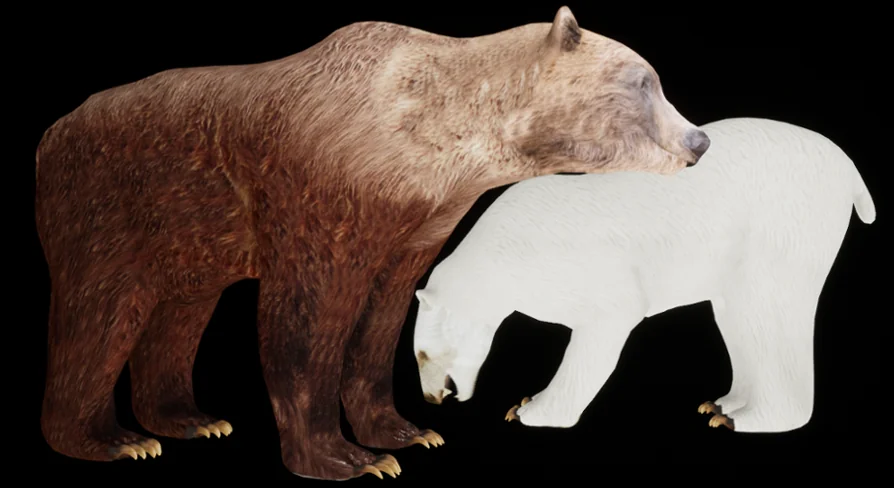
Two distinct animal variations are provided: the Brown bear and the Polar bear. To accommodate different hardware constraints, draw distance limits, and scene density requirements, both species feature low-poly and middle-poly mesh options.
Vertex allocations are tightly controlled across the variants:
BrownBearLowPoly: 2,974 vertices
BrownBearMiddlePoly: 12,202 vertices
PolarBearLowPoly: 2,980 vertices
PolarBearMiddlePoly: 12,226 vertices
The low-poly versions operate under 3,000 vertices, making them suitable for distant background fauna, massive wildlife counts, or strict rendering budgets. The middle-poly variants sit just above 12,200 vertices, preserving surface curvature across the muscle groups, limbs, snout, and ears for close-up playable cameras or high-detail foreground encounters.
Surface rendering relies on paired high-resolution texture maps alongside an optimized roughness channel. Base Color and Normal maps are authored at 4096x4096 resolution to retain fur detail, directional comb lines, and skin creases. Roughness maps are packaged at 512x512 resolution, conserving memory bandwidth while controlling the specular spread across wet snouts, paw pads, and dense coat layers.
Platform Deployment and Project Integration
Projects integrating these assets can target both Windows and MacOS development environments and final builds. When organizing assets alongside broader ecosystem collections like the Complete Animals Pack, the standard naming structures and clean Blueprint division—separating direct player controllers from NavMesh AI—allow the bears to run concurrently with other fauna without naming collisions or logic overlaps.
Deploying into shipping builds requires maintaining appropriate graphics settings if the UE5 groom strands are deployed. On Windows builds utilizing groom, ensuring compute skin cache remains active in packaged configurations guarantees visual parity with the editor viewport, keeping groom strand roots firmly attached to the deforming 66-bone skeletal mesh during complex locomotion, IK-adjusted footing, and physics-driven death simulations.
 Mammals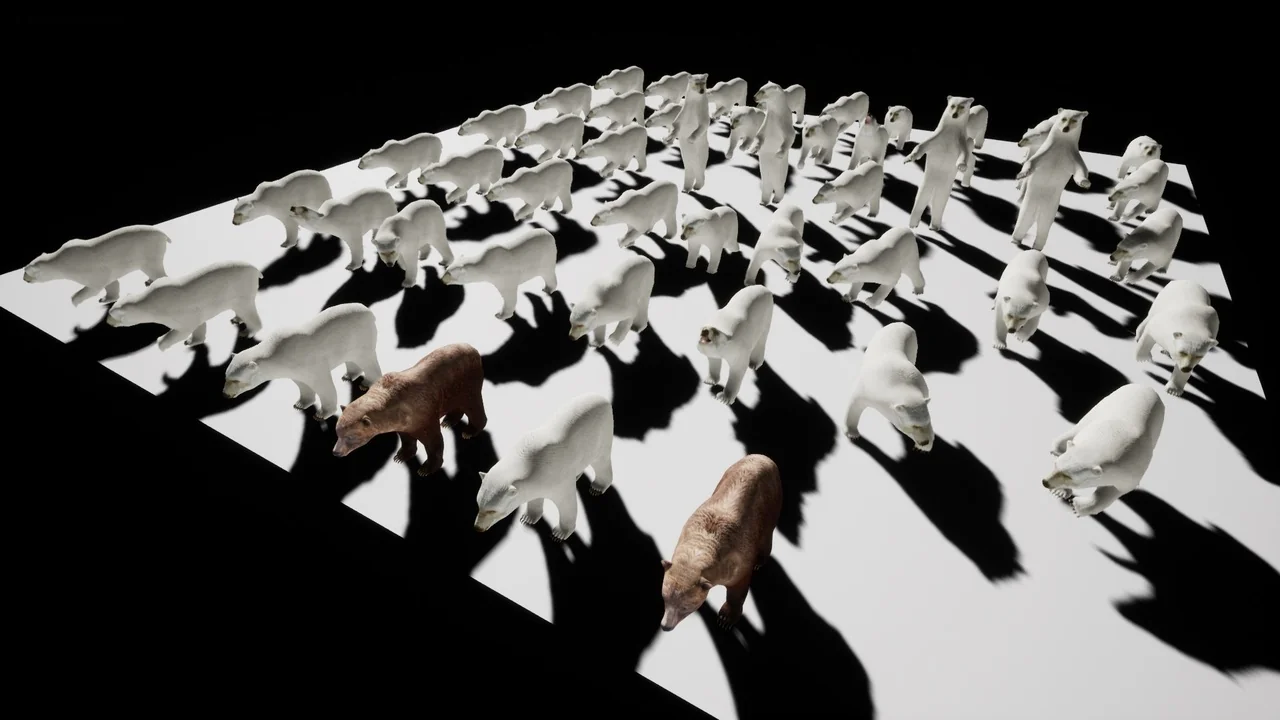
 Mammals
 Mammals
 Mammals