"7aa4acc705f0d80b"{"id":"1001962","slug":"beefy-blackbirds-niagara-bird-system","title":"Beefy Blackbirds (Niagara Bird System)","category":"Procedural Systems","engine":"5.2+","assetVersion":"","engineVersion":"Engine Version: 5.2+","tag":"Procedural Systems","accent":"blue","visual":"mech","summary":"Configure stylized bird flocks in Unreal Engine 5.2 with Niagara particle simulation, WorldPositionOffset animation, and modular Blueprint behaviors.","platform":"Unreal Engine","publishedAt":"2026-10-24T11:38:57.939Z","updatedAt":"2026-10-24T11:38:57.939Z","sourceNotes":[],"fileContents":[],"compatibility":["Unreal Engine","Engine Version: 5.2+"],"featuredImage":{"alt":"Beefy Blackbirds (Niagara Bird System)","src":"/wp-content/uploads/published/2026/10/476c54916c49-5ea6c711-b7bb-42d8-a7ce-b262faede018-a232374bc2.webp"},"hasDownloadLink":true,"downloads":0,"terms":[{"taxonomy":"category","slug":"procedural-systems","name":"Procedural Systems"}],"galleryImages":[{"src":"/wp-content/uploads/published/2026/10/b00a22e70d63-c0424bc5-871a-45f2-9c5e-059a8c2b9275-bb8268fd24.webp","alt":"Beefy Blackbirds (Niagara Bird System)"},{"src":"/wp-content/uploads/published/2026/10/6ca489b3878f-d47201ee-510d-4387-8576-9e771824b6e3-13aafed185.webp","alt":"Beefy Blackbirds (Niagara Bird System)"},{"src":"/wp-content/uploads/published/2026/10/e723111169e3-31c30d6c-4f36-4856-933c-5f9e221a7a0f-4c43f0b889.webp","alt":"Beefy Blackbirds (Niagara Bird System)"},{"src":"/wp-content/uploads/published/2026/10/638b929d8901-b1ceeb1d-f123-4cc2-b1f1-9a7b464ba253-c249040763.webp","alt":"Beefy Blackbirds (Niagara Bird System)"},{"src":"/wp-content/uploads/published/2026/10/e43834f22bdf-e0e685d9-d8b7-41d4-98ae-cd0198ce902f-2b182774c5.webp","alt":"Beefy Blackbirds (Niagara Bird System)"},{"src":"/wp-content/uploads/published/2026/10/9bb25b73d4e2-39d9f807-71b3-4547-abe2-2a5174bbc9c5-0815e20255.webp","alt":"Beefy Blackbirds (Niagara Bird System)"},{"src":"/wp-content/uploads/published/2026/10/7a002ab41c2c-906d72cb-1f2a-4826-a621-b21b6a46af66-c9bb11d6d4.webp","alt":"Beefy Blackbirds (Niagara Bird System)"},{"src":"/wp-content/uploads/published/2026/10/4578d6df0310-a1b7f83c-86c7-4804-af02-aff6ee125ec9-77582e0687.webp","alt":"Beefy Blackbirds (Niagara Bird System)"},{"src":"/wp-content/uploads/published/2026/10/09f9c2b841b1-2b74b26d-aff5-4c2e-9aaa-7db9319574dc-6206628f97.webp","alt":"Beefy Blackbirds (Niagara Bird System)"},{"src":"/wp-content/uploads/published/2026/10/ae542f23a110-f5e6171c-70cf-47d6-b0d3-f23b785c4f3f-15aecb2484.webp","alt":"Beefy Blackbirds (Niagara Bird System)"}],"accessPanel":{"kind":"resource","title":"Download this resource","eyebrow":"Free Download","message":"Log in or create a free account to start your download.","fileName":"Content.7z","safetyNote":"Resources are manually reviewed before listing to improve quality and reduce obvious risks.","actionLabel":"Download Free","resourceType":"Resource archive"},"contentHtml":"\u003ch2\u003eFirst Steps in Map_NiagaraFlockExample\u003c/h2\u003e\u003cp\u003eWorking with the flocking logic begins inside the provided demonstration level, Map_NiagaraFlockExample. Loading this map reveals how the core Actor blueprints, Niagara particle emitters, and spatial boundary tools communicate within Unreal Engine 5.2. Instead of building flock triggers from an empty scene, the level demonstrates practical placement patterns for bird actors, illustrating how flight paths and landing spots interact with environment geometry.\u003c/p\u003e\u003cp\u003eBird meshes can be assigned or swapped directly on the Actor instance placed in the scene. For large-scale scenes where draw calls and polygon budgets require aggressive management, individual actors allow developers to toggle between detail levels or deploy standalone low-detail assets right away.\u003c/p\u003e\u003ch2\u003eConfiguring Flight Behaviors via the InitialFlightType Enum\u003c/h2\u003e\u003cp\u003eThe core steering logic of each flock Actor is dictated by an enum property named InitialFlightType. Changing this property shifts how the flock interprets surrounding space, targets, and environmental boundaries:\u003c/p\u003e\u003cul\u003e\u003cli\u003e\u003cstrong\u003ePerch:\u003c/strong\u003e Birds calculate trajectories toward nearby Perch actor positions. The system relies on its integrated collision component to discover these landing zones automatically, removing the need to link explicit reference variables in the level details panel.\u003c/li\u003e\u003cli\u003e\u003cstrong\u003eSplinePath:\u003c/strong\u003e Flight trajectories follow designated splines. Setting this mode requires populating the PathActor reference variable with a nearby Path Blueprint, guiding the flock along defined aerial routes through canyons, streets, or tree canopies.\u003c/li\u003e\u003cli\u003e\u003cstrong\u003eFlockingPoint:\u003c/strong\u003e Flocks navigate randomly within a bounded volume. Designers can constrain this behavior by placing a BoundaryBox tool Blueprint or establishing boundaries through a Flight Path Blueprint.\u003c/li\u003e\u003cli\u003e\u003cstrong\u003eFree roam:\u003c/strong\u003e Birds remain settled or idling until approached, taking to the air to avoid incoming players or intruders.\u003c/li\u003e\u003cli\u003e\u003cstrong\u003eFollow Intruder:\u003c/strong\u003e Rather than dispersing in avoidance, the flock tracks and flies toward the nearest detected intruder.\u003c/li\u003e\u003c/ul\u003e\u003ch2\u003eNiagara Simulation Modules and Raytraced Collision\u003c/h2\u003e\u003cp\u003eRather than managing bird positioning purely through standard Blueprint ticks, the system shifts performance-heavy motion to Niagara. Dedicated modules inside the particle system govern emergent flocking rules, trajectory calculation along spline flightpaths, and randomized idle intervals on the ground or perches.\u003c/p\u003e\u003cp\u003eSpatial awareness is maintained through integrated raytraced collision detection modules within the Niagara stack. As particles cruise or scatter, real-time collision rays check against level geometry, allowing birds to navigate around obstacles, terrain elevations, and architectural barriers without clipping awkwardly through surfaces.\u003c/p\u003e\u003ch2\u003eWorldPositionOffset Animation and Mesh LODs\u003c/h2\u003e\u003cp\u003eThe pack achieves lightweight movement by driving all wing flapping and motion through material WorldPositionOffset (WPO) instead of traditional skeletal mesh rigs and skinning evaluations. Offloading mesh deformation to vertex shaders allows dozens or hundreds of birds to animate concurrently without the CPU overhead associated with standard skeletal ticks. This framework also grants fine-tuned control over animation speeds, amplitudes, and offsets directly through material parameters.\u003c/p\u003e\u003cp\u003eStatic mesh geometry is tailored for stylized and low-poly environments. The asset collection includes 11 unique bird meshes accompanied by 21 distinct color variants. Geometry is organized across two distinct level of detail steps:\u003c/p\u003e\u003cul\u003e\u003cli\u003e\u003cstrong\u003eLOD0:\u003c/strong\u003e Modeled at roughly 2,100 triangles for foreground viewing and perches close to the camera.\u003c/li\u003e\u003cli\u003e\u003cstrong\u003eLOD1:\u003c/strong\u003e Reduced to roughly 1,200 triangles to maintain flock silhouettes while shedding half the vertex overhead.\u003c/li\u003e\u003c/ul\u003e\u003cp\u003eFor scenarios demanding strict optimization, separate LOD1 meshes are supplied directly in the package. These dedicated meshes allow developers to bypass higher-density base meshes entirely in distant background systems. Custom meshes can also be plugged into the animation materials, provided the incoming static meshes are modeled facing forward along the positive X-axis (X+).\u003c/p\u003e\u003ch2\u003eMaterial Customization and Stylized Shading\u003c/h2\u003e\u003cp\u003eVisual styling relies on a dynamic master material setup that supports fast creation of material instances. Built-in shader switches include configurable color masks to isolate specific plumage regions, discrete low-poly facet shading controls, and adjustable fresnel highlights to accentuate wings and contours against natural backgrounds.\u003c/p\u003e\u003cp\u003eThese shading parameters, combined with the modular color configurations, provide visual variation across large groups so identical meshes do not appear repetitive when gathered on perches or circling along splines.\u003c/p\u003e\u003ch2\u003eEnvironment Integration and System Ecosystem\u003c/h2\u003e\u003cp\u003eThe package functions alongside environmental assets like Beefy Water Hole (Water System), fitting visual pipelines focused on low-poly nature, stylized wildlife, and ambient particle ecosystems. By combining Niagara-based swarm dynamics with material-driven vertex deformation, the setup accommodates dense populations of ambient birds with minimal overhead across Unreal Engine 5.2 projects.\u003c/p\u003e\n\n\u003ch2\u003eMore From The Same Workflow\u003c/h2\u003e\n\u003cul\u003e\n\u003cli\u003e\u003ca href=\"https://3dcghub.com/beefy-bass-niagara-fish-system/\" title=\"Beefy Bass (Niagara Fish System)\"\u003eBeefy Bass (Niagara Fish System)\u003c/a\u003e\u003c/li\u003e\n\u003cli\u003e\u003ca href=\"https://3dcghub.com/easy-snow/\" title=\"Easy Snow\"\u003eEasy Snow\u003c/a\u003e\u003c/li\u003e\n\u003cli\u003e\u003ca href=\"https://3dcghub.com/infinity-weather/\" title=\"Infinity Weather\"\u003eInfinity Weather\u003c/a\u003e\u003c/li\u003e\n\u003cli\u003e\u003ca href=\"https://3dcghub.com/easy-rain/\" title=\"Easy Rain\"\u003eEasy Rain\u003c/a\u003e\u003c/li\u003e\n\u003cli\u003e\u003ca href=\"https://3dcghub.com/fluid-flux/\" title=\"Fluid Flux\"\u003eFluid Flux\u003c/a\u003e\u003c/li\u003e\n\u003c/ul\u003e","contentTextLength":5236,"navigation":{"current":28,"total":3925,"previous":{"id":"1001963","slug":"bigblob-the-slime-physical-and-soft-body-slime-creature-with-blueprint-and-mat","title":"BigBlob the Slime, physical and soft body slime creature with blueprint and mat","category":"Characters \u0026 Creatures","platform":"Unreal Engine","updatedAt":"2026-10-24T11:39:33.963Z"},"next":{"id":"1001961","slug":"bears-pack","title":"Bears pack","category":"Mammals","platform":"Unreal Engine","updatedAt":"2026-10-24T11:38:14.034Z"}},"relatedResources":[{"id":"1000779","slug":"beefy-bass-niagara-fish-system","title":"Beefy Bass (Niagara Fish System)","category":"Procedural Systems","engine":"4.26+,5.0+","assetVersion":"","engineVersion":"Engine Version: 4.26+,5.0+","tag":"Procedural Systems","accent":"blue","visual":"mech","summary":"Unreal 5.2 Niagara fish system with five freshwater species, reusable stylized materials, and five flocking behavior modes for populating water environments.","platform":"Unreal Engine","publishedAt":"2026-07-29T15:47:27.384Z","updatedAt":"2026-07-29T15:47:27.384Z","sourceNotes":[],"fileContents":[],"compatibility":["Unreal Engine","Engine Version: 4.26+,5.0+"],"featuredImage":{"alt":"Beefy Bass (Niagara Fish System)","src":"/wp-content/uploads/published/2026/07/8b74a6c2ec35-48c0ff12-97e7-440c-86be-4f6286f215e3-dc328a73ef.webp"},"hasDownloadLink":true,"downloads":2},{"id":"1001597","slug":"easy-snow","title":"Easy Snow","category":"Procedural Systems","engine":"5.3+","assetVersion":"","engineVersion":"Engine Version: 5.3+","tag":"Procedural Systems","accent":"blue","visual":"mech","summary":"Create realistic winter weather in Unreal Engine with Easy Snow, featuring 3D clump Niagara particles, Nanite displacement, and Lumen support.","platform":"Unreal Engine","publishedAt":"2026-10-10T16:19:16.737Z","updatedAt":"2026-10-10T16:19:16.737Z","sourceNotes":[],"fileContents":[],"compatibility":["Unreal Engine","Engine Version: 5.3+"],"featuredImage":{"alt":"Easy Snow","src":"/wp-content/uploads/published/2026/10/b08d96305363-aae1b995-0b59-46a0-9190-f6355cfb4919-d9b474f25a.webp"},"hasDownloadLink":true,"downloads":0},{"id":"11436","slug":"infinity-weather","title":"Infinity Weather","category":"Procedural Systems","engine":"5.4+","assetVersion":"Engine version: 5.4+","engineVersion":"4.23","tag":"Procedural Systems","accent":"blue","visual":"audio","summary":"Enhance your project with Infinity Weather, a robust system for realistic environmental effects. It features advanced displacement, dynamic skies, and a complete footstep system.","platform":"Unreal Engine","publishedAt":"2026-03-05T17:18:31.000Z","updatedAt":"2026-04-19T15:48:12.000Z","sourceNotes":[],"fileContents":[],"compatibility":["Unreal Engine","Engine version: 5.4+"],"featuredImage":{"alt":"Infinity Weather","src":"https://3dcghub.com/wp-content/uploads/2026/03/3bc5c887-7265-4714-a69c-802add0e7f33.webp"},"hasDownloadLink":true,"downloads":3}]}
Procedural Systems
Beefy Blackbirds (Niagara Bird System)
Configure stylized bird flocks in Unreal Engine 5.2 with Niagara particle simulation, WorldPositionOffset animation, and modular Blueprint behaviors.
Working with the flocking logic begins inside the provided demonstration level, Map_NiagaraFlockExample. Loading this map reveals how the core Actor blueprints, Niagara particle emitters, and spatial boundary tools communicate within Unreal Engine 5.2. Instead of building flock triggers from an empty scene, the level demonstrates practical placement patterns for bird actors, illustrating how flight paths and landing spots interact with environment geometry.
Bird meshes can be assigned or swapped directly on the Actor instance placed in the scene. For large-scale scenes where draw calls and polygon budgets require aggressive management, individual actors allow developers to toggle between detail levels or deploy standalone low-detail assets right away.
Configuring Flight Behaviors via the InitialFlightType Enum
The core steering logic of each flock Actor is dictated by an enum property named InitialFlightType. Changing this property shifts how the flock interprets surrounding space, targets, and environmental boundaries:
Perch: Birds calculate trajectories toward nearby Perch actor positions. The system relies on its integrated collision component to discover these landing zones automatically, removing the need to link explicit reference variables in the level details panel.
SplinePath: Flight trajectories follow designated splines. Setting this mode requires populating the PathActor reference variable with a nearby Path Blueprint, guiding the flock along defined aerial routes through canyons, streets, or tree canopies.
FlockingPoint: Flocks navigate randomly within a bounded volume. Designers can constrain this behavior by placing a BoundaryBox tool Blueprint or establishing boundaries through a Flight Path Blueprint.
Free roam: Birds remain settled or idling until approached, taking to the air to avoid incoming players or intruders.
Follow Intruder: Rather than dispersing in avoidance, the flock tracks and flies toward the nearest detected intruder.
Niagara Simulation Modules and Raytraced Collision
Rather than managing bird positioning purely through standard Blueprint ticks, the system shifts performance-heavy motion to Niagara. Dedicated modules inside the particle system govern emergent flocking rules, trajectory calculation along spline flightpaths, and randomized idle intervals on the ground or perches.
Spatial awareness is maintained through integrated raytraced collision detection modules within the Niagara stack. As particles cruise or scatter, real-time collision rays check against level geometry, allowing birds to navigate around obstacles, terrain elevations, and architectural barriers without clipping awkwardly through surfaces.
WorldPositionOffset Animation and Mesh LODs
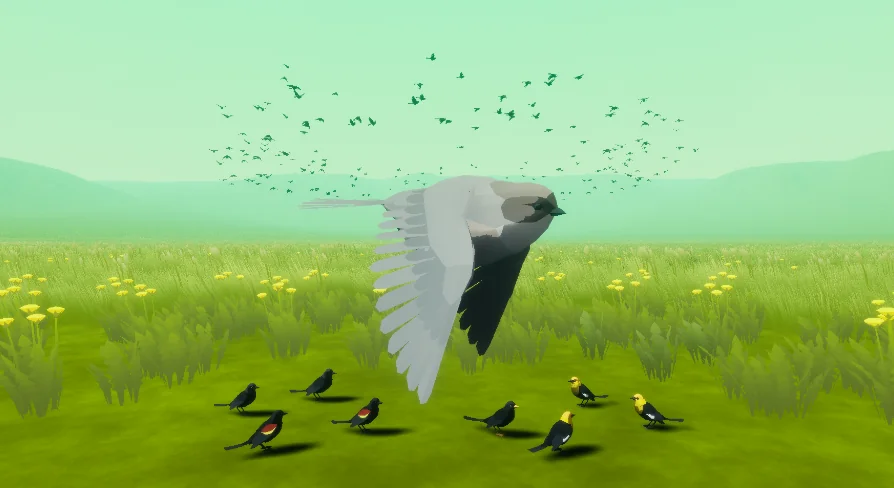
The pack achieves lightweight movement by driving all wing flapping and motion through material WorldPositionOffset (WPO) instead of traditional skeletal mesh rigs and skinning evaluations. Offloading mesh deformation to vertex shaders allows dozens or hundreds of birds to animate concurrently without the CPU overhead associated with standard skeletal ticks. This framework also grants fine-tuned control over animation speeds, amplitudes, and offsets directly through material parameters.
Static mesh geometry is tailored for stylized and low-poly environments. The asset collection includes 11 unique bird meshes accompanied by 21 distinct color variants. Geometry is organized across two distinct level of detail steps:
LOD0: Modeled at roughly 2,100 triangles for foreground viewing and perches close to the camera.
LOD1: Reduced to roughly 1,200 triangles to maintain flock silhouettes while shedding half the vertex overhead.
For scenarios demanding strict optimization, separate LOD1 meshes are supplied directly in the package. These dedicated meshes allow developers to bypass higher-density base meshes entirely in distant background systems. Custom meshes can also be plugged into the animation materials, provided the incoming static meshes are modeled facing forward along the positive X-axis (X+).
Material Customization and Stylized Shading
Visual styling relies on a dynamic master material setup that supports fast creation of material instances. Built-in shader switches include configurable color masks to isolate specific plumage regions, discrete low-poly facet shading controls, and adjustable fresnel highlights to accentuate wings and contours against natural backgrounds.
These shading parameters, combined with the modular color configurations, provide visual variation across large groups so identical meshes do not appear repetitive when gathered on perches or circling along splines.
Environment Integration and System Ecosystem
The package functions alongside environmental assets like Beefy Water Hole (Water System), fitting visual pipelines focused on low-poly nature, stylized wildlife, and ambient particle ecosystems. By combining Niagara-based swarm dynamics with material-driven vertex deformation, the setup accommodates dense populations of ambient birds with minimal overhead across Unreal Engine 5.2 projects.
 Procedural Systems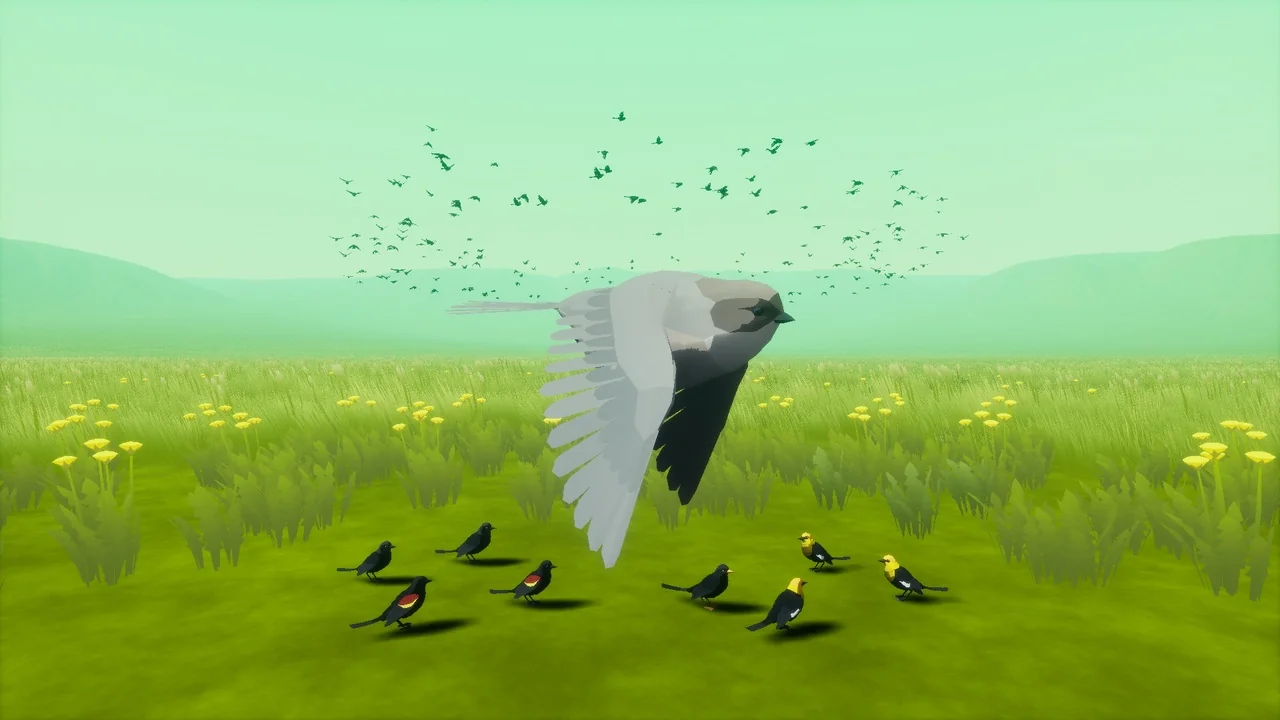
 Procedural Systems
 Procedural Systems
 Procedural Systems