"177e4e4394b9ce1f"{"id":"1001597","slug":"easy-snow","title":"Easy Snow","category":"Procedural Systems","engine":"5.3+","assetVersion":"","engineVersion":"Engine Version: 5.3+","tag":"Procedural Systems","accent":"blue","visual":"mech","summary":"Create realistic winter weather in Unreal Engine with Easy Snow, featuring 3D clump Niagara particles, Nanite displacement, and Lumen support.","platform":"Unreal Engine","publishedAt":"2026-10-10T16:19:16.737Z","updatedAt":"2026-10-10T16:19:16.737Z","sourceNotes":[],"fileContents":[],"compatibility":["Unreal Engine","Engine Version: 5.3+"],"featuredImage":{"alt":"Easy Snow","src":"/wp-content/uploads/published/2026/10/b08d96305363-aae1b995-0b59-46a0-9190-f6355cfb4919-d9b474f25a.webp"},"hasDownloadLink":true,"downloads":0,"terms":[{"taxonomy":"category","slug":"procedural-systems","name":"Procedural Systems"}],"galleryImages":[{"src":"/wp-content/uploads/published/2026/10/63271e3cd305-061f2240-8d2b-4fbc-9ed0-c578f82ab5f6-899e4abaf5.webp","alt":"Easy Snow"},{"src":"/wp-content/uploads/published/2026/10/d27233dc8195-af0cdfab-2f56-498f-9053-b14e27dafa9f-4c583c23e6.webp","alt":"Easy Snow"},{"src":"/wp-content/uploads/published/2026/10/51d81eee0bfe-aca32520-ff10-45be-af76-4c39947249b1-677aab8610.webp","alt":"Easy Snow"},{"src":"/wp-content/uploads/published/2026/10/98bfd1b09076-5b6a23ca-e190-400a-bdf1-902498098bb7-0250c0f15f.webp","alt":"Easy Snow"},{"src":"/wp-content/uploads/published/2026/10/143acf352ecc-14fb369e-8f0d-4cec-b8b7-f6dc48407a09-c710df081d.webp","alt":"Easy Snow"}],"accessPanel":{"kind":"resource","title":"Download this resource","eyebrow":"Free Download","message":"Log in or create a free account to start your download.","fileName":"Content.7z","safetyNote":"Resources are manually reviewed before listing to improve quality and reduce obvious risks.","actionLabel":"Download Free","resourceType":"Resource archive"},"contentHtml":"\u003ch2\u003eSolving the Realism Gap in Weather Simulation\u003c/h2\u003e\u003cp\u003eSimulating believable winter weather often presents environment artists with a compromise between flat two-dimensional particle cards that lose volume under dynamic lights and custom simulations that demand extensive technical setup. Easy Snow addresses this workflow obstacle through a dedicated Blueprint architecture combined with Niagara particle systems to deliver controllable winter conditions rapidly.\u003c/p\u003e\u003cp\u003eThe system is structured to scale effortlessly across different weather intensities. Whether an environment requires a gentle flurry, a steady cold-snap drift, or an impenetrable stormy blizzard, the core Blueprint gives artists immediate control over the atmospheric volume without requiring complex particle rewires from scratch.\u003c/p\u003e\u003ch2\u003eNiagara Particles Formed from 3D Snow Clumps\u003c/h2\u003e\u003cp\u003eUnlike standard particle setups that rely solely on flat textures facing the camera, Easy Snow generates each particle from a distinct 3D model modeled after real-world snow clumps.\u003c/p\u003e\u003cp\u003eBecause each falling flake possesses actual geometric volume, it responds naturally to dynamic scene illumination. Light catches the edges of individual clumps, creating accurate shading, self-shadowing, and depth. The geometric nature of the flakes ensures complete compatibility with both Lumen global illumination and Pathtracing render pipelines, allowing atmospheric scattering and bounced light to treat falling snow as physical geometry rather than simple visual overlays.\u003c/p\u003e\u003ch2\u003eSwitching Between Cinematic Movie Render Queue Outputs and Realtime Game Modes\u003c/h2\u003e\u003cp\u003eWhile the primary design focus centers on maximum visual fidelity, the system adapts to different performance budgets depending on whether a project targets linear animation or interactive runtime execution.\u003c/p\u003e\u003cp\u003eFor linear cinematic projects, rendering falling flakes through the Movie Render Queue produces clean, photorealistic motion blur across the individual 3D meshes without creating the visual smearing commonly associated with billboard particles. For interactive game projects, a game-ready realtime mode is available. Artists can swap the heavy 3D clump meshes for lightweight particle sprites within the Niagara system, retaining the overall motion logic and atmospheric density while reducing render overhead during active gameplay.\u003c/p\u003e\u003ch2\u003eSurface Blending with the World Snow Material Function\u003c/h2\u003e\u003cp\u003eFalling precipitation only represents half of an authentic winter scene; the interaction between cold air and level geometry completes the visual illusion. Easy Snow incorporates a specialized Material Function designed to plug directly into an environment's existing Master Material setup.\u003c/p\u003e\u003cp\u003eConnecting this function instantly applies accumulated snow cover across props, architectural pieces, and terrain assets throughout an entire level. The material implementation provides full artistic direction over how precipitation collects. Artists can tune the coverage amount, soften or harden the blend falloff against steep surface normals, and adjust procedural breakup patterns to suggest natural drifting, wind erosion, or melting. Integrated crystalline glimmering effects replicate the distinct specular sparkle of fresh snow under direct sunlight or streetlamps.\u003c/p\u003e\u003ch2\u003eNanite Tessellation and Displacement Configuration\u003c/h2\u003e\u003cp\u003eFor scenes requiring authentic surface depth, the world snow Material Function interfaces directly with Nanite Tessellation and displacement systems, transforming flat material layers into volumetric drifts across physical geometry.\u003c/p\u003e\u003cp\u003eAchieving stable Nanite displacement requires specific project configurations. Nanite Tessellation functions strictly under Windows environments running DirectX 12. To enable the feature properly, projects require two explicit console variables added to the \u003ccode\u003eDefaultEngine.ini\u003c/code\u003e File:\u003c/p\u003e\u003cpre\u003e\u003ccode\u003eR.Nanite.AllowTessellation=1\nr.Nanite.Tessellation=1\u003c/code\u003e\u003c/pre\u003e\u003cp\u003eWhen configuring Master Materials, displacement calculations can occasionally misalign or produce distorted geometry. If displacement issues arise, set the Displacement Center property to 0 within the material details panel on the left side of the Material Editor interface. Leaving this setting at its default value of 0.5 can produce irregular surface lifting depending on the underlying mesh UVs and base material setup. MacOS platforms should also be noted for stability concerns, as crashes have been reported when working with these features on that operating system.\u003c/p\u003e\u003ch2\u003eProduction Integration and Environment Workflows\u003c/h2\u003e\u003cp\u003eEasy Snow is built to fit neatly alongside broader natural environment pipelines, pairing cleanly with external systems such as Easy Waterscape - Realtime Ocean \u0026amp; Water System when constructing coastal or freezing shoreline scenes. Demonstration levels adapted from the Epic Content Examples project are included to illustrate proper master material connections, particle bounds, and camera interactions right out of the box.\u003c/p\u003e\u003cp\u003eThe package serves environment artists, lighting designers, and technical directors who need to bypass manual particle creation in favor of a physically grounded, light-reactive winter weather pipeline.\u003c/p\u003e\n\n\u003ch2\u003eMore From The Same Workflow\u003c/h2\u003e\n\u003cul\u003e\n\u003cli\u003e\u003ca href=\"https://3dcghub.com/easy-rain/\" title=\"Easy Rain\"\u003eEasy Rain\u003c/a\u003e\u003c/li\u003e\n\u003cli\u003e\u003ca href=\"https://3dcghub.com/infinity-weather/\" title=\"Infinity Weather\"\u003eInfinity Weather\u003c/a\u003e\u003c/li\u003e\n\u003cli\u003e\u003ca href=\"https://3dcghub.com/desert-and-snow-vdb-collection/\" title=\"Desert \u0026amp; Snow VDB Collection\"\u003eDesert \u0026amp; Snow VDB Collection\u003c/a\u003e\u003c/li\u003e\n\u003cli\u003e\u003ca href=\"https://3dcghub.com/beefy-bass-niagara-fish-system/\" title=\"Beefy Bass (Niagara Fish System)\"\u003eBeefy Bass (Niagara Fish System)\u003c/a\u003e\u003c/li\u003e\n\u003cli\u003e\u003ca href=\"https://3dcghub.com/water-fountain/\" title=\"Water Fountain\"\u003eWater Fountain\u003c/a\u003e\u003c/li\u003e\n\u003c/ul\u003e","contentTextLength":5247,"navigation":{"current":17,"total":3551,"previous":{"id":"1001598","slug":"electrical-substation-34-assets","title":"Electrical Substation / 34 Assets","category":"Industrial","platform":"Unreal Engine","updatedAt":"2026-10-10T16:20:45.572Z"},"next":{"id":"1001596","slug":"dinosaur-megalodon-sea-monster-series-5","title":"Dinosaur MEGALODON - Sea Monster Series 5","category":"Characters \u0026 Creatures","platform":"Unreal Engine","updatedAt":"2026-10-10T16:18:43.454Z"}},"relatedResources":[{"id":"11369","slug":"easy-rain","title":"Easy Rain","category":"Procedural Systems","engine":"5.4+","assetVersion":"Engine version: 5.4+","engineVersion":"5.3","tag":"Procedural Systems","accent":"blue","visual":"luts","summary":"Easy Rain is a comprehensive Blueprint system that harnesses Niagara particles to create photorealistic weather effects. From light drizzles to stormy summer downpours, this tool offers high performance and deep customization for artists.","platform":"Unreal Engine","publishedAt":"2026-03-05T17:09:01.000Z","updatedAt":"2026-04-19T15:48:13.000Z","sourceNotes":[],"fileContents":[],"compatibility":["Unreal Engine","Engine version: 5.4+"],"featuredImage":{"alt":"Easy Rain","src":"https://3dcghub.com/wp-content/uploads/2026/03/fbfa88dc-7eef-45e3-867c-fad1aa6421d1.webp"},"hasDownloadLink":true,"downloads":5},{"id":"11436","slug":"infinity-weather","title":"Infinity Weather","category":"Procedural Systems","engine":"5.4+","assetVersion":"Engine version: 5.4+","engineVersion":"4.23","tag":"Procedural Systems","accent":"blue","visual":"audio","summary":"Enhance your project with Infinity Weather, a robust system for realistic environmental effects. It features advanced displacement, dynamic skies, and a complete footstep system.","platform":"Unreal Engine","publishedAt":"2026-03-05T17:18:31.000Z","updatedAt":"2026-04-19T15:48:12.000Z","sourceNotes":[],"fileContents":[],"compatibility":["Unreal Engine","Engine version: 5.4+"],"featuredImage":{"alt":"Infinity Weather","src":"https://3dcghub.com/wp-content/uploads/2026/03/3bc5c887-7265-4714-a69c-802add0e7f33.webp"},"hasDownloadLink":true,"downloads":2},{"id":"1000050","slug":"desert-and-snow-vdb-collection","title":"Desert \u0026 Snow VDB Collection","category":"Weather","engine":"5.3+","assetVersion":"","engineVersion":"5.3+","tag":"Weather","accent":"blue","visual":"mech","summary":"Desert \u0026 Snow VDB Collection brings 45 customizable volumetric effects to Unreal Engine for storms, blizzards, tornados, and sand or snow movement.","platform":"Unreal Engine","publishedAt":"2026-05-22T12:42:59.843Z","updatedAt":"2026-05-22T12:42:59.843Z","sourceNotes":[],"fileContents":[],"compatibility":["Unreal Engine","Engine version: 5.3+"],"featuredImage":{"alt":"Desert \u0026 Snow VDB Collection","src":"/wp-content/uploads/published/2026/05/6c38fbd27e23-c1188312-885c-4c2f-8f70-0c3a957a4a26-23f8ba47ad.webp"},"hasDownloadLink":true,"downloads":2}]}
Procedural Systems
Easy Snow
Create realistic winter weather in Unreal Engine with Easy Snow, featuring 3D clump Niagara particles, Nanite displacement, and Lumen support.
Simulating believable winter weather often presents environment artists with a compromise between flat two-dimensional particle cards that lose volume under dynamic lights and custom simulations that demand extensive technical setup. Easy Snow addresses this workflow obstacle through a dedicated Blueprint architecture combined with Niagara particle systems to deliver controllable winter conditions rapidly.
The system is structured to scale effortlessly across different weather intensities. Whether an environment requires a gentle flurry, a steady cold-snap drift, or an impenetrable stormy blizzard, the core Blueprint gives artists immediate control over the atmospheric volume without requiring complex particle rewires from scratch.
Niagara Particles Formed from 3D Snow Clumps
Unlike standard particle setups that rely solely on flat textures facing the camera, Easy Snow generates each particle from a distinct 3D model modeled after real-world snow clumps.
Because each falling flake possesses actual geometric volume, it responds naturally to dynamic scene illumination. Light catches the edges of individual clumps, creating accurate shading, self-shadowing, and depth. The geometric nature of the flakes ensures complete compatibility with both Lumen global illumination and Pathtracing render pipelines, allowing atmospheric scattering and bounced light to treat falling snow as physical geometry rather than simple visual overlays.
Switching Between Cinematic Movie Render Queue Outputs and Realtime Game Modes
While the primary design focus centers on maximum visual fidelity, the system adapts to different performance budgets depending on whether a project targets linear animation or interactive runtime execution.
For linear cinematic projects, rendering falling flakes through the Movie Render Queue produces clean, photorealistic motion blur across the individual 3D meshes without creating the visual smearing commonly associated with billboard particles. For interactive game projects, a game-ready realtime mode is available. Artists can swap the heavy 3D clump meshes for lightweight particle sprites within the Niagara system, retaining the overall motion logic and atmospheric density while reducing render overhead during active gameplay.
Surface Blending with the World Snow Material Function
Falling precipitation only represents half of an authentic winter scene; the interaction between cold air and level geometry completes the visual illusion. Easy Snow incorporates a specialized Material Function designed to plug directly into an environment's existing Master Material setup.
Connecting this function instantly applies accumulated snow cover across props, architectural pieces, and terrain assets throughout an entire level. The material implementation provides full artistic direction over how precipitation collects. Artists can tune the coverage amount, soften or harden the blend falloff against steep surface normals, and adjust procedural breakup patterns to suggest natural drifting, wind erosion, or melting. Integrated crystalline glimmering effects replicate the distinct specular sparkle of fresh snow under direct sunlight or streetlamps.
Nanite Tessellation and Displacement Configuration
For scenes requiring authentic surface depth, the world snow Material Function interfaces directly with Nanite Tessellation and displacement systems, transforming flat material layers into volumetric drifts across physical geometry.
Achieving stable Nanite displacement requires specific project configurations. Nanite Tessellation functions strictly under Windows environments running DirectX 12. To enable the feature properly, projects require two explicit console variables added to the DefaultEngine.ini File:
When configuring Master Materials, displacement calculations can occasionally misalign or produce distorted geometry. If displacement issues arise, set the Displacement Center property to 0 within the material details panel on the left side of the Material Editor interface. Leaving this setting at its default value of 0.5 can produce irregular surface lifting depending on the underlying mesh UVs and base material setup. MacOS platforms should also be noted for stability concerns, as crashes have been reported when working with these features on that operating system.
Production Integration and Environment Workflows
Easy Snow is built to fit neatly alongside broader natural environment pipelines, pairing cleanly with external systems such as Easy Waterscape - Realtime Ocean & Water System when constructing coastal or freezing shoreline scenes. Demonstration levels adapted from the Epic Content Examples project are included to illustrate proper master material connections, particle bounds, and camera interactions right out of the box.
The package serves environment artists, lighting designers, and technical directors who need to bypass manual particle creation in favor of a physically grounded, light-reactive winter weather pipeline.
 Procedural Systems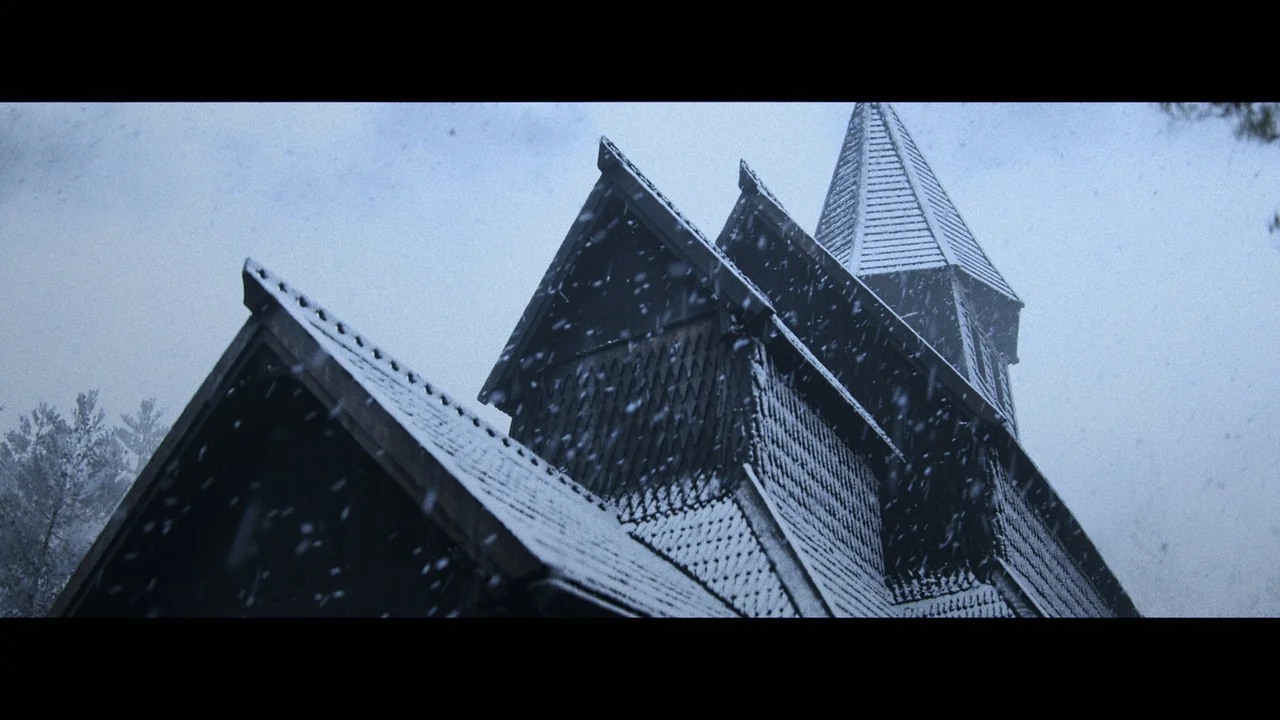
 Procedural Systems
 Procedural Systems
 Weather