"c14ff6bd758dadb1"{"id":"1000567","slug":"blueprint-exporter","title":"Blueprint Exporter","category":"Engine Tools","engine":"5.5","assetVersion":"Asset Version: 0.1","engineVersion":"Engine Version: 5.5","tag":"Engine Tools","accent":"blue","visual":"mech","summary":"Export readable execution flow from any Unreal Blueprint as plain text or JSON. Right-click export, supports branches, sequences, and all Blueprint classes.","platform":"Unreal Engine","publishedAt":"2026-07-16T05:33:59.970Z","updatedAt":"2026-07-16T05:33:59.970Z","sourceNotes":[],"fileContents":[],"compatibility":["Unreal Engine","Asset Version: 0.1","Engine Version: 5.5"],"featuredImage":{"alt":"Blueprint Exporter","src":"/wp-content/uploads/published/2026/07/8d672deb4681-96ac3add-e819-41aa-948a-1fab546ba174-5402f39151.webp"},"hasDownloadLink":true,"downloads":0,"terms":[{"taxonomy":"category","slug":"engine-tools-tools-and-plugins","name":"Engine Tools"}],"galleryImages":[{"src":"/wp-content/uploads/published/2026/07/021dd533d923-29040e27-f6a8-43e3-bd74-95108fb75269-60f85d90f4.webp","alt":"Blueprint Exporter"},{"src":"/wp-content/uploads/published/2026/07/d61db6c4329d-cfcc5aa6-e2ad-4323-90d9-da2e176059d7-3c48997407.webp","alt":"Blueprint Exporter"},{"src":"/wp-content/uploads/published/2026/07/1b9f4a78388f-f5fdd5b3-7698-49d0-b7b4-2e03821ddb14-3e86e9356a.webp","alt":"Blueprint Exporter"},{"src":"/wp-content/uploads/published/2026/07/b217ab50ae24-bba2d84a-ae76-4e76-be1b-84f1d00caead-98e6c2cb4b.webp","alt":"Blueprint Exporter"},{"src":"/wp-content/uploads/published/2026/07/75d17437fb95-c32d56f0-a2f2-4b6e-be79-92d6145c9912-431b6e5e1d.webp","alt":"Blueprint Exporter"}],"accessPanel":{"kind":"resource","title":"Download this resource","eyebrow":"Free Download","message":"Log in or create a free account to start your download.","fileName":"Plugins.7z","safetyNote":"Resources are manually reviewed before listing to improve quality and reduce obvious risks.","actionLabel":"Download Free","resourceType":"Resource archive"},"contentHtml":"\u003cp\u003eComplex Blueprint logic often lives deep inside graphs that are difficult to share, review, or archive without opening the Unreal Editor and taking screenshots. A gameplay script that branches across multiple sequences, function calls, and pure node inputs can become a tangle of wires that resists quick inspection. Blueprint Exporter addresses that workflow gap by converting any Blueprint asset into a clean, indented text representation of its execution flow, letting developers read script logic the same way they would read code.\u003c/p\u003e \u003ch2\u003eReading Blueprint Logic Without Opening the Editor\u003c/h2\u003e \u003cp\u003eThe plugin's core function is turning visual node graphs into a readable execution tree. When a developer exports a Blueprint, the tool traces connected nodes and formats them into an indented hierarchy that mirrors how execution flows through the script. A simple BeginPlay event followed by a Print String node renders as:\u003c/p\u003e \u003cpre\u003eEvent BeginPlay\n└─ then → Print String ()\n\u003c/pre\u003e \u003cp\u003eThat structure scales to more complex graphs. The exporter handles branches, sequences, and function calls through smart traversal of execution pins, walking multiple paths and nested logic while filtering out pure node clutter that would otherwise interrupt the readable flow.\u003c/p\u003e \u003ch3\u003ePure Nodes Shown as Inline Parameters\u003c/h3\u003e \u003cp\u003ePure nodes—such as Get Player Controller—do not carry execution pins, so they often appear as floating labels in a graph rather than steps in a sequence. Blueprint Exporter automatically detects connected pure nodes and displays them as inline readable parameters within the tree output. This means the exported text shows what data feeds into each execution node without duplicating the visual noise of the original graph layout.\u003c/p\u003e \u003ch2\u003eText and JSON Output Formats\u003c/h2\u003e \u003cp\u003eEvery export produces two files saved to the project's \u003ccode\u003eSaved/BlueprintExports\u003c/code\u003e Folder:\u003c/p\u003e \u003cul\u003e\n\u003cli\u003e\u003cstrong\u003ePlain text (.txt)\u003c/strong\u003e — A human-friendly, indented tree view intended for direct reading, documentation, and sharing.\u003c/li\u003e\n\u003cli\u003e\u003cstrong\u003eStructured data (.json)\u003c/strong\u003e — A machine-readable format suited for import into diagramming tools, automated comparison, or AI assistant input.\u003c/li\u003e\n\u003c/ul\u003e \u003cp\u003eHaving both formats available from a single export means the same Blueprint can serve a teammate reading logic in a text editor and an automated pipeline parsing structure in JSON.\u003c/p\u003e \u003ch2\u003eOne-Click Export From the Content Browser\u003c/h2\u003e \u003cp\u003eThe plugin integrates into the standard Content Browser workflow. A developer can right-click any Blueprint asset and export it immediately—no need to open the Blueprint Editor, navigate to a specific graph, or capture screenshots. The export process makes zero changes to the Blueprint itself, so the script remains untouched while the text representation is generated. This keeps the operation fast and lightweight regardless of graph complexity.\u003c/p\u003e \u003ch3\u003eCompatibility Across Blueprint Types and Engine Versions\u003c/h3\u003e \u003cp\u003eBlueprint Exporter has been tested with Unreal Engine 5.4 and newer versions, with broader editor notes indicating compatibility spanning 4.27 through 5.7. It works with all Blueprint classes, including Actors, Components, and Widgets. Because the export reads from existing graph data and writes only to the Saved folder, it functions identically whether the asset is a character Actor, a UI Widget, or a Component Blueprint.\u003c/p\u003e \u003ch2\u003eWhere Exported Logic Fits Into a Production Pipeline\u003c/h2\u003e \u003ch3\u003eTeam Documentation and Source Control Comparison\u003c/h3\u003e \u003cp\u003eFor teams, the text export provides a stable format for Blueprint documentation. A readable.txt file can be stored alongside project files, attached to task tickets, or pasted into design documents. Because the output is plain text rather than an image, it diffs cleanly in source control—developers can compare two versions of a Blueprint's logic and immediately see which nodes or branches changed, something screenshots cannot support.\u003c/p\u003e \u003ch3\u003eInput for Diagramming Tools and AI Assistants\u003c/h3\u003e \u003cp\u003eThe JSON output opens the Blueprint to further processing. Diagramming tools can consume the structured data to rebuild logic maps outside the engine. AI assistants can use the same exported flow as input for analyzing script behavior, suggesting optimizations, or generating summaries. A custom Blueprint Exporter GPT is noted alongside the plugin, specifically tuned to work with the exported format and assist with interpreting the logic it contains.\u003c/p\u003e \u003ch2\u003eA Practical Fit for Debugging, Review, and Sharing\u003c/h2\u003e \u003cp\u003eDevelopers working in fast-moving projects can skip the screenshot cycle entirely. Instead of opening a Blueprint, zooming to a readable area, capturing an image, and pasting it into a message, they export a text tree and paste that. The format is compact, searchable, and structured enough to follow execution order at a glance. For debugging, comparing a known-good export against a broken one in source control can isolate where logic diverged. For review, a lead can read a teammate's Blueprint logic without leaving their current task. The plugin keeps the workflow close to the Content Browser while extending what a Blueprint can communicate beyond the editor window.\u003c/p\u003e\n\n\u003ch2\u003eMore From The Same Workflow\u003c/h2\u003e\n\u003cul\u003e\n\u003cli\u003e\u003ca href=\"https://3dcghub.com/hypergrid/\" title=\"HyperGrid\"\u003eHyperGrid\u003c/a\u003e\u003c/li\u003e\n\u003cli\u003e\u003ca href=\"https://3dcghub.com/blueprint-generator-ai-kibibyte-labs-engine-assistant/\" title=\"AI Engine Assistant - Kibibyte Labs (Blueprint Generator \u0026amp; More!)\"\u003eAI Engine Assistant - Kibibyte Labs (Blueprint Generator \u0026amp; More!)\u003c/a\u003e\u003c/li\u003e\n\u003cli\u003e\u003ca href=\"https://3dcghub.com/advanced-control-flow/\" title=\"Advanced Control Flow\"\u003eAdvanced Control Flow\u003c/a\u003e\u003c/li\u003e\n\u003cli\u003e\u003ca href=\"https://3dcghub.com/map-function-library/\" title=\"Map Function Library\"\u003eMap Function Library\u003c/a\u003e\u003c/li\u003e\n\u003cli\u003e\u003ca href=\"https://3dcghub.com/async-blueprints-extension/\" title=\"Async Blueprints Extension\"\u003eAsync Blueprints Extension\u003c/a\u003e\u003c/li\u003e\n\u003c/ul\u003e","contentTextLength":5169,"navigation":{"current":1296,"total":3719,"previous":{"id":"1000568","slug":"boatyard-vol-7-fishing-nanite-and-low-poly","title":"Boatyard VOL.7 - Fishing (Nanite and Low Poly)","category":"Tools, Objects \u0026 Decor","platform":"Unreal Engine","updatedAt":"2026-07-16T21:16:43.999Z"},"next":{"id":"1000565","slug":"bjorn-viking","title":"Bjorn Viking","category":"Characters \u0026 Creatures","platform":"Unreal Engine","updatedAt":"2026-07-16T05:28:46.622Z"}},"relatedResources":[{"id":"1001264","slug":"blueprint-cheat-manager-pro","title":"Blueprint Cheat Manager Pro","category":"Engine Tools","engine":"5.0 - 5.5","assetVersion":"Asset Version: 1.0 - 1.0.3","engineVersion":"Engine Version: 5.0 - 5.5","tag":"Engine Tools","accent":"blue","visual":"mech","summary":"Blueprint Cheat Manager Pro replaces C++ requirements with direct Blueprint console commands in Unreal Engine 4.25 through 4.27 for faster testing.","platform":"Unreal Engine","publishedAt":"2026-09-30T05:42:15.265Z","updatedAt":"2026-09-30T05:42:15.265Z","sourceNotes":[],"fileContents":[],"compatibility":["Unreal Engine","Asset Version: 1.0 - 1.0.3","Engine Version: 5.0 - 5.5"],"featuredImage":{"alt":"Blueprint Cheat Manager Pro","src":"/wp-content/uploads/published/2026/09/e652aae19521-9278f853-a3a3-4859-8fcf-b3df15837fdb-4de192570c.webp"},"hasDownloadLink":true,"downloads":0},{"id":"14068","slug":"hypergrid","title":"HyperGrid","category":"Engine Tools","engine":"5.5","assetVersion":"Engine version: 5.5","engineVersion":"Asset Version:1.0","tag":"Engine Tools","accent":"blue","visual":"character","summary":"Upgrade your Unreal Engine workspace with HyperGrid, a custom blueprint grid system designed for precision and efficiency. Replace dull backgrounds with customizable dot matrices and high-contrast lines for better node alignment.","platform":"Unreal Engine","publishedAt":"2026-03-11T15:35:22.000Z","updatedAt":"2026-04-19T15:45:54.000Z","sourceNotes":[],"fileContents":[],"compatibility":["Unreal Engine","Engine version: 5.5","Asset Version: 1.0"],"featuredImage":{"alt":"HyperGrid","src":"https://3dcghub.com/wp-content/uploads/2026/03/aceb7ac9-a260-49f9-b99d-a08e8085d8e2.webp"},"hasDownloadLink":true,"downloads":0},{"id":"1000796","slug":"blueprint-mesh-extractor","title":"Blueprint Mesh Extractor","category":"Engine Tools","engine":"5.7","assetVersion":"Asset Version: 1.0","engineVersion":"Engine Version: 5.7","tag":"Engine Tools","accent":"blue","visual":"mech","summary":"Blueprint Mesh Extractor breaks Blueprint Actors into separate Static Mesh Actors, preserving transforms, materials, and child actors, with bulk extraction from","platform":"Unreal Engine","publishedAt":"2026-07-30T14:29:11.117Z","updatedAt":"2026-07-30T14:29:11.117Z","sourceNotes":[],"fileContents":[],"compatibility":["Unreal Engine","Asset Version: 1.0","Engine Version: 5.7"],"featuredImage":{"alt":"Blueprint Mesh Extractor","src":"/wp-content/uploads/published/2026/07/4565c5f72c93-3a93b647-ac5f-43a0-8e2d-6754dccb9d34-aa8b0957a6.webp"},"hasDownloadLink":true,"downloads":2}]}
Engine Tools
Blueprint Exporter
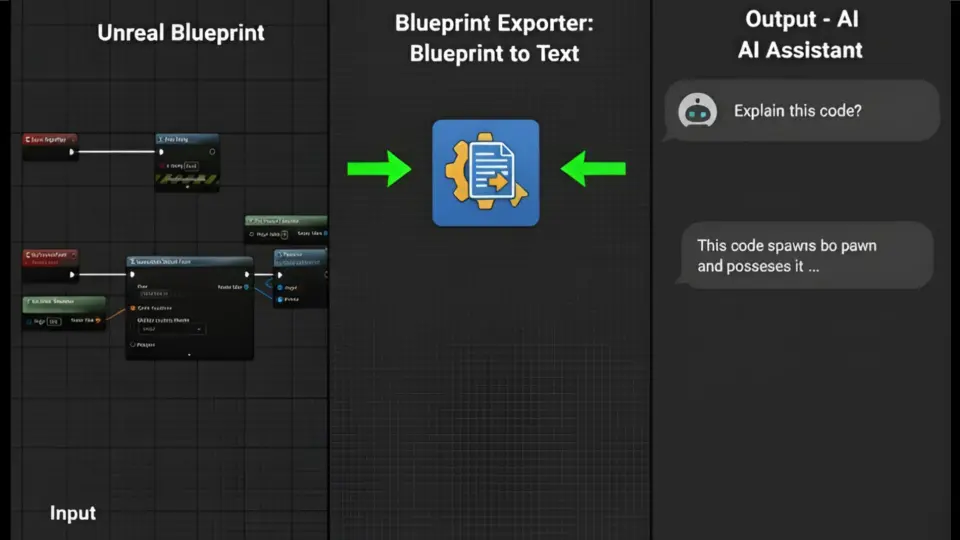
Export readable execution flow from any Unreal Blueprint as plain text or JSON. Right-click export, supports branches, sequences, and all Blueprint classes.
Complex Blueprint logic often lives deep inside graphs that are difficult to share, review, or archive without opening the Unreal Editor and taking screenshots. A gameplay script that branches across multiple sequences, function calls, and pure node inputs can become a tangle of wires that resists quick inspection. Blueprint Exporter addresses that workflow gap by converting any Blueprint asset into a clean, indented text representation of its execution flow, letting developers read script logic the same way they would read code.
Reading Blueprint Logic Without Opening the Editor
The plugin's core function is turning visual node graphs into a readable execution tree. When a developer exports a Blueprint, the tool traces connected nodes and formats them into an indented hierarchy that mirrors how execution flows through the script. A simple BeginPlay event followed by a Print String node renders as:
Event BeginPlay
└─ then → Print String ()
That structure scales to more complex graphs. The exporter handles branches, sequences, and function calls through smart traversal of execution pins, walking multiple paths and nested logic while filtering out pure node clutter that would otherwise interrupt the readable flow.
Pure Nodes Shown as Inline Parameters
Pure nodes—such as Get Player Controller—do not carry execution pins, so they often appear as floating labels in a graph rather than steps in a sequence. Blueprint Exporter automatically detects connected pure nodes and displays them as inline readable parameters within the tree output. This means the exported text shows what data feeds into each execution node without duplicating the visual noise of the original graph layout.
Text and JSON Output Formats
Every export produces two files saved to the project's Saved/BlueprintExports Folder:
Plain text (.txt) — A human-friendly, indented tree view intended for direct reading, documentation, and sharing.
Structured data (.json) — A machine-readable format suited for import into diagramming tools, automated comparison, or AI assistant input.
Having both formats available from a single export means the same Blueprint can serve a teammate reading logic in a text editor and an automated pipeline parsing structure in JSON.
One-Click Export From the Content Browser
The plugin integrates into the standard Content Browser workflow. A developer can right-click any Blueprint asset and export it immediately—no need to open the Blueprint Editor, navigate to a specific graph, or capture screenshots. The export process makes zero changes to the Blueprint itself, so the script remains untouched while the text representation is generated. This keeps the operation fast and lightweight regardless of graph complexity.
Compatibility Across Blueprint Types and Engine Versions
Blueprint Exporter has been tested with Unreal Engine 5.4 and newer versions, with broader editor notes indicating compatibility spanning 4.27 through 5.7. It works with all Blueprint classes, including Actors, Components, and Widgets. Because the export reads from existing graph data and writes only to the Saved folder, it functions identically whether the asset is a character Actor, a UI Widget, or a Component Blueprint.
Where Exported Logic Fits Into a Production Pipeline
Team Documentation and Source Control Comparison
For teams, the text export provides a stable format for Blueprint documentation. A readable.txt file can be stored alongside project files, attached to task tickets, or pasted into design documents. Because the output is plain text rather than an image, it diffs cleanly in source control—developers can compare two versions of a Blueprint's logic and immediately see which nodes or branches changed, something screenshots cannot support.
Input for Diagramming Tools and AI Assistants
The JSON output opens the Blueprint to further processing. Diagramming tools can consume the structured data to rebuild logic maps outside the engine. AI assistants can use the same exported flow as input for analyzing script behavior, suggesting optimizations, or generating summaries. A custom Blueprint Exporter GPT is noted alongside the plugin, specifically tuned to work with the exported format and assist with interpreting the logic it contains.
A Practical Fit for Debugging, Review, and Sharing
Developers working in fast-moving projects can skip the screenshot cycle entirely. Instead of opening a Blueprint, zooming to a readable area, capturing an image, and pasting it into a message, they export a text tree and paste that. The format is compact, searchable, and structured enough to follow execution order at a glance. For debugging, comparing a known-good export against a broken one in source control can isolate where logic diverged. For review, a lead can read a teammate's Blueprint logic without leaving their current task. The plugin keeps the workflow close to the Content Browser while extending what a Blueprint can communicate beyond the editor window.
 Engine Tools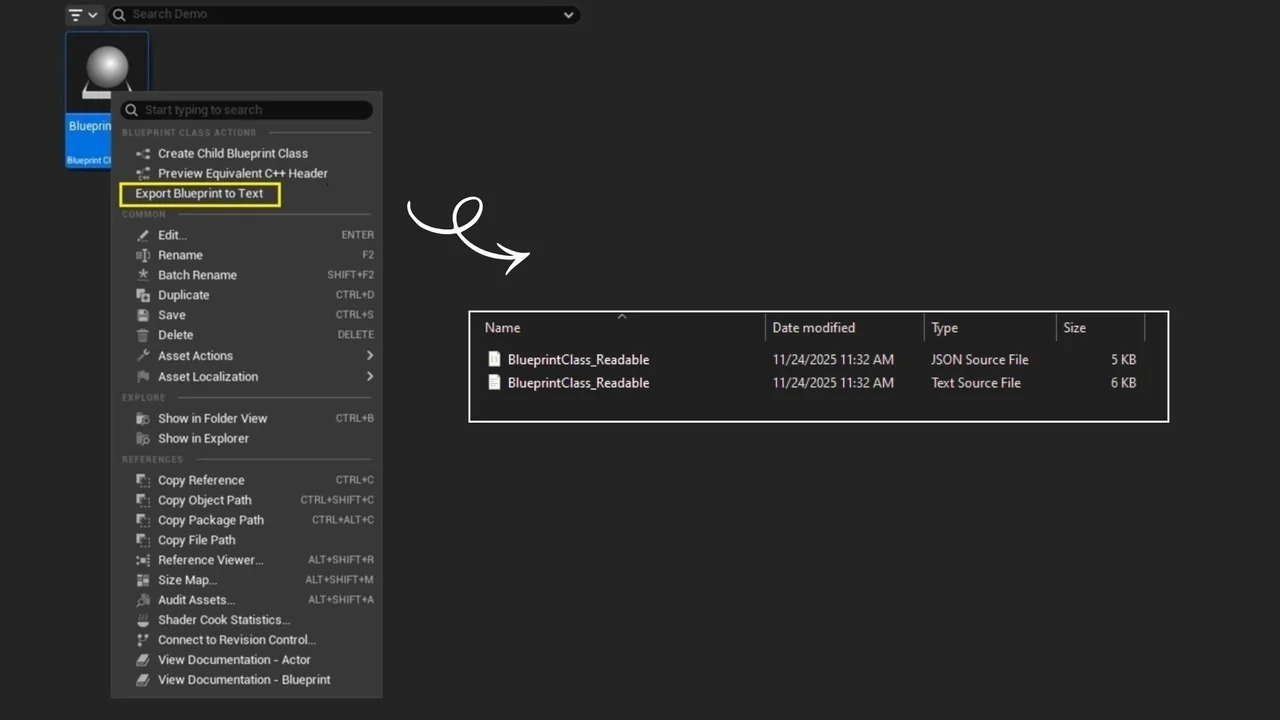
 Engine Tools
 Engine Tools
 Engine Tools