"148d1066ed74e216"{"id":"1002946","slug":"wall-hiding-system","title":"Wall Hiding System","category":"Gameplay Features","engine":"4.26+,5.0+","assetVersion":"","engineVersion":"Engine Version: 4.26+,5.0+","tag":"Gameplay Features","accent":"blue","visual":"mech","summary":"Examine how the Wall Hiding System uses material functions, Blueprint coordinates, and opacity masks to manage occlusion in top-down games.","platform":"Unreal Engine","indexPolicy":"index","publishedAt":"2026-11-21T23:35:05.525Z","updatedAt":"2026-11-21T23:35:05.525Z","sourceNotes":[],"fileContents":[],"compatibility":["Unreal Engine","Engine Version: 4.26+,5.0+"],"featuredImage":{"alt":"Wall Hiding System","src":"/wp-content/uploads/published/2026/11/e4b0eb55d3a7-1ddc06b6-a4b6-4733-ae7f-1c427c904a71-d76e809b03.webp"},"fileSizeBytes":43922213,"hasDownloadLink":true,"downloads":0,"terms":[{"taxonomy":"category","slug":"gameplay-features","name":"Gameplay Features"}],"galleryImages":[{"src":"/wp-content/uploads/published/2026/11/cb9621c1c132-5802dcb4-0dc3-455b-83da-a175c8c6afb6-b74d13f1da.webp","alt":"Wall Hiding System"},{"src":"/wp-content/uploads/published/2026/11/502050a8cdde-567513d0-77c2-4bd0-8412-55f15431af58-e5822d3725.webp","alt":"Wall Hiding System"},{"src":"/wp-content/uploads/published/2026/11/3c27e8aa9b09-43e6feba-020a-4554-aa0e-8a8b9ccf4bca-2e72973772.webp","alt":"Wall Hiding System"},{"src":"/wp-content/uploads/published/2026/11/bd73e26699e7-e23d62f0-d0e1-4122-b03a-e2990de796f5-b986825d75.webp","alt":"Wall Hiding System"},{"src":"/wp-content/uploads/published/2026/11/32ab6c2d918a-c8c2264d-2307-4486-afde-0bdaa34eb0e5-51ce00a332.webp","alt":"Wall Hiding System"},{"src":"/wp-content/uploads/published/2026/11/b965c8332701-beede67c-8ae3-42b2-9c73-3c6aa35aa725-a2bbae59e6.webp","alt":"Wall Hiding System"},{"src":"/wp-content/uploads/published/2026/11/47cb5a4993d0-7491b464-e4fd-405a-aeb0-3e0b3969106d-c1c01c9d4e.webp","alt":"Wall Hiding System"},{"src":"/wp-content/uploads/published/2026/11/47bfc129f000-4f38ffb1-b03c-4a35-80ef-134514cb4dfa-2f8d1700a0.webp","alt":"Wall Hiding System"}],"accessPanel":{"kind":"resource","title":"Get this resource","safetyNote":"Resources are manually reviewed before listing to improve quality and reduce obvious risks.","fileName":"Content.7z","resourceType":"Resource archive","versions":[]},"contentHtml":"\u003cp\u003eIn top-down perspectives, isometric role-playing games, and real-time strategy environments, vertical structures present a continuous visual dilemma. Dense urban landscapes, downtown alleyways, high-walled interior corridors, and dense tree canopies naturally block the player's view of the active character. Traditional visibility workarounds often resort to clumsy actor toggles or complete mesh disappearing acts that compromise the visual weight of an environment. The Wall Hiding System addresses this spatial conflict through targeted, shader-level masking that keeps environments solid until geometry directly obstructs the focal point.\u003c/p\u003e \u003ch2\u003eTop-Down Occlusion and the Wall Hiding Mechanics\u003c/h2\u003e\n\u003cp\u003eThe primary design intention of the system is rooted in precision. Rather than culling an entire structural mesh when an obstruction occurs, the system focuses strictly on hiding the specific portions of walls behind which the player character is currently standing. This localized approach preserves the composition of the surrounding architectural layout, letting buildings, downtown storefronts, and perimeter barriers retain their framing while granting the camera an unobstructed line of sight.\u003c/p\u003e \u003cp\u003eBecause the mechanics operate entirely within shaders rather than heavy continuous geometry manipulation, the visual transition avoids jarring pops. The technique relies on mathematical volume definitions calculated at the pixel and vertex shading stage, which evaluates where geometry intersects the conceptual line between the overhead camera and the focal entity. That leaves an immediate, localized cut or fade that isolates the occlusion zone without degrading the rest of the visible world.\u003c/p\u003e \u003ch2\u003eShader Integration and Blueprint Target Passing\u003c/h2\u003e\n\u003cp\u003eUnder the hood, the system splits its logic cleanly between material graphs and engine scripting. The visual masking effects are driven by a collection of dedicated Material Functions. To implement the masking behavior on an environmental asset, the appropriate Material Function simply feeds directly into the Opacity Mask channel of the target material setup.\u003c/p\u003e \u003cp\u003eCommunication between the scene and the material network is handled through Blueprints. The Blueprint layer carries a very lightweight responsibility: it monitors and defines world coordinates for the zones that need to trigger transparency. By feeding the coordinates of the player character into the material parameter network, the shader knows the exact world-space center where the mask should activate.\u003c/p\u003e \u003cp\u003eThis decoupling makes extending the logic straightforward:\u003c/p\u003e\n\u003cul\u003e \u003cli\u003eSupport for multiple targets allows developers to feed several distinct world coordinates into the system simultaneously, ensuring that squads in an RTS or companion party members in an RPG all maintain their own clear visual openings.\u003c/li\u003e \u003cli\u003eArbitrary camera placements and full mesh rotation are natively accommodated, meaning the mathematical masking functions hold up whether a camera is locked completely top-down, tilted at an isometric pitch, or dynamically orbiting during gameplay.\u003c/li\u003e\n\u003c/ul\u003e \u003ch2\u003eShadow Casting, Decals, and Mesh Flexibility\u003c/h2\u003e\n\u003cp\u003eA frequent casualty of standard object-hiding setups is scene lighting. When standard meshes are hidden or made transparent through simple visibility toggles, their cast shadows often vanish with them. This creates jarring flashes across the ground and strips away the grounding contact shadows that tell the player where structures stand relative to the terrain.\u003c/p\u003e \u003cp\u003eWith this setup, hidden objects can still cast shadows even while the camera sees straight through them. The Opacity Mask inputs and underlying shader logic allow shadow-depth passes to remain intact, projecting accurate silhouettes onto floors and neighboring props while the player navigates behind obstructed surfaces. Directional sunlight, streetlamps, and ambient occlusion maintain visual consistency across urban street corners and tight architectural spaces.\u003c/p\u003e \u003cp\u003eSurface detailing also remains protected. The system functions alongside decals, allowing grime, painted road markings, blood spatters, and urban textures to adhere to walls and floors without breaking projection or causing rendering artifacts when the masking is actively engaged. Regardless of whether a wall is aligned strictly to world axes or rotated at odd angles across an uneven downtown grid, the coordinate evaluation executes uniformly across the mesh surface.\u003c/p\u003e \u003ch2\u003eCombining Hiding Functions with Vegetation and Outlines\u003c/h2\u003e\n\u003cp\u003eDifferent materials and mesh types demand different masking profiles. The package provides seven customizable material hiding functions designed to handle specific structural needs, including vertical walls, overhead roofs, layered vegetation, and generic clutter props. A solid brick wall requires a different visual cut than a complex organic canopy, and having dedicated functions allows artists to tweak how the transparency pattern bites into the silhouette of each asset type.\u003c/p\u003e \u003cp\u003eFor outdoor scenes and rural boundaries, the system allows the combining of hiding functions with existing vegetation masks. Foliage cards, leafy tree branches, and dense bushes can apply cutout logic that respects the organic alpha maps already built into their foliage master materials. This prevents broad geometric holes from punching through trees in an artificial way, allowing nature assets to clear space around the character while preserving leaf-edge definitions.\u003c/p\u003e \u003cp\u003eTo further reinforce character presence in cluttered combat or exploration scenes, the toolkit includes a Post Process character outlining material. When the character passes into zones where geometry masking is active, this post-process layer traces the silhouette of the character model. Even if dense foreground props, hanging banners, or roof edges partially obscure the immediate view, the character outline cuts cleanly through the visual noise, ensuring immediate gameplay readability.\u003c/p\u003e \u003ch2\u003ePractical Scene Integration in Top-Down Productions\u003c/h2\u003e\n\u003cp\u003eEmploying this workflow within an active production pipeline comes down to standardizing master materials across the asset library. Because the solution lives inside Material Functions, technical artists can embed the masking node within the primary master shaders used for architecture, city props, and foliage. Once embedded, setting an asset to react to occlusion requires minimal per-instance overhead.\u003c/p\u003e \u003cp\u003eIn high-density environments like downtown districts, multi-room interiors, and cluttered RTS battlegrounds, the system eliminates the need to slice buildings into separate, trigger-dependent visibility sections. Walls stay standing, roofs remain overhead, dynamic shadows keep the scene anchored, and the camera maintains clear sightlines on the action through automated shader coordinates.\u003c/p\u003e\n\n\u003ch2\u003eExplore Similar Assets\u003c/h2\u003e\n\u003cul\u003e\n\u003cli\u003e\u003ca href=\"https://3dcghub.com/nv-spline-tools/\" rel=\"noopener noreferrer\"\u003eNV Spline Tools\u003c/a\u003e\u003c/li\u003e\n\u003cli\u003e\u003ca href=\"https://3dcghub.com/point-clouds-morphing-gpu-based-point-cloud-morphing-system/\" rel=\"noopener noreferrer\"\u003ePoint Clouds Morphing – GPU based point cloud morphing system\u003c/a\u003e\u003c/li\u003e\n\u003cli\u003e\u003ca href=\"https://3dcghub.com/portal-pack-teleport-blueprint-vfx/\" rel=\"noopener noreferrer\"\u003ePortal Pack / Teleport Blueprint / VFX\u003c/a\u003e\u003c/li\u003e\n\u003cli\u003e\u003ca href=\"https://3dcghub.com/modular-staircase-blueprint/\" rel=\"noopener noreferrer\"\u003eModular Staircase Blueprint\u003c/a\u003e\u003c/li\u003e\n\u003cli\u003e\u003ca href=\"https://3dcghub.com/path-tracer-toolkit/\" rel=\"noopener noreferrer\"\u003ePath Tracer Toolkit\u003c/a\u003e\u003c/li\u003e\n\u003c/ul\u003e","contentTextLength":6943,"navigation":{"current":26,"total":4890,"previous":{"id":"1002947","slug":"xprojectile-multithreaded-ricochet-in-5-8-easy-to-use","title":"XProjectile - Multithreaded | Ricochet in 5.8 \u003e | Easy to use","category":"Engine Tools","platform":"Unreal Engine","updatedAt":"2026-11-21T23:37:32.896Z"},"next":{"id":"1002945","slug":"websocket-client-for-unreal-engine","title":"WebSocket Client for Unreal Engine","category":"Network \u0026 Multiplayer","platform":"Unreal Engine","updatedAt":"2026-11-21T23:34:24.400Z"}},"relatedResources":[{"id":"1000125","slug":"nv-spline-tools","title":"NV Spline Tools","category":"Gameplay Features","engine":"4.26+,5.0+","assetVersion":"","engineVersion":"Engine Version: 4.26+,5.0+","tag":"Gameplay Features","accent":"blue","visual":"mech","summary":"NV Spline Tools is a Blueprint-based spline system for arranging deformed SplineMeshes and static meshes for fences, walls, tracks, pipes, and more.","platform":"Unreal Engine","indexPolicy":"index","publishedAt":"2026-06-11T09:59:29.656Z","updatedAt":"2026-06-11T09:59:29.656Z","sourceNotes":[],"fileContents":[],"compatibility":["Unreal Engine","Engine Version: 4.26+,5.0+"],"featuredImage":{"alt":"NV Spline Tools","src":"/wp-content/uploads/published/2026/06/7d1b7f79d598-d6f9a000-1bac-4160-8ec5-897e993e6e0a-4decfdc9c9.webp"},"fileSizeBytes":43785462,"hasDownloadLink":true,"downloads":1},{"id":"1002827","slug":"point-clouds-morphing-gpu-based-point-cloud-morphing-system","title":"Point Clouds Morphing – GPU based point cloud morphing system","category":"Gameplay Features","engine":"4.15+,5.0+","assetVersion":"","engineVersion":"Engine Version: 4.15+,5.0+","tag":"Gameplay Features","accent":"blue","visual":"mech","summary":"Explore GPU-driven point cloud morphing in Unreal Engine. Bake static meshes directly to cloud textures with custom transitions and zero particle systems.","platform":"Unreal Engine","indexPolicy":"index","publishedAt":"2026-11-20T08:15:36.656Z","updatedAt":"2026-11-20T08:15:36.656Z","sourceNotes":[],"fileContents":[],"compatibility":["Unreal Engine","Engine Version: 4.15+,5.0+"],"featuredImage":{"alt":"Point Clouds Morphing – GPU based point cloud morphing system","src":"/wp-content/uploads/published/2026/11/b531e40b284d-044e96b4-9ff2-40fa-870a-13a39a1049da-3ab54fe8af.webp"},"fileSizeBytes":4037295,"hasDownloadLink":true,"downloads":0},{"id":"1002148","slug":"portal-pack-teleport-blueprint-vfx","title":"Portal Pack / Teleport Blueprint / VFX","category":"Gameplay Features","engine":"4.26+,5.0+","assetVersion":"","engineVersion":"Engine Version: 4.26+,5.0+","tag":"Gameplay Features","accent":"blue","visual":"mech","summary":"Explore the Portal Pack / Teleport Blueprint / VFX asset, featuring Niagara effects, interactive Blueprint teleportation, and Windows x64 demo testing.","platform":"Unreal Engine","indexPolicy":"index","publishedAt":"2026-10-29T09:52:41.232Z","updatedAt":"2026-10-29T09:52:41.232Z","sourceNotes":[],"fileContents":[],"compatibility":["Unreal Engine","Engine Version: 4.26+,5.0+"],"featuredImage":{"alt":"Portal Pack / Teleport Blueprint / VFX","src":"/wp-content/uploads/published/2026/10/3ed953fb85b7-bbc314a8-8cb1-4314-92d9-b415b7bafdd1-0597e5afee.webp"},"fileSizeBytes":437797178,"hasDownloadLink":true,"downloads":0}]}[{"id":4225,"sourceId":4225,"taxonomyId":4225,"taxonomy":"category","slug":"asset-library","name":"Asset Library","parentId":null,"count":4744,"hasChildren":true,"href":"/","seoTitle":"Free Game Assets Library | 3DCGHUB","seoDescription":"Browse free Unreal Engine, Unity, Blender assets and game development tutorials on 3DCGHUB with previews, compatibility notes, and secure downloads.","sitemapEnabled":true,"children":[{"id":4227,"sourceId":4227,"taxonomyId":4227,"taxonomy":"category","slug":"blender-add-ons-plugins","name":"Blender Add-ons \u0026 Plugins","parentId":4225,"count":10,"hasChildren":false,"href":"/category/blender-add-ons-plugins/","seoTitle":"Free Blender Add-ons \u0026 Plugins | 3DCGHUB","seoDescription":"Browse free Blender Add-ons \u0026 Plugins tools for Blender on 3DCGHUB: curated downloads with preview images, compatibility notes and secure download access.","sitemapEnabled":true},{"id":514,"sourceId":514,"taxonomyId":514,"taxonomy":"category","slug":"unity-2","name":"Unity","parentId":4225,"count":453,"hasChildren":true,"href":"/category/unity-2/","seoTitle":"Free Unity Assets | 3DCGHUB","seoDescription":"Browse free Unity resources on 3DCGHUB: curated downloads with preview images, compatibility notes and secure download access.","sitemapEnabled":true,"children":[{"id":523,"sourceId":523,"taxonomyId":523,"taxonomy":"category","slug":"2d","name":"2D","parentId":514,"count":1,"hasChildren":true,"href":"/category/2d/","seoTitle":"Free Unity 2D | 3DCGHUB","seoDescription":"Browse free 2D assets for Unity on 3DCGHUB: curated downloads with preview images, compatibility notes and secure download access.","sitemapEnabled":true},{"id":515,"sourceId":515,"taxonomyId":515,"taxonomy":"category","slug":"3d-unity-2","name":"3D","parentId":514,"count":162,"hasChildren":true,"href":"/category/3d-unity-2/","seoTitle":"Free Unity 3D Assets | 3DCGHUB","seoDescription":"Browse free 3D assets for Unity on 3DCGHUB: curated downloads with preview images, compatibility notes and secure download access.","sitemapEnabled":true},{"id":565,"sourceId":565,"taxonomyId":565,"taxonomy":"category","slug":"add-ons","name":"Add-Ons","parentId":514,"count":2,"hasChildren":false,"href":"/category/add-ons/","seoTitle":"Free Unity Add-Ons | 3DCGHUB","seoDescription":"Browse free Add-Ons assets for Unity on 3DCGHUB: curated downloads with preview images, compatibility notes and secure download access.","sitemapEnabled":true},{"id":529,"sourceId":529,"taxonomyId":529,"taxonomy":"category","slug":"audio-unity-2","name":"Audio","parentId":514,"count":1,"hasChildren":true,"href":"/category/audio-unity-2/","seoTitle":"Free Unity Audio | 3DCGHUB","seoDescription":"Browse free Audio for Unity on 3DCGHUB: curated downloads with preview images, compatibility notes and secure download access.","sitemapEnabled":true},{"id":557,"sourceId":557,"taxonomyId":557,"taxonomy":"category","slug":"templates","name":"Templates","parentId":514,"count":36,"hasChildren":true,"href":"/category/templates/","seoTitle":"Free Unity Templates | 3DCGHUB","seoDescription":"Browse free Unity project templates on 3DCGHUB. Starter kits with previews, compatibility notes, and secure download access.","sitemapEnabled":true},{"id":533,"sourceId":533,"taxonomyId":533,"taxonomy":"category","slug":"tools-unity-2","name":"Tools","parentId":514,"count":0,"hasChildren":true,"href":"/category/tools-unity-2/","sitemapEnabled":true},{"id":554,"sourceId":554,"taxonomyId":554,"taxonomy":"category","slug":"vfx-unity-2","name":"VFX","parentId":514,"count":4,"hasChildren":true,"href":"/category/vfx-unity-2/","seoTitle":"Free Unity VFX | 3DCGHUB","seoDescription":"Browse free VFX for Unity on 3DCGHUB: curated downloads with preview images, compatibility notes and secure download access.","sitemapEnabled":true}]},{"id":511,"sourceId":511,"taxonomyId":511,"taxonomy":"category","slug":"unreal-engine-2","name":"Unreal Engine","parentId":4225,"count":4282,"hasChildren":true,"href":"/category/unreal-engine-2/","seoTitle":"Free Unreal Engine Assets | 3DCGHUB","seoDescription":"Browse free Unreal Engine resources on 3DCGHUB: curated downloads with preview images, compatibility notes and secure download access.","sitemapEnabled":true,"children":[{"id":54,"sourceId":54,"taxonomyId":54,"taxonomy":"category","slug":"3d","name":"3D","parentId":511,"count":2428,"hasChildren":true,"href":"/category/3d/","seoTitle":"Free Unreal Engine 3D | 3DCGHUB","seoDescription":"Browse free 3D assets for Unreal Engine on 3DCGHUB: curated downloads with preview images, compatibility notes and secure download access.","sitemapEnabled":true},{"id":441,"sourceId":441,"taxonomyId":441,"taxonomy":"category","slug":"animations","name":"Animations","parentId":511,"count":245,"hasChildren":true,"href":"/category/animations/","seoTitle":"Free Unreal Engine Animations | 3DCGHUB","seoDescription":"Browse free Animations for Unreal Engine on 3DCGHUB: curated downloads with preview images, compatibility notes and secure download access.","sitemapEnabled":true},{"id":446,"sourceId":446,"taxonomyId":446,"taxonomy":"category","slug":"audio","name":"Audio","parentId":511,"count":63,"hasChildren":true,"href":"/category/audio/","seoTitle":"Free Unreal Engine Audio Resources | 3DCGHUB","seoDescription":"Browse free Unreal Engine audio resources including sound effects, voices, dialogue, and ambient sounds. Curated free downloads on 3DCGHUB.","sitemapEnabled":true},{"id":466,"sourceId":466,"taxonomyId":466,"taxonomy":"category","slug":"game-systems","name":"Game Systems","parentId":511,"count":356,"hasChildren":true,"href":"/category/game-systems/","seoTitle":"Free Unreal Engine Game Systems | 3DCGHUB","seoDescription":"Browse free Game Systems tools for Unreal Engine on 3DCGHUB: curated downloads with preview images, compatibility notes and secure download access.","sitemapEnabled":true},{"id":478,"sourceId":478,"taxonomyId":478,"taxonomy":"category","slug":"game-templates","name":"Game Templates","parentId":511,"count":150,"hasChildren":true,"href":"/category/game-templates/","seoTitle":"Free Unreal Engine Game Templates | 3DCGHUB","seoDescription":"Browse free Game Templates for Unreal Engine on 3DCGHUB: curated downloads with preview images, compatibility notes and secure download access.","sitemapEnabled":true},{"id":432,"sourceId":432,"taxonomyId":432,"taxonomy":"category","slug":"hdri","name":"HDRI","parentId":511,"count":6,"hasChildren":true,"href":"/category/hdri/","seoTitle":"Free Unreal Engine HDRI | 3DCGHUB","seoDescription":"Browse free Unreal Engine HDRI skies and lighting maps on 3DCGHUB. Environment lighting with previews and secure downloads.","sitemapEnabled":true},{"id":228,"sourceId":228,"taxonomyId":228,"taxonomy":"category","slug":"material-and-textures","name":"Material \u0026 Textures","parentId":511,"count":172,"hasChildren":true,"href":"/category/material-and-textures/","seoTitle":"Free Unreal Engine Material \u0026 Textures | 3DCGHUB","seoDescription":"Browse free Material \u0026 Textures for Unreal Engine on 3DCGHUB: curated downloads with preview images, compatibility notes and secure download access.","sitemapEnabled":true},{"id":298,"sourceId":298,"taxonomyId":298,"taxonomy":"category","slug":"sprites-and-flipbooks","name":"Sprites \u0026 Flipbooks","parentId":511,"count":17,"hasChildren":true,"href":"/category/sprites-and-flipbooks/","seoTitle":"Free Unreal Engine Sprites \u0026 Flipbooks | 3DCGHUB","seoDescription":"Browse free Sprites \u0026 Flipbooks assets for Unreal Engine on 3DCGHUB: curated downloads with preview images, compatibility notes and secure download access.","sitemapEnabled":true},{"id":489,"sourceId":489,"taxonomyId":489,"taxonomy":"category","slug":"tools-and-plugins","name":"Tools \u0026 Plugins","parentId":511,"count":390,"hasChildren":true,"href":"/category/tools-and-plugins/","seoTitle":"Free Unreal Engine Tools \u0026 Plugins | 3DCGHUB","seoDescription":"Browse free Tools \u0026 Plugins for Unreal Engine on 3DCGHUB: curated downloads with preview images, compatibility notes and secure download access.","sitemapEnabled":true},{"id":459,"sourceId":459,"taxonomyId":459,"taxonomy":"category","slug":"ui","name":"UI","parentId":511,"count":43,"hasChildren":true,"href":"/category/ui/","seoTitle":"Free Unreal Engine UI | 3DCGHUB","seoDescription":"Browse free UI for Unreal Engine on 3DCGHUB: curated downloads with preview images, compatibility notes and secure download access.","sitemapEnabled":true},{"id":450,"sourceId":450,"taxonomyId":450,"taxonomy":"category","slug":"vfx","name":"VFX","parentId":511,"count":412,"hasChildren":true,"href":"/category/vfx/","seoTitle":"Free Unreal Engine VFX | 3DCGHUB","seoDescription":"Browse free VFX for Unreal Engine on 3DCGHUB: curated downloads with preview images, compatibility notes and secure download access.","sitemapEnabled":true}]}]},{"id":4222,"sourceId":4222,"taxonomyId":4222,"taxonomy":"category","slug":"tutorial-library","name":"Tutorial Library","parentId":null,"count":117,"hasChildren":false,"href":"/tutorials/","seoTitle":"Free Game Development Tutorial Library | 3DCGHUB","seoDescription":"Browse free game development tutorials for Unreal Engine, Unity, Blender, and more on 3DCGHUB with practical workflows and secure downloads.","sitemapEnabled":true}]
Resource screenshots
1 / 8
Join our channel
Follow 3DCGHUB on Telegram for new resource drops, migration updates, and community notices.
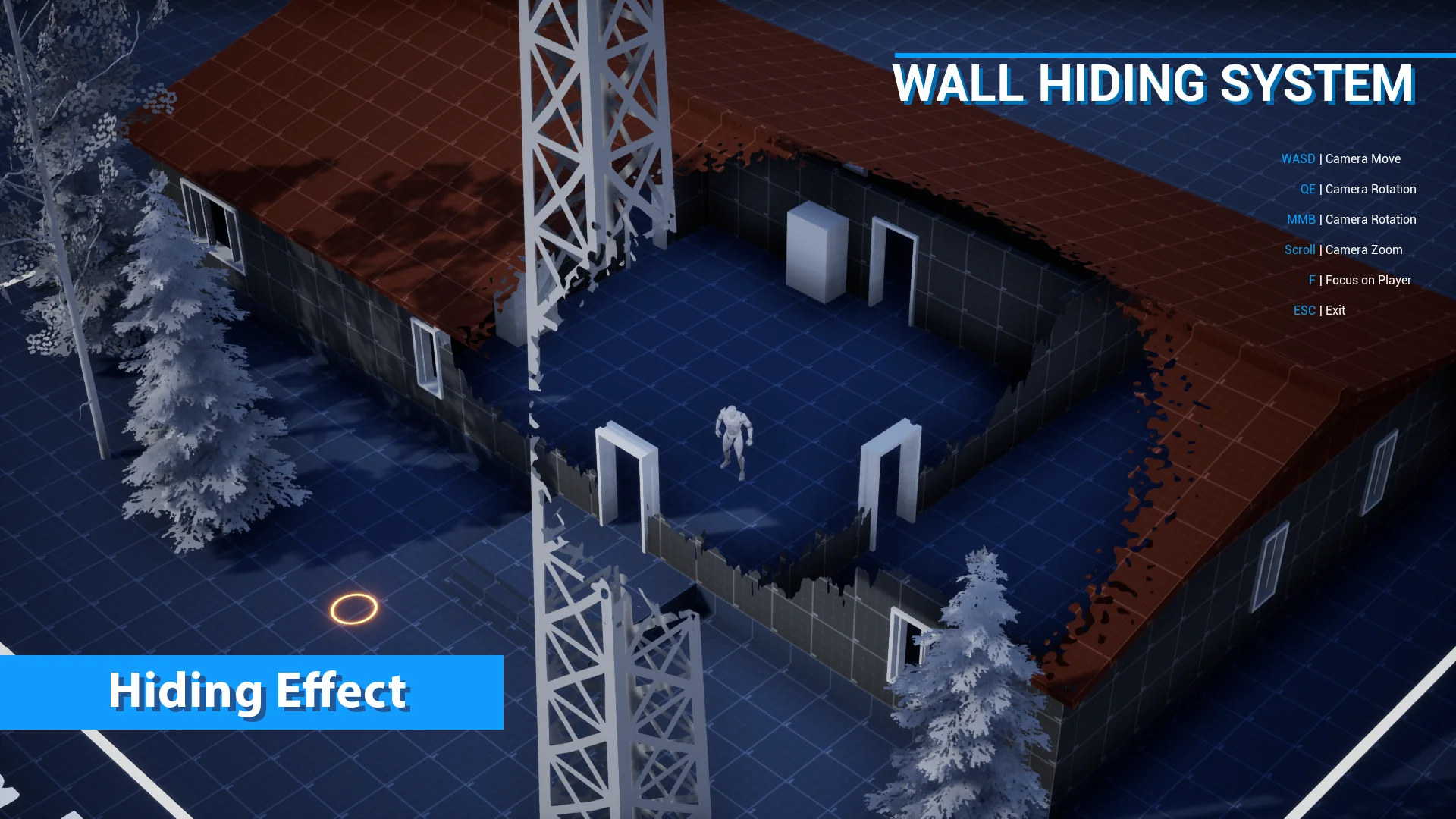
In top-down perspectives, isometric role-playing games, and real-time strategy environments, vertical structures present a continuous visual dilemma. Dense urban landscapes, downtown alleyways, high-walled interior corridors, and dense tree canopies naturally block the player's view of the active character. Traditional visibility workarounds often resort to clumsy actor toggles or complete mesh disappearing acts that compromise the visual weight of an environment. The Wall Hiding System addresses this spatial conflict through targeted, shader-level masking that keeps environments solid until geometry directly obstructs the focal point.
Top-Down Occlusion and the Wall Hiding Mechanics
The primary design intention of the system is rooted in precision. Rather than culling an entire structural mesh when an obstruction occurs, the system focuses strictly on hiding the specific portions of walls behind which the player character is currently standing. This localized approach preserves the composition of the surrounding architectural layout, letting buildings, downtown storefronts, and perimeter barriers retain their framing while granting the camera an unobstructed line of sight.
Because the mechanics operate entirely within shaders rather than heavy continuous geometry manipulation, the visual transition avoids jarring pops. The technique relies on mathematical volume definitions calculated at the pixel and vertex shading stage, which evaluates where geometry intersects the conceptual line between the overhead camera and the focal entity. That leaves an immediate, localized cut or fade that isolates the occlusion zone without degrading the rest of the visible world.
Shader Integration and Blueprint Target Passing
Under the hood, the system splits its logic cleanly between material graphs and engine scripting. The visual masking effects are driven by a collection of dedicated Material Functions. To implement the masking behavior on an environmental asset, the appropriate Material Function simply feeds directly into the Opacity Mask channel of the target material setup.
Communication between the scene and the material network is handled through Blueprints. The Blueprint layer carries a very lightweight responsibility: it monitors and defines world coordinates for the zones that need to trigger transparency. By feeding the coordinates of the player character into the material parameter network, the shader knows the exact world-space center where the mask should activate.
This decoupling makes extending the logic straightforward:
Support for multiple targets allows developers to feed several distinct world coordinates into the system simultaneously, ensuring that squads in an RTS or companion party members in an RPG all maintain their own clear visual openings.
Arbitrary camera placements and full mesh rotation are natively accommodated, meaning the mathematical masking functions hold up whether a camera is locked completely top-down, tilted at an isometric pitch, or dynamically orbiting during gameplay.
Shadow Casting, Decals, and Mesh Flexibility
A frequent casualty of standard object-hiding setups is scene lighting. When standard meshes are hidden or made transparent through simple visibility toggles, their cast shadows often vanish with them. This creates jarring flashes across the ground and strips away the grounding contact shadows that tell the player where structures stand relative to the terrain.
With this setup, hidden objects can still cast shadows even while the camera sees straight through them. The Opacity Mask inputs and underlying shader logic allow shadow-depth passes to remain intact, projecting accurate silhouettes onto floors and neighboring props while the player navigates behind obstructed surfaces. Directional sunlight, streetlamps, and ambient occlusion maintain visual consistency across urban street corners and tight architectural spaces.
Surface detailing also remains protected. The system functions alongside decals, allowing grime, painted road markings, blood spatters, and urban textures to adhere to walls and floors without breaking projection or causing rendering artifacts when the masking is actively engaged. Regardless of whether a wall is aligned strictly to world axes or rotated at odd angles across an uneven downtown grid, the coordinate evaluation executes uniformly across the mesh surface.
Combining Hiding Functions with Vegetation and Outlines
Different materials and mesh types demand different masking profiles. The package provides seven customizable material hiding functions designed to handle specific structural needs, including vertical walls, overhead roofs, layered vegetation, and generic clutter props. A solid brick wall requires a different visual cut than a complex organic canopy, and having dedicated functions allows artists to tweak how the transparency pattern bites into the silhouette of each asset type.
For outdoor scenes and rural boundaries, the system allows the combining of hiding functions with existing vegetation masks. Foliage cards, leafy tree branches, and dense bushes can apply cutout logic that respects the organic alpha maps already built into their foliage master materials. This prevents broad geometric holes from punching through trees in an artificial way, allowing nature assets to clear space around the character while preserving leaf-edge definitions.
To further reinforce character presence in cluttered combat or exploration scenes, the toolkit includes a Post Process character outlining material. When the character passes into zones where geometry masking is active, this post-process layer traces the silhouette of the character model. Even if dense foreground props, hanging banners, or roof edges partially obscure the immediate view, the character outline cuts cleanly through the visual noise, ensuring immediate gameplay readability.
Practical Scene Integration in Top-Down Productions
Employing this workflow within an active production pipeline comes down to standardizing master materials across the asset library. Because the solution lives inside Material Functions, technical artists can embed the masking node within the primary master shaders used for architecture, city props, and foliage. Once embedded, setting an asset to react to occlusion requires minimal per-instance overhead.
In high-density environments like downtown districts, multi-room interiors, and cluttered RTS battlegrounds, the system eliminates the need to slice buildings into separate, trigger-dependent visibility sections. Walls stay standing, roofs remain overhead, dynamic shadows keep the scene anchored, and the camera maintains clear sightlines on the action through automated shader coordinates.
 Gameplay Features
 Gameplay Features
 Gameplay Features