"c14ff6bd758dadb1"{"id":"24720","slug":"modular-staircase-blueprint","title":"Modular Staircase Blueprint","category":"Gameplay Features","engine":"4.26+,5.0+","assetVersion":"Engine version: 4.26+,5.0+","engineVersion":"","tag":"Gameplay Features","accent":"blue","visual":"city","summary":"This blueprint helps place stairs in a scene without treating every setup the same way. It exposes a wide range of variables, updates as you scale it, and includes a separate tool for checking asset size against its pivot and bounds. It fits naturally into...","platform":"Unreal Engine","publishedAt":"2026-04-16T15:46:19.000Z","updatedAt":"2026-04-20T06:12:39.000Z","sourceNotes":[],"fileContents":[],"compatibility":["Unreal Engine","Engine version: 4.26+,5.0+"],"featuredImage":{"alt":"Modular Staircase Blueprint","src":"https://3dcghub.com/wp-content/uploads/2026/04/253cf5903660_d8a8b49c-75fc-44c8-bc57-79a7ab1fc79b.webp"},"hasDownloadLink":true,"downloads":1,"terms":[{"taxonomy":"category","slug":"gameplay-features","name":"Gameplay Features"},{"taxonomy":"post_tag","slug":"environment","name":"Environment"},{"taxonomy":"post_tag","slug":"materials","name":"Materials"},{"taxonomy":"post_tag","slug":"tools","name":"Tools"}],"galleryImages":[{"src":"https://3dcghub.com/wp-content/uploads/2026/04/bdba59cccf82_76047dab-7a2c-4228-938a-b2e0dccbe9ff.webp","alt":"Modular Staircase Blueprint"},{"src":"https://3dcghub.com/wp-content/uploads/2026/04/c7120e187101_1c6f7b58-d577-45ad-bad8-4c11b9411764.webp","alt":"Modular Staircase Blueprint"},{"src":"https://3dcghub.com/wp-content/uploads/2026/04/306e19dc9b12_e7882ca8-2128-4b40-9bb9-6a8dd5aa9edf.webp","alt":"Modular Staircase Blueprint"},{"src":"https://3dcghub.com/wp-content/uploads/2026/04/aa3590128ef9_b3520f36-5083-4f02-b9da-3f2528bf6dbe.webp","alt":"Modular Staircase Blueprint"},{"src":"https://3dcghub.com/wp-content/uploads/2026/04/4b36ad5168e6_d345614a-4d1e-406d-8bcc-e4d4be943836.webp","alt":"Modular Staircase Blueprint"},{"src":"https://3dcghub.com/wp-content/uploads/2026/04/6e0fdfb45b6f_4eb958c2-4623-4902-9c83-81a82c58a08d.webp","alt":"Modular Staircase Blueprint"},{"src":"https://3dcghub.com/wp-content/uploads/2026/04/3448e460297e_f12b40f7-4f12-4d39-a53e-3c98556bc321.webp","alt":"Modular Staircase Blueprint"},{"src":"https://3dcghub.com/wp-content/uploads/2026/04/a6cd2635cc63_446ab937-537a-4927-97d8-f6fb5e95035f.webp","alt":"Modular Staircase Blueprint"},{"src":"https://3dcghub.com/wp-content/uploads/2026/04/424857c1091f_ad1f373d-f08d-463b-8e4c-a5d0c1208731.webp","alt":"Modular Staircase Blueprint"}],"accessPanel":{"kind":"resource","title":"Access this resource","eyebrow":"Free Download","message":"Log in or create a free account to start your download.","fileName":"Modular Staircase Blueprint.7z","safetyNote":"All resources are 100% manually reviewed to eliminate all risks.","actionLabel":"Download Free","resourceType":"Resource archive"},"contentHtml":"\u003ch2\u003eStairs that adapt as the scene changes\u003c/h2\u003e\n\u003cp\u003eThis blueprint is set up to make stair placement easier in scenes where one fixed solution will not work for every project. Instead of locking stairs to a single size or layout, it lets the creator adjust the measurements of the assets being used and then scale the blueprint itself to see the result. As the scale changes, the setup updates automatically, calculating the number, sizes, and locations of the parts based on the options that have been chosen.\u003c/p\u003e\n\u003cp\u003eThat behavior makes it a practical fit for scene assembly work where the stair footprint may need to change to match a room, a floor-to-floor connection, or a custom set of assets. The focus is not on forcing a single staircase shape into every level. It is on exposing enough control so the staircase can be tuned to the needs of the scene.\u003c/p\u003e \u003ch2\u003eControls exposed for production use\u003c/h2\u003e\n\u003cp\u003eOne of the strongest parts of the setup is how much can be adjusted directly. Each piece can be enabled or disabled, which gives the creator control over what appears in the final arrangement. Floor height can also be controlled, and it is not tied to the height of the stair geometry itself. That means the stair layout can scale to match the scene without the floor setting being limited by one fixed geometry height.\u003c/p\u003e\n\u003cp\u003eThere are also controls for individual materials, draw distances, railing offsets, and pillar placement. The railing offsets can pull the railings away from the edges, which gives extra room for fitting the stair set into different spaces. Pillar controls work independently in the X and Y directions, giving more room to adjust the structural look of the stairs without reshaping the entire setup.\u003c/p\u003e\n\u003cp\u003eMaterial updates are part of the exposed options as well, so the visual side of the stair set can be adjusted alongside the layout. Rather than treating the staircase as a static object, the blueprint behaves more like a configurable scene-building tool with several layers of control available at once.\u003c/p\u003e \u003ch2\u003eTwo blueprints included for different tasks\u003c/h2\u003e\n\u003cp\u003eThe pack includes two blueprints. One handles the stairs themselves. The other is an asset information tool made to help judge the size of an asset based on its bounds relative to the pivot point.\u003c/p\u003e\n\u003cp\u003eThat second blueprint is especially useful when the measurements of custom assets are not already known. Instead of repeatedly adjusting values inside the staircase blueprint while trying to estimate size, the information tool can be used to find the measurements more quickly. In practice, that helps cut down on trial-and-error when matching custom parts to the stair system.\u003c/p\u003e\n\u003cp\u003eTogether, the two blueprints support a workflow where the creator can inspect an asset first and then feed the right measurements into the staircase setup. That keeps the staircase blueprint focused on layout and scaling, while the information tool handles measurement checking.\u003c/p\u003e \u003ch2\u003eWhere it fits in a scene-building workflow\u003c/h2\u003e\n\u003cp\u003eThis blueprint fits best in projects where stairs need to adapt to different layouts rather than stay tied to a single modular kit arrangement. The described behavior makes it useful when a scene needs stairs that can be resized, reconfigured, or matched to user-selected assets. Because the setup automatically recalculates sizes and locations as it is scaled, it can save time when a scene calls for a different stair height or proportion than the one originally built.\u003c/p\u003e\n\u003cp\u003eIt also suits workflows where visual variation matters. The ability to swap in custom assets, control materials, move railings away from edges, and adjust pillar positions gives the staircase more room to match a specific environment. Those controls make it easier to keep the stair assembly consistent with the rest of the scene instead of treating it as a separate fixed prop.\u003c/p\u003e\n\u003cp\u003eThe asset information blueprint adds another layer to that workflow by making asset sizing easier to judge. When the pivot point and bounds matter for placement, having a tool that measures those values directly can make setup faster and more predictable. That is useful whenever the stairs need to respond to assets that were not built specifically for the same staircase system.\u003c/p\u003e \u003ch2\u003eA configurable stair setup rather than a fixed prop\u003c/h2\u003e\n\u003cp\u003eThis pack is less about dropping in a single staircase model and more about giving control over how stairs are assembled in a scene. The exposed options cover the major parts that usually need adjustment: the stairs themselves, the floor height, the materials, the draw distance, the railing placement, and the pillar directions. Because the blueprint updates as it is scaled, the layout can be explored interactively instead of being rebuilt by hand each time the size changes.\u003c/p\u003e\n\u003cp\u003eThat makes it a practical tool for teams that need stair setups to adapt across different environments. It can support quick testing, custom asset integration, and layout changes without turning the staircase into a manual rebuild every time the scene changes. For projects that need stair placement to remain flexible, the strongest takeaway is simple: the blueprint is built to calculate, scale, and reorganize its parts around the measurements and options you give it.\u003c/p\u003e\n\n\u003ch2\u003eExplore Similar Assets\u003c/h2\u003e\n\u003cul\u003e\n\u003cli\u003e\u003ca href=\"https://3dcghub.com/nature-package-forest-environment/\" title=\"Nature Package – Forest Environment\"\u003eNature Package – Forest Environment\u003c/a\u003e\u003c/li\u003e\n\u003cli\u003e\u003ca href=\"https://3dcghub.com/forest-environment-dynamic-nature/\" title=\"Forest Environment – Dynamic Nature\"\u003eForest Environment – Dynamic Nature\u003c/a\u003e\u003c/li\u003e\n\u003cli\u003e\u003ca href=\"https://3dcghub.com/underwater-sunken-ship-environment/\" title=\"Underwater Sunken Ship Environment\"\u003eUnderwater Sunken Ship Environment\u003c/a\u003e\u003c/li\u003e\n\u003cli\u003e\u003ca href=\"https://3dcghub.com/the-carnival-environment/\" title=\"The Carnival Environment\"\u003eThe Carnival Environment\u003c/a\u003e\u003c/li\u003e\n\u003cli\u003e\u003ca href=\"https://3dcghub.com/pizza-bar-environment-by-gamertose/\" title=\"Pizza Bar Environment by Gamertose\"\u003ePizza Bar Environment by Gamertose\u003c/a\u003e\u003c/li\u003e\n\u003c/ul\u003e","contentTextLength":5398,"navigation":{"current":2043,"total":3719,"previous":{"id":"24632","slug":"auto-rig-pro-quick-rig","title":"Auto-Rig Pro: Quick Rig","category":"Blender Add-ons \u0026 Plugins","platform":"Blender","updatedAt":"2026-04-20T06:12:40.000Z"},"next":{"id":"24703","slug":"sakuga-toon-shader-cycles-eevee","title":"Sakuga Toon Shader Cycles \u0026 Eevee","category":"Blender Add-ons \u0026 Plugins","platform":"Blender","updatedAt":"2026-04-20T06:12:39.000Z"}},"relatedResources":[{"id":"15092","slug":"tile-based-minimap","title":"Tile Based Minimap","category":"Gameplay Features","engine":"5.3 - 5.5","assetVersion":"Asset Version: 1.2.2 - 2.1.1","engineVersion":"Engine Version: 5.3 - 5.5","tag":"Gameplay Features","accent":"blue","visual":"mech","summary":"The Tile Based Minimap system provides a robust solution for creating tiled in-game maps using pre-rendered level images. It features GPS-style routing, multi-grid support, and full Blueprint extensibility.","platform":"Unreal Engine","publishedAt":"2026-03-12T07:51:23.000Z","updatedAt":"2026-10-08T12:57:55.645Z","sourceNotes":[],"fileContents":[],"compatibility":["Unreal Engine","Asset Version: 1.2.2 - 2.1.1","Engine Version: 5.3 - 5.5"],"featuredImage":{"alt":"Tile Based Minimap","src":"https://3dcghub.com/wp-content/uploads/2026/03/768cc7d5-0ca5-439b-b02a-f4807a2c39bd.webp"},"hasDownloadLink":true,"downloads":4},{"id":"28521","slug":"balloons","title":"Balloons","category":"Gameplay Features","engine":"5.2+","assetVersion":"Engine version: 5.2+","engineVersion":"","tag":"Gameplay Features","accent":"blue","visual":"character","summary":"Balloons focuses on scene-ready balloon behavior rather than a single static prop. It includes blueprints for precise placement, anchor-tied bunches, and large loose balloon spawns, with control over speed, helium, materials, meshes, strings, and spawn amount.","platform":"Unreal Engine","publishedAt":"2026-05-16T07:52:05.000Z","updatedAt":"2026-05-16T07:52:06.000Z","sourceNotes":[],"fileContents":[],"compatibility":["Unreal Engine","Engine version: 5.2+"],"featuredImage":{"alt":"Balloons","src":"https://3dcghub.com/wp-content/uploads/2026/05/89ab9d49611e_158efac7-d2f5-4a55-b264-f4c0f813133d.webp"},"hasDownloadLink":true,"downloads":0},{"id":"27307","slug":"alchemist-starbase-rover","title":"Alchemist Starbase: Rover","category":"Gameplay Features","engine":"5.1+","assetVersion":"Engine version: 5.1+","engineVersion":"","tag":"Gameplay Features","accent":"blue","visual":"animation","summary":"Alchemist Starbase: Rover brings a sharp sci-fi vehicle into play for alien terrain, hidden-treasure hunts, and frontier travel. Its PBR and Blueprint tags make it relevant for visually grounded, interactive scenes.","platform":"Unreal Engine","publishedAt":"2026-04-24T04:00:00.000Z","updatedAt":"2026-04-24T04:13:18.000Z","sourceNotes":[],"fileContents":[],"compatibility":["Unreal Engine","Engine version: 5.1+"],"featuredImage":{"alt":"Alchemist Starbase: Rover","src":"https://3dcghub.com/wp-content/uploads/2026/04/054184c5f6a4_83ce63c6-4538-4398-8d28-1eeae1763968.webp"},"hasDownloadLink":true,"downloads":0}]}
Gameplay Features
Modular Staircase Blueprint
This blueprint helps place stairs in a scene without treating every setup the same way. It exposes a wide range of variables, updates as you scale it, and includes a separate tool for checking asset size against its pivot and bounds. It fits naturally into...
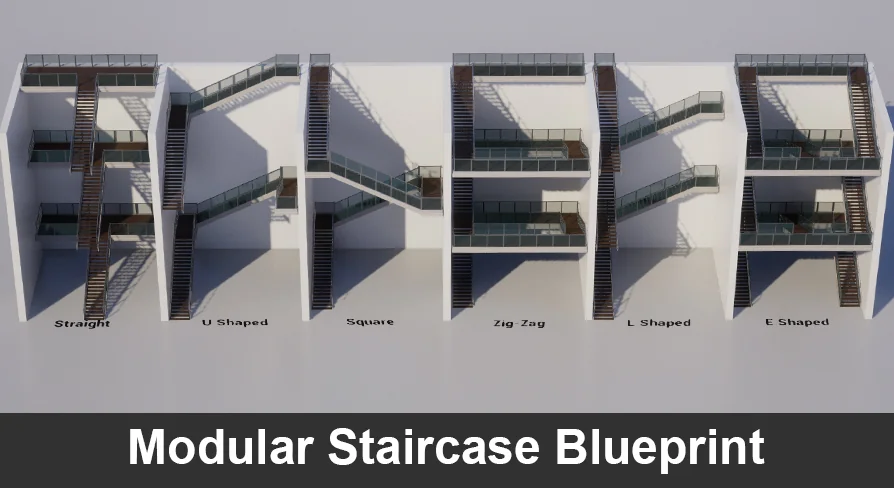
This blueprint is set up to make stair placement easier in scenes where one fixed solution will not work for every project. Instead of locking stairs to a single size or layout, it lets the creator adjust the measurements of the assets being used and then scale the blueprint itself to see the result. As the scale changes, the setup updates automatically, calculating the number, sizes, and locations of the parts based on the options that have been chosen.
That behavior makes it a practical fit for scene assembly work where the stair footprint may need to change to match a room, a floor-to-floor connection, or a custom set of assets. The focus is not on forcing a single staircase shape into every level. It is on exposing enough control so the staircase can be tuned to the needs of the scene.
Controls exposed for production use
One of the strongest parts of the setup is how much can be adjusted directly. Each piece can be enabled or disabled, which gives the creator control over what appears in the final arrangement. Floor height can also be controlled, and it is not tied to the height of the stair geometry itself. That means the stair layout can scale to match the scene without the floor setting being limited by one fixed geometry height.
There are also controls for individual materials, draw distances, railing offsets, and pillar placement. The railing offsets can pull the railings away from the edges, which gives extra room for fitting the stair set into different spaces. Pillar controls work independently in the X and Y directions, giving more room to adjust the structural look of the stairs without reshaping the entire setup.
Material updates are part of the exposed options as well, so the visual side of the stair set can be adjusted alongside the layout. Rather than treating the staircase as a static object, the blueprint behaves more like a configurable scene-building tool with several layers of control available at once.
Two blueprints included for different tasks
The pack includes two blueprints. One handles the stairs themselves. The other is an asset information tool made to help judge the size of an asset based on its bounds relative to the pivot point.
That second blueprint is especially useful when the measurements of custom assets are not already known. Instead of repeatedly adjusting values inside the staircase blueprint while trying to estimate size, the information tool can be used to find the measurements more quickly. In practice, that helps cut down on trial-and-error when matching custom parts to the stair system.
Together, the two blueprints support a workflow where the creator can inspect an asset first and then feed the right measurements into the staircase setup. That keeps the staircase blueprint focused on layout and scaling, while the information tool handles measurement checking.
Where it fits in a scene-building workflow
This blueprint fits best in projects where stairs need to adapt to different layouts rather than stay tied to a single modular kit arrangement. The described behavior makes it useful when a scene needs stairs that can be resized, reconfigured, or matched to user-selected assets. Because the setup automatically recalculates sizes and locations as it is scaled, it can save time when a scene calls for a different stair height or proportion than the one originally built.
It also suits workflows where visual variation matters. The ability to swap in custom assets, control materials, move railings away from edges, and adjust pillar positions gives the staircase more room to match a specific environment. Those controls make it easier to keep the stair assembly consistent with the rest of the scene instead of treating it as a separate fixed prop.
The asset information blueprint adds another layer to that workflow by making asset sizing easier to judge. When the pivot point and bounds matter for placement, having a tool that measures those values directly can make setup faster and more predictable. That is useful whenever the stairs need to respond to assets that were not built specifically for the same staircase system.
A configurable stair setup rather than a fixed prop
This pack is less about dropping in a single staircase model and more about giving control over how stairs are assembled in a scene. The exposed options cover the major parts that usually need adjustment: the stairs themselves, the floor height, the materials, the draw distance, the railing placement, and the pillar directions. Because the blueprint updates as it is scaled, the layout can be explored interactively instead of being rebuilt by hand each time the size changes.
That makes it a practical tool for teams that need stair setups to adapt across different environments. It can support quick testing, custom asset integration, and layout changes without turning the staircase into a manual rebuild every time the scene changes. For projects that need stair placement to remain flexible, the strongest takeaway is simple: the blueprint is built to calculate, scale, and reorganize its parts around the measurements and options you give it.
 Gameplay Features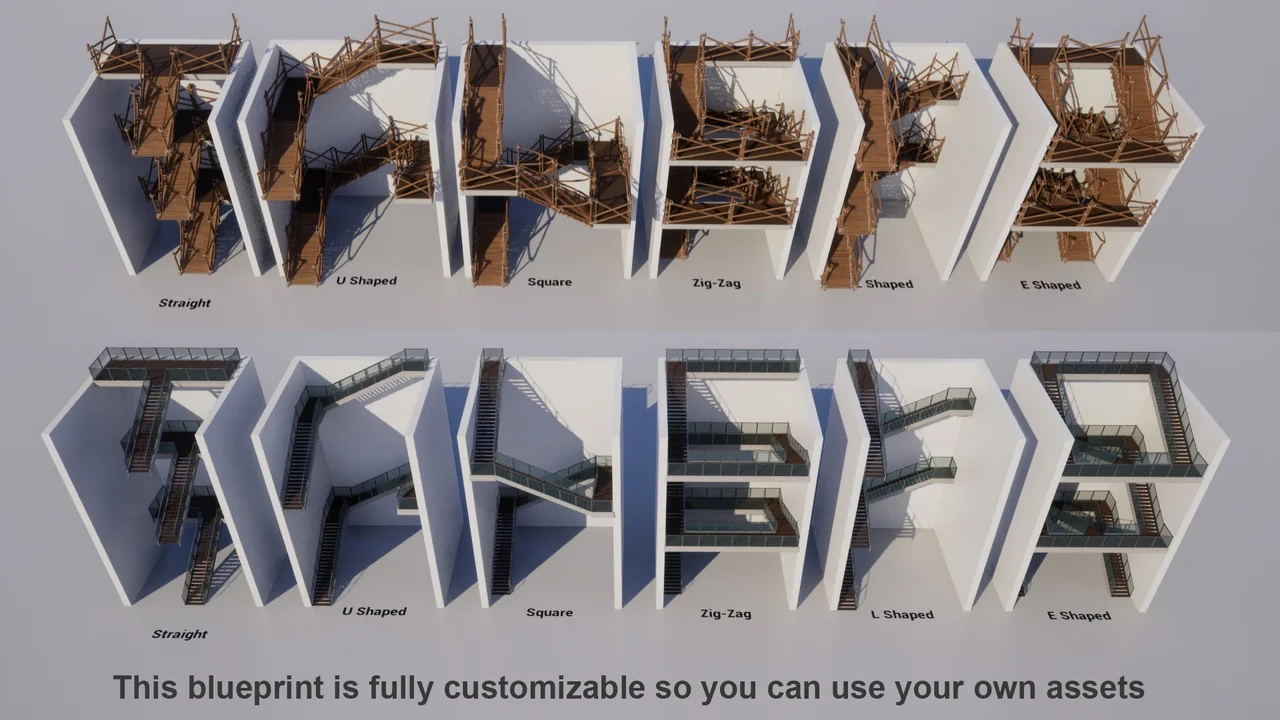
 Gameplay Features
 Gameplay Features
 Gameplay Features