"031373f479d9561a"{"id":"28521","slug":"balloons","title":"Balloons","category":"Gameplay Features","engine":"5.2+","assetVersion":"Engine version: 5.2+","engineVersion":"","tag":"Gameplay Features","accent":"blue","visual":"character","summary":"Balloons focuses on scene-ready balloon behavior rather than a single static prop. It includes blueprints for precise placement, anchor-tied bunches, and large loose balloon spawns, with control over speed, helium, materials, meshes, strings, and spawn amount.","platform":"Unreal Engine","publishedAt":"2026-05-16T07:52:05.000Z","updatedAt":"2026-05-16T07:52:06.000Z","sourceNotes":[],"fileContents":[],"compatibility":["Unreal Engine","Engine version: 5.2+"],"featuredImage":{"alt":"Balloons","src":"https://3dcghub.com/wp-content/uploads/2026/05/89ab9d49611e_158efac7-d2f5-4a55-b264-f4c0f813133d.webp"},"hasDownloadLink":true,"downloads":0,"terms":[{"taxonomy":"category","slug":"gameplay-features","name":"Gameplay Features"},{"taxonomy":"post_tag","slug":"environment","name":"Environment"},{"taxonomy":"post_tag","slug":"prop","name":"Prop"},{"taxonomy":"post_tag","slug":"unreal-engine-5","name":"Unreal Engine 5"}],"galleryImages":[{"src":"https://3dcghub.com/wp-content/uploads/2026/05/6509e2845624_b6154afe-09db-4b1c-9208-e329b4aeaa14.webp","alt":"Balloons"},{"src":"https://3dcghub.com/wp-content/uploads/2026/05/ebd19e9e7bcc_fd3dabd8-c847-4c93-91ff-9d5967ff0208.webp","alt":"Balloons"},{"src":"https://3dcghub.com/wp-content/uploads/2026/05/733df5880dfc_4a5b1512-ad3c-45b6-a448-88ac0d899b92.webp","alt":"Balloons"},{"src":"https://3dcghub.com/wp-content/uploads/2026/05/fb326184d46e_3e9260c1-5d2d-40d5-9406-825f7c687ed9.webp","alt":"Balloons"},{"src":"https://3dcghub.com/wp-content/uploads/2026/05/c1487fc91183_cc01aa68-f54e-4dc6-b56a-9fc692870bb0.webp","alt":"Balloons"},{"src":"https://3dcghub.com/wp-content/uploads/2026/05/480f0020dfb3_936632f6-fc32-4fc8-bbab-6c52d01efd33.webp","alt":"Balloons"},{"src":"https://3dcghub.com/wp-content/uploads/2026/05/c95fe8049bba_9543955c-c998-467e-ad70-a738071497b4.webp","alt":"Balloons"},{"src":"https://3dcghub.com/wp-content/uploads/2026/05/92cc4ff24970_7605e7e2-cbf6-4124-a095-cfca4aee53a0.webp","alt":"Balloons"}],"accessPanel":{"kind":"resource","title":"Access this resource","eyebrow":"Free Download","message":"Log in or create a free account to start your download.","fileName":"Content.7z","safetyNote":"All resources are 100% manually reviewed to eliminate all risks.","actionLabel":"Download Free","resourceType":"Resource archive"},"contentHtml":"\u003cp\u003eParty spaces, birthday setups, kid-focused environments, and carnival scenes often need more than a few floating props placed by hand. \u003cstrong\u003eBalloons\u003c/strong\u003e Approaches that need with a small set of blueprints that can shift from a single decorative balloon to large groups rising through an area. The resource is driven by spawning and behavior, giving artists and developers a way to shape how balloons appear, how many are present, and whether they behave like grounded decorations or free-floating elements moving into the sky.\u003c/p\u003e \u003cp\u003eThe setup is not limited to one fixed arrangement. It provides control over speed, whether the balloons use helium, which materials can be used, which meshes can be used, whether a string is attached, and the amount of balloons spawned. Those controls make the pack flexible in how it can support a scene: a quiet decorative corner can use one carefully placed balloon, while a broader celebratory space can fill with many loose balloons drifting upward at a slower pace.\u003c/p\u003e \u003ch2\u003eSingle Balloon for exact placement\u003c/h2\u003e\n\u003cp\u003eThe most direct use case is the \u003cstrong\u003eSingle Balloon\u003c/strong\u003e Blueprint. It allows a balloon to be placed in the level at a specific location, which makes it useful when the balloon needs to serve a clear visual role in composition. That can mean placing one near a table setting, tying attention to a doorway, marking a stage area, or using it as a small point of motion in an otherwise still environment.\u003c/p\u003e \u003cp\u003eThis blueprint is also the core balloon used in the other blueprints. That matters in practice because the single placed balloon is not a separate visual idea from the larger systems; it is the base behavior that carries through the pack. If a project starts with one balloon for dressing a scene and later grows into bunches or larger ambient spawns, the workflow stays consistent.\u003c/p\u003e \u003cp\u003eBecause the blueprints expose controls for materials and meshes, the single balloon setup can be treated as a precise art-direction tool instead of a one-note prop. A developer can decide whether the balloon uses helium, whether it has a string attached, and how quickly it moves. Even without changing the broader scene, those choices alter the feel of the prop: a string-attached balloon can read as part of a planned decoration, while a helium-driven balloon can feel lighter and more active within the space.\u003c/p\u003e \u003ch2\u003eTethered Balloons and anchored movement\u003c/h2\u003e\n\u003cp\u003eThe \u003cstrong\u003eTethered Balloons\u003c/strong\u003e Blueprint changes the role of the asset from individual placement to grouped decoration. Balloons spawn tethered to an anchor point, remain attached, and move with that anchor. This simulates the familiar setup where a bunch of balloons is tied to the same object.\u003c/p\u003e \u003cp\u003eThat behavior opens up a specific kind of scene-building value. Instead of manually positioning several individual balloons and trying to keep them visually coherent, the bunch acts as a connected unit. If the anchor represents an object in the world, the balloons inherit that relationship and move with it. For artists, that means decorative clusters can stay organized rather than feeling like scattered props. For gameplay or cinematic blocking, it means balloon groups can remain attached to a chosen element instead of drifting out of the intended composition.\u003c/p\u003e \u003cp\u003eThe appeal here is less about raw quantity and more about believable attachment. A bunch of balloons tied together carries a different visual meaning from free-floating balloons. It suggests an event, a gift, a marked object, or a celebratory focal point. With the exposed blueprint controls, that bunch can still be adjusted through speed, helium choice, materials, meshes, string attachment, and spawn amount, so the same anchored setup can move from playful to subdued depending on how it is tuned.\u003c/p\u003e \u003cp\u003eTags associated with the resource point toward decoration-heavy themes such as party, birthday, kid, and carnival. Tethered balloons fit those settings especially well because they are easy to read at a glance as event dressing. In a scene where the environment needs clear festive cues, a bunch tied to one object can communicate the tone quickly without requiring many different prop types.\u003c/p\u003e \u003ch2\u003eLoose Balloons for wide coverage and upward motion\u003c/h2\u003e\n\u003cp\u003eThe broadest visual use comes from \u003cstrong\u003eLoose Balloons\u003c/strong\u003e. This blueprint lets the user choose a spawn location and change the size of the spawn box. Balloons then spawn at random locations within that area and are not tethered. It simulates the case where hundreds of balloons cover an area and fly up slowly into the sky.\u003c/p\u003e \u003cp\u003eThat makes this part of the pack the most atmospheric. Rather than dressing a single object or a small cluster, it can shape the mood of an entire space. A random spawn area introduces variation without needing to place each balloon by hand, which is useful when the goal is density and motion rather than exact arrangement. The emphasis on balloons slowly rising into the sky also gives the blueprint a clear visual direction: it is suited to moments of release, celebration, or environmental spectacle.\u003c/p\u003e \u003cp\u003eFrom a creative standpoint, this setup can serve very different scales. In a compact scene, a smaller spawn box can keep the motion local and contained. In a much larger outdoor shot, a broader spawn area can fill the frame with upward movement. The fact that the balloons are loose rather than tethered is what changes the emotional register. Tethered balloons feel attached to an object or event setup; loose balloons feel like an active moment unfolding in space.\u003c/p\u003e \u003cp\u003eThe controls exposed across the blueprints remain important here. Speed affects how calm or lively the effect appears. Helium determines whether the motion should behave like buoyant balloons rather than a grounded decorative arrangement. Material and mesh choices help keep the field of balloons visually aligned with the rest of the scene. String attachment can also alter the silhouette and readability of each spawned balloon when viewed in motion across a wider area.\u003c/p\u003e \u003ch2\u003eBlueprint controls that shape the look of Balloons\u003c/h2\u003e\n\u003cp\u003eAll blueprints in the pack give control over the same core set of variables:\u003c/p\u003e\n\u003cul\u003e\n\u003cli\u003eSpeed\u003c/li\u003e\n\u003cli\u003eWhether the balloons use helium or not\u003c/li\u003e\n\u003cli\u003eWhich materials can be used\u003c/li\u003e\n\u003cli\u003eWhich meshes can be used\u003c/li\u003e\n\u003cli\u003eWhether a string is attached\u003c/li\u003e\n\u003cli\u003eThe amount of balloons spawned\u003c/li\u003e\n\u003c/ul\u003e \u003cp\u003eThese are straightforward controls, but they cover the choices that most directly change how balloons read on screen. Speed influences energy. Helium determines whether the object behaves like a buoyant balloon or something more restrained. Materials and meshes allow the visual treatment to shift without changing the overall system. String attachment changes both the decorative feel and the silhouette. Spawn amount defines whether this gives a single accent, a bunch tied together, or a much larger environmental field.\u003c/p\u003e \u003cp\u003eThat set of controls also explains why the pack can move across different decorative themes without requiring a different workflow for each one. The tags include star and heart alongside party, birthday, kid, and carnival, which points toward a broad celebratory range. Since the blueprints allow mesh and material selection, the resource is not locked into just one kind of presentation. The same balloon system can be tuned toward different event moods while keeping the same spawning logic and scene behavior.\u003c/p\u003e \u003ch2\u003eUE5.1 string fix and the UE5.0 Cable issue\u003c/h2\u003e\n\u003cp\u003eThere is one practical engine note tied directly to the string visuals. String visuals are fixed in UE5.1. An update also improved physics interactions, which is relevant for a resource where motion and attachment are central to the effect.\u003c/p\u003e \u003cp\u003eThere is also a specific disclaimer for Unreal Engine 5.0: an engine bug causes the string, identified as a Cable, to have rendering issues when spawned via Blueprint. The issue is expected to be fixed in 5.1. For projects where the string is part of the look, that version note is important because it directly affects how the spawned balloon setups appear.\u003c/p\u003e \u003cp\u003eFor teams deciding where this resource fits, the clearest match is any project that needs balloon behavior rather than a purely static decoration. \u003cstrong\u003eSingle Balloon\u003c/strong\u003e Works when placement needs to be exact. \u003cstrong\u003eTethered Balloons\u003c/strong\u003e Works when a bunch should stay tied to one object and move with it. \u003cstrong\u003eLoose Balloons\u003c/strong\u003e Works when the scene needs many balloons rising through space. If a project’s visual language leans into parties, birthdays, kid-focused spaces, carnival dressing, or other celebratory setups, this is where the pack is most at home.\u003c/p\u003e\n\n\u003ch2\u003eRelated Resources Worth Checking\u003c/h2\u003e\n\u003cul\u003e\n\u003cli\u003e\u003ca href=\"https://3dcghub.com/mountain-village-environment-village-modular-village-houses-village-props/\" title=\"Mountain Village Environment (Village, Modular Village Houses, Village Props)\"\u003eMountain Village Environment (Village, Modular Village Houses, Village Props)\u003c/a\u003e\u003c/li\u003e\n\u003cli\u003e\u003ca href=\"https://3dcghub.com/medieval-props-kit/\" title=\"Medieval Props Kit\"\u003eMedieval Props Kit\u003c/a\u003e\u003c/li\u003e\n\u003cli\u003e\u003ca href=\"https://3dcghub.com/medieval-props-pack/\" title=\"Medieval Props Pack\"\u003eMedieval Props Pack\u003c/a\u003e\u003c/li\u003e\n\u003cli\u003e\u003ca href=\"https://3dcghub.com/military-props-pack-high-quality-3d-assets-for-game-dev/\" title=\"Military Props Pack\"\u003eMilitary Props Pack\u003c/a\u003e\u003c/li\u003e\n\u003c/ul\u003e","contentTextLength":8622,"navigation":{"current":1364,"total":3223,"previous":{"id":"28528","slug":"bat-extension","title":".bat Extension","category":"Engine Tools","platform":"Unreal Engine","updatedAt":"2026-05-16T08:03:05.000Z"},"next":{"id":"28510","slug":"atmospheric-modular-underground-car-park-hallways","title":"Atmospheric Modular Underground Car Park \u0026 Hallways","category":"Horror","platform":"Unreal Engine","updatedAt":"2026-05-16T07:51:40.000Z"}},"relatedResources":[{"id":"27307","slug":"alchemist-starbase-rover","title":"Alchemist Starbase: Rover","category":"Gameplay Features","engine":"5.1+","assetVersion":"Engine version: 5.1+","engineVersion":"","tag":"Gameplay Features","accent":"blue","visual":"animation","summary":"Alchemist Starbase: Rover brings a sharp sci-fi vehicle into play for alien terrain, hidden-treasure hunts, and frontier travel. Its PBR and Blueprint tags make it relevant for visually grounded, interactive scenes.","platform":"Unreal Engine","publishedAt":"2026-04-24T04:00:00.000Z","updatedAt":"2026-04-24T04:13:18.000Z","sourceNotes":[],"fileContents":[],"compatibility":["Unreal Engine","Engine version: 5.1+"],"featuredImage":{"alt":"Alchemist Starbase: Rover","src":"https://3dcghub.com/wp-content/uploads/2026/04/054184c5f6a4_83ce63c6-4538-4398-8d28-1eeae1763968.webp"},"hasDownloadLink":true,"downloads":0},{"id":"24720","slug":"modular-staircase-blueprint","title":"Modular Staircase Blueprint","category":"Gameplay Features","engine":"4.26+,5.0+","assetVersion":"Engine version: 4.26+,5.0+","engineVersion":"","tag":"Gameplay Features","accent":"blue","visual":"city","summary":"This blueprint helps place stairs in a scene without treating every setup the same way. It exposes a wide range of variables, updates as you scale it, and includes a separate tool for checking asset size against its pivot and bounds. It fits naturally into...","platform":"Unreal Engine","publishedAt":"2026-04-16T15:46:19.000Z","updatedAt":"2026-04-20T06:12:39.000Z","sourceNotes":[],"fileContents":[],"compatibility":["Unreal Engine","Engine version: 4.26+,5.0+"],"featuredImage":{"alt":"Modular Staircase Blueprint","src":"https://3dcghub.com/wp-content/uploads/2026/04/253cf5903660_d8a8b49c-75fc-44c8-bc57-79a7ab1fc79b.webp"},"hasDownloadLink":true,"downloads":1},{"id":"1001004","slug":"next-gen-destruction-toolkit","title":"Next Gen Destruction Toolkit","category":"Gameplay Features","engine":"5.3+","assetVersion":"","engineVersion":"Engine Version: 5.3+","tag":"Gameplay Features","accent":"blue","visual":"mech","summary":"A UE5 Chaos Destruction framework using data assets, surface-driven VFX and sound, with 15 Blueprints and 14 Niagara systems. Built for Nanite/Lumen.","platform":"Unreal Engine","publishedAt":"2026-08-22T10:54:47.045Z","updatedAt":"2026-08-22T10:54:47.045Z","sourceNotes":[],"fileContents":[],"compatibility":["Unreal Engine","Engine Version: 5.3+"],"featuredImage":{"alt":"Next Gen Destruction Toolkit","src":"/wp-content/uploads/published/2026/08/ae98b282cc03-ed3bc7a2-1533-4764-9cea-bf9d64a790d8-8eb923473f.webp"},"hasDownloadLink":true,"downloads":5}]}
Gameplay Features
Balloons
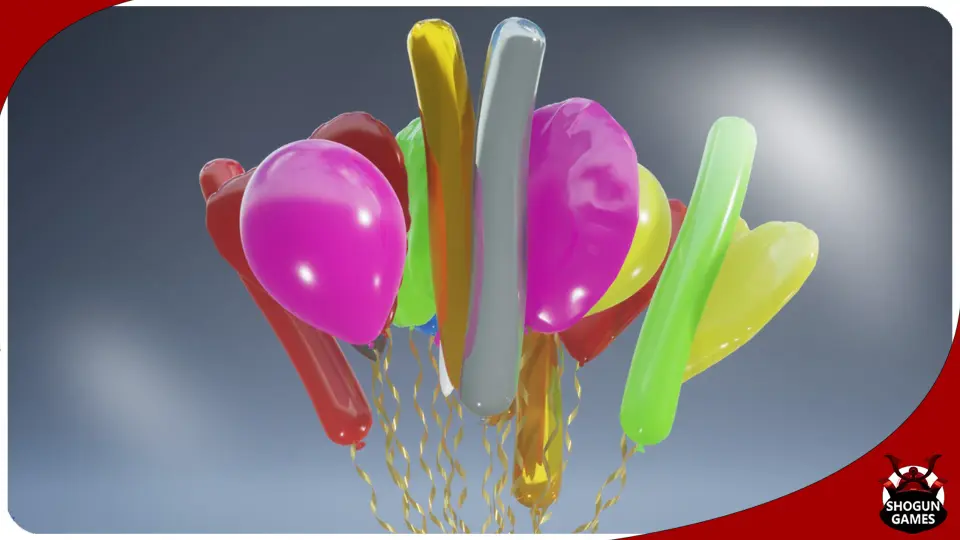
Balloons focuses on scene-ready balloon behavior rather than a single static prop. It includes blueprints for precise placement, anchor-tied bunches, and large loose balloon spawns, with control over speed, helium, materials, meshes, strings, and spawn amount.
Party spaces, birthday setups, kid-focused environments, and carnival scenes often need more than a few floating props placed by hand. Balloons Approaches that need with a small set of blueprints that can shift from a single decorative balloon to large groups rising through an area. The resource is driven by spawning and behavior, giving artists and developers a way to shape how balloons appear, how many are present, and whether they behave like grounded decorations or free-floating elements moving into the sky.
The setup is not limited to one fixed arrangement. It provides control over speed, whether the balloons use helium, which materials can be used, which meshes can be used, whether a string is attached, and the amount of balloons spawned. Those controls make the pack flexible in how it can support a scene: a quiet decorative corner can use one carefully placed balloon, while a broader celebratory space can fill with many loose balloons drifting upward at a slower pace.
Single Balloon for exact placement
The most direct use case is the Single Balloon Blueprint. It allows a balloon to be placed in the level at a specific location, which makes it useful when the balloon needs to serve a clear visual role in composition. That can mean placing one near a table setting, tying attention to a doorway, marking a stage area, or using it as a small point of motion in an otherwise still environment.
This blueprint is also the core balloon used in the other blueprints. That matters in practice because the single placed balloon is not a separate visual idea from the larger systems; it is the base behavior that carries through the pack. If a project starts with one balloon for dressing a scene and later grows into bunches or larger ambient spawns, the workflow stays consistent.
Because the blueprints expose controls for materials and meshes, the single balloon setup can be treated as a precise art-direction tool instead of a one-note prop. A developer can decide whether the balloon uses helium, whether it has a string attached, and how quickly it moves. Even without changing the broader scene, those choices alter the feel of the prop: a string-attached balloon can read as part of a planned decoration, while a helium-driven balloon can feel lighter and more active within the space.
Tethered Balloons and anchored movement
The Tethered Balloons Blueprint changes the role of the asset from individual placement to grouped decoration. Balloons spawn tethered to an anchor point, remain attached, and move with that anchor. This simulates the familiar setup where a bunch of balloons is tied to the same object.
That behavior opens up a specific kind of scene-building value. Instead of manually positioning several individual balloons and trying to keep them visually coherent, the bunch acts as a connected unit. If the anchor represents an object in the world, the balloons inherit that relationship and move with it. For artists, that means decorative clusters can stay organized rather than feeling like scattered props. For gameplay or cinematic blocking, it means balloon groups can remain attached to a chosen element instead of drifting out of the intended composition.
The appeal here is less about raw quantity and more about believable attachment. A bunch of balloons tied together carries a different visual meaning from free-floating balloons. It suggests an event, a gift, a marked object, or a celebratory focal point. With the exposed blueprint controls, that bunch can still be adjusted through speed, helium choice, materials, meshes, string attachment, and spawn amount, so the same anchored setup can move from playful to subdued depending on how it is tuned.
Tags associated with the resource point toward decoration-heavy themes such as party, birthday, kid, and carnival. Tethered balloons fit those settings especially well because they are easy to read at a glance as event dressing. In a scene where the environment needs clear festive cues, a bunch tied to one object can communicate the tone quickly without requiring many different prop types.
Loose Balloons for wide coverage and upward motion
The broadest visual use comes from Loose Balloons. This blueprint lets the user choose a spawn location and change the size of the spawn box. Balloons then spawn at random locations within that area and are not tethered. It simulates the case where hundreds of balloons cover an area and fly up slowly into the sky.
That makes this part of the pack the most atmospheric. Rather than dressing a single object or a small cluster, it can shape the mood of an entire space. A random spawn area introduces variation without needing to place each balloon by hand, which is useful when the goal is density and motion rather than exact arrangement. The emphasis on balloons slowly rising into the sky also gives the blueprint a clear visual direction: it is suited to moments of release, celebration, or environmental spectacle.
From a creative standpoint, this setup can serve very different scales. In a compact scene, a smaller spawn box can keep the motion local and contained. In a much larger outdoor shot, a broader spawn area can fill the frame with upward movement. The fact that the balloons are loose rather than tethered is what changes the emotional register. Tethered balloons feel attached to an object or event setup; loose balloons feel like an active moment unfolding in space.
The controls exposed across the blueprints remain important here. Speed affects how calm or lively the effect appears. Helium determines whether the motion should behave like buoyant balloons rather than a grounded decorative arrangement. Material and mesh choices help keep the field of balloons visually aligned with the rest of the scene. String attachment can also alter the silhouette and readability of each spawned balloon when viewed in motion across a wider area.
Blueprint controls that shape the look of Balloons
All blueprints in the pack give control over the same core set of variables:
Speed
Whether the balloons use helium or not
Which materials can be used
Which meshes can be used
Whether a string is attached
The amount of balloons spawned
These are straightforward controls, but they cover the choices that most directly change how balloons read on screen. Speed influences energy. Helium determines whether the object behaves like a buoyant balloon or something more restrained. Materials and meshes allow the visual treatment to shift without changing the overall system. String attachment changes both the decorative feel and the silhouette. Spawn amount defines whether this gives a single accent, a bunch tied together, or a much larger environmental field.
That set of controls also explains why the pack can move across different decorative themes without requiring a different workflow for each one. The tags include star and heart alongside party, birthday, kid, and carnival, which points toward a broad celebratory range. Since the blueprints allow mesh and material selection, the resource is not locked into just one kind of presentation. The same balloon system can be tuned toward different event moods while keeping the same spawning logic and scene behavior.
UE5.1 string fix and the UE5.0 Cable issue
There is one practical engine note tied directly to the string visuals. String visuals are fixed in UE5.1. An update also improved physics interactions, which is relevant for a resource where motion and attachment are central to the effect.
There is also a specific disclaimer for Unreal Engine 5.0: an engine bug causes the string, identified as a Cable, to have rendering issues when spawned via Blueprint. The issue is expected to be fixed in 5.1. For projects where the string is part of the look, that version note is important because it directly affects how the spawned balloon setups appear.
For teams deciding where this resource fits, the clearest match is any project that needs balloon behavior rather than a purely static decoration. Single Balloon Works when placement needs to be exact. Tethered Balloons Works when a bunch should stay tied to one object and move with it. Loose Balloons Works when the scene needs many balloons rising through space. If a project’s visual language leans into parties, birthdays, kid-focused spaces, carnival dressing, or other celebratory setups, this is where the pack is most at home.
 Gameplay Features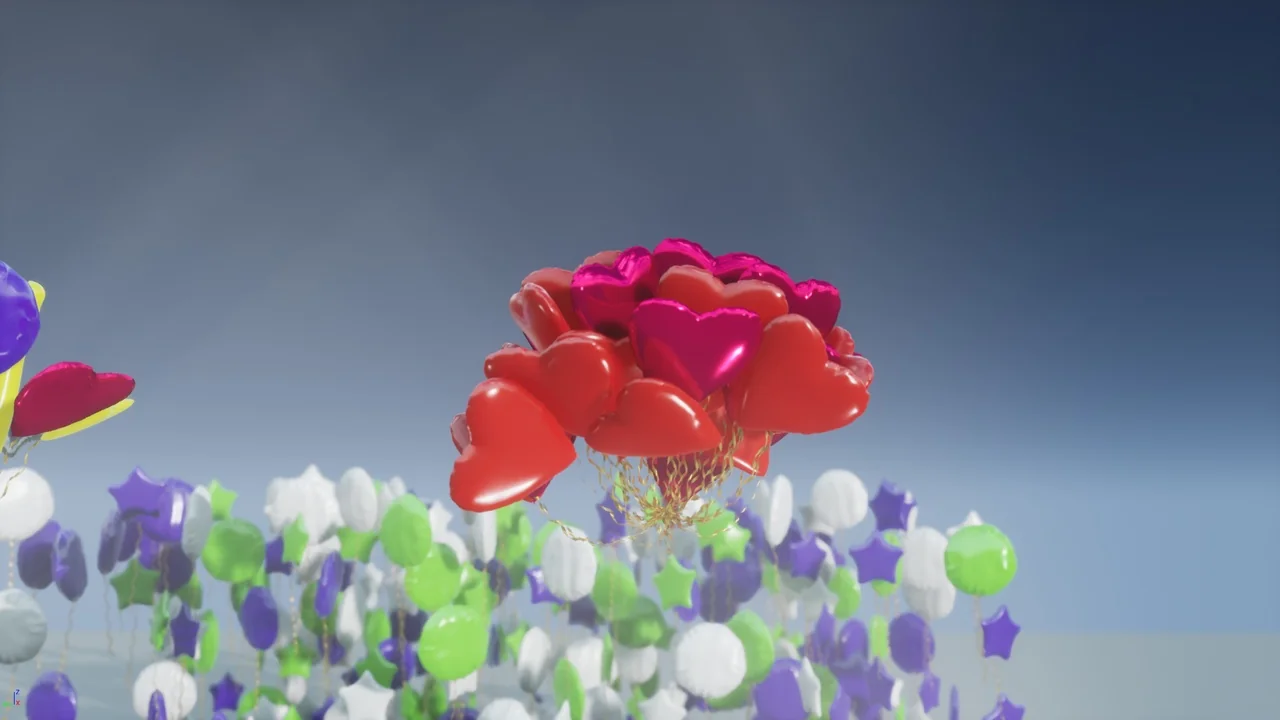
 Gameplay Features
 Gameplay Features
 Gameplay Features