"031373f479d9561a"{"id":"28528","slug":"bat-extension","title":".bat Extension","category":"Engine Tools","engine":"5.5","assetVersion":"Engine version: 5.5","engineVersion":"Asset Version:1.3","tag":"Engine Tools","accent":"blue","visual":"animation","summary":".bat Extension focuses on one specific job inside Unreal Engine: performing actions related to batch files and batch scripts. It adds 8 new functions or nodes, backed by documentation, full source code, and active support across versions from UE4.26 to UE5.7.","platform":"Unreal Engine","publishedAt":"2026-05-16T08:03:03.000Z","updatedAt":"2026-05-16T08:03:05.000Z","sourceNotes":[],"fileContents":[],"compatibility":["Unreal Engine","Engine version: 5.5","Asset Version: 1.3"],"featuredImage":{"alt":".bat Extension","src":"https://3dcghub.com/wp-content/uploads/2026/05/f9ae753e1677_b064eed9-0058-42aa-9b9f-ada3ed238ee0.webp"},"hasDownloadLink":true,"downloads":0,"terms":[{"taxonomy":"category","slug":"engine-tools-tools-and-plugins","name":"Engine Tools"},{"taxonomy":"post_tag","slug":"environment","name":"Environment"},{"taxonomy":"post_tag","slug":"plugins","name":"Plugins"},{"taxonomy":"post_tag","slug":"unreal-engine-5","name":"Unreal Engine 5"}],"galleryImages":[{"src":"https://3dcghub.com/wp-content/uploads/2026/05/4e0399831c3e_69b0dd92-f2a6-49a4-b2cb-60e09756633a.webp","alt":".bat Extension"},{"src":"https://3dcghub.com/wp-content/uploads/2026/05/a4506b1dad6f_0032f13e-d4a0-4eef-bae5-af48cd58144e.webp","alt":".bat Extension"},{"src":"https://3dcghub.com/wp-content/uploads/2026/05/0d5bc69fdac3_004cbdc9-b8bb-4926-8008-fb6babbd1a28.webp","alt":".bat Extension"},{"src":"https://3dcghub.com/wp-content/uploads/2026/05/1fc7207eab29_1cd48828-bc56-4826-a825-ce6889eed89b.webp","alt":".bat Extension"}],"accessPanel":{"kind":"resource","title":"Access this resource","eyebrow":"Free Download","message":"Log in or create a free account to start your download.","fileName":"5.5,v1.3.7z","safetyNote":"All resources are 100% manually reviewed to eliminate all risks.","actionLabel":"Download Free","resourceType":"Resource archive"},"contentHtml":"\u003cp\u003e.bat Extension adds a focused set of tools to Unreal Engine for anyone who needs to perform actions involving batch files and batch scripts. The plugin introduces 8 new functions or nodes, and that number tells you a lot about its identity. This is not presented as a sprawling toolkit with a long list of unrelated systems. It is a compact extension that concentrates on one practical area of project workflow: working with.bat-based processes from inside Unreal Engine.\u003c/p\u003e\n\u003cp\u003eThat narrow scope can be useful in a creative pipeline because it keeps the plugin readable and direct. When a project depends on batch files or batch scripts as part of how work gets done, a small, easy-to-use node set is often more valuable than a larger system with diffuse purpose. Here, the emphasis falls on usability, organized and efficient code, detailed documentation, and full source code, which together make the plugin feel aimed at teams and solo creators who want clarity rather than mystery.\u003c/p\u003e \u003ch2\u003e.bat Extension and batch script actions in Unreal Engine\u003c/h2\u003e\n\u003cp\u003eThe core role of.bat Extension is straightforward: it allows Unreal Engine users to perform actions regarding batch files and batch scripts. That makes the plugin functional rather than decorative. Its place in a project is tied to execution, process handling, file-related tasks, and script-driven behavior, which is reinforced by the associated tags such as Process, File, Running, Bat, Execution, Run, and Executive.\u003c/p\u003e\n\u003cp\u003eIn use, that gives the plugin a distinct identity inside an Unreal workflow. It is not concerned with visual assets, environment dressing, character systems, or effects work. Its value sits in how Unreal can interact with script-based operations. For developers, that can mean a cleaner way to expose those actions through Blueprint-accessible functionality. For technical artists and artists who handle parts of their own setup, the appeal is just as clear: script-related operations can be brought closer to the day-to-day engine workflow instead of feeling separate from it.\u003c/p\u003e\n\u003cp\u003eThe plugin is described as easy to use, and that matters in this context because batch-script functionality can easily become intimidating when it is hidden behind opaque setup. A small set of nodes gives the feature set a more approachable shape. Rather than suggesting endless complexity, the package presents itself as something that can be understood, referenced in documentation, and integrated with intention.\u003c/p\u003e \u003ch2\u003e8 new functions/nodes\u003c/h2\u003e\n\u003cp\u003eThe headline feature is the addition of 8 new functions or nodes. The exact names of those nodes are not listed here, so the important verified point is their count and their role as the primary functional content of the plugin. That number suggests a deliberately scoped toolset: enough to cover a defined area of script-related actions, without presenting itself as a generic all-in-one extension.\u003c/p\u003e\n\u003cp\u003eFor Blueprint users, the mention of nodes is especially relevant. It signals that the plugin is structured in a way that fits Unreal’s visual scripting workflow rather than living entirely as hidden backend code. That makes the package easier to position inside a production process where different team members may interact with tools at different levels of technical comfort.\u003c/p\u003e\n\u003cp\u003eThe documentation is also emphasized alongside those nodes, with a note that all nodes can be viewed there. That pairing matters. New nodes are only truly useful when they are explained clearly, and the plugin makes documentation part of its identity rather than an afterthought. For teams that need consistency, or for solo developers revisiting older project work, well-documented node behavior can be just as important as the node count itself.\u003c/p\u003e\n\u003cp\u003eThere is also a quality signal in how the plugin describes its code: organized and efficient. That does not add extra features on its own, but it does shape expectations about maintainability. When a plugin deals with script-oriented actions, code structure can influence how confidently it is adopted in a live project. Organized code, visible source, and documented nodes create a more transparent package overall.\u003c/p\u003e \u003ch2\u003eFull Source Code, documentation, and active support\u003c/h2\u003e\n\u003cp\u003e.bat Extension includes full source code. That is one of the most concrete production-facing details attached to the plugin. Full source code changes the relationship between a team and a tool. Instead of treating the plugin as a sealed component, developers can inspect how it works, understand its implementation more directly, and keep that knowledge closer to the project’s own technical foundation.\u003c/p\u003e\n\u003cp\u003eFor creative teams, that transparency can matter even when not every user reads code. A technical lead may handle evaluation while artists or designers work only with the resulting nodes. The availability of source code still improves trust because the plugin is not a black box. It is a resource that can be examined, maintained, and understood in context.\u003c/p\u003e\n\u003cp\u003eDocumentation appears repeatedly as part of the package’s appeal, and it is paired with roadmap and changelog material as well. That combination gives the plugin a more active and trackable presence. Documentation explains current use, while roadmap and changelog information help define how the tool is being maintained over time. The presence of active premium quality support reinforces that sense of continuity.\u003c/p\u003e\n\u003cp\u003eSupport is a practical concern for any workflow extension, especially one tied to processes and execution. Script-related tooling tends to sit near sensitive parts of production behavior, so dependable support can be as important as a long feature list. Here, support is not presented as a side note. It is part of the plugin’s core offering alongside code access and documentation.\u003c/p\u003e \u003ch2\u003eUE4.26 to UE5.7 coverage\u003c/h2\u003e\n\u003cp\u003eThe current version noted here is V.1.3, with support spanning UE4.26 through UE5.7. That version range is one of the clearest technical details available, and it gives the plugin a broad engine footprint across both later Unreal Engine 4 projects and Unreal Engine 5 work.\u003c/p\u003e\n\u003cp\u003eThat range affects project fit in a practical way. Teams maintaining older productions while also developing newer ones often need utility plugins that do not lock them to a single generation of engine usage. A script-focused extension with coverage from UE4.26 to UE5.7 can sit in that middle ground where continuity matters. It is not framed as a one-version experiment. It is framed as an actively versioned plugin with a defined span of engine compatibility.\u003c/p\u003e\n\u003cp\u003eThe version note also supports the broader impression of upkeep. Combined with changelog tracking and support, the plugin does not read like a static release left on its own. Even without adding unverified claims about future features or technical direction, the stated versioning is enough to show that the package has an ongoing maintenance context.\u003c/p\u003e \u003ch2\u003eNodes Bundle, commercial use, and project fit\u003c/h2\u003e\n\u003cp\u003e.bat Extension is also included in the Nodes Bundle. That detail places it within a larger family of node-oriented tools, which helps explain its format and its intended audience. Even on its own, the plugin is clearly aimed at Unreal users who appreciate targeted utility nodes that add very specific engine-side capability.\u003c/p\u003e\n\u003cp\u003eThe usage note is also direct. The plugin can be used in both commercial and non-commercial projects, while reselling the plugin is not permitted. That gives teams a clear boundary around where the tool fits: it is meant to be used in production work, but not redistributed as a product of its own. There is also a note that Fab plugins use a per-seat licensing model. That is a practical licensing detail, not a creative feature, yet it still matters when the plugin is being evaluated for team use.\u003c/p\u003e\n\u003cp\u003eSet against the rest of the package, the fit is easy to summarize..bat Extension is set up for Unreal Engine users who need a compact, documented, source-available way to perform actions involving batch files and batch scripts. Its 8 nodes define the feature core, its support and documentation define how approachable it is, and its version coverage from UE4.26 to UE5.7 defines the range of projects it is prepared to serve.\u003c/p\u003e\n\u003cp\u003eFor a workflow that depends on process execution or script-based operations inside Unreal, this plugin is configured to handle that narrow job with a clear node-driven structure.\u003c/p\u003e\n\n\u003ch2\u003eContinue Browsing Similar Packs\u003c/h2\u003e\n\u003cul\u003e\n\u003cli\u003e\u003ca href=\"https://3dcghub.com/ultimate-level-art-tool-ulat-tools-plugin-plugins/\" title=\"Ultimate Level Art Tool – ULAT ( Tools / Plugin / Plugins )\"\u003eUltimate Level Art Tool – ULAT ( Tools / Plugin / Plugins )\u003c/a\u003e\u003c/li\u003e\n\u003c/ul\u003e","contentTextLength":8452,"navigation":{"current":1363,"total":3223,"previous":{"id":"28545","slug":"acf-u-ascent-combat-framework-ultimate-v4-c-complete-action-rpg-creator","title":"(ACF U) Ascent Combat Framework Ultimate V4- C++ Complete Action RPG Creator","category":"Game Mechanics","platform":"Unreal Engine","updatedAt":"2026-05-17T12:50:28.000Z"},"next":{"id":"28521","slug":"balloons","title":"Balloons","category":"Gameplay Features","platform":"Unreal Engine","updatedAt":"2026-05-16T07:52:06.000Z"}},"relatedResources":[{"id":"13699","slug":"async-blueprints-extension","title":"Async Blueprints Extension","category":"Engine Tools","engine":"5.7","assetVersion":"Engine version: 5.7","engineVersion":"Asset Version:1.6.1","tag":"Engine Tools","accent":"blue","visual":"mech","summary":"The Async Blueprints Extension offers a simple, object-oriented approach to handling asynchronous tasks. This tool streamlines threading and variable management within your project.","platform":"Unreal Engine","publishedAt":"2026-03-11T09:43:07.000Z","updatedAt":"2026-04-19T15:46:23.000Z","sourceNotes":[],"fileContents":[],"compatibility":["Unreal Engine","Engine version: 5.7","Asset Version: 1.6.1"],"featuredImage":{"alt":"Async Blueprints Extension","src":"https://3dcghub.com/wp-content/uploads/2026/03/9861d440-1082-434a-b436-8abbdf38ba3f.webp"},"hasDownloadLink":true,"downloads":0},{"id":"14804","slug":"voxel-weaver-advanced-voxel-plugin","title":"Voxel Weaver | Advanced Voxel Plugin","category":"Engine Tools","engine":"5.5","assetVersion":"Engine version: 5.5","engineVersion":"Asset Version:1.0","tag":"Engine Tools","accent":"blue","visual":"luts","summary":"Voxel Weaver | Advanced Voxel Plugin empowers developers to build dynamic, infinite worlds with GPU-accelerated biomes and real-time destruction. This tool includes full multiplayer support and intuitive visual node graphs for seamless world-building.","platform":"Unreal Engine","publishedAt":"2026-03-11T19:26:00.000Z","updatedAt":"2026-04-19T15:45:40.000Z","sourceNotes":[],"fileContents":[],"compatibility":["Unreal Engine","Engine version: 5.5","Asset Version: 1.0"],"featuredImage":{"alt":"Voxel Weaver | Advanced Voxel Plugin","src":"https://3dcghub.com/wp-content/uploads/2026/03/a21890e2-81ea-496b-9ce5-e72eb19dd784.webp"},"hasDownloadLink":true,"downloads":0},{"id":"14738","slug":"ultimate-level-art-tool-ulat-tools-plugin-plugins","title":"Ultimate Level Art Tool - ULAT ( Tools / Plugin / Plugins )","category":"Engine Tools","engine":"5.0 - 5.7","assetVersion":"Engine version: 5.0 - 5.7","engineVersion":"Asset Version:1.3 - 1.3.1","tag":"Engine Tools","accent":"blue","visual":"character","summary":"Optimize your environment design workflow with the Ultimate Level Art Tool. This Unreal Engine plugin offers modular building features, one-click automation, and advanced mesh management.","platform":"Unreal Engine","publishedAt":"2026-03-11T19:16:44.000Z","updatedAt":"2026-05-31T13:00:16.112Z","sourceNotes":[],"fileContents":[],"compatibility":["Unreal Engine","Engine version: 5.0 - 5.7","Asset Version: 1.3 - 1.3.1"],"featuredImage":{"alt":"Ultimate Level Art Tool - ULAT ( Tools / Plugin / Plugins )","src":"https://3dcghub.com/wp-content/uploads/2026/03/06dfb4ec-9574-4b27-8363-21090a467eb4.webp"},"hasDownloadLink":true,"downloads":1}]}
Engine Tools
.bat Extension
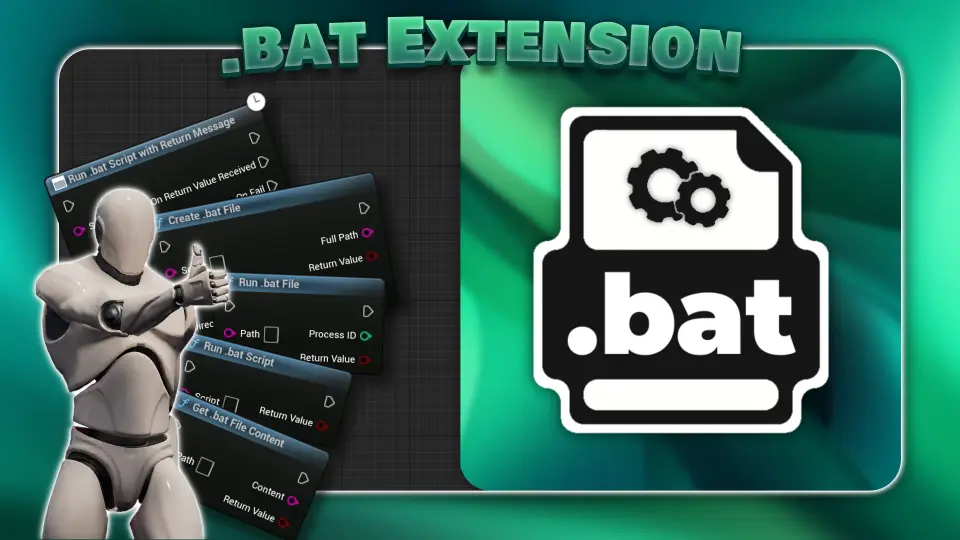
.bat Extension focuses on one specific job inside Unreal Engine: performing actions related to batch files and batch scripts. It adds 8 new functions or nodes, backed by documentation, full source code, and active support across versions from UE4.26 to UE5.7.
.bat Extension adds a focused set of tools to Unreal Engine for anyone who needs to perform actions involving batch files and batch scripts. The plugin introduces 8 new functions or nodes, and that number tells you a lot about its identity. This is not presented as a sprawling toolkit with a long list of unrelated systems. It is a compact extension that concentrates on one practical area of project workflow: working with.bat-based processes from inside Unreal Engine.
That narrow scope can be useful in a creative pipeline because it keeps the plugin readable and direct. When a project depends on batch files or batch scripts as part of how work gets done, a small, easy-to-use node set is often more valuable than a larger system with diffuse purpose. Here, the emphasis falls on usability, organized and efficient code, detailed documentation, and full source code, which together make the plugin feel aimed at teams and solo creators who want clarity rather than mystery.
.bat Extension and batch script actions in Unreal Engine
The core role of.bat Extension is straightforward: it allows Unreal Engine users to perform actions regarding batch files and batch scripts. That makes the plugin functional rather than decorative. Its place in a project is tied to execution, process handling, file-related tasks, and script-driven behavior, which is reinforced by the associated tags such as Process, File, Running, Bat, Execution, Run, and Executive.
In use, that gives the plugin a distinct identity inside an Unreal workflow. It is not concerned with visual assets, environment dressing, character systems, or effects work. Its value sits in how Unreal can interact with script-based operations. For developers, that can mean a cleaner way to expose those actions through Blueprint-accessible functionality. For technical artists and artists who handle parts of their own setup, the appeal is just as clear: script-related operations can be brought closer to the day-to-day engine workflow instead of feeling separate from it.
The plugin is described as easy to use, and that matters in this context because batch-script functionality can easily become intimidating when it is hidden behind opaque setup. A small set of nodes gives the feature set a more approachable shape. Rather than suggesting endless complexity, the package presents itself as something that can be understood, referenced in documentation, and integrated with intention.
8 new functions/nodes
The headline feature is the addition of 8 new functions or nodes. The exact names of those nodes are not listed here, so the important verified point is their count and their role as the primary functional content of the plugin. That number suggests a deliberately scoped toolset: enough to cover a defined area of script-related actions, without presenting itself as a generic all-in-one extension.
For Blueprint users, the mention of nodes is especially relevant. It signals that the plugin is structured in a way that fits Unreal’s visual scripting workflow rather than living entirely as hidden backend code. That makes the package easier to position inside a production process where different team members may interact with tools at different levels of technical comfort.
The documentation is also emphasized alongside those nodes, with a note that all nodes can be viewed there. That pairing matters. New nodes are only truly useful when they are explained clearly, and the plugin makes documentation part of its identity rather than an afterthought. For teams that need consistency, or for solo developers revisiting older project work, well-documented node behavior can be just as important as the node count itself.
There is also a quality signal in how the plugin describes its code: organized and efficient. That does not add extra features on its own, but it does shape expectations about maintainability. When a plugin deals with script-oriented actions, code structure can influence how confidently it is adopted in a live project. Organized code, visible source, and documented nodes create a more transparent package overall.
Full Source Code, documentation, and active support
.bat Extension includes full source code. That is one of the most concrete production-facing details attached to the plugin. Full source code changes the relationship between a team and a tool. Instead of treating the plugin as a sealed component, developers can inspect how it works, understand its implementation more directly, and keep that knowledge closer to the project’s own technical foundation.
For creative teams, that transparency can matter even when not every user reads code. A technical lead may handle evaluation while artists or designers work only with the resulting nodes. The availability of source code still improves trust because the plugin is not a black box. It is a resource that can be examined, maintained, and understood in context.
Documentation appears repeatedly as part of the package’s appeal, and it is paired with roadmap and changelog material as well. That combination gives the plugin a more active and trackable presence. Documentation explains current use, while roadmap and changelog information help define how the tool is being maintained over time. The presence of active premium quality support reinforces that sense of continuity.
Support is a practical concern for any workflow extension, especially one tied to processes and execution. Script-related tooling tends to sit near sensitive parts of production behavior, so dependable support can be as important as a long feature list. Here, support is not presented as a side note. It is part of the plugin’s core offering alongside code access and documentation.
UE4.26 to UE5.7 coverage
The current version noted here is V.1.3, with support spanning UE4.26 through UE5.7. That version range is one of the clearest technical details available, and it gives the plugin a broad engine footprint across both later Unreal Engine 4 projects and Unreal Engine 5 work.
That range affects project fit in a practical way. Teams maintaining older productions while also developing newer ones often need utility plugins that do not lock them to a single generation of engine usage. A script-focused extension with coverage from UE4.26 to UE5.7 can sit in that middle ground where continuity matters. It is not framed as a one-version experiment. It is framed as an actively versioned plugin with a defined span of engine compatibility.
The version note also supports the broader impression of upkeep. Combined with changelog tracking and support, the plugin does not read like a static release left on its own. Even without adding unverified claims about future features or technical direction, the stated versioning is enough to show that the package has an ongoing maintenance context.
Nodes Bundle, commercial use, and project fit
.bat Extension is also included in the Nodes Bundle. That detail places it within a larger family of node-oriented tools, which helps explain its format and its intended audience. Even on its own, the plugin is clearly aimed at Unreal users who appreciate targeted utility nodes that add very specific engine-side capability.
The usage note is also direct. The plugin can be used in both commercial and non-commercial projects, while reselling the plugin is not permitted. That gives teams a clear boundary around where the tool fits: it is meant to be used in production work, but not redistributed as a product of its own. There is also a note that Fab plugins use a per-seat licensing model. That is a practical licensing detail, not a creative feature, yet it still matters when the plugin is being evaluated for team use.
Set against the rest of the package, the fit is easy to summarize..bat Extension is set up for Unreal Engine users who need a compact, documented, source-available way to perform actions involving batch files and batch scripts. Its 8 nodes define the feature core, its support and documentation define how approachable it is, and its version coverage from UE4.26 to UE5.7 defines the range of projects it is prepared to serve.
For a workflow that depends on process execution or script-based operations inside Unreal, this plugin is configured to handle that narrow job with a clear node-driven structure.
 Engine Tools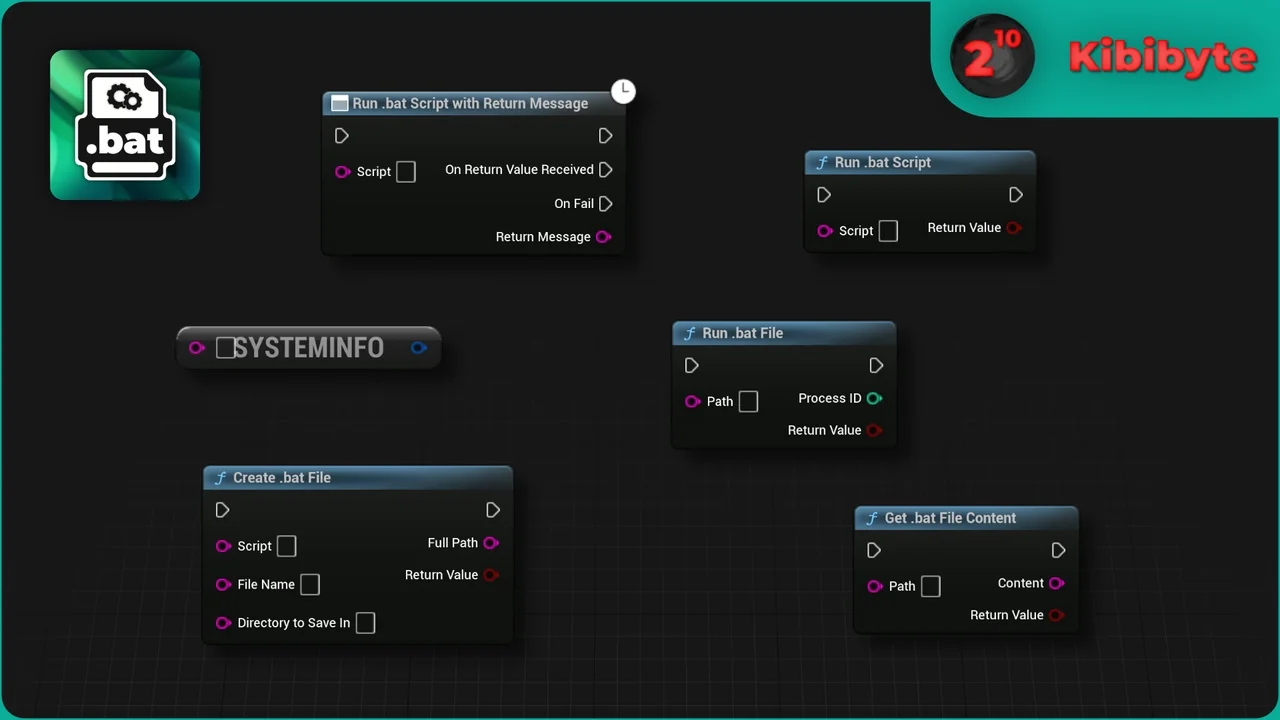
 Engine Tools
 Engine Tools
 Engine Tools