"b00678cacce53329"{"id":"1002827","slug":"point-clouds-morphing-gpu-based-point-cloud-morphing-system","title":"Point Clouds Morphing – GPU based point cloud morphing system","category":"Gameplay Features","engine":"4.15+,5.0+","assetVersion":"","engineVersion":"Engine Version: 4.15+,5.0+","tag":"Gameplay Features","accent":"blue","visual":"mech","summary":"Explore GPU-driven point cloud morphing in Unreal Engine. Bake static meshes directly to cloud textures with custom transitions and zero particle systems.","platform":"Unreal Engine","indexPolicy":"index","publishedAt":"2026-11-20T08:15:36.656Z","updatedAt":"2026-11-20T08:15:36.656Z","sourceNotes":[],"fileContents":[],"compatibility":["Unreal Engine","Engine Version: 4.15+,5.0+"],"featuredImage":{"alt":"Point Clouds Morphing – GPU based point cloud morphing system","src":"/wp-content/uploads/published/2026/11/b531e40b284d-044e96b4-9ff2-40fa-870a-13a39a1049da-3ab54fe8af.webp"},"fileSizeBytes":4037295,"hasDownloadLink":true,"downloads":0,"terms":[{"taxonomy":"category","slug":"gameplay-features","name":"Gameplay Features"}],"galleryImages":[{"src":"/wp-content/uploads/published/2026/11/9af5a0eceead-d44f756d-54cb-4882-9a51-3b0cfa411bff-4834136157.webp","alt":"Point Clouds Morphing – GPU based point cloud morphing system"},{"src":"/wp-content/uploads/published/2026/11/f1c78f500b30-203a8c48-52ed-40f3-8552-7b8865e137eb-09355d645f.webp","alt":"Point Clouds Morphing – GPU based point cloud morphing system"},{"src":"/wp-content/uploads/published/2026/11/77a256bcb253-40ae0d52-94c4-40d8-adf2-92a9cf69bf60-26fc1bed98.webp","alt":"Point Clouds Morphing – GPU based point cloud morphing system"},{"src":"/wp-content/uploads/published/2026/11/dc0c706bf42d-85b06203-fe27-41e7-a702-34cba8a06667-50365c01ea.webp","alt":"Point Clouds Morphing – GPU based point cloud morphing system"},{"src":"/wp-content/uploads/published/2026/11/c3148fda891f-164235ac-e098-4351-a40a-fb130d4225fa-2766d8a4b4.webp","alt":"Point Clouds Morphing – GPU based point cloud morphing system"},{"src":"/wp-content/uploads/published/2026/11/f652bb482f70-4ed65d3b-9c27-4ecd-ba0d-fc4ebda76895-8aea1302d2.webp","alt":"Point Clouds Morphing – GPU based point cloud morphing system"}],"accessPanel":{"kind":"resource","title":"Get this resource","safetyNote":"Resources are manually reviewed before listing to improve quality and reduce obvious risks.","fileName":"Content.7z","resourceType":"Resource archive","versions":[]},"contentHtml":"\u003cp\u003eTransitioning an object or character into an entirely different silhouette typically demands complex skeletal mesh swaps, heavy Niagara or Cascade emitter setups, or bespoke dissolve shaders that introduce significant runtime overhead. Coordinating thousands of separate elements to shift cleanly between disparate volumes without dropping frame rates presents an ongoing hurdle in visual effects pipelines. \u003cem\u003ePoint Clouds Morphing – GPU based point cloud morphing system\u003c/em\u003e Addresses this problem by executing point-cloud transitions directly on the graphics card through an entirely Blueprint-driven framework.\u003c/p\u003e\u003cp\u003ePoints locate directly at the vertex coordinates of target static models, generating a smooth, readable path from one shape to the next. By bypassing the engine's conventional particle systems in favor of pure shader and Blueprint calculations, the system achieves rapid transformation sequences without requiring artists to assemble complex simulation networks or manage multi-emitter lifecycles.\u003c/p\u003e\u003ch2\u003eBaking Static Meshes Directly into Cloud Textures\u003c/h2\u003e\u003cp\u003eAsset workflows often suffer friction when coordinate data must be baked, formatted, or exported through third-party digital content creation suites before it can be used inside an engine. That external round-tripping is eliminated here.\u003c/p\u003e\u003cp\u003eThe package contains an integrated baking system that generates point-cloud textures directly from static meshes inside Unreal Engine. Meshes are processed natively, converting their spatial configurations into data maps that drive point positions at runtime. Meshes with multiple sections are fully supported by the baker, allowing composite models with distinct material segments to be prepared without pre-merging or manual UV alterations. During this conversion phase, the baking utility accommodates vertex coordinates within a bounding space ranging from -32767 to 32767 units. Because no third-party utilities are needed, artists can import a raw model, run the bake process immediately, and evaluate the resulting point cloud within the same project context.\u003c/p\u003e\u003ch2\u003eGPU Execution Architecture and Particle-Free Shading\u003c/h2\u003e\u003cp\u003eManaging individual point transforms on the CPU quickly saturates main-thread performance, especially when shapes shift at rapid intervals during gameplay or cinematic sequences.\u003c/p\u003e\u003cp\u003eThis framework offloads 99% of its mathematical calculations directly to the GPU. Instead of treating every point as a distinct simulated particle entity with associated collision and tick steps, the tool functions via shader-driven vertex manipulation accessible through a standard Blueprint interface. The system supports densities scaling anywhere from 1 to 16,384 points. Running the morph logic entirely within GPU passes prevents frame pacing issues and keeps CPU overhead virtually nonexistent, even when dense clouds transition across wide screen spaces. Two complete demo maps are supplied to demonstrate how the basic and advanced shader graphs behave under real-time rendering conditions.\u003c/p\u003e\u003ch2\u003eControlling Distortion, Waves, and Morphing Parameters\u003c/h2\u003e\u003cp\u003eUniform linear interpolation between two static poses often yields mechanical, unconvincing visual results. Transition effects need adjustable intermediate behaviors to feel deliberate and energetic.\u003c/p\u003e\u003cp\u003eA broad suite of exposed Blueprint parameters gives creators control over motion dynamics and surface styling throughout the morph cycle. Core timing is dictated by the Morph speed and Show time variables, which set how quickly points depart their initial layout and how long they remain settled in their target formation. To break up rigid paths, artists can engage built-in zoom wave parameters alongside position distortion controls, sending shockwaves or undulating displacement patterns rippling through the cloud as points move. Spatial limits are configured via the BoundBox size property, while point density is fine-tuned through the points count parameter. Visual attributes are equally configurable: scale, point size, color with opacity values, and emissive power can all be morphed simultaneously during the geometric shift.\u003c/p\u003e\u003ch2\u003eAdvanced Point Clouds Morphing Features and Platform Support\u003c/h2\u003e\u003cp\u003eDeploying specialized shader tools across varying engine builds and hardware targets can reveal edge cases in clipping and rendering pipelines.\u003c/p\u003e\u003cp\u003eTargeted updates have resolved historical platform-specific quirks, including dedicated fixes for PlayStation 4 rendering bugs and an update resolving viewport clipping behaviors in Unreal Engine 5. Version 1.3 expanded the core shader set by introducing a dedicated Opacity parameter, enabling soft fade-ins and transparency modulation alongside existing transform transitions. Version 1.2 added an advanced branch alongside the basic toolset, incorporating per-cloud particle size transitions. In this advanced version, creators can specify distinct particle sizes across different cloud groups, allowing fine dust-like points and larger glowing motes to coexist within the same shifting visual sequence. A dedicated demo map accompanies this advanced configuration, while the basic system received shader optimizations to streamline performance on modest hardware configurations.\u003c/p\u003e\u003ch2\u003eProduction Roles for Point-Based Silhouette Transitions\u003c/h2\u003e\u003cp\u003eBecause the tool operates entirely through Blueprints and self-contained static mesh baking, it drops cleanly into diverse production pipelines without external plugin requirements.\u003c/p\u003e\u003cp\u003eThe effect adapts directly to sci-fi diagnostic interfaces, holographic data displays, stylized character transformations, and high-tech scanning visuals where physical objects materialize out of suspended point clusters. Creators can experiment with shape transformations using the Win64 executable demo or follow the included mesh baking tutorials to integrate their own asset libraries. The combination of a 16,384-point ceiling, internal texture generation, multi-section mesh compatibility, and GPU-centric evaluation provides an efficient, particle-free route for real-time metamorphic visual effects.\u003c/p\u003e\n\n\u003ch2\u003eContinue Browsing Similar Packs\u003c/h2\u003e\n\u003cul\u003e\n\u003cli\u003e\u003ca href=\"https://3dcghub.com/multiplayer-xp-system/\" rel=\"noopener noreferrer\"\u003eMultiplayer XP System\u003c/a\u003e\u003c/li\u003e\n\u003cli\u003e\u003ca href=\"https://3dcghub.com/path-tracer-toolkit/\" rel=\"noopener noreferrer\"\u003ePath Tracer Toolkit\u003c/a\u003e\u003c/li\u003e\n\u003cli\u003e\u003ca href=\"https://3dcghub.com/hudcallouttitles01/\" rel=\"noopener noreferrer\"\u003eHUDCallOutTitles01\u003c/a\u003e\u003c/li\u003e\n\u003cli\u003e\u003ca href=\"https://3dcghub.com/tile-based-minimap/\" rel=\"noopener noreferrer\"\u003eTile Based Minimap\u003c/a\u003e\u003c/li\u003e\n\u003cli\u003e\u003ca href=\"https://3dcghub.com/daforma-vertex-shader-based-3d-deformation-effectors/\" rel=\"noopener noreferrer\"\u003edaforma - Vertex Shader based 3D Deformation Effectors\u003c/a\u003e\u003c/li\u003e\n\u003c/ul\u003e","contentTextLength":6186,"navigation":{"current":53,"total":4797,"previous":{"id":"1002828","slug":"power-explosions-vfx-pack-color-explosions-dust-and-sand-explosions","title":"Power Explosions VFX Pack // Color Explosions // Dust and Sand explosions","category":"Fire \u0026 Explosions","platform":"Unreal Engine","updatedAt":"2026-11-20T08:17:01.414Z"},"next":{"id":"1002826","slug":"ninja-player","title":"Ninja Player","category":"Variety","platform":"Unreal Engine","updatedAt":"2026-11-20T08:14:46.570Z"}},"relatedResources":[{"id":"11024","slug":"multiplayer-xp-system","title":"Multiplayer XP System","category":"Gameplay Features","engine":"4.26+,5.0+","assetVersion":"Engine version: 4.26+,5.0+","engineVersion":"4.18","tag":"Gameplay Features","accent":"blue","visual":"luts","summary":"A streamlined Blueprint-based system for managing experience points and leveling in single-player or multiplayer projects.","platform":"Unreal Engine","indexPolicy":"noindex","publishedAt":"2026-03-03T16:43:29.000Z","updatedAt":"2026-04-19T15:49:52.000Z","sourceNotes":[],"fileContents":[],"compatibility":["Unreal Engine","Engine version: 4.26+,5.0+"],"featuredImage":{"alt":"Multiplayer XP System","src":"https://3dcghub.com/wp-content/uploads/2026/03/8c714f2d-8796-4591-a01d-e06608c50194.webp"},"fileSizeBytes":10980637,"hasDownloadLink":true,"downloads":0},{"id":"11043","slug":"path-tracer-toolkit","title":"Path Tracer Toolkit","category":"Gameplay Features","engine":"4.27,5.0+","assetVersion":"Engine version: 4.27,5.0+","engineVersion":"4.27","tag":"Gameplay Features","accent":"blue","visual":"city","summary":"The Path Tracer Toolkit provides a comprehensive Blueprint solution for generating paths and borders manually or via runtime point arrays. It includes advanced customization, procedural materials, and performance-optimizing texture baking.","platform":"Unreal Engine","indexPolicy":"noindex","publishedAt":"2026-03-03T16:47:08.000Z","updatedAt":"2026-04-19T15:49:51.000Z","sourceNotes":[],"fileContents":[],"compatibility":["Unreal Engine","Engine version: 4.27,5.0+"],"featuredImage":{"alt":"Path Tracer Toolkit","src":"https://3dcghub.com/wp-content/uploads/2026/03/fd42f630-b95d-4396-bf4a-af676428ed24.webp"},"fileSizeBytes":91559835,"hasDownloadLink":true,"downloads":1},{"id":"10931","slug":"hudcallouttitles01","title":"HUDCallOutTitles01","category":"Gameplay Features","engine":"4.27,5.0+","assetVersion":"Engine version: 4.27,5.0+","engineVersion":"4.27","tag":"Gameplay Features","accent":"blue","visual":"city","summary":"HUDCallOutTitles01 provides a comprehensive collection of 60 animated callout titles designed for ease of use. This pack leverages materials and Niagara particles to deliver high-quality visual data points for your projects.","platform":"Unreal Engine","indexPolicy":"noindex","publishedAt":"2026-03-03T16:33:16.000Z","updatedAt":"2026-04-19T15:49:53.000Z","sourceNotes":[],"fileContents":[],"compatibility":["Unreal Engine","Engine version: 4.27,5.0+"],"featuredImage":{"alt":"HUDCallOutTitles01","src":"https://3dcghub.com/wp-content/uploads/2026/03/dee665b6-3322-4760-9fd7-060348e10303.webp"},"fileSizeBytes":20429905,"hasDownloadLink":true,"downloads":0}]}
Resource screenshots
1 / 6
Join our channel
Follow 3DCGHUB on Telegram for new resource drops, migration updates, and community notices.
Resources are manually reviewed before listing to improve quality and reduce obvious risks.
No account required
Gameplay Features
Point Clouds Morphing – GPU based point cloud morphing system
Explore GPU-driven point cloud morphing in Unreal Engine. Bake static meshes directly to cloud textures with custom transitions and zero particle systems.
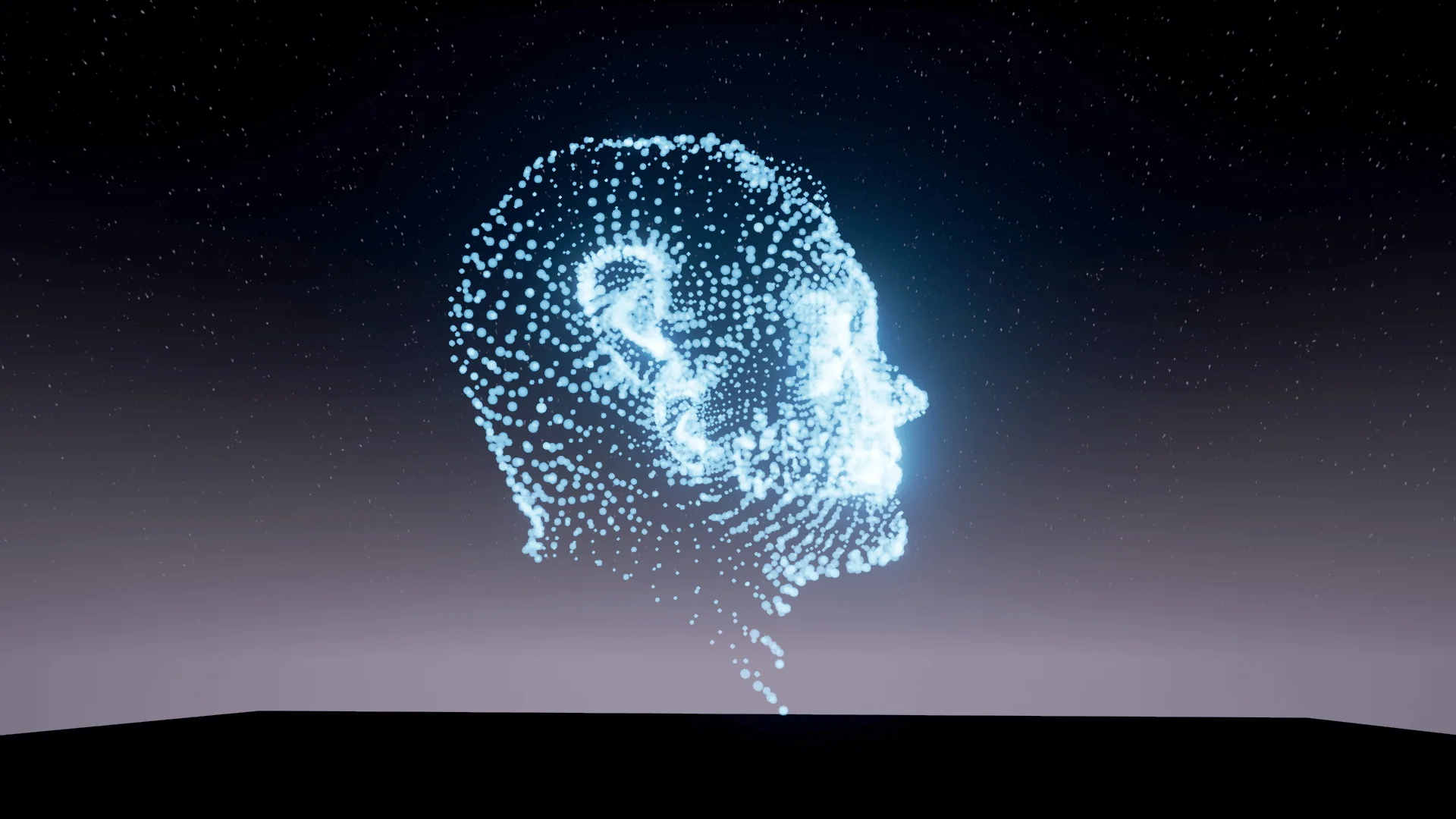
Transitioning an object or character into an entirely different silhouette typically demands complex skeletal mesh swaps, heavy Niagara or Cascade emitter setups, or bespoke dissolve shaders that introduce significant runtime overhead. Coordinating thousands of separate elements to shift cleanly between disparate volumes without dropping frame rates presents an ongoing hurdle in visual effects pipelines. Point Clouds Morphing – GPU based point cloud morphing system Addresses this problem by executing point-cloud transitions directly on the graphics card through an entirely Blueprint-driven framework.
Points locate directly at the vertex coordinates of target static models, generating a smooth, readable path from one shape to the next. By bypassing the engine's conventional particle systems in favor of pure shader and Blueprint calculations, the system achieves rapid transformation sequences without requiring artists to assemble complex simulation networks or manage multi-emitter lifecycles.
Baking Static Meshes Directly into Cloud Textures
Asset workflows often suffer friction when coordinate data must be baked, formatted, or exported through third-party digital content creation suites before it can be used inside an engine. That external round-tripping is eliminated here.
The package contains an integrated baking system that generates point-cloud textures directly from static meshes inside Unreal Engine. Meshes are processed natively, converting their spatial configurations into data maps that drive point positions at runtime. Meshes with multiple sections are fully supported by the baker, allowing composite models with distinct material segments to be prepared without pre-merging or manual UV alterations. During this conversion phase, the baking utility accommodates vertex coordinates within a bounding space ranging from -32767 to 32767 units. Because no third-party utilities are needed, artists can import a raw model, run the bake process immediately, and evaluate the resulting point cloud within the same project context.
GPU Execution Architecture and Particle-Free Shading
Managing individual point transforms on the CPU quickly saturates main-thread performance, especially when shapes shift at rapid intervals during gameplay or cinematic sequences.
This framework offloads 99% of its mathematical calculations directly to the GPU. Instead of treating every point as a distinct simulated particle entity with associated collision and tick steps, the tool functions via shader-driven vertex manipulation accessible through a standard Blueprint interface. The system supports densities scaling anywhere from 1 to 16,384 points. Running the morph logic entirely within GPU passes prevents frame pacing issues and keeps CPU overhead virtually nonexistent, even when dense clouds transition across wide screen spaces. Two complete demo maps are supplied to demonstrate how the basic and advanced shader graphs behave under real-time rendering conditions.
Controlling Distortion, Waves, and Morphing Parameters
Uniform linear interpolation between two static poses often yields mechanical, unconvincing visual results. Transition effects need adjustable intermediate behaviors to feel deliberate and energetic.
A broad suite of exposed Blueprint parameters gives creators control over motion dynamics and surface styling throughout the morph cycle. Core timing is dictated by the Morph speed and Show time variables, which set how quickly points depart their initial layout and how long they remain settled in their target formation. To break up rigid paths, artists can engage built-in zoom wave parameters alongside position distortion controls, sending shockwaves or undulating displacement patterns rippling through the cloud as points move. Spatial limits are configured via the BoundBox size property, while point density is fine-tuned through the points count parameter. Visual attributes are equally configurable: scale, point size, color with opacity values, and emissive power can all be morphed simultaneously during the geometric shift.
Advanced Point Clouds Morphing Features and Platform Support
Deploying specialized shader tools across varying engine builds and hardware targets can reveal edge cases in clipping and rendering pipelines.
Targeted updates have resolved historical platform-specific quirks, including dedicated fixes for PlayStation 4 rendering bugs and an update resolving viewport clipping behaviors in Unreal Engine 5. Version 1.3 expanded the core shader set by introducing a dedicated Opacity parameter, enabling soft fade-ins and transparency modulation alongside existing transform transitions. Version 1.2 added an advanced branch alongside the basic toolset, incorporating per-cloud particle size transitions. In this advanced version, creators can specify distinct particle sizes across different cloud groups, allowing fine dust-like points and larger glowing motes to coexist within the same shifting visual sequence. A dedicated demo map accompanies this advanced configuration, while the basic system received shader optimizations to streamline performance on modest hardware configurations.
Production Roles for Point-Based Silhouette Transitions
Because the tool operates entirely through Blueprints and self-contained static mesh baking, it drops cleanly into diverse production pipelines without external plugin requirements.
The effect adapts directly to sci-fi diagnostic interfaces, holographic data displays, stylized character transformations, and high-tech scanning visuals where physical objects materialize out of suspended point clusters. Creators can experiment with shape transformations using the Win64 executable demo or follow the included mesh baking tutorials to integrate their own asset libraries. The combination of a 16,384-point ceiling, internal texture generation, multi-section mesh compatibility, and GPU-centric evaluation provides an efficient, particle-free route for real-time metamorphic visual effects.
 Gameplay Features
 Gameplay Features
 Gameplay Features