"b00678cacce53329"{"id":"1002826","slug":"ninja-player","title":"Ninja Player","category":"Variety","engine":"4.25+,5.0+","assetVersion":"","engineVersion":"Engine Version: 4.25+,5.0+","tag":"Variety","accent":"blue","visual":"mech","summary":"Examine Ninja Player 1.02, a flipbook processor utilizing velocity-based blending for baked simulation playback across Meshes, UI, and Niagara.","platform":"Unreal Engine","indexPolicy":"index","publishedAt":"2026-11-20T08:14:46.570Z","updatedAt":"2026-11-20T08:14:46.570Z","sourceNotes":[],"fileContents":[],"compatibility":["Unreal Engine","Engine Version: 4.25+,5.0+"],"featuredImage":{"alt":"Ninja Player","src":"/wp-content/uploads/published/2026/11/d9a4fa8ce6e1-07ce50da-ea47-41d0-81c5-f925482f5ae5-5934a9a609.webp"},"fileSizeBytes":80983157,"hasDownloadLink":true,"downloads":0,"terms":[{"taxonomy":"category","slug":"variety-vfx","name":"Variety"}],"galleryImages":[{"src":"/wp-content/uploads/published/2026/11/c71fed5d2eb7-3ff4d7ac-56fa-4408-94e8-f43fe3caeccb-f459aa618f.webp","alt":"Ninja Player"},{"src":"/wp-content/uploads/published/2026/11/32f9f5496efb-0b8e480f-2144-4087-9f66-adcdc598d3c6-5686900064.webp","alt":"Ninja Player"},{"src":"/wp-content/uploads/published/2026/11/9a424d0231ed-82cc4d8f-e664-4c99-b939-930dd05068a9-bd82fb4b28.webp","alt":"Ninja Player"},{"src":"/wp-content/uploads/published/2026/11/e2e22532a11f-83cc119f-6e16-4ecb-bb63-aae7d9647142-be2b6597b4.webp","alt":"Ninja Player"},{"src":"/wp-content/uploads/published/2026/11/b4d6ac1f765e-26ef70ce-3590-4cae-ae00-f778c1cfd4e7-7931a618fb.webp","alt":"Ninja Player"},{"src":"/wp-content/uploads/published/2026/11/35fa8eabe6fe-d41a8638-2b13-4020-bfc7-182363420a4b-164cbd1fd9.webp","alt":"Ninja Player"},{"src":"/wp-content/uploads/published/2026/11/2c1e6dc9c25b-6f0d4824-ab87-4c5b-acc3-ff7b9a66d5fa-067bd33023.webp","alt":"Ninja Player"},{"src":"/wp-content/uploads/published/2026/11/c4ff9588951a-69812417-8682-4deb-8ecd-2c36e73f860f-0ad124e75a.webp","alt":"Ninja Player"},{"src":"/wp-content/uploads/published/2026/11/4c41d6b9f69c-a2d1e69f-d182-4cce-8ad7-bf0389143010-5db35c4555.webp","alt":"Ninja Player"},{"src":"/wp-content/uploads/published/2026/11/edfb4e7079b4-b80ae3e5-1bd3-4eb2-93c2-e2329dec698d-9729890bba.webp","alt":"Ninja Player"}],"accessPanel":{"kind":"resource","title":"Get this resource","safetyNote":"Resources are manually reviewed before listing to improve quality and reduce obvious risks.","fileName":"Ninja Player.7z","resourceType":"Resource archive","versions":[]},"contentHtml":"\u003ch2\u003eCore Ninja Player Components and Architecture\u003c/h2\u003e\n\u003cp\u003eNinja Player 1.02 delivers a specialized set of Material Functions, Niagara Modules, pre-built Materials, and Particle Emitters built to function as a generic flipbook processor. The asset targets the playback of baked simulation data, offering technical solutions for rendering pre-calculated fluid dynamics, smoke, and fire across diverse visual contexts inside Unreal Engine projects. Instead of relying purely on rigid sub-frame stepping, the framework operates by evaluating frame data alongside directional data to drive visual effects across multiple surface types.\u003c/p\u003e\n\u003cp\u003eThe structural layout of the package isolates the underlying logic from raw assets. At its base, the system splits into a compact 6 Mbyte functional core and a secondary 120 Mbyte collection of example content. This separation ensures that the mathematical functions, module logic, and material trees can be migrated into active production pipelines without forcing high-resolution textures or demonstration setups into the target project environment. The core contains only the functions, modules, and base emitter templates necessary to process flipbooks, keeping the footprint minimal when integrated into custom project hierarchies.\u003c/p\u003e\n\u003cp\u003ePre-configured assets inside the system allow developers to immediately preview and deploy playback networks. These pre-built materials and emitters handle standard flipbook inputs without necessitating manual setup from scratch. When standard setups do not meet the exact needs of a project, the isolated Material Functions and Niagara Modules serve as modular nodes that can be spliced directly into proprietary shaders, custom Niagara emitter stacks, and specialized material graphs.\u003c/p\u003e \u003ch2\u003eDisplaying Baked Simulation Data Across Engine Surfaces\u003c/h2\u003e\n\u003cp\u003eA primary function of the processor is mapping baked fluid simulation data across varied rendering targets. Rather than limiting playback to traditional sprite particles, the underlying functions map texture sheets to standard Meshes, User Interface elements, traditional Particles, and Niagara Particle Arrays. This broad rendering scope allows the same simulation output to inform environmental visual effects, HUD-level graphics, and complex multi-instance particle systems.\u003c/p\u003e\n\u003cp\u003eWhen mapping to static or skeletal geometry, the material functions evaluate the mesh texture coordinates to display the baked frames across arbitrary surfaces. This enables effects such as surface fire or smoke blankets to cling directly to structural props or terrain elements without requiring separate real-time fluid solvers. For interface design, the system feeds into Slate and UMG material paths, allowing technical artists to drive animated visual effects directly within the UI layer, such as animated combustion badges, smokey screen borders, or dynamic menu flourishes.\u003c/p\u003e\n\u003cp\u003eWithin particle contexts, the processor handles both single-particle instances and grouped Niagara Particle Arrays. The Niagara Modules are engineered to interpret particle-level attributes, driving flipbook frame coordinates dynamically per particle based on simulation lifetime, system age, or custom scripted parameters. This dual compatibility across Materials and Niagara allows developers to assign baked visual data to solitary point emitters or coordinate it across thousands of simultaneous elements moving through 3D space.\u003c/p\u003e \u003ch2\u003eVelocity-Based Blending in Ninja Player Systems\u003c/h2\u003e\n\u003cp\u003eStandard flipbook playback frequently suffers from visible stepping, strobing, or frame jitter when played at lower frame rates or slowed down for cinematic presentations. Ninja Player addresses this playback limitation through velocity-based frame blending. By reading baked motion vectors or velocity maps encoded alongside the primary visual frames, the system interpolates pixel positions between subsequent animation steps.\u003c/p\u003e\n\u003cp\u003eThis velocity-guided interpolation prevents the sharp popping typically associated with low-frame-count texture sheets. As a frame advances to the next step, the velocity data informs the material or emitter of the vector direction in which visual density is travelling. The processor warps and blends the current frame into the target frame along these vectors, producing continuous, smooth playback even when playback speed is reduced significantly below the capture rate.\u003c/p\u003e\n\u003cp\u003eBeyond smoothing standard playback, this velocity evaluation mechanism allows the system to generate flow effects. The motion vectors can distort underlying texture layers, disperse color values, or displace surface highlights along the simulated currents of the original fluid. This makes it possible to maintain the fine visual structures of complex gas simulations, such as curling smoke tendrils or turbulent fire plumes, without introducing the ghosting artifacts common to basic linear crossfades.\u003c/p\u003e \u003ch2\u003ePre-Built Emitters and Custom Material Functions\u003c/h2\u003e\n\u003cp\u003eTo support different production pipelines, the processor offers two implementation tiers: turnkey drop-in assets and bare-bones logical building blocks. The pre-built Materials and Particle Emitters are configured to point directly to imported simulation sheets, establishing frame count, grid layouts, and blending parameters automatically. This tier works well when visual effects artists need to place functional fire or smoke elements directly into a level without custom scripting.\u003c/p\u003e\n\u003cp\u003eThe second tier consists of exposed Material Functions and Niagara Modules intended for integration into bespoke assets. In custom material graphs, artists can patch the material functions between texture samplers and final material attributes, leveraging the processor to handle coordinate offsets, vector decoding, and temporal transitions. This modular construction allows the blending logic to sit alongside custom depth fading, emissive multipliers, lighting models, and material parameter collections.\u003c/p\u003e\n\u003cp\u003eIn the Niagara graph, the custom modules hook into the particle update and particle spawn phases. By feeding velocity attributes directly into Niagara Particle Arrays, technical artists can manipulate how individual particles progress through baked flipbook data. The particle system can pause, reverse, accelerate, or scatter the playback index of individual particles independently, allowing a single baked simulation texture to produce non-repetitive visual patterns across an entire particle field.\u003c/p\u003e \u003ch2\u003eProject Footprint and Standalone NinjaTools Integration\u003c/h2\u003e\n\u003cp\u003eNinja Player exists both as an independent standalone package and as an integrated component within NinjaTools. While NinjaTools provides the authoring environment for simulating and baking fluid dynamics directly inside Unreal Engine, Ninja Player focuses strictly on the downstream runtime processing of that baked data. Releasing the player as an isolated utility allows teams to utilize baked flipbooks without carrying authoring-stage simulation utilities inside their final runtime game builds.\u003c/p\u003e\n\u003cp\u003eThe compact 6 Mbyte functional core makes the asset practical for deployment across multiple project branches. Because the core omits demonstration textures, flipbooks, and complex testing maps, merging the asset into an existing project does not bloat version control repositories or package sizes. Teams can import the core into production codebases while keeping the accompanying 120 Mbyte example library in sandbox or development environments.\u003c/p\u003e\n\u003cp\u003eThe 120 Mbyte example package provides working testbeds covering varied use cases, from interface animations to complex Niagara arrays. These example assets illustrate how texture properties, material parameters, and emitter stack orders must be configured to achieve correct frame blending and flow behavior. Technical documentation, tutorial videos, and Discord community channels provide external operational guidance for configuring the processor, linking custom flipbook assets, and debugging particle module inputs across active production setups.\u003c/p\u003e\n\n\u003ch2\u003eMore From The Same Workflow\u003c/h2\u003e\n\u003cul\u003e\n\u003cli\u003e\u003ca href=\"https://3dcghub.com/attack-animals-vfx/\" rel=\"noopener noreferrer\"\u003eAttack Animals VFX\u003c/a\u003e\u003c/li\u003e\n\u003cli\u003e\u003ca href=\"https://3dcghub.com/fluid-ninja-live/\" rel=\"noopener noreferrer\"\u003eFluid Ninja LIVE\u003c/a\u003e\u003c/li\u003e\n\u003cli\u003e\u003ca href=\"https://3dcghub.com/sci-fi-hud-effects/\" rel=\"noopener noreferrer\"\u003eSci-fi HUD Effects\u003c/a\u003e\u003c/li\u003e\n\u003cli\u003e\u003ca href=\"https://3dcghub.com/niagara-media-visualizers/\" rel=\"noopener noreferrer\"\u003eNiagara Media Visualizers\u003c/a\u003e\u003c/li\u003e\n\u003cli\u003e\u003ca href=\"https://3dcghub.com/abstract-fx-meshes/\" rel=\"noopener noreferrer\"\u003eAbstract FX: Meshes\u003c/a\u003e\u003c/li\u003e\n\u003c/ul\u003e","contentTextLength":8084,"navigation":{"current":54,"total":4797,"previous":{"id":"1002827","slug":"point-clouds-morphing-gpu-based-point-cloud-morphing-system","title":"Point Clouds Morphing – GPU based point cloud morphing system","category":"Gameplay Features","platform":"Unreal Engine","updatedAt":"2026-11-20T08:15:36.656Z"},"next":{"id":"1002825","slug":"niagara-symbols","title":"Niagara Symbols","category":"Variety","platform":"Unreal Engine","updatedAt":"2026-11-20T08:13:18.772Z"}},"relatedResources":[{"id":"1001047","slug":"attack-animals-vfx","title":"Attack Animals VFX","category":"Variety","engine":"4.27,5.0+","assetVersion":"","engineVersion":"Engine Version: 4.27,5.0+","tag":"Variety","accent":"blue","visual":"mech","summary":"Game-ready low poly attack animal VFX pack with 10 creatures, vertex animation, player attack blueprints, Niagara particles, materials, textures, and sound for","platform":"Unreal Engine","indexPolicy":"index","publishedAt":"2026-08-27T15:30:48.707Z","updatedAt":"2026-08-27T15:30:48.707Z","sourceNotes":[],"fileContents":[],"compatibility":["Unreal Engine","Engine Version: 4.27,5.0+"],"featuredImage":{"alt":"Attack Animals VFX","src":"/wp-content/uploads/published/2026/08/6850d22e9255-d195760b-5936-47e2-9cd6-1669125d2f34-19a7ef6a7a.webp"},"fileSizeBytes":94694727,"hasDownloadLink":true,"downloads":3},{"id":"17158","slug":"fluid-ninja-live","title":"Fluid Ninja LIVE","category":"Variety","engine":"5.4+","assetVersion":"Engine version: 5.4+","engineVersion":"Asset Version:1.9.54.4","tag":"Variety","accent":"blue","visual":"character","summary":"Fluid Ninja LIVE is a robust toolset for creating dynamic, responsive fluid simulations in real-time. It supports everything from Metahuman tracking to large-scale environmental effects like fog and sand.","platform":"Unreal Engine","indexPolicy":"index","publishedAt":"2026-03-13T13:52:32.000Z","updatedAt":"2026-04-19T15:43:36.000Z","sourceNotes":[],"fileContents":[],"compatibility":["Unreal Engine","Engine version: 5.4+","Asset Version: 1.9.54.4"],"featuredImage":{"alt":"Fluid Ninja LIVE","src":"https://3dcghub.com/wp-content/uploads/2026/03/48b74bb6-c70d-408a-8f29-27d49a842381.webp"},"fileSizeBytes":288779683,"hasDownloadLink":true,"downloads":9},{"id":"1002855","slug":"vfx-playground","title":"VFX Playground","category":"Variety","engine":"4.22+,5.0+","assetVersion":"","engineVersion":"Engine Version: 4.22+,5.0+","tag":"Variety","accent":"blue","visual":"mech","summary":"Explore the VFX Playground project file, featuring Cascade particle systems, weapon and spell blueprints, in-game UI documentation, and testing templates.","platform":"Unreal Engine","indexPolicy":"index","publishedAt":"2026-11-20T12:36:41.568Z","updatedAt":"2026-11-20T12:36:41.568Z","sourceNotes":[],"fileContents":[],"compatibility":["Unreal Engine","Engine Version: 4.22+,5.0+"],"featuredImage":{"alt":"VFX Playground","src":"/wp-content/uploads/published/2026/11/cc9433c7e926-4d181f07-2d4d-4075-80f0-6797f13c21b0-68cc780d3b.webp"},"fileSizeBytes":143299614,"hasDownloadLink":true,"downloads":0}]}
Resource screenshots
1 / 10
Join our channel
Follow 3DCGHUB on Telegram for new resource drops, migration updates, and community notices.
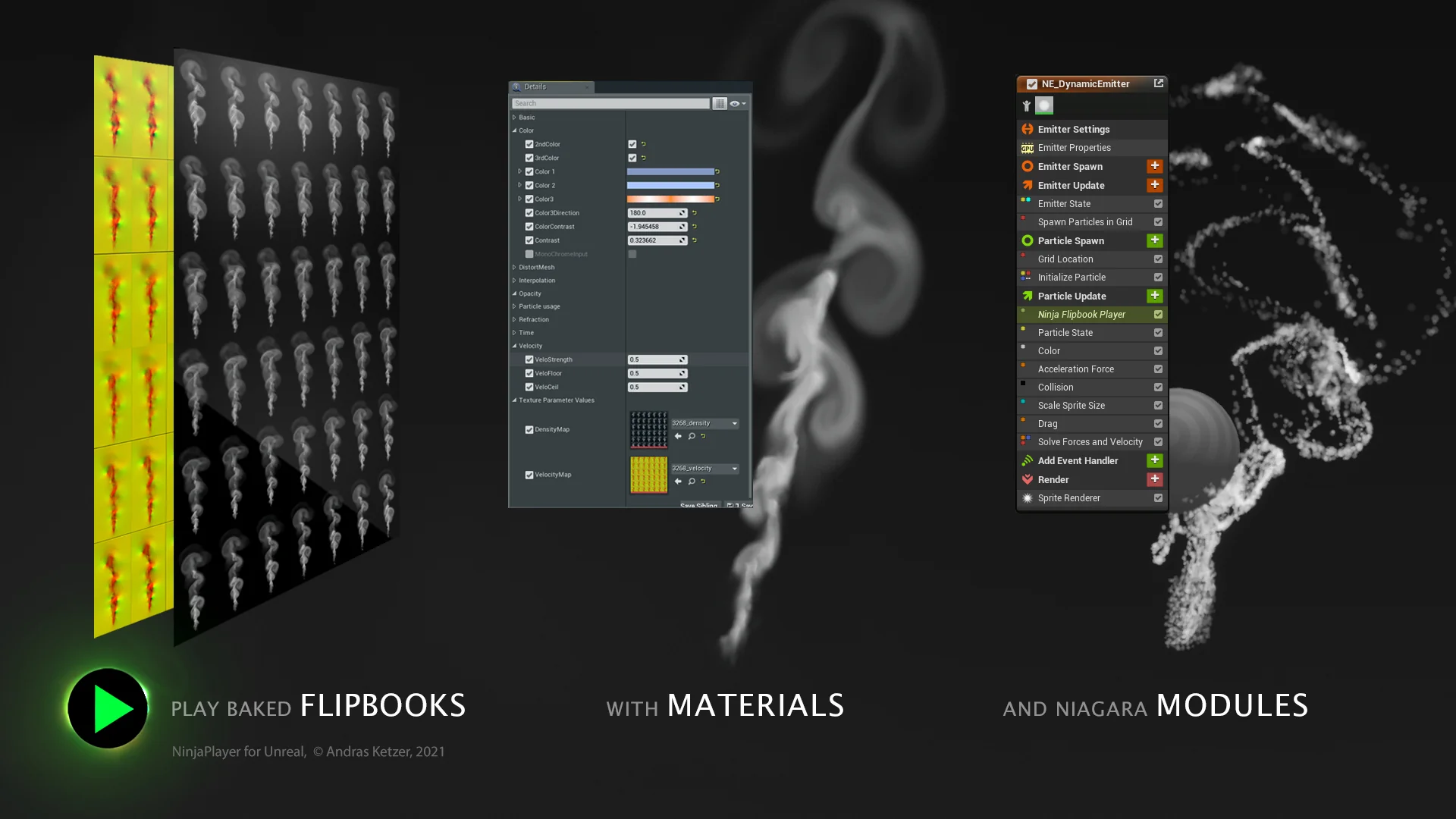
Ninja Player 1.02 delivers a specialized set of Material Functions, Niagara Modules, pre-built Materials, and Particle Emitters built to function as a generic flipbook processor. The asset targets the playback of baked simulation data, offering technical solutions for rendering pre-calculated fluid dynamics, smoke, and fire across diverse visual contexts inside Unreal Engine projects. Instead of relying purely on rigid sub-frame stepping, the framework operates by evaluating frame data alongside directional data to drive visual effects across multiple surface types.
The structural layout of the package isolates the underlying logic from raw assets. At its base, the system splits into a compact 6 Mbyte functional core and a secondary 120 Mbyte collection of example content. This separation ensures that the mathematical functions, module logic, and material trees can be migrated into active production pipelines without forcing high-resolution textures or demonstration setups into the target project environment. The core contains only the functions, modules, and base emitter templates necessary to process flipbooks, keeping the footprint minimal when integrated into custom project hierarchies.
Pre-configured assets inside the system allow developers to immediately preview and deploy playback networks. These pre-built materials and emitters handle standard flipbook inputs without necessitating manual setup from scratch. When standard setups do not meet the exact needs of a project, the isolated Material Functions and Niagara Modules serve as modular nodes that can be spliced directly into proprietary shaders, custom Niagara emitter stacks, and specialized material graphs.
Displaying Baked Simulation Data Across Engine Surfaces
A primary function of the processor is mapping baked fluid simulation data across varied rendering targets. Rather than limiting playback to traditional sprite particles, the underlying functions map texture sheets to standard Meshes, User Interface elements, traditional Particles, and Niagara Particle Arrays. This broad rendering scope allows the same simulation output to inform environmental visual effects, HUD-level graphics, and complex multi-instance particle systems.
When mapping to static or skeletal geometry, the material functions evaluate the mesh texture coordinates to display the baked frames across arbitrary surfaces. This enables effects such as surface fire or smoke blankets to cling directly to structural props or terrain elements without requiring separate real-time fluid solvers. For interface design, the system feeds into Slate and UMG material paths, allowing technical artists to drive animated visual effects directly within the UI layer, such as animated combustion badges, smokey screen borders, or dynamic menu flourishes.
Within particle contexts, the processor handles both single-particle instances and grouped Niagara Particle Arrays. The Niagara Modules are engineered to interpret particle-level attributes, driving flipbook frame coordinates dynamically per particle based on simulation lifetime, system age, or custom scripted parameters. This dual compatibility across Materials and Niagara allows developers to assign baked visual data to solitary point emitters or coordinate it across thousands of simultaneous elements moving through 3D space.
Velocity-Based Blending in Ninja Player Systems
Standard flipbook playback frequently suffers from visible stepping, strobing, or frame jitter when played at lower frame rates or slowed down for cinematic presentations. Ninja Player addresses this playback limitation through velocity-based frame blending. By reading baked motion vectors or velocity maps encoded alongside the primary visual frames, the system interpolates pixel positions between subsequent animation steps.
This velocity-guided interpolation prevents the sharp popping typically associated with low-frame-count texture sheets. As a frame advances to the next step, the velocity data informs the material or emitter of the vector direction in which visual density is travelling. The processor warps and blends the current frame into the target frame along these vectors, producing continuous, smooth playback even when playback speed is reduced significantly below the capture rate.
Beyond smoothing standard playback, this velocity evaluation mechanism allows the system to generate flow effects. The motion vectors can distort underlying texture layers, disperse color values, or displace surface highlights along the simulated currents of the original fluid. This makes it possible to maintain the fine visual structures of complex gas simulations, such as curling smoke tendrils or turbulent fire plumes, without introducing the ghosting artifacts common to basic linear crossfades.
Pre-Built Emitters and Custom Material Functions
To support different production pipelines, the processor offers two implementation tiers: turnkey drop-in assets and bare-bones logical building blocks. The pre-built Materials and Particle Emitters are configured to point directly to imported simulation sheets, establishing frame count, grid layouts, and blending parameters automatically. This tier works well when visual effects artists need to place functional fire or smoke elements directly into a level without custom scripting.
The second tier consists of exposed Material Functions and Niagara Modules intended for integration into bespoke assets. In custom material graphs, artists can patch the material functions between texture samplers and final material attributes, leveraging the processor to handle coordinate offsets, vector decoding, and temporal transitions. This modular construction allows the blending logic to sit alongside custom depth fading, emissive multipliers, lighting models, and material parameter collections.
In the Niagara graph, the custom modules hook into the particle update and particle spawn phases. By feeding velocity attributes directly into Niagara Particle Arrays, technical artists can manipulate how individual particles progress through baked flipbook data. The particle system can pause, reverse, accelerate, or scatter the playback index of individual particles independently, allowing a single baked simulation texture to produce non-repetitive visual patterns across an entire particle field.
Project Footprint and Standalone NinjaTools Integration
Ninja Player exists both as an independent standalone package and as an integrated component within NinjaTools. While NinjaTools provides the authoring environment for simulating and baking fluid dynamics directly inside Unreal Engine, Ninja Player focuses strictly on the downstream runtime processing of that baked data. Releasing the player as an isolated utility allows teams to utilize baked flipbooks without carrying authoring-stage simulation utilities inside their final runtime game builds.
The compact 6 Mbyte functional core makes the asset practical for deployment across multiple project branches. Because the core omits demonstration textures, flipbooks, and complex testing maps, merging the asset into an existing project does not bloat version control repositories or package sizes. Teams can import the core into production codebases while keeping the accompanying 120 Mbyte example library in sandbox or development environments.
The 120 Mbyte example package provides working testbeds covering varied use cases, from interface animations to complex Niagara arrays. These example assets illustrate how texture properties, material parameters, and emitter stack orders must be configured to achieve correct frame blending and flow behavior. Technical documentation, tutorial videos, and Discord community channels provide external operational guidance for configuring the processor, linking custom flipbook assets, and debugging particle module inputs across active production setups.
 Variety
 Variety
 Variety