"b00678cacce53329"{"id":"1002855","slug":"vfx-playground","title":"VFX Playground","category":"Variety","engine":"4.22+,5.0+","assetVersion":"","engineVersion":"Engine Version: 4.22+,5.0+","tag":"Variety","accent":"blue","visual":"mech","summary":"Explore the VFX Playground project file, featuring Cascade particle systems, weapon and spell blueprints, in-game UI documentation, and testing templates.","platform":"Unreal Engine","indexPolicy":"index","publishedAt":"2026-11-20T12:36:41.568Z","updatedAt":"2026-11-20T12:36:41.568Z","sourceNotes":[],"fileContents":[],"compatibility":["Unreal Engine","Engine Version: 4.22+,5.0+"],"featuredImage":{"alt":"VFX Playground","src":"/wp-content/uploads/published/2026/11/cc9433c7e926-4d181f07-2d4d-4075-80f0-6797f13c21b0-68cc780d3b.webp"},"fileSizeBytes":143299614,"hasDownloadLink":true,"downloads":0,"terms":[{"taxonomy":"category","slug":"variety-vfx","name":"Variety"}],"galleryImages":[{"src":"/wp-content/uploads/published/2026/11/84787413d854-dfdef846-53d9-4096-945f-4737a24bd2a1-b1ee0c5e4d.webp","alt":"VFX Playground"},{"src":"/wp-content/uploads/published/2026/11/1bb1ed7856d8-9ffd2ae6-1667-4b04-bd83-147ea514ad0b-05716fdd60.webp","alt":"VFX Playground"},{"src":"/wp-content/uploads/published/2026/11/5851e8a662aa-cb74335d-ef39-4e2c-b8d9-6f2723bbf1de-63cc3f481d.webp","alt":"VFX Playground"},{"src":"/wp-content/uploads/published/2026/11/3640fe10c957-057cc326-9f54-4c67-8fbc-25bab399108b-72b32a7277.webp","alt":"VFX Playground"},{"src":"/wp-content/uploads/published/2026/11/7b6d7667212a-4b2a91d8-2647-4e21-a77e-633eac6d1671-86a3f35dfd.webp","alt":"VFX Playground"},{"src":"/wp-content/uploads/published/2026/11/676ec4476fd4-a189afcc-a1bc-49f9-bc70-95910bdd8884-cd22cbec58.webp","alt":"VFX Playground"},{"src":"/wp-content/uploads/published/2026/11/247e0650ef34-24bcd440-c190-4d9c-b0b8-bd9ad01aecff-b222d2254c.webp","alt":"VFX Playground"},{"src":"/wp-content/uploads/published/2026/11/3311c99a7c49-82743f27-a3f4-4b60-9db3-d374dbb7b749-9183dd9e2e.webp","alt":"VFX Playground"},{"src":"/wp-content/uploads/published/2026/11/0a4799ea8bb7-904773ef-6931-4e4a-b87b-bcf856bc60a8-877e702d89.webp","alt":"VFX Playground"}],"accessPanel":{"kind":"resource","title":"Get this resource","safetyNote":"Resources are manually reviewed before listing to improve quality and reduce obvious risks.","fileName":"VFX Playground.7z","resourceType":"Resource archive","versions":[]},"contentHtml":"\u003ch2\u003eSetting Up the VFX Playground Project Architecture\u003c/h2\u003e\u003cp\u003eOpening the project file immediately reveals an environment tailored for visual experimentation rather than a static asset showcase. Developed by a senior visual effects artist working in the games industry, the workspace functions as an active laboratory where design concepts, particle dynamics, and combat-oriented visual systems can be evaluated in real time. Instead of requiring creators to construct isolated test maps or configure makeshift character rigs to inspect particle behaviors, the project arrives pre-configured for rapid testing and design validation.\u003c/p\u003e\u003cp\u003eThe underlying layout organizes visual elements and logic to minimize the friction of asset loading and debugging. By loading directly into a dedicated sandbox environment, artists and technical designers bypass the customary pipeline overhead of binding emitters to dummy actors. Whether testing immediate burst dynamics, trailing particle behaviors, or persistent environmental atmospheric effects, the baseline project structure provides instant feedback on motion cadence, visual balance, and particle density.\u003c/p\u003e\u003ch2\u003eIn-Game Interface and UI-Driven Documentation\u003c/h2\u003e\u003cp\u003eRather than relying on separate external readmes or detached reference folders, documentation exists directly inside the runtime user interface. This implementation allows users to read through system notes, operational instructions, and behavioral explanations in-game while actively observing particle motion.\u003c/p\u003e\u003cp\u003eAccessing the documentation through the runtime UI maintains the interactive context of each effect. While manipulating parameters or examining particle properties, users can inspect technical breakdowns directly on screen. This integration simplifies onboarding for developers unfamiliar with the project structure, clarifying how specific visual effects connect to supporting logic without requiring frequent alt-tabbing between editor viewports, external web browsers, or text documents.\u003c/p\u003e\u003cp\u003eThe interface acts as a functional hub for the testing suite. Integrating the explanatory text into the UI allows real-time review of timing, spawn loops, and trigger parameters in live play sessions. This close coupling of documentation and active demonstration offers immediate visual context for how complex systems are staged and executed.\u003c/p\u003e\u003ch2\u003eBlueprint Systems for Weapons, Projectiles, and Spell Buffs\u003c/h2\u003e\u003cp\u003eThe technical foundation of the project relies on dedicated blueprints structured around common gameplay interactions. To properly test visual effects within combat and action scenarios, the project incorporates functional blueprints for weapons, spell projectiles, and spell buffs. These nodes serve as practical vehicles for hosting and triggering particle emitters under actual gameplay conditions.\u003c/p\u003e\u003cp\u003eEvaluating effects on static meshes rarely provides an accurate reading of how visual assets perform in motion. Projectiles demand precise alignment of lead meshes, trailing ribbons, and impact responses. The included spell projectile blueprints supply the underlying velocity, collision parameters, and lifetime management necessary to evaluate linear, arcing, or accelerating particle streams. When a projectile connects with a surface, associated impact triggers fire according to the logic established in the blueprint hierarchy.\u003c/p\u003e\u003cp\u003eSimilarly, spell buff blueprints address persistent and character-bound visual treatments. These setups accommodate cyclical particle loops, sustained glowing auras, energy shields, and status indicators that track cleanly against moving anchor points. Weapon blueprints complement this by offering designated attachment points, enabling artists to test dynamic weapon glows, elemental edge trails, or ignition events directly on weapon templates and supplied 3D models.\u003c/p\u003e\u003ch2\u003eCascade Particle Systems Across the Playground\u003c/h2\u003e\u003cp\u003eEvery visual effect included across the project is constructed using Cascade. By anchoring all assets in Unreal Engine's classic particle authoring system, the library provides a direct look into modular particle construction, legacy emitter stacking, and traditional curve-driven parameter animation.\u003c/p\u003e\u003cp\u003eThe asset collection includes both fully realized visual effects and fundamental baseline templates:\u003c/p\u003e\u003cul\u003e\u003cli\u003eComplete, ready-to-use visual effects demonstrating complex timing, layered emitters, and polished color grading.\u003c/li\u003e\u003cli\u003eBasic template effects stripped down to essential emitter components, providing clean starting points for new custom designs.\u003c/li\u003e\u003cli\u003eWeapon-specific attachments built to demonstrate edge tracing, elemental overlays, and surface-bound particle behaviors.\u003c/li\u003e\u003cli\u003eProjectile particle setups mapped to linear velocities, impact flashes, and dissipation curves.\u003c/li\u003e\u003cli\u003eSustained spell buff structures calibrated for looping emissions, radius modulation, and layered atmospheric effects.\u003c/li\u003e\u003c/ul\u003e\u003cp\u003eThe presence of both fully built assets and foundational templates supports diverse production needs. Fully completed effects demonstrate advanced techniques in particle size variation, lifetime distribution, and alpha erosion over time. In contrast, the template effects offer unencumbered starting blocks, allowing artists to build new behaviors without having to first strip away dense layers of specialized modules.\u003c/p\u003e\u003ch2\u003eIntegrating Models and Stylized Effects in Production\u003c/h2\u003e\u003cp\u003eVisual presentation across the project accommodates a spectrum of artistic directions, spanning lowpoly, stylized, and realistic visual styles. Rather than restricting effects to a single narrow aesthetic, the library applies versatile visual logic suitable for diverse project pipelines. The included templates and 3D models allow developers to observe how the same particle behavior interacts with different geometry types, surface materials, and mesh complexities.\u003c/p\u003e\u003cp\u003eLowpoly geometry offers a clean backdrop for checking the clarity of silhouettes and the readability of core motion paths. Stylized effects emphasize distinct shapes, snappy timing, and saturated color palettes, making them easy to spot and read even during chaotic onscreen action. Realistic effects, meanwhile, rely on subtler color ramps, refined dissipation curves, and realistic timing controls to emulate physical phenomena such as smoke, flame, or volatile magic.\u003c/p\u003e\u003cp\u003eHaving these varying visual treatments organized alongside corresponding models helps bridge the gap between initial concept and game-ready asset. The models and templates provide consistent physical scales, ensuring that when an effect is tuned to a weapon or projectile blueprint, the spatial dimensions, particle radii, and collision boundaries translate predictably into external production scenes.\u003c/p\u003e\u003ch2\u003eWorkflow Execution and Iterative Design\u003c/h2\u003e\u003cp\u003eBecause the project functions as a self-contained testing sandbox, it facilitates rapid prototyping loops. Game artists often face delays when testing real-time effects because the supporting game logic—such as hit detection, projectile tracking, and buff timers—is still being authored by programming teams. By shipping complete with spell projectile logic, buff containers, and weapon templates, this file removes those dependencies.\u003c/p\u003e\u003cp\u003eArtists can drop new texture masks, adjust curve values inside Cascade, link the revised particle system to an existing projectile or buff blueprint, and launch the in-game preview immediately. The interface-driven documentation ensures that implementation steps remain transparent, while the breadth of fully built assets provides clear benchmarks for performance, module organization, and artistic polish.\u003c/p\u003e\u003cp\u003eThe project delivers an interconnected working space where technical logic, 3D templates, and Cascade particle systems operate as a coherent whole. By centralizing the practical mechanics of combat visual effects into an accessible, documented environment, it streamlines both the study and execution of real-time VFX authoring.\u003c/p\u003e\n\n\u003ch2\u003eMore From The Same Workflow\u003c/h2\u003e\n\u003cul\u003e\n\u003cli\u003e\u003ca href=\"https://3dcghub.com/sci-fi-ui-fx/\" rel=\"noopener noreferrer\"\u003eSci Fi UI FX\u003c/a\u003e\u003c/li\u003e\n\u003cli\u003e\u003ca href=\"https://3dcghub.com/ninja-player/\" rel=\"noopener noreferrer\"\u003eNinja Player\u003c/a\u003e\u003c/li\u003e\n\u003cli\u003e\u003ca href=\"https://3dcghub.com/sci-fi-hud-effects/\" rel=\"noopener noreferrer\"\u003eSci-fi HUD Effects\u003c/a\u003e\u003c/li\u003e\n\u003cli\u003e\u003ca href=\"https://3dcghub.com/abstract-fx-meshes/\" rel=\"noopener noreferrer\"\u003eAbstract FX: Meshes\u003c/a\u003e\u003c/li\u003e\n\u003cli\u003e\u003ca href=\"https://3dcghub.com/niagara-realistic-starter-vfx-pack/\" rel=\"noopener noreferrer\"\u003eNiagara Realistic Starter VFX Pack\u003c/a\u003e\u003c/li\u003e\n\u003c/ul\u003e","contentTextLength":7978,"navigation":{"current":25,"total":4797,"previous":{"id":"1002856","slug":"vfx-series-pack-1","title":"VFX Series Pack 1","category":"Variety","platform":"Unreal Engine","updatedAt":"2026-11-20T12:37:19.700Z"},"next":{"id":"1002854","slug":"vfx-grenade-pack","title":"VFX Grenade Pack","category":"Fire \u0026 Explosions","platform":"Unreal Engine","updatedAt":"2026-11-20T12:35:58.420Z"}},"relatedResources":[{"id":"1002833","slug":"sci-fi-ui-fx","title":"Sci Fi UI FX","category":"Variety","engine":"4.22+,5.0+","assetVersion":"","engineVersion":"Engine Version: 4.22+,5.0+","tag":"Variety","accent":"blue","visual":"mech","summary":"Sci Fi UI FX provides 46 packed RGB textures, 38 particle systems, 90 customizable materials, and 5 blueprints for building realistic in-game screens.","platform":"Unreal Engine","indexPolicy":"index","publishedAt":"2026-11-20T12:12:24.063Z","updatedAt":"2026-11-20T12:12:24.063Z","sourceNotes":[],"fileContents":[],"compatibility":["Unreal Engine","Engine Version: 4.22+,5.0+"],"featuredImage":{"alt":"Sci Fi UI FX","src":"/wp-content/uploads/published/2026/11/d6c40f68d948-f5cc04f2-a025-4492-ab61-370d92718d4d-d94e5952bc.webp"},"fileSizeBytes":49048779,"hasDownloadLink":true,"downloads":0},{"id":"1002826","slug":"ninja-player","title":"Ninja Player","category":"Variety","engine":"4.25+,5.0+","assetVersion":"","engineVersion":"Engine Version: 4.25+,5.0+","tag":"Variety","accent":"blue","visual":"mech","summary":"Examine Ninja Player 1.02, a flipbook processor utilizing velocity-based blending for baked simulation playback across Meshes, UI, and Niagara.","platform":"Unreal Engine","indexPolicy":"index","publishedAt":"2026-11-20T08:14:46.570Z","updatedAt":"2026-11-20T08:14:46.570Z","sourceNotes":[],"fileContents":[],"compatibility":["Unreal Engine","Engine Version: 4.25+,5.0+"],"featuredImage":{"alt":"Ninja Player","src":"/wp-content/uploads/published/2026/11/d9a4fa8ce6e1-07ce50da-ea47-41d0-81c5-f925482f5ae5-5934a9a609.webp"},"fileSizeBytes":80983157,"hasDownloadLink":true,"downloads":0},{"id":"1000480","slug":"sci-fi-hud-effects","title":"Sci-fi HUD Effects","category":"Variety","engine":"4.26+,5.0+","assetVersion":"","engineVersion":"Engine Version: 4.26+,5.0+","tag":"Variety","accent":"blue","visual":"mech","summary":"Unreal Engine package of animated HUD effects built from blueprints, skeletal meshes, 2K sprite textures, and Niagara systems for device screens and holograms.","platform":"Unreal Engine","indexPolicy":"index","publishedAt":"2026-07-12T06:01:25.891Z","updatedAt":"2026-07-12T06:01:25.891Z","sourceNotes":[],"fileContents":[],"compatibility":["Unreal Engine","Engine Version: 4.26+,5.0+"],"featuredImage":{"alt":"Sci-fi HUD Effects","src":"/wp-content/uploads/published/2026/07/b83b3e2c775d-4026d93b-0655-4e84-91a7-0c636ea5f2d2-5621ce40c7.webp"},"fileSizeBytes":134276365,"hasDownloadLink":true,"downloads":1}]}
Resource screenshots
1 / 9
Join our channel
Follow 3DCGHUB on Telegram for new resource drops, migration updates, and community notices.
Setting Up the VFX Playground Project Architecture
Opening the project file immediately reveals an environment tailored for visual experimentation rather than a static asset showcase. Developed by a senior visual effects artist working in the games industry, the workspace functions as an active laboratory where design concepts, particle dynamics, and combat-oriented visual systems can be evaluated in real time. Instead of requiring creators to construct isolated test maps or configure makeshift character rigs to inspect particle behaviors, the project arrives pre-configured for rapid testing and design validation.
The underlying layout organizes visual elements and logic to minimize the friction of asset loading and debugging. By loading directly into a dedicated sandbox environment, artists and technical designers bypass the customary pipeline overhead of binding emitters to dummy actors. Whether testing immediate burst dynamics, trailing particle behaviors, or persistent environmental atmospheric effects, the baseline project structure provides instant feedback on motion cadence, visual balance, and particle density.
In-Game Interface and UI-Driven Documentation
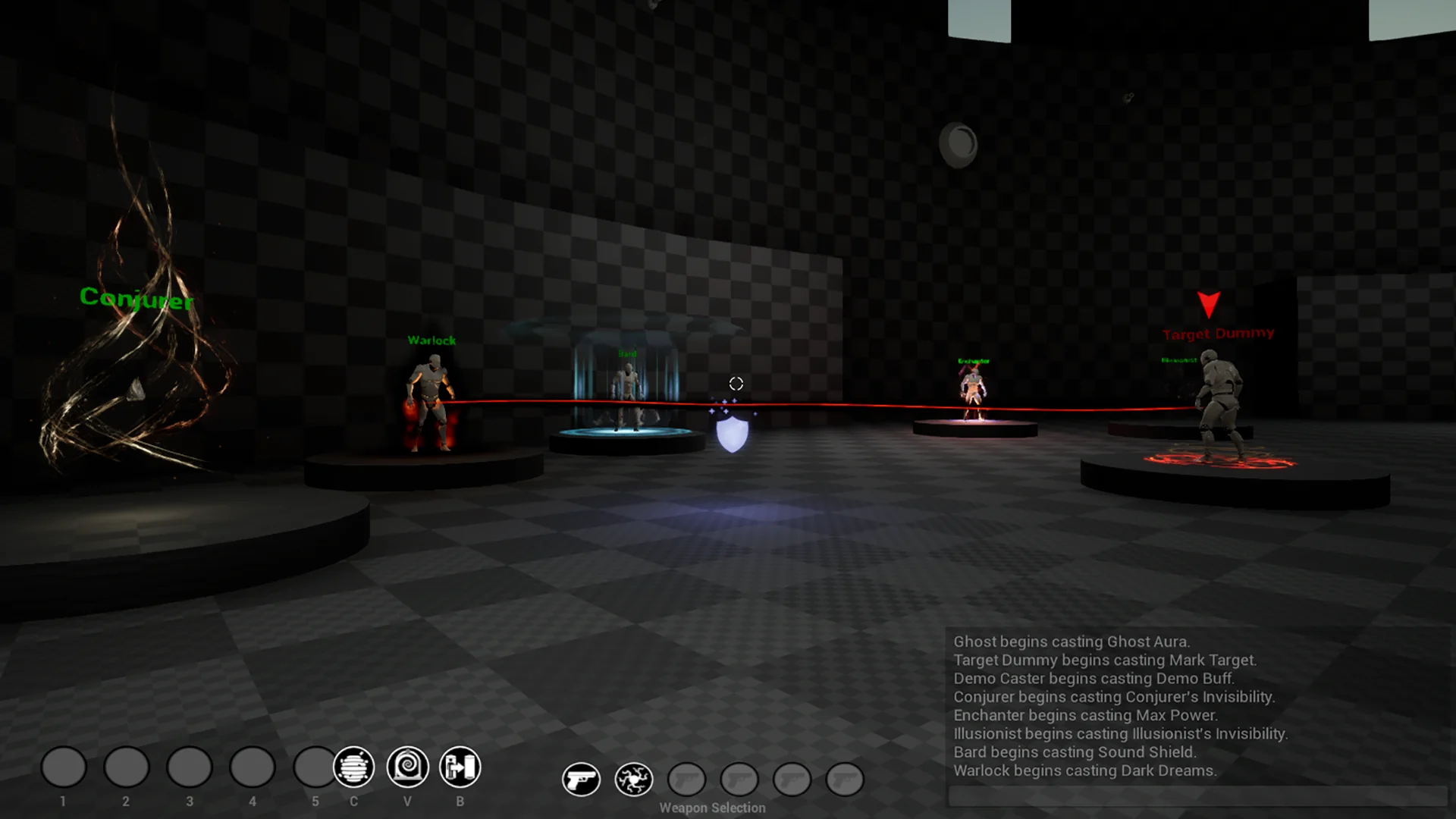
Rather than relying on separate external readmes or detached reference folders, documentation exists directly inside the runtime user interface. This implementation allows users to read through system notes, operational instructions, and behavioral explanations in-game while actively observing particle motion.
Accessing the documentation through the runtime UI maintains the interactive context of each effect. While manipulating parameters or examining particle properties, users can inspect technical breakdowns directly on screen. This integration simplifies onboarding for developers unfamiliar with the project structure, clarifying how specific visual effects connect to supporting logic without requiring frequent alt-tabbing between editor viewports, external web browsers, or text documents.
The interface acts as a functional hub for the testing suite. Integrating the explanatory text into the UI allows real-time review of timing, spawn loops, and trigger parameters in live play sessions. This close coupling of documentation and active demonstration offers immediate visual context for how complex systems are staged and executed.
Blueprint Systems for Weapons, Projectiles, and Spell Buffs
The technical foundation of the project relies on dedicated blueprints structured around common gameplay interactions. To properly test visual effects within combat and action scenarios, the project incorporates functional blueprints for weapons, spell projectiles, and spell buffs. These nodes serve as practical vehicles for hosting and triggering particle emitters under actual gameplay conditions.
Evaluating effects on static meshes rarely provides an accurate reading of how visual assets perform in motion. Projectiles demand precise alignment of lead meshes, trailing ribbons, and impact responses. The included spell projectile blueprints supply the underlying velocity, collision parameters, and lifetime management necessary to evaluate linear, arcing, or accelerating particle streams. When a projectile connects with a surface, associated impact triggers fire according to the logic established in the blueprint hierarchy.
Similarly, spell buff blueprints address persistent and character-bound visual treatments. These setups accommodate cyclical particle loops, sustained glowing auras, energy shields, and status indicators that track cleanly against moving anchor points. Weapon blueprints complement this by offering designated attachment points, enabling artists to test dynamic weapon glows, elemental edge trails, or ignition events directly on weapon templates and supplied 3D models.
Cascade Particle Systems Across the Playground
Every visual effect included across the project is constructed using Cascade. By anchoring all assets in Unreal Engine's classic particle authoring system, the library provides a direct look into modular particle construction, legacy emitter stacking, and traditional curve-driven parameter animation.
The asset collection includes both fully realized visual effects and fundamental baseline templates:
Complete, ready-to-use visual effects demonstrating complex timing, layered emitters, and polished color grading.
Basic template effects stripped down to essential emitter components, providing clean starting points for new custom designs.
Weapon-specific attachments built to demonstrate edge tracing, elemental overlays, and surface-bound particle behaviors.
Projectile particle setups mapped to linear velocities, impact flashes, and dissipation curves.
Sustained spell buff structures calibrated for looping emissions, radius modulation, and layered atmospheric effects.
The presence of both fully built assets and foundational templates supports diverse production needs. Fully completed effects demonstrate advanced techniques in particle size variation, lifetime distribution, and alpha erosion over time. In contrast, the template effects offer unencumbered starting blocks, allowing artists to build new behaviors without having to first strip away dense layers of specialized modules.
Integrating Models and Stylized Effects in Production
Visual presentation across the project accommodates a spectrum of artistic directions, spanning lowpoly, stylized, and realistic visual styles. Rather than restricting effects to a single narrow aesthetic, the library applies versatile visual logic suitable for diverse project pipelines. The included templates and 3D models allow developers to observe how the same particle behavior interacts with different geometry types, surface materials, and mesh complexities.
Lowpoly geometry offers a clean backdrop for checking the clarity of silhouettes and the readability of core motion paths. Stylized effects emphasize distinct shapes, snappy timing, and saturated color palettes, making them easy to spot and read even during chaotic onscreen action. Realistic effects, meanwhile, rely on subtler color ramps, refined dissipation curves, and realistic timing controls to emulate physical phenomena such as smoke, flame, or volatile magic.
Having these varying visual treatments organized alongside corresponding models helps bridge the gap between initial concept and game-ready asset. The models and templates provide consistent physical scales, ensuring that when an effect is tuned to a weapon or projectile blueprint, the spatial dimensions, particle radii, and collision boundaries translate predictably into external production scenes.
Workflow Execution and Iterative Design
Because the project functions as a self-contained testing sandbox, it facilitates rapid prototyping loops. Game artists often face delays when testing real-time effects because the supporting game logic—such as hit detection, projectile tracking, and buff timers—is still being authored by programming teams. By shipping complete with spell projectile logic, buff containers, and weapon templates, this file removes those dependencies.
Artists can drop new texture masks, adjust curve values inside Cascade, link the revised particle system to an existing projectile or buff blueprint, and launch the in-game preview immediately. The interface-driven documentation ensures that implementation steps remain transparent, while the breadth of fully built assets provides clear benchmarks for performance, module organization, and artistic polish.
The project delivers an interconnected working space where technical logic, 3D templates, and Cascade particle systems operate as a coherent whole. By centralizing the practical mechanics of combat visual effects into an accessible, documented environment, it streamlines both the study and execution of real-time VFX authoring.
 Variety
 Variety
 Variety