"7e6fc58c410f2894"{"id":"1000480","slug":"sci-fi-hud-effects","title":"Sci-fi HUD Effects","category":"Variety","engine":"4.26+,5.0+","assetVersion":"","engineVersion":"Engine Version: 4.26+,5.0+","tag":"Variety","accent":"blue","visual":"mech","summary":"Unreal Engine package of animated HUD effects built from blueprints, skeletal meshes, 2K sprite textures, and Niagara systems for device screens and holograms.","platform":"Unreal Engine","publishedAt":"2026-07-12T06:01:25.891Z","updatedAt":"2026-07-12T06:01:25.891Z","sourceNotes":[],"fileContents":[],"compatibility":["Unreal Engine","Engine Version: 4.26+,5.0+"],"featuredImage":{"alt":"Sci-fi HUD Effects","src":"/wp-content/uploads/published/2026/07/b83b3e2c775d-4026d93b-0655-4e84-91a7-0c636ea5f2d2-5621ce40c7.webp"},"hasDownloadLink":true,"downloads":0,"terms":[{"taxonomy":"category","slug":"variety-vfx","name":"Variety"}],"galleryImages":[{"src":"/wp-content/uploads/published/2026/07/6bb0d654243b-59815910-3e40-4755-8b8c-3b1045ffe834-bbccc91db1.webp","alt":"Sci-fi HUD Effects"},{"src":"/wp-content/uploads/published/2026/07/257ae78ce7dd-1a8cc00b-899e-408e-b491-d24ca2637a47-7c2489341e.webp","alt":"Sci-fi HUD Effects"},{"src":"/wp-content/uploads/published/2026/07/eacce548c7dc-4282f35c-0314-4c2c-87df-c1da1fceb132-cb2d71d690.webp","alt":"Sci-fi HUD Effects"},{"src":"/wp-content/uploads/published/2026/07/875df1d94115-1322232c-4b09-4d6f-b5b2-9eb59771db0a-029a6e18b3.webp","alt":"Sci-fi HUD Effects"},{"src":"/wp-content/uploads/published/2026/07/215bb4e5e283-9cb555be-bb49-4b06-9aec-07768f78589e-0943a3cec8.webp","alt":"Sci-fi HUD Effects"},{"src":"/wp-content/uploads/published/2026/07/f7db0c372551-7f8af467-435b-4e7a-af23-b452a2cae1e0-5eb0193177.webp","alt":"Sci-fi HUD Effects"},{"src":"/wp-content/uploads/published/2026/07/87927ff14567-ed383dd4-0cc8-4759-bae9-67167d648fb2-c20d83ab56.webp","alt":"Sci-fi HUD Effects"},{"src":"/wp-content/uploads/published/2026/07/dbe64d9537b1-be3c32ef-3bd9-4a94-9ad3-f4ed6629cfaa-de162cab94.webp","alt":"Sci-fi HUD Effects"},{"src":"/wp-content/uploads/published/2026/07/d46c1a8a7346-b2fd534c-b8e3-4259-b68f-e16184a1b833-f9f5e67664.webp","alt":"Sci-fi HUD Effects"},{"src":"/wp-content/uploads/published/2026/07/909f26c1bfff-0f12f68b-a41e-4f0d-bf05-2f0a5b20867a-bb20dcd616.webp","alt":"Sci-fi HUD Effects"}],"accessPanel":{"kind":"resource","title":"Download this resource","eyebrow":"Free Download","message":"Log in or create a free account to start your download.","fileName":"Content.7z","safetyNote":"Resources are manually reviewed before listing to improve quality and reduce obvious risks.","actionLabel":"Download Free","resourceType":"Resource archive"},"contentHtml":"\u003cp\u003eSetting up a futuristic interface in Unreal Engine with this pack begins with three core blueprint types rather than a monolithic widget system. The first handles animated 2K sprite textures, the second manages skeletal meshes used as frames, and the third drives Niagara particle effects. These three blueprints act as the foundation for combining frame geometry, animated sprite playback, and real-time particle simulation into a single 3D widget. The workflow is intentionally modular: the creator combines, swaps, and tweaks these three pieces to generate a broad range of widget variations without needing to dive into complex material logic or recreate assets from scratch.\u003c/p\u003e \u003cp\u003eThis structure differs significantly from traditional HUD implementation methods. Typically, a developer would need to manually create a material for each texture, adjust sprite sheet parameters individually, and separately manage any particle systems before combining them in a widget or actor. Here, the blueprints abstract those steps. The pack includes several widget examples that demonstrate how the three foundational blueprints interact, giving developers a clear starting point for constructing their own interface elements.\u003c/p\u003e \u003ch2\u003eModular 3D Widget Construction\u003c/h2\u003e \u003cp\u003eThe core strength of the package lies in how it separates the visual components of a digital interface. A skeletal mesh is used to physically form the frame of the widget, providing a 3D structure that can be placed and manipulated within the environment. Instead of functioning solely as static geometry, these frames are combined with animated 2K sprite textures to bring the display surface to life. The 2K resolution ensures the animated textures remain crisp when viewed up close on devices or holograms.\u003c/p\u003e \u003cp\u003eWrapping these mesh and texture elements are Niagara effects, which add dynamic, floating particle simulations to the widget. The real-time combination of mesh geometry, texture animation, and particle effects happens entirely within the blueprint system. This design choice means the user is not locked into a single preset widget. The documentation emphasizes that combining the three basic blueprints allows for the creation of many widget variations, making the system adaptable to different visual needs across a project.\u003c/p\u003e \u003ch3\u003eBlueprint Controls for Texture and Color\u003c/h3\u003e \u003cp\u003eA critical implementation detail is how materials are managed within the blueprints. Instead of forcing a shader artist to create custom material instances every time a color or texture needs to be swapped, the blueprints expose these controls directly. A developer can change the texture and color parameters through the blueprint's exposed variables. This direct control significantly reduces the overhead of managing a large library of HUD materials.\u003c/p\u003e \u003cp\u003eIf a sci-fi terminal needs to shift from a neutral blue scanning screen to a red alert state, the change can be handled within the blueprint logic itself. The underlying system does not require the generation of extra material assets for every color variation. This approach keeps the asset footprint lean while allowing artists and designers to rapidly prototype different visual themes for holograms and digital devices without altering the core rendering structure.\u003c/p\u003e \u003ch2\u003eNiagara Systems for Device Screens and Holograms\u003c/h2\u003e \u003cp\u003eThe Niagara effects included in the package are specifically tailored for rendering on 3D widgets, device screens, and volumetric holograms. They are not intended to be used as standard ambient environment particles, but rather as integral parts of a digital interface. Sharing a single primary texture and material across most of the Niagara systems keeps rendering costs down and simplifies the visual cohesion of the effects.\u003c/p\u003e \u003cp\u003eWhile most systems rely on this shared single texture and material, the creator notes that some Niagara effects do utilize animated textures. The distinction implies that while broad visual strokes are optimized through texture and material sharing, more complex behaviors are available when an effect requires reticulating patterns or shifting data streams. The Niagara integration is fully realized through the 3Dwidget blueprints, binding the particle effects directly to the skeletal meshes and 2K sprite textures.\u003c/p\u003e \u003ch2\u003eSpecialized Materials: Stealth, Flipbook, and Glows\u003c/h2\u003e \u003cp\u003eBeyond the standard texture and color swapping capabilities, the pack includes several specialized materials designed to expand the visual vocabulary of a futuristic interface. One highlighted example is a stealth effect powered by procedural noise. This allows a widget or hologram to shimmer, distort, or cloak itself in a way that reads as high-tech concealment or distortion, useful for active camouflage interfaces or corrupt data packets.\u003c/p\u003e \u003cp\u003eAnother key material is a specialized flipbook shader. While flipbooks are standard for sprite animation, this material is built to play those sprites with variable speed changes and reversals. The ability to scrub, speed up, slow down, and reverse sprite animations directly within the material adds a level of kinetic control that static flipbooks cannot achieve. This is particularly effective for data loops, scanning lines, and loading sequences that need to stutter or pulse dynamically. Glowing materials are also included to push the emissive qualities of the holograms, and the combination of these specialized materials allows developers to introduce further visual variations to their widgets.\u003c/p\u003e \u003ch2\u003eProject Application and Engine Compatibility\u003c/h2\u003e \u003cp\u003eThese effects are built for scenes requiring a high-tech aesthetic, particularly those involving holograms, interactive device screens, and digital user interfaces. The visual language leans heavily into futuristic technology, incorporating elements associated with DNA sequences, sci-fi interfaces, and high-density data displays. Because the pack focuses on the visual elements of these displays, it can be layered into existing projects where functional UI logic is already present, serving as the visual layer for player interaction.\u003c/p\u003e \u003cp\u003eAn important distinction for production implementation is that this package provides visual effects only. It is not a functional HUD system; it does not inherently handle player health tracking, ammunition counts, or inventory management. Developers using this pack will need to connect their own gameplay logic to the visible elements. The blueprints serve purely as the aesthetic delivery mechanism, rendering the glowing frames, animated data sprites, and scanning particles that make a digital interface feel alive.\u003c/p\u003e \u003ch2\u003ePractical Takeaway for Developers\u003c/h2\u003e \u003cp\u003eUnreal Engine developers working on projects within the supported compatibility range can leverage this pack as a fixture for their sci-fi visual language. The modular nature of the 3D widget blueprints, combined with the in-editor texture and color controls, makes iteration fast. The reliance on Niagara and the inclusion of specialized noise and flipbook materials provide the depth needed for convincing holograms and interface effects. For projects requiring additional visual variations beyond what is provided in this foundational package, an extended version exists, allowing developers to expand their library of HUD and hologram effects as their production needs grow.\u003c/p\u003e\n\n\u003ch2\u003eRelated Resources Worth Checking\u003c/h2\u003e\n\u003cul\u003e\n\u003cli\u003e\u003ca href=\"https://3dcghub.com/catalyst-sci-fi-vfx-pack/\" title=\"Catalyst Sci Fi VFX Pack\"\u003eCatalyst Sci Fi VFX Pack\u003c/a\u003e\u003c/li\u003e\n\u003cli\u003e\u003ca href=\"https://3dcghub.com/machinery-particle-fx/\" title=\"Machinery Particle FX\"\u003eMachinery Particle FX\u003c/a\u003e\u003c/li\u003e\n\u003cli\u003e\u003ca href=\"https://3dcghub.com/molecules-and-organisms-vfx/\" title=\"Molecules and Organisms VFX\"\u003eMolecules and Organisms VFX\u003c/a\u003e\u003c/li\u003e\n\u003cli\u003e\u003ca href=\"https://3dcghub.com/abstract-fx-meshes/\" title=\"Abstract FX: Meshes\"\u003eAbstract FX: Meshes\u003c/a\u003e\u003c/li\u003e\n\u003cli\u003e\u003ca href=\"https://3dcghub.com/convolution-bloom-kernels-pack/\" title=\"Convolution Bloom Kernels Pack\"\u003eConvolution Bloom Kernels Pack\u003c/a\u003e\u003c/li\u003e\n\u003c/ul\u003e","contentTextLength":7419,"navigation":{"current":1279,"total":3618,"previous":{"id":"1000481","slug":"stylized-nature-vol-1-stylized-environment-bundle","title":"Stylized Nature Vol. 1 | Stylized Environment Bundle","category":"Forest \u0026 Jungle","platform":"Unreal Engine","updatedAt":"2026-07-12T06:08:17.870Z"},"next":{"id":"1000479","slug":"roadside-vol-3-rural-props-nanite-and-low-poly-versions","title":"Roadside VOL.3 - Rural Props (Nanite and Low Poly Versions)","category":"Rocks \u0026 Stones","platform":"Unreal Engine","updatedAt":"2026-07-11T20:18:42.987Z"}},"relatedResources":[{"id":"1000470","slug":"molecules-and-organisms-vfx","title":"Molecules and Organisms VFX","category":"Variety","engine":"4.26+,5.0+","assetVersion":"","engineVersion":"Engine Version: 4.26+,5.0+","tag":"Variety","accent":"blue","visual":"mech","summary":"A Niagara-driven VFX pack of 35 static meshes, blueprint animations, and sci-fi organic effects for building medical, molecular, and biological Unreal Engine sc","platform":"Unreal Engine","publishedAt":"2026-07-11T18:04:56.784Z","updatedAt":"2026-07-11T18:04:56.784Z","sourceNotes":[],"fileContents":[],"compatibility":["Unreal Engine","Engine Version: 4.26+,5.0+"],"featuredImage":{"alt":"Molecules and Organisms VFX","src":"/wp-content/uploads/published/2026/07/ab98a75954b2-279e3997-4d81-4a2d-acab-460d37d34da7-00f4ac9c4f.webp"},"hasDownloadLink":true,"downloads":0},{"id":"17043","slug":"catalyst-sci-fi-vfx-pack","title":"Catalyst Sci Fi VFX Pack","category":"Variety","engine":"4.27,5.0+","assetVersion":"Engine version: 4.27,5.0+","engineVersion":"4.27","tag":"Variety","accent":"blue","visual":"mech","summary":"The Catalyst Sci Fi VFX Pack is a professional collection of visual effects designed for futuristic environments. This pack leverages Niagara and Blueprint technologies to provide a high-quality system for developers.","platform":"Unreal Engine","publishedAt":"2026-03-13T13:32:46.000Z","updatedAt":"2026-04-19T15:43:38.000Z","sourceNotes":[],"fileContents":[],"compatibility":["Unreal Engine","Engine version: 4.27,5.0+"],"featuredImage":{"alt":"Catalyst Sci Fi VFX Pack","src":"https://3dcghub.com/wp-content/uploads/2026/03/c8050389-1586-40fd-8606-bd44cb37c5f6.webp"},"hasDownloadLink":true,"downloads":0},{"id":"17199","slug":"machinery-particle-fx","title":"Machinery Particle FX","category":"Variety","engine":"4.26+,5.0+","assetVersion":"Engine version: 4.26+,5.0+","engineVersion":"4.15","tag":"Variety","accent":"blue","visual":"animation","summary":"Enhance your industrial environments with the Machinery Particle FX pack. This collection features 15 distinct visual effects designed to bring mechanical scenes to life with realistic details like blow-torches and sparks.","platform":"Unreal Engine","publishedAt":"2026-03-13T13:57:33.000Z","updatedAt":"2026-04-19T15:43:35.000Z","sourceNotes":[],"fileContents":[],"compatibility":["Unreal Engine","Engine version: 4.26+,5.0+"],"featuredImage":{"alt":"Machinery Particle FX","src":"https://3dcghub.com/wp-content/uploads/2026/03/82134a59-292d-4c75-ba79-0bfbd8c77a63.webp"},"hasDownloadLink":true,"downloads":0}]}
Variety
Sci-fi HUD Effects
Unreal Engine package of animated HUD effects built from blueprints, skeletal meshes, 2K sprite textures, and Niagara systems for device screens and holograms.
Setting up a futuristic interface in Unreal Engine with this pack begins with three core blueprint types rather than a monolithic widget system. The first handles animated 2K sprite textures, the second manages skeletal meshes used as frames, and the third drives Niagara particle effects. These three blueprints act as the foundation for combining frame geometry, animated sprite playback, and real-time particle simulation into a single 3D widget. The workflow is intentionally modular: the creator combines, swaps, and tweaks these three pieces to generate a broad range of widget variations without needing to dive into complex material logic or recreate assets from scratch.
This structure differs significantly from traditional HUD implementation methods. Typically, a developer would need to manually create a material for each texture, adjust sprite sheet parameters individually, and separately manage any particle systems before combining them in a widget or actor. Here, the blueprints abstract those steps. The pack includes several widget examples that demonstrate how the three foundational blueprints interact, giving developers a clear starting point for constructing their own interface elements.
Modular 3D Widget Construction
The core strength of the package lies in how it separates the visual components of a digital interface. A skeletal mesh is used to physically form the frame of the widget, providing a 3D structure that can be placed and manipulated within the environment. Instead of functioning solely as static geometry, these frames are combined with animated 2K sprite textures to bring the display surface to life. The 2K resolution ensures the animated textures remain crisp when viewed up close on devices or holograms.
Wrapping these mesh and texture elements are Niagara effects, which add dynamic, floating particle simulations to the widget. The real-time combination of mesh geometry, texture animation, and particle effects happens entirely within the blueprint system. This design choice means the user is not locked into a single preset widget. The documentation emphasizes that combining the three basic blueprints allows for the creation of many widget variations, making the system adaptable to different visual needs across a project.
Blueprint Controls for Texture and Color
A critical implementation detail is how materials are managed within the blueprints. Instead of forcing a shader artist to create custom material instances every time a color or texture needs to be swapped, the blueprints expose these controls directly. A developer can change the texture and color parameters through the blueprint's exposed variables. This direct control significantly reduces the overhead of managing a large library of HUD materials.
If a sci-fi terminal needs to shift from a neutral blue scanning screen to a red alert state, the change can be handled within the blueprint logic itself. The underlying system does not require the generation of extra material assets for every color variation. This approach keeps the asset footprint lean while allowing artists and designers to rapidly prototype different visual themes for holograms and digital devices without altering the core rendering structure.
Niagara Systems for Device Screens and Holograms
The Niagara effects included in the package are specifically tailored for rendering on 3D widgets, device screens, and volumetric holograms. They are not intended to be used as standard ambient environment particles, but rather as integral parts of a digital interface. Sharing a single primary texture and material across most of the Niagara systems keeps rendering costs down and simplifies the visual cohesion of the effects.
While most systems rely on this shared single texture and material, the creator notes that some Niagara effects do utilize animated textures. The distinction implies that while broad visual strokes are optimized through texture and material sharing, more complex behaviors are available when an effect requires reticulating patterns or shifting data streams. The Niagara integration is fully realized through the 3Dwidget blueprints, binding the particle effects directly to the skeletal meshes and 2K sprite textures.
Specialized Materials: Stealth, Flipbook, and Glows
Beyond the standard texture and color swapping capabilities, the pack includes several specialized materials designed to expand the visual vocabulary of a futuristic interface. One highlighted example is a stealth effect powered by procedural noise. This allows a widget or hologram to shimmer, distort, or cloak itself in a way that reads as high-tech concealment or distortion, useful for active camouflage interfaces or corrupt data packets.
Another key material is a specialized flipbook shader. While flipbooks are standard for sprite animation, this material is built to play those sprites with variable speed changes and reversals. The ability to scrub, speed up, slow down, and reverse sprite animations directly within the material adds a level of kinetic control that static flipbooks cannot achieve. This is particularly effective for data loops, scanning lines, and loading sequences that need to stutter or pulse dynamically. Glowing materials are also included to push the emissive qualities of the holograms, and the combination of these specialized materials allows developers to introduce further visual variations to their widgets.
Project Application and Engine Compatibility
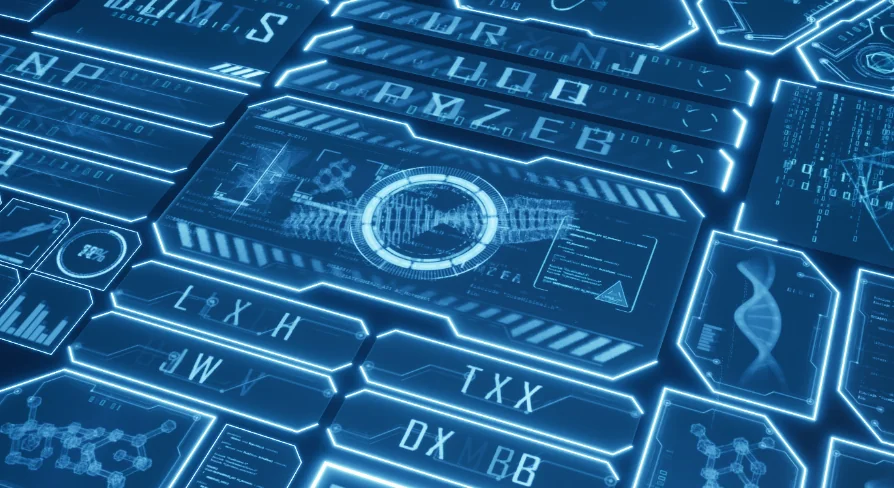
These effects are built for scenes requiring a high-tech aesthetic, particularly those involving holograms, interactive device screens, and digital user interfaces. The visual language leans heavily into futuristic technology, incorporating elements associated with DNA sequences, sci-fi interfaces, and high-density data displays. Because the pack focuses on the visual elements of these displays, it can be layered into existing projects where functional UI logic is already present, serving as the visual layer for player interaction.
An important distinction for production implementation is that this package provides visual effects only. It is not a functional HUD system; it does not inherently handle player health tracking, ammunition counts, or inventory management. Developers using this pack will need to connect their own gameplay logic to the visible elements. The blueprints serve purely as the aesthetic delivery mechanism, rendering the glowing frames, animated data sprites, and scanning particles that make a digital interface feel alive.
Practical Takeaway for Developers
Unreal Engine developers working on projects within the supported compatibility range can leverage this pack as a fixture for their sci-fi visual language. The modular nature of the 3D widget blueprints, combined with the in-editor texture and color controls, makes iteration fast. The reliance on Niagara and the inclusion of specialized noise and flipbook materials provide the depth needed for convincing holograms and interface effects. For projects requiring additional visual variations beyond what is provided in this foundational package, an extended version exists, allowing developers to expand their library of HUD and hologram effects as their production needs grow.
 Variety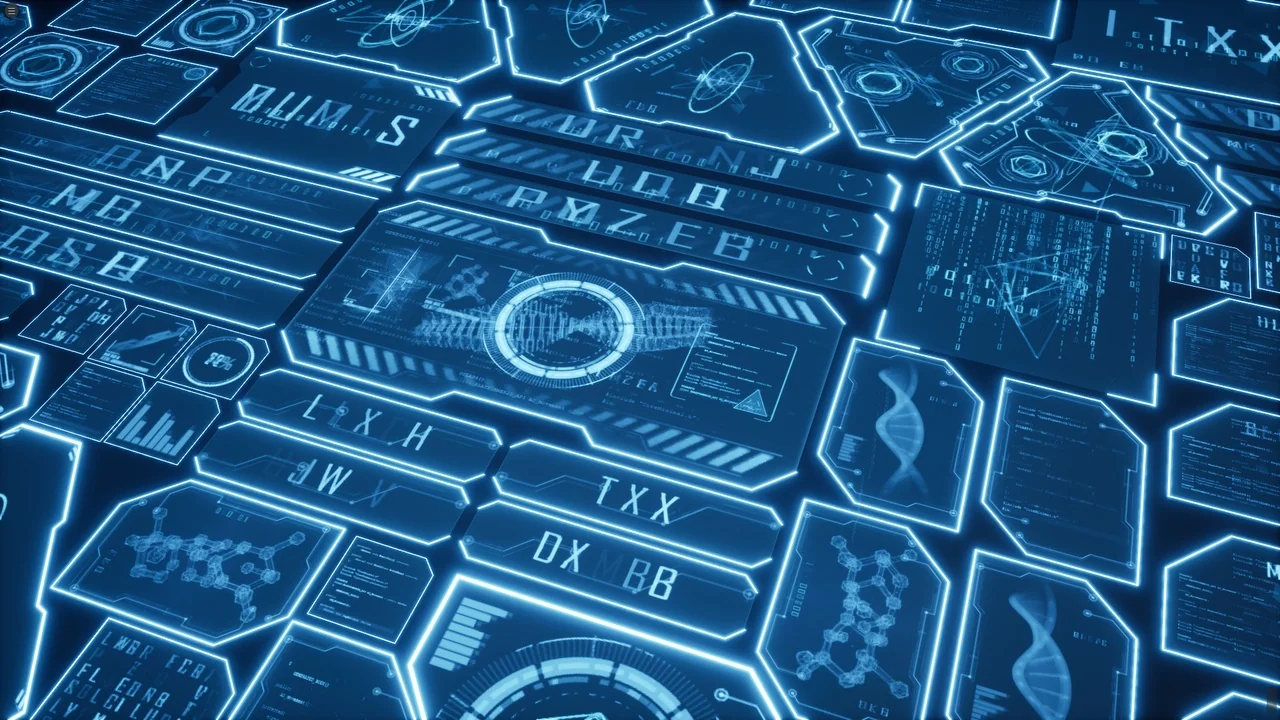
 Variety
 Variety
 Variety