"0341a2901a4ae9aa"{"id":"17077","slug":"convolution-bloom-kernels-pack","title":"Convolution Bloom Kernels Pack","category":"Variety","engine":"4.26+,5.0+","assetVersion":"Engine version: 4.26+,5.0+","engineVersion":"4.25","tag":"Variety","accent":"blue","visual":"luts","summary":"Upgrade your project's visual fidelity with the Convolution Bloom Kernels Pack. This resource utilizes Unreal Engine's built-in convolution system to generate realistic, calculated bloom and glare effects.","platform":"Unreal Engine","publishedAt":"2026-03-13T13:37:14.000Z","updatedAt":"2026-04-19T15:43:37.000Z","sourceNotes":[],"fileContents":[],"compatibility":["Unreal Engine","Engine version: 4.26+,5.0+"],"featuredImage":{"alt":"Convolution Bloom Kernels Pack","src":"https://3dcghub.com/wp-content/uploads/2026/03/d8af99a2-8332-4610-bf4a-ed4ccb1778e0.webp"},"hasDownloadLink":true,"downloads":0,"terms":[{"taxonomy":"category","slug":"variety-vfx","name":"Variety"},{"taxonomy":"post_tag","slug":"bloom-effects","name":"Bloom Effects"},{"taxonomy":"post_tag","slug":"environment","name":"Environment"},{"taxonomy":"post_tag","slug":"game-systems","name":"Game Systems"},{"taxonomy":"post_tag","slug":"textures","name":"Textures"},{"taxonomy":"post_tag","slug":"unreal-engine-5","name":"Unreal Engine 5"},{"taxonomy":"post_tag","slug":"vfx","name":"VFX"}],"galleryImages":[{"src":"https://3dcghub.com/wp-content/uploads/2026/03/5b18b8b90c2f_094e5c79-eec5-40eb-88c9-9631df38f4cd.webp","alt":"Convolution Bloom Kernels Pack"},{"src":"https://3dcghub.com/wp-content/uploads/2026/03/02c9346e918a_f30d78f1-4e16-4681-b1e1-feef2e38cc42.webp","alt":"Convolution Bloom Kernels Pack"},{"src":"https://3dcghub.com/wp-content/uploads/2026/03/6eb45d3e691a_121a8e4d-b643-4c8a-9184-369c426421bf.webp","alt":"Convolution Bloom Kernels Pack"},{"src":"https://3dcghub.com/wp-content/uploads/2026/03/85001590016e_8db2e822-ae97-48d0-8713-791c8f5f492d.webp","alt":"Convolution Bloom Kernels Pack"},{"src":"https://3dcghub.com/wp-content/uploads/2026/03/92ea5be70aac_704d0dd8-5849-4e1f-bc24-ba7c36bf5187.webp","alt":"Convolution Bloom Kernels Pack"},{"src":"https://3dcghub.com/wp-content/uploads/2026/03/7a522aaff8d1_63e511c0-2db6-4d9a-a828-0026e1b4b21a.webp","alt":"Convolution Bloom Kernels Pack"},{"src":"https://3dcghub.com/wp-content/uploads/2026/03/0f3e1162d2d7_0c3bc493-b674-4e48-9ffc-7c1a6606f65e.webp","alt":"Convolution Bloom Kernels Pack"},{"src":"https://3dcghub.com/wp-content/uploads/2026/03/88f0425a349d_9e3b2816-8a23-4675-b319-a58ddec4d15a.webp","alt":"Convolution Bloom Kernels Pack"},{"src":"https://3dcghub.com/wp-content/uploads/2026/03/044c93cb873a_7b00c022-a4d4-4ed1-84b2-2b6fadf169de.webp","alt":"Convolution Bloom Kernels Pack"},{"src":"https://3dcghub.com/wp-content/uploads/2026/03/822bd2e4726f_f3d408c8-fc61-4ea8-924c-888aa97ddfb3.webp","alt":"Convolution Bloom Kernels Pack"},{"src":"https://3dcghub.com/wp-content/uploads/2026/03/d3f8e05a1f70_c5a8643c-2ff0-4f81-8280-26ff015bda56.webp","alt":"Convolution Bloom Kernels Pack"},{"src":"https://3dcghub.com/wp-content/uploads/2026/03/631fd194c0b5_02b80641-667e-4aef-9679-527ea3b23c6c.webp","alt":"Convolution Bloom Kernels Pack"},{"src":"https://3dcghub.com/wp-content/uploads/2026/03/4d2777663f53_7c788621-50b7-4872-960b-6741c3ffdf92.webp","alt":"Convolution Bloom Kernels Pack"},{"src":"https://3dcghub.com/wp-content/uploads/2026/03/bb7cd50be7ac_838ed19b-b4e3-4751-b2c9-964046563cb3.webp","alt":"Convolution Bloom Kernels Pack"},{"src":"https://3dcghub.com/wp-content/uploads/2026/03/9db2cee9250e_632e5f18-c636-4cbd-954f-1ca82f955905.webp","alt":"Convolution Bloom Kernels Pack"},{"src":"https://3dcghub.com/wp-content/uploads/2026/03/4c5f11394f79_fa2e95f8-75e1-4a43-a9a8-f625d91e24b2.webp","alt":"Convolution Bloom Kernels Pack"},{"src":"https://3dcghub.com/wp-content/uploads/2026/03/378cf434f2fe_0cf7ffd5-8704-426b-917b-bd4222489c26.webp","alt":"Convolution Bloom Kernels Pack"},{"src":"https://3dcghub.com/wp-content/uploads/2026/03/4e2dd681afc1_fa8ab014-3e52-4c29-bf3c-d06086d6faa0.webp","alt":"Convolution Bloom Kernels Pack"}],"accessPanel":{"kind":"resource","title":"Access this resource","eyebrow":"Free Download","message":"Log in or create a free account to start your download.","fileName":"Content.7z","safetyNote":"All resources are 100% manually reviewed to eliminate all risks.","actionLabel":"Download Free","resourceType":"Resource archive"},"contentHtml":"\u003ch2\u003eRealistic Bloom and Glare Effects\u003c/h2\u003e\n\u003cp\u003eThe \u003cstrong\u003eConvolution Bloom Kernels Pack\u003c/strong\u003e offers a sophisticated solution for developers looking to create beautiful bloom and glare effects. This system is built directly into Unreal Engine, utilizing the Convolution Bloom Kernel system. Consequently, you can now use real calculated bloom via convolution and Fast Fourier Transform (FFT). This approach replaces the need for traditional lens flare textures used as emissive planes.\u003c/p\u003e\n\n\u003ch2\u003eHow to Use the Convolution System\u003c/h2\u003e\n\u003cp\u003eTo begin using the \u003cstrong\u003eConvolution Bloom Kernels Pack\u003c/strong\u003e, you must first set the bloom type to convolution within your Post Process Volume (PPV). From this point forward, all standard bloom settings become obsolete. The creator recommends starting with the \"Convolution Scale\" set to 0.5. Furthermore, this pack includes kernels that are twice the size of the default version. Therefore, you have the flexibility to increase the scale significantly to achieve your specific visual goals.\u003c/p\u003e\n\n\u003cp\u003eRegarding the \"Convolution Center\" setting, every bloom kernel is already set perfectly in the center. Because of this, you do not need to adjust this value at all. Instead, focus on the boost settings to refine your look.\u003c/p\u003e\n\n\u003ch2\u003eMastering Boost and Intensity\u003c/h2\u003e\n\u003cp\u003eThe Convolution Boost Min, Max, and Multiplier are essential for controlling the \u003cstrong\u003eConvolution Bloom Kernels Pack\u003c/strong\u003e. If you set the multiplier to one, the system will not boost any pixel intensity before the bloom phase. Specifically, every pixel on the screen is boosted relative to its own luminance. However, it is generally better to adjust the Min and Multiplier values rather than changing the Max value.\u003c/p\u003e\n\n\u003cul\u003e\n\u003cli\u003e\u003cstrong\u003eConvolution Boost Min:\u003c/strong\u003e This typically works well between 0.2 and 2, though it is highly dependent on your scene lighting.\u003c/li\u003e\n\u003cli\u003e\u003cstrong\u003eBoost Multiplier:\u003c/strong\u003e This value is usually set between 2 and 60.\u003c/li\u003e\n\u003cli\u003e\u003cstrong\u003eHighlight Compression:\u003c/strong\u003e If you set the multiplier lower than 1, it reduces the intensity of selected brightness levels, acting similarly to highlight compression.\u003c/li\u003e\n\u003c/ul\u003e\n\n\u003ch2\u003eProfessional Lighting Techniques\u003c/h2\u003e\n\u003cp\u003eIf you require a controlled singular point bloom highlight on a surface, the developer suggests using a very small sphere with an emissive texture. The final characteristics of the bloom are highly dependent on your specific scene lighting. Moreover, because this is a pixel-based effect, the screen size will also influence the final appearance.\u003c/p\u003e\n\n\u003cp\u003eThe \u003cstrong\u003eConvolution Bloom Kernels Pack\u003c/strong\u003e has been updated to include full support for Unreal Engine 5.0. This update introduced two new kernels: Film Halation and Festive. Additionally, the developer tweaked the falloff of several kernels to ensure they are more usable in dim lighting situations.\u003c/p\u003e\n\n\u003ch2\u003eClosing Notes\u003c/h2\u003e\n\u003cp\u003eThe \u003cstrong\u003eConvolution Bloom Kernels Pack\u003c/strong\u003e provides a powerful alternative to standard bloom methods. By utilizing FFT calculations and specialized kernels, you can achieve a more cinematic and realistic lighting result. Whether you are aiming for subtle film halation or festive glares, these tools offer the precision needed for high-end visual development.\u003c/p\u003e\n\n\u003ch2\u003eContinue Browsing Similar Packs\u003c/h2\u003e\n\u003cul\u003e\n\u003cli\u003e\u003ca href=\"https://3dcghub.com/glitter-shader/\" title=\"Glitter Shader\"\u003eGlitter Shader\u003c/a\u003e\u003c/li\u003e\n\u003cli\u003e\u003ca href=\"https://3dcghub.com/master-console-commands/\" title=\"Master Console Commands\"\u003eMaster Console Commands\u003c/a\u003e\u003c/li\u003e\n\u003cli\u003e\u003ca href=\"https://3dcghub.com/cherry-plum-prunus-cerasifera-seasons-tree-pack/\" title=\"Cherry Plum, Prunus cerasifera – Seasons, Tree Pack\"\u003eCherry Plum, Prunus cerasifera – Seasons, Tree Pack\u003c/a\u003e\u003c/li\u003e\n\u003cli\u003eBillboards Pack Vol.01: Animated LED Ads for 3D Cities\u003c/li\u003e\n\u003cli\u003e\u003ca href=\"https://3dcghub.com/rodinbridge-unreal-engine-add-on/\" title=\"RodinBridge – Unreal Engine Add-on\"\u003eRodinBridge – Unreal Engine Add-on\u003c/a\u003e\u003c/li\u003e\n\u003c/ul\u003e","contentTextLength":3268,"navigation":{"current":3552,"total":4017,"previous":{"id":"17090","slug":"falling-leaves-vfx-pack","title":"Falling Leaves VFX Pack","category":"Variety","platform":"Unreal Engine","updatedAt":"2026-04-19T15:43:37.000Z"},"next":{"id":"17056","slug":"concrete-debris-vfx-pack","title":"Concrete Debris VFX Pack","category":"Variety","platform":"Unreal Engine","updatedAt":"2026-04-19T15:43:37.000Z"}},"relatedResources":[{"id":"17185","slug":"lightning-electricity-vfx-pack","title":"Lightning / Electricity VFX Pack","category":"Variety","engine":"4.26+,5.0+","assetVersion":"Engine version: 4.26+,5.0+","engineVersion":"4.24","tag":"Variety","accent":"blue","visual":"city","summary":"Enhance your project with the Lightning / Electricity VFX Pack, a versatile collection of Niagara effects ranging from electric arcs to storms. This pack includes turnkey examples and VR-optimized maps for high-performance development.","platform":"Unreal Engine","publishedAt":"2026-03-13T13:55:56.000Z","updatedAt":"2026-04-19T15:43:36.000Z","sourceNotes":[],"fileContents":[],"compatibility":["Unreal Engine","Engine version: 4.26+,5.0+"],"featuredImage":{"alt":"Lightning / Electricity VFX Pack","src":"https://3dcghub.com/wp-content/uploads/2026/03/7fdd3a51-39bb-4954-9f95-8abd86e3500c.webp"},"hasDownloadLink":true,"downloads":3},{"id":"17263","slug":"niagara-effects06","title":"Niagara Effects06","category":"Variety","engine":"4.26+,5.0+","assetVersion":"Engine version: 4.26+,5.0+","engineVersion":"4.25","tag":"Variety","accent":"blue","visual":"mech","summary":"Niagara Effects06 is a specialized collection of advanced particle systems and materials designed for semi-realistic magical environments. This pack includes 16 distinct Niagara systems alongside a comprehensive suite of meshes and textures.","platform":"Unreal Engine","publishedAt":"2026-03-13T14:07:43.000Z","updatedAt":"2026-04-19T15:43:34.000Z","sourceNotes":[],"fileContents":[],"compatibility":["Unreal Engine","Engine version: 4.26+,5.0+"],"featuredImage":{"alt":"Niagara Effects06","src":"https://3dcghub.com/wp-content/uploads/2026/03/87bbfa81-03cb-4773-b9e9-cccc82f5e47a.webp"},"hasDownloadLink":true,"downloads":0},{"id":"17376","slug":"plane-crash-vfx","title":"Plane Crash VFX","category":"Variety","engine":"4.26+,5.0+","assetVersion":"Engine version: 4.26+,5.0+","engineVersion":"4.26","tag":"Variety","accent":"blue","visual":"luts","summary":"Create high-stakes cinematic aircraft destruction with the Plane Crash VFX pack. This toolkit features customizable Niagara effects for jets, helicopters, and UFOs, complete with adjustable impact materials.","platform":"Unreal Engine","publishedAt":"2026-03-13T14:27:00.000Z","updatedAt":"2026-04-19T15:43:33.000Z","sourceNotes":[],"fileContents":[],"compatibility":["Unreal Engine","Engine version: 4.26+,5.0+"],"featuredImage":{"alt":"Plane Crash VFX","src":"https://3dcghub.com/wp-content/uploads/2026/03/9658262a-048d-41ad-a0de-fc950a697674.webp"},"hasDownloadLink":true,"downloads":0}]}
Variety
Convolution Bloom Kernels Pack
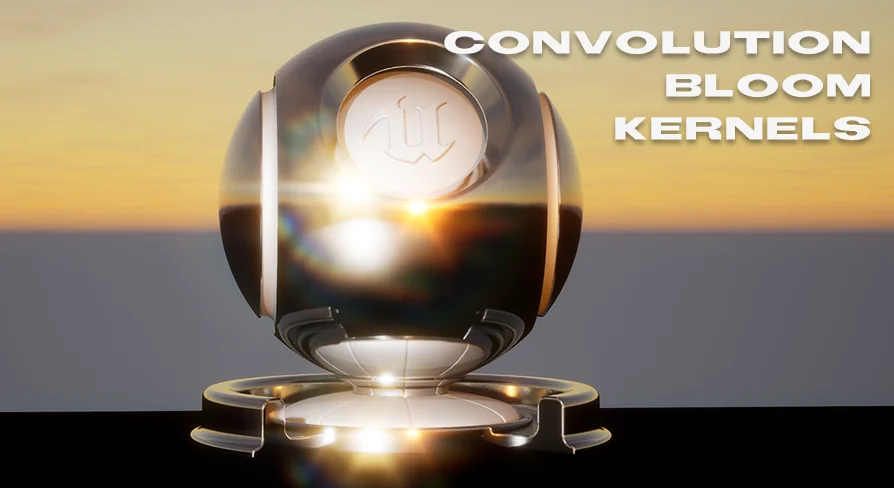
Upgrade your project's visual fidelity with the Convolution Bloom Kernels Pack. This resource utilizes Unreal Engine's built-in convolution system to generate realistic, calculated bloom and glare effects.
The Convolution Bloom Kernels Pack offers a sophisticated solution for developers looking to create beautiful bloom and glare effects. This system is built directly into Unreal Engine, utilizing the Convolution Bloom Kernel system. Consequently, you can now use real calculated bloom via convolution and Fast Fourier Transform (FFT). This approach replaces the need for traditional lens flare textures used as emissive planes.
How to Use the Convolution System
To begin using the Convolution Bloom Kernels Pack, you must first set the bloom type to convolution within your Post Process Volume (PPV). From this point forward, all standard bloom settings become obsolete. The creator recommends starting with the "Convolution Scale" set to 0.5. Furthermore, this pack includes kernels that are twice the size of the default version. Therefore, you have the flexibility to increase the scale significantly to achieve your specific visual goals.
Regarding the "Convolution Center" setting, every bloom kernel is already set perfectly in the center. Because of this, you do not need to adjust this value at all. Instead, focus on the boost settings to refine your look.
Mastering Boost and Intensity
The Convolution Boost Min, Max, and Multiplier are essential for controlling the Convolution Bloom Kernels Pack. If you set the multiplier to one, the system will not boost any pixel intensity before the bloom phase. Specifically, every pixel on the screen is boosted relative to its own luminance. However, it is generally better to adjust the Min and Multiplier values rather than changing the Max value.
Convolution Boost Min: This typically works well between 0.2 and 2, though it is highly dependent on your scene lighting.
Boost Multiplier: This value is usually set between 2 and 60.
Highlight Compression: If you set the multiplier lower than 1, it reduces the intensity of selected brightness levels, acting similarly to highlight compression.
Professional Lighting Techniques
If you require a controlled singular point bloom highlight on a surface, the developer suggests using a very small sphere with an emissive texture. The final characteristics of the bloom are highly dependent on your specific scene lighting. Moreover, because this is a pixel-based effect, the screen size will also influence the final appearance.
The Convolution Bloom Kernels Pack has been updated to include full support for Unreal Engine 5.0. This update introduced two new kernels: Film Halation and Festive. Additionally, the developer tweaked the falloff of several kernels to ensure they are more usable in dim lighting situations.
Closing Notes
The Convolution Bloom Kernels Pack provides a powerful alternative to standard bloom methods. By utilizing FFT calculations and specialized kernels, you can achieve a more cinematic and realistic lighting result. Whether you are aiming for subtle film halation or festive glares, these tools offer the precision needed for high-end visual development.
 Variety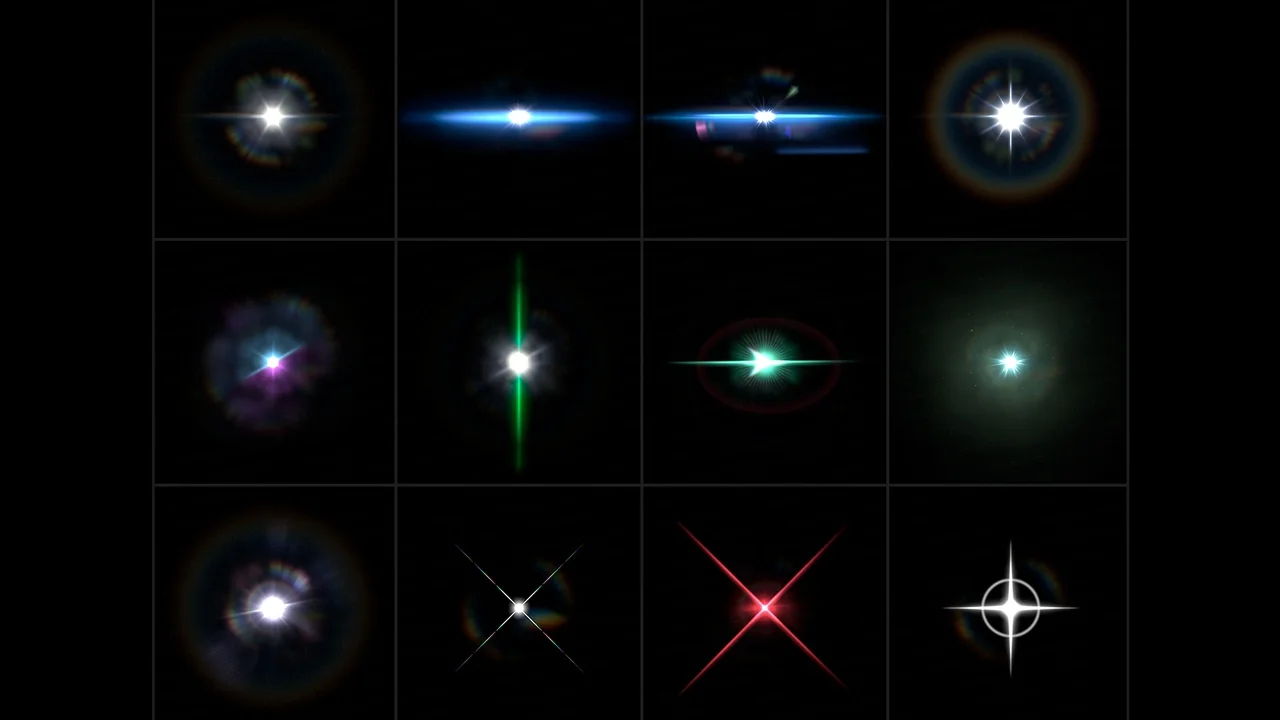
 Variety
 Variety
 Variety