"0341a2901a4ae9aa"{"id":"12585","slug":"glitter-shader","title":"Glitter Shader","category":"Fabric \u0026 Clothing","engine":"5.4+","assetVersion":"Engine version: 5.4+","engineVersion":"5.4","tag":"Fabric \u0026 Clothing","accent":"blue","visual":"luts","summary":"Enhance your Unreal Engine projects with a procedural Glitter Shader designed for stylized emissive effects. This tool allows for flexible implementation on static and skinned meshes through advanced material functions.","platform":"Unreal Engine","publishedAt":"2026-03-07T12:51:37.000Z","updatedAt":"2026-04-19T15:47:51.000Z","sourceNotes":[],"fileContents":[],"compatibility":["Unreal Engine","Engine version: 5.4+"],"featuredImage":{"alt":"Glitter Shader","src":"https://3dcghub.com/wp-content/uploads/2026/03/5ad28374-7ff9-4d84-b814-543fe341c5ee.webp"},"hasDownloadLink":true,"downloads":0,"terms":[{"taxonomy":"category","slug":"fabric-and-clothing","name":"Fabric \u0026 Clothing"},{"taxonomy":"post_tag","slug":"emissive-shader","name":"emissive shader"},{"taxonomy":"post_tag","slug":"glitter-shader","name":"Glitter Shader"},{"taxonomy":"post_tag","slug":"procedural-material","name":"procedural material"},{"taxonomy":"post_tag","slug":"ue5-material-functions","name":"UE5 material functions"}],"galleryImages":[{"src":"https://3dcghub.com/wp-content/uploads/2026/03/7c0b1f85033b_32bca2b4-7e77-497d-8035-1275c98c1dba.webp","alt":"Glitter Shader"},{"src":"https://3dcghub.com/wp-content/uploads/2026/03/0d9a02bb2f31_3c2f2e10-5afb-4905-9486-51bd9230d8e3.webp","alt":"Glitter Shader"},{"src":"https://3dcghub.com/wp-content/uploads/2026/03/47f3c4d2cc84_2211f4c0-5ba3-4a17-beea-c05192a709d2.webp","alt":"Glitter Shader"},{"src":"https://3dcghub.com/wp-content/uploads/2026/03/732fde0db5ce_9fca9c38-aaf5-47be-8c55-16df0743b309.webp","alt":"Glitter Shader"},{"src":"https://3dcghub.com/wp-content/uploads/2026/03/953f58db8528_24463557-74db-4595-bd6f-1fe81bab6f70.webp","alt":"Glitter Shader"},{"src":"https://3dcghub.com/wp-content/uploads/2026/03/98a48b21540a_d59c4227-e8ea-4fd6-94a1-3d428c283ec8.webp","alt":"Glitter Shader"},{"src":"https://3dcghub.com/wp-content/uploads/2026/03/dbb0abe773d8_2e09733b-e13d-4064-b82d-a492e90dddc3.webp","alt":"Glitter Shader"},{"src":"https://3dcghub.com/wp-content/uploads/2026/03/02097ff5f5fd_da00aa1b-ae08-4dd9-8288-8deff25b5f1e.webp","alt":"Glitter Shader"},{"src":"https://3dcghub.com/wp-content/uploads/2026/03/1c942f023acd_3ad4b5de-3e8f-4d1c-9a2f-9ce48cc5ed4a.webp","alt":"Glitter Shader"},{"src":"https://3dcghub.com/wp-content/uploads/2026/03/1561a5603839_317ea84d-a290-447f-9910-7d651ded2a31.webp","alt":"Glitter Shader"},{"src":"https://3dcghub.com/wp-content/uploads/2026/03/0d6c81abe160_ca58ad80-46f4-4250-b4e5-3fb5eda1db3b.webp","alt":"Glitter Shader"},{"src":"https://3dcghub.com/wp-content/uploads/2026/03/2b48188196c2_df608df6-396b-4623-aa2f-56c8b7ef216e.webp","alt":"Glitter Shader"},{"src":"https://3dcghub.com/wp-content/uploads/2026/03/5e0541866b7c_1c36983a-2740-4756-b00c-04c9d05f0bc1.webp","alt":"Glitter Shader"},{"src":"https://3dcghub.com/wp-content/uploads/2026/03/3cfa5fa633cc_dbe13d86-cca5-4490-8eae-a36e2303b173.webp","alt":"Glitter Shader"},{"src":"https://3dcghub.com/wp-content/uploads/2026/03/0c9f6f453719_dd0ffbfa-fed9-413d-87c5-f38880213365.webp","alt":"Glitter Shader"}],"accessPanel":{"kind":"resource","title":"Access this resource","eyebrow":"Free Download","message":"Log in or create a free account to start your download.","fileName":"Content.7z","safetyNote":"All resources are 100% manually reviewed to eliminate all risks.","actionLabel":"Download Free","resourceType":"Resource archive"},"contentHtml":"\u003cp\u003e[post_meta_tags]\u003c/p\u003e\n\u003ch2\u003eIntroduction to the Glitter Shader\u003c/h2\u003e\n\u003cp\u003eThe Glitter Shader is a stylized emissive tool specifically designed for Unreal Engine 5.4 and above. It utilizes material functions to generate medium to large size glitter effects. By using emissive properties, the shader effectively simulates sparkle and shine within a digital environment. This resource provides a procedural approach to creating glittering surfaces without relying on static textures.\u003c/p\u003e\n\u003ch2\u003eKey Features and Customization\u003c/h2\u003e\n\u003cp\u003eThe Glitter Shader is generated procedurally using Voronoi 3D noise. Each individual piece of glitter is shaped as a small dot, creating a clean and stylized look. Furthermore, the creator has included options to generate glitter in Local 3D Space, which remains independent of UVs. For skinned meshes such as characters, the shader can also generate glitter in UV Space.\u003c/p\u003e\n\u003cp\u003eUsers have significant control over the final appearance of the effect. For instance, you can easily change the size and amount of the glitter dots. Additionally, the brightness and sparkliness are fully adjustable to suit different art styles. These parameters allow for a high degree of flexibility across various project types.\u003c/p\u003e\n\u003ch2\u003eFlexible Implementation Methods\u003c/h2\u003e\n\u003cp\u003eThe developer has included several material functions to streamline the workflow. You can use these functions to create a dedicated Overlay Material for your assets. Alternatively, the shader can be added to an existing material as a separate material layer. Moreover, users can add glitter by merging material attributes directly into their current shaders.\u003c/p\u003e\n\u003cul\u003e\n\u003cli\u003e\u003cstrong\u003eMF_Glitter_MakeGlitter:\u003c/strong\u003e Used to create an Overlay Material.\u003c/li\u003e\n\u003cli\u003e\u003cstrong\u003eMF_Glitter_MakeGlitterLayer:\u003c/strong\u003e Adds glitter as a Material Layer.\u003c/li\u003e\n\u003cli\u003e\u003cstrong\u003eMF_Glitter_MergeGlitter:\u003c/strong\u003e Merges glitter attributes into existing materials.\u003c/li\u003e\n\u003c/ul\u003e\n\u003ch2\u003eTechnical Requirements and Limitations\u003c/h2\u003e\n\u003cp\u003eThis shader is intended for Windows platforms and requires specific settings for optimal performance. Because it relies on procedural noise, mobile platforms are not supported. Furthermore, the shader is not compatible with Landscapes. It is also important to note that the Anti-Aliasing method must be set to TAA or TSR, as other methods are unsupported.\u003c/p\u003e\n\u003cp\u003eHowever, users should be aware of certain shading model restrictions. Models such as Hair, SingleLayerWater, Thin Translucent, and Material Expression are not supported. Consequently, the shader works best when following these technical guidelines. For the most sparkly results, the developer recommends using the Convolution Bloom method in Post Process.\u003c/p\u003e\n\u003ch2\u003eLighting and Demo Content\u003c/h2\u003e\n\u003cp\u003eThe Glitter Shader is largely an emissive effect and does not change based on scene lighting or shadows automatically. Therefore, settings must be adjusted manually to match the environment. If you need the glitter to darken in shadows, you must use Custom Primitive Data parameters and trigger volumes via scripts. This allows for more dynamic integration into complex scenes.\u003c/p\u003e\n\u003cp\u003eThe package includes a variety of demo content to help you get started. This includes the GlitterDemo level, which provides a comprehensive overview of features. You will also find material instances showing different looks and an implementation of the shader on the Quinn character. These examples demonstrate how to use blueprints to adjust emissive brightness effectively.\u003c/p\u003e\n\u003ch2\u003eClosing Notes\u003c/h2\u003e\n\u003cp\u003eThe Glitter Shader provides a robust and procedural way to add stylized sparkle to Unreal Engine projects. With its multiple implementation methods and adjustable parameters, it offers a versatile solution for developers. While it requires specific technical configurations, its ability to generate UV-independent effects makes it a valuable asset for modern game development.\u003c/p\u003e\n\n\u003ch2\u003eExplore Similar Assets\u003c/h2\u003e\n\u003cul\u003e\n\u003cli\u003e\u003ca href=\"https://3dcghub.com/eggo-the-talking-egg-face-morphs-epic-skeleton-skins-and-ultimate-material/\" title=\"Eggo the Talking Egg, face morphs, epic skeleton, skins and ultimate material\"\u003eEggo the Talking Egg, face morphs, epic skeleton, skins and ultimate material\u003c/a\u003e\u003c/li\u003e\n\u003cli\u003e\u003ca href=\"https://3dcghub.com/brushify-natural-roads-pack/\" title=\"Brushify – Natural Roads Pack\"\u003eBrushify – Natural Roads Pack\u003c/a\u003e\u003c/li\u003e\n\u003cli\u003e\u003ca href=\"https://3dcghub.com/brushify-moon-pack/\" title=\"Brushify – Moon Pack\"\u003eBrushify – Moon Pack\u003c/a\u003e\u003c/li\u003e\n\u003cli\u003e\u003ca href=\"https://3dcghub.com/brushify-moorlands-pack/\" title=\"Brushify – Moorlands Pack\"\u003eBrushify – Moorlands Pack\u003c/a\u003e\u003c/li\u003e\n\u003cli\u003e\u003ca href=\"https://3dcghub.com/food-scans/\" title=\"Food Scans\"\u003eFood Scans\u003c/a\u003e\u003c/li\u003e\n\u003c/ul\u003e\n\n\u003chr\u003e\n\u003cp\u003e\u003c/p\u003e","contentTextLength":3929,"navigation":{"current":3286,"total":4017,"previous":{"id":"12513","slug":"crater-decals","title":"Crater Decals","category":"Damage \u0026 Grunge","platform":"Unreal Engine","updatedAt":"2026-04-19T15:47:52.000Z"},"next":{"id":"12567","slug":"56-fabric-textile-materials-4k-pbr-collection","title":"56 Fabric \u0026 Textile Materials (4K PBR Collection)","category":"Fabric \u0026 Clothing","platform":"Unreal Engine","updatedAt":"2026-04-19T15:47:51.000Z"}},"relatedResources":[{"id":"1002016","slug":"fabric-material-pack-v4-20-pcs-4k-material","title":"Fabric Material Pack V4 - 20 Pcs 4k Material","category":"Fabric \u0026 Clothing","engine":"5.0+","assetVersion":"","engineVersion":"Engine Version: 5.0+","tag":"Fabric \u0026 Clothing","accent":"blue","visual":"luts","summary":"Examine the technical setup, 4k PNG tiling, and Substance-prepared PBR workflow of Fabric Material Pack V4 for games, cinematics, and cloth texturing.","platform":"Unreal Engine","publishedAt":"2026-10-26T12:55:39.072Z","updatedAt":"2026-10-26T12:55:39.072Z","sourceNotes":[],"fileContents":[],"compatibility":["Unreal Engine","Engine Version: 5.0+"],"featuredImage":{"alt":"Fabric Material Pack V4 - 20 Pcs 4k Material","src":"/wp-content/uploads/published/2026/10/3f6309213654-a5c6f3d4-8249-4ea5-87d2-9d466275eab2-23e7fee2fe.webp"},"hasDownloadLink":true,"downloads":0},{"id":"1000873","slug":"realistic-lace-material-pack-4k-v3","title":"Realistic Lace Material Pack 4K - V3","category":"Fabric \u0026 Clothing","engine":"5.1+","assetVersion":"","engineVersion":"Engine Version: 5.1+","tag":"Fabric \u0026 Clothing","accent":"blue","visual":"luts","summary":"A 20-piece PBR lace material pack with tileable 4K textures, customizable parameters, Substance-prepared surfaces, and a demo scene rendered in Unreal Engine 5.","platform":"Unreal Engine","publishedAt":"2026-08-05T15:01:25.198Z","updatedAt":"2026-08-05T15:01:25.198Z","sourceNotes":[],"fileContents":[],"compatibility":["Unreal Engine","Engine Version: 5.1+"],"featuredImage":{"alt":"Realistic Lace Material Pack 4K - V3","src":"/wp-content/uploads/published/2026/08/5ef52b4f7d8d-15850038-5722-4ba0-8d0e-758357851764-65d2db67e6.webp"},"hasDownloadLink":true,"downloads":2},{"id":"12567","slug":"56-fabric-textile-materials-4k-pbr-collection","title":"56 Fabric \u0026 Textile Materials (4K PBR Collection)","category":"Fabric \u0026 Clothing","engine":"5.0+","assetVersion":"Engine version: 5.0+","engineVersion":"4.20","tag":"Fabric \u0026 Clothing","accent":"blue","visual":"luts","summary":"This massive library of 4K scan-based fabric materials is optimized for Unreal Engine. It features a flexible Master Material for instant customization across 56 unique seamless textiles.","platform":"Unreal Engine","publishedAt":"2026-03-07T12:46:41.000Z","updatedAt":"2026-04-19T15:47:51.000Z","sourceNotes":[],"fileContents":[],"compatibility":["Unreal Engine","Engine version: 5.0+"],"featuredImage":{"alt":"56 Fabric \u0026 Textile Materials (4K PBR Collection)","src":"https://3dcghub.com/wp-content/uploads/2026/03/54217ec1-60fe-4a79-afdd-b38312a8c3b0.webp"},"hasDownloadLink":true,"downloads":1}]}
Fabric & Clothing
Glitter Shader
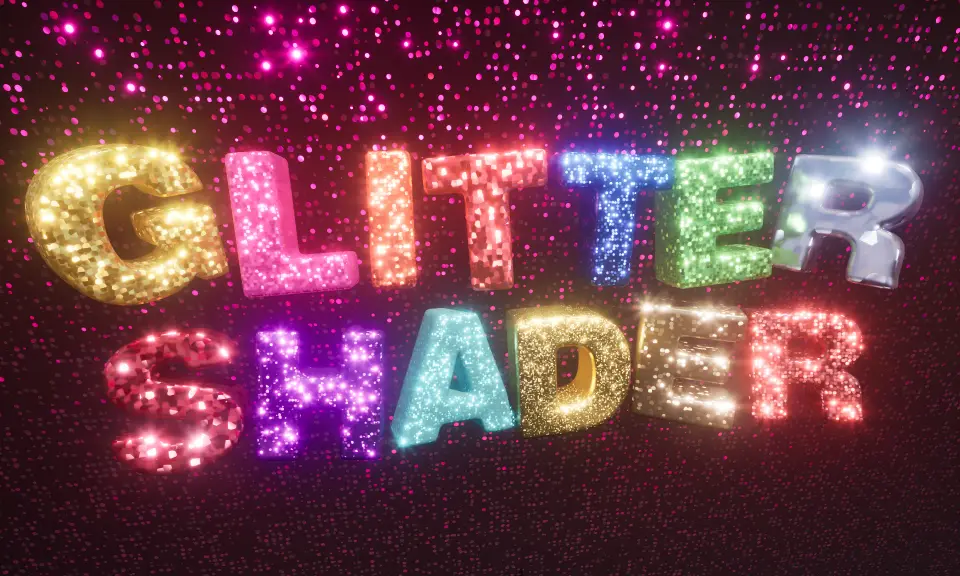
Enhance your Unreal Engine projects with a procedural Glitter Shader designed for stylized emissive effects. This tool allows for flexible implementation on static and skinned meshes through advanced material functions.
The Glitter Shader is a stylized emissive tool specifically designed for Unreal Engine 5.4 and above. It utilizes material functions to generate medium to large size glitter effects. By using emissive properties, the shader effectively simulates sparkle and shine within a digital environment. This resource provides a procedural approach to creating glittering surfaces without relying on static textures.
Key Features and Customization
The Glitter Shader is generated procedurally using Voronoi 3D noise. Each individual piece of glitter is shaped as a small dot, creating a clean and stylized look. Furthermore, the creator has included options to generate glitter in Local 3D Space, which remains independent of UVs. For skinned meshes such as characters, the shader can also generate glitter in UV Space.
Users have significant control over the final appearance of the effect. For instance, you can easily change the size and amount of the glitter dots. Additionally, the brightness and sparkliness are fully adjustable to suit different art styles. These parameters allow for a high degree of flexibility across various project types.
Flexible Implementation Methods
The developer has included several material functions to streamline the workflow. You can use these functions to create a dedicated Overlay Material for your assets. Alternatively, the shader can be added to an existing material as a separate material layer. Moreover, users can add glitter by merging material attributes directly into their current shaders.
MF_Glitter_MakeGlitter: Used to create an Overlay Material.
MF_Glitter_MakeGlitterLayer: Adds glitter as a Material Layer.
MF_Glitter_MergeGlitter: Merges glitter attributes into existing materials.
Technical Requirements and Limitations
This shader is intended for Windows platforms and requires specific settings for optimal performance. Because it relies on procedural noise, mobile platforms are not supported. Furthermore, the shader is not compatible with Landscapes. It is also important to note that the Anti-Aliasing method must be set to TAA or TSR, as other methods are unsupported.
However, users should be aware of certain shading model restrictions. Models such as Hair, SingleLayerWater, Thin Translucent, and Material Expression are not supported. Consequently, the shader works best when following these technical guidelines. For the most sparkly results, the developer recommends using the Convolution Bloom method in Post Process.
Lighting and Demo Content
The Glitter Shader is largely an emissive effect and does not change based on scene lighting or shadows automatically. Therefore, settings must be adjusted manually to match the environment. If you need the glitter to darken in shadows, you must use Custom Primitive Data parameters and trigger volumes via scripts. This allows for more dynamic integration into complex scenes.
The package includes a variety of demo content to help you get started. This includes the GlitterDemo level, which provides a comprehensive overview of features. You will also find material instances showing different looks and an implementation of the shader on the Quinn character. These examples demonstrate how to use blueprints to adjust emissive brightness effectively.
Closing Notes
The Glitter Shader provides a robust and procedural way to add stylized sparkle to Unreal Engine projects. With its multiple implementation methods and adjustable parameters, it offers a versatile solution for developers. While it requires specific technical configurations, its ability to generate UV-independent effects makes it a valuable asset for modern game development.
 Fabric & Clothing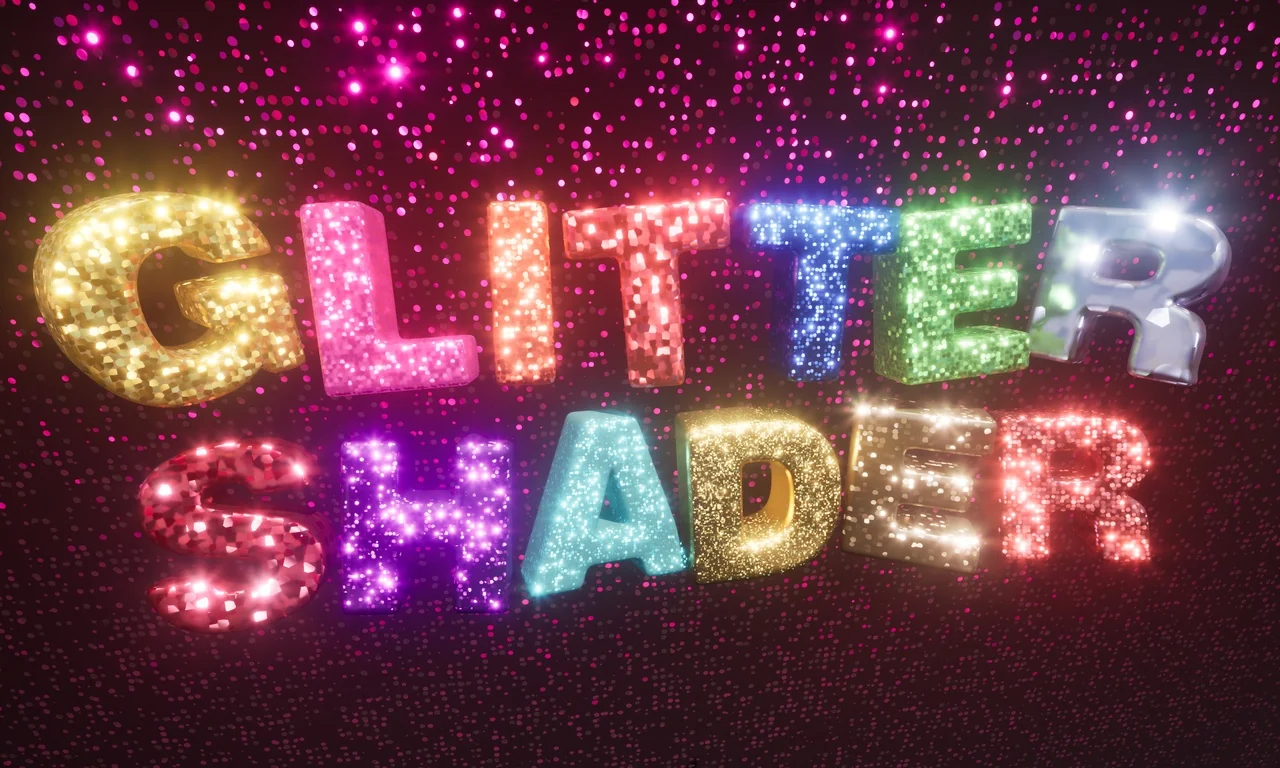
 Fabric & Clothing
 Fabric & Clothing
 Fabric & Clothing