"b00678cacce53329"{"id":"1002828","slug":"power-explosions-vfx-pack-color-explosions-dust-and-sand-explosions","title":"Power Explosions VFX Pack // Color Explosions // Dust and Sand explosions","category":"Fire \u0026 Explosions","engine":"4.22+,5.0+","assetVersion":"","engineVersion":"Engine Version: 4.22+,5.0+","tag":"Fire \u0026 Explosions","accent":"blue","visual":"mech","summary":"Explore the Power Explosions VFX Pack for Unreal Engine, featuring Niagara exposed parameters, modular debris, decals, color blasts, and sand impacts.","platform":"Unreal Engine","indexPolicy":"index","publishedAt":"2026-11-20T08:17:01.414Z","updatedAt":"2026-11-20T08:17:01.414Z","sourceNotes":[],"fileContents":[],"compatibility":["Unreal Engine","Engine Version: 4.22+,5.0+"],"featuredImage":{"alt":"Power Explosions VFX Pack // Color Explosions // Dust and Sand explosions","src":"/wp-content/uploads/published/2026/11/cd745ebb1b88-d1f95d7e-ffb0-4130-9806-35a51f3dd53c-bb75fd0432.webp"},"fileSizeBytes":60308805,"hasDownloadLink":true,"downloads":0,"terms":[{"taxonomy":"category","slug":"fire-and-explosions","name":"Fire \u0026 Explosions"}],"galleryImages":[{"src":"/wp-content/uploads/published/2026/11/6ad92b7ddeba-2dd8616e-e9ec-4c40-8cf0-62f034ad0ebc-9a518b917f.webp","alt":"Power Explosions VFX Pack // Color Explosions // Dust and Sand explosions"},{"src":"/wp-content/uploads/published/2026/11/178a9df744ac-d46c05bd-907d-47ef-b34e-550f61514c31-314e4d2af8.webp","alt":"Power Explosions VFX Pack // Color Explosions // Dust and Sand explosions"},{"src":"/wp-content/uploads/published/2026/11/d7398073ff9f-8fdd89e3-ebcb-41cc-a701-8130359e98ff-46d28d1201.webp","alt":"Power Explosions VFX Pack // Color Explosions // Dust and Sand explosions"},{"src":"/wp-content/uploads/published/2026/11/eb5722d9fc99-e42623c9-4881-4612-ac1d-8ccdc105baed-2132e0c88a.webp","alt":"Power Explosions VFX Pack // Color Explosions // Dust and Sand explosions"},{"src":"/wp-content/uploads/published/2026/11/bd72bfbcfaa1-137c7df6-d1cd-4525-b071-a6e3f7ff5b99-1552376126.webp","alt":"Power Explosions VFX Pack // Color Explosions // Dust and Sand explosions"},{"src":"/wp-content/uploads/published/2026/11/ae4a9923cae6-6d3cee0c-b64b-4deb-a61f-0e76b4a7ed6e-404f5a3be6.webp","alt":"Power Explosions VFX Pack // Color Explosions // Dust and Sand explosions"},{"src":"/wp-content/uploads/published/2026/11/8e2d77398890-c817d3ae-3c8f-4613-b2d0-c452e77e81e5-630397d94c.webp","alt":"Power Explosions VFX Pack // Color Explosions // Dust and Sand explosions"},{"src":"/wp-content/uploads/published/2026/11/ade201c81598-4071aeaf-cbdf-46e8-bf3e-648bfa8c4e5a-79ba7ccfc3.webp","alt":"Power Explosions VFX Pack // Color Explosions // Dust and Sand explosions"},{"src":"/wp-content/uploads/published/2026/11/d4e9c48defd8-6da86b7e-9765-40a8-b9b1-da4f0a3618a0-716a84a4e9.webp","alt":"Power Explosions VFX Pack // Color Explosions // Dust and Sand explosions"}],"accessPanel":{"kind":"resource","title":"Get this resource","safetyNote":"Resources are manually reviewed before listing to improve quality and reduce obvious risks.","fileName":"Content.7z","resourceType":"Resource archive","versions":[]},"contentHtml":"\u003ch2\u003eVisual Variety Across Power Explosions VFX Pack Categories\u003c/h2\u003e\n\u003cp\u003eCombat encounters, heavy artillery strikes, and environmental hazards require distinct visual signatures depending on where detonations occur. Ground detonations in arid wastelands behave differently from aerial bursts or stylized energy impacts. To address varying environmental conditions, the collection organizes its detonations into six core archetypes, each catering to different staging demands.\u003c/p\u003e\n\u003cp\u003eType 1 provides spherical explosive elements that radiate evenly from a central core, making them well-suited for generalized blasts, high-altitude detonations, or balanced kinetic impacts. Type 2 shifts to mushroom-shaped explosive formations, capturing the vertical lift, rising thermal columns, and top-heavy expansion typical of heavier ground munitions or concentrated explosive payloads.\u003c/p\u003e\n\u003cp\u003eType 3 focuses on colorful explosions, which bring vivid hue variation to impacts. This type works directly with dedicated tint adjustments, allowing creators to shift away from standard fire and smoke palettes into saturated tones suited for sci-fi weapons, magical bursts, or stylized gameplay indicators. Type 4 shifts focus toward dry terrain, producing dust explosion events where particulate matter dominates the visual silhouette. Type 5 extends this environmental interaction into sand explosions, dispersing heavier granular clouds suited for desert zones, beachheads, or weathered dunes. Rounding out the primary visual types, Type 6 supplies burning elements, establishing lingering flame pockets that persist well after the initial blast wave dissipates.\u003c/p\u003e \u003ch2\u003eRadial Shockwaves, Sand, and Dust Explosions\u003c/h2\u003e\n\u003cp\u003eSimulating an explosion requires more than an expanding fireball. A believable burst displaces the surrounding atmosphere, pulls up the terrain surface, and leaves an imprint on nearby geometry. Within the Unreal Engine 5 Niagara architecture, every sub-emitter can be manipulated directly to match the spatial requirements of an encounter.\u003c/p\u003e\n\u003cp\u003eDust and shockwave propagation can be dialed in using dedicated radial properties. When setting up a Type 4 dust explosion or a Type 5 sand explosion, enabling the Activate_dust_radial switch triggers a directional, outward-spreading cloud that matches the burst momentum across the ground plane. Developers can balance the thickness of these atmospheric particulate clouds using the Dust_spawn_rate_multiplier, increasing the value for blinding zero-visibility blasts or reducing it to keep player sightlines clear during active fire fights.\u003c/p\u003e\n\u003cp\u003eGround interaction is handled through decal integration. The Activate_decal toggle places a scorch or impact footprint directly on the underlying surface. For surface detonations, Decal_size_multiplier alters the footprint footprint to reflect the destructive radius, while Decal_duration manages the temporal decay, dictating how long the scorch mark remains visible in the world. Conversely, when setting up mid-air flak bursts, airborne missile impacts, or zero-gravity ruptures, turning the Activate_decal toggle off instantly detaches the effect from terrain logic, preventing scorch marks from spawning unnaturally on distant ground meshes.\u003c/p\u003e \u003ch2\u003eFine-Tuning Impact Dynamics via Exposed Niagara Controls\u003c/h2\u003e\n\u003cp\u003eThe Niagara update introduces a standardized set of exposed parameters across the effect systems, allowing artists to customize individual instances without needing to rewrite emitter graphs. Flash timing, fragmentation, lingering flame, and projectile traces can be shaped directly in the editor viewport or via Blueprint logic.\u003c/p\u003e\n\u003cp\u003eFlash and trailing elements frame the immediate ignition phase. If an instantaneous optical burst is needed to emphasize sudden kinetic energy, Activate_initial_flare injects a high-luminosity burst at the origin. If a project requires a softer, smoke-dominated detonation, turning off the flare removes the instant pop entirely. To trace outward trajectory lines, Activate_trails activates streaks that shoot away from the epicenter, with Trail_spawn_multiplier governing the density and frequency of these line elements.\u003c/p\u003e\n\u003cp\u003eFragment scattering is handled via physical mesh emitters. The Activate_debris toggle enables flying solid geometry that sprays from the blast point. Two companion controls govern the physical distribution of these fragments: Debris_spawn_multiplier dictates the sheer volume of expelled objects, while Debris_scale_per_element resizes the individual rubble pieces to match the scale of the exploding object, whether a small crate or a massive fortified barrier.\u003c/p\u003e\n\u003cp\u003eWhen an initial impact needs sustained fire afterward, secondary combustion parameters take over:\u003c/p\u003e\n\u003cul\u003e \u003cli\u003e\u003cstrong\u003eActivate_secondary_fire:\u003c/strong\u003e Toggles the post-explosion burning effect on or off.\u003c/li\u003e \u003cli\u003e\u003cstrong\u003eSecondary_fire_Duration:\u003c/strong\u003e Regulates how long the lingering flames survive before fading out.\u003c/li\u003e \u003cli\u003e\u003cstrong\u003eSecondary_fire_Ring Radius:\u003c/strong\u003e Expands or contracts the ground surface area covered by residual flames.\u003c/li\u003e \u003cli\u003e\u003cstrong\u003eSecondary_fire_SpawnRate:\u003c/strong\u003e Dictates the overall particle density of the residual fire field.\u003c/li\u003e \u003cli\u003e\u003cstrong\u003eSecondary_fire_scale_per_element:\u003c/strong\u003e Adjusts the physical dimensions of each individual flame particle within the burn ring.\u003c/li\u003e\n\u003c/ul\u003e\n\u003cp\u003eFor Type 3 variants, the Color parameter unlocks direct palette shifts across the explosion structure, enabling unique chromatic configurations that distinguish standard fuel blasts from chemical, plasma, or enchanted detonations.\u003c/p\u003e \u003ch2\u003eManaging Performance with Lamp, Distortion, and Collision Overheads\u003c/h2\u003e\n\u003cp\u003eHigh-density particle systems can place heavy demands on rendering budgets, particularly during intense gameplay sequences with overlapping explosions. The Niagara setup addresses runtime efficiency by exposing individual toggles for the most resource-intensive visual components.\u003c/p\u003e\n\u003cp\u003eRefraction effects create realistic heat shimmer around detonations, yet full-screen normal refraction layers can strain pixel fill rates. With the Activate_distortion switch, projects targeting lower-tier platforms can bypass distortion calculations entirely. When active, Distortion_Strength offers granular control over the heat wave intensity, letting technical artists match visual distortion to the thermal scale of the blast without introducing excess shader cost.\u003c/p\u003e\n\u003cp\u003eDynamic scene illumination introduces another significant performance consideration. The Activate_lamp parameter controls the dynamic light source bound to the initial flash. Because dynamic point lights can become performance bottlenecks in complex scenes with deferred lighting, switching off the lamp allows the system to rely purely on emissive materials and bloom, maintaining high framerates in dense battle scenes.\u003c/p\u003e\n\u003cp\u003eDebris interactions involve real-time physical checks against world geometry. The Debris_Collision_GPU_Dist_field option determines how flying fragments evaluate collision boundaries using global distance fields. For projects with alternate performance profiles or specific physics preferences, users can navigate directly into the Mesh_debris emitter inside the Niagara system to adjust collision calculations to alternative modes.\u003c/p\u003e \u003ch2\u003eAsset Structure Across Niagara Systems and Legacy Environments\u003c/h2\u003e\n\u003cp\u003eThe package maintains two clear implementations catering to different production pipelines: a modern Unreal Engine 5 Niagara architecture and a legacy Unreal Engine 4 release.\u003c/p\u003e\n\u003cp\u003eIn the Unreal Engine 5 deployment, all assets are organized within the dedicated Particles directory. Every Niagara system uses a uniform FX_ prefix, allowing for clean filtering and quick asset referencing across project folders. System parameters remain exposed at the instance level, ensuring fast iteration for level designers and technical artists adjusting values directly in scene placements.\u003c/p\u003e\n\u003cp\u003eThe legacy Unreal Engine 4 build utilizes traditional Cascade particle setups and includes a dedicated demonstration level named Test_map. Inside this test level, pre-placed emitters demonstrate each archetype in a live scene environment. Legacy assets use distinct naming conventions identifying their category and scale profile, such as P_Explosion_type01_med for medium spherical blasts, P_Explosion_type02_med for medium mushroom clouds, P_Explosion_type03_green_med for tinted type-three blasts, P_Explosion_type04_med for dust outbursts, P_Explosion_type05_med for sand impacts, and P_burn_green_002 representing the lingering burn components. This dual-pipeline structure ensures backward continuity while granting current-generation projects complete modular control through Niagara systems.\u003c/p\u003e\n\n\u003ch2\u003eContinue Browsing Similar Packs\u003c/h2\u003e\n\u003cul\u003e\n\u003cli\u003e\u003ca href=\"https://3dcghub.com/stylized-vfx-fire/\" rel=\"noopener noreferrer\"\u003eStylized VFX - Fire\u003c/a\u003e\u003c/li\u003e\n\u003cli\u003e\u003ca href=\"https://3dcghub.com/m5-vfx-vol1-smoke-and-big-explosion-niagara/\" rel=\"noopener noreferrer\"\u003eM5 VFX Vol1. Smoke and Big Explosion(Niagara)\u003c/a\u003e\u003c/li\u003e\n\u003cli\u003e\u003ca href=\"https://3dcghub.com/niagara-stylized-fire-vol-1/\" rel=\"noopener noreferrer\"\u003eNiagara Stylized Fire Vol. 1\u003c/a\u003e\u003c/li\u003e\n\u003cli\u003e\u003ca href=\"https://3dcghub.com/volcano-environment-vfx/\" rel=\"noopener noreferrer\"\u003eVolcano Environment VFX\u003c/a\u003e\u003c/li\u003e\n\u003cli\u003e\u003ca href=\"https://3dcghub.com/atmospheric-entry-fx/\" rel=\"noopener noreferrer\"\u003eAtmospheric Entry FX\u003c/a\u003e\u003c/li\u003e\n\u003c/ul\u003e","contentTextLength":8672,"navigation":{"current":52,"total":4797,"previous":{"id":"1002829","slug":"realistic-starter-vfx-pack","title":"Realistic Starter VFX Pack","category":"Variety","platform":"Unreal Engine","updatedAt":"2026-11-20T08:17:55.148Z"},"next":{"id":"1002827","slug":"point-clouds-morphing-gpu-based-point-cloud-morphing-system","title":"Point Clouds Morphing – GPU based point cloud morphing system","category":"Gameplay Features","platform":"Unreal Engine","updatedAt":"2026-11-20T08:15:36.656Z"}},"relatedResources":[{"id":"1002281","slug":"stylized-vfx-fire","title":"Stylized VFX - Fire","category":"Fire \u0026 Explosions","engine":"4.26+,5.0+","assetVersion":"","engineVersion":"Engine Version: 4.26+,5.0+","tag":"Fire \u0026 Explosions","accent":"blue","visual":"mech","summary":"Explore Stylized VFX - Fire, featuring 70 unique fire element effects built with optimized Sub UV materials for instant drag-and-drop game integration.","platform":"Unreal Engine","indexPolicy":"noindex","publishedAt":"2026-10-29T16:40:51.715Z","updatedAt":"2026-10-29T16:40:51.715Z","sourceNotes":[],"fileContents":[],"compatibility":["Unreal Engine","Engine Version: 4.26+,5.0+"],"featuredImage":{"alt":"Stylized VFX - Fire","src":"/wp-content/uploads/published/2026/10/057bd2631882-ab64453d-fecf-4944-9fc0-3b59cd7b749c-66a5cc8e61.webp"},"fileSizeBytes":21207103,"hasDownloadLink":true,"downloads":3},{"id":"1002854","slug":"vfx-grenade-pack","title":"VFX Grenade Pack","category":"Fire \u0026 Explosions","engine":"4.26+,5.0+","assetVersion":"","engineVersion":"Engine Version: 4.26+,5.0+","tag":"Fire \u0026 Explosions","accent":"blue","visual":"mech","summary":"VFX Grenade Pack delivers material-specific explosions for Niagara and Cascade in Unreal Engine, featuring Blueprints, decals, and camera shakes.","platform":"Unreal Engine","indexPolicy":"index","publishedAt":"2026-11-20T12:35:58.420Z","updatedAt":"2026-11-20T12:35:58.420Z","sourceNotes":[],"fileContents":[],"compatibility":["Unreal Engine","Engine Version: 4.26+,5.0+"],"featuredImage":{"alt":"VFX Grenade Pack","src":"/wp-content/uploads/published/2026/11/6558a19cbb7f-b11a8f0d-0f45-43c4-9e0e-9dd9232faa13-41a5e4c368.webp"},"fileSizeBytes":18032032,"hasDownloadLink":true,"downloads":0},{"id":"1002853","slug":"vfx-fire-pack","title":"VFX Fire Pack","category":"Fire \u0026 Explosions","engine":"4.26+,5.0+","assetVersion":"","engineVersion":"Engine Version: 4.26+,5.0+","tag":"Fire \u0026 Explosions","accent":"blue","visual":"mech","summary":"VFX Fire Pack delivers complete fire effects updated for Unreal Engine 5 with Niagara emitters, embedded lights, lit smoke, and environmental blueprints.","platform":"Unreal Engine","indexPolicy":"index","publishedAt":"2026-11-20T12:34:58.772Z","updatedAt":"2026-11-20T12:34:58.772Z","sourceNotes":[],"fileContents":[],"compatibility":["Unreal Engine","Engine Version: 4.26+,5.0+"],"featuredImage":{"alt":"VFX Fire Pack","src":"/wp-content/uploads/published/2026/11/9bb5dd81c644-56f491fb-6a1e-4ff8-a8ff-7823b382ff71-72b196ffb0.webp"},"fileSizeBytes":162136848,"hasDownloadLink":true,"downloads":0}]}
Resource screenshots
1 / 9
Join our channel
Follow 3DCGHUB on Telegram for new resource drops, migration updates, and community notices.
Visual Variety Across Power Explosions VFX Pack Categories
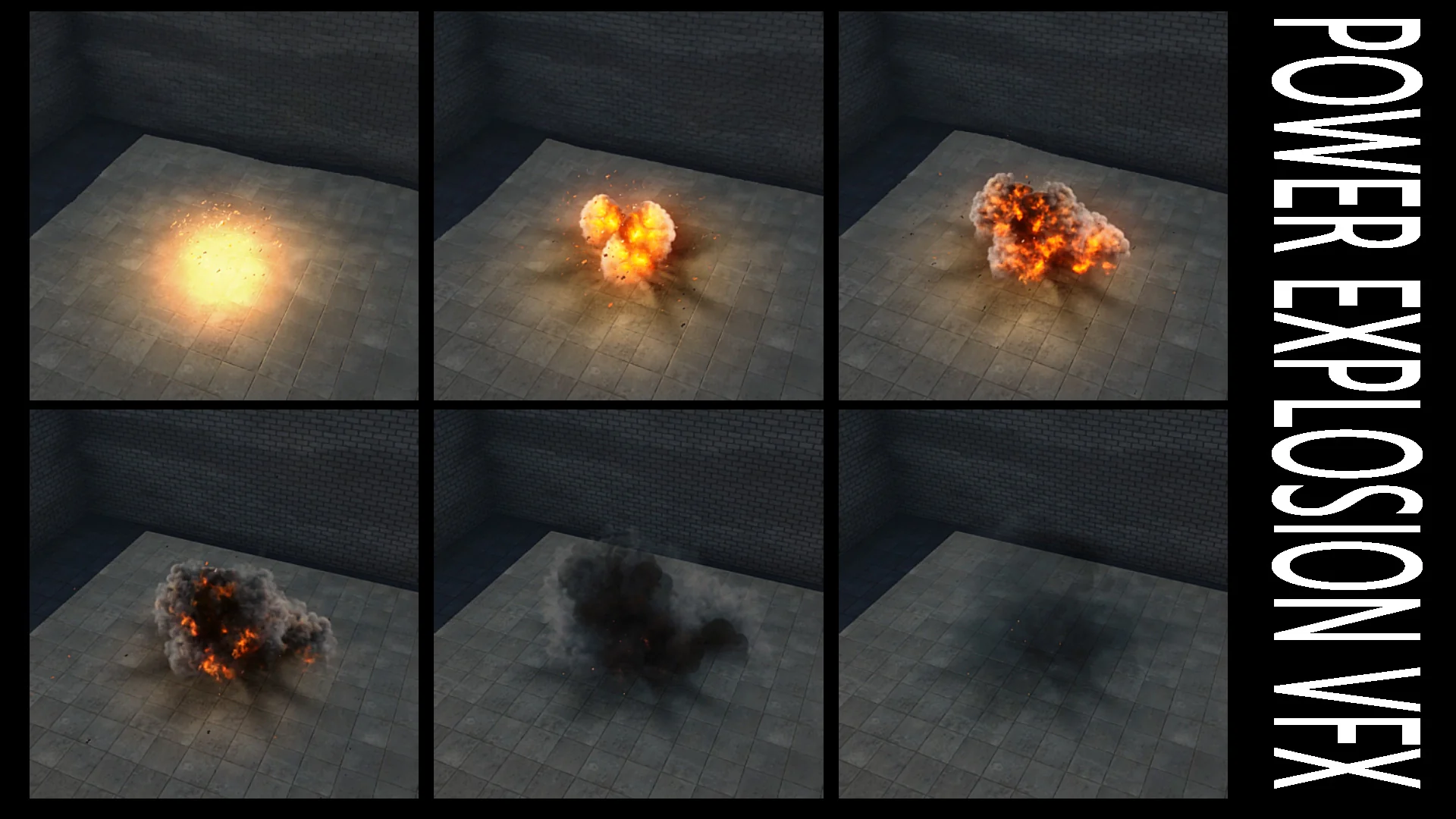
Combat encounters, heavy artillery strikes, and environmental hazards require distinct visual signatures depending on where detonations occur. Ground detonations in arid wastelands behave differently from aerial bursts or stylized energy impacts. To address varying environmental conditions, the collection organizes its detonations into six core archetypes, each catering to different staging demands.
Type 1 provides spherical explosive elements that radiate evenly from a central core, making them well-suited for generalized blasts, high-altitude detonations, or balanced kinetic impacts. Type 2 shifts to mushroom-shaped explosive formations, capturing the vertical lift, rising thermal columns, and top-heavy expansion typical of heavier ground munitions or concentrated explosive payloads.
Type 3 focuses on colorful explosions, which bring vivid hue variation to impacts. This type works directly with dedicated tint adjustments, allowing creators to shift away from standard fire and smoke palettes into saturated tones suited for sci-fi weapons, magical bursts, or stylized gameplay indicators. Type 4 shifts focus toward dry terrain, producing dust explosion events where particulate matter dominates the visual silhouette. Type 5 extends this environmental interaction into sand explosions, dispersing heavier granular clouds suited for desert zones, beachheads, or weathered dunes. Rounding out the primary visual types, Type 6 supplies burning elements, establishing lingering flame pockets that persist well after the initial blast wave dissipates.
Radial Shockwaves, Sand, and Dust Explosions
Simulating an explosion requires more than an expanding fireball. A believable burst displaces the surrounding atmosphere, pulls up the terrain surface, and leaves an imprint on nearby geometry. Within the Unreal Engine 5 Niagara architecture, every sub-emitter can be manipulated directly to match the spatial requirements of an encounter.
Dust and shockwave propagation can be dialed in using dedicated radial properties. When setting up a Type 4 dust explosion or a Type 5 sand explosion, enabling the Activate_dust_radial switch triggers a directional, outward-spreading cloud that matches the burst momentum across the ground plane. Developers can balance the thickness of these atmospheric particulate clouds using the Dust_spawn_rate_multiplier, increasing the value for blinding zero-visibility blasts or reducing it to keep player sightlines clear during active fire fights.
Ground interaction is handled through decal integration. The Activate_decal toggle places a scorch or impact footprint directly on the underlying surface. For surface detonations, Decal_size_multiplier alters the footprint footprint to reflect the destructive radius, while Decal_duration manages the temporal decay, dictating how long the scorch mark remains visible in the world. Conversely, when setting up mid-air flak bursts, airborne missile impacts, or zero-gravity ruptures, turning the Activate_decal toggle off instantly detaches the effect from terrain logic, preventing scorch marks from spawning unnaturally on distant ground meshes.
Fine-Tuning Impact Dynamics via Exposed Niagara Controls
The Niagara update introduces a standardized set of exposed parameters across the effect systems, allowing artists to customize individual instances without needing to rewrite emitter graphs. Flash timing, fragmentation, lingering flame, and projectile traces can be shaped directly in the editor viewport or via Blueprint logic.
Flash and trailing elements frame the immediate ignition phase. If an instantaneous optical burst is needed to emphasize sudden kinetic energy, Activate_initial_flare injects a high-luminosity burst at the origin. If a project requires a softer, smoke-dominated detonation, turning off the flare removes the instant pop entirely. To trace outward trajectory lines, Activate_trails activates streaks that shoot away from the epicenter, with Trail_spawn_multiplier governing the density and frequency of these line elements.
Fragment scattering is handled via physical mesh emitters. The Activate_debris toggle enables flying solid geometry that sprays from the blast point. Two companion controls govern the physical distribution of these fragments: Debris_spawn_multiplier dictates the sheer volume of expelled objects, while Debris_scale_per_element resizes the individual rubble pieces to match the scale of the exploding object, whether a small crate or a massive fortified barrier.
When an initial impact needs sustained fire afterward, secondary combustion parameters take over:
Activate_secondary_fire: Toggles the post-explosion burning effect on or off.
Secondary_fire_Duration: Regulates how long the lingering flames survive before fading out.
Secondary_fire_Ring Radius: Expands or contracts the ground surface area covered by residual flames.
Secondary_fire_SpawnRate: Dictates the overall particle density of the residual fire field.
Secondary_fire_scale_per_element: Adjusts the physical dimensions of each individual flame particle within the burn ring.
For Type 3 variants, the Color parameter unlocks direct palette shifts across the explosion structure, enabling unique chromatic configurations that distinguish standard fuel blasts from chemical, plasma, or enchanted detonations.
Managing Performance with Lamp, Distortion, and Collision Overheads
High-density particle systems can place heavy demands on rendering budgets, particularly during intense gameplay sequences with overlapping explosions. The Niagara setup addresses runtime efficiency by exposing individual toggles for the most resource-intensive visual components.
Refraction effects create realistic heat shimmer around detonations, yet full-screen normal refraction layers can strain pixel fill rates. With the Activate_distortion switch, projects targeting lower-tier platforms can bypass distortion calculations entirely. When active, Distortion_Strength offers granular control over the heat wave intensity, letting technical artists match visual distortion to the thermal scale of the blast without introducing excess shader cost.
Dynamic scene illumination introduces another significant performance consideration. The Activate_lamp parameter controls the dynamic light source bound to the initial flash. Because dynamic point lights can become performance bottlenecks in complex scenes with deferred lighting, switching off the lamp allows the system to rely purely on emissive materials and bloom, maintaining high framerates in dense battle scenes.
Debris interactions involve real-time physical checks against world geometry. The Debris_Collision_GPU_Dist_field option determines how flying fragments evaluate collision boundaries using global distance fields. For projects with alternate performance profiles or specific physics preferences, users can navigate directly into the Mesh_debris emitter inside the Niagara system to adjust collision calculations to alternative modes.
Asset Structure Across Niagara Systems and Legacy Environments
The package maintains two clear implementations catering to different production pipelines: a modern Unreal Engine 5 Niagara architecture and a legacy Unreal Engine 4 release.
In the Unreal Engine 5 deployment, all assets are organized within the dedicated Particles directory. Every Niagara system uses a uniform FX_ prefix, allowing for clean filtering and quick asset referencing across project folders. System parameters remain exposed at the instance level, ensuring fast iteration for level designers and technical artists adjusting values directly in scene placements.
The legacy Unreal Engine 4 build utilizes traditional Cascade particle setups and includes a dedicated demonstration level named Test_map. Inside this test level, pre-placed emitters demonstrate each archetype in a live scene environment. Legacy assets use distinct naming conventions identifying their category and scale profile, such as P_Explosion_type01_med for medium spherical blasts, P_Explosion_type02_med for medium mushroom clouds, P_Explosion_type03_green_med for tinted type-three blasts, P_Explosion_type04_med for dust outbursts, P_Explosion_type05_med for sand impacts, and P_burn_green_002 representing the lingering burn components. This dual-pipeline structure ensures backward continuity while granting current-generation projects complete modular control through Niagara systems.
 Fire & Explosions
 Fire & Explosions
 Fire & Explosions