"6f9bd6df1f44a86f"{"id":"1000859","slug":"niagara-stylized-fire-vol-1","title":"Niagara Stylized Fire Vol. 1","category":"Fire \u0026 Explosions","engine":"4.27,5.0+","assetVersion":"","engineVersion":"Engine Version: 4.27,5.0+","tag":"Fire \u0026 Explosions","accent":"blue","visual":"mech","summary":"Explore 13 stylized fire effects for Niagra, with exposed parameters for direct scaling, color, texture, and velocity changes in the Unreal editor.","platform":"Unreal Engine","indexPolicy":"index","publishedAt":"2026-08-05T06:21:08.974Z","updatedAt":"2026-08-05T06:21:08.974Z","sourceNotes":[],"fileContents":[],"compatibility":["Unreal Engine","Engine Version: 4.27,5.0+"],"featuredImage":{"alt":"Niagara Stylized Fire Vol. 1","src":"/wp-content/uploads/published/2026/08/c265c4f123de-44081164-a0db-48a5-be07-59033067b8d9-6e2c8e4977.webp"},"hasDownloadLink":true,"downloads":1,"terms":[{"taxonomy":"category","slug":"fire-and-explosions","name":"Fire \u0026 Explosions"}],"galleryImages":[{"src":"/wp-content/uploads/published/2026/08/c3012fbaf9ce-0dd46c1f-e478-4db2-b78e-615099a8a8d0-63a193a8c3.webp","alt":"Niagara Stylized Fire Vol. 1"},{"src":"/wp-content/uploads/published/2026/08/5aa1b3c847e2-5bc60fc3-1bbe-427e-806d-613c2dedcca2-f53abfc37c.webp","alt":"Niagara Stylized Fire Vol. 1"},{"src":"/wp-content/uploads/published/2026/08/1200d1aa2f13-d810b08a-82ea-4121-90fc-58b2bcd512fd-e171dcdc9b.webp","alt":"Niagara Stylized Fire Vol. 1"},{"src":"/wp-content/uploads/published/2026/08/420043761611-1714a51a-ff0f-4066-933e-9de0ac0c8bfa-dbdfa38bbb.webp","alt":"Niagara Stylized Fire Vol. 1"},{"src":"/wp-content/uploads/published/2026/08/98b530318675-e939ec5e-643c-49a9-8f6f-7110f41e85e2-0511abaf50.webp","alt":"Niagara Stylized Fire Vol. 1"},{"src":"/wp-content/uploads/published/2026/08/ca2a27c80ea4-2e4698a0-2026-425c-bceb-273c55b384ab-f7a28943c3.webp","alt":"Niagara Stylized Fire Vol. 1"},{"src":"/wp-content/uploads/published/2026/08/1c58d3c57697-7eeb1183-f039-4481-b174-7ee6ddb5e824-0b397143e9.webp","alt":"Niagara Stylized Fire Vol. 1"}],"accessPanel":{"kind":"resource","title":"Download this resource","eyebrow":"Free Download","message":"Log in or create a free account to start your download.","fileName":"Content.7z","safetyNote":"Resources are manually reviewed before listing to improve quality and reduce obvious risks.","actionLabel":"Download Free","resourceType":"Resource archive"},"contentHtml":"\u003cp\u003eIn a dark dungeon or a wizard’s study, the glow of a fire tells much of the story. This pack places 13 stylized fire effects in the hands of artists, each 1 built with Unreal Engine’s Niagara. The flames read as fantasy and magic rather than medical-grade realism, and they are set up to be adapted quickly without digging through the Particle Graph.\u003c/p\u003e\n\n\u003ch2\u003eA Family of 13 Stylized Flames\u003c/h2\u003e\n\n\u003cp\u003eAll 13 fires share a visual language that fits fantasy and stylized production work. The tags that pop up with the asset—\u003cem\u003eFireplace\u003c/em\u003e, \u003cem\u003eFantasy\u003c/em\u003e, \u003cem\u003eMagic\u003c/em\u003e, and \u003cem\u003eFlame\u003c/em\u003e—point to a range of uses beyond just a typical campfire. If a scene calls for a simple magical flame on a torch, or a larger, more mysterious fire for a ritual site, the pack offers multiple starting points. Because the set is built in Niagara, every fire behaves as a living Particle System rather than a static texture, so there is constant motion and variation in the light and smoke.\u003c/p\u003e\n\n\u003cp\u003eThe stylized treatment means the flames stay readable in stylized environments without clashing with broad, painterly art directions. They are not physically simulated fuel fires; they are made to look like a designed fire effect, which makes them easier to blend with hand-crafted visuals. When a developer wants a flame that reads clearly as magical, shifting the color from orange to green or blue can do it in a few clicks.\u003c/p\u003e\n\n\u003ch2\u003eCustomizing Directly on the Level\u003c/h2\u003e\n\n\u003cp\u003eThe strongest trait of this pack is how customization is exposed. The Niagara parameters are not buried inside the system; they can be accessed directly on the Level, map, or Editor. That means an artist can select a fire placed in a scene and start changing values right away, without opening the Niagara Graph or hunting for the right attribute.\u003c/p\u003e\n\n\u003cp\u003eThis setup changes the workflow for both artists and technical designers. Someone whose job is to stage a Level can tweak a flame without needing to understand Niagara’s node-based logic. This removes a barrier between concept art and final scene setup. If a Level Designer decides that a particular fire should be brighter or smaller, the adjustment happens in place, leading to faster iteration and fewer round trips between disciplines.\u003c/p\u003e\n\n\u003ch2\u003eScale, Color, Texture, and Velocity\u003c/h2\u003e\n\n\u003cp\u003eThe exposed parameters cover the properties that matter most when placing fire in a scene: \u003ccode\u003eScale\u003c/code\u003e, \u003ccode\u003eColor\u003c/code\u003e, \u003ccode\u003eTexture\u003c/code\u003e, and \u003ccode\u003eVelocity\u003c/code\u003e.\u003c/p\u003e\n\n\u003cp\u003e\u003ccode\u003eScale\u003c/code\u003e lets a single fire grow from a small candle-like accent to a towering bonfire. \u003ccode\u003eColor\u003c/code\u003e shifts the entire flame palette, turning a standard lit torch into a spectral blue flame or an otherworldly purple wall of fire. \u003ccode\u003eTexture\u003c/code\u003e gives the artist the option to swap in different flame shapes, Alpha edges, or noise, which changes the silhouette of the fire without rebuilding the particle setup. \u003ccode\u003eVelocity\u003c/code\u003e adjusts how fast the flames move, giving the artist control over the energy of the effect. A calm, slow fire feels different in gameplay or cinematic work than a fast, whipping flame, and having that parameter available on the fly is valuable for matching mood.\u003c/p\u003e\n\n\u003cp\u003eBecause these 4 parameters are exposed together, the same base fire can be reused many times across a project with different looks and behaviors. A single flame effect might serve as a torch in 1 Level, a magical portal in another, and an environmental hazard in a 3rd. That kind of modular reuse is exactly what the Niagara system allows.\u003c/p\u003e\n\n\u003ch2\u003eEnable Niagara and Niagara Extras\u003c/h2\u003e\n\n\u003cp\u003e1 important setup note comes from the developer: the fire assets may require that Niagara and Niagara Extras are enabled in the Engine. This is done under \u003ccode\u003eEdit\u003c/code\u003e \u003e \u003ccode\u003ePlugins\u003c/code\u003e \u003e \u003ccode\u003eFX\u003c/code\u003e. The step is quick, but it matters if the project has not previously used Niagara particles. Once these plugins are active, the asset’s systems should load and behave as expected.\u003c/p\u003e\n\n\u003cp\u003eThis is a practical detail for Technical Directors who are integrating the pack into a larger project. It is not a 1-line fix in the asset itself, but rather a project-level configuration that is common for any Niagara-heavy asset. Knowing about it ahead of time saves a bit of confusion during the 1st import.\u003c/p\u003e\n\n\u003ch2\u003ePart of a Broader Niagara VFX Library\u003c/h2\u003e\n\n\u003cp\u003eThe pack is part of the \u003cem\u003eNiagara Mega Pack Vol. 2\u003c/em\u003e, which places it in a broader family of effects. The same creator has also published \u003cem\u003eMagic Projectiles Mega Pack Vol. 1\u003c/em\u003e, \u003cem\u003eStylized Explosions Vol. 1\u003c/em\u003e, \u003cem\u003eSci-Fi Pack Vol. 1\u003c/em\u003e, and the first \u003cem\u003eNiagara Mega Pack\u003c/em\u003e. For artists who are assembling a library of effects, this fire set can sit alongside those other packs, each 1 maintaining a similar approach to exposed parameters and easy customization.\u003c/p\u003e\n\n\u003cp\u003eThis is also useful for larger teams that want consistency across different Visual Effects (VFX) assets. When several effects packs follow the same editing philosophy, a Level Designer who learns how to tweak 1 pack can apply that knowledge to the others. The workflow stays the same, which shortens the onboarding time for new team members.\u003c/p\u003e\n\n\u003cp\u003eThe practical takeaway is this: because the parameters are exposed and editable in the Level, team members who may not be comfortable inside Niagara Graphs can still place, scale, and re-theme these fires. For a small studio or a solo developer, that removes a layer of friction between asset and scene. The set offers a quick path to getting stylized, believable fire into a game or cinematic, with enough direct control to make each flame feel intentional.\u003c/p\u003e\n\n\u003ch2\u003eExplore Similar Assets\u003c/h2\u003e\n\u003cul\u003e\n\u003cli\u003e\u003ca href=\"https://3dcghub.com/volcano-environment-vfx/\" rel=\"noopener noreferrer\"\u003eVolcano Environment VFX\u003c/a\u003e\u003c/li\u003e\n\u003cli\u003e\u003ca href=\"https://3dcghub.com/rocket-thruster-exhaust-fx/\" rel=\"noopener noreferrer\"\u003eRocket Thruster Exhaust FX\u003c/a\u003e\u003c/li\u003e\n\u003cli\u003e\u003ca href=\"https://3dcghub.com/atmospheric-entry-fx/\" rel=\"noopener noreferrer\"\u003eAtmospheric Entry FX\u003c/a\u003e\u003c/li\u003e\n\u003cli\u003e\u003ca href=\"https://3dcghub.com/explosion-vfx-2/\" rel=\"noopener noreferrer\"\u003eExplosion VFX 2\u003c/a\u003e\u003c/li\u003e\n\u003cli\u003e\u003ca href=\"https://3dcghub.com/fire-bursts-vdb/\" rel=\"noopener noreferrer\"\u003eFire Bursts VDB\u003c/a\u003e\u003c/li\u003e\n\u003c/ul\u003e","contentTextLength":5466,"navigation":{"current":1505,"total":4218,"previous":{"id":"1000860","slug":"open-world-audio-system","title":"Open World Audio System","category":"Gameplay Features","platform":"Unreal Engine","updatedAt":"2026-08-05T06:24:43.389Z"},"next":{"id":"1000858","slug":"niagara-ray-vfx-pack-remaster","title":"Niagara Ray VFX Pack Remaster","category":"Spells \u0026 Combat","platform":"Unreal Engine","updatedAt":"2026-08-05T06:17:53.049Z"}},"relatedResources":[{"id":"1002281","slug":"stylized-vfx-fire","title":"Stylized VFX - Fire","category":"Fire \u0026 Explosions","engine":"4.26+,5.0+","assetVersion":"","engineVersion":"Engine Version: 4.26+,5.0+","tag":"Fire \u0026 Explosions","accent":"blue","visual":"mech","summary":"Explore Stylized VFX - Fire, featuring 70 unique fire element effects built with optimized Sub UV materials for instant drag-and-drop game integration.","platform":"Unreal Engine","indexPolicy":"index","publishedAt":"2026-10-29T16:40:51.715Z","updatedAt":"2026-10-29T16:40:51.715Z","sourceNotes":[],"fileContents":[],"compatibility":["Unreal Engine","Engine Version: 4.26+,5.0+"],"featuredImage":{"alt":"Stylized VFX - Fire","src":"/wp-content/uploads/published/2026/10/057bd2631882-ab64453d-fecf-4944-9fc0-3b59cd7b749c-66a5cc8e61.webp"},"hasDownloadLink":true,"downloads":3},{"id":"1001418","slug":"100-explosion-pack-niagara","title":"100 Explosion Pack Niagara","category":"Fire \u0026 Explosions","engine":"4.15+,5.0+","assetVersion":"","engineVersion":"Engine Version: 4.15+,5.0+","tag":"Fire \u0026 Explosions","accent":"blue","visual":"mech","summary":"Explore the 100 Explosion Pack Niagara, featuring baked simulation textures, Blueprint user parameters, and diverse blast effects for game production.","platform":"Unreal Engine","indexPolicy":"index","publishedAt":"2026-10-06T14:54:36.669Z","updatedAt":"2026-10-06T14:54:36.669Z","sourceNotes":[],"fileContents":[],"compatibility":["Unreal Engine","Engine Version: 4.15+,5.0+"],"featuredImage":{"alt":"100 Explosion Pack Niagara","src":"/wp-content/uploads/published/2026/10/7773cc88cebe-07f88a0e-c695-4ee8-907f-829ae250a9ef-be3c371fca.webp"},"hasDownloadLink":true,"downloads":2},{"id":"1000777","slug":"volcano-environment-vfx","title":"Volcano Environment VFX","category":"Fire \u0026 Explosions","engine":"4.27,5.0+","assetVersion":"","engineVersion":"Engine Version: 4.27,5.0+","tag":"Fire \u0026 Explosions","accent":"blue","visual":"city","summary":"Six modular volcano environment and atmosphere VFX built for Niagara, optimized for games with drag-and-drop setup and customizable parameters for cinematic sce","platform":"Unreal Engine","indexPolicy":"index","publishedAt":"2026-07-28T18:19:24.127Z","updatedAt":"2026-07-28T18:19:24.127Z","sourceNotes":[],"fileContents":[],"compatibility":["Unreal Engine","Engine Version: 4.27,5.0+"],"featuredImage":{"alt":"Volcano Environment VFX","src":"/wp-content/uploads/published/2026/07/e24d5c319fff-909aa903-77c4-4aa3-a8ec-9a1cafca8cdf-5173a7858b.webp"},"hasDownloadLink":true,"downloads":0}]}
Fire & Explosions
Niagara Stylized Fire Vol. 1
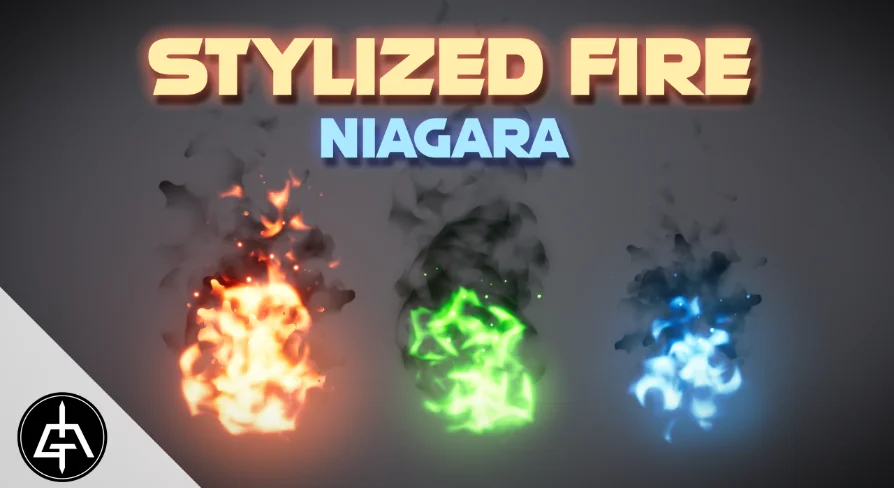
Explore 13 stylized fire effects for Niagra, with exposed parameters for direct scaling, color, texture, and velocity changes in the Unreal editor.
In a dark dungeon or a wizard’s study, the glow of a fire tells much of the story. This pack places 13 stylized fire effects in the hands of artists, each 1 built with Unreal Engine’s Niagara. The flames read as fantasy and magic rather than medical-grade realism, and they are set up to be adapted quickly without digging through the Particle Graph.
A Family of 13 Stylized Flames
All 13 fires share a visual language that fits fantasy and stylized production work. The tags that pop up with the asset—Fireplace, Fantasy, Magic, and Flame—point to a range of uses beyond just a typical campfire. If a scene calls for a simple magical flame on a torch, or a larger, more mysterious fire for a ritual site, the pack offers multiple starting points. Because the set is built in Niagara, every fire behaves as a living Particle System rather than a static texture, so there is constant motion and variation in the light and smoke.
The stylized treatment means the flames stay readable in stylized environments without clashing with broad, painterly art directions. They are not physically simulated fuel fires; they are made to look like a designed fire effect, which makes them easier to blend with hand-crafted visuals. When a developer wants a flame that reads clearly as magical, shifting the color from orange to green or blue can do it in a few clicks.
Customizing Directly on the Level
The strongest trait of this pack is how customization is exposed. The Niagara parameters are not buried inside the system; they can be accessed directly on the Level, map, or Editor. That means an artist can select a fire placed in a scene and start changing values right away, without opening the Niagara Graph or hunting for the right attribute.
This setup changes the workflow for both artists and technical designers. Someone whose job is to stage a Level can tweak a flame without needing to understand Niagara’s node-based logic. This removes a barrier between concept art and final scene setup. If a Level Designer decides that a particular fire should be brighter or smaller, the adjustment happens in place, leading to faster iteration and fewer round trips between disciplines.
Scale, Color, Texture, and Velocity
The exposed parameters cover the properties that matter most when placing fire in a scene: Scale, Color, Texture, and Velocity.
Scale lets a single fire grow from a small candle-like accent to a towering bonfire. Color shifts the entire flame palette, turning a standard lit torch into a spectral blue flame or an otherworldly purple wall of fire. Texture gives the artist the option to swap in different flame shapes, Alpha edges, or noise, which changes the silhouette of the fire without rebuilding the particle setup. Velocity adjusts how fast the flames move, giving the artist control over the energy of the effect. A calm, slow fire feels different in gameplay or cinematic work than a fast, whipping flame, and having that parameter available on the fly is valuable for matching mood.
Because these 4 parameters are exposed together, the same base fire can be reused many times across a project with different looks and behaviors. A single flame effect might serve as a torch in 1 Level, a magical portal in another, and an environmental hazard in a 3rd. That kind of modular reuse is exactly what the Niagara system allows.
Enable Niagara and Niagara Extras
1 important setup note comes from the developer: the fire assets may require that Niagara and Niagara Extras are enabled in the Engine. This is done under Edit > Plugins > FX. The step is quick, but it matters if the project has not previously used Niagara particles. Once these plugins are active, the asset’s systems should load and behave as expected.
This is a practical detail for Technical Directors who are integrating the pack into a larger project. It is not a 1-line fix in the asset itself, but rather a project-level configuration that is common for any Niagara-heavy asset. Knowing about it ahead of time saves a bit of confusion during the 1st import.
Part of a Broader Niagara VFX Library
The pack is part of the Niagara Mega Pack Vol. 2, which places it in a broader family of effects. The same creator has also published Magic Projectiles Mega Pack Vol. 1, Stylized Explosions Vol. 1, Sci-Fi Pack Vol. 1, and the first Niagara Mega Pack. For artists who are assembling a library of effects, this fire set can sit alongside those other packs, each 1 maintaining a similar approach to exposed parameters and easy customization.
This is also useful for larger teams that want consistency across different Visual Effects (VFX) assets. When several effects packs follow the same editing philosophy, a Level Designer who learns how to tweak 1 pack can apply that knowledge to the others. The workflow stays the same, which shortens the onboarding time for new team members.
The practical takeaway is this: because the parameters are exposed and editable in the Level, team members who may not be comfortable inside Niagara Graphs can still place, scale, and re-theme these fires. For a small studio or a solo developer, that removes a layer of friction between asset and scene. The set offers a quick path to getting stylized, believable fire into a game or cinematic, with enough direct control to make each flame feel intentional.
 Fire & Explosions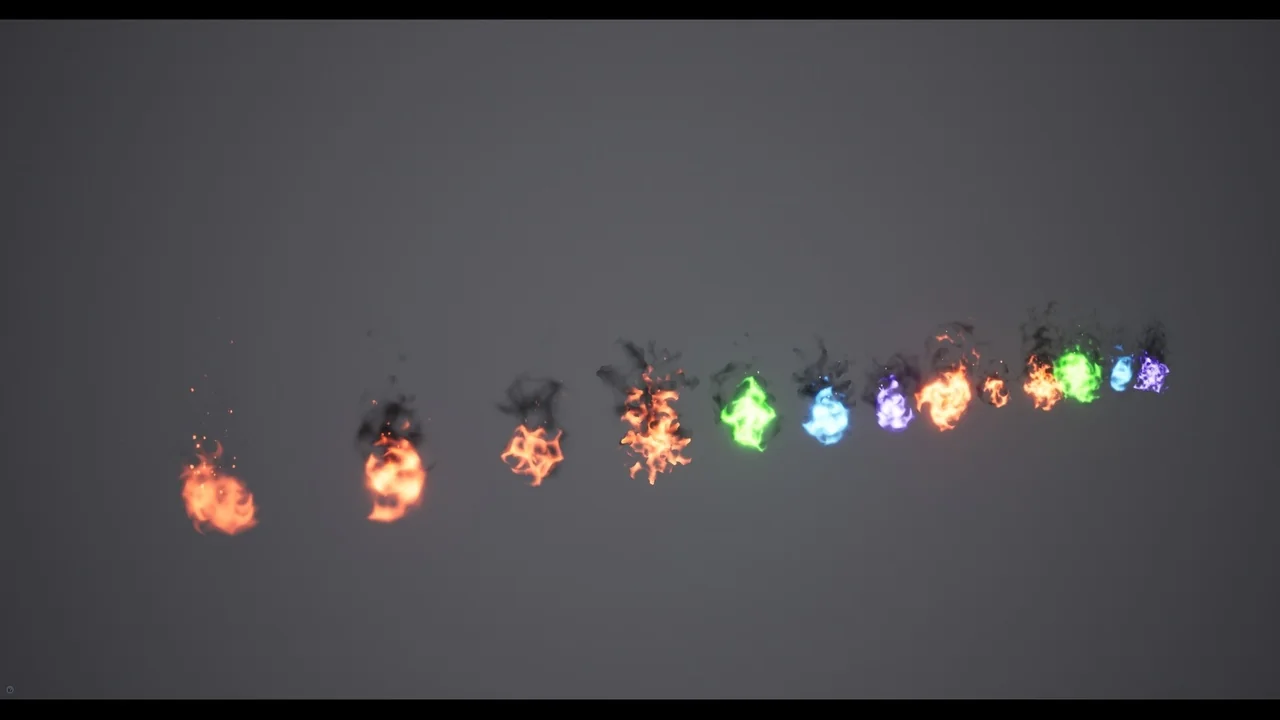
 Fire & Explosions
 Fire & Explosions
 Fire & Explosions