"7066dd76da796369"{"id":"1000125","slug":"nv-spline-tools","title":"NV Spline Tools","category":"Gameplay Features","engine":"4.26+,5.0+","assetVersion":"","engineVersion":"Engine Version: 4.26+,5.0+","tag":"Gameplay Features","accent":"blue","visual":"mech","summary":"NV Spline Tools is a Blueprint-based spline system for arranging deformed SplineMeshes and static meshes for fences, walls, tracks, pipes, and more.","platform":"Unreal Engine","publishedAt":"2026-06-11T09:59:29.656Z","updatedAt":"2026-06-11T09:59:29.656Z","sourceNotes":[],"fileContents":[],"compatibility":["Unreal Engine","Engine Version: 4.26+,5.0+"],"featuredImage":{"alt":"NV Spline Tools","src":"/wp-content/uploads/published/2026/06/7d1b7f79d598-d6f9a000-1bac-4160-8ec5-897e993e6e0a-4decfdc9c9.webp"},"hasDownloadLink":true,"downloads":1,"terms":[{"taxonomy":"category","slug":"gameplay-features","name":"Gameplay Features"}],"galleryImages":[{"src":"/wp-content/uploads/published/2026/06/1cb64e4ba80a-9d7b3cc4-5d31-4225-ba63-0c5e75b12756-2498956932.webp","alt":"NV Spline Tools"},{"src":"/wp-content/uploads/published/2026/06/cfd3db9f507f-137d885f-f163-4cb6-a1c7-9c62a950c6cd-f0df2c0858.webp","alt":"NV Spline Tools"},{"src":"/wp-content/uploads/published/2026/06/a5d87f5753f3-703f0483-c791-47fa-8e27-bf67a51fd454-ab608c31a6.webp","alt":"NV Spline Tools"},{"src":"/wp-content/uploads/published/2026/06/c9971962aeb6-6eab7da7-a551-4e52-b990-ab9d1c3e1b20-83fbbb7398.webp","alt":"NV Spline Tools"},{"src":"/wp-content/uploads/published/2026/06/5a6eaa92f2f6-5ace847c-5b99-4ed0-ad2e-7963246e28cc-11b2a16a34.webp","alt":"NV Spline Tools"},{"src":"/wp-content/uploads/published/2026/06/05e9b81e6cdc-d70ac184-63b8-4212-9501-110e05c45edd-caa214a5fe.webp","alt":"NV Spline Tools"},{"src":"/wp-content/uploads/published/2026/06/5bb151b6dcfb-02e001b7-e5ed-485e-b3d8-bded17f63761-02052c2c38.webp","alt":"NV Spline Tools"},{"src":"/wp-content/uploads/published/2026/06/10c2f69fdd82-5a3e8fb5-bbf4-4e39-935f-22077221cde3-8ca51cd316.webp","alt":"NV Spline Tools"}],"accessPanel":{"kind":"resource","title":"Access this resource","eyebrow":"Free Download","message":"Log in or create a free account to start your download.","fileName":"Content.7z","safetyNote":"Resources are manually reviewed before listing to improve quality and reduce obvious risks.","actionLabel":"Download Free","resourceType":"Resource archive"},"contentHtml":"\u003cp\u003eNV Spline Tools starts at the point where manual placement usually becomes slow: building a line of modular meshes that needs to follow a path. Instead of setting pieces one by one, it creates a sequence of meshes along a spline, either by deforming SplineMesh components to match the curve or by placing static meshes at controlled intervals. The system is built entirely in Blueprints and is intended for edit-time use, so it fits directly into level creation rather than acting as a separate modeling step.\u003c/p\u003e\n\u003cp\u003eThat makes its role in production very clear. When a scene needs repeatable structure that still has to bend, twist, or adapt to terrain, the tool provides a base for laying out flexible architectural elements quickly. Fences, walls, tracks, and pipes are all named examples, and those examples make sense because they all depend on the same core need: following a route while preserving a modular construction logic.\u003c/p\u003e \u003ch2\u003eSetting up NV Spline Tools in a level workflow\u003c/h2\u003e\n\u003cp\u003eThe system is a customizable base for flexible architecture, which puts it in the practical middle ground between a one-off spline actor and a hardcoded specialty tool. It is not limited to a single preset structure. The included examples are simple, but the broader purpose is to drive user-supplied static meshes through a repeatable spline workflow.\u003c/p\u003e\n\u003cp\u003eIts edit-time focus is important. This is aimed at scene assembly, where a developer or artist shapes a spline and uses that path to generate the modular sequence needed for the level. That means the spline becomes the main layout input, while mesh selection and spacing rules determine how the final structure fills the path. The package can also re-generate the sequence at run-time, but its main identity is still as a level-building utility rather than a purely runtime effect.\u003c/p\u003e\n\u003cp\u003eIn real use, that places NV Spline Tools in the stage where blockout begins turning into environment structure. A fence line can be drawn, a wall can be routed through uneven space, or a corridor-like run can be mocked up from repeated parts without abandoning modular control.\u003c/p\u003e \u003ch2\u003eSplineMeshes and static meshes solve two different placement jobs\u003c/h2\u003e\n\u003cp\u003eOne of the stronger parts of the system is that it does not force a single spline strategy. It supports two distinct mesh placement methods, and each suits a different production need.\u003c/p\u003e\n\u003cp\u003eWith SplineMesh components, segments can be deformed along the spline's curve. This is the approach for shapes that need to visibly bend with the path instead of reading as a chain of rigid pieces. The tool supports repeating segments across the entire length of the spline, repeating segments between each point on the spline, and stretching segments between each point on the spline. Those options create different pacing and structure depending on how the spline itself is authored.\u003c/p\u003e\n\u003cp\u003eStatic mesh placement addresses the opposite problem. Some modular pieces should remain rigid and simply be distributed in an ordered way along a path. NV Spline Tools can place static meshes at fixed distances along the spline, between deformed segments, and at points on the spline. That gives room for hybrid setups where curved sections and rigid inserts coexist in the same sequence.\u003c/p\u003e\n\u003cp\u003eThis separation between deformed spline-driven pieces and fixed static placement gives the tool broader coverage than a system that only bends meshes. Curved runs, repeated supports, posts, inserts, or interval-based detail pieces can all be handled from the same spline-driven setup.\u003c/p\u003e \u003ch2\u003eControlling distance, segment order, and edge conditions\u003c/h2\u003e\n\u003cp\u003eA spline tool becomes much more useful when it can respond intelligently to the actual distance it needs to cover, and NV Spline Tools includes several controls shaped by that idea. Mesh placement can be adjusted according to spline length, which helps prevent awkward end conditions when the path does not divide neatly into equal pieces.\u003c/p\u003e\n\u003cp\u003eOne option is to stretch meshes so they cover the required distance. Another is to stop placing meshes shortly before the end of the spline if there is not enough room for a full mesh. Those are two very different behaviors, and having both matters. In one case, continuity is the priority. In the other, preserving the full shape of the modular unit matters more than forcing a squeezed or partial fit.\u003c/p\u003e\n\u003cp\u003eThe sequence logic goes further than simple repetition. Meshes can be chosen from a list either randomly or sequentially, which affects patterning across a long run. The tool also adjusts the mesh sequence based on the remaining distance to cover. It can complete the sequence by choosing the mesh that most closely matches what is left, or it can keep using the longest segment or segments until the last piece. It can also assign different meshes to the first or last segment in the sequence.\u003c/p\u003e\n\u003cp\u003eThese controls are especially useful for modular sets that are not made from a single universal piece. Start caps, end caps, filler pieces, and mixed segment lengths are common in architecture kits. NV Spline Tools gives those kinds of sets a rules-based way to adapt to variable spline lengths without losing their modular identity.\u003c/p\u003e \u003ch2\u003eGround snapping, runtime regeneration, and flexible architecture\u003c/h2\u003e\n\u003cp\u003eAnother practical part of the system is its ability to automatically snap the spline to the ground underneath it. For environment work, this reduces one of the most tedious parts of laying out long modular features across uneven terrain. A fence, rail-like structure, or similar line-based element often needs to follow the land first and be refined second. Ground snapping supports that kind of iterative placement.\u003c/p\u003e\n\u003cp\u003eThe ability to re-generate the sequence at run-time adds another layer of usefulness, even though the primary design target is edit-time level creation. That means the generated arrangement is not locked to a one-time authoring pass. When a project needs the sequence to be refreshed or rebuilt during play, the system can do that without abandoning the same spline-driven logic.\u003c/p\u003e\n\u003cp\u003eCalling it a customizable base system for flexible architecture fits the feature set well. The tool is not narrowly framed around a fence generator or a road preset. Its actual strength is that it handles mesh sequencing, spacing, deformation, and placement logic in a reusable way that can support many modular structures that depend on spline paths.\u003c/p\u003e \u003ch2\u003eWooden fence sample, simple corridor, and using your own meshes\u003c/h2\u003e\n\u003cp\u003eThe included examples show the intended workflow without pretending to replace a full production-ready mesh library. Two simple sets of example meshes are included, but the tool is primarily meant to work with user-supplied static meshes. That puts the emphasis on the system itself rather than on stock content.\u003c/p\u003e\n\u003cp\u003eThe package includes two sample usages, complete with simple models and PBR materials. One is a wooden fence sample made from six wooden fence segment meshes and one wooden post mesh. The other is a simple corridor that is included for demonstration purposes. Together, those samples illustrate two sensible directions for the tool: exterior modular runs that repeat over terrain, and enclosed structural paths that show how segments can form a guided space.\u003c/p\u003e\n\u003cp\u003eThere is also a clear authoring requirement for custom meshes. Meshes should be aligned along the X axis, because the system places them along the spline from -X to +X. That single detail matters in practice, since orientation errors are one of the fastest ways to break a spline-based modular setup. If a team is preparing its own mesh kit for use with NV Spline Tools, consistent alignment along that axis is part of making the system behave as intended.\u003c/p\u003e\n\u003cp\u003eDocumentation is available for the package, which reinforces its role as a reusable working system rather than a throwaway demo.\u003c/p\u003e \u003ch2\u003eA practical place for NV Spline Tools\u003c/h2\u003e\n\u003cp\u003eNV Spline Tools fits best where modular environment pieces need to follow a path without becoming a manual placement chore. Its Blueprint setup, edit-time workflow, spline deformation options, fixed-distance static placement, ground snapping, and sequence controls all support that job directly. For teams building their own mesh sets, the tool works less like a finished theme and more like a production utility that turns spline paths into repeatable architectural structure.\u003c/p\u003e\n\n\u003ch2\u003eExplore Similar Assets\u003c/h2\u003e\n\u003cul\u003e\n\u003cli\u003e\u003ca href=\"https://3dcghub.com/advanced-spline-mesh-analysis-tool/\" title=\"Advanced Spline Mesh Analysis Tool\"\u003eAdvanced Spline Mesh Analysis Tool\u003c/a\u003e\u003c/li\u003e\n\u003cli\u003e\u003ca href=\"https://3dcghub.com/fluid-pumping-hose-system/\" title=\"Fluid Pumping \u0026amp; Hose System\"\u003eFluid Pumping \u0026amp; Hose System\u003c/a\u003e\u003c/li\u003e\n\u003cli\u003e\u003ca href=\"https://3dcghub.com/npc-ai-queuing-system/\" title=\"NPC AI Queuing System\"\u003eNPC AI Queuing System\u003c/a\u003e\u003c/li\u003e\n\u003cli\u003e\u003ca href=\"https://3dcghub.com/ia-scatter/\" title=\"ia scatter\"\u003eia scatter\u003c/a\u003e\u003c/li\u003e\n\u003cli\u003e\u003ca href=\"https://3dcghub.com/advanced-character-camera-and-functions/\" title=\"Advanced Character Camera And Functions\"\u003eAdvanced Character Camera And Functions\u003c/a\u003e\u003c/li\u003e\n\u003c/ul\u003e","contentTextLength":8443,"navigation":{"current":2040,"total":4016,"previous":{"id":"1000127","slug":"old-man-animset","title":"Old Man Animset","category":"Variety","platform":"Unreal Engine","updatedAt":"2026-06-11T10:12:14.396Z"},"next":{"id":"1000124","slug":"level-transition-system","title":"Level Transition System","category":"Gameplay Features","platform":"Unreal Engine","updatedAt":"2026-06-11T09:47:27.283Z"}},"relatedResources":[{"id":"1000083","slug":"npc-ai-queuing-system","title":"NPC AI Queuing System","category":"Gameplay Features","engine":"Engine Version: 4.26+,5.0+","assetVersion":"Engine Version: 4.26+,5.0+","engineVersion":"","tag":"Gameplay Features","accent":"blue","visual":"mech","summary":"A Blueprint-based NPC queuing system for smooth pedestrian behavior, spline routes, behavior tree logic, debug tools, and quick scene setup.","platform":"Unreal Engine","publishedAt":"2026-06-05T16:06:07.049Z","updatedAt":"2026-06-05T16:06:07.049Z","sourceNotes":[],"fileContents":[],"compatibility":["Unreal Engine","Engine Version: 4.26+,5.0+"],"featuredImage":{"alt":"NPC AI Queuing System","src":"/wp-content/uploads/published/2026/06/2fce6ebe6d61-050ebb3a-f89b-44e9-8982-9b4b5c0267ab-85fbd54aad.webp"},"hasDownloadLink":true,"downloads":0},{"id":"10552","slug":"advanced-spline-mesh-analysis-tool","title":"Advanced Spline Mesh Analysis Tool","category":"Gameplay Features","engine":"4.27,5.0+","assetVersion":"Engine version: 4.27,5.0+","engineVersion":"4.26","tag":"Gameplay Features","accent":"blue","visual":"city","summary":"Enhance your project workflow with the Advanced Spline Mesh Analysis Tool. This resource offers modular blueprints for procedural line interactions and dynamic pipeline generation in complex environments.","platform":"Unreal Engine","publishedAt":"2026-03-03T15:40:20.000Z","updatedAt":"2026-04-19T15:49:59.000Z","sourceNotes":[],"fileContents":[],"compatibility":["Unreal Engine","Engine version: 4.27,5.0+"],"featuredImage":{"alt":"Advanced Spline Mesh Analysis Tool","src":"https://3dcghub.com/wp-content/uploads/2026/03/c1b76e0a-2725-417c-9867-e990efb453bc.webp"},"hasDownloadLink":true,"downloads":0},{"id":"10844","slug":"fluid-pumping-hose-system","title":"Fluid Pumping \u0026 Hose System","category":"Gameplay Features","engine":"4.26+,5.0+","assetVersion":"Engine version: 4.26+,5.0+","engineVersion":"4.25","tag":"Gameplay Features","accent":"blue","visual":"luts","summary":"Manage complex fluid transfers with the Fluid Pumping \u0026 Hose System. This tool features configurable containers, adjustable pump rates, and physics-based hose mechanics for realistic gameplay.","platform":"Unreal Engine","publishedAt":"2026-03-03T16:22:21.000Z","updatedAt":"2026-04-19T15:49:55.000Z","sourceNotes":[],"fileContents":[],"compatibility":["Unreal Engine","Engine version: 4.26+,5.0+"],"featuredImage":{"alt":"Fluid Pumping \u0026 Hose System","src":"https://3dcghub.com/wp-content/uploads/2026/03/248588f7-e0c4-4dac-b392-8a13c816d038.webp"},"hasDownloadLink":true,"downloads":0}]}
Gameplay Features
NV Spline Tools
NV Spline Tools is a Blueprint-based spline system for arranging deformed SplineMeshes and static meshes for fences, walls, tracks, pipes, and more.
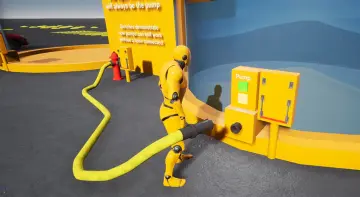
NV Spline Tools starts at the point where manual placement usually becomes slow: building a line of modular meshes that needs to follow a path. Instead of setting pieces one by one, it creates a sequence of meshes along a spline, either by deforming SplineMesh components to match the curve or by placing static meshes at controlled intervals. The system is built entirely in Blueprints and is intended for edit-time use, so it fits directly into level creation rather than acting as a separate modeling step.
That makes its role in production very clear. When a scene needs repeatable structure that still has to bend, twist, or adapt to terrain, the tool provides a base for laying out flexible architectural elements quickly. Fences, walls, tracks, and pipes are all named examples, and those examples make sense because they all depend on the same core need: following a route while preserving a modular construction logic.
Setting up NV Spline Tools in a level workflow
The system is a customizable base for flexible architecture, which puts it in the practical middle ground between a one-off spline actor and a hardcoded specialty tool. It is not limited to a single preset structure. The included examples are simple, but the broader purpose is to drive user-supplied static meshes through a repeatable spline workflow.
Its edit-time focus is important. This is aimed at scene assembly, where a developer or artist shapes a spline and uses that path to generate the modular sequence needed for the level. That means the spline becomes the main layout input, while mesh selection and spacing rules determine how the final structure fills the path. The package can also re-generate the sequence at run-time, but its main identity is still as a level-building utility rather than a purely runtime effect.
In real use, that places NV Spline Tools in the stage where blockout begins turning into environment structure. A fence line can be drawn, a wall can be routed through uneven space, or a corridor-like run can be mocked up from repeated parts without abandoning modular control.
SplineMeshes and static meshes solve two different placement jobs
One of the stronger parts of the system is that it does not force a single spline strategy. It supports two distinct mesh placement methods, and each suits a different production need.
With SplineMesh components, segments can be deformed along the spline's curve. This is the approach for shapes that need to visibly bend with the path instead of reading as a chain of rigid pieces. The tool supports repeating segments across the entire length of the spline, repeating segments between each point on the spline, and stretching segments between each point on the spline. Those options create different pacing and structure depending on how the spline itself is authored.
Static mesh placement addresses the opposite problem. Some modular pieces should remain rigid and simply be distributed in an ordered way along a path. NV Spline Tools can place static meshes at fixed distances along the spline, between deformed segments, and at points on the spline. That gives room for hybrid setups where curved sections and rigid inserts coexist in the same sequence.
This separation between deformed spline-driven pieces and fixed static placement gives the tool broader coverage than a system that only bends meshes. Curved runs, repeated supports, posts, inserts, or interval-based detail pieces can all be handled from the same spline-driven setup.
Controlling distance, segment order, and edge conditions
A spline tool becomes much more useful when it can respond intelligently to the actual distance it needs to cover, and NV Spline Tools includes several controls shaped by that idea. Mesh placement can be adjusted according to spline length, which helps prevent awkward end conditions when the path does not divide neatly into equal pieces.
One option is to stretch meshes so they cover the required distance. Another is to stop placing meshes shortly before the end of the spline if there is not enough room for a full mesh. Those are two very different behaviors, and having both matters. In one case, continuity is the priority. In the other, preserving the full shape of the modular unit matters more than forcing a squeezed or partial fit.
The sequence logic goes further than simple repetition. Meshes can be chosen from a list either randomly or sequentially, which affects patterning across a long run. The tool also adjusts the mesh sequence based on the remaining distance to cover. It can complete the sequence by choosing the mesh that most closely matches what is left, or it can keep using the longest segment or segments until the last piece. It can also assign different meshes to the first or last segment in the sequence.
These controls are especially useful for modular sets that are not made from a single universal piece. Start caps, end caps, filler pieces, and mixed segment lengths are common in architecture kits. NV Spline Tools gives those kinds of sets a rules-based way to adapt to variable spline lengths without losing their modular identity.
Ground snapping, runtime regeneration, and flexible architecture
Another practical part of the system is its ability to automatically snap the spline to the ground underneath it. For environment work, this reduces one of the most tedious parts of laying out long modular features across uneven terrain. A fence, rail-like structure, or similar line-based element often needs to follow the land first and be refined second. Ground snapping supports that kind of iterative placement.
The ability to re-generate the sequence at run-time adds another layer of usefulness, even though the primary design target is edit-time level creation. That means the generated arrangement is not locked to a one-time authoring pass. When a project needs the sequence to be refreshed or rebuilt during play, the system can do that without abandoning the same spline-driven logic.
Calling it a customizable base system for flexible architecture fits the feature set well. The tool is not narrowly framed around a fence generator or a road preset. Its actual strength is that it handles mesh sequencing, spacing, deformation, and placement logic in a reusable way that can support many modular structures that depend on spline paths.
Wooden fence sample, simple corridor, and using your own meshes
The included examples show the intended workflow without pretending to replace a full production-ready mesh library. Two simple sets of example meshes are included, but the tool is primarily meant to work with user-supplied static meshes. That puts the emphasis on the system itself rather than on stock content.
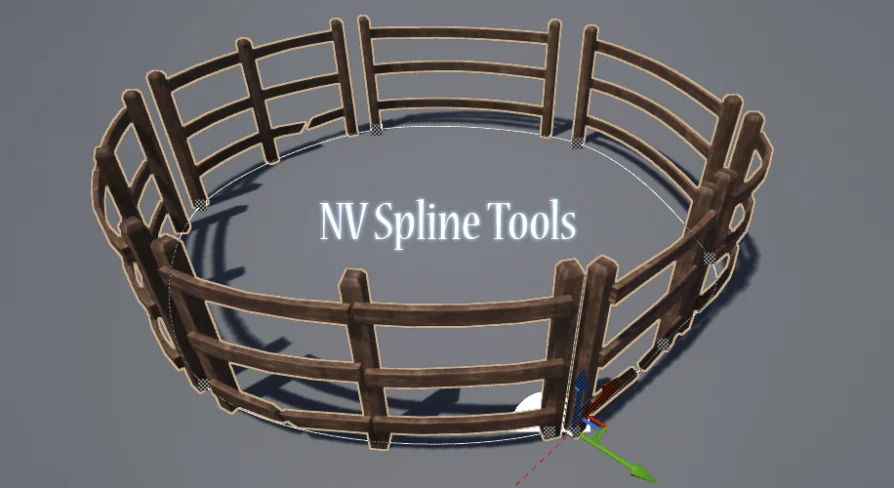
The package includes two sample usages, complete with simple models and PBR materials. One is a wooden fence sample made from six wooden fence segment meshes and one wooden post mesh. The other is a simple corridor that is included for demonstration purposes. Together, those samples illustrate two sensible directions for the tool: exterior modular runs that repeat over terrain, and enclosed structural paths that show how segments can form a guided space.
There is also a clear authoring requirement for custom meshes. Meshes should be aligned along the X axis, because the system places them along the spline from -X to +X. That single detail matters in practice, since orientation errors are one of the fastest ways to break a spline-based modular setup. If a team is preparing its own mesh kit for use with NV Spline Tools, consistent alignment along that axis is part of making the system behave as intended.
Documentation is available for the package, which reinforces its role as a reusable working system rather than a throwaway demo.
A practical place for NV Spline Tools
NV Spline Tools fits best where modular environment pieces need to follow a path without becoming a manual placement chore. Its Blueprint setup, edit-time workflow, spline deformation options, fixed-distance static placement, ground snapping, and sequence controls all support that job directly. For teams building their own mesh sets, the tool works less like a finished theme and more like a production utility that turns spline paths into repeatable architectural structure.
 Gameplay Features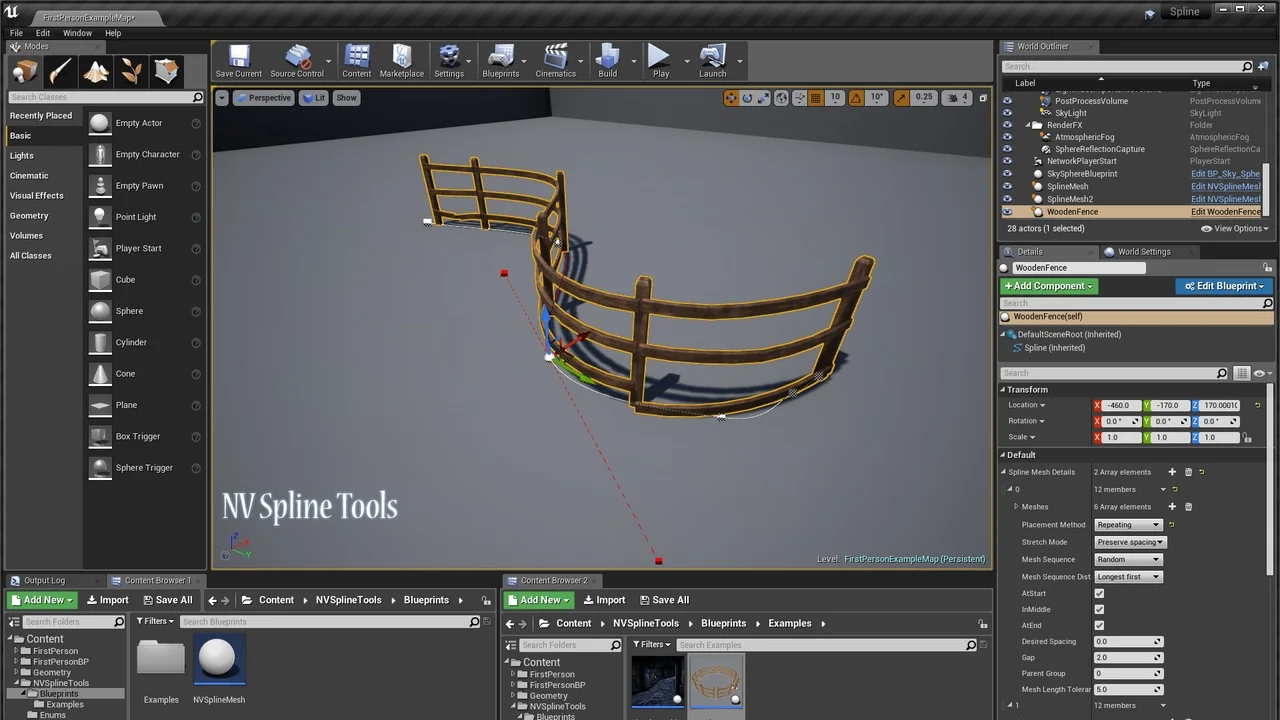
 Gameplay Features
 Gameplay Features
 Gameplay Features