"7b46a695175d8694"{"id":"1001531","slug":"launcher-animations","title":"Launcher Animations","category":"Combat","engine":"4.18+,5.0+","assetVersion":"","engineVersion":"Engine Version: 4.18+,5.0+","tag":"Combat","accent":"blue","visual":"animation","summary":"Launcher Animations delivers combat-ready motion sets tailored for third-person soldiers, first-person setups, accompanying weapons, and creature rigs.","platform":"Unreal Engine","publishedAt":"2026-10-09T17:25:01.227Z","updatedAt":"2026-10-09T17:25:01.227Z","sourceNotes":[],"fileContents":[],"compatibility":["Unreal Engine","Engine Version: 4.18+,5.0+"],"featuredImage":{"alt":"Launcher Animations","src":"/wp-content/uploads/published/2026/10/d7eff0ce4c65-33774e35-d19b-42e6-a38e-7a4410f89f28-5b5bef0b37.webp"},"hasDownloadLink":true,"downloads":0,"terms":[{"taxonomy":"category","slug":"combat","name":"Combat"}],"galleryImages":[{"src":"/wp-content/uploads/published/2026/10/1337a0166486-605ced0f-6c26-4220-b790-e3482fd7fc4d-3f08133d8d.webp","alt":"Launcher Animations"},{"src":"/wp-content/uploads/published/2026/10/3adb896a572d-1bd928ab-4516-4238-b5b0-5b82690b5d1e-8f1505537e.webp","alt":"Launcher Animations"},{"src":"/wp-content/uploads/published/2026/10/791e29479b8a-19101f80-22a6-4966-b3e0-e6f0cd65daf3-4e268649e8.webp","alt":"Launcher Animations"},{"src":"/wp-content/uploads/published/2026/10/05347b54e673-a308e21e-4e48-463f-9801-dd32821158cd-c0b37668d7.webp","alt":"Launcher Animations"}],"accessPanel":{"kind":"resource","title":"Download this resource","eyebrow":"Free Download","message":"Log in or create a free account to start your download.","fileName":"Content.7z","safetyNote":"Resources are manually reviewed before listing to improve quality and reduce obvious risks.","actionLabel":"Download Free","resourceType":"Resource archive"},"contentHtml":"\u003ch2\u003eSetting Up Launcher Animations Across Camera Perspectives\u003c/h2\u003e\u003cp\u003eDeploying combat motion sets into an active project requires an immediate choice regarding viewport positioning and character rig framing. Launcher Animations supplies a collection of movement sets built principally for third-person camera placement, giving developers a full-body view of weapon handling, stance management, and propulsion recoil. Third-person cameras require clear silhouettes, precise foot placement, and stable weapon alignment so that character movements read clearly from medium and long distances across typical battlefield terrain.\u003c/p\u003e\u003cp\u003eWhile third-person framing serves as the primary implementation target, the motion sets also allow adaptation to first-person viewports. Using third-person motion data in a first-person context depends on how the rig binds to camera viewports, specifically arm positioning, weapon sway, and barrel clearance. In first-person setups, the primary camera is attached directly to the character head bone or isolated upper-body skeletal chains. Because these animations retain solid root mechanics and disciplined weapon stabilization, developers can repurpose the motion sequences for closer camera angles without completely separating character body animations from weapon attachment points.\u003c/p\u003e\u003cp\u003eIntegrating these movements into a dual-perspective framework gives production pipelines more flexibility. When a project enables smooth perspective transitions—such as switching from an over-the-shoulder perspective into an aimed iron-sights or optic view—the underlying movement tracks help prevent visual snapping. Maintaining consistent timing between whole-body movement and weapon firing actions ensures character interaction remains unified across distinct camera distances.\u003c/p\u003e\u003ch2\u003eIntegrating Accompanying Weapons with Soldier Profiles\u003c/h2\u003e\u003cp\u003eLauncher weapon mechanics require matching props that sit correctly in a soldier's hands. Launcher Animations includes dedicated weapon assets provided alongside the animation library, giving teams matched equipment ready for attachment without sourcing separate armaments. These weapon assets feature clean mesh construction tailored to soldier archetypes, offering detailed visual surfaces while aligning with low-poly design standards.\u003c/p\u003e\u003cp\u003eApplying low-poly weapons within interactive scenes minimizes performance overhead while preserving the defining profiles needed for military gear. Soldier character models, particularly those deployed in tactical or low-poly visual styles, benefit from weaponry that maintains consistent aesthetic density. When launcher meshes share similar poly budgets with character models, projects avoid visual disparity where a weapon looks either too simplified or overly detailed compared to the hands holding it.\u003c/p\u003e\u003cp\u003eProper socket positioning forms the technical core of weapon integration. The accompanying weapons must mount reliably to skeletal sockets in the character right or left hand, as well as auxiliary back or shoulder mounts during resting and traversing states. Because the animations emphasize disciplined weapon control, launcher orientation during idle, aim, and firing states aligns directly with the included low-poly weapon geometry, reducing the manual offset correction usually needed when binding standalone weapon assets to third-party motion sets.\u003c/p\u003e\u003ch2\u003eAdapting Motion Sets to 56 Animations for Creatures\u003c/h2\u003e\u003cp\u003eBeyond traditional soldier setups, character pipelines frequently involve non-humanoid combatants or customized skeletal structures. Launcher Animations features compatibility considerations that account for 56 Animations for Creatures, allowing animators and gameplay programmers to connect weapon-based logic with extended creature skeletons. Expanding projectile launcher behavior to creature rigs allows for heavy brutes, automated combat units, or specialized non-standard bipeds to shoulder military-grade ordnance.\u003c/p\u003e\u003cp\u003eRetargeting humanoid actions to creature profiles involves managing distinct bone proportions, altered center-of-mass distributions, and broader shoulder geometry. When mapping these launcher motions to creature skeletal hierarchies, technical artists can link the 56 compatible creature animation channels to maintain weapon alignment through dramatic strides, charging movements, or heavy idle loops. The mechanical stability of the launcher cycles provides reliable base curves that survive skeletal transformation without collapsing joint limits.\u003c/p\u003e\u003cp\u003eManaging creature combat actions with projectile armaments also involves balancing root motion against in-place locomotion. When a creature takes a braced stance to launch an explosive payload, the animation data communicates weight through deliberate recovery frames and grounded foot placement. Aligning these behaviors with the broader creature animation library ensures that specialized launcher sequences fit naturally alongside melee sweeps, roars, and dynamic reactions.\u003c/p\u003e\u003ch2\u003eRefining Weapon States and Combat Execution\u003c/h2\u003e\u003cp\u003eCombat pacing relies heavily on the division of animations into distinct phases: readying the weapon, acquiring a target, launching the projectile, absorbing recoil impulse, and transitioning back into an alert stance. Launcher Animations provides clear motion separation across these operational beats, allowing gameplay developers to assign state-machine triggers and animation montages cleanly within their animation blueprints or state graphs.\u003c/p\u003e\u003cp\u003eDuring weapon firing cycles, the impulse from launching a heavy projectile must reflect through the upper torso, hands, and legs. Third-person cameras reveal how this kinetic energy moves across the entire character model, providing immediate visual feedback to the player that a high-yield round has discharged. In first-person implementation, this same kinetic burst manifests as sharp screen recoil and barrel lift, delivering satisfying tactical impact right in front of the lens.\u003c/p\u003e\u003cp\u003eBecause the included weapons match low-poly performance targets and soldier equipment setups, handling draw, aim, and holstering cycles avoids complex socket swapping logic. Production teams can establish reliable blueprint structures where launcher firing states hook directly into projectile spawning delegates, visual flash events, and physical recoil impulses, maintaining stable performance across dense multi-character engagements.\u003c/p\u003e\n\n\u003ch2\u003eMore From The Same Workflow\u003c/h2\u003e\n\u003cul\u003e\n\u003cli\u003e\u003ca href=\"https://3dcghub.com/fps-rocket-launcher-animations/\" title=\"FPS Rocket Launcher Animations\"\u003eFPS Rocket Launcher Animations\u003c/a\u003e\u003c/li\u003e\n\u003cli\u003e\u003ca href=\"https://3dcghub.com/essential-great-sword-animation-pack/\" title=\"Essential Great Sword Animation Pack\"\u003eEssential Great Sword Animation Pack\u003c/a\u003e\u003c/li\u003e\n\u003cli\u003e\u003ca href=\"https://3dcghub.com/92-animations-for-warrior/\" title=\"92 Animations For Warrior\"\u003e92 Animations For Warrior\u003c/a\u003e\u003c/li\u003e\n\u003cli\u003e\u003ca href=\"https://3dcghub.com/rogue-volume-2/\" title=\"Rogue Volume 2\"\u003eRogue Volume 2\u003c/a\u003e\u003c/li\u003e\n\u003cli\u003e\u003ca href=\"https://3dcghub.com/weapon-and-shield-animations/\" title=\"Weapon And Shield Animations\"\u003eWeapon And Shield Animations\u003c/a\u003e\u003c/li\u003e\n\u003c/ul\u003e","contentTextLength":6525,"navigation":{"current":13,"total":3481,"previous":{"id":"1001532","slug":"levelcontroller2-transform-levels-at-runtime-in-realtime","title":"LevelController2 (Transform Levels At Runtime In Realtime)","category":"Engine Tools","platform":"Unreal Engine","updatedAt":"2026-10-09T17:25:41.854Z"},"next":{"id":"1001530","slug":"laboratory-interior-studio-in-loft-style","title":"Laboratory Interior Studio in Loft Style","category":"Interior","platform":"Unreal Engine","updatedAt":"2026-10-09T17:24:29.957Z"}},"relatedResources":[{"id":"1001345","slug":"fps-rocket-launcher-animations","title":"FPS Rocket Launcher Animations","category":"Combat","engine":"5.1+","assetVersion":"","engineVersion":"Engine Version: 5.1+","tag":"Combat","accent":"blue","visual":"animation","summary":"Low-poly first-person rocket launcher animation set featuring multiple hand skins, traversal cycles, aiming stances, and dedicated firing actions.","platform":"Unreal Engine","publishedAt":"2026-10-04T10:08:57.563Z","updatedAt":"2026-10-04T10:08:57.563Z","sourceNotes":[],"fileContents":[],"compatibility":["Unreal Engine","Engine Version: 5.1+"],"featuredImage":{"alt":"FPS Rocket Launcher Animations","src":"/wp-content/uploads/published/2026/10/190e171ddcf1-168a517a-0e43-433b-80bd-4f62dd1dd1aa-86574c97c5.webp"},"hasDownloadLink":true,"downloads":0},{"id":"1000598","slug":"essential-great-sword-animation-pack","title":"Essential Great Sword Animation Pack","category":"Combat","engine":"4.26+,5.0+","assetVersion":"","engineVersion":"Engine Version: 4.26+,5.0+","tag":"Combat","accent":"blue","visual":"animation","summary":"Unreal Engine animation pack with one-handed and two-handed great sword combat stances, locomotion, attacks, and a playable character blueprint for action RPGs.","platform":"Unreal Engine","publishedAt":"2026-07-18T13:52:05.447Z","updatedAt":"2026-07-18T13:52:05.447Z","sourceNotes":[],"fileContents":[],"compatibility":["Unreal Engine","Engine Version: 4.26+,5.0+"],"featuredImage":{"alt":"Essential Great Sword Animation Pack","src":"/wp-content/uploads/published/2026/07/825b1d12899d-c4bf9404-41fd-4b60-a7a2-0ffc173b037f-2674bc9bbb.webp"},"hasDownloadLink":true,"downloads":19},{"id":"1000783","slug":"92-animations-for-warrior","title":"92 Animations For Warrior","category":"Combat","engine":"4.26+,5.0+","assetVersion":"","engineVersion":"Engine Version: 4.26+,5.0+","tag":"Combat","accent":"blue","visual":"animation","summary":"92 Animations For Warrior delivers directional movement and root animation for fantasy warriors and barbarians, built for combat-heavy character work.","platform":"Unreal Engine","publishedAt":"2026-07-30T11:37:20.237Z","updatedAt":"2026-07-30T11:37:20.237Z","sourceNotes":[],"fileContents":[],"compatibility":["Unreal Engine","Engine Version: 4.26+,5.0+"],"featuredImage":{"alt":"92 Animations For Warrior","src":"/wp-content/uploads/published/2026/07/8cce50755180-a3b1db25-cb8a-41fc-bc3b-88043f3d0b0a-1e56065b4b.webp"},"hasDownloadLink":true,"downloads":3}]}
Combat
Launcher Animations
Launcher Animations delivers combat-ready motion sets tailored for third-person soldiers, first-person setups, accompanying weapons, and creature rigs.
Category:Unreal Engine,CombatPlatform: Unreal EngineEngine Version: 4.18+,5.0+Published: Oct 9, 2026
Combat
Resource overview
Setting Up Launcher Animations Across Camera Perspectives
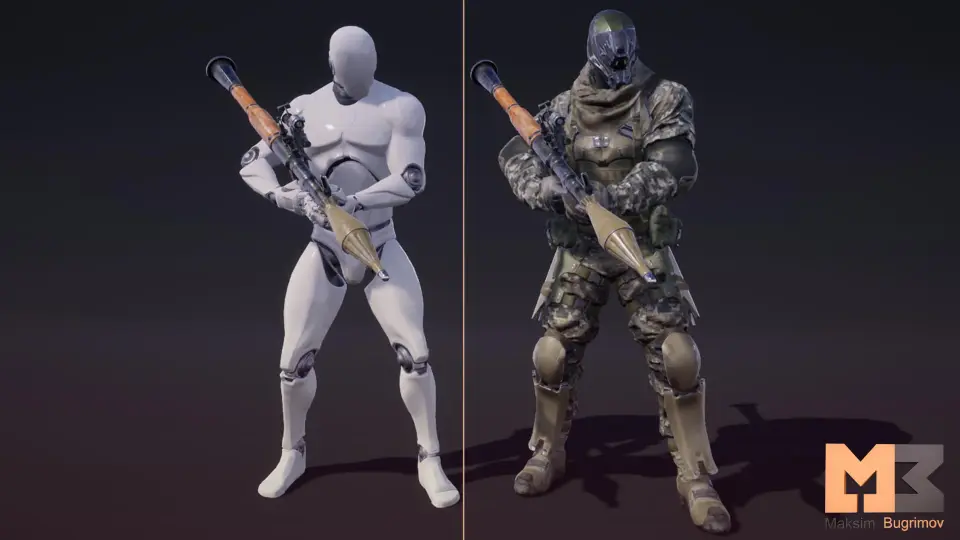
Deploying combat motion sets into an active project requires an immediate choice regarding viewport positioning and character rig framing. Launcher Animations supplies a collection of movement sets built principally for third-person camera placement, giving developers a full-body view of weapon handling, stance management, and propulsion recoil. Third-person cameras require clear silhouettes, precise foot placement, and stable weapon alignment so that character movements read clearly from medium and long distances across typical battlefield terrain.
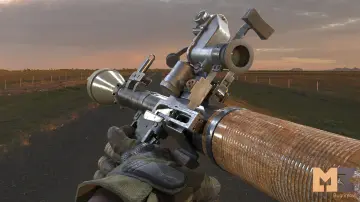
While third-person framing serves as the primary implementation target, the motion sets also allow adaptation to first-person viewports. Using third-person motion data in a first-person context depends on how the rig binds to camera viewports, specifically arm positioning, weapon sway, and barrel clearance. In first-person setups, the primary camera is attached directly to the character head bone or isolated upper-body skeletal chains. Because these animations retain solid root mechanics and disciplined weapon stabilization, developers can repurpose the motion sequences for closer camera angles without completely separating character body animations from weapon attachment points.
Integrating these movements into a dual-perspective framework gives production pipelines more flexibility. When a project enables smooth perspective transitions—such as switching from an over-the-shoulder perspective into an aimed iron-sights or optic view—the underlying movement tracks help prevent visual snapping. Maintaining consistent timing between whole-body movement and weapon firing actions ensures character interaction remains unified across distinct camera distances.
Integrating Accompanying Weapons with Soldier Profiles
Launcher weapon mechanics require matching props that sit correctly in a soldier's hands. Launcher Animations includes dedicated weapon assets provided alongside the animation library, giving teams matched equipment ready for attachment without sourcing separate armaments. These weapon assets feature clean mesh construction tailored to soldier archetypes, offering detailed visual surfaces while aligning with low-poly design standards.
Applying low-poly weapons within interactive scenes minimizes performance overhead while preserving the defining profiles needed for military gear. Soldier character models, particularly those deployed in tactical or low-poly visual styles, benefit from weaponry that maintains consistent aesthetic density. When launcher meshes share similar poly budgets with character models, projects avoid visual disparity where a weapon looks either too simplified or overly detailed compared to the hands holding it.
Proper socket positioning forms the technical core of weapon integration. The accompanying weapons must mount reliably to skeletal sockets in the character right or left hand, as well as auxiliary back or shoulder mounts during resting and traversing states. Because the animations emphasize disciplined weapon control, launcher orientation during idle, aim, and firing states aligns directly with the included low-poly weapon geometry, reducing the manual offset correction usually needed when binding standalone weapon assets to third-party motion sets.
Adapting Motion Sets to 56 Animations for Creatures
Beyond traditional soldier setups, character pipelines frequently involve non-humanoid combatants or customized skeletal structures. Launcher Animations features compatibility considerations that account for 56 Animations for Creatures, allowing animators and gameplay programmers to connect weapon-based logic with extended creature skeletons. Expanding projectile launcher behavior to creature rigs allows for heavy brutes, automated combat units, or specialized non-standard bipeds to shoulder military-grade ordnance.
Retargeting humanoid actions to creature profiles involves managing distinct bone proportions, altered center-of-mass distributions, and broader shoulder geometry. When mapping these launcher motions to creature skeletal hierarchies, technical artists can link the 56 compatible creature animation channels to maintain weapon alignment through dramatic strides, charging movements, or heavy idle loops. The mechanical stability of the launcher cycles provides reliable base curves that survive skeletal transformation without collapsing joint limits.
Managing creature combat actions with projectile armaments also involves balancing root motion against in-place locomotion. When a creature takes a braced stance to launch an explosive payload, the animation data communicates weight through deliberate recovery frames and grounded foot placement. Aligning these behaviors with the broader creature animation library ensures that specialized launcher sequences fit naturally alongside melee sweeps, roars, and dynamic reactions.
Refining Weapon States and Combat Execution
Combat pacing relies heavily on the division of animations into distinct phases: readying the weapon, acquiring a target, launching the projectile, absorbing recoil impulse, and transitioning back into an alert stance. Launcher Animations provides clear motion separation across these operational beats, allowing gameplay developers to assign state-machine triggers and animation montages cleanly within their animation blueprints or state graphs.
During weapon firing cycles, the impulse from launching a heavy projectile must reflect through the upper torso, hands, and legs. Third-person cameras reveal how this kinetic energy moves across the entire character model, providing immediate visual feedback to the player that a high-yield round has discharged. In first-person implementation, this same kinetic burst manifests as sharp screen recoil and barrel lift, delivering satisfying tactical impact right in front of the lens.
Because the included weapons match low-poly performance targets and soldier equipment setups, handling draw, aim, and holstering cycles avoids complex socket swapping logic. Production teams can establish reliable blueprint structures where launcher firing states hook directly into projectile spawning delegates, visual flash events, and physical recoil impulses, maintaining stable performance across dense multi-character engagements.
 Combat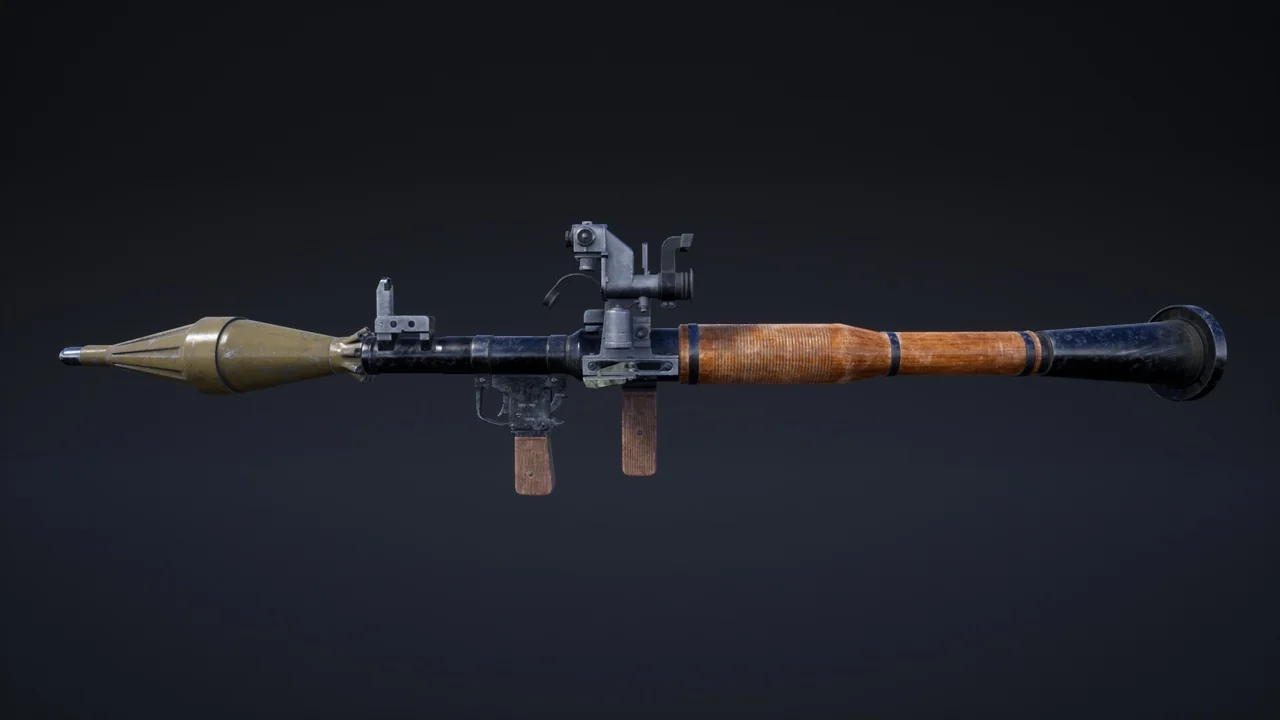
 Combat
 Combat
 Combat