"efaa631e936fd3ee"{"id":"1000759","slug":"ultimate-difficulty-scaling-uds","title":"Ultimate Difficulty Scaling (UDS)","category":"Engine Tools","engine":"5.5 - 5.8","assetVersion":"Asset Version: 2.0.5","engineVersion":"Engine Version: 5.5 - 5.8","tag":"Engine Tools","accent":"blue","visual":"mech","summary":"An Unreal Engine plugin providing a central dockable editor to manage difficulty variables across Blueprints, with AI-powered tuning and deep struct support.","platform":"Unreal Engine","publishedAt":"2026-07-27T20:56:52.428Z","updatedAt":"2026-07-27T20:56:52.428Z","sourceNotes":[],"fileContents":[],"compatibility":["Unreal Engine","Asset Version: 2.0.5","Engine Version: 5.5 - 5.8"],"featuredImage":{"alt":"Ultimate Difficulty Scaling (UDS)","src":"/wp-content/uploads/published/2026/07/727d2de77de5-06a6af98-ba76-42c9-8c88-bc543f120909-7c88dc222b.webp"},"hasDownloadLink":true,"downloads":0,"terms":[{"taxonomy":"category","slug":"engine-tools-tools-and-plugins","name":"Engine Tools"}],"galleryImages":[{"src":"/wp-content/uploads/published/2026/07/92c6612fdfc9-4fc4dd34-cbb2-4cd8-9196-47ea5d37ccdf-878ee7218b.webp","alt":"Ultimate Difficulty Scaling (UDS)"},{"src":"/wp-content/uploads/published/2026/07/03f60bcaf1a6-eb8d69aa-0b2e-4539-8690-f3f860b9641e-f02587767c.webp","alt":"Ultimate Difficulty Scaling (UDS)"},{"src":"/wp-content/uploads/published/2026/07/5572ede61561-57a5649e-e086-4c86-a1b9-97193fa41b04-53a8bd5803.webp","alt":"Ultimate Difficulty Scaling (UDS)"},{"src":"/wp-content/uploads/published/2026/07/f7a35034aa49-1a428460-eaef-4c94-9c92-6291e655a90f-46bc47228d.webp","alt":"Ultimate Difficulty Scaling (UDS)"},{"src":"/wp-content/uploads/published/2026/07/145a0b6e45a2-dfeea68f-cc66-4e14-befc-50de1202610c-1e659d4100.webp","alt":"Ultimate Difficulty Scaling (UDS)"},{"src":"/wp-content/uploads/published/2026/07/ac4ccc2dfd84-4ead0579-efe9-451b-8a69-c78aee46e702-7168139686.webp","alt":"Ultimate Difficulty Scaling (UDS)"},{"src":"/wp-content/uploads/published/2026/07/543ed8cd18f5-6d459b21-1024-490f-98d1-f0b623cd5b29-719e56fba0.webp","alt":"Ultimate Difficulty Scaling (UDS)"}],"accessPanel":{"kind":"resource","title":"Download this resource","eyebrow":"Free Download","message":"Log in or create a free account to start your download.","fileName":"Ultimate Difficulty Scaling (UDS).7z","safetyNote":"Resources are manually reviewed before listing to improve quality and reduce obvious risks.","actionLabel":"Download Free","resourceType":"Resource archive"},"contentHtml":"\u003cp\u003eEvery Unreal Engine developer who has built a difficulty system knows the pattern. A Player Character's \u003ccode\u003eBeginPlay\u003c/code\u003e event grows into a tangled web of \u003ccode\u003eBranch\u003c/code\u003e nodes checking whether Difficulty equals Easy, then setting health to 100. Else if Medium, set it to 80. Then the same logic repeats for enemy AI damage values, and again for ammo pickup quantities. \u003cem\u003eUltimate Difficulty Scaling\u003c/em\u003e (\u003cem\u003eUDS\u003c/em\u003e) replaces that workflow with a single, dockable editor window designed to centralize every difficulty-related variable in a project.\u003c/p\u003e\n\n\u003ch2\u003eOne Central Editor for Every Difficulty\u003c/h2\u003e\n\u003cp\u003eThe plugin's functional identity is shaped by replacing scattered, hard-coded values with one clean management hub. Instead of digging through dozens of Blueprints to find every value sprinkled across a project, the developer works within a single, modern interface that loads variable trees on demand. This on-demand loading keeps the editor responsive even when dealing with massive Blueprints containing hundreds of variables.\u003c/p\u003e\n\n\u003cp\u003eThe core workflow operates in three steps. First, add a Blueprint to the system, whether that is a Player Character, an enemy AI, or a weapon. Second, pick a variable from a live tree displayed in the editor. Third, set the desired values per difficulty level using type-appropriate input controls. The plugin manages the application of these values at runtime automatically.\u003c/p\u003e\n\n\u003ch2\u003eDeep Variable Support and Type-Aware Fields\u003c/h2\u003e\n\u003cp\u003e\u003cem\u003eUDS\u003c/em\u003e does not limit variable tracking to the root level of a Blueprint. The editor's live tree finds variables directly on the Blueprint, variables nested inside its Components, and even variables buried deep inside \u003ccode\u003eStructs\u003c/code\u003e. If a variable is visible in the editor, it can be scaled.\u003c/p\u003e\n\n\u003cp\u003eThe interface adapts its input controls to match the data type of each variable. A \u003ccode\u003eBoolean\u003c/code\u003e variable presents a checkbox. An \u003ccode\u003eEnum\u003c/code\u003e provides a dropdown menu populated with its correct options. \u003ccode\u003eInteger\u003c/code\u003e and \u003ccode\u003eFloat\u003c/code\u003e variables use validated input fields that prevent accidental letter entry. This type-aware approach ensures data integrity while inputting balance values.\u003c/p\u003e\n\n\u003ch2\u003eAI-Powered Tuning in v2.0\u003c/h2\u003e\n\u003cp\u003eVersion 2.0 introduces AI-assisted balancing. The developer can describe the desired difficulty curve in plain English, and the AI proposes balanced values across every configured difficulty level. The system offers two distinct modes for this functionality. The \u003ccode\u003eFill values\u003c/code\u003e mode tunes variables that have already been added to the difficulty configuration. The \u003ccode\u003eSuggest what to scale\u003c/code\u003e mode allows the AI to scan the Blueprint, identify variables worth scaling, and automatically populate the difficulty settings.\u003c/p\u003e\n\n\u003cp\u003eThe AI integration operates on a bring-your-own-key model. It is compatible with \u003cem\u003eOpenAI\u003c/em\u003e, \u003cem\u003eAnthropic\u003c/em\u003e, \u003cem\u003eGemini\u003c/em\u003e, \u003cem\u003eDeepSeek\u003c/em\u003e, and any OpenAI-compatible local LLM running through platforms like \u003cem\u003eOllama\u003c/em\u003e, \u003cem\u003eLM Studio\u003c/em\u003e, or \u003cem\u003evLLM\u003c/em\u003e. Keys are stored locally on the developer's machine and are only transmitted to the chosen provider. There is no subscription or middleman involved.\u003c/p\u003e\n\n\u003cp\u003eControl remains entirely with the developer. The AI never applies changes autonomously. It proposes values, displays a clear before-and-after diff for review, and requires an explicit click of the \u003ccode\u003eApply\u003c/code\u003e button before any changes take effect. Every proposed value is validated against its real type before application.\u003c/p\u003e\n\n\u003ch2\u003eNon-Destructive Integration and Blueprint API\u003c/h2\u003e\n\u003cp\u003eImplementing \u003cem\u003eUDS\u003c/em\u003e requires no alterations to existing logic. The plugin operates by adding a single lightweight \u003ccode\u003eActorComponent\u003c/code\u003e. It never modifies existing event graphs or disrupts established logic flows.\u003c/p\u003e\n\n\u003cp\u003eFor gameplay implementation, the plugin provides a full Blueprint API. This allows developers to expose difficulty changes to players through settings menus using a couple of nodes. When a player adjusts the difficulty at runtime, the system handles the transition.\u003c/p\u003e\n\n\u003ch2\u003ePersistence, Custom Difficulties, and Safe Refactoring\u003c/h2\u003e\n\u003cp\u003eThe system includes built-in persistence. It automatically saves and loads the player's chosen difficulty between sessions with zero setup required.\u003c/p\u003e\n\n\u003cp\u003eDevelopers are not restricted to predefined tiers like \u003cem\u003eEasy\u003c/em\u003e, \u003cem\u003eMedium\u003c/em\u003e, or \u003cem\u003eHard\u003c/em\u003e. \u003cem\u003eUDS\u003c/em\u003e supports an unlimited number of custom difficulty levels, allowing for configurations like \u003cem\u003eHell\u003c/em\u003e or \u003cem\u003eNightmare\u003c/em\u003e modes as project requirements dictate.\u003c/p\u003e\n\n\u003cp\u003eConfiguration safety is handled through an orphaning system. If a developer renames a variable in a Blueprint, \u003cem\u003eUDS\u003c/em\u003e automatically flags the old configuration entry as \u003ccode\u003eorphaned\u003c/code\u003e with a warning. A one-click \u003ccode\u003eClean\u003c/code\u003e function removes the invalid data, preventing configuration breakage.\u003c/p\u003e\n\n\u003cp\u003eBy centralizing difficulty management, \u003cem\u003eUltimate Difficulty Scaling\u003c/em\u003e addresses the specific pain point of post-launch balancing. When a designer realizes a difficulty level is too hard or too easy, they no longer need to trace through scattered \u003ccode\u003eBranch\u003c/code\u003e nodes. The values sit in one dockable window, ready for rapid iteration.\u003c/p\u003e\n\n\u003ch2\u003eRelated Resources Worth Checking\u003c/h2\u003e\n\u003cul\u003e\n\u003cli\u003e\u003ca href=\"https://3dcghub.com/ultimate-level-art-tool-ulat-tools-plugin-plugins/\" title=\"Ultimate Level Art Tool - ULAT ( Tools / Plugin / Plugins )\"\u003eUltimate Level Art Tool - ULAT ( Tools / Plugin / Plugins )\u003c/a\u003e\u003c/li\u003e\n\u003cli\u003e\u003ca href=\"https://3dcghub.com/ultimate-engine-copilot-formerly-ultimate-blueprint-generator/\" title=\"Ultimate Engine CoPilot (formerly Ultimate Blueprint Generator)\"\u003eUltimate Engine CoPilot (formerly Ultimate Blueprint Generator)\u003c/a\u003e\u003c/li\u003e\n\u003cli\u003e\u003ca href=\"https://3dcghub.com/fps-animation-pack-ultimate/\" title=\"FPS Animation Pack Ultimate\"\u003eFPS Animation Pack Ultimate\u003c/a\u003e\u003c/li\u003e\n\u003cli\u003e\u003ca href=\"https://3dcghub.com/ultimate-gameplay-camera/\" title=\"Ultimate Gameplay Camera\"\u003eUltimate Gameplay Camera\u003c/a\u003e\u003c/li\u003e\n\u003cli\u003e\u003ca href=\"https://3dcghub.com/forest-tools-ultimate-scattering-system/\" title=\"Forest Tools - Ultimate Scattering System\"\u003eForest Tools - Ultimate Scattering System\u003c/a\u003e\u003c/li\u003e\n\u003c/ul\u003e","contentTextLength":5089,"navigation":{"current":1599,"total":4209,"previous":{"id":"14127","slug":"magic-spline-plugin","title":"Magic Spline Plugin","category":"Engine Tools","platform":"Unreal Engine","updatedAt":"2026-07-27T21:40:11.065Z"},"next":{"id":"1000758","slug":"voxy-a-voxel-plugin","title":"Voxy - A Voxel Plugin","category":"Engine Tools","platform":"Unreal Engine","updatedAt":"2026-07-27T15:51:03.349Z"}},"relatedResources":[{"id":"1002246","slug":"ultimate-gamedev-bundle","title":"Ultimate GameDev Bundle","category":"Engine Tools","engine":"5.5","assetVersion":"Asset Version: 1.1","engineVersion":"Engine Version: 5.5","tag":"Engine Tools","accent":"blue","visual":"mech","summary":"Explore the Ultimate GameDev Bundle for Unreal Engine, featuring Blueprints for health, dynamic scoring, logic acceleration, and cinematic UI controls.","platform":"Unreal Engine","publishedAt":"2026-10-29T16:05:10.720Z","updatedAt":"2026-10-29T16:05:10.720Z","sourceNotes":[],"fileContents":[],"compatibility":["Unreal Engine","Asset Version: 1.1","Engine Version: 5.5"],"featuredImage":{"alt":"Ultimate GameDev Bundle","src":"/wp-content/uploads/published/2026/10/90500c9db515-f3918c6d-e637-4e2c-88a3-6efa23fdec0a-3ce150a110.webp"},"hasDownloadLink":true,"downloads":0},{"id":"1001370","slug":"ultimate-lighting-and-camera-tool-ulct","title":"Ultimate Lighting and Camera Tool ( ULCT )","category":"Engine Tools","engine":"5.5","assetVersion":"Asset Version: 1.2","engineVersion":"Engine Version: 5.5","tag":"Engine Tools","accent":"blue","visual":"mech","summary":"Explore the Ultimate Lighting and Camera Tool for Unreal Engine, featuring fast light spawning, IES profiles, lightmap management, and camera controls.","platform":"Unreal Engine","publishedAt":"2026-10-04T10:38:22.592Z","updatedAt":"2026-10-04T10:38:22.592Z","sourceNotes":[],"fileContents":[],"compatibility":["Unreal Engine","Asset Version: 1.2","Engine Version: 5.5"],"featuredImage":{"alt":"Ultimate Lighting and Camera Tool ( ULCT )","src":"/wp-content/uploads/published/2026/10/51d1307f17f1-9eeee845-4199-41b6-a2cf-09b76328ed34-ca87139e07.webp"},"hasDownloadLink":true,"downloads":0},{"id":"14738","slug":"ultimate-level-art-tool-ulat-tools-plugin-plugins","title":"Ultimate Level Art Tool - ULAT ( Tools / Plugin / Plugins )","category":"Engine Tools","engine":"5.0 - 5.7","assetVersion":"Engine version: 5.0 - 5.7","engineVersion":"Asset Version:1.3 - 1.3.1","tag":"Engine Tools","accent":"blue","visual":"character","summary":"Optimize your environment design workflow with the Ultimate Level Art Tool. This Unreal Engine plugin offers modular building features, one-click automation, and advanced mesh management.","platform":"Unreal Engine","publishedAt":"2026-03-11T19:16:44.000Z","updatedAt":"2026-05-31T13:00:16.112Z","sourceNotes":[],"fileContents":[],"compatibility":["Unreal Engine","Engine version: 5.0 - 5.7","Asset Version: 1.3 - 1.3.1"],"featuredImage":{"alt":"Ultimate Level Art Tool - ULAT ( Tools / Plugin / Plugins )","src":"https://3dcghub.com/wp-content/uploads/2026/03/06dfb4ec-9574-4b27-8363-21090a467eb4.webp"},"hasDownloadLink":true,"downloads":1}]}
Engine Tools
Ultimate Difficulty Scaling (UDS)
An Unreal Engine plugin providing a central dockable editor to manage difficulty variables across Blueprints, with AI-powered tuning and deep struct support.
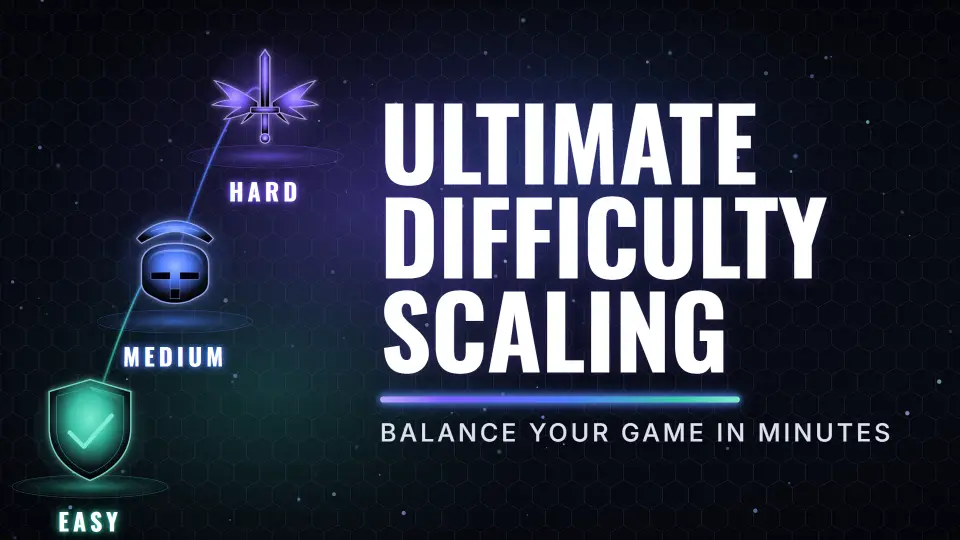
Every Unreal Engine developer who has built a difficulty system knows the pattern. A Player Character's BeginPlay event grows into a tangled web of Branch nodes checking whether Difficulty equals Easy, then setting health to 100. Else if Medium, set it to 80. Then the same logic repeats for enemy AI damage values, and again for ammo pickup quantities. Ultimate Difficulty Scaling (UDS) replaces that workflow with a single, dockable editor window designed to centralize every difficulty-related variable in a project.
One Central Editor for Every Difficulty
The plugin's functional identity is shaped by replacing scattered, hard-coded values with one clean management hub. Instead of digging through dozens of Blueprints to find every value sprinkled across a project, the developer works within a single, modern interface that loads variable trees on demand. This on-demand loading keeps the editor responsive even when dealing with massive Blueprints containing hundreds of variables.
The core workflow operates in three steps. First, add a Blueprint to the system, whether that is a Player Character, an enemy AI, or a weapon. Second, pick a variable from a live tree displayed in the editor. Third, set the desired values per difficulty level using type-appropriate input controls. The plugin manages the application of these values at runtime automatically.
Deep Variable Support and Type-Aware Fields
UDS does not limit variable tracking to the root level of a Blueprint. The editor's live tree finds variables directly on the Blueprint, variables nested inside its Components, and even variables buried deep inside Structs. If a variable is visible in the editor, it can be scaled.
The interface adapts its input controls to match the data type of each variable. A Boolean variable presents a checkbox. An Enum provides a dropdown menu populated with its correct options. Integer and Float variables use validated input fields that prevent accidental letter entry. This type-aware approach ensures data integrity while inputting balance values.
AI-Powered Tuning in v2.0
Version 2.0 introduces AI-assisted balancing. The developer can describe the desired difficulty curve in plain English, and the AI proposes balanced values across every configured difficulty level. The system offers two distinct modes for this functionality. The Fill values mode tunes variables that have already been added to the difficulty configuration. The Suggest what to scale mode allows the AI to scan the Blueprint, identify variables worth scaling, and automatically populate the difficulty settings.
The AI integration operates on a bring-your-own-key model. It is compatible with OpenAI, Anthropic, Gemini, DeepSeek, and any OpenAI-compatible local LLM running through platforms like Ollama, LM Studio, or vLLM. Keys are stored locally on the developer's machine and are only transmitted to the chosen provider. There is no subscription or middleman involved.
Control remains entirely with the developer. The AI never applies changes autonomously. It proposes values, displays a clear before-and-after diff for review, and requires an explicit click of the Apply button before any changes take effect. Every proposed value is validated against its real type before application.
Non-Destructive Integration and Blueprint API
Implementing UDS requires no alterations to existing logic. The plugin operates by adding a single lightweight ActorComponent. It never modifies existing event graphs or disrupts established logic flows.
For gameplay implementation, the plugin provides a full Blueprint API. This allows developers to expose difficulty changes to players through settings menus using a couple of nodes. When a player adjusts the difficulty at runtime, the system handles the transition.
Persistence, Custom Difficulties, and Safe Refactoring
The system includes built-in persistence. It automatically saves and loads the player's chosen difficulty between sessions with zero setup required.
Developers are not restricted to predefined tiers like Easy, Medium, or Hard. UDS supports an unlimited number of custom difficulty levels, allowing for configurations like Hell or Nightmare modes as project requirements dictate.
Configuration safety is handled through an orphaning system. If a developer renames a variable in a Blueprint, UDS automatically flags the old configuration entry as orphaned with a warning. A one-click Clean function removes the invalid data, preventing configuration breakage.
By centralizing difficulty management, Ultimate Difficulty Scaling addresses the specific pain point of post-launch balancing. When a designer realizes a difficulty level is too hard or too easy, they no longer need to trace through scattered Branch nodes. The values sit in one dockable window, ready for rapid iteration.
 Engine Tools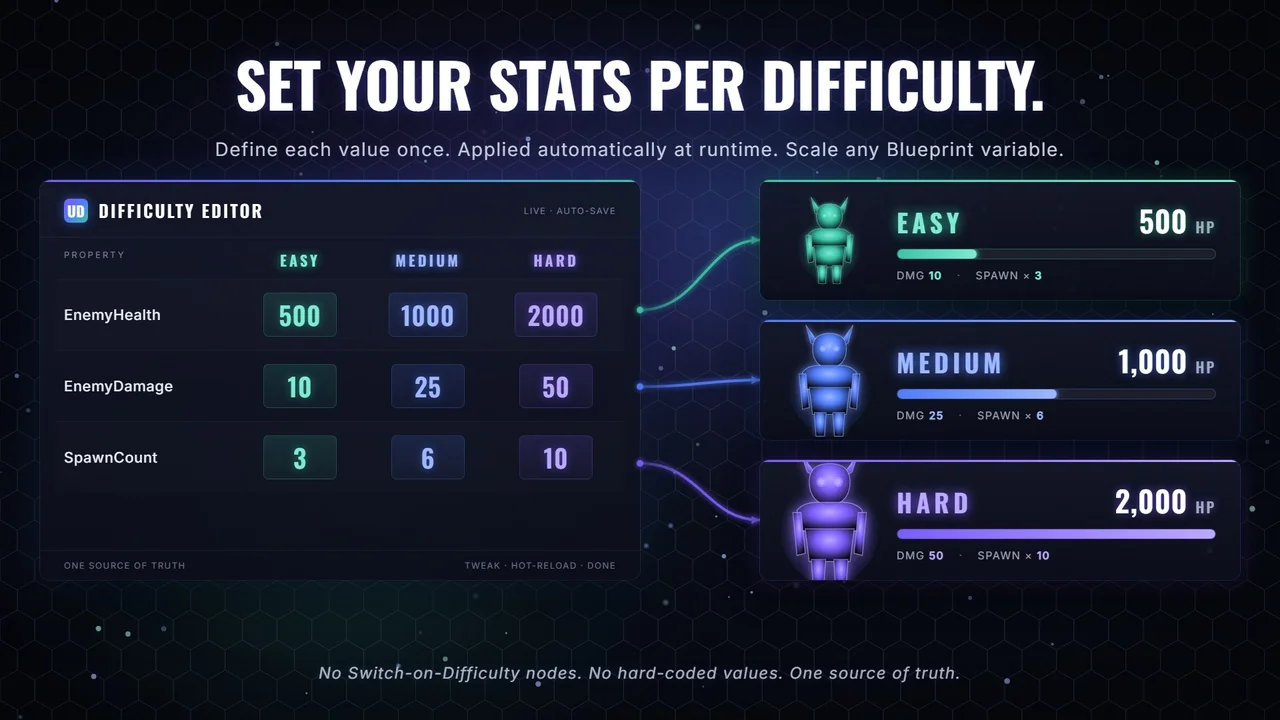
 Engine Tools
 Engine Tools
 Engine Tools