"7066dd76da796369"{"id":"14127","slug":"magic-spline-plugin","title":"Magic Spline Plugin","category":"Engine Tools","engine":"1.5","assetVersion":"Engine version: 4.26 - 5. 8","engineVersion":"Asset Version:1.5","tag":"Engine Tools","accent":"blue","visual":"city","summary":"The Magic Spline Plugin is a powerful level design tool for creating and editing meshes along splines. It offers an optimized C++ workflow for building roads, walls, and pipes without needing programming knowledge.","platform":"Unreal Engine","publishedAt":"2026-03-11T15:56:30.000Z","updatedAt":"2026-07-27T21:40:11.065Z","sourceNotes":[],"fileContents":[],"compatibility":["Unreal Engine","Engine version: 4.26 - 5. 8","Asset Version:1.5"],"featuredImage":{"alt":"Magic Spline Plugin","src":"https://3dcghub.com/wp-content/uploads/2026/03/a8f83706-0f29-452e-8704-4ad78733a2e4.webp"},"hasDownloadLink":true,"downloads":1,"terms":[{"taxonomy":"category","slug":"engine-tools-tools-and-plugins","name":"Engine Tools"},{"taxonomy":"post_tag","slug":"blueprint","name":"Blueprint"},{"taxonomy":"post_tag","slug":"environment","name":"Environment"},{"taxonomy":"post_tag","slug":"plugins","name":"Plugins"},{"taxonomy":"post_tag","slug":"spline-deformation","name":"Spline Deformation"},{"taxonomy":"post_tag","slug":"tools","name":"Tools"},{"taxonomy":"post_tag","slug":"unreal-engine-5","name":"Unreal Engine 5"}],"galleryImages":[{"src":"https://3dcghub.com/wp-content/uploads/2026/03/e631b84b6ab9_5ba60d46-94fd-4cf4-af72-74346bd4bcae.webp","alt":"Magic Spline Plugin"},{"src":"https://3dcghub.com/wp-content/uploads/2026/03/3cc28e673fb1_33e7ab38-5a48-4df0-b65b-c19c54337b59.webp","alt":"Magic Spline Plugin"},{"src":"https://3dcghub.com/wp-content/uploads/2026/03/48d76daa313d_6fdbe10f-d8bb-4e94-9fe5-39c9f2958885.webp","alt":"Magic Spline Plugin"},{"src":"https://3dcghub.com/wp-content/uploads/2026/03/ab2a6e1d6526_dcaff1f9-2c14-4df8-90fd-54b453dbd541.webp","alt":"Magic Spline Plugin"},{"src":"https://3dcghub.com/wp-content/uploads/2026/03/f03a7ed9cbfb_4f40cc96-ae35-4507-bffb-9f296d130a84.webp","alt":"Magic Spline Plugin"},{"src":"https://3dcghub.com/wp-content/uploads/2026/03/e4a0ac318105_7187ff7e-2819-491e-a166-db35b6ee8c1b.webp","alt":"Magic Spline Plugin"},{"src":"https://3dcghub.com/wp-content/uploads/2026/03/f6803afaf8fb_54cf104e-8972-43a1-82d0-932a53e0d849.webp","alt":"Magic Spline Plugin"},{"src":"https://3dcghub.com/wp-content/uploads/2026/03/900e54b99968_f82a277e-1878-460f-a8b4-4acf9f2fe9f3.webp","alt":"Magic Spline Plugin"},{"src":"https://3dcghub.com/wp-content/uploads/2026/03/293d607bfb54_4cf79eeb-cb7d-488f-b5ed-f402c17ddd8c.webp","alt":"Magic Spline Plugin"},{"src":"https://3dcghub.com/wp-content/uploads/2026/03/435fb59bf311_2ade70e4-4ac0-487d-8244-5a0b28f34db5.webp","alt":"Magic Spline Plugin"}],"accessPanel":{"kind":"resource","title":"Download this resource","eyebrow":"Free Download","message":"Log in or create a free account to start your download.","fileName":"Magic Spline Plugin.7z","safetyNote":"Resources are manually reviewed before listing to improve quality and reduce obvious risks.","actionLabel":"Download Free","resourceType":"Resource archive"},"contentHtml":"\u003cp\u003eBuilding expansive environments in Unreal Engine often means repeating identical mesh segments along curving paths. Whether laying down a winding mountain road, threading pipes through an industrial facility, or stringing chains across a gated entrance, manual placement and rotation quickly become unmanageable. \u003cem\u003eMagic Spline Plugin\u003c/em\u003e steps into this workflow gap. It provides a specialized framework for spawning \u003ccode\u003eSplineMeshActors\u003c/code\u003e that automatically deform and fit meshes to a drawn path.\u003c/p\u003e\n\n\u003ch2\u003eGenerating \u003ccode\u003eSplineMeshActors\u003c/code\u003e for Walls, Roads, and Pipes\u003c/h2\u003e\n\u003cp\u003eThe core function of the plugin is the creation of \u003ccode\u003eSplineMeshActors\u003c/code\u003e within a level. Instead of dealing with isolated mesh components, the tool ties geometry generation directly to an editable spline path. This allows Static Meshes to stretch, bend, and conform to the curve of the spline. The plugin also supports spline meshes that include deformation, giving level designers direct control over how the selected geometry adapts to the underlying path.\u003c/p\u003e\n\n\u003cp\u003eThe practical application cases for this are immediately recognizable in standard environment construction. The tool is built to handle a variety of modular and continuous elements:\u003c/p\u003e\n\n\u003cul\u003e\n \u003cli\u003e\u003cstrong\u003eWalls and Fences:\u003c/strong\u003e Perimeter structures that need to follow terrain contours or enclose specific areas without visible gaps or overlapping geometry.\u003c/li\u003e\n \u003cli\u003e\u003cstrong\u003eRoads:\u003c/strong\u003e Pathways that require curvature and precise alignment with the surrounding environment.\u003c/li\u003e\n \u003cli\u003e\u003cstrong\u003ePipes and Chains:\u003c/strong\u003e Continuous industrial elements or hanging details that benefit from following a smooth mathematical curve rather than manual vertex manipulation.\u003c/li\u003e\n \u003cli\u003e\u003cstrong\u003eBlocking Volumes:\u003c/strong\u003e Invisible or functional boundaries that need to match the shape of complex visible geometry for collision and gameplay purposes.\u003c/li\u003e\n\u003c/ul\u003e\n\n\u003cp\u003eBy wrapping these varied use cases into a single tool, the plugin reduces the need for multiple specialized assets or custom manual setups for different environment props.\u003c/p\u003e\n\n\u003ch2\u003eAn Optimized C++ Foundation Accessible Through Blueprints\u003c/h2\u003e\n\u003cp\u003eBeneath the interface, the plugin operates through optimized C++ code. This ensures that the generation and management of spline-based meshes remain performant, even when handling complex paths or multiple actors within a scene. Despite running on a C++ foundation, the tool does not require the user to write or understand any programming.\u003c/p\u003e\n\n\u003cp\u003eAccess to the plugin is handled entirely through Blueprints. The workflow begins by creating a new Blueprint class based on the provided \u003ccode\u003eSME_SplineMeshActor\u003c/code\u003e class. This acts as the bridge between the underlying C++ logic and the editor interface. Once the Blueprint is created, it can be placed into the level like any other actor, opening up the spline editing tools.\u003c/p\u003e\n\n\u003ch2\u003eWorking in the Details Panel\u003c/h2\u003e\n\u003cp\u003eAfter the Blueprint actor is placed in a level, every necessary configuration is handled directly in the Unreal Engine Details panel. There is no need to open the Blueprint Editor to adjust how the meshes are distributed or deformed along the spline. The settings in the Details panel control the behavior of the \u003ccode\u003eSplineMeshActor\u003c/code\u003e, allowing users to define the meshes used, how they deform, and how they fit the drawn path.\u003c/p\u003e\n\n\u003cp\u003eTo support this workflow, the plugin includes comprehensive documentation. Tooltips are embedded directly in the editor, providing immediate context for specific settings while working. Alongside the in-editor text, a PDF document is included to explain each setting in greater detail, giving users a reference guide for configuring their level design elements.\u003c/p\u003e\n\n\u003ch2\u003eInstallation and Integration Workflow\u003c/h2\u003e\n\u003cp\u003eThe plugin is designed to integrate into an existing project with minimal friction. Once added to a user's library, it installs automatically into the engine. This removes the manual steps often associated with migrating C++ plugins into a project's source folder or compiling source code. The expected workflow is direct: allow the engine to install the files, create the required Blueprint based on \u003ccode\u003eSME_SplineMeshActor\u003c/code\u003e, place it in the level, and begin editing.\u003c/p\u003e\n\n\u003ch2\u003eLevel Design Impact\u003c/h2\u003e\n\u003cp\u003eFor environment artists and level designers working in Unreal Engine, \u003cem\u003eMagic Spline Plugin\u003c/em\u003e centers on removing repetitive placement tasks and replacing them with a path-based generation system. The inclusion of Blocking Volumes alongside visible meshes means collision and gameplay boundaries can be generated alongside the visual elements. Because the tool is driven by the \u003ccode\u003eSME_SplineMeshActor\u003c/code\u003e class, users who want to create reusable configurations can build custom Blueprint variations and save them for different projects, while relying on the Details panel for on-the-fly adjustments in the Viewport.\u003c/p\u003e","contentTextLength":4614,"navigation":{"current":1404,"total":4016,"previous":{"id":"1000760","slug":"unreal-engine-5-automation-using-editor-utility-widgets","title":"Unreal Engine 5 - Automation using Editor Utility Widgets","category":"Unreal Engine","platform":"Unreal Engine","updatedAt":"2026-07-28T04:33:25.769Z"},"next":{"id":"1000759","slug":"ultimate-difficulty-scaling-uds","title":"Ultimate Difficulty Scaling (UDS)","category":"Engine Tools","platform":"Unreal Engine","updatedAt":"2026-07-27T20:56:52.428Z"}},"relatedResources":[{"id":"14450","slug":"rdsplinetools-rd-tools-pro","title":"rdSplineTools (rd Tools Pro)","category":"Engine Tools","engine":"5.5","assetVersion":"Engine version: 5.5","engineVersion":"Asset Version:1.2","tag":"Engine Tools","accent":"blue","visual":"city","summary":"rdSplineTools (rd Tools Pro) enhances the Unreal Engine editor by streamlining spline creation and management. This plugin offers advanced snapping, subdivision, and conversion tools for professional game development.","platform":"Unreal Engine","publishedAt":"2026-03-11T18:05:03.000Z","updatedAt":"2026-04-19T15:45:46.000Z","sourceNotes":[],"fileContents":[],"compatibility":["Unreal Engine","Engine version: 5.5","Asset Version: 1.2"],"featuredImage":{"alt":"rdSplineTools (rd Tools Pro)","src":"https://3dcghub.com/wp-content/uploads/2026/03/97c7dc16-acd1-4eb3-8b36-aa984f24c5a3.webp"},"hasDownloadLink":true,"downloads":0},{"id":"14215","slug":"modular-snap-system","title":"Modular Snap System","category":"Engine Tools","engine":"4.26 - 5.8","assetVersion":"Asset Version: 1.5.1 - 1.5.3","engineVersion":"Engine version: 4.26 - 5.8","tag":"Engine Tools","accent":"blue","visual":"animation","summary":"Simplify your level design workflow with the Modular Snap System. This Editor Plugin uses a socket-to-socket concept to align meshes, splines, and actors instantly without manual grid adjustments.","platform":"Unreal Engine","publishedAt":"2026-03-11T16:17:51.000Z","updatedAt":"2026-10-21T17:02:25.901Z","sourceNotes":[],"fileContents":[],"compatibility":["Unreal Engine","Asset Version: 1.5.1 - 1.5.3","Engine version: 4.26 - 5.8"],"featuredImage":{"alt":"Modular Snap System","src":"https://3dcghub.com/wp-content/uploads/2026/03/70a3c32f-f27e-4e90-93ea-0cadd2355ae2.webp"},"hasDownloadLink":true,"downloads":1},{"id":"14597","slug":"simple-instanced-spline-mesh","title":"Simple Instanced Spline Mesh","category":"Engine Tools","engine":"5.3","assetVersion":"Engine version: 5.3","engineVersion":"4.26","tag":"Engine Tools","accent":"blue","visual":"mech","summary":"The Simple Instanced Spline Mesh plugin offers a robust way to create HISM structures using splines. Designed for efficiency, it helps level designers iterate faster with specialized tools.","platform":"Unreal Engine","publishedAt":"2026-03-11T18:36:35.000Z","updatedAt":"2026-04-19T15:45:43.000Z","sourceNotes":[],"fileContents":[],"compatibility":["Unreal Engine","Engine version: 5.3"],"featuredImage":{"alt":"Simple Instanced Spline Mesh","src":"https://3dcghub.com/wp-content/uploads/2026/03/f2221001-9630-4b63-90f9-bcc63655709e.webp"},"hasDownloadLink":true,"downloads":0}]}
Engine Tools
Magic Spline Plugin
The Magic Spline Plugin is a powerful level design tool for creating and editing meshes along splines. It offers an optimized C++ workflow for building roads, walls, and pipes without needing programming knowledge.
Building expansive environments in Unreal Engine often means repeating identical mesh segments along curving paths. Whether laying down a winding mountain road, threading pipes through an industrial facility, or stringing chains across a gated entrance, manual placement and rotation quickly become unmanageable. Magic Spline Plugin steps into this workflow gap. It provides a specialized framework for spawning SplineMeshActors that automatically deform and fit meshes to a drawn path.
Generating SplineMeshActors for Walls, Roads, and Pipes
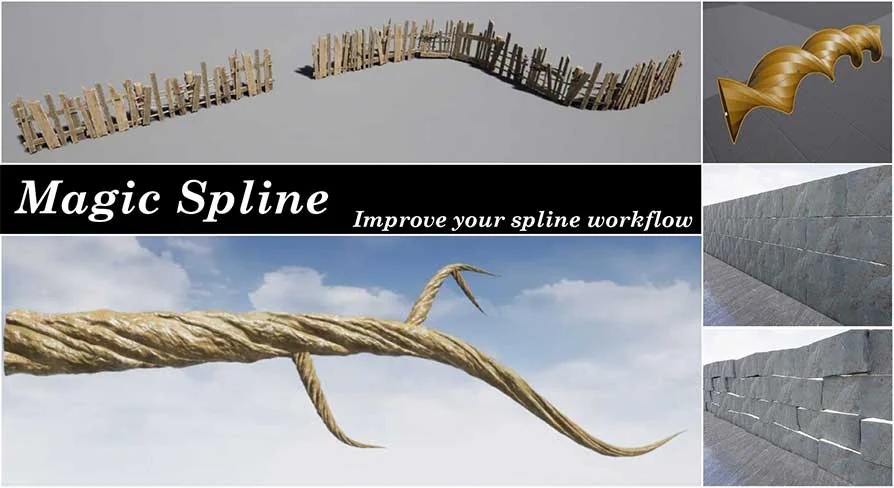
The core function of the plugin is the creation of SplineMeshActors within a level. Instead of dealing with isolated mesh components, the tool ties geometry generation directly to an editable spline path. This allows Static Meshes to stretch, bend, and conform to the curve of the spline. The plugin also supports spline meshes that include deformation, giving level designers direct control over how the selected geometry adapts to the underlying path.
The practical application cases for this are immediately recognizable in standard environment construction. The tool is built to handle a variety of modular and continuous elements:
Walls and Fences: Perimeter structures that need to follow terrain contours or enclose specific areas without visible gaps or overlapping geometry.
Roads: Pathways that require curvature and precise alignment with the surrounding environment.
Pipes and Chains: Continuous industrial elements or hanging details that benefit from following a smooth mathematical curve rather than manual vertex manipulation.
Blocking Volumes: Invisible or functional boundaries that need to match the shape of complex visible geometry for collision and gameplay purposes.
By wrapping these varied use cases into a single tool, the plugin reduces the need for multiple specialized assets or custom manual setups for different environment props.
An Optimized C++ Foundation Accessible Through Blueprints
Beneath the interface, the plugin operates through optimized C++ code. This ensures that the generation and management of spline-based meshes remain performant, even when handling complex paths or multiple actors within a scene. Despite running on a C++ foundation, the tool does not require the user to write or understand any programming.
Access to the plugin is handled entirely through Blueprints. The workflow begins by creating a new Blueprint class based on the provided SME_SplineMeshActor class. This acts as the bridge between the underlying C++ logic and the editor interface. Once the Blueprint is created, it can be placed into the level like any other actor, opening up the spline editing tools.
Working in the Details Panel
After the Blueprint actor is placed in a level, every necessary configuration is handled directly in the Unreal Engine Details panel. There is no need to open the Blueprint Editor to adjust how the meshes are distributed or deformed along the spline. The settings in the Details panel control the behavior of the SplineMeshActor, allowing users to define the meshes used, how they deform, and how they fit the drawn path.
To support this workflow, the plugin includes comprehensive documentation. Tooltips are embedded directly in the editor, providing immediate context for specific settings while working. Alongside the in-editor text, a PDF document is included to explain each setting in greater detail, giving users a reference guide for configuring their level design elements.
Installation and Integration Workflow
The plugin is designed to integrate into an existing project with minimal friction. Once added to a user's library, it installs automatically into the engine. This removes the manual steps often associated with migrating C++ plugins into a project's source folder or compiling source code. The expected workflow is direct: allow the engine to install the files, create the required Blueprint based on SME_SplineMeshActor, place it in the level, and begin editing.
Level Design Impact
For environment artists and level designers working in Unreal Engine, Magic Spline Plugin centers on removing repetitive placement tasks and replacing them with a path-based generation system. The inclusion of Blocking Volumes alongside visible meshes means collision and gameplay boundaries can be generated alongside the visual elements. Because the tool is driven by the SME_SplineMeshActor class, users who want to create reusable configurations can build custom Blueprint variations and save them for different projects, while relying on the Details panel for on-the-fly adjustments in the Viewport.
Preview Gallery
Resource screenshots
10 curated preview images
1 / 10
Free Download
Download this resource
Log in or create a free account to start your download.
Resources are manually reviewed before listing to improve quality and reduce obvious risks.
 Engine Tools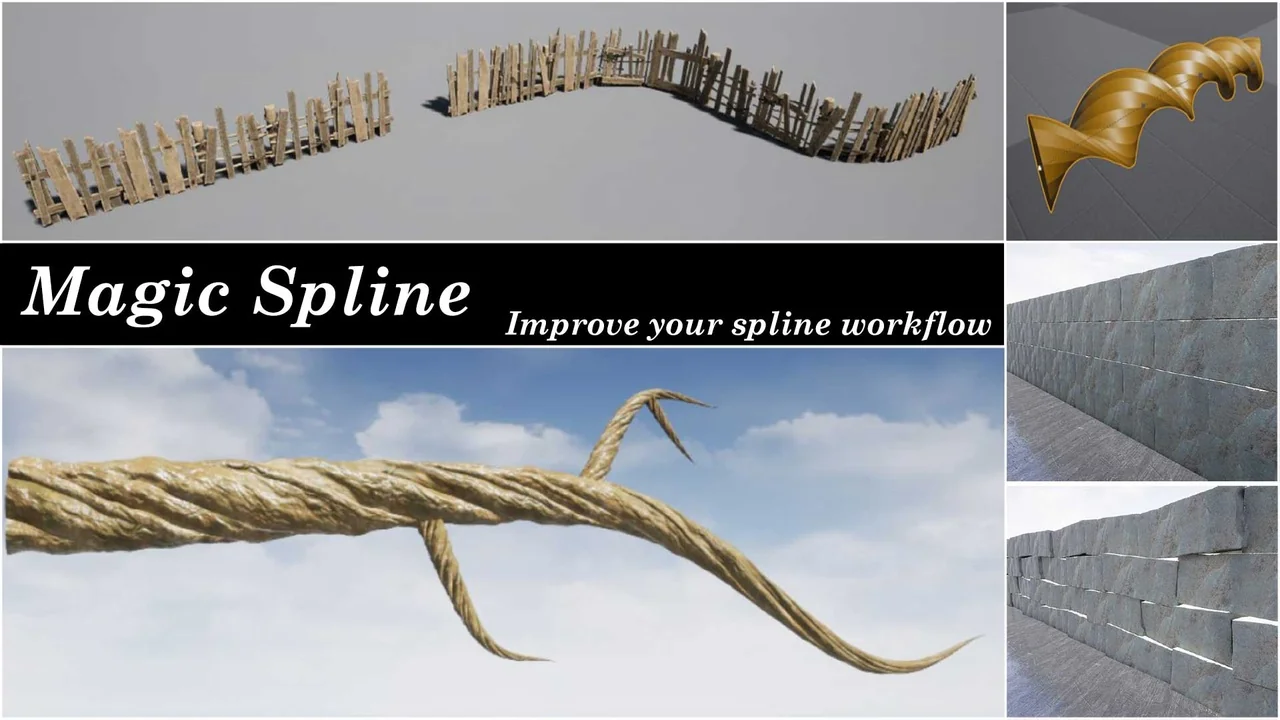
 Engine Tools
 Engine Tools
 Engine Tools