"7066dd76da796369"{"id":"1000758","slug":"voxy-a-voxel-plugin","title":"Voxy - A Voxel Plugin","category":"Engine Tools","engine":"5.6","assetVersion":"Asset Version: 0.9.2","engineVersion":"Engine Version: 5.6","tag":"Engine Tools","accent":"blue","visual":"mech","summary":"Voxy is an Unreal Engine voxel toolkit for building characters and environments using brushes, mesh and image voxelization, frame animation, and Nanite conversi","platform":"Unreal Engine","publishedAt":"2026-07-27T15:51:03.349Z","updatedAt":"2026-07-27T15:51:03.349Z","sourceNotes":[],"fileContents":[],"compatibility":["Unreal Engine","Asset Version: 0.9.2","Engine Version: 5.6"],"featuredImage":{"alt":"Voxy - A Voxel Plugin","src":"/wp-content/uploads/published/2026/07/b33530580b25-5d0478a3-464e-4b26-aaaa-a74f31ee6e17-230df632d6.webp"},"hasDownloadLink":true,"downloads":0,"terms":[{"taxonomy":"category","slug":"engine-tools-tools-and-plugins","name":"Engine Tools"}],"galleryImages":[{"src":"/wp-content/uploads/published/2026/07/b9b186e9b2fb-fdac1a79-e78e-4634-a39a-91c08f516421-5c1e20510b.webp","alt":"Voxy - A Voxel Plugin"},{"src":"/wp-content/uploads/published/2026/07/65d5422f33cc-2d22eb63-33c1-409a-9a46-cb07ebb9e322-1312e93fa2.webp","alt":"Voxy - A Voxel Plugin"},{"src":"/wp-content/uploads/published/2026/07/4ae92b04a86c-eee93bd7-ba4d-4a81-8bec-f816dc7ae523-cd2445d6a3.webp","alt":"Voxy - A Voxel Plugin"},{"src":"/wp-content/uploads/published/2026/07/ba0c3f60d0d1-bdb94d57-3b0b-4227-9940-fafa684821d3-dbc06b424e.webp","alt":"Voxy - A Voxel Plugin"},{"src":"/wp-content/uploads/published/2026/07/14e8be7267e3-55d4ca61-5292-4cb8-bbab-10f25433b824-e1222cd4b6.webp","alt":"Voxy - A Voxel Plugin"},{"src":"/wp-content/uploads/published/2026/07/2d82fb2789d6-4ab014be-b65d-415d-ac61-3aa14bc9e041-02bb970420.webp","alt":"Voxy - A Voxel Plugin"},{"src":"/wp-content/uploads/published/2026/07/ac29e24f58c4-50f8065c-57ac-4f13-b287-cdf57c306f4f-0ee602411d.webp","alt":"Voxy - A Voxel Plugin"},{"src":"/wp-content/uploads/published/2026/07/03d80b2fc49d-e6e93a87-bed1-4be1-995d-bf0546e87b18-8bd4ff69ad.webp","alt":"Voxy - A Voxel Plugin"}],"accessPanel":{"kind":"resource","title":"Download this resource","eyebrow":"Free Download","message":"Log in or create a free account to start your download.","fileName":"5.6.7z","safetyNote":"Resources are manually reviewed before listing to improve quality and reduce obvious risks.","actionLabel":"Download Free","resourceType":"Resource archive"},"contentHtml":"\u003ch2\u003eWorking with the Tool\u003c/h2\u003e\n\u003cp\u003eFor projects where blocky, low-poly, and stylized aesthetics are central, game developers and artists working within Epic Games' engine now have access to a dedicated voxel plugin named \u003cem\u003eVoxy\u003c/em\u003e. This tool is engineered to create immersive game worlds by combining voxel-based modeling capabilities with Unreal Engine’s rendering ecosystem. It allows users to build natural environments and characters and aims to deliver high speed and low resource consumption.\u003c/p\u003e\n\n\u003cp\u003eAt the core of organizing work are two concepts: individual volumes called \u003ccode\u003eVoxyAsset\u003c/code\u003e, and collection containers called \u003ccode\u003eVoxyBundle\u003c/code\u003e. Users can create as many individual volumes as needed and assemble them into a bundle. This system allows for managing large or complex scenes by breaking them into manageable parts without being limited by a single volume container.\u003c/p\u003e\n\n\u003ch3\u003eSetting Up for Voxy in Unreal Engine\u003c/h3\u003e\n\u003cp\u003eBefore diving into content creation, the project environment must be correctly configured. The tool requires the project settings to be set to DirectX 12, and Shader Model 6 (\u003ccode\u003eSM6\u003c/code\u003e) must be enabled. This ensures compatibility with modern rendering pathways and allows the plugin to communicate effectively with the engine’s advanced graphics systems.\u003c/p\u003e\n\n\u003ch2\u003eCreating and Editing Voxel Assets\u003c/h2\u003e\n\u003cp\u003eBuilding content within the plugin relies on various editing functions and brush types. Users have access to tools such as:\u003c/p\u003e\n\n\u003cul\u003e\n \u003cli\u003e\u003cstrong\u003eBrush\u003c/strong\u003e: For freehand painting and placement of voxel data.\u003c/li\u003e\n \u003cli\u003e\u003cstrong\u003eLine\u003c/strong\u003e: For creating straight, structured strokes between points.\u003c/li\u003e\n \u003cli\u003e\u003cstrong\u003eRegion\u003c/strong\u003e: For filling or affecting larger defined areas.\u003c/li\u003e\n \u003cli\u003e\u003cstrong\u003eExtrude\u003c/strong\u003e: For pulling 2D voxel surfaces into 3D forms.\u003c/li\u003e\n \u003cli\u003e\u003cstrong\u003eBevel\u003c/strong\u003e: For creating angled or rounded edges on blocky structures.\u003c/li\u003e\n \u003cli\u003e\u003cstrong\u003eSmooth\u003c/strong\u003e: For refining rough surfaces and blending voxel transitions.\u003c/li\u003e\n \u003cli\u003e\u003cstrong\u003eClone\u003c/strong\u003e: For duplicating existing geometry to quickly repeat details.\u003c/li\u003e\n\u003c/ul\u003e\n\n\u003cp\u003eThese procedural editing functions are also exposed to Blueprint systems, allowing developers to script changes and interact with voxel data programmatically rather than only through manual modeling sessions.\u003c/p\u003e\n\n\u003ch2\u003eConverting Meshes, Images, and External Assets\u003c/h2\u003e\n\n\u003ch2\u003eRelated Resources Worth Checking\u003c/h2\u003e\n\u003cul\u003e\n\u003cli\u003e\u003ca href=\"https://3dcghub.com/voxel-weaver-advanced-voxel-plugin/\" title=\"Voxel Weaver | Advanced Voxel Plugin\"\u003eVoxel Weaver | Advanced Voxel Plugin\u003c/a\u003e\u003c/li\u003e\n\u003cli\u003e\u003ca href=\"https://3dcghub.com/voxel-plugin-pro-legacy/\" title=\"Voxel Plugin Pro Legacy\"\u003eVoxel Plugin Pro Legacy\u003c/a\u003e\u003c/li\u003e\n\u003cli\u003e\u003ca href=\"https://3dcghub.com/easy-localization-translation/\" title=\"Easy Localization Translation\"\u003eEasy Localization Translation\u003c/a\u003e\u003c/li\u003e\n\u003cli\u003e\u003ca href=\"https://3dcghub.com/daz-to-unreal/\" title=\"Daz To Unreal\"\u003eDaz To Unreal\u003c/a\u003e\u003c/li\u003e\n\u003cli\u003e\u003ca href=\"https://3dcghub.com/narrative-pro-2-complete-game-framework/\" title=\"Narrative Pro 2 - Complete Game Framework\"\u003eNarrative Pro 2 - Complete Game Framework\u003c/a\u003e\u003c/li\u003e\n\u003c/ul\u003e","contentTextLength":2270,"navigation":{"current":1406,"total":4016,"previous":{"id":"1000759","slug":"ultimate-difficulty-scaling-uds","title":"Ultimate Difficulty Scaling (UDS)","category":"Engine Tools","platform":"Unreal Engine","updatedAt":"2026-07-27T20:56:52.428Z"},"next":{"id":"1000757","slug":"ui-deformer","title":"UI Deformer","category":"Gameplay Features","platform":"Unreal Engine","updatedAt":"2026-07-27T15:31:31.432Z"}},"relatedResources":[{"id":"1001780","slug":"voxel-plugin","title":"Voxel Plugin","category":"Engine Tools","engine":"5.3","assetVersion":"Asset Version: 1.0","engineVersion":"Engine Version: 5.3","tag":"Engine Tools","accent":"blue","visual":"mech","summary":"Generate smoothed voxel terrain in Unreal Engine with in-editor terraforming, real-time destruction, dynamic NavMesh, replication, and infinite generation.","platform":"Unreal Engine","publishedAt":"2026-10-20T03:27:28.201Z","updatedAt":"2026-10-20T03:27:28.201Z","sourceNotes":[],"fileContents":[],"compatibility":["Unreal Engine","Asset Version: 1.0","Engine Version: 5.3"],"featuredImage":{"alt":"Voxel Plugin","src":"/wp-content/uploads/published/2026/10/8b4d1df60f53-5a2ff731-ea13-4a01-aa5b-d547af54be89-29d6658113.webp"},"hasDownloadLink":true,"downloads":1},{"id":"14804","slug":"voxel-weaver-advanced-voxel-plugin","title":"Voxel Weaver | Advanced Voxel Plugin","category":"Engine Tools","engine":"5.5","assetVersion":"Engine version: 5.5","engineVersion":"Asset Version:1.0","tag":"Engine Tools","accent":"blue","visual":"luts","summary":"Voxel Weaver | Advanced Voxel Plugin empowers developers to build dynamic, infinite worlds with GPU-accelerated biomes and real-time destruction. This tool includes full multiplayer support and intuitive visual node graphs for seamless world-building.","platform":"Unreal Engine","publishedAt":"2026-03-11T19:26:00.000Z","updatedAt":"2026-04-19T15:45:40.000Z","sourceNotes":[],"fileContents":[],"compatibility":["Unreal Engine","Engine version: 5.5","Asset Version: 1.0"],"featuredImage":{"alt":"Voxel Weaver | Advanced Voxel Plugin","src":"https://3dcghub.com/wp-content/uploads/2026/03/a21890e2-81ea-496b-9ce5-e72eb19dd784.webp"},"hasDownloadLink":true,"downloads":0},{"id":"14777","slug":"voxel-plugin-pro-legacy","title":"Voxel Plugin Pro Legacy","category":"Engine Tools","engine":"4.22 -4.27, 5.0 - 5.7","assetVersion":"Engine version: 4.22 -4.27, 5.0 - 5.7","engineVersion":"Asset Version:1.0 - 2.0.8","tag":"Engine Tools","accent":"blue","visual":"animation","summary":"Create infinite, fully volumetric landscapes in Unreal Engine with Voxel Plugin Pro Legacy. This tool offers runtime editing, procedural generation, and surface sculpting for advanced environment design.","platform":"Unreal Engine","publishedAt":"2026-03-11T19:24:08.000Z","updatedAt":"2026-04-19T15:45:40.000Z","sourceNotes":[],"fileContents":[],"compatibility":["Unreal Engine","Engine version: 4.22 -4.27, 5.0 - 5.7","Asset Version: 1.0 - 2.0.8"],"featuredImage":{"alt":"Voxel Plugin Pro Legacy","src":"https://3dcghub.com/wp-content/uploads/2026/03/96bf1d13-25ff-4c47-a02e-8e0d855c1fd8.webp"},"hasDownloadLink":true,"downloads":4}]}
Engine Tools
Voxy - A Voxel Plugin
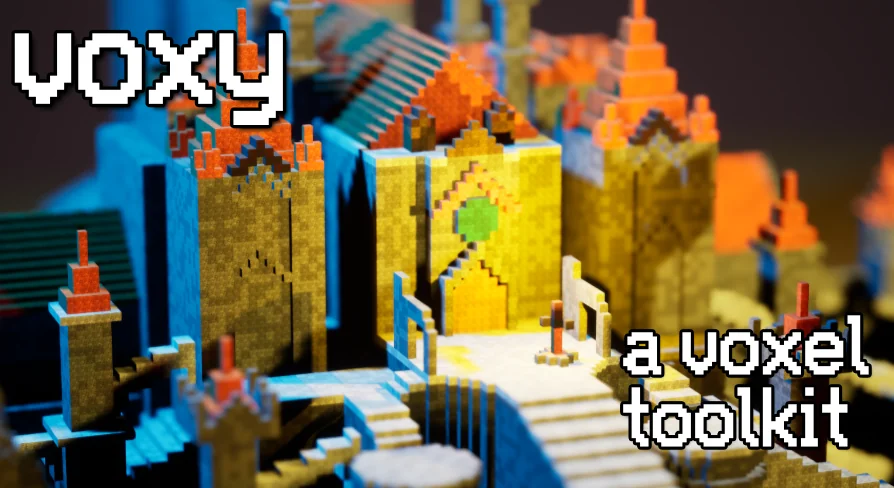
Voxy is an Unreal Engine voxel toolkit for building characters and environments using brushes, mesh and image voxelization, frame animation, and Nanite conversi
For projects where blocky, low-poly, and stylized aesthetics are central, game developers and artists working within Epic Games' engine now have access to a dedicated voxel plugin named Voxy. This tool is engineered to create immersive game worlds by combining voxel-based modeling capabilities with Unreal Engine’s rendering ecosystem. It allows users to build natural environments and characters and aims to deliver high speed and low resource consumption.
At the core of organizing work are two concepts: individual volumes called VoxyAsset, and collection containers called VoxyBundle. Users can create as many individual volumes as needed and assemble them into a bundle. This system allows for managing large or complex scenes by breaking them into manageable parts without being limited by a single volume container.
Setting Up for Voxy in Unreal Engine
Before diving into content creation, the project environment must be correctly configured. The tool requires the project settings to be set to DirectX 12, and Shader Model 6 (SM6) must be enabled. This ensures compatibility with modern rendering pathways and allows the plugin to communicate effectively with the engine’s advanced graphics systems.
Creating and Editing Voxel Assets
Building content within the plugin relies on various editing functions and brush types. Users have access to tools such as:
Brush: For freehand painting and placement of voxel data.
Line: For creating straight, structured strokes between points.
Region: For filling or affecting larger defined areas.
Extrude: For pulling 2D voxel surfaces into 3D forms.
Bevel: For creating angled or rounded edges on blocky structures.
Smooth: For refining rough surfaces and blending voxel transitions.
Clone: For duplicating existing geometry to quickly repeat details.
These procedural editing functions are also exposed to Blueprint systems, allowing developers to script changes and interact with voxel data programmatically rather than only through manual modeling sessions.
 Engine Tools
 Engine Tools
 Engine Tools
 Engine Tools