"6f9bd6df1f44a86f"{"id":"1000865","slug":"player-farming-system","title":"Player Farming System","category":"Gameplay Features","engine":"5.3+","assetVersion":"","engineVersion":"Engine Version: 5.3+","tag":"Gameplay Features","accent":"blue","visual":"mech","summary":"Multiplayer farming Blueprint with plant stats, growth stages, sickness, socket placement, 7 plants, 3 tools, 3 planters, Survival Game Kit V2.","platform":"Unreal Engine","indexPolicy":"index","publishedAt":"2026-08-05T06:42:26.659Z","updatedAt":"2026-08-05T06:42:26.659Z","sourceNotes":[],"fileContents":[],"compatibility":["Unreal Engine","Engine Version: 5.3+"],"featuredImage":{"alt":"Player Farming System","src":"/wp-content/uploads/published/2026/08/41a79560e065-b4125912-9555-45fb-b37f-36aeb529a75e-d4ec89e558.webp"},"hasDownloadLink":true,"downloads":2,"terms":[{"taxonomy":"category","slug":"gameplay-features","name":"Gameplay Features"}],"galleryImages":[{"src":"/wp-content/uploads/published/2026/08/050ba58f0cc7-0797bae5-999e-452b-b06f-0cca1611833a-fc82f546ad.webp","alt":"Player Farming System"},{"src":"/wp-content/uploads/published/2026/08/6affa2b65379-28af8b82-7c4b-4729-8bd8-2bfd80f89984-af67546826.webp","alt":"Player Farming System"},{"src":"/wp-content/uploads/published/2026/08/1556bba9a4cc-653272f7-1b19-4be0-8a52-382c772493d0-d61cf87db2.webp","alt":"Player Farming System"},{"src":"/wp-content/uploads/published/2026/08/b5ae5631bc92-2ca0d806-4e9b-4090-ac58-56028906ca3e-361bab4b22.webp","alt":"Player Farming System"},{"src":"/wp-content/uploads/published/2026/08/0ae38e6e87cf-a12d2315-ad03-4436-b3db-7b0230a8378e-1f70ce28da.webp","alt":"Player Farming System"},{"src":"/wp-content/uploads/published/2026/08/f67e683a05af-bcfd5a79-7e85-4f42-b2df-7b9fd4289a96-1581a5c5a5.webp","alt":"Player Farming System"},{"src":"/wp-content/uploads/published/2026/08/dd161df2441d-51a60d04-8384-477f-819b-ed76b16f0951-7d76c34471.webp","alt":"Player Farming System"},{"src":"/wp-content/uploads/published/2026/08/b5901379f4dc-8a8ef3dd-687f-4258-ba88-15b764e48ae9-e2248482d3.webp","alt":"Player Farming System"},{"src":"/wp-content/uploads/published/2026/08/1a1adc93a7ba-206202ad-7f41-4b99-afb4-c6408716b1ef-ea6a83e584.webp","alt":"Player Farming System"},{"src":"/wp-content/uploads/published/2026/08/0db1219f42d1-b43a7fbc-9dad-4c22-bae5-b1eb4116edd2-b14e18c1ad.webp","alt":"Player Farming System"}],"accessPanel":{"kind":"resource","title":"Download this resource","eyebrow":"Free Download","message":"Log in or create a free account to start your download.","fileName":"PlayerFarmingSystem.7z","safetyNote":"Resources are manually reviewed before listing to improve quality and reduce obvious risks.","actionLabel":"Download Free","resourceType":"Resource archive"},"contentHtml":"\u003cp\u003eAdding a farming loop to an Unreal Engine project usually means juggling plant growth timers, replication, save data, and a placement system that feels reliable in both tidy and chaotic scenes. \u003cem\u003ePlayer Farming System\u003c/em\u003e compresses that into a fast setup by handling the Multiplayer side and exposing the plant behavior through customization options. The advanced placement system lets you drop plants, planters, and tools with snapping or without, and the included Plant Info Panel User Interface (UI) is clean enough to read at a glance while remaining flexible through Unreal Engine's Widget System.\u003c/p\u003e\n\n\u003ch2\u003eA Fast Multiplayer Farming Framework\u003c/h2\u003e\n\n\u003cp\u003eThe system is designed to get Multiplayer farming into a project without a long integration stretch. Multiplayer support is built in, so connected players can share the same growing plots and interact with crops that progress according to the same rules. The included features go beyond simple planting and harvesting: vegetable growth, vegetable yields, plant respawning, and growth stages give the cycle a natural rhythm.\u003c/p\u003e\n\n\u003cp\u003eCustomization is 1 of the 1st things you notice when you open the Blueprint Graphs. The behavior of each plant can be fine-tuned, and the Farming Menu, Plant Info Panel, and placement logic all belong to the same system. Instead of treating the asset as a fixed template, you can adjust how individual plants behave and then let the rest of the game respond around those changes. Because it is Blueprint-based, the customization options remain approachable for designers who prefer to work visually rather than digging through engine source code.\u003c/p\u003e\n\n\u003ch2\u003ePlant Behavior Under the Hood\u003c/h2\u003e\n\n\u003cp\u003eEach plant relies on 4 core stats: \u003ccode\u003eHealth\u003c/code\u003e, \u003ccode\u003eWarmth\u003c/code\u003e, \u003ccode\u003eWater\u003c/code\u003e, and \u003ccode\u003eFertilizer\u003c/code\u003e. These 4 values determine how a crop is doing and give you a clear tuning lever for difficulty. Plant sickness and sickness spreading add a failure state that travels between plants, forcing players to monitor more than just the health bar. Night and rain states modify behavior in specific conditions: when \u003ccode\u003eIs Night\u003c/code\u003e is \u003ccode\u003etrue\u003c/code\u003e, the plant changes its behavior; when \u003ccode\u003eIs Raining\u003c/code\u003e is \u003ccode\u003etrue\u003c/code\u003e, plant water increases. If a plant dies, death stages swap the Mesh based on the growth level at the time of death, and a destruction effect handles the removal. Plant resources are also part of the feature set, giving you additional outputs to work with.\u003c/p\u003e\n\n\u003cp\u003eThe smooth growth effect makes the transition between stages feel visual and continuous, which is important when plants are meant to feel alive over a long survival session. Combined with the progression from vegetable growth to vegetable yields, the system covers the core farm loop without requiring manual Mesh swaps from the designer.\u003c/p\u003e\n\n\u003ch2\u003ePlacement That Snaps or Doesn't\u003c/h2\u003e\n\n\u003cp\u003ePlacement is handled through a system that supports both snapping and non-snapping placement. This applies to plants, planters, and tools, so you can build a precise grid-based garden with aligned planting beds or scatter crops naturally around a base. The Socket and non-Socket placement option adds another layer of control: use Sockets for reusable attach points, or place objects freely when the scene calls for a more improvisational layout. That flexibility makes the system work for structured farming plots as well as more organic survival outposts.\u003c/p\u003e\n\n\u003cp\u003eSnapping placement is useful for farms that need consistent spacing between plants, while non-snapping placement works better when you want plants to feel organically placed around a camp or field. The fact that the same system also handles planters and tools means you do not have to switch between different placement modules depending on what you are building.\u003c/p\u003e\n\n\u003ch2\u003eFarming Menu and Plant Info UI\u003c/h2\u003e\n\n\u003cp\u003ePlayer interactions are organized through the Farming Menu, while the Plant Info Panel UI gives players a clean and easy-to-read readout of the current plant state. Since it is built with Unreal Engine's Widget System, the panel can be customized to fit the rest of your Heads-Up Display (HUD). Whether you need a compact status element or a more detailed inspection window, the layout can be rearranged without replacing the underlying logic.\u003c/p\u003e\n\n\u003ch2\u003e7 Plants, 3 Tools, 3 Planters\u003c/h2\u003e\n\n\u003cp\u003eThe content set is ready to test immediately. 7 plants are included: \u003cem\u003eTomato\u003c/em\u003e, \u003cem\u003eBerry\u003c/em\u003e, \u003cem\u003eCorn\u003c/em\u003e, \u003cem\u003ePotato\u003c/em\u003e, \u003cem\u003eCarrot\u003c/em\u003e, \u003cem\u003eZucchini\u003c/em\u003e, and \u003cem\u003eBush\u003c/em\u003e. For upkeep, the package provides 3 tools: a \u003cem\u003eSprinkler\u003c/em\u003e, a \u003cem\u003eHeat Lamp\u003c/em\u003e, and a \u003cem\u003eGrow Light\u003c/em\u003e. On the container side, there are 3 planter sizes: \u003cem\u003eSmall\u003c/em\u003e, \u003cem\u003eMedium\u003c/em\u003e, and \u003cem\u003eLarge\u003c/em\u003e. Having all of these in 1 asset means you can assemble a functioning farm, wire up the menu, and see the growth cycle working without sourcing separate plant and furniture packs.\u003c/p\u003e\n\n\u003cp\u003eThis is a practical collection for a survival game: \u003cem\u003eTomato\u003c/em\u003e, \u003cem\u003eBerry\u003c/em\u003e, \u003cem\u003eCorn\u003c/em\u003e, \u003cem\u003ePotato\u003c/em\u003e, \u003cem\u003eCarrot\u003c/em\u003e, \u003cem\u003eZucchini\u003c/em\u003e, and \u003cem\u003eBush\u003c/em\u003e cover a range of crop types, from small ground plants to taller vegetables. The 3 planters give you immediate options for organizing them, while the tools can be placed alongside the farm as part of the same placement system.\u003c/p\u003e\n\n\u003ch2\u003eSave Support, Documentation, and \u003cem\u003eSurvival Game Kit V2\u003c/em\u003e Compatibility\u003c/h2\u003e\n\n\u003cp\u003eA save system is included so progress can persist, though it does not support World Composition. For teams already using \u003cem\u003eSurvival Game Kit V2\u003c/em\u003e, the \u003cem\u003ePlayer Farming System\u003c/em\u003e is marked as compatible, which makes it a useful addition to an existing survival template. The project ships with commented code, tooltips, and documentation, making it easier to trace how the Blueprint logic fits together. First- and Third-Person camera modes are supported, and a showcase video and patch notes are available to help you get oriented with the system before diving into the Blueprint Graph.\u003c/p\u003e\n\n\u003cp\u003eFor an Unreal Engine project that needs farming mechanics that feel complete out of the box, the \u003cem\u003ePlayer Farming System\u003c/em\u003e provides the core loop, the UI, the placement tools, and the content in 1 package.\u003c/p\u003e\n\n\u003ch2\u003eRelated Resources Worth Checking\u003c/h2\u003e\n\u003cul\u003e\n\u003cli\u003e\u003ca href=\"https://3dcghub.com/mgt-multiplayer-gravity-template/\" rel=\"noopener noreferrer\"\u003eMGT Multiplayer Gravity Template\u003c/a\u003e\u003c/li\u003e\n\u003cli\u003e\u003ca href=\"https://3dcghub.com/simple-screen-damage-indicator/\" rel=\"noopener noreferrer\"\u003eSimple Screen Damage Indicator\u003c/a\u003e\u003c/li\u003e\n\u003cli\u003e\u003ca href=\"https://3dcghub.com/multiplayer-xp-system/\" rel=\"noopener noreferrer\"\u003eMultiplayer XP System\u003c/a\u003e\u003c/li\u003e\n\u003cli\u003e\u003ca href=\"https://3dcghub.com/chat-groups-guilds/\" rel=\"noopener noreferrer\"\u003eChat Groups Guilds\u003c/a\u003e\u003c/li\u003e\n\u003cli\u003e\u003ca href=\"https://3dcghub.com/multiplayer-object-throwing-system/\" rel=\"noopener noreferrer\"\u003eMultiplayer Object Throwing System\u003c/a\u003e\u003c/li\u003e\n\u003c/ul\u003e","contentTextLength":5991,"navigation":{"current":1499,"total":4218,"previous":{"id":"1000866","slug":"poseidon-statues-poseidon-statues-statue-ancient-mythical-roman-prop-3d-art","title":"Poseidon Statues ( Poseidon Statues Statue Ancient Mythical Roman Prop 3D Art )","category":"Art \u0026 Statues","platform":"Unreal Engine","updatedAt":"2026-08-05T06:46:08.835Z"},"next":{"id":"1000864","slug":"platoon-drill-basics","title":"Platoon: Drill Basics","category":"Variety","platform":"Unreal Engine","updatedAt":"2026-08-05T06:38:16.978Z"}},"relatedResources":[{"id":"1001302","slug":"inventory-system","title":"Inventory System","category":"Gameplay Features","engine":"5.2+","assetVersion":"","engineVersion":"Engine Version: 5.2+","tag":"Gameplay Features","accent":"blue","visual":"mech","summary":"Examine the Inventory System featuring single-player and multiplayer support, crafting, typewriter saves, dynamic weapon blueprints, and shop modules.","platform":"Unreal Engine","indexPolicy":"index","publishedAt":"2026-10-02T06:05:08.067Z","updatedAt":"2026-10-02T06:05:08.067Z","sourceNotes":[],"fileContents":[],"compatibility":["Unreal Engine","Engine Version: 5.2+"],"featuredImage":{"alt":"Inventory System","src":"/wp-content/uploads/published/2026/10/3bb3f4c53928-ce3f6f81-1040-479c-90a1-7486c3e9f958-2f64db60f3.webp"},"hasDownloadLink":true,"downloads":0},{"id":"1000926","slug":"player-electricity-system","title":"Player Electricity System","category":"Gameplay Features","engine":"5.3+","assetVersion":"","engineVersion":"Engine Version: 5.3+","tag":"Gameplay Features","accent":"blue","visual":"city","summary":"Multiplayer electricity system for Unreal with 17 devices, snapping/non-snapping cable placement, device stats, and a customizable power info panel.","platform":"Unreal Engine","indexPolicy":"index","publishedAt":"2026-08-08T05:30:11.296Z","updatedAt":"2026-08-08T05:30:11.296Z","sourceNotes":[],"fileContents":[],"compatibility":["Unreal Engine","Engine Version: 5.3+"],"featuredImage":{"alt":"Player Electricity System","src":"/wp-content/uploads/published/2026/08/66f20ad90c0b-482f52d2-e85d-4762-9833-86d8a5b94442-9dc0b04e2b.webp"},"hasDownloadLink":true,"downloads":3},{"id":"1000775","slug":"simple-screen-damage-indicator","title":"Simple Screen Damage Indicator","category":"Gameplay Features","engine":"5.4+","assetVersion":"","engineVersion":"Engine Version: 5.4+","tag":"Gameplay Features","accent":"blue","visual":"mech","summary":"A 100% Blueprint visual feedback system displaying a blood splatter overlay on hazard damage. Built for single-player prototyping with local multiplayer UI rend","platform":"Unreal Engine","indexPolicy":"index","publishedAt":"2026-07-28T18:07:04.744Z","updatedAt":"2026-07-28T18:07:04.744Z","sourceNotes":[],"fileContents":[],"compatibility":["Unreal Engine","Engine Version: 5.4+"],"featuredImage":{"alt":"Simple Screen Damage Indicator","src":"/wp-content/uploads/published/2026/07/5369eff53b58-641db878-ef1c-4892-ab16-112ae9023f3c-f070c8732a.webp"},"hasDownloadLink":true,"downloads":2}]}
Adding a farming loop to an Unreal Engine project usually means juggling plant growth timers, replication, save data, and a placement system that feels reliable in both tidy and chaotic scenes. Player Farming System compresses that into a fast setup by handling the Multiplayer side and exposing the plant behavior through customization options. The advanced placement system lets you drop plants, planters, and tools with snapping or without, and the included Plant Info Panel User Interface (UI) is clean enough to read at a glance while remaining flexible through Unreal Engine's Widget System.
A Fast Multiplayer Farming Framework
The system is designed to get Multiplayer farming into a project without a long integration stretch. Multiplayer support is built in, so connected players can share the same growing plots and interact with crops that progress according to the same rules. The included features go beyond simple planting and harvesting: vegetable growth, vegetable yields, plant respawning, and growth stages give the cycle a natural rhythm.
Customization is 1 of the 1st things you notice when you open the Blueprint Graphs. The behavior of each plant can be fine-tuned, and the Farming Menu, Plant Info Panel, and placement logic all belong to the same system. Instead of treating the asset as a fixed template, you can adjust how individual plants behave and then let the rest of the game respond around those changes. Because it is Blueprint-based, the customization options remain approachable for designers who prefer to work visually rather than digging through engine source code.
Plant Behavior Under the Hood
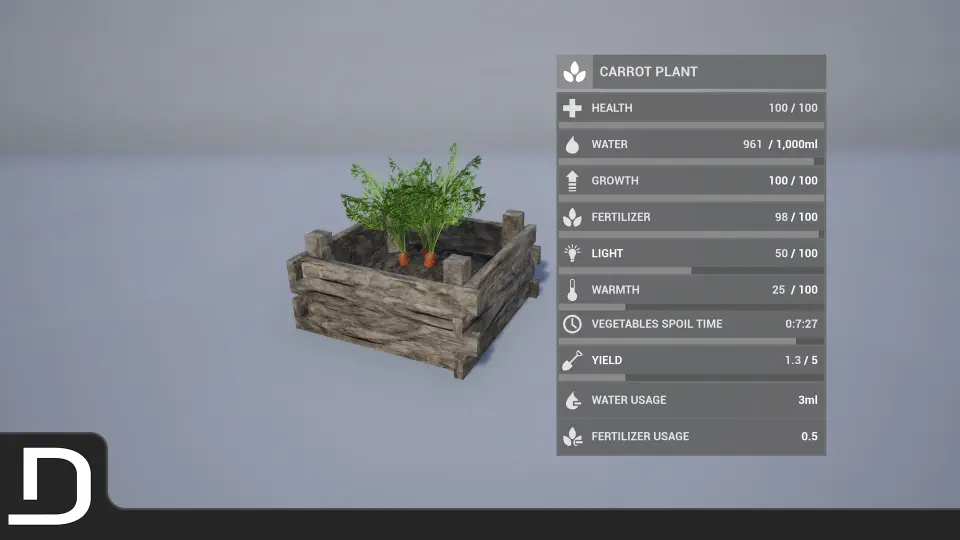
Each plant relies on 4 core stats: Health, Warmth, Water, and Fertilizer. These 4 values determine how a crop is doing and give you a clear tuning lever for difficulty. Plant sickness and sickness spreading add a failure state that travels between plants, forcing players to monitor more than just the health bar. Night and rain states modify behavior in specific conditions: when Is Night is true, the plant changes its behavior; when Is Raining is true, plant water increases. If a plant dies, death stages swap the Mesh based on the growth level at the time of death, and a destruction effect handles the removal. Plant resources are also part of the feature set, giving you additional outputs to work with.
The smooth growth effect makes the transition between stages feel visual and continuous, which is important when plants are meant to feel alive over a long survival session. Combined with the progression from vegetable growth to vegetable yields, the system covers the core farm loop without requiring manual Mesh swaps from the designer.
Placement That Snaps or Doesn't
Placement is handled through a system that supports both snapping and non-snapping placement. This applies to plants, planters, and tools, so you can build a precise grid-based garden with aligned planting beds or scatter crops naturally around a base. The Socket and non-Socket placement option adds another layer of control: use Sockets for reusable attach points, or place objects freely when the scene calls for a more improvisational layout. That flexibility makes the system work for structured farming plots as well as more organic survival outposts.
Snapping placement is useful for farms that need consistent spacing between plants, while non-snapping placement works better when you want plants to feel organically placed around a camp or field. The fact that the same system also handles planters and tools means you do not have to switch between different placement modules depending on what you are building.
Farming Menu and Plant Info UI
Player interactions are organized through the Farming Menu, while the Plant Info Panel UI gives players a clean and easy-to-read readout of the current plant state. Since it is built with Unreal Engine's Widget System, the panel can be customized to fit the rest of your Heads-Up Display (HUD). Whether you need a compact status element or a more detailed inspection window, the layout can be rearranged without replacing the underlying logic.
7 Plants, 3 Tools, 3 Planters
The content set is ready to test immediately. 7 plants are included: Tomato, Berry, Corn, Potato, Carrot, Zucchini, and Bush. For upkeep, the package provides 3 tools: a Sprinkler, a Heat Lamp, and a Grow Light. On the container side, there are 3 planter sizes: Small, Medium, and Large. Having all of these in 1 asset means you can assemble a functioning farm, wire up the menu, and see the growth cycle working without sourcing separate plant and furniture packs.
This is a practical collection for a survival game: Tomato, Berry, Corn, Potato, Carrot, Zucchini, and Bush cover a range of crop types, from small ground plants to taller vegetables. The 3 planters give you immediate options for organizing them, while the tools can be placed alongside the farm as part of the same placement system.
Save Support, Documentation, and Survival Game Kit V2 Compatibility
A save system is included so progress can persist, though it does not support World Composition. For teams already using Survival Game Kit V2, the Player Farming System is marked as compatible, which makes it a useful addition to an existing survival template. The project ships with commented code, tooltips, and documentation, making it easier to trace how the Blueprint logic fits together. First- and Third-Person camera modes are supported, and a showcase video and patch notes are available to help you get oriented with the system before diving into the Blueprint Graph.
For an Unreal Engine project that needs farming mechanics that feel complete out of the box, the Player Farming System provides the core loop, the UI, the placement tools, and the content in 1 package.
 Gameplay Features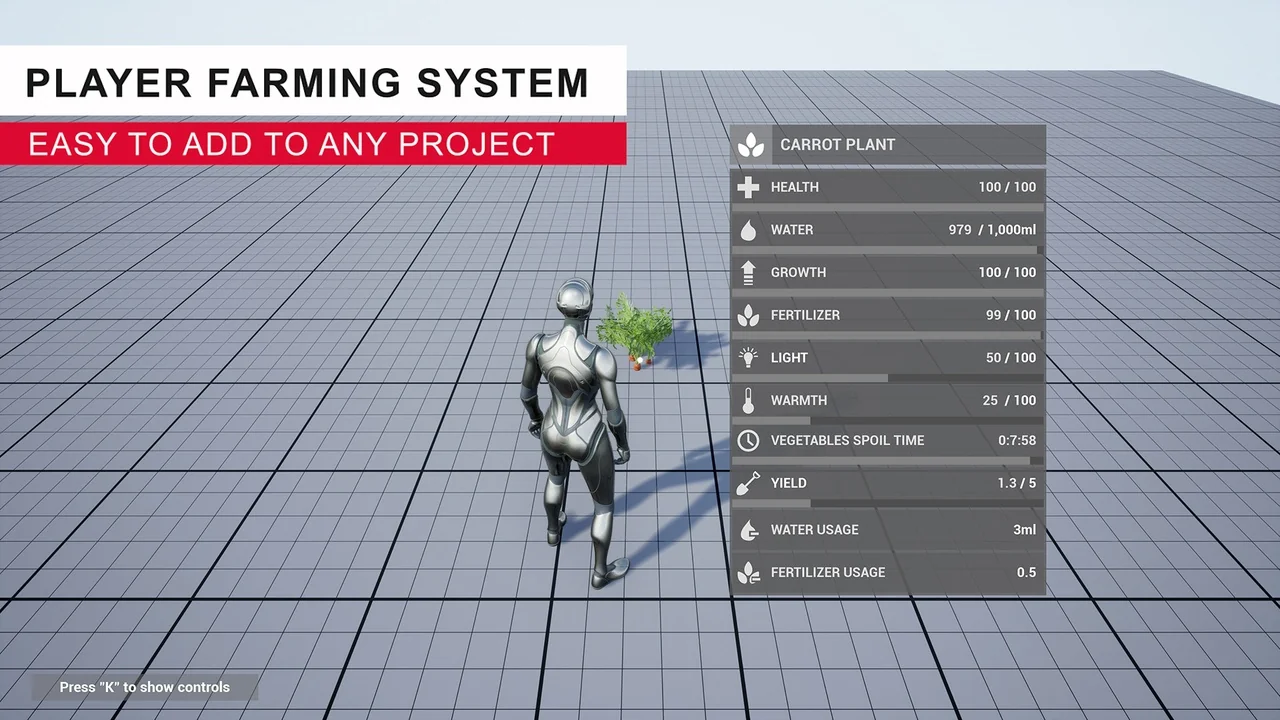
 Gameplay Features
 Gameplay Features
 Gameplay Features